Animated
   GIF
An animated GIF is a a single
graphic file that contains a series
of images which are displayed
sequentially to give the illusion of
movement or change over time.
Animation is best used sparingly
on text intensive webpages.
Movement may add a dynamic
feel to content.

A GIF file is a compressed image
with only 256 colours.

GIF stands for The Graphics
Interchange Format
JPEG IMAGE
Jpeg file is used for high
quality images. It contains
approximately 24 million
colours, and is typically
used for photographs. Alot
of cameras use jpeg.

'JPEG' stands for 'Joint
Photographic Experts
Group'

JPEG file is a compressed
file.
PIXEL
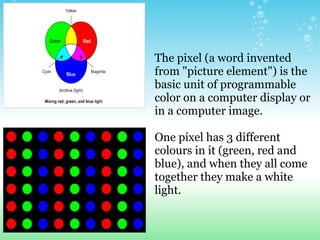
The pixel (a word invented
from "picture element") is the
basic unit of programmable
color on a computer display or
in a computer image.

One pixel has 3 different
colours in it (green, red and
blue), and when they all come
together they make a white
light.
BMP FILE
In computer graphics, a bitmap (BMP) or pixmap is a
type of memory organization or image file format used
to store digital images. The term bitmap comes from
the computer programming terminology, meaning just
a map of bits.

It is a large file because it is not compressed and it is
used in windows.

BMP files are becoming less and less common
FLIP
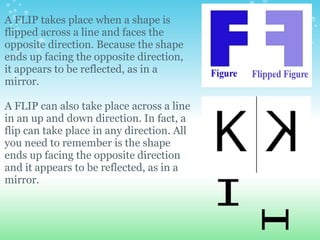
A FLIP takes place when a shape is
flipped across a line and faces the
opposite direction. Because the shape
ends up facing the opposite direction,
it appears to be reflected, as in a
mirror.

A FLIP can also take place across a line
in an up and down direction. In fact, a
flip can take place in any direction. All
you need to remember is the shape
ends up facing the opposite direction
and it appears to be reflected, as in a
mirror.
VIDEO
CARD
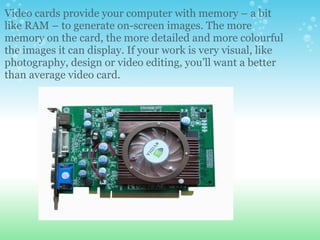
Video cards provide your computer with memory – a bit
like RAM – to generate on-screen images. The more
memory on the card, the more detailed and more colourful
the images it can display. If your work is very visual, like
photography, design or video editing, you’ll want a better
than average video card.
CROP
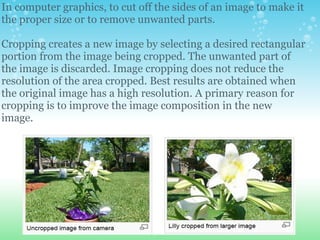
In computer graphics, to cut off the sides of an image to make it
the proper size or to remove unwanted parts.

Cropping creates a new image by selecting a desired rectangular
portion from the image being cropped. The unwanted part of

the image is discarded. Image cropping does not reduce the
resolution of the area cropped. Best results are obtained when
the original image has a high resolution. A primary reason for
cropping is to improve the image composition in the new
image.
MIRROR
FRAMES PER
  SECOND
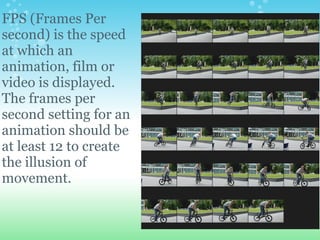
FPS (Frames Per
second) is the speed
at which an
animation, film or
video is displayed.
The frames per
second setting for an
animation should be
at least 12 to create
the illusion of
movement.
FRAME
Graphics and desktop publishing programs also use frames.
In these programs, frames are rectangular areas meant for
inserting graphics and text. They allow users to place objects
wherever they want to on the page.

In video and animation, frames are individual pictures in a
sequence of images. For example, a Flash movie you see on
the Web may play 12 frames per second, creating the
appearance of motion. Most video is shot at 24 or 30 frames
per second, or FPS. FPS is often measured in 3D games as a
way of checking how fast the graphics processor of a
computer is.
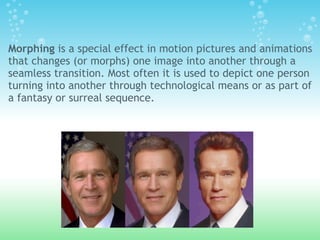
MORPH
Morphing is a special effect in motion pictures and animations
that changes (or morphs) one image into another through a
seamless transition. Most often it is used to depict one person
turning into another through technological means or as part of
a fantasy or surreal sequence.
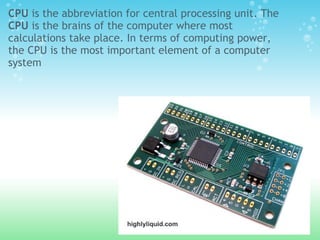
CPU
CPU is the abbreviation for central processing unit. The
CPU is the brains of the computer where most
calculations take place. In terms of computing power,
the CPU is the most important element of a computer
system
DPI
A measure of the resolution of a printer is called DPI or dots
per inch. It properly refers to the dots of ink or toner used by
an imagesetter, laser printer, or other printing device to print
your text and graphics. In general, the more dots, the better
and sharper the image. DPI is printer resolution.
DPI is not image resolution although frequently used that way.
RESOLUTION
Refers to the sharpness and clarity of an image. The term is
most often used to describe monitors, printers and bit-
mapped graphic images
 
For graphics monitors the screen resolution signifies the
number of dots pixels on the entire screen. For example, a
640-by-480 pixel screen is capable of displaying 640 distinct
dots on each of 480 lines, or about 300,000 pixels.
FILE EXTENSION
A file extension (or simply "extension") is the suffix at the end
of a filename that indicates what type of file it is. For
example, in the filename "myreport.txt," the. TXT is the file
extension. It indicates the file is a text document. Some other
examples include.DOCX, which is used for Microsoft Word
documents, and .PSD, which is the standard file extension for
Photoshop documents.
 
Most file extensions are 3 letters
compression
A means of reducing the amount of
data to be transmitted or stored.
Compression is possible since there
always is some amount of data
redundancy or there may be a
predictable flow to the data.
FRAME BUFFER
The portion of memory reserved for holding
the complete bit-mapped image that is sent
to the monitor. Typically the frame buffer is
stored in the memory chips on the video
adapter.
COLOUR DEPTH
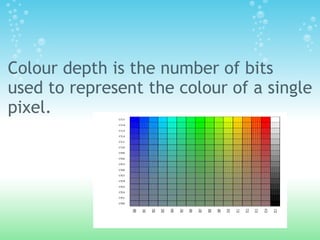
Colour depth is the number of bits
used to represent the colour of a single
pixel.

Graphics flashcards

  • 2.
  • 3.
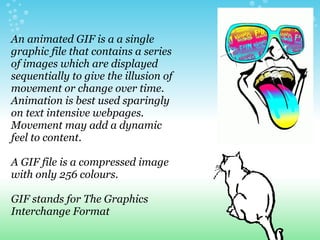
    An animated GIFis a a single graphic file that contains a series of images which are displayed sequentially to give the illusion of movement or change over time. Animation is best used sparingly on text intensive webpages. Movement may add a dynamic feel to content. A GIF file is a compressed image with only 256 colours. GIF stands for The Graphics Interchange Format
  • 4.
  • 5.
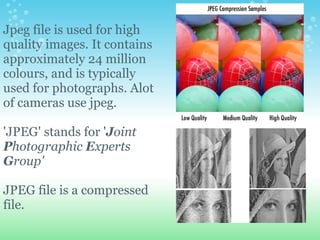
    Jpeg file isused for high quality images. It contains approximately 24 million colours, and is typically used for photographs. Alot of cameras use jpeg. 'JPEG' stands for 'Joint Photographic Experts Group' JPEG file is a compressed file.
  • 6.
  • 7.
    The pixel (aword invented from "picture element") is the basic unit of programmable color on a computer display or in a computer image. One pixel has 3 different colours in it (green, red and blue), and when they all come together they make a white light.
  • 8.
  • 9.
    In computer graphics,a bitmap (BMP) or pixmap is a type of memory organization or image file format used to store digital images. The term bitmap comes from the computer programming terminology, meaning just a map of bits. It is a large file because it is not compressed and it is used in windows. BMP files are becoming less and less common
  • 10.
  • 11.
    A FLIP takesplace when a shape is flipped across a line and faces the opposite direction. Because the shape ends up facing the opposite direction, it appears to be reflected, as in a mirror. A FLIP can also take place across a line in an up and down direction. In fact, a flip can take place in any direction. All you need to remember is the shape ends up facing the opposite direction and it appears to be reflected, as in a mirror.
  • 12.
  • 13.
    Video cards provideyour computer with memory – a bit like RAM – to generate on-screen images. The more memory on the card, the more detailed and more colourful the images it can display. If your work is very visual, like photography, design or video editing, you’ll want a better than average video card.
  • 14.
  • 15.
    In computer graphics,to cut off the sides of an image to make it the proper size or to remove unwanted parts. Cropping creates a new image by selecting a desired rectangular portion from the image being cropped. The unwanted part of the image is discarded. Image cropping does not reduce the resolution of the area cropped. Best results are obtained when the original image has a high resolution. A primary reason for cropping is to improve the image composition in the new image.
  • 16.
  • 18.
  • 19.
    FPS (Frames Per second)is the speed at which an animation, film or video is displayed. The frames per second setting for an animation should be at least 12 to create the illusion of movement.
  • 20.
  • 21.
    Graphics and desktoppublishing programs also use frames. In these programs, frames are rectangular areas meant for inserting graphics and text. They allow users to place objects wherever they want to on the page. In video and animation, frames are individual pictures in a sequence of images. For example, a Flash movie you see on the Web may play 12 frames per second, creating the appearance of motion. Most video is shot at 24 or 30 frames per second, or FPS. FPS is often measured in 3D games as a way of checking how fast the graphics processor of a computer is.
  • 22.
  • 23.
    Morphing is a specialeffect in motion pictures and animations that changes (or morphs) one image into another through a seamless transition. Most often it is used to depict one person turning into another through technological means or as part of a fantasy or surreal sequence.
  • 24.
  • 25.
    CPU is theabbreviation for central processing unit. The CPU is the brains of the computer where most calculations take place. In terms of computing power, the CPU is the most important element of a computer system
  • 26.
  • 27.
    A measure ofthe resolution of a printer is called DPI or dots per inch. It properly refers to the dots of ink or toner used by an imagesetter, laser printer, or other printing device to print your text and graphics. In general, the more dots, the better and sharper the image. DPI is printer resolution. DPI is not image resolution although frequently used that way.
  • 28.
  • 29.
    Refers to thesharpness and clarity of an image. The term is most often used to describe monitors, printers and bit- mapped graphic images   For graphics monitors the screen resolution signifies the number of dots pixels on the entire screen. For example, a 640-by-480 pixel screen is capable of displaying 640 distinct dots on each of 480 lines, or about 300,000 pixels.
  • 30.
  • 31.
    A file extension(or simply "extension") is the suffix at the end of a filename that indicates what type of file it is. For example, in the filename "myreport.txt," the. TXT is the file extension. It indicates the file is a text document. Some other examples include.DOCX, which is used for Microsoft Word documents, and .PSD, which is the standard file extension for Photoshop documents.   Most file extensions are 3 letters
  • 32.
  • 33.
    A means ofreducing the amount of data to be transmitted or stored. Compression is possible since there always is some amount of data redundancy or there may be a predictable flow to the data.
  • 34.
  • 35.
    The portion ofmemory reserved for holding the complete bit-mapped image that is sent to the monitor. Typically the frame buffer is stored in the memory chips on the video adapter.
  • 36.
  • 37.
    Colour depth isthe number of bits used to represent the colour of a single pixel.