Module 3
Configuring and
Troubleshooting DNS
Module Overview
• Installing the DNS Server Role
• Configuring the DNS Server Role
• Configuring DNS Zones
• Configuring DNS Zone Transfers
• Managing and Troubleshooting DNS
Lesson 1: Installing the DNS Server Role
• Overview of the Domain Name System Role
• Overview of the DNS Namespace
• DNS Improvements for Windows Server 2008
• DNS Improvements for Windows Server 2008 R2
• Demonstration: How to Install the DNS Server Role
• Considerations for Deploying the DNS Server Role
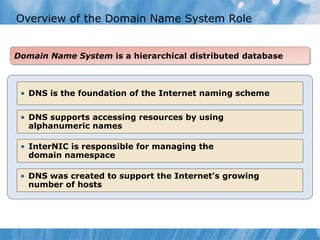
Overview of the Domain Name System Role
Domain Name System is a hierarchical distributed database
• DNS is the foundation of the Internet naming scheme
• DNS supports accessing resources by using
alphanumeric names
• InterNIC is responsible for managing the
domain namespace
• DNS was created to support the Internet’s growing
number of hosts
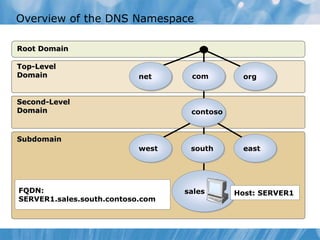
Overview of the DNS Namespace
Root Domain
Subdomain
Second-Level
Domain
Top-Level
Domain
FQDN:
SERVER1.sales.south.contoso.com
south
contoso
com
sales
west east
orgnet
Host: SERVER1
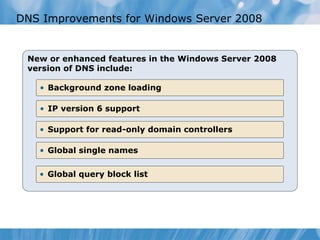
DNS Improvements for Windows Server 2008
New or enhanced features in the Windows Server 2008
version of DNS include:
• Background zone loading
• IP version 6 support
• Support for read-only domain controllers
• Global single names
• Global query block list
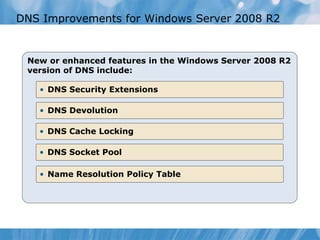
DNS Improvements for Windows Server 2008 R2
New or enhanced features in the Windows Server 2008 R2
version of DNS include:
• DNS Security Extensions
• DNS Devolution
• DNS Cache Locking
• DNS Socket Pool
• Name Resolution Policy Table
Demonstration: How to Install the DNS Server Role
This demonstration shows how to install the DNS
Server role
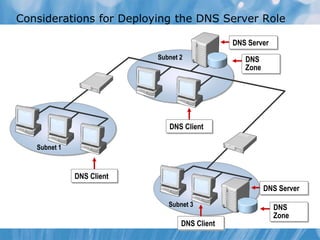
Considerations for Deploying the DNS Server Role
Subnet 1
Subnet 2
DNS Server
DNS
Zone
DNS Client
DNS Client
Subnet 3
DNS Server
DNS
Zone
DNS Client
Lesson 2: Configuring the DNS Server Role
• What Are the Components of a DNS Solution?
• DNS Resource Records
• What Are Root Hints?
• What Are DNS Queries?
• What Is Forwarding?
• How DNS Server Caching Works
• Demonstration: How to Configure the DNS Server Role
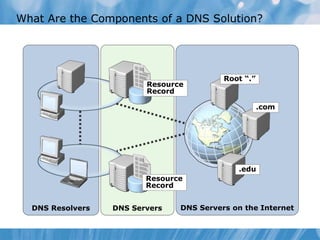
What Are the Components of a DNS Solution?
DNS Servers on the InternetDNS ServersDNS Resolvers
Root “.”
.com
.edu
Resource
Record
Resource
Record
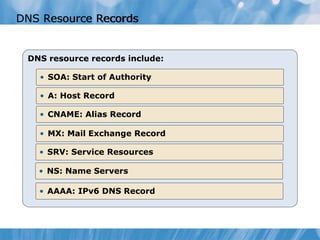
DNS resource records include:
• SOA: Start of Authority
• A: Host Record
• CNAME: Alias Record
• MX: Mail Exchange Record
• SRV: Service Resources
• NS: Name Servers
• AAAA: IPv6 DNS Record
DNS Resource RecordsDNS Resource Records
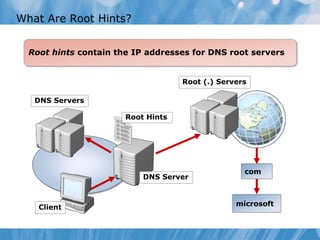
What Are Root Hints?
Root hints contain the IP addresses for DNS root servers
microsoft
DNS Servers
DNS Server
Root (.) Servers
com
Client
Root Hints
What Are DNS Queries?
DNS Client
mail1.contoso.com
172.16.64.11
A recursive query is sent to a DNS server and requires a
complete answer
Database
Local DNS Server
An iterative query directed to a DNS server may be
answered with a referral to another DNS server
Client Server
Local DNS Server
Root Hint (.)
.com
Iterative Query
Ask .com
Contoso.com
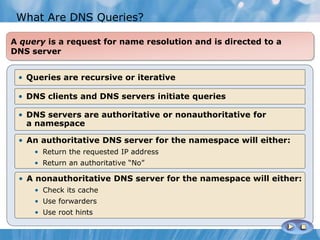
• Queries are recursive or iterative
• DNS clients and DNS servers initiate queries
• DNS servers are authoritative or nonauthoritative for
a namespace
• An authoritative DNS server for the namespace will either:
• Return the requested IP address
• Return an authoritative “No”
• A nonauthoritative DNS server for the namespace will either:
• Check its cache
• Use forwarders
• Use root hints
A query is a request for name resolution and is directed to a
DNS server
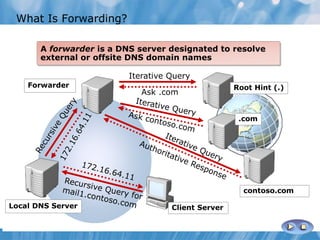
What Is Forwarding?
ISP DNS
All other DNS domains
Local DNS
Contoso.com DNS
Conditional forwarding forwards requests using a domain
name condition
Client Computer
A forwarder is a DNS server designated to resolve
external or offsite DNS domain names
contoso.com
Root Hint (.)
.com
Iterative Query
Ask .com
Forwarder
Local DNS Server Client Server
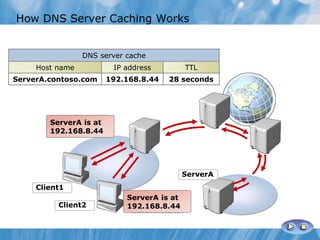
Where’s
ServerA?
ServerA is at
192.168.8.44
Where’s
ServerA?
ServerA is at
192.168.8.44
How DNS Server Caching Works
Client1
Client2
ServerA
DNS server cache
Host name IP address TTL
ServerA.contoso.com 192.168.8.44 28 seconds
Demonstration: How to Configure the DNS Server
Role
This demonstration shows how to:
• Configure DNS server properties
• Configure conditional forwarding
• Clear the DNS cache
Lesson 3: Configuring DNS Zones
• What Is a DNS Zone?
• What Are the DNS Zone Types?
• What Are Forward and Reverse Lookup Zones?
• What are Stub Zones?
• Demonstration: How to Create Zones
• DNS Zone Delegation
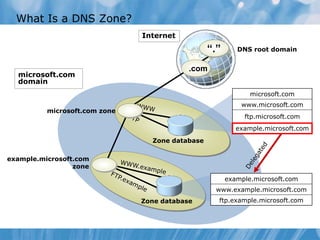
What Is a DNS Zone?
“.”
.com
microsoft.com zone
microsoft.com
domain
Internet
example.microsoft.com
zone
DNS root domain
Zone database
Zone database
example.microsoft.com
www.example.microsoft.com
ftp.example.microsoft.com
microsoft.com
www.microsoft.com
ftp.microsoft.com
example.microsoft.com
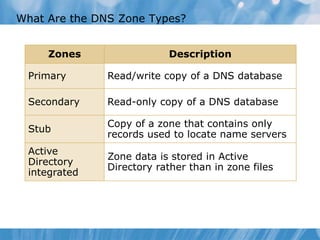
What Are the DNS Zone Types?
Zones Description
Primary Read/write copy of a DNS database
Secondary Read-only copy of a DNS database
Stub
Copy of a zone that contains only
records used to locate name servers
Active
Directory
integrated
Zone data is stored in Active
Directory rather than in zone files
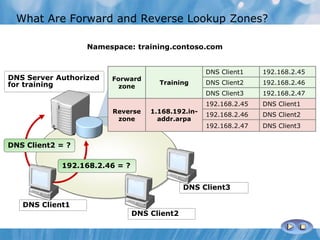
DNS Client2
DNS Client3
What Are Forward and Reverse Lookup Zones?
Namespace: training.contoso.com
DNS Client1
DNS Server Authorized
for training
Forward
zone
Training
DNS Client1 192.168.2.45
DNS Client2 192.168.2.46
DNS Client3 192.168.2.47
Reverse
zone
1.168.192.in-
addr.arpa
192.168.2.45 DNS Client1
192.168.2.46 DNS Client2
192.168.2.47 DNS Client3
DNS Client2 = ?
192.168.2.46 = ?
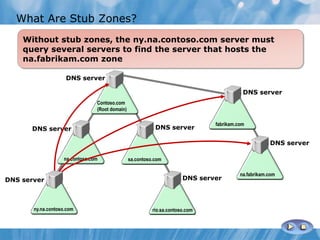
With a stub zone defined, the location of the
na.fabrikam.com zone is known without querying multiple
DNS servers
Contoso.com
(Root domain)
na.contoso.com sa.contoso.com
ny.na.contoso.com rio.sa.contoso.com
DNS server
DNS server
DNS server
DNS server
DNS server
fabrikam.com
DNS server
DNS server
na.fabrikam.com
Without stub zones, the ny.na.contoso.com server must
query several servers to find the server that hosts the
na.fabrikam.com zone
Contoso.com
(Root domain)
na.contoso.com sa.contoso.com
ny.na.contoso.com rio.sa.contoso.com
DNS server
DNS server
DNS server
DNS server
DNS server
fabrikam.com
DNS server
DNS server
na.fabrikam.com
What Are Stub Zones?
Demonstration: How to Create Zones
This demonstration shows how to:
• Create a reverse lookup zone
• Create a forward lookup zone
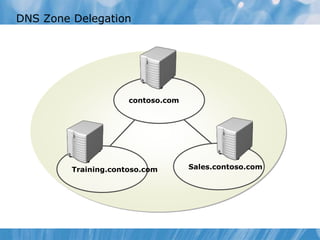
DNS Zone Delegation
Training.contoso.com Sales.contoso.com
contoso.com
Lesson 4: Configuring DNS Zone Transfers
• What Is a DNS Zone Transfer?
• Configuring Zone Transfer Security
• Demonstration: How to Configure DNS Zone Transfers
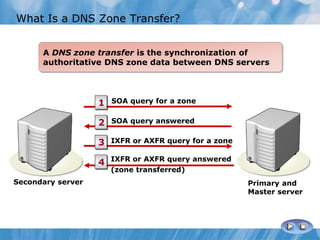
What Is a DNS Zone Transfer?
A DNS zone transfer is the synchronization of
authoritative DNS zone data between DNS servers
SOA query for a zone
SOA query answered
IXFR or AXFR query for a zone
IXFR or AXFR query answered
(zone transferred)
1
2
3
4
Secondary server Primary and
Master server
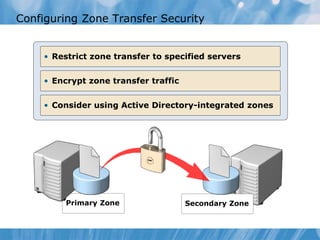
Configuring Zone Transfer Security
Primary Zone Secondary Zone
• Encrypt zone transfer traffic
• Consider using Active Directory-integrated zones
• Restrict zone transfer to specified servers
This demonstration shows how to:
• Enable DNS zone transfers
• Update the secondary zone from the master server
• Update the primary zone and verify the change on the
secondary zone
Demonstration: How to Configure Zone Transfers
Lesson 5: Managing and Troubleshooting DNS
• What Is Time to Live, Aging, and Scavenging?
• Demonstration: How to Manage DNS Records
• Tools That Identify Problems With DNS
• Demonstration: How to Test the DNS Server Configuration
• Monitoring DNS Using the DNS Event Log
• Monitoring DNS Using Debug Logging
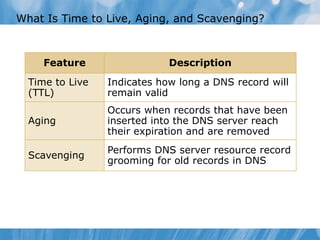
What Is Time to Live, Aging, and Scavenging?
Feature Description
Time to Live
(TTL)
Indicates how long a DNS record will
remain valid
Aging
Occurs when records that have been
inserted into the DNS server reach
their expiration and are removed
Scavenging
Performs DNS server resource record
grooming for old records in DNS
Demonstration: How to Manage DNS Records
This demonstration shows how to:
• Configure TTL
• Enable and configure scavenging and aging
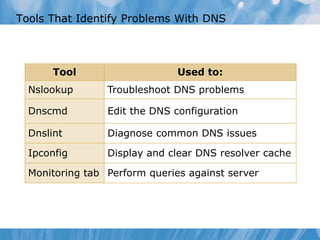
Tools That Identify Problems With DNS
Tool Used to:
Nslookup Troubleshoot DNS problems
Dnscmd Edit the DNS configuration
Dnslint Diagnose common DNS issues
Ipconfig Display and clear DNS resolver cache
Monitoring tab Perform queries against server
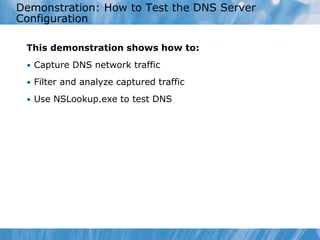
Demonstration: How to Test the DNS Server
Configuration
This demonstration shows how to:
• Capture DNS network traffic
• Filter and analyze captured traffic
• Use NSLookup.exe to test DNS
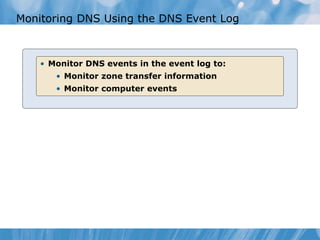
Monitoring DNS Using the DNS Event Log
• Monitor DNS events in the event log to:
• Monitor zone transfer information
• Monitor computer events
Monitoring DNS Using Debug Logging
• Enable DNS debug logging to view granular
verbose information about DNS activities
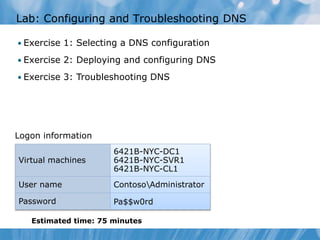
Lab: Configuring and Troubleshooting DNS
• Exercise 1: Selecting a DNS configuration
• Exercise 2: Deploying and configuring DNS
• Exercise 3: Troubleshooting DNS
Estimated time: 75 minutes
Logon information
Virtual machines
6421B-NYC-DC1
6421B-NYC-SVR1
6421B-NYC-CL1
User name ContosoAdministrator
Password Pa$$w0rd
Lab Scenario
Contoso is planning to improve their DNS infrastructure due
to complaints from users about poor performance. In
addition, Contoso is partnering with A Datum and name
resolution must be optimized between these two
organizations. Your task is to plan and implement the
required changes.
Lab Review
• In the lab, you were required to deploy a secondary zone
because no additional domain controllers were going to be
deployed. If this condition changed, that is, NYC-SVR1 was
a domain controller, how would that change your
implementation plan?
Module Review and Takeaways
• Review Questions
• Tools

6421 b Module-03

  • 1.
  • 2.
    Module Overview • Installingthe DNS Server Role • Configuring the DNS Server Role • Configuring DNS Zones • Configuring DNS Zone Transfers • Managing and Troubleshooting DNS
  • 3.
    Lesson 1: Installingthe DNS Server Role • Overview of the Domain Name System Role • Overview of the DNS Namespace • DNS Improvements for Windows Server 2008 • DNS Improvements for Windows Server 2008 R2 • Demonstration: How to Install the DNS Server Role • Considerations for Deploying the DNS Server Role
  • 4.
    Overview of theDomain Name System Role Domain Name System is a hierarchical distributed database • DNS is the foundation of the Internet naming scheme • DNS supports accessing resources by using alphanumeric names • InterNIC is responsible for managing the domain namespace • DNS was created to support the Internet’s growing number of hosts
  • 5.
    Overview of theDNS Namespace Root Domain Subdomain Second-Level Domain Top-Level Domain FQDN: SERVER1.sales.south.contoso.com south contoso com sales west east orgnet Host: SERVER1
  • 6.
    DNS Improvements forWindows Server 2008 New or enhanced features in the Windows Server 2008 version of DNS include: • Background zone loading • IP version 6 support • Support for read-only domain controllers • Global single names • Global query block list
  • 7.
    DNS Improvements forWindows Server 2008 R2 New or enhanced features in the Windows Server 2008 R2 version of DNS include: • DNS Security Extensions • DNS Devolution • DNS Cache Locking • DNS Socket Pool • Name Resolution Policy Table
  • 8.
    Demonstration: How toInstall the DNS Server Role This demonstration shows how to install the DNS Server role
  • 9.
    Considerations for Deployingthe DNS Server Role Subnet 1 Subnet 2 DNS Server DNS Zone DNS Client DNS Client Subnet 3 DNS Server DNS Zone DNS Client
  • 10.
    Lesson 2: Configuringthe DNS Server Role • What Are the Components of a DNS Solution? • DNS Resource Records • What Are Root Hints? • What Are DNS Queries? • What Is Forwarding? • How DNS Server Caching Works • Demonstration: How to Configure the DNS Server Role
  • 11.
    What Are theComponents of a DNS Solution? DNS Servers on the InternetDNS ServersDNS Resolvers Root “.” .com .edu Resource Record Resource Record
  • 12.
    DNS resource recordsinclude: • SOA: Start of Authority • A: Host Record • CNAME: Alias Record • MX: Mail Exchange Record • SRV: Service Resources • NS: Name Servers • AAAA: IPv6 DNS Record DNS Resource RecordsDNS Resource Records
  • 13.
    What Are RootHints? Root hints contain the IP addresses for DNS root servers microsoft DNS Servers DNS Server Root (.) Servers com Client Root Hints
  • 14.
    What Are DNSQueries? DNS Client mail1.contoso.com 172.16.64.11 A recursive query is sent to a DNS server and requires a complete answer Database Local DNS Server An iterative query directed to a DNS server may be answered with a referral to another DNS server Client Server Local DNS Server Root Hint (.) .com Iterative Query Ask .com Contoso.com • Queries are recursive or iterative • DNS clients and DNS servers initiate queries • DNS servers are authoritative or nonauthoritative for a namespace • An authoritative DNS server for the namespace will either: • Return the requested IP address • Return an authoritative “No” • A nonauthoritative DNS server for the namespace will either: • Check its cache • Use forwarders • Use root hints A query is a request for name resolution and is directed to a DNS server
  • 15.
    What Is Forwarding? ISPDNS All other DNS domains Local DNS Contoso.com DNS Conditional forwarding forwards requests using a domain name condition Client Computer A forwarder is a DNS server designated to resolve external or offsite DNS domain names contoso.com Root Hint (.) .com Iterative Query Ask .com Forwarder Local DNS Server Client Server
  • 16.
    Where’s ServerA? ServerA is at 192.168.8.44 Where’s ServerA? ServerAis at 192.168.8.44 How DNS Server Caching Works Client1 Client2 ServerA DNS server cache Host name IP address TTL ServerA.contoso.com 192.168.8.44 28 seconds
  • 17.
    Demonstration: How toConfigure the DNS Server Role This demonstration shows how to: • Configure DNS server properties • Configure conditional forwarding • Clear the DNS cache
  • 18.
    Lesson 3: ConfiguringDNS Zones • What Is a DNS Zone? • What Are the DNS Zone Types? • What Are Forward and Reverse Lookup Zones? • What are Stub Zones? • Demonstration: How to Create Zones • DNS Zone Delegation
  • 19.
    What Is aDNS Zone? “.” .com microsoft.com zone microsoft.com domain Internet example.microsoft.com zone DNS root domain Zone database Zone database example.microsoft.com www.example.microsoft.com ftp.example.microsoft.com microsoft.com www.microsoft.com ftp.microsoft.com example.microsoft.com
  • 20.
    What Are theDNS Zone Types? Zones Description Primary Read/write copy of a DNS database Secondary Read-only copy of a DNS database Stub Copy of a zone that contains only records used to locate name servers Active Directory integrated Zone data is stored in Active Directory rather than in zone files
  • 21.
    DNS Client2 DNS Client3 WhatAre Forward and Reverse Lookup Zones? Namespace: training.contoso.com DNS Client1 DNS Server Authorized for training Forward zone Training DNS Client1 192.168.2.45 DNS Client2 192.168.2.46 DNS Client3 192.168.2.47 Reverse zone 1.168.192.in- addr.arpa 192.168.2.45 DNS Client1 192.168.2.46 DNS Client2 192.168.2.47 DNS Client3 DNS Client2 = ? 192.168.2.46 = ?
  • 22.
    With a stubzone defined, the location of the na.fabrikam.com zone is known without querying multiple DNS servers Contoso.com (Root domain) na.contoso.com sa.contoso.com ny.na.contoso.com rio.sa.contoso.com DNS server DNS server DNS server DNS server DNS server fabrikam.com DNS server DNS server na.fabrikam.com Without stub zones, the ny.na.contoso.com server must query several servers to find the server that hosts the na.fabrikam.com zone Contoso.com (Root domain) na.contoso.com sa.contoso.com ny.na.contoso.com rio.sa.contoso.com DNS server DNS server DNS server DNS server DNS server fabrikam.com DNS server DNS server na.fabrikam.com What Are Stub Zones?
  • 23.
    Demonstration: How toCreate Zones This demonstration shows how to: • Create a reverse lookup zone • Create a forward lookup zone
  • 24.
    DNS Zone Delegation Training.contoso.comSales.contoso.com contoso.com
  • 25.
    Lesson 4: ConfiguringDNS Zone Transfers • What Is a DNS Zone Transfer? • Configuring Zone Transfer Security • Demonstration: How to Configure DNS Zone Transfers
  • 26.
    What Is aDNS Zone Transfer? A DNS zone transfer is the synchronization of authoritative DNS zone data between DNS servers SOA query for a zone SOA query answered IXFR or AXFR query for a zone IXFR or AXFR query answered (zone transferred) 1 2 3 4 Secondary server Primary and Master server
  • 27.
    Configuring Zone TransferSecurity Primary Zone Secondary Zone • Encrypt zone transfer traffic • Consider using Active Directory-integrated zones • Restrict zone transfer to specified servers
  • 28.
    This demonstration showshow to: • Enable DNS zone transfers • Update the secondary zone from the master server • Update the primary zone and verify the change on the secondary zone Demonstration: How to Configure Zone Transfers
  • 29.
    Lesson 5: Managingand Troubleshooting DNS • What Is Time to Live, Aging, and Scavenging? • Demonstration: How to Manage DNS Records • Tools That Identify Problems With DNS • Demonstration: How to Test the DNS Server Configuration • Monitoring DNS Using the DNS Event Log • Monitoring DNS Using Debug Logging
  • 30.
    What Is Timeto Live, Aging, and Scavenging? Feature Description Time to Live (TTL) Indicates how long a DNS record will remain valid Aging Occurs when records that have been inserted into the DNS server reach their expiration and are removed Scavenging Performs DNS server resource record grooming for old records in DNS
  • 31.
    Demonstration: How toManage DNS Records This demonstration shows how to: • Configure TTL • Enable and configure scavenging and aging
  • 32.
    Tools That IdentifyProblems With DNS Tool Used to: Nslookup Troubleshoot DNS problems Dnscmd Edit the DNS configuration Dnslint Diagnose common DNS issues Ipconfig Display and clear DNS resolver cache Monitoring tab Perform queries against server
  • 33.
    Demonstration: How toTest the DNS Server Configuration This demonstration shows how to: • Capture DNS network traffic • Filter and analyze captured traffic • Use NSLookup.exe to test DNS
  • 34.
    Monitoring DNS Usingthe DNS Event Log • Monitor DNS events in the event log to: • Monitor zone transfer information • Monitor computer events
  • 35.
    Monitoring DNS UsingDebug Logging • Enable DNS debug logging to view granular verbose information about DNS activities
  • 36.
    Lab: Configuring andTroubleshooting DNS • Exercise 1: Selecting a DNS configuration • Exercise 2: Deploying and configuring DNS • Exercise 3: Troubleshooting DNS Estimated time: 75 minutes Logon information Virtual machines 6421B-NYC-DC1 6421B-NYC-SVR1 6421B-NYC-CL1 User name ContosoAdministrator Password Pa$$w0rd
  • 37.
    Lab Scenario Contoso isplanning to improve their DNS infrastructure due to complaints from users about poor performance. In addition, Contoso is partnering with A Datum and name resolution must be optimized between these two organizations. Your task is to plan and implement the required changes.
  • 38.
    Lab Review • Inthe lab, you were required to deploy a secondary zone because no additional domain controllers were going to be deployed. If this condition changed, that is, NYC-SVR1 was a domain controller, how would that change your implementation plan?
  • 39.
    Module Review andTakeaways • Review Questions • Tools