Project Over View
             CentOS 5
        Auxiliary Tools
               Security
                  DNS
               phpBB3


CentoS Server running phpBB3

             Pierce Preston

       Cork Institute of Technology


            March 21, 2010


        Pierce Preston    CentoS Server running phpBB3
Project Over View
                                   CentOS 5
                              Auxiliary Tools
                                     Security
                                        DNS
                                     phpBB3


Outline
  1   Project Over View
  2   CentOS 5
        Installation
  3   Auxiliary Tools
        Apache
          Testing Apache
        mySQL
        PHP
          Testing PHP
        phpMyAdmin
        vsftpd
        Updating the Tools
  4   Security
  5   DNS
  6   phpBB3
                              Pierce Preston    CentoS Server running phpBB3
Project Over View
                            CentOS 5
                       Auxiliary Tools
                              Security
                                 DNS
                              phpBB3


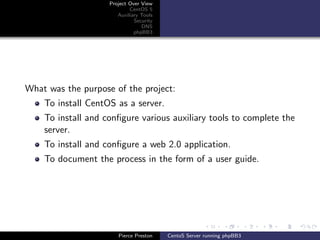
What was the purpose of the project:
    To install CentOS as a server.
    To install and configure various auxiliary tools to complete the
    server.
    To install and configure a web 2.0 application.
    To document the process in the form of a user guide.


                       Pierce Preston    CentoS Server running phpBB3
Project Over View
                            CentOS 5
                       Auxiliary Tools
                              Security
                                 DNS
                              phpBB3


The project was broken into three main sections.
    Install and configure CentOS 5.
    Install and configure the various tools.
    Install and configure phpBB3


                       Pierce Preston    CentoS Server running phpBB3
Project Over View
                             CentOS 5
                        Auxiliary Tools
                                          Installation
                               Security
                                  DNS
                               phpBB3


CentOS is a Linux distribution based on red hat enterprise edition.
Due to the fact that it is developed mainly for servers, it ships with
older, more secure and stable tools than other more home user
oriented distributions, such as Ubuntu.
CentOS comes in both 32 and 64 bit architectures. It also has an
ever increasing fan base, who add to the product in terms of
support for users and development of various tools. As well as this,
it provides virtualisation using Xen technology.


                        Pierce Preston    CentoS Server running phpBB3
Project Over View
                            CentOS 5
                       Auxiliary Tools
                                         Installation
                              Security
                                 DNS
                              phpBB3


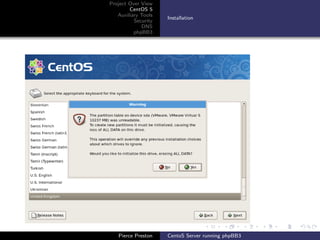
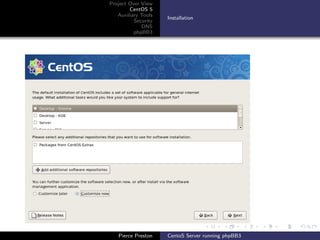
To install CentOS, simply insert the disk, restart your PC and boot
into CD. Then follow the step by step stages of the installation. A
number of things to take note of.
    When it asks you about partitions, make sure you have
    selected a black partition, and that you are not going to cause
    any damage to existing operating systems etc.
    When it asks you what software and GUI you’d like, make sure
    to unselected gnome, and not to select anything else (Its a
    common mistake to select server here).


                       Pierce Preston    CentoS Server running phpBB3
Project Over View
        CentOS 5
   Auxiliary Tools
                     Installation
          Security
             DNS
          phpBB3


   Pierce Preston    CentoS Server running phpBB3
Project Over View
        CentOS 5
   Auxiliary Tools
                     Installation
          Security
             DNS
          phpBB3


   Pierce Preston    CentoS Server running phpBB3
Project Over View    Apache
                             CentOS 5     mySQL
                        Auxiliary Tools   PHP
                               Security   phpMyAdmin
                                  DNS     vsftpd
                               phpBB3     Updating the Tools


A number of auxiliary tools are required to fulfill the needs of the
basic server. These include:
    Apache.
    MySQL.
    PHP.
    phpMyAdmin.
    Vsftpd.


                        Pierce Preston    CentoS Server running phpBB3
Project Over View    Apache
                             CentOS 5     mySQL
                        Auxiliary Tools   PHP
                               Security   phpMyAdmin
                                  DNS     vsftpd
                               phpBB3     Updating the Tools


Apache is a tool that allows you to host web pages on your server.
It is the most popular HTTP server available.
To install Apache, use the command
yum install httpd
To start the service, use the command
service httpd start
If you would like the service to start on start up, use the command
chkconfig httpd on


                        Pierce Preston    CentoS Server running phpBB3
Project Over View    Apache
                            CentOS 5     mySQL
                       Auxiliary Tools   PHP
                              Security   phpMyAdmin
                                 DNS     vsftpd
                              phpBB3     Updating the Tools


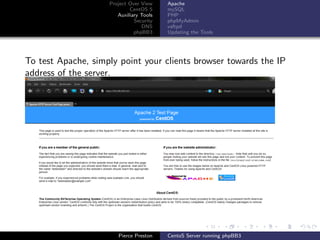
To test Apache, simply point your clients browser towards the IP
address of the server.


                       Pierce Preston    CentoS Server running phpBB3
Project Over View    Apache
                             CentOS 5     mySQL
                        Auxiliary Tools   PHP
                               Security   phpMyAdmin
                                  DNS     vsftpd
                               phpBB3     Updating the Tools


MySQL is a database management system. It works well with all
major operating systems, and most major programming languages.
To install mySQL, use the command
yum mysql httpd
To start the service, use the command
service mysqld start
If you would like the service to start on start up, use the command
chkconfig hmysqld on


                        Pierce Preston    CentoS Server running phpBB3
Project Over View    Apache
                            CentOS 5     mySQL
                       Auxiliary Tools   PHP
                              Security   phpMyAdmin
                                 DNS     vsftpd
                              phpBB3     Updating the Tools


PHP is a server side scripting language, which has many extensions
available to increase its usability. It is he final component of a
LAMP server.
To install PHP, use the command
yum install php
You can also install any other the php plug ins you see fit to.
Some suggested examples are php-mysql, php-mbstring and php-gd


                       Pierce Preston    CentoS Server running phpBB3
Project Over View    Apache
                               CentOS 5     mySQL
                          Auxiliary Tools   PHP
                                 Security   phpMyAdmin
                                    DNS     vsftpd
                                 phpBB3     Updating the Tools


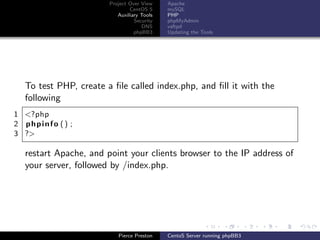
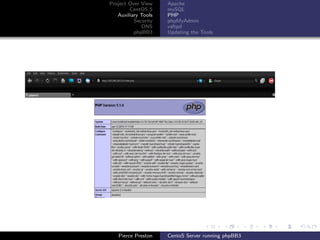
  To test PHP, create a file called index.php, and fill it with the
  following
1 <?php
2 phpinfo () ;
3 ?>

  restart Apache, and point your clients browser to the IP address of
  your server, followed by /index.php.


                          Pierce Preston    CentoS Server running phpBB3
Project Over View    Apache
        CentOS 5     mySQL
   Auxiliary Tools   PHP
          Security   phpMyAdmin
             DNS     vsftpd
          phpBB3     Updating the Tools


   Pierce Preston    CentoS Server running phpBB3
Project Over View    Apache
                             CentOS 5     mySQL
                        Auxiliary Tools   PHP
                               Security   phpMyAdmin
                                  DNS     vsftpd
                               phpBB3     Updating the Tools


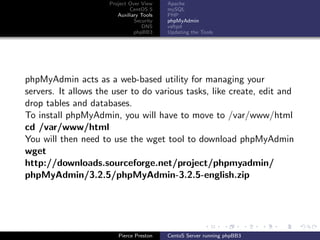
phpMyAdmin acts as a web-based utility for managing your
servers. It allows the user to do various tasks, like create, edit and
drop tables and databases.
To install phpMyAdmin, you will have to move to /var/www/html
cd /var/www/html
You will then need to use the wget tool to download phpMyAdmin
wget
http://downloads.sourceforge.net/project/phpmyadmin/
phpMyAdmin/3.2.5/phpMyAdmin-3.2.5-english.zip


                        Pierce Preston    CentoS Server running phpBB3
Project Over View    Apache
                            CentOS 5     mySQL
                       Auxiliary Tools   PHP
                              Security   phpMyAdmin
                                 DNS     vsftpd
                              phpBB3     Updating the Tools


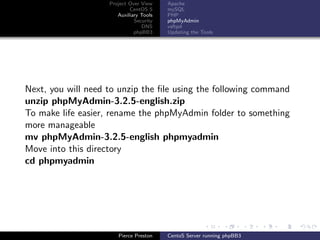
Next, you will need to unzip the file using the following command
unzip phpMyAdmin-3.2.5-english.zip
To make life easier, rename the phpMyAdmin folder to something
more manageable
mv phpMyAdmin-3.2.5-english phpmyadmin
Move into this directory
cd phpmyadmin


                       Pierce Preston    CentoS Server running phpBB3
Project Over View    Apache
                              CentOS 5     mySQL
                         Auxiliary Tools   PHP
                                Security   phpMyAdmin
                                   DNS     vsftpd
                                phpBB3     Updating the Tools


Copy over the sample config file
cp config.sample.inc.php config.inc.php
Edit the config file, changing the line
“$cfg[’Servers’][$i][’auth type’] = ‘cookies‘;”
to
“$cfg[’Servers’][$i][’auth type’] = ‘http‘;”


                         Pierce Preston    CentoS Server running phpBB3
Project Over View    Apache
                           CentOS 5     mySQL
                      Auxiliary Tools   PHP
                             Security   phpMyAdmin
                                DNS     vsftpd
                             phpBB3     Updating the Tools


Add a root user for mySQLAdmin using the following command
mysqladmin -u [user name] password [password]
Restart both the Apache and MySQL services
service httpd restart
service mysqld restart


                      Pierce Preston    CentoS Server running phpBB3
Project Over View    Apache
                            CentOS 5     mySQL
                       Auxiliary Tools   PHP
                              Security   phpMyAdmin
                                 DNS     vsftpd
                              phpBB3     Updating the Tools


vsftpd (or very secure FTP daemon) allows you to connect to your
server via an FTP client, and upload files directly.
To install vsftpd, use the command
yum install vsftpd
Next you will need to edit the config file, found at
/etc/vsftpd/vsftpd.conf
nano [or any editor you like] /etc/vsftpd/vsftpd.conf


                       Pierce Preston    CentoS Server running phpBB3
Project Over View    Apache
                              CentOS 5     mySQL
                         Auxiliary Tools   PHP
                                Security   phpMyAdmin
                                   DNS     vsftpd
                                phpBB3     Updating the Tools


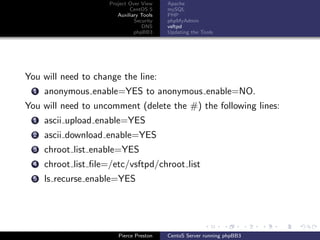
You will need to change the line:
  1   anonymous enable=YES to anonymous enable=NO.
You will need to uncomment (delete the #) the following lines:
  1   ascii upload enable=YES
  2   ascii download enable=YES
  3   chroot list enable=YES
  4   chroot list file=/etc/vsftpd/chroot list
  5   ls recurse enable=YES


                         Pierce Preston    CentoS Server running phpBB3
Project Over View    Apache
                              CentOS 5     mySQL
                         Auxiliary Tools   PHP
                                Security   phpMyAdmin
                                   DNS     vsftpd
                                phpBB3     Updating the Tools


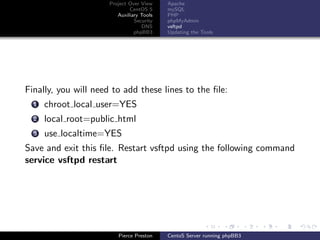
Finally, you will need to add these lines to the file:
  1   chroot local user=YES
  2   local root=public html
  3   use localtime=YES
Save and exit this file. Restart vsftpd using the following command
service vsftpd restart


                         Pierce Preston    CentoS Server running phpBB3
Project Over View    Apache
                             CentOS 5     mySQL
                        Auxiliary Tools   PHP
                               Security   phpMyAdmin
                                  DNS     vsftpd
                               phpBB3     Updating the Tools


To test to see if vsftpd worked, create a new user, with the
following commands:
useradd [user name]
passwd [user name]
Then, create a file with the following path /etc/vsftpd/chroot list.
Into that file, add your new user. Using an FTP client of your
choice (gftp, filezilla etc), you should be able to connect using the
new users log in name and password.


                        Pierce Preston    CentoS Server running phpBB3
Project Over View    Apache
                            CentOS 5     mySQL
                       Auxiliary Tools   PHP
                              Security   phpMyAdmin
                                 DNS     vsftpd
                              phpBB3     Updating the Tools


To update an software packages installed onto CentOS, use the
following command:
yum update [tool name]
To update all packages, simply type:
yum update


                       Pierce Preston    CentoS Server running phpBB3
Project Over View    Apache
                            CentOS 5     mySQL
                       Auxiliary Tools   PHP
                              Security   phpMyAdmin
                                 DNS     vsftpd
                              phpBB3     Updating the Tools


Some of the tools we have downloaded require up to date software
packages that don’t get catered for with CentOS’ base repositories.
This is due to the fact that they may not be fully tested yet, and
therefore may present bugs and instability. To update our tools to
the latest versions, we will have to add the testing repository.
To do this, first move to /etc/yum.repos.d
cd /etc/yum.repos.d


                       Pierce Preston    CentoS Server running phpBB3
Project Over View    Apache
                           CentOS 5     mySQL
                      Auxiliary Tools   PHP
                             Security   phpMyAdmin
                                DNS     vsftpd
                             phpBB3     Updating the Tools


Next, use the following command to add the testing repository:
wget http://dev.centos.org/centos/5/CentOS-Testing.repo
Once this has been done, you can call this repository when
updating using the following command:
 yum –enablerepo=c5-testing update [tool name]


                      Pierce Preston    CentoS Server running phpBB3
Project Over View
                              CentOS 5
                         Auxiliary Tools
                                Security
                                   DNS
                                phpBB3


Securing the server is of utmost importance. You can do this by
restricting ports and by using a proper, stateful firewall. A stateful
firewall logs information related to a session, thus allowing it to
make filtering decisions in the context of entire sessions.
To secure the server, you can start up iptables, and write a few
rules to stop unwanted traffic. The syntax for rules is:
iptables [chain name] [matching criteria] [action]
For a more in depth look at iptables, see:
  1   http://en.wikipedia.org/wiki/Iptables
  2   http://www.netfilter.org/
  3   http://www.frozentux.net/iptables-tutorial/iptables-
      tutorial.html


                         Pierce Preston    CentoS Server running phpBB3
Project Over View
                            CentOS 5
                       Auxiliary Tools
                              Security
                                 DNS
                              phpBB3


Another idea is to introduce DNS into your hosting server. To do
this, BIND can be used. BIND is considered the most widely used
DNS software tool.
BIND uses various zones, and associated attributes to manage
addressing.
For more information on BIND, See:
 1   http://www.isc.org/software/bind
 2   http://www.centos.org/modules/newbb/viewtopic.php?
     topic id=6485&forum=31
 3   http://www.howtoforge.com/bind-installation-on-centos


                       Pierce Preston    CentoS Server running phpBB3
Project Over View
                            CentOS 5     Introduction
                       Auxiliary Tools   Download
                              Security   Installation
                                 DNS     Customisation
                              phpBB3


phpBB3 is a software tool that allows you to host an on-line board.
It allows you to create and manage forums and sub-forums,
manage users and groups, change the look and feel of the board,
and limit access to certain areas using a highly customisable
permissions system.
phpBB3 is the most widely used open source forum tool.


                       Pierce Preston    CentoS Server running phpBB3
Project Over View
                            CentOS 5     Introduction
                       Auxiliary Tools   Download
                              Security   Installation
                                 DNS     Customisation
                              phpBB3


You will first have to download phpBB3. The latest version can be
found here:
http://www.phpbb.com/downloads/olympus.php
Once you have downloaded the .zip file, simply use an FTP client
to transfer it over to your server. Then, move the .zip file to:
/var/www/html/
and once you have unzipped it, you are ready to install it.


                       Pierce Preston    CentoS Server running phpBB3
Project Over View
                            CentOS 5     Introduction
                       Auxiliary Tools   Download
                              Security   Installation
                                 DNS     Customisation
                              phpBB3


Now that the .zip file has been expanded, you can start installing
phpBB3. The first step is to give permissions to a number of
folders and files. Simply move into the phpBB3 directory and type
the following lines to change the permissions:
    chmod 666 connfig.php.
    chmod 777 store/.
    chmod 777 cache/.
    chmod 777 files/.
    chmod 777 images/avatars/upload/.


                       Pierce Preston    CentoS Server running phpBB3
Project Over View
                             CentOS 5     Introduction
                        Auxiliary Tools   Download
                               Security   Installation
                                  DNS     Customisation
                               phpBB3


Now you can start the installation. To do this, simply point your
clients browser to:
http://[servers IP]/phpBB3
and follow the step by step instructions.
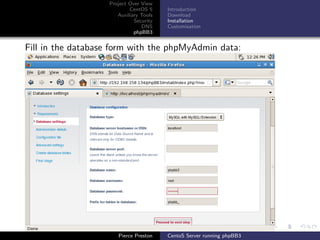
When it comes to the database set up, use “localhost” for the
server name, and give the values for phpMyAdmin. You should
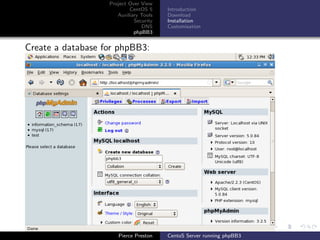
also have a database created for phpBB3. If you haven’t already
created a database, log into phpMyAdmin, and use the “Create
new database” option on the front page.


                        Pierce Preston    CentoS Server running phpBB3
Project Over View
                           CentOS 5     Introduction
                      Auxiliary Tools   Download
                             Security   Installation
                                DNS     Customisation
                             phpBB3


Create a database for phpBB3:


                      Pierce Preston    CentoS Server running phpBB3
Project Over View
                           CentOS 5     Introduction
                      Auxiliary Tools   Download
                             Security   Installation
                                DNS     Customisation
                             phpBB3


Fill in the database form with the phpMyAdmin data:


                      Pierce Preston    CentoS Server running phpBB3
Project Over View
                           CentOS 5     Introduction
                      Auxiliary Tools   Download
                             Security   Installation
                                DNS     Customisation
                             phpBB3


A useful guide is provided by phpBB3 on the following link:
http://www.phpbb.com/support/documentation/3.0/quickstart
/quick installation.php


                      Pierce Preston    CentoS Server running phpBB3
Project Over View
                             CentOS 5     Introduction
                        Auxiliary Tools   Download
                               Security   Installation
                                  DNS     Customisation
                               phpBB3


Once you have finished installing phpBB3, you will be sent to the
administrators control panel, where you can start customising your
board to suit you.
The first thing I will look at is changing the style of the forum. To
do this, find a style that you like, download it and transfer the
compressed file over to your server, then into the /styles
subdirectory in the phpBB3 directory. Expand the compressed file,
and in the administrators control panel, go to the “styles” tab.
There you should see your new style. Just press install, and, if
you’d like to make it the default skin, select yes for that option.


                        Pierce Preston    CentoS Server running phpBB3
Project Over View
                            CentOS 5     Introduction
                       Auxiliary Tools   Download
                              Security   Installation
                                 DNS     Customisation
                              phpBB3


You can create as many forums as you like. If you go to the
“Forums” tab, you can edit existing forums by clicking on the
image of the green cog next to the forum you wish to edit, or
create a new one by putting the name of the new forum into the
text box provided, and pressing “Create new forum”. Choose the
settings that you wish to have for that forum, and press “Submit”.
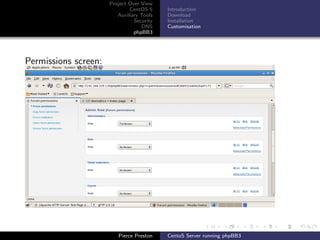
If you wish to change the permissions of the forum (say you want
to allow only moderators and above to be able to see it), you can
do that on the permissions screen.


                       Pierce Preston    CentoS Server running phpBB3
Project Over View
                              CentOS 5     Introduction
                         Auxiliary Tools   Download
                                Security   Installation
                                   DNS     Customisation
                                phpBB3


Permissions screen:


                         Pierce Preston    CentoS Server running phpBB3
Project Over View
                            CentOS 5     Introduction
                       Auxiliary Tools   Download
                              Security   Installation
                                 DNS     Customisation
                              phpBB3


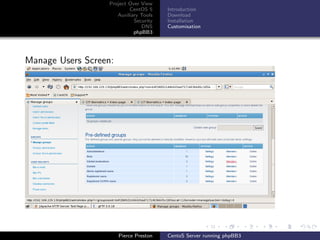
Now that you have extra forums, its time to manage them. This is
done using moderators, and they can be easily selected. Just move
to the “Users and Groups” tab, Once there, select the ”Manage
Groups” option. Assuming its moderators you want to add to,
select the “members” option for that group that from the list of
groups. Alternatively, select a different group if you want to give
the user different rights, or create a new group.


                       Pierce Preston    CentoS Server running phpBB3
Project Over View
                           CentOS 5     Introduction
                      Auxiliary Tools   Download
                             Security   Installation
                                DNS     Customisation
                             phpBB3


Manage Users Screen:


                       Pierce Preston   CentoS Server running phpBB3
Project Over View
                            CentOS 5     Introduction
                       Auxiliary Tools   Download
                              Security   Installation
                                 DNS     Customisation
                              phpBB3


Simply type the users name into the box, and press submit. The
user will then be added to the group, and given the appropriate
permissions and rights for that group.


                       Pierce Preston    CentoS Server running phpBB3

Presentation

  • 1.
    Project Over View CentOS 5 Auxiliary Tools Security DNS phpBB3 CentoS Server running phpBB3 Pierce Preston Cork Institute of Technology March 21, 2010 Pierce Preston CentoS Server running phpBB3
  • 2.
    Project Over View CentOS 5 Auxiliary Tools Security DNS phpBB3 Outline 1 Project Over View 2 CentOS 5 Installation 3 Auxiliary Tools Apache Testing Apache mySQL PHP Testing PHP phpMyAdmin vsftpd Updating the Tools 4 Security 5 DNS 6 phpBB3 Pierce Preston CentoS Server running phpBB3
  • 3.
    Project Over View CentOS 5 Auxiliary Tools Security DNS phpBB3 What was the purpose of the project: To install CentOS as a server. To install and configure various auxiliary tools to complete the server. To install and configure a web 2.0 application. To document the process in the form of a user guide. Pierce Preston CentoS Server running phpBB3
  • 4.
    Project Over View CentOS 5 Auxiliary Tools Security DNS phpBB3 The project was broken into three main sections. Install and configure CentOS 5. Install and configure the various tools. Install and configure phpBB3 Pierce Preston CentoS Server running phpBB3
  • 5.
    Project Over View CentOS 5 Auxiliary Tools Installation Security DNS phpBB3 CentOS is a Linux distribution based on red hat enterprise edition. Due to the fact that it is developed mainly for servers, it ships with older, more secure and stable tools than other more home user oriented distributions, such as Ubuntu. CentOS comes in both 32 and 64 bit architectures. It also has an ever increasing fan base, who add to the product in terms of support for users and development of various tools. As well as this, it provides virtualisation using Xen technology. Pierce Preston CentoS Server running phpBB3
  • 6.
    Project Over View CentOS 5 Auxiliary Tools Installation Security DNS phpBB3 To install CentOS, simply insert the disk, restart your PC and boot into CD. Then follow the step by step stages of the installation. A number of things to take note of. When it asks you about partitions, make sure you have selected a black partition, and that you are not going to cause any damage to existing operating systems etc. When it asks you what software and GUI you’d like, make sure to unselected gnome, and not to select anything else (Its a common mistake to select server here). Pierce Preston CentoS Server running phpBB3
  • 7.
    Project Over View CentOS 5 Auxiliary Tools Installation Security DNS phpBB3 Pierce Preston CentoS Server running phpBB3
  • 8.
    Project Over View CentOS 5 Auxiliary Tools Installation Security DNS phpBB3 Pierce Preston CentoS Server running phpBB3
  • 9.
    Project Over View Apache CentOS 5 mySQL Auxiliary Tools PHP Security phpMyAdmin DNS vsftpd phpBB3 Updating the Tools A number of auxiliary tools are required to fulfill the needs of the basic server. These include: Apache. MySQL. PHP. phpMyAdmin. Vsftpd. Pierce Preston CentoS Server running phpBB3
  • 10.
    Project Over View Apache CentOS 5 mySQL Auxiliary Tools PHP Security phpMyAdmin DNS vsftpd phpBB3 Updating the Tools Apache is a tool that allows you to host web pages on your server. It is the most popular HTTP server available. To install Apache, use the command yum install httpd To start the service, use the command service httpd start If you would like the service to start on start up, use the command chkconfig httpd on Pierce Preston CentoS Server running phpBB3
  • 11.
    Project Over View Apache CentOS 5 mySQL Auxiliary Tools PHP Security phpMyAdmin DNS vsftpd phpBB3 Updating the Tools To test Apache, simply point your clients browser towards the IP address of the server. Pierce Preston CentoS Server running phpBB3
  • 12.
    Project Over View Apache CentOS 5 mySQL Auxiliary Tools PHP Security phpMyAdmin DNS vsftpd phpBB3 Updating the Tools MySQL is a database management system. It works well with all major operating systems, and most major programming languages. To install mySQL, use the command yum mysql httpd To start the service, use the command service mysqld start If you would like the service to start on start up, use the command chkconfig hmysqld on Pierce Preston CentoS Server running phpBB3
  • 13.
    Project Over View Apache CentOS 5 mySQL Auxiliary Tools PHP Security phpMyAdmin DNS vsftpd phpBB3 Updating the Tools PHP is a server side scripting language, which has many extensions available to increase its usability. It is he final component of a LAMP server. To install PHP, use the command yum install php You can also install any other the php plug ins you see fit to. Some suggested examples are php-mysql, php-mbstring and php-gd Pierce Preston CentoS Server running phpBB3
  • 14.
    Project Over View Apache CentOS 5 mySQL Auxiliary Tools PHP Security phpMyAdmin DNS vsftpd phpBB3 Updating the Tools To test PHP, create a file called index.php, and fill it with the following 1 <?php 2 phpinfo () ; 3 ?> restart Apache, and point your clients browser to the IP address of your server, followed by /index.php. Pierce Preston CentoS Server running phpBB3
  • 15.
    Project Over View Apache CentOS 5 mySQL Auxiliary Tools PHP Security phpMyAdmin DNS vsftpd phpBB3 Updating the Tools Pierce Preston CentoS Server running phpBB3
  • 16.
    Project Over View Apache CentOS 5 mySQL Auxiliary Tools PHP Security phpMyAdmin DNS vsftpd phpBB3 Updating the Tools phpMyAdmin acts as a web-based utility for managing your servers. It allows the user to do various tasks, like create, edit and drop tables and databases. To install phpMyAdmin, you will have to move to /var/www/html cd /var/www/html You will then need to use the wget tool to download phpMyAdmin wget http://downloads.sourceforge.net/project/phpmyadmin/ phpMyAdmin/3.2.5/phpMyAdmin-3.2.5-english.zip Pierce Preston CentoS Server running phpBB3
  • 17.
    Project Over View Apache CentOS 5 mySQL Auxiliary Tools PHP Security phpMyAdmin DNS vsftpd phpBB3 Updating the Tools Next, you will need to unzip the file using the following command unzip phpMyAdmin-3.2.5-english.zip To make life easier, rename the phpMyAdmin folder to something more manageable mv phpMyAdmin-3.2.5-english phpmyadmin Move into this directory cd phpmyadmin Pierce Preston CentoS Server running phpBB3
  • 18.
    Project Over View Apache CentOS 5 mySQL Auxiliary Tools PHP Security phpMyAdmin DNS vsftpd phpBB3 Updating the Tools Copy over the sample config file cp config.sample.inc.php config.inc.php Edit the config file, changing the line “$cfg[’Servers’][$i][’auth type’] = ‘cookies‘;” to “$cfg[’Servers’][$i][’auth type’] = ‘http‘;” Pierce Preston CentoS Server running phpBB3
  • 19.
    Project Over View Apache CentOS 5 mySQL Auxiliary Tools PHP Security phpMyAdmin DNS vsftpd phpBB3 Updating the Tools Add a root user for mySQLAdmin using the following command mysqladmin -u [user name] password [password] Restart both the Apache and MySQL services service httpd restart service mysqld restart Pierce Preston CentoS Server running phpBB3
  • 20.
    Project Over View Apache CentOS 5 mySQL Auxiliary Tools PHP Security phpMyAdmin DNS vsftpd phpBB3 Updating the Tools vsftpd (or very secure FTP daemon) allows you to connect to your server via an FTP client, and upload files directly. To install vsftpd, use the command yum install vsftpd Next you will need to edit the config file, found at /etc/vsftpd/vsftpd.conf nano [or any editor you like] /etc/vsftpd/vsftpd.conf Pierce Preston CentoS Server running phpBB3
  • 21.
    Project Over View Apache CentOS 5 mySQL Auxiliary Tools PHP Security phpMyAdmin DNS vsftpd phpBB3 Updating the Tools You will need to change the line: 1 anonymous enable=YES to anonymous enable=NO. You will need to uncomment (delete the #) the following lines: 1 ascii upload enable=YES 2 ascii download enable=YES 3 chroot list enable=YES 4 chroot list file=/etc/vsftpd/chroot list 5 ls recurse enable=YES Pierce Preston CentoS Server running phpBB3
  • 22.
    Project Over View Apache CentOS 5 mySQL Auxiliary Tools PHP Security phpMyAdmin DNS vsftpd phpBB3 Updating the Tools Finally, you will need to add these lines to the file: 1 chroot local user=YES 2 local root=public html 3 use localtime=YES Save and exit this file. Restart vsftpd using the following command service vsftpd restart Pierce Preston CentoS Server running phpBB3
  • 23.
    Project Over View Apache CentOS 5 mySQL Auxiliary Tools PHP Security phpMyAdmin DNS vsftpd phpBB3 Updating the Tools To test to see if vsftpd worked, create a new user, with the following commands: useradd [user name] passwd [user name] Then, create a file with the following path /etc/vsftpd/chroot list. Into that file, add your new user. Using an FTP client of your choice (gftp, filezilla etc), you should be able to connect using the new users log in name and password. Pierce Preston CentoS Server running phpBB3
  • 24.
    Project Over View Apache CentOS 5 mySQL Auxiliary Tools PHP Security phpMyAdmin DNS vsftpd phpBB3 Updating the Tools To update an software packages installed onto CentOS, use the following command: yum update [tool name] To update all packages, simply type: yum update Pierce Preston CentoS Server running phpBB3
  • 25.
    Project Over View Apache CentOS 5 mySQL Auxiliary Tools PHP Security phpMyAdmin DNS vsftpd phpBB3 Updating the Tools Some of the tools we have downloaded require up to date software packages that don’t get catered for with CentOS’ base repositories. This is due to the fact that they may not be fully tested yet, and therefore may present bugs and instability. To update our tools to the latest versions, we will have to add the testing repository. To do this, first move to /etc/yum.repos.d cd /etc/yum.repos.d Pierce Preston CentoS Server running phpBB3
  • 26.
    Project Over View Apache CentOS 5 mySQL Auxiliary Tools PHP Security phpMyAdmin DNS vsftpd phpBB3 Updating the Tools Next, use the following command to add the testing repository: wget http://dev.centos.org/centos/5/CentOS-Testing.repo Once this has been done, you can call this repository when updating using the following command: yum –enablerepo=c5-testing update [tool name] Pierce Preston CentoS Server running phpBB3
  • 27.
    Project Over View CentOS 5 Auxiliary Tools Security DNS phpBB3 Securing the server is of utmost importance. You can do this by restricting ports and by using a proper, stateful firewall. A stateful firewall logs information related to a session, thus allowing it to make filtering decisions in the context of entire sessions. To secure the server, you can start up iptables, and write a few rules to stop unwanted traffic. The syntax for rules is: iptables [chain name] [matching criteria] [action] For a more in depth look at iptables, see: 1 http://en.wikipedia.org/wiki/Iptables 2 http://www.netfilter.org/ 3 http://www.frozentux.net/iptables-tutorial/iptables- tutorial.html Pierce Preston CentoS Server running phpBB3
  • 28.
    Project Over View CentOS 5 Auxiliary Tools Security DNS phpBB3 Another idea is to introduce DNS into your hosting server. To do this, BIND can be used. BIND is considered the most widely used DNS software tool. BIND uses various zones, and associated attributes to manage addressing. For more information on BIND, See: 1 http://www.isc.org/software/bind 2 http://www.centos.org/modules/newbb/viewtopic.php? topic id=6485&forum=31 3 http://www.howtoforge.com/bind-installation-on-centos Pierce Preston CentoS Server running phpBB3
  • 29.
    Project Over View CentOS 5 Introduction Auxiliary Tools Download Security Installation DNS Customisation phpBB3 phpBB3 is a software tool that allows you to host an on-line board. It allows you to create and manage forums and sub-forums, manage users and groups, change the look and feel of the board, and limit access to certain areas using a highly customisable permissions system. phpBB3 is the most widely used open source forum tool. Pierce Preston CentoS Server running phpBB3
  • 30.
    Project Over View CentOS 5 Introduction Auxiliary Tools Download Security Installation DNS Customisation phpBB3 You will first have to download phpBB3. The latest version can be found here: http://www.phpbb.com/downloads/olympus.php Once you have downloaded the .zip file, simply use an FTP client to transfer it over to your server. Then, move the .zip file to: /var/www/html/ and once you have unzipped it, you are ready to install it. Pierce Preston CentoS Server running phpBB3
  • 31.
    Project Over View CentOS 5 Introduction Auxiliary Tools Download Security Installation DNS Customisation phpBB3 Now that the .zip file has been expanded, you can start installing phpBB3. The first step is to give permissions to a number of folders and files. Simply move into the phpBB3 directory and type the following lines to change the permissions: chmod 666 connfig.php. chmod 777 store/. chmod 777 cache/. chmod 777 files/. chmod 777 images/avatars/upload/. Pierce Preston CentoS Server running phpBB3
  • 32.
    Project Over View CentOS 5 Introduction Auxiliary Tools Download Security Installation DNS Customisation phpBB3 Now you can start the installation. To do this, simply point your clients browser to: http://[servers IP]/phpBB3 and follow the step by step instructions. When it comes to the database set up, use “localhost” for the server name, and give the values for phpMyAdmin. You should also have a database created for phpBB3. If you haven’t already created a database, log into phpMyAdmin, and use the “Create new database” option on the front page. Pierce Preston CentoS Server running phpBB3
  • 33.
    Project Over View CentOS 5 Introduction Auxiliary Tools Download Security Installation DNS Customisation phpBB3 Create a database for phpBB3: Pierce Preston CentoS Server running phpBB3
  • 34.
    Project Over View CentOS 5 Introduction Auxiliary Tools Download Security Installation DNS Customisation phpBB3 Fill in the database form with the phpMyAdmin data: Pierce Preston CentoS Server running phpBB3
  • 35.
    Project Over View CentOS 5 Introduction Auxiliary Tools Download Security Installation DNS Customisation phpBB3 A useful guide is provided by phpBB3 on the following link: http://www.phpbb.com/support/documentation/3.0/quickstart /quick installation.php Pierce Preston CentoS Server running phpBB3
  • 36.
    Project Over View CentOS 5 Introduction Auxiliary Tools Download Security Installation DNS Customisation phpBB3 Once you have finished installing phpBB3, you will be sent to the administrators control panel, where you can start customising your board to suit you. The first thing I will look at is changing the style of the forum. To do this, find a style that you like, download it and transfer the compressed file over to your server, then into the /styles subdirectory in the phpBB3 directory. Expand the compressed file, and in the administrators control panel, go to the “styles” tab. There you should see your new style. Just press install, and, if you’d like to make it the default skin, select yes for that option. Pierce Preston CentoS Server running phpBB3
  • 37.
    Project Over View CentOS 5 Introduction Auxiliary Tools Download Security Installation DNS Customisation phpBB3 You can create as many forums as you like. If you go to the “Forums” tab, you can edit existing forums by clicking on the image of the green cog next to the forum you wish to edit, or create a new one by putting the name of the new forum into the text box provided, and pressing “Create new forum”. Choose the settings that you wish to have for that forum, and press “Submit”. If you wish to change the permissions of the forum (say you want to allow only moderators and above to be able to see it), you can do that on the permissions screen. Pierce Preston CentoS Server running phpBB3
  • 38.
    Project Over View CentOS 5 Introduction Auxiliary Tools Download Security Installation DNS Customisation phpBB3 Permissions screen: Pierce Preston CentoS Server running phpBB3
  • 39.
    Project Over View CentOS 5 Introduction Auxiliary Tools Download Security Installation DNS Customisation phpBB3 Now that you have extra forums, its time to manage them. This is done using moderators, and they can be easily selected. Just move to the “Users and Groups” tab, Once there, select the ”Manage Groups” option. Assuming its moderators you want to add to, select the “members” option for that group that from the list of groups. Alternatively, select a different group if you want to give the user different rights, or create a new group. Pierce Preston CentoS Server running phpBB3
  • 40.
    Project Over View CentOS 5 Introduction Auxiliary Tools Download Security Installation DNS Customisation phpBB3 Manage Users Screen: Pierce Preston CentoS Server running phpBB3
  • 41.
    Project Over View CentOS 5 Introduction Auxiliary Tools Download Security Installation DNS Customisation phpBB3 Simply type the users name into the box, and press submit. The user will then be added to the group, and given the appropriate permissions and rights for that group. Pierce Preston CentoS Server running phpBB3