CCN LAB:06
DNS server
What is DNS
DNS servers translate the website domain names users search in web
browsers into corresponding numerical IP addresses. This process is
known as DNS resolution.
It allows users to access websites using domain names and URLs
rather than complex numerical internet protocol (IP) addresses.
Key Components of DNS
•Domain Names: These are human-readable addresses like example.com.
•IP Addresses: The numerical label assigned to each device or server
connected to the internet.
•DNS Servers: These are the backbone of DNS, handling the conversion of
domain names to IP addresses.
Types of DNS Server
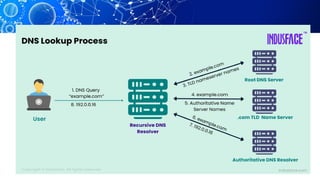
🔹 Recursive DNS Server
🔹 Root Name Server
🔹 TLD Name Server
🔹 Authoritative Name Server
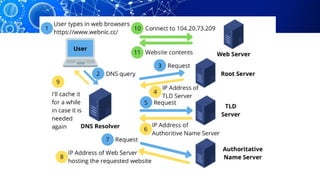
When you enter a website URL, your
request passes through four main
types of DNS servers before reaching
the correct destination.
Recursive DNS Server (DNS Resolver) 1 ️
️
‍
♂️
1️⃣
🕵️
‍
️
🕵️
‍
️
🕵️
‍
️
🕵️
‍
️
🕵️
‍
️
🕵️
‍
️
🕵️
‍
️
🕵️
‍
️
🕵️
‍
️
🕵️
‍
️
🕵️
‍
️
🕵️
‍
️
🕵️
‍
️ 🕵️
‍ ️
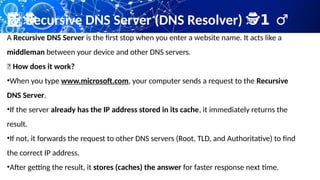
A Recursive DNS Server is the first stop when you enter a website name. It acts like a
middleman between your device and other DNS servers.
📌 How does it work?
•When you type www.microsoft.com, your computer sends a request to the Recursive
DNS Server.
•If the server already has the IP address stored in its cache, it immediately returns the
result.
•If not, it forwards the request to other DNS servers (Root, TLD, and Authoritative) to find
the correct IP address.
•After getting the result, it stores (caches) the answer for faster response next time.
Root Name Server
2️⃣ 🌍
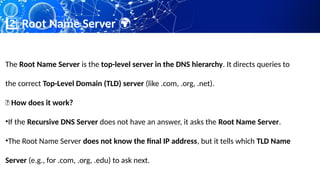
The Root Name Server is the top-level server in the DNS hierarchy. It directs queries to
the correct Top-Level Domain (TLD) server (like .com, .org, .net).
📌 How does it work?
•If the Recursive DNS Server does not have an answer, it asks the Root Name Server.
•The Root Name Server does not know the final IP address, but it tells which TLD Name
Server (e.g., for .com, .org, .edu) to ask next.
📌 How Many Root Servers Exist?
There are 13 sets of Root Name Servers worldwide, operated
by organizations like ICANN, Verisign, and NASA. They label
from A to M. Each root server operates within a global
distributed network.
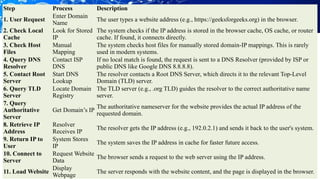
Step Process Description
1. User Request
Enter Domain
Name
The user types a website address (e.g., https://geeksforgeeks.org) in the browser.
2. Check Local
Cache
Look for Stored
IP
The system checks if the IP address is stored in the browser cache, OS cache, or router
cache. If found, it connects directly.
3. Check Host
Files
Manual
Mapping
The system checks host files for manually stored domain-IP mappings. This is rarely
used in modern systems.
4. Query DNS
Resolver
Contact ISP
DNS
If no local match is found, the request is sent to a DNS Resolver (provided by ISP or
public DNS like Google DNS 8.8.8.8).
5. Contact Root
Server
Start DNS
Lookup
The resolver contacts a Root DNS Server, which directs it to the relevant Top-Level
Domain (TLD) server.
6. Query TLD
Server
Locate Domain
Registry
The TLD server (e.g., .org TLD) guides the resolver to the correct authoritative name
server.
7. Query
Authoritative
Server
Get Domain’s IP
The authoritative nameserver for the website provides the actual IP address of the
requested domain.
8. Retrieve IP
Address
Resolver
Receives IP
The resolver gets the IP address (e.g., 192.0.2.1) and sends it back to the user's system.
9. Return IP to
User
System Stores
IP
The system saves the IP address in cache for faster future access.
10. Connect to
Server
Request Website
Data
The browser sends a request to the web server using the IP address.
11. Load Website
Display
Webpage
The server responds with the website content, and the page is displayed in the browser.
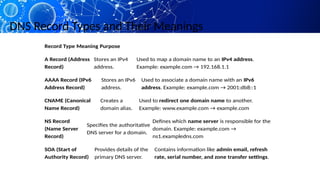
DNS Record Types and Their Meanings
Record Type Meaning Purpose
A Record (Address
Record)
Stores an IPv4
address.
Used to map a domain name to an IPv4 address.
Example: example.com → 192.168.1.1
AAAA Record (IPv6
Address Record)
Stores an IPv6
address.
Used to associate a domain name with an IPv6
address. Example: example.com → 2001:db8::1
CNAME (Canonical
Name Record)
Creates a
domain alias.
Used to redirect one domain name to another.
Example: www.example.com → example.com
NS Record
(Name Server
Record)
Specifies the authoritative
DNS server for a domain.
Defines which name server is responsible for the
domain. Example: example.com →
ns1.exampledns.com
SOA (Start of
Authority Record)
Provides details of the
primary DNS server.
Contains information like admin email, refresh
rate, serial number, and zone transfer settings.
Configuring a DNS Server in Cisco Packet Tracer
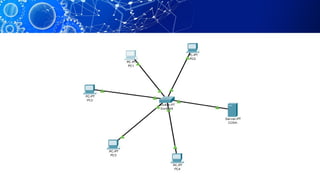
Step 1: Create a Network Topology
Build a basic network consisting of a router, a switch, a DNS server, and at least
one PC. This setup simulates a small network environment.
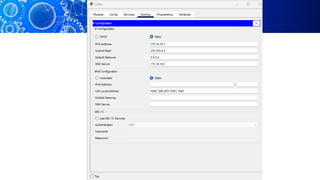
Step 2: Configure the DNS Server
•Assign an IP address: Give the DNS server a static IP address (172.18.10.1)
within your network. This IP address will be used by other devices to locate the
DNS server.
•Enable DNS service: Ensure the DNS service is activated on the server. This
allows the server to process DNS queries.
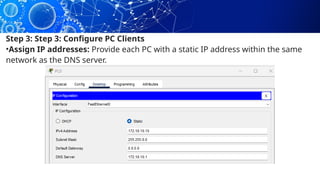
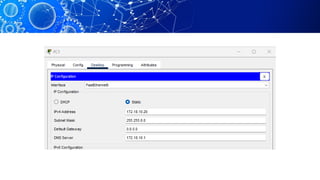
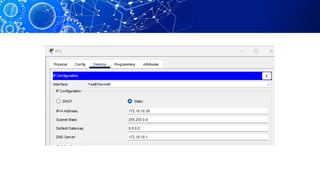
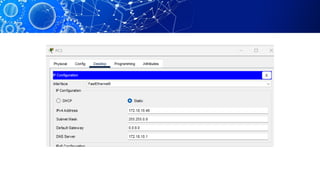
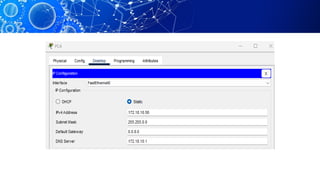
Step 3: Step 3: Configure PC Clients
•Assign IP addresses: Provide each PC with a static IP address within the same
network as the DNS server.
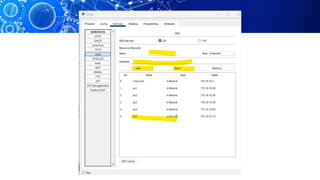
Step 4: Add Hostnames
Register Create hostnames: Assign unique hostnames to
each PC. This is optional but can improve readability in your
network.
hostnames: If you created hostnames, register them on
the DNS server. This allows other devices to resolve the
hostname to the corresponding IP address.
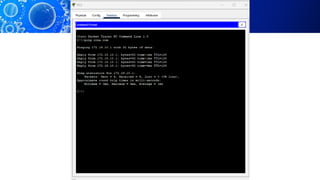
Step 5: Verify DNS Resolution
•Open a command prompt: Access the command prompt on one of
the PCs.
•Ping a domain name: Use the ping command to test DNS
resolution.
•For example, ping google.com.
•If the DNS server is working correctly, the PC will resolve the
domain name to its IP address and successfully ping the website.
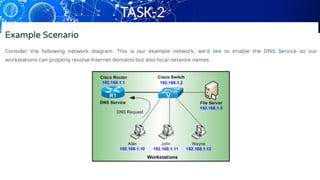
TASK-2
TASK-2
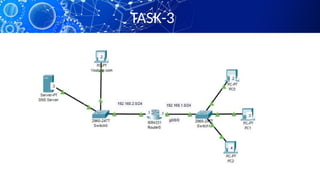
TASK-3

COMPUTER COMMUNICATION AND NETWORWING LAB - 06.pptx

  • 1.
  • 2.
  • 3.
    What is DNS DNSservers translate the website domain names users search in web browsers into corresponding numerical IP addresses. This process is known as DNS resolution. It allows users to access websites using domain names and URLs rather than complex numerical internet protocol (IP) addresses.
  • 4.
    Key Components ofDNS •Domain Names: These are human-readable addresses like example.com. •IP Addresses: The numerical label assigned to each device or server connected to the internet. •DNS Servers: These are the backbone of DNS, handling the conversion of domain names to IP addresses.
  • 5.
    Types of DNSServer 🔹 Recursive DNS Server 🔹 Root Name Server 🔹 TLD Name Server 🔹 Authoritative Name Server
  • 6.
    When you entera website URL, your request passes through four main types of DNS servers before reaching the correct destination.
  • 8.
    Recursive DNS Server(DNS Resolver) 1 ️ ️ ‍ ♂️ 1️⃣ 🕵️ ‍ ️ 🕵️ ‍ ️ 🕵️ ‍ ️ 🕵️ ‍ ️ 🕵️ ‍ ️ 🕵️ ‍ ️ 🕵️ ‍ ️ 🕵️ ‍ ️ 🕵️ ‍ ️ 🕵️ ‍ ️ 🕵️ ‍ ️ 🕵️ ‍ ️ 🕵️ ‍ ️ 🕵️ ‍ ️ A Recursive DNS Server is the first stop when you enter a website name. It acts like a middleman between your device and other DNS servers. 📌 How does it work? •When you type www.microsoft.com, your computer sends a request to the Recursive DNS Server. •If the server already has the IP address stored in its cache, it immediately returns the result. •If not, it forwards the request to other DNS servers (Root, TLD, and Authoritative) to find the correct IP address. •After getting the result, it stores (caches) the answer for faster response next time.
  • 9.
    Root Name Server 2️⃣🌍 The Root Name Server is the top-level server in the DNS hierarchy. It directs queries to the correct Top-Level Domain (TLD) server (like .com, .org, .net). 📌 How does it work? •If the Recursive DNS Server does not have an answer, it asks the Root Name Server. •The Root Name Server does not know the final IP address, but it tells which TLD Name Server (e.g., for .com, .org, .edu) to ask next.
  • 10.
    📌 How ManyRoot Servers Exist? There are 13 sets of Root Name Servers worldwide, operated by organizations like ICANN, Verisign, and NASA. They label from A to M. Each root server operates within a global distributed network.
  • 11.
    Step Process Description 1.User Request Enter Domain Name The user types a website address (e.g., https://geeksforgeeks.org) in the browser. 2. Check Local Cache Look for Stored IP The system checks if the IP address is stored in the browser cache, OS cache, or router cache. If found, it connects directly. 3. Check Host Files Manual Mapping The system checks host files for manually stored domain-IP mappings. This is rarely used in modern systems. 4. Query DNS Resolver Contact ISP DNS If no local match is found, the request is sent to a DNS Resolver (provided by ISP or public DNS like Google DNS 8.8.8.8). 5. Contact Root Server Start DNS Lookup The resolver contacts a Root DNS Server, which directs it to the relevant Top-Level Domain (TLD) server. 6. Query TLD Server Locate Domain Registry The TLD server (e.g., .org TLD) guides the resolver to the correct authoritative name server. 7. Query Authoritative Server Get Domain’s IP The authoritative nameserver for the website provides the actual IP address of the requested domain. 8. Retrieve IP Address Resolver Receives IP The resolver gets the IP address (e.g., 192.0.2.1) and sends it back to the user's system. 9. Return IP to User System Stores IP The system saves the IP address in cache for faster future access. 10. Connect to Server Request Website Data The browser sends a request to the web server using the IP address. 11. Load Website Display Webpage The server responds with the website content, and the page is displayed in the browser.
  • 13.
    DNS Record Typesand Their Meanings Record Type Meaning Purpose A Record (Address Record) Stores an IPv4 address. Used to map a domain name to an IPv4 address. Example: example.com → 192.168.1.1 AAAA Record (IPv6 Address Record) Stores an IPv6 address. Used to associate a domain name with an IPv6 address. Example: example.com → 2001:db8::1 CNAME (Canonical Name Record) Creates a domain alias. Used to redirect one domain name to another. Example: www.example.com → example.com NS Record (Name Server Record) Specifies the authoritative DNS server for a domain. Defines which name server is responsible for the domain. Example: example.com → ns1.exampledns.com SOA (Start of Authority Record) Provides details of the primary DNS server. Contains information like admin email, refresh rate, serial number, and zone transfer settings.
  • 14.
    Configuring a DNSServer in Cisco Packet Tracer Step 1: Create a Network Topology Build a basic network consisting of a router, a switch, a DNS server, and at least one PC. This setup simulates a small network environment.
  • 16.
    Step 2: Configurethe DNS Server •Assign an IP address: Give the DNS server a static IP address (172.18.10.1) within your network. This IP address will be used by other devices to locate the DNS server. •Enable DNS service: Ensure the DNS service is activated on the server. This allows the server to process DNS queries.
  • 18.
    Step 3: Step3: Configure PC Clients •Assign IP addresses: Provide each PC with a static IP address within the same network as the DNS server.
  • 23.
    Step 4: AddHostnames Register Create hostnames: Assign unique hostnames to each PC. This is optional but can improve readability in your network. hostnames: If you created hostnames, register them on the DNS server. This allows other devices to resolve the hostname to the corresponding IP address.
  • 25.
    Step 5: VerifyDNS Resolution •Open a command prompt: Access the command prompt on one of the PCs. •Ping a domain name: Use the ping command to test DNS resolution. •For example, ping google.com. •If the DNS server is working correctly, the PC will resolve the domain name to its IP address and successfully ping the website.

  • 27.
  • 28.