A
Presentation
On
“Domain Name Server”
by: Vipul Vaid
History of DNS
 Through the 1970s, the ARPAnet was a small, friendly
community of a few hundred hosts. A single file,
HOSTS.TXT, contained a name-to-address mapping for
every host connected to the ARPAnet. The familiar Unix
host table, /etc/hosts, was compiled from HOSTS.TXT
(mostly by deleting fields Unix didn't use).
 As the ARPAnet grew, however, this scheme became
unworkable. The size of HOSTS.TXT grew in proportion
to the growth in the number of ARPAnet hosts.
 Problems with HOSTS.TXT
 Consistency
 Name collision
“The Domain Name System”
What is DNS ?
 The Domain Name System is a distributed database with
hierarchal structure and serve the basis for name
resolution process in TCP/IP network.
 Domain Name System (DNS) converts the name of a
Web site (www.vipul.com) to an IP address
(65.115.71.34) and vice-versa.
 This IP is the IP address of a Web site's server, not the
Web site's name, and is used in routing traffic over the
Internet.
Key Components of DNS
 Domain namespace
 Zones
 Nameservers
 Resolver
Domain namespace
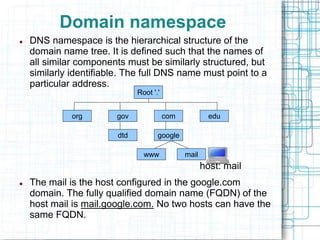
 DNS namespace is the hierarchical structure of the
domain name tree. It is defined such that the names of
all similar components must be similarly structured, but
similarly identifiable. The full DNS name must point to a
particular address.
host: mail
 The mail is the host configured in the google.com
domain. The fully qualified domain name (FQDN) of the
host mail is mail.google.com. No two hosts can have the
same FQDN.
Root '.'
edu
com
gov
org
dtd
www mail
google
sales
support training
microsoft
Zones
• All top-level domains, and many domains at the
second and lower levels, are broken into zones.
• Zones: smaller, more manageable units by
delegation.
Name server
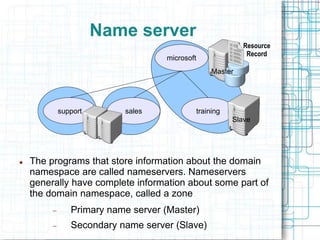
 The programs that store information about the domain
namespace are called nameservers. Nameservers
generally have complete information about some part of
the domain namespace, called a zone
 Primary name server (Master)
 Secondary name server (Slave)
microsoft
sales
support training
Master
Slave
Resource
Record
Resolver
 Resolvers are the clients that access nameservers.
Programs running on a host that need information from
the domain namespace use the resolver. The resolver
handles:
 Querying a nameserver.
 Interpreting responses (which may be resource
records or an error).
 Returning the information to the programs that
requested it.
 In BIND, the resolver is a set of library routines that is
linked to programs.
 Ex. gethostbyname() in standard socket library
inC programming language.
What is DNS query
 A query is a request for name resolution to a DNS
server. There are two types of queries: recursive and
iterative.
 Recursive
 The queried nameserver is obliged to respond with the
requested data or with an error.
 Iterative
 In iterative resolution, a nameserver simply gives the best
answer it already knows back to the querier. No additional
querying is required.
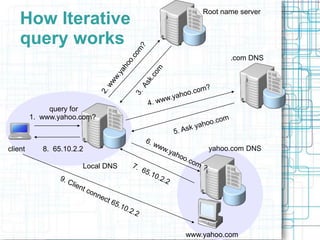
query for
1. www.yahoo.com?
client
www.yahoo.com
Root name server
Local DNS
.com DNS
yahoo.com DNS
8. 65.10.2.2
How Iterative
query works
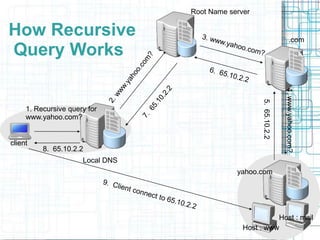
client
Local DNS
Root Name server
.com
yahoo.com
4.
www.yahoo.com?
1. Recursive query for
www.yahoo.com?
Host : www
5.
65.10.2.2
8. 65.10.2.2
How Recursive
Query Works
Host : mail
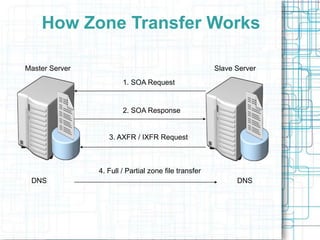
Master Server Slave Server
1. SOA Request
2. SOA Response
3. AXFR / IXFR Request
DNS DNS
4. Full / Partial zone file transfer
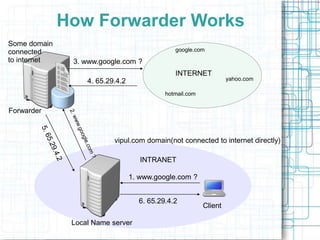
How Zone Transfer Works
INTRANET
INTERNET
Forwarder
Local Name server
Client
vipul.com domain(not connected to internet directly)
google.com
yahoo.com
hotmail.com
1. www.google.com ?
3. www.google.com ?
How Forwarder Works
4. 65.29.4.2
6. 65.29.4.2
Some domain
connected
to internet
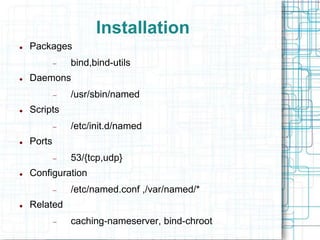
Installation
 Packages
 bind,bind-utils
 Daemons
 /usr/sbin/named
 Scripts
 /etc/init.d/named
 Ports
 53/{tcp,udp}
 Configuration
 /etc/named.conf ,/var/named/*
 Related
 caching-nameserver, bind-chroot
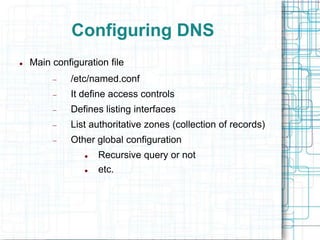
Configuring DNS
 Main configuration file
 /etc/named.conf
 It define access controls
 Defines listing interfaces
 List authoritative zones (collection of records)
 Other global configuration
 Recursive query or not
 etc.
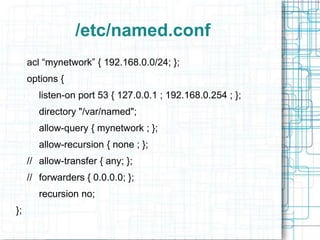
/etc/named.conf
acl “mynetwork” { 192.168.0.0/24; };
options {
listen-on port 53 { 127.0.0.1 ; 192.168.0.254 ; };
directory "/var/named";
allow-query { mynetwork ; };
allow-recursion { none ; };
// allow-transfer { any; };
// forwarders { 0.0.0.0; };
recursion no;
};
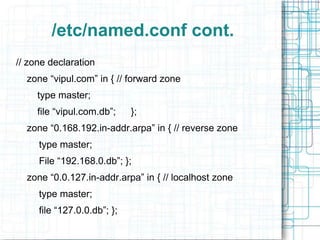
/etc/named.conf cont.
// zone declaration
zone “vipul.com” in { // forward zone
type master;
file “vipul.com.db”; };
zone “0.168.192.in-addr.arpa” in { // reverse zone
type master;
File “192.168.0.db”; };
zone “0.0.127.in-addr.arpa” in { // localhost zone
type master;
file “127.0.0.db”; };
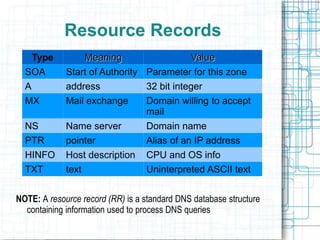
Resource Records
NOTE: A resource record (RR) is a standard DNS database structure
containing information used to process DNS queries
Type Meaning Value
SOA Start of Authority Parameter for this zone
A address 32 bit integer
MX Mail exchange Domain willing to accept
mail
NS Name server Domain name
PTR pointer Alias of an IP address
HINFO Host description CPU and OS info
TXT text Uninterpreted ASCII text
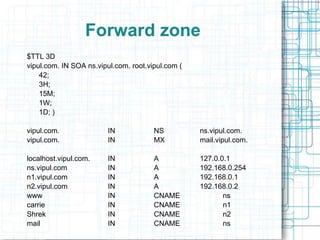
Forward zone
$TTL 3D
vipul.com. IN SOA ns.vipul.com. root.vipul.com (
42;
3H;
15M;
1W;
1D; )
vipul.com. IN NS ns.vipul.com.
vipul.com. IN MX mail.vipul.com.
localhost.vipul.com. IN A 127.0.0.1
ns.vipul.com IN A 192.168.0.254
n1.vipul.com IN A 192.168.0.1
n2.vipul.com IN A 192.168.0.2
www IN CNAME ns
carrie IN CNAME n1
Shrek IN CNAME n2
mail IN CNAME ns
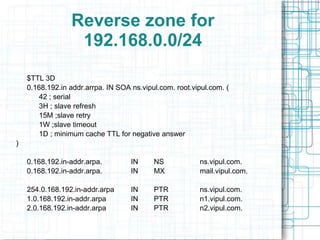
Reverse zone for
192.168.0.0/24
$TTL 3D
0.168.192.in addr.arrpa. IN SOA ns.vipul.com. root.vipul.com. (
42 ; serial
3H ; slave refresh
15M ;slave retry
1W ;slave timeout
1D ; minimum cache TTL for negative answer
)
0.168.192.in-addr.arpa. IN NS ns.vipul.com.
0.168.192.in-addr.arpa. IN MX mail.vipul.com.
254.0.168.192.in-addr.arpa IN PTR ns.vipul.com.
1.0.168.192.in-addr.arpa IN PTR n1.vipul.com.
2.0.168.192.in-addr.arpa IN PTR n2.vipul.com.
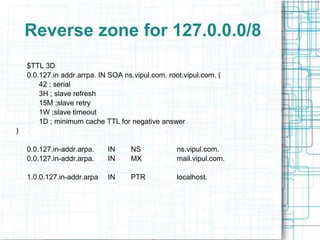
Reverse zone for 127.0.0.0/8
$TTL 3D
0.0.127.in addr.arrpa. IN SOA ns.vipul.com. root.vipul.com. (
42 ; serial
3H ; slave refresh
15M ;slave retry
1W ;slave timeout
1D ; minimum cache TTL for negative answer
)
0.0.127.in-addr.arpa. IN NS ns.vipul.com.
0.0.127.in-addr.arpa. IN MX mail.vipul.com.
1.0.0.127.in-addr.arpa IN PTR localhost.
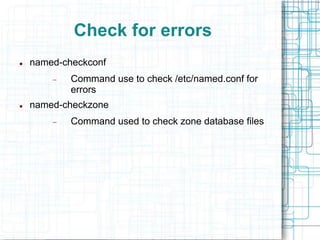
Check for errors
 named-checkconf
 Command use to check /etc/named.conf for
errors
 named-checkzone
 Command used to check zone database files
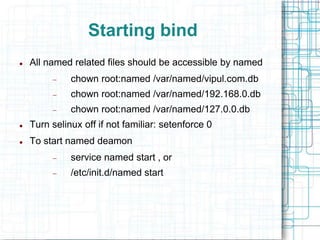
Starting bind
 All named related files should be accessible by named
 chown root:named /var/named/vipul.com.db
 chown root:named /var/named/192.168.0.db
 chown root:named /var/named/127.0.0.db
 Turn selinux off if not familiar: setenforce 0
 To start named deamon
 service named start , or
 /etc/init.d/named start
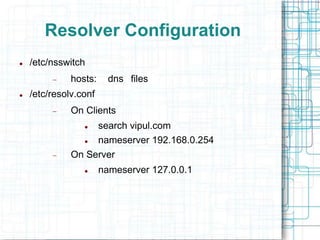
Resolver Configuration
 /etc/nsswitch
 hosts: dns files
 /etc/resolv.conf
 On Clients
 search vipul.com
 nameserver 192.168.0.254
 On Server
 nameserver 127.0.0.1
Resolver Client
 gethostip
 Queries using stub resolver.
 host and dig
 Only query DNS (not /etc/hosts).
 more flexible and powerful then gethostip.
 host provides concise output by default.
 Dig provide verbose output by default.
 nslookup
 Standard DNS query tool.
 Interactive and non interactive mode.
Conclusion
• DNS serve the basis for name resolution process on internet. DNS consists of the
domain namespace, name servers that store resource records, and DNS resolvers.
• A domain is a branch of the DNS namespace beginning at its root node. All of the
resource records in a domain are stored in zones on DNS servers. A zone is a
contiguous portion of a DNS domain whose information is stored in a file on a DNS
server.
• On the Internet, DNS consists of the root domain, top-level domains, and second-
level domains. IANA manages the names and DNS servers of the root domain and the
top-level domains. Individual organizations are responsible for managing the names in
their second-level domains.
• DNS resolvers use either recursive or iterative queries
• Forward lookups provide an IP address based on an FQDN. Reverse lookups provide
an FQDN based on an IP address.
• Zone transfers can transfer either the entire zone file (known as a full zone transfer) or
just the records that have changed (known as an incremental zone transfer). DNS
Notify is a standard mechanism by which a master name server notifies secondary
name servers to check .
Query?
Reach me at vipul.vid@gmail.com

Domain Name Server

  • 1.
  • 2.
    History of DNS Through the 1970s, the ARPAnet was a small, friendly community of a few hundred hosts. A single file, HOSTS.TXT, contained a name-to-address mapping for every host connected to the ARPAnet. The familiar Unix host table, /etc/hosts, was compiled from HOSTS.TXT (mostly by deleting fields Unix didn't use).  As the ARPAnet grew, however, this scheme became unworkable. The size of HOSTS.TXT grew in proportion to the growth in the number of ARPAnet hosts.  Problems with HOSTS.TXT  Consistency  Name collision
  • 3.
  • 4.
    What is DNS?  The Domain Name System is a distributed database with hierarchal structure and serve the basis for name resolution process in TCP/IP network.  Domain Name System (DNS) converts the name of a Web site (www.vipul.com) to an IP address (65.115.71.34) and vice-versa.  This IP is the IP address of a Web site's server, not the Web site's name, and is used in routing traffic over the Internet.
  • 5.
    Key Components ofDNS  Domain namespace  Zones  Nameservers  Resolver
  • 6.
    Domain namespace  DNSnamespace is the hierarchical structure of the domain name tree. It is defined such that the names of all similar components must be similarly structured, but similarly identifiable. The full DNS name must point to a particular address. host: mail  The mail is the host configured in the google.com domain. The fully qualified domain name (FQDN) of the host mail is mail.google.com. No two hosts can have the same FQDN. Root '.' edu com gov org dtd www mail google
  • 7.
    sales support training microsoft Zones • Alltop-level domains, and many domains at the second and lower levels, are broken into zones. • Zones: smaller, more manageable units by delegation.
  • 8.
    Name server  Theprograms that store information about the domain namespace are called nameservers. Nameservers generally have complete information about some part of the domain namespace, called a zone  Primary name server (Master)  Secondary name server (Slave) microsoft sales support training Master Slave Resource Record
  • 9.
    Resolver  Resolvers arethe clients that access nameservers. Programs running on a host that need information from the domain namespace use the resolver. The resolver handles:  Querying a nameserver.  Interpreting responses (which may be resource records or an error).  Returning the information to the programs that requested it.  In BIND, the resolver is a set of library routines that is linked to programs.  Ex. gethostbyname() in standard socket library inC programming language.
  • 10.
    What is DNSquery  A query is a request for name resolution to a DNS server. There are two types of queries: recursive and iterative.  Recursive  The queried nameserver is obliged to respond with the requested data or with an error.  Iterative  In iterative resolution, a nameserver simply gives the best answer it already knows back to the querier. No additional querying is required.
  • 11.
    query for 1. www.yahoo.com? client www.yahoo.com Rootname server Local DNS .com DNS yahoo.com DNS 8. 65.10.2.2 How Iterative query works
  • 12.
    client Local DNS Root Nameserver .com yahoo.com 4. www.yahoo.com? 1. Recursive query for www.yahoo.com? Host : www 5. 65.10.2.2 8. 65.10.2.2 How Recursive Query Works Host : mail
  • 13.
    Master Server SlaveServer 1. SOA Request 2. SOA Response 3. AXFR / IXFR Request DNS DNS 4. Full / Partial zone file transfer How Zone Transfer Works
  • 14.
    INTRANET INTERNET Forwarder Local Name server Client vipul.comdomain(not connected to internet directly) google.com yahoo.com hotmail.com 1. www.google.com ? 3. www.google.com ? How Forwarder Works 4. 65.29.4.2 6. 65.29.4.2 Some domain connected to internet
  • 15.
    Installation  Packages  bind,bind-utils Daemons  /usr/sbin/named  Scripts  /etc/init.d/named  Ports  53/{tcp,udp}  Configuration  /etc/named.conf ,/var/named/*  Related  caching-nameserver, bind-chroot
  • 16.
    Configuring DNS  Mainconfiguration file  /etc/named.conf  It define access controls  Defines listing interfaces  List authoritative zones (collection of records)  Other global configuration  Recursive query or not  etc.
  • 17.
    /etc/named.conf acl “mynetwork” {192.168.0.0/24; }; options { listen-on port 53 { 127.0.0.1 ; 192.168.0.254 ; }; directory "/var/named"; allow-query { mynetwork ; }; allow-recursion { none ; }; // allow-transfer { any; }; // forwarders { 0.0.0.0; }; recursion no; };
  • 18.
    /etc/named.conf cont. // zonedeclaration zone “vipul.com” in { // forward zone type master; file “vipul.com.db”; }; zone “0.168.192.in-addr.arpa” in { // reverse zone type master; File “192.168.0.db”; }; zone “0.0.127.in-addr.arpa” in { // localhost zone type master; file “127.0.0.db”; };
  • 19.
    Resource Records NOTE: Aresource record (RR) is a standard DNS database structure containing information used to process DNS queries Type Meaning Value SOA Start of Authority Parameter for this zone A address 32 bit integer MX Mail exchange Domain willing to accept mail NS Name server Domain name PTR pointer Alias of an IP address HINFO Host description CPU and OS info TXT text Uninterpreted ASCII text
  • 20.
    Forward zone $TTL 3D vipul.com.IN SOA ns.vipul.com. root.vipul.com ( 42; 3H; 15M; 1W; 1D; ) vipul.com. IN NS ns.vipul.com. vipul.com. IN MX mail.vipul.com. localhost.vipul.com. IN A 127.0.0.1 ns.vipul.com IN A 192.168.0.254 n1.vipul.com IN A 192.168.0.1 n2.vipul.com IN A 192.168.0.2 www IN CNAME ns carrie IN CNAME n1 Shrek IN CNAME n2 mail IN CNAME ns
  • 21.
    Reverse zone for 192.168.0.0/24 $TTL3D 0.168.192.in addr.arrpa. IN SOA ns.vipul.com. root.vipul.com. ( 42 ; serial 3H ; slave refresh 15M ;slave retry 1W ;slave timeout 1D ; minimum cache TTL for negative answer ) 0.168.192.in-addr.arpa. IN NS ns.vipul.com. 0.168.192.in-addr.arpa. IN MX mail.vipul.com. 254.0.168.192.in-addr.arpa IN PTR ns.vipul.com. 1.0.168.192.in-addr.arpa IN PTR n1.vipul.com. 2.0.168.192.in-addr.arpa IN PTR n2.vipul.com.
  • 22.
    Reverse zone for127.0.0.0/8 $TTL 3D 0.0.127.in addr.arrpa. IN SOA ns.vipul.com. root.vipul.com. ( 42 ; serial 3H ; slave refresh 15M ;slave retry 1W ;slave timeout 1D ; minimum cache TTL for negative answer ) 0.0.127.in-addr.arpa. IN NS ns.vipul.com. 0.0.127.in-addr.arpa. IN MX mail.vipul.com. 1.0.0.127.in-addr.arpa IN PTR localhost.
  • 23.
    Check for errors named-checkconf  Command use to check /etc/named.conf for errors  named-checkzone  Command used to check zone database files
  • 24.
    Starting bind  Allnamed related files should be accessible by named  chown root:named /var/named/vipul.com.db  chown root:named /var/named/192.168.0.db  chown root:named /var/named/127.0.0.db  Turn selinux off if not familiar: setenforce 0  To start named deamon  service named start , or  /etc/init.d/named start
  • 25.
    Resolver Configuration  /etc/nsswitch hosts: dns files  /etc/resolv.conf  On Clients  search vipul.com  nameserver 192.168.0.254  On Server  nameserver 127.0.0.1
  • 26.
    Resolver Client  gethostip Queries using stub resolver.  host and dig  Only query DNS (not /etc/hosts).  more flexible and powerful then gethostip.  host provides concise output by default.  Dig provide verbose output by default.  nslookup  Standard DNS query tool.  Interactive and non interactive mode.
  • 27.
    Conclusion • DNS servethe basis for name resolution process on internet. DNS consists of the domain namespace, name servers that store resource records, and DNS resolvers. • A domain is a branch of the DNS namespace beginning at its root node. All of the resource records in a domain are stored in zones on DNS servers. A zone is a contiguous portion of a DNS domain whose information is stored in a file on a DNS server. • On the Internet, DNS consists of the root domain, top-level domains, and second- level domains. IANA manages the names and DNS servers of the root domain and the top-level domains. Individual organizations are responsible for managing the names in their second-level domains. • DNS resolvers use either recursive or iterative queries • Forward lookups provide an IP address based on an FQDN. Reverse lookups provide an FQDN based on an IP address. • Zone transfers can transfer either the entire zone file (known as a full zone transfer) or just the records that have changed (known as an incremental zone transfer). DNS Notify is a standard mechanism by which a master name server notifies secondary name servers to check .
  • 28.
    Query? Reach me atvipul.vid@gmail.com