Berkeley Internet Name Domain
  BIND DNS Configuration
Introduction: BIND DNS
• DNS (Domain Name System), also known as a nameserver, is a network
  system that associates hostnames with their respective IP addresses.

• When a client host requests information from a nameserver, it usually
  connects to port 53. The nameserver then attempts to resolve the name
  requested.

• In a DNS server such as BIND, all information is stored in basic data elements
  called resource records (RR). The resource record is usually a fully qualified
  domain name (FQDN) of a host, and is broken down into multiple sections
  organized into a tree- like hierarchy.


                                                   BIND DNS Configuration
Hierarchy: bob.sales.example.com
• Each level of the hierarchy is divided by a period
  (that is, . ).

• com defines the top-level domain, example its subdomain, and sales the
  subdomain of example.

• In this case, bob identifies a resource record that is part of the
  sales.example.com domain. With the exception of the part furthest to the
  left (that is, bob), each of these sections is called a zone and defines a specific
  namespace.


                                                       BIND DNS Configuration
Zones files and Nameserver type
• Are stored on primary nameservers (also called master nameservers), where
  changes are made to the files, and secondary nameservers (also called slave
  nameservers), which receive zone definitions from the primary nameservers.

There are two nameserver configuration types:

  authoritative
  Authoritative nameservers answer to resource records that are part of their
  zones only. This category includes both primary (master) and secondary (slave)
  nameservers.

       recursive
       Recursive nameservers offer resolution services, but they are not
       authoritative for any zone. Answers for all resolutions are cached in a
       memory for a fixed period of time, which is specified by the retrieved
       resource record.
                                                   BIND DNS Configuration
BIND DNS Configuration
Files that needs to be configured (file directory will vary depends on your setup)
 name.conf         name.conf
 zone file         azrael.com.zone
 loop back         1.168.192.in-addr.arpa

Install all packages
 bind-libs-9.3.3-7.el5.i386.rpm2.
 bind-9.3.3-7.el5.i386.rpm3.
 bind-chroot-9.3.3-7.el5.i386.rpm4.
 bind-utils-9.3.3-7.el5.i386.rpm5.
 caching-nameserver-9.3.3-7.el5.i386.rpm

       NOTE: Check first if there’s an existing Bind on your system using

             [root@redhat root]# rpm –qa | grep –i bind
             [root@redhat root]# rpm –qa | grep –i caching


                                                           BIND DNS Configuration
BIND DNS Configuration
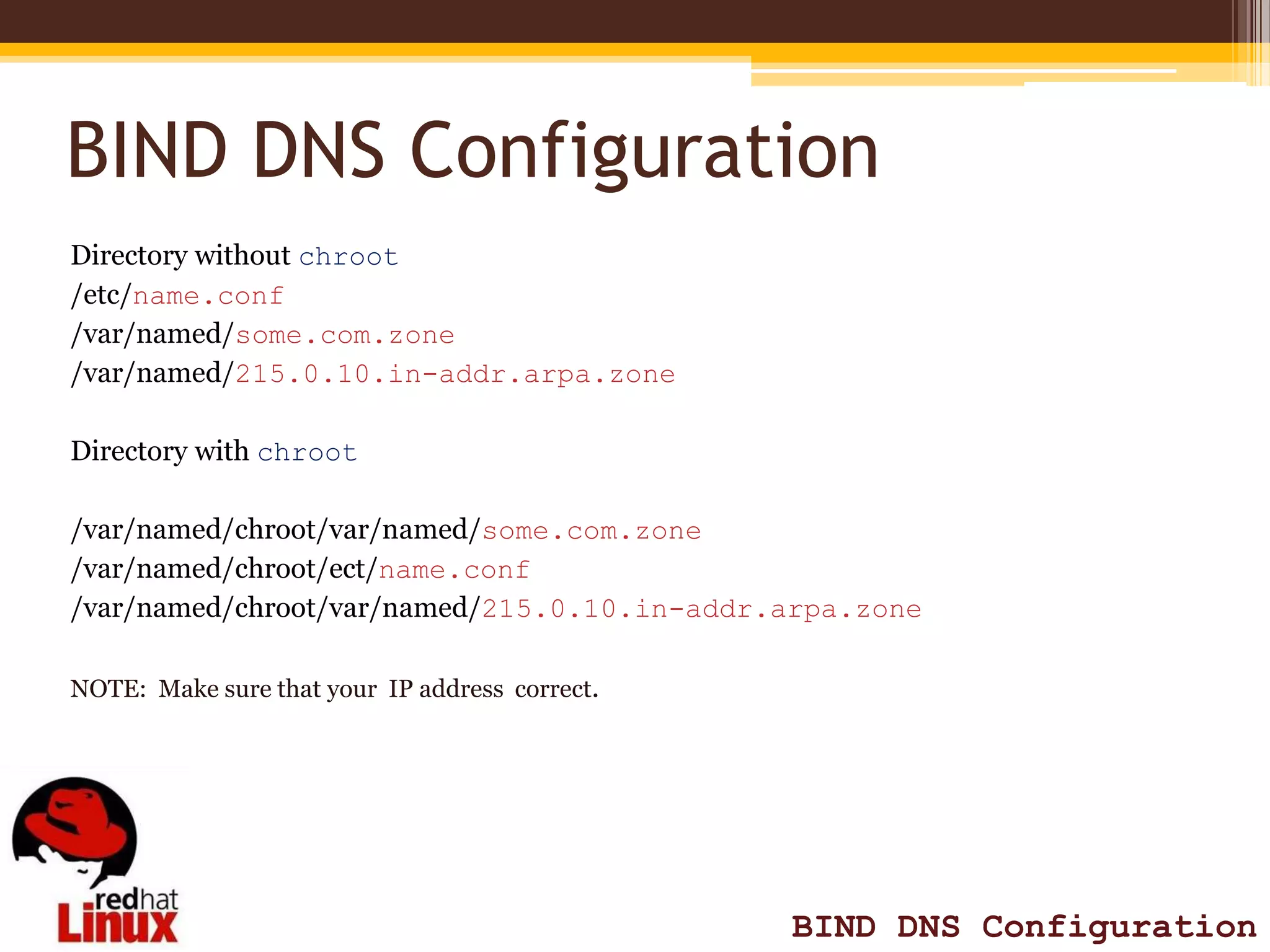
Directory without chroot
/etc/name.conf
/var/named/some.com.zone
/var/named/215.0.10.in-addr.arpa.zone

Directory with chroot

/var/named/chroot/var/named/some.com.zone
/var/named/chroot/ect/name.conf
/var/named/chroot/var/named/215.0.10.in-addr.arpa.zone

NOTE: Make sure that your IP address correct.


                                                BIND DNS Configuration
Code for trouble shooting
[root@redhat ~]# pwd
 to check which working environtment your are

[root@redhat ~]# ifconfig
show nit card configuration

[root@redhat ~]# rpm –qa | grep –i bind OR rpm –qa | grep –i caching
check if Bind/Caching is already installed

[root@redhat ~]# netstat -tuna
 to check which port is your configuration is listening

[root@redhat ~]# service named restart
to restart named service

             [root@redhat ~]# rndc status
             to check if services is up and running


                                                          BIND DNS Configuration
Code for trouble shooting
[root@redhat ~]# dig azrael.com NS
to look up a nameserver for a particular domain

[root@redhat ~]# dig azrael.com A
to look up an IP address assigned to a particular domain

[root@redhat ~]# host www.redhat.com
to host name resolution

[root@redhat ~]# nslookup www.azrael.com
to check query

          [root@redhat ~]# tail -20 /var/log/messages
          to check logs

          [root@redhat ~]# chgrp /var/named/(zone file)
          change all file permission (3 files)


   q                                                       BIND DNS Configuration
Things to Consider
 Make sure you NIT card is properly set up (IP address)

 Use [root@redhat ~]# ifconfig to check IP

 Make sure you have the right version (no version is the same setup as the other)

 Use [root@redhat ~]# tail -20 /var/log/messages                  to check logs

 Use [root@redhat ~]# chgrp /var/named/(zone file) to change
  directory permission


                                                   BIND DNS Configuration
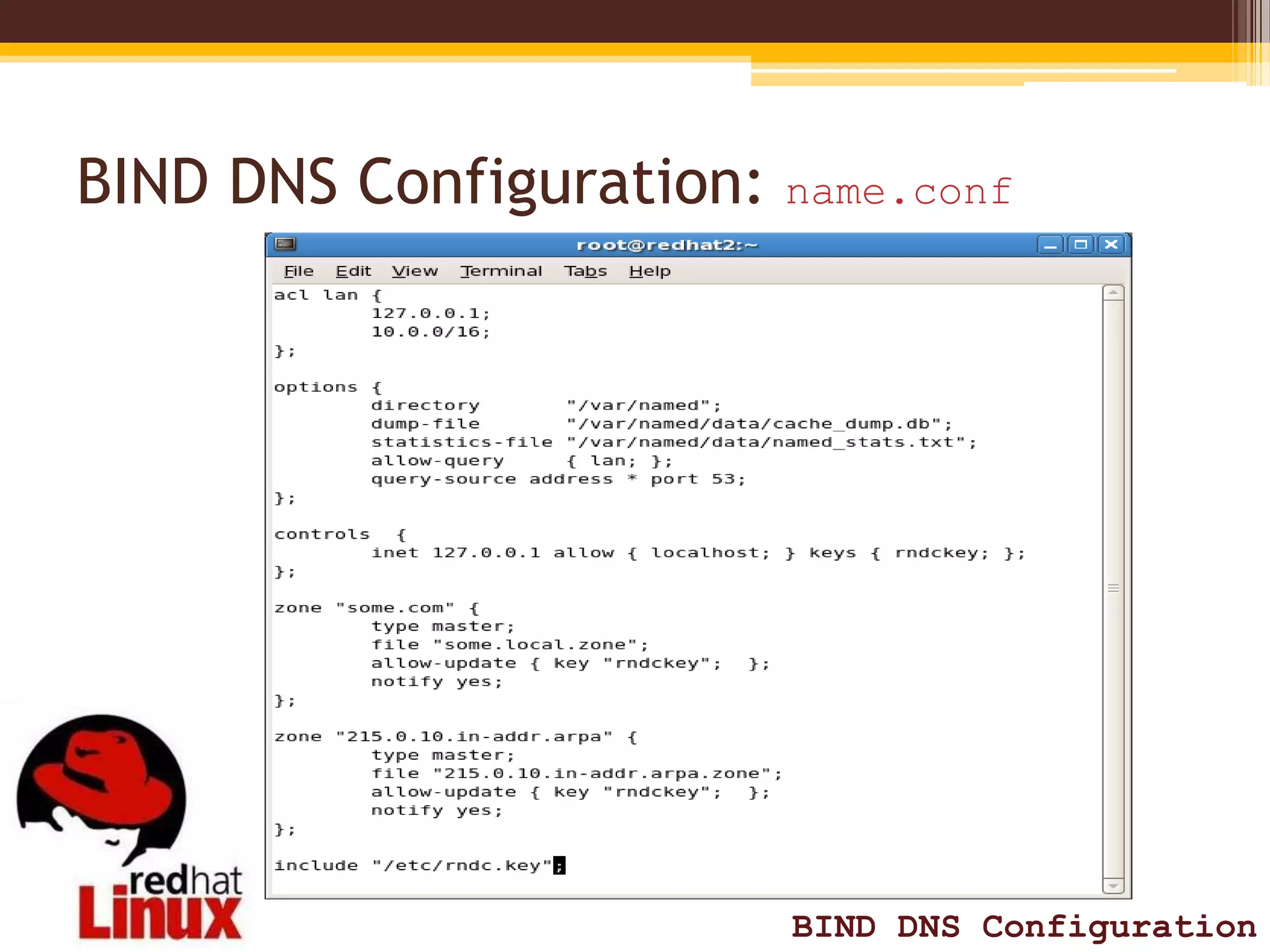
BIND DNS Configuration: name.conf


                         BIND DNS Configuration
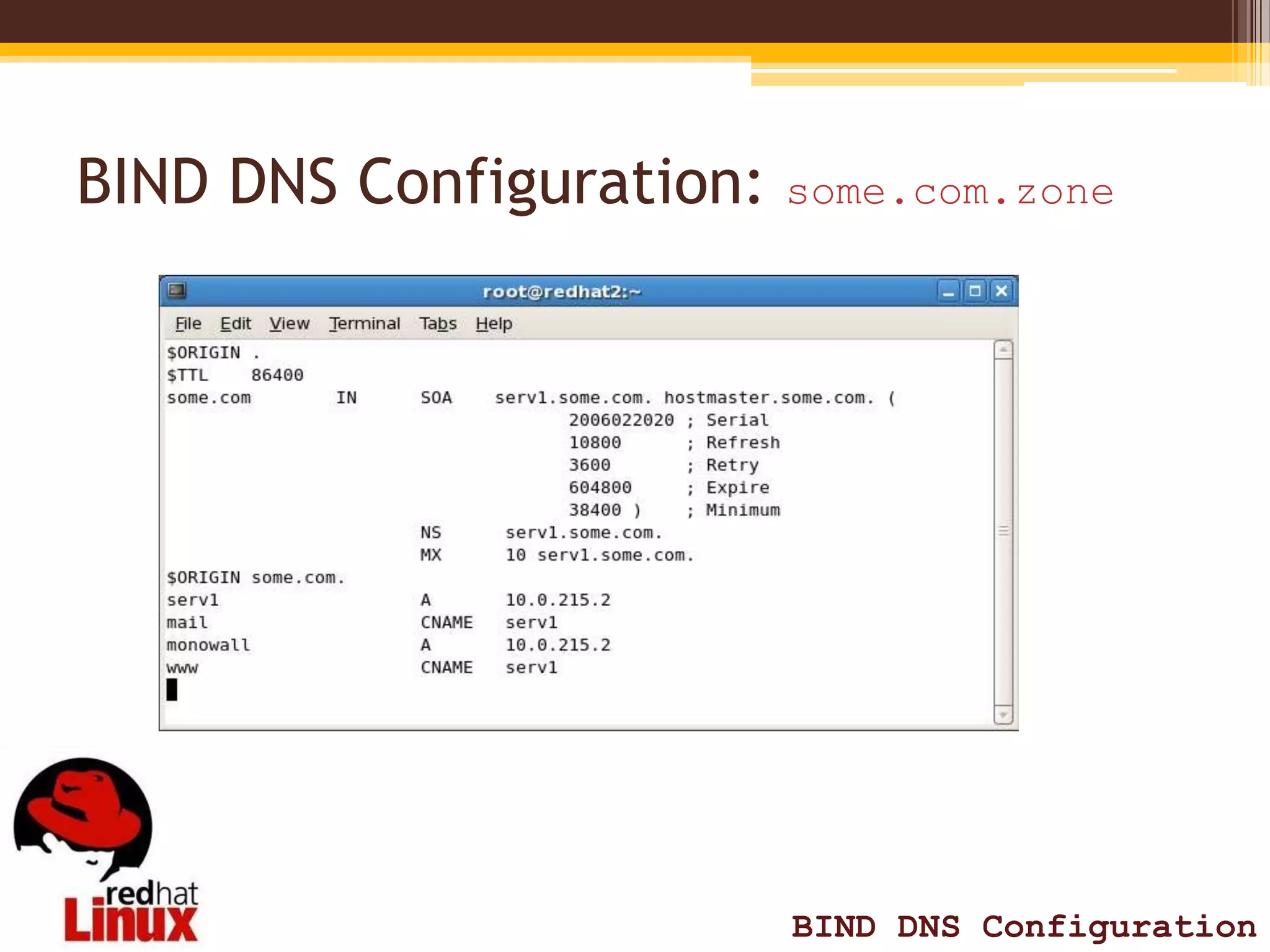
BIND DNS Configuration: some.com.zone


                         BIND DNS Configuration
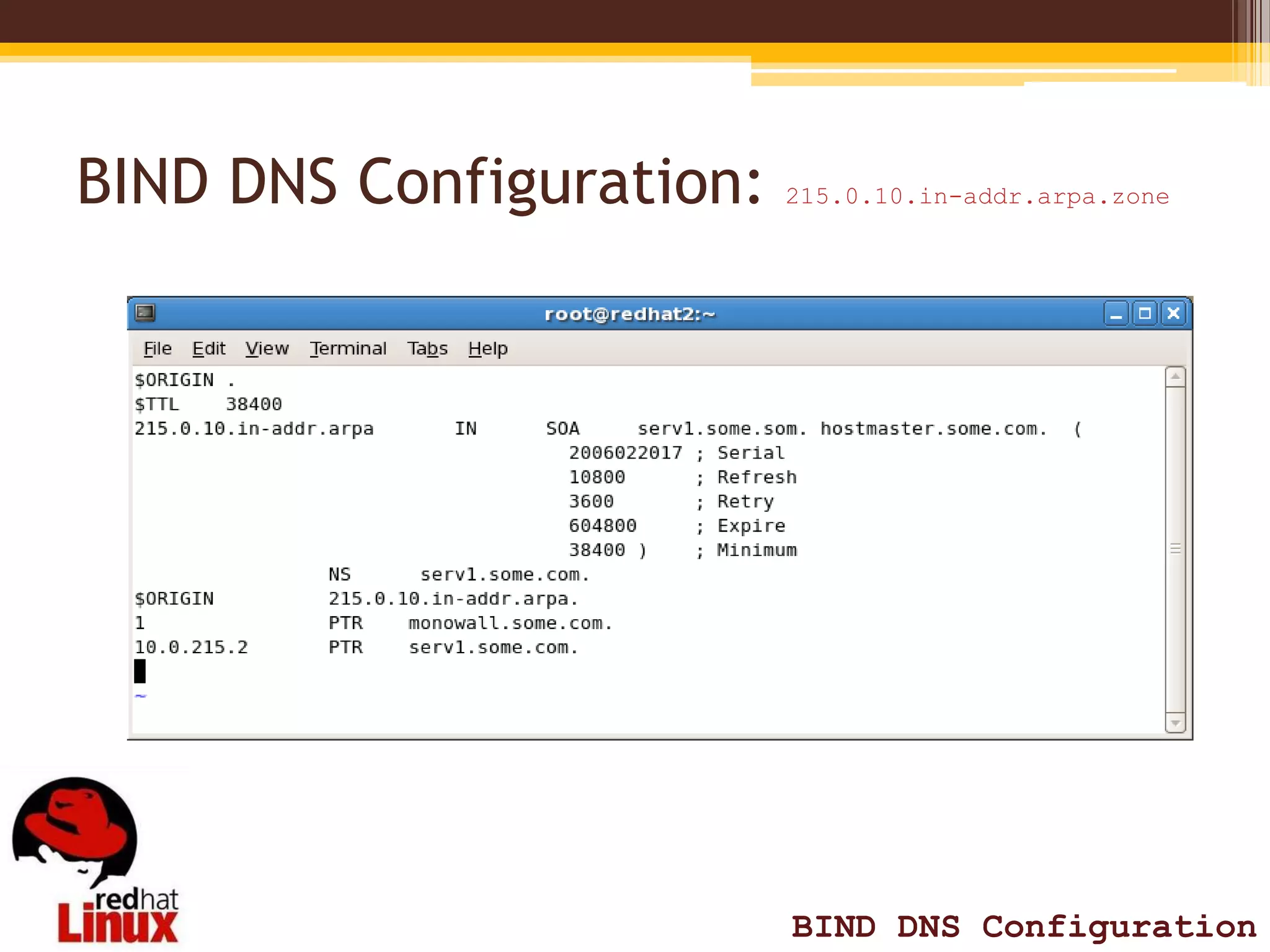
BIND DNS Configuration:   215.0.10.in-addr.arpa.zone


                          BIND DNS Configuration

BIND DNS Configuration Red Hat 5

  • 1.
    Berkeley Internet NameDomain BIND DNS Configuration
  • 2.
    Introduction: BIND DNS •DNS (Domain Name System), also known as a nameserver, is a network system that associates hostnames with their respective IP addresses. • When a client host requests information from a nameserver, it usually connects to port 53. The nameserver then attempts to resolve the name requested. • In a DNS server such as BIND, all information is stored in basic data elements called resource records (RR). The resource record is usually a fully qualified domain name (FQDN) of a host, and is broken down into multiple sections organized into a tree- like hierarchy. BIND DNS Configuration
  • 3.
    Hierarchy: bob.sales.example.com • Eachlevel of the hierarchy is divided by a period (that is, . ). • com defines the top-level domain, example its subdomain, and sales the subdomain of example. • In this case, bob identifies a resource record that is part of the sales.example.com domain. With the exception of the part furthest to the left (that is, bob), each of these sections is called a zone and defines a specific namespace. BIND DNS Configuration
  • 4.
    Zones files andNameserver type • Are stored on primary nameservers (also called master nameservers), where changes are made to the files, and secondary nameservers (also called slave nameservers), which receive zone definitions from the primary nameservers. There are two nameserver configuration types: authoritative Authoritative nameservers answer to resource records that are part of their zones only. This category includes both primary (master) and secondary (slave) nameservers. recursive Recursive nameservers offer resolution services, but they are not authoritative for any zone. Answers for all resolutions are cached in a memory for a fixed period of time, which is specified by the retrieved resource record. BIND DNS Configuration
  • 5.
    BIND DNS Configuration Filesthat needs to be configured (file directory will vary depends on your setup)  name.conf name.conf  zone file azrael.com.zone  loop back 1.168.192.in-addr.arpa Install all packages  bind-libs-9.3.3-7.el5.i386.rpm2.  bind-9.3.3-7.el5.i386.rpm3.  bind-chroot-9.3.3-7.el5.i386.rpm4.  bind-utils-9.3.3-7.el5.i386.rpm5.  caching-nameserver-9.3.3-7.el5.i386.rpm NOTE: Check first if there’s an existing Bind on your system using [root@redhat root]# rpm –qa | grep –i bind [root@redhat root]# rpm –qa | grep –i caching BIND DNS Configuration
  • 6.
    BIND DNS Configuration Directorywithout chroot /etc/name.conf /var/named/some.com.zone /var/named/215.0.10.in-addr.arpa.zone Directory with chroot /var/named/chroot/var/named/some.com.zone /var/named/chroot/ect/name.conf /var/named/chroot/var/named/215.0.10.in-addr.arpa.zone NOTE: Make sure that your IP address correct. BIND DNS Configuration
  • 7.
    Code for troubleshooting [root@redhat ~]# pwd to check which working environtment your are [root@redhat ~]# ifconfig show nit card configuration [root@redhat ~]# rpm –qa | grep –i bind OR rpm –qa | grep –i caching check if Bind/Caching is already installed [root@redhat ~]# netstat -tuna to check which port is your configuration is listening [root@redhat ~]# service named restart to restart named service [root@redhat ~]# rndc status to check if services is up and running BIND DNS Configuration
  • 8.
    Code for troubleshooting [root@redhat ~]# dig azrael.com NS to look up a nameserver for a particular domain [root@redhat ~]# dig azrael.com A to look up an IP address assigned to a particular domain [root@redhat ~]# host www.redhat.com to host name resolution [root@redhat ~]# nslookup www.azrael.com to check query [root@redhat ~]# tail -20 /var/log/messages to check logs [root@redhat ~]# chgrp /var/named/(zone file) change all file permission (3 files) q BIND DNS Configuration
  • 9.
    Things to Consider Make sure you NIT card is properly set up (IP address)  Use [root@redhat ~]# ifconfig to check IP  Make sure you have the right version (no version is the same setup as the other)  Use [root@redhat ~]# tail -20 /var/log/messages to check logs  Use [root@redhat ~]# chgrp /var/named/(zone file) to change directory permission BIND DNS Configuration
  • 10.
    BIND DNS Configuration:name.conf BIND DNS Configuration
  • 11.
    BIND DNS Configuration:some.com.zone BIND DNS Configuration
  • 12.
    BIND DNS Configuration: 215.0.10.in-addr.arpa.zone BIND DNS Configuration