
Dell World 2014
Locking the Doors, Securing the Appliances
Bryan Brooks - Customer Success, and Kevin Gehrke – Technical Support November, 06, 2014
Dell World
User Forum
Dell World User Forum
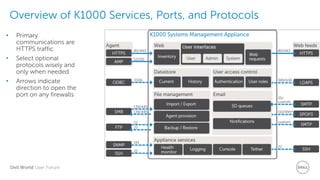
Overview of K1000 Services, Ports, and Protocols
• Primary
communications are
HTTPS traffic
• Select optional
protocols wisely and
only when needed
• Arrows indicate
direction to open the
port on any firewalls
Dell World User Forum
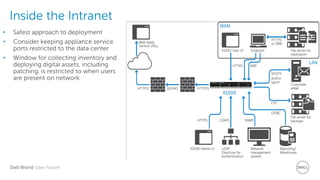
Inside the Intranet
• Safest approach to deployment
• Consider keeping appliance service
ports restricted to the data center
• Window for collecting inventory and
deploying digital assets, including
patching, is restricted to when users
are present on network
Dell World User Forum
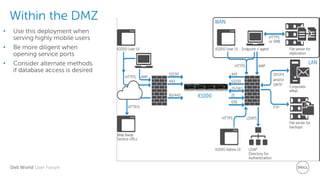
Within the DMZ
• Use this deployment when
serving highly mobile users
• Be more diligent when
opening service ports
• Consider alternate methods
if database access is desired
Dell World User Forum
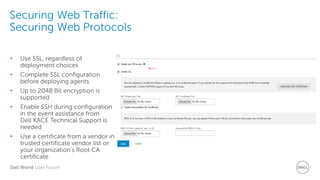
Securing Web Traffic:
Securing Web Protocols
• Use SSL, regardless of
deployment choices
• Complete SSL configuration
before deploying agents
• Up to 2048 Bit encryption is
supported
• Enable SSH during configuration
in the event assistance from
Dell KACE Technical Support is
needed
• Use a certificate from a vendor in
trusted certificate vendor list or
your organization’s Root CA
certificate
Dell World User Forum
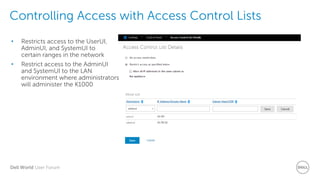
Controlling Access with Access Control Lists
• Restricts access to the UserUI,
AdminUI, and SystemUI to
certain ranges in the network
• Restrict access to the AdminUI
and SystemUI to the LAN
environment where administrators
will administer the K1000
Dell World User Forum
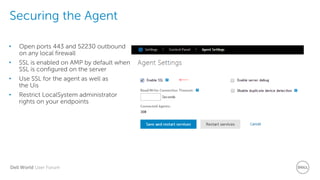
Securing the Agent
• Open ports 443 and 52230 outbound
on any local firewall
• SSL is enabled on AMP by default when
SSL is configured on the server
• Use SSL for the agent as well as
the Uis
• Restrict LocalSystem administrator
rights on your endpoints
Dell World User Forum
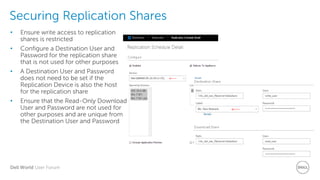
Securing Replication Shares
• Ensure write access to replication
shares is restricted
• Configure a Destination User and
Password for the replication share
that is not used for other purposes
• A Destination User and Password
does not need to be set if the
Replication Device is also the host
for the replication share
• Ensure that the Read-Only Download
User and Password are not used for
other purposes and are unique from
the Destination User and Password
Dell World User Forum
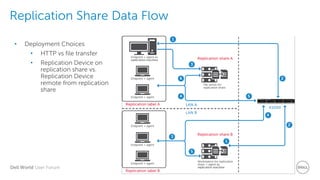
Replication Share Data Flow
• Deployment Choices
• HTTP vs file transfer
• Replication Device on
replication share vs.
Replication Device
remote from replication
share
Dell World User Forum
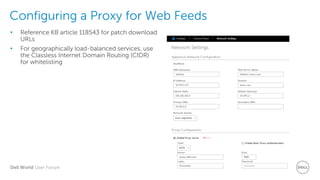
Configuring a Proxy for Web Feeds
• Reference KB article 118543 for patch download
URLs
• For geographically load-balanced services, use
the Classless Internet Domain Routing (CIDR)
for whitelisting
Dell World User Forum
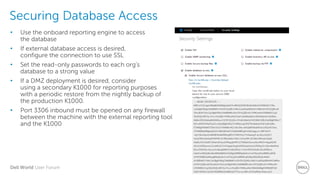
Securing Database Access
• Use the onboard reporting engine to access
the database
• If external database access is desired,
configure the connection to use SSL
• Set the read-only passwords to each org’s
database to a strong value
• If a DMZ deployment is desired, consider
using a secondary K1000 for reporting purposes
with a periodic restore from the nightly backup of
the production K1000.
• Port 3306 inbound must be opened on any firewall
between the machine with the external reporting tool
and the K1000
Dell World User Forum
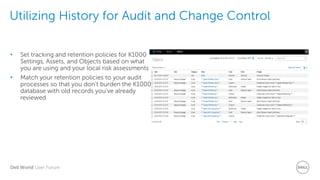
Utilizing History for Audit and Change Control
• Set tracking and retention policies for K1000
Settings, Assets, and Objects based on what
you are using and your local risk assessments
• Match your retention policies to your audit
processes so that you don’t burden the K1000
database with old records you’ve already
reviewed
Dell World User Forum
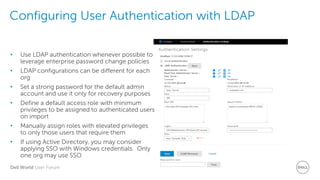
Configuring User Authentication with LDAP
• Use LDAP authentication whenever possible to
leverage enterprise password change policies
• LDAP configurations can be different for each
org
• Set a strong password for the default admin
account and use it only for recovery purposes
• Define a default access role with minimum
privileges to be assigned to authenticated users
on import
• Manually assign roles with elevated privileges
to only those users that require them
• If using Active Directory, you may consider
applying SSO with Windows credentials. Only
one org may use SSO
Dell World User Forum
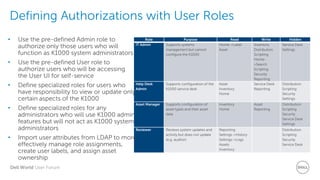
Defining Authorizations with User Roles
Role Purpose Read Write Hidden
IT Admin Supports systems
management but cannot
configure the K1000
Home->Label
Asset
Inventory
Distribution
Scripting
Home-
>Search
Scripting
Security
Reporting
Service Desk
Settings
Help Desk
Admin
Supports configuration of the
K1000 service desk
Asset
Inventory
Home
Service Desk
Reporting
Distribution
Scripting
Security
Settings
Asset Manager Supports configuration of
asset types and their asset
data
Inventory
Home
Asset
Reporting
Distribution
Scripting
Security
Service Desk
Settings
Reviewer Reviews system updates and
activity but does not update
(e.g. auditor)
Reporting
Settings->History
Settings->Logs
Assets
Inventory
Distribution
Scripting
Security
Service Desk
• Use the pre-defined Admin role to
authorize only those users who will
function as K1000 system administrators
• Use the pre-defined User role to
authorize users who will be accessing
the User UI for self-service
• Define specialized roles for users who
have responsibility to view or update only
certain aspects of the K1000
• Define specialized roles for any
administrators who will use K1000 admin
features but will not act as K1000 system
administrators
• Import user attributes from LDAP to more
effectively manage role assignments,
create user labels, and assign asset
ownership
Dell World User Forum
Securing Backups
• Enable the Secure Backup Files option to prevent backup files from being downloaded via
HTTP/S
without authentication
• Use FTP to retrieve backups to external storage on a nightly basis in accordance with your
defined
backup schedule
• Set the FTP password in accordance with your password policies. You should use a new
password created solely for this purpose rather than reusing a common FTP service password
• You should know explicitly where your last good backup is located and secure access to that
backup
• Only enable Make FTP Writeable when you need to conduct a restore to your K1000 AND your
backup files exceed 2 gigabytes. Once the restore is complete, disable this setting.
• Evaluate your history retention policies and make adjustments to reduce the size of your backup
files if necessary.
Dell World User Forum
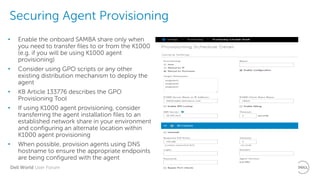
Securing Agent Provisioning
• Enable the onboard SAMBA share only when
you need to transfer files to or from the K1000
(e.g. if you will be using K1000 agent
provisioning)
• Consider using GPO scripts or any other
existing distribution mechanism to deploy the
agent
• KB Article 133776 describes the GPO
Provisioning Tool
• If using K1000 agent provisioning, consider
transferring the agent installation files to an
established network share in your environment
and configuring an alternate location within
K1000 agent provisioning
• When possible, provision agents using DNS
hostname to ensure the appropriate endpoints
are being configured with the agent
Dell World User Forum
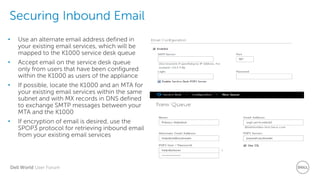
Securing Inbound Email
• Use an alternate email address defined in
your existing email services, which will be
mapped to the K1000 service desk queue
• Accept email on the service desk queue
only from users that have been configured
within the K1000 as users of the appliance
• If possible, locate the K1000 and an MTA for
your existing email services within the same
subnet and with MX records in DNS defined
to exchange SMTP messages between your
MTA and the K1000
• If encryption of email is desired, use the
SPOP3 protocol for retrieving inbound email
from your existing email services
Dell World User Forum
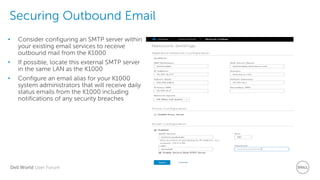
Securing Outbound Email
• Consider configuring an SMTP server within
your existing email services to receive
outbound mail from the K1000
• If possible, locate this external SMTP server
in the same LAN as the K1000
• Configure an email alias for your K1000
system administrators that will receive daily
status emails from the K1000 including
notifications of any security breaches
Dell World User Forum
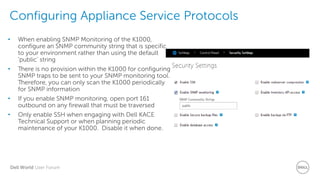
Configuring Appliance Service Protocols
• When enabling SNMP Monitoring of the K1000,
configure an SNMP community string that is specific
to your environment rather than using the default
‘public’ string
• There is no provision within the K1000 for configuring
SNMP traps to be sent to your SNMP monitoring tool.
Therefore, you can only scan the K1000 periodically
for SNMP information
• If you enable SNMP monitoring, open port 161
outbound on any firewall that must be traversed
• Only enable SSH when engaging with Dell KACE
Technical Support or when planning periodic
maintenance of your K1000. Disable it when done.
Dell World User Forum
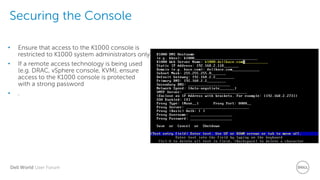
Securing the Console
• Ensure that access to the K1000 console is
restricted to K1000 system administrators only
• If a remote access technology is being used
(e.g. DRAC, vSphere console, KVM), ensure
access to the K1000 console is protected
with a strong password
• .
Dell World User Forum
Security Improvements in K1000 6.2 / 6.3
https://software.dell.com/docs/k
ace-k1000-systems-
management-appliance-best-
practices-for-a-secure-k1000-
deployment-technicalbrief-
15417.pdf
• Opt-in subscription service for receiving alerts and notifications from Dell Kace
Technical Support
• Introduction of Group Policy Object Agent Provisioning Tool
• Application of recommendations from third-party security audit and
assessment:
• Hardening against cross-site scripting, request forgery, and SQL injection
• Improvements in Apache configuration
• Upgrades to component software
• Harden K1000 against NIST Security Technical Implementation Guidelines (STIG)
for Unix/FreeBSD, Apache, and MySQL
Dell World User Forum
Resources
https://software.dell.com/docs/kace-k1000-systems-
management-appliance-best-practices-for-a-secure-k1000-
deployment-technicalbrief-15417.pdf
Dell World User Forum
Thank you.
Dell World User Forum
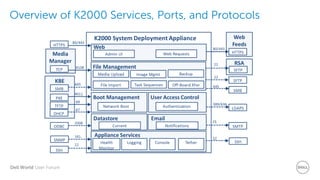
Overview of K2000 Services, Ports, and Protocols
Dell World User Forum
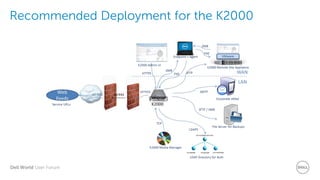
Recommended Deployment for the K2000

Locking the Doors, Securing the Appliances

  • 1.
    Dell World 2014 Lockingthe Doors, Securing the Appliances Bryan Brooks - Customer Success, and Kevin Gehrke – Technical Support November, 06, 2014 Dell World User Forum
  • 2.
    Dell World UserForum Overview of K1000 Services, Ports, and Protocols • Primary communications are HTTPS traffic • Select optional protocols wisely and only when needed • Arrows indicate direction to open the port on any firewalls
  • 3.
    Dell World UserForum Inside the Intranet • Safest approach to deployment • Consider keeping appliance service ports restricted to the data center • Window for collecting inventory and deploying digital assets, including patching, is restricted to when users are present on network
  • 4.
    Dell World UserForum Within the DMZ • Use this deployment when serving highly mobile users • Be more diligent when opening service ports • Consider alternate methods if database access is desired
  • 5.
    Dell World UserForum Securing Web Traffic: Securing Web Protocols • Use SSL, regardless of deployment choices • Complete SSL configuration before deploying agents • Up to 2048 Bit encryption is supported • Enable SSH during configuration in the event assistance from Dell KACE Technical Support is needed • Use a certificate from a vendor in trusted certificate vendor list or your organization’s Root CA certificate
  • 6.
    Dell World UserForum Controlling Access with Access Control Lists • Restricts access to the UserUI, AdminUI, and SystemUI to certain ranges in the network • Restrict access to the AdminUI and SystemUI to the LAN environment where administrators will administer the K1000
  • 7.
    Dell World UserForum Securing the Agent • Open ports 443 and 52230 outbound on any local firewall • SSL is enabled on AMP by default when SSL is configured on the server • Use SSL for the agent as well as the Uis • Restrict LocalSystem administrator rights on your endpoints
  • 8.
    Dell World UserForum Securing Replication Shares • Ensure write access to replication shares is restricted • Configure a Destination User and Password for the replication share that is not used for other purposes • A Destination User and Password does not need to be set if the Replication Device is also the host for the replication share • Ensure that the Read-Only Download User and Password are not used for other purposes and are unique from the Destination User and Password
  • 9.
    Dell World UserForum Replication Share Data Flow • Deployment Choices • HTTP vs file transfer • Replication Device on replication share vs. Replication Device remote from replication share
  • 10.
    Dell World UserForum Configuring a Proxy for Web Feeds • Reference KB article 118543 for patch download URLs • For geographically load-balanced services, use the Classless Internet Domain Routing (CIDR) for whitelisting
  • 11.
    Dell World UserForum Securing Database Access • Use the onboard reporting engine to access the database • If external database access is desired, configure the connection to use SSL • Set the read-only passwords to each org’s database to a strong value • If a DMZ deployment is desired, consider using a secondary K1000 for reporting purposes with a periodic restore from the nightly backup of the production K1000. • Port 3306 inbound must be opened on any firewall between the machine with the external reporting tool and the K1000
  • 12.
    Dell World UserForum Utilizing History for Audit and Change Control • Set tracking and retention policies for K1000 Settings, Assets, and Objects based on what you are using and your local risk assessments • Match your retention policies to your audit processes so that you don’t burden the K1000 database with old records you’ve already reviewed
  • 13.
    Dell World UserForum Configuring User Authentication with LDAP • Use LDAP authentication whenever possible to leverage enterprise password change policies • LDAP configurations can be different for each org • Set a strong password for the default admin account and use it only for recovery purposes • Define a default access role with minimum privileges to be assigned to authenticated users on import • Manually assign roles with elevated privileges to only those users that require them • If using Active Directory, you may consider applying SSO with Windows credentials. Only one org may use SSO
  • 14.
    Dell World UserForum Defining Authorizations with User Roles Role Purpose Read Write Hidden IT Admin Supports systems management but cannot configure the K1000 Home->Label Asset Inventory Distribution Scripting Home- >Search Scripting Security Reporting Service Desk Settings Help Desk Admin Supports configuration of the K1000 service desk Asset Inventory Home Service Desk Reporting Distribution Scripting Security Settings Asset Manager Supports configuration of asset types and their asset data Inventory Home Asset Reporting Distribution Scripting Security Service Desk Settings Reviewer Reviews system updates and activity but does not update (e.g. auditor) Reporting Settings->History Settings->Logs Assets Inventory Distribution Scripting Security Service Desk • Use the pre-defined Admin role to authorize only those users who will function as K1000 system administrators • Use the pre-defined User role to authorize users who will be accessing the User UI for self-service • Define specialized roles for users who have responsibility to view or update only certain aspects of the K1000 • Define specialized roles for any administrators who will use K1000 admin features but will not act as K1000 system administrators • Import user attributes from LDAP to more effectively manage role assignments, create user labels, and assign asset ownership
  • 15.
    Dell World UserForum Securing Backups • Enable the Secure Backup Files option to prevent backup files from being downloaded via HTTP/S without authentication • Use FTP to retrieve backups to external storage on a nightly basis in accordance with your defined backup schedule • Set the FTP password in accordance with your password policies. You should use a new password created solely for this purpose rather than reusing a common FTP service password • You should know explicitly where your last good backup is located and secure access to that backup • Only enable Make FTP Writeable when you need to conduct a restore to your K1000 AND your backup files exceed 2 gigabytes. Once the restore is complete, disable this setting. • Evaluate your history retention policies and make adjustments to reduce the size of your backup files if necessary.
  • 16.
    Dell World UserForum Securing Agent Provisioning • Enable the onboard SAMBA share only when you need to transfer files to or from the K1000 (e.g. if you will be using K1000 agent provisioning) • Consider using GPO scripts or any other existing distribution mechanism to deploy the agent • KB Article 133776 describes the GPO Provisioning Tool • If using K1000 agent provisioning, consider transferring the agent installation files to an established network share in your environment and configuring an alternate location within K1000 agent provisioning • When possible, provision agents using DNS hostname to ensure the appropriate endpoints are being configured with the agent
  • 17.
    Dell World UserForum Securing Inbound Email • Use an alternate email address defined in your existing email services, which will be mapped to the K1000 service desk queue • Accept email on the service desk queue only from users that have been configured within the K1000 as users of the appliance • If possible, locate the K1000 and an MTA for your existing email services within the same subnet and with MX records in DNS defined to exchange SMTP messages between your MTA and the K1000 • If encryption of email is desired, use the SPOP3 protocol for retrieving inbound email from your existing email services
  • 18.
    Dell World UserForum Securing Outbound Email • Consider configuring an SMTP server within your existing email services to receive outbound mail from the K1000 • If possible, locate this external SMTP server in the same LAN as the K1000 • Configure an email alias for your K1000 system administrators that will receive daily status emails from the K1000 including notifications of any security breaches
  • 19.
    Dell World UserForum Configuring Appliance Service Protocols • When enabling SNMP Monitoring of the K1000, configure an SNMP community string that is specific to your environment rather than using the default ‘public’ string • There is no provision within the K1000 for configuring SNMP traps to be sent to your SNMP monitoring tool. Therefore, you can only scan the K1000 periodically for SNMP information • If you enable SNMP monitoring, open port 161 outbound on any firewall that must be traversed • Only enable SSH when engaging with Dell KACE Technical Support or when planning periodic maintenance of your K1000. Disable it when done.
  • 20.
    Dell World UserForum Securing the Console • Ensure that access to the K1000 console is restricted to K1000 system administrators only • If a remote access technology is being used (e.g. DRAC, vSphere console, KVM), ensure access to the K1000 console is protected with a strong password • .
  • 21.
    Dell World UserForum Security Improvements in K1000 6.2 / 6.3 https://software.dell.com/docs/k ace-k1000-systems- management-appliance-best- practices-for-a-secure-k1000- deployment-technicalbrief- 15417.pdf • Opt-in subscription service for receiving alerts and notifications from Dell Kace Technical Support • Introduction of Group Policy Object Agent Provisioning Tool • Application of recommendations from third-party security audit and assessment: • Hardening against cross-site scripting, request forgery, and SQL injection • Improvements in Apache configuration • Upgrades to component software • Harden K1000 against NIST Security Technical Implementation Guidelines (STIG) for Unix/FreeBSD, Apache, and MySQL
  • 22.
    Dell World UserForum Resources https://software.dell.com/docs/kace-k1000-systems- management-appliance-best-practices-for-a-secure-k1000- deployment-technicalbrief-15417.pdf
  • 23.
    Dell World UserForum Thank you.
  • 24.
    Dell World UserForum Overview of K2000 Services, Ports, and Protocols
  • 25.
    Dell World UserForum Recommended Deployment for the K2000