

DNS
for Developers
Maarten Balliauw
@maartenballiauw
“Can we add a CNAME to
the DNS?”
Manager
“Sure, why?”
Me
“foo.bar.com
should redirect to
http://bar.com/foo.aspx”
Manager
Who am I?
Maarten Balliauw
Antwerp, Belgium
Software Engineer, Microsoft
Founder, MyGet
AZUG
Focus on web
ASP.NET MVC, Azure, SignalR, ...
Former MVP Azure & ASPInsider
Big passion: Azure
http://blog.maartenballiauw.be
@maartenballiauw
Shameless self promotion: Pro NuGet - http://amzn.to/pronuget2
Agenda
The 101 stuff
How the Internet works (the DNS part)
DNS zones
Security
DNS in application architecture
Failover, load balancing, CDN
Configuration and service discovery
DNS for fun and profit
How the Internet works
(the DNS part)
“Let’s Google!”
“Let’s Google!”
We need an IP address for www.google.com
Use Domain Name System (“phone book”)
Map www.google.com to 216.58.213.100 / 2a00:1450:4009:80f::2004
After which the browser will do its HTTP magic
“Let’s Google!”
Check operating system (hosts file, ...)
Check DNS cache
Ask home router
Check DNS cache at ISP, not in cache? Iterate!
“Let’s Google!”
Ask root servers where .com. lives
Ask .com. authoritative server where google.com lives
Ask .google.com. authoritative server for www.google.com. IP address
Digging into the DNS
DEMO
DNS
2 types of servers
Authoritative
“Owns the domain”
Cache (recursor)
“Resolves the domain for you”
DNS
Designed in 1983 by Paul Mockapetris (University of California, Irvine)
Converts hostnames to IP addresses
Stores mail delivery information for a domain
Stores other information for a domain (TXT records)
How do I get a domain name?
TLD’s managed by separate organisations
Verisign (.com) – DNS Belgium (.be) – EURid (.eu) - …
Rules!
Who can register a name?
Ownership change procedures
Disputes
Technical rules
Usually domain registration done by registrar
E.g. DNSimple - http://bit.ly/dns4developers
Hierarchical system
.
com
google
www
mail
org
example
www staff
www
be
…
Root servers
ICANN’s 13 root servers http://root-servers.org/
Why only 13?
UDP packets limited to 512 bytes
Response with > 13 entries would be > 512 bytes
There are more: anycast
gTLD, ccTLD, iTLD, … servers
Delegation from root servers to gTLD, ccTLD, iTLD, … servers
List managed by IANA http://www.iana.org/domains/root/db
“Where does .tld live?”
Root servers are a convention!
Every OS has them, but they can be replaced
E.g. www.opennicproject.org
They have their own gTLD’s as well, e.g. .bit, .free, .null, .oss, …
Not widely used (?) as it’s an alternate realm
E.g. www.orsn.org Open Root Server Network
Mirrors ICANN root servers
Reduce over-dependence on the USA
“Independent mode” in case political situation requires it
Caches, caches everywhere!
“Let’s change the IP address for our webserver in the DNS”
Caches in recursive resolvers (e.g. at ISP’s)
https://www.whatsmydns.net/
Caches in OS
ipconfig /flushdns
Caches in application (e.g. in IE)
Restart browser
Lower TTL beforehand
DNS zones
DNS zone
“A Domain Name System (DNS) zone file is a text file that describes a
DNS zone. A DNS zone is a subset, often a single domain, of the
hierarchical domain name structure of the DNS.
The zone file contains mappings between domain names and IP
addresses and other resources, organized in the form of text
representations of resource records (RR).
A zone file may be either a DNS master file, authoritatively describing a
zone, or it may be used to list the contents of a DNS cache. [1]“
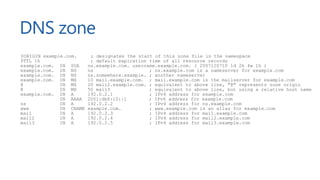
DNS zone
$ORIGIN example.com. ; designates the start of this zone file in the namespace
$TTL 1h ; default expiration time of all resource records
example.com. IN SOA ns.example.com. username.example.com. ( 2007120710 1d 2h 4w 1h )
example.com. IN NS ns ; ns.example.com is a nameserver for example.com
example.com. IN NS ns.somewhere.example. ; another nameserver
example.com. IN MX 10 mail.example.com. ; mail.example.com is the mailserver for example.com
@ IN MX 20 mail2.example.com. ; equivalent to above line, "@" represents zone origin
@ IN MX 50 mail3 ; equivalent to above line, but using a relative host name
example.com. IN A 192.0.2.1 ; IPv4 address for example.com
IN AAAA 2001:db8:10::1 ; IPv6 address for example.com
ns IN A 192.0.2.2 ; IPv4 address for ns.example.com
www IN CNAME example.com. ; www.example.com is an alias for example.com
mail IN A 192.0.2.3 ; IPv4 address for mail.example.com
mail2 IN A 192.0.2.4 ; IPv4 address for mail2.example.com
mail3 IN A 192.0.2.5 ; IPv4 address for mail3.example.com
DNS zone
Contains records describing a domain
Value + TTL
At the minimum: Start of Authority (SOA) record
“which server stores all the information about the website I want to look up”
Name of authoritative master name server
Email address of someone responsible for management of the name server
Expiration parameters
(serial #, slave refresh, slave retry time, slave expiration rime, cache duration or Time To Live)
DNS zone
Typical other records:
NS – Who are my nameservers? (or subdomain delegation)
A – IPv4 address pointer
AAAA – IPv6 address pointer
CNAME – Reference to another record (NOT A REDIRECT)
MX – Mail exchangers for the domain, with priorities
TXT – Textual value, often used to validate domain ownership/spam rules/…
SRV – Describes a service type and port
PTR
“Reverse DNS” used for e.g. diagnostics tools like ping and traceroute
Email anti-spam uses this as well (check EHLO IP address)
Zone transfer
Usually more than one nameserver for a zone
1 primary, other secondaries
No need to maintain zones on every slave!
Zone transfer
Primary knows secondary IP’s (we don’t want to transfer to anyone out there)
Secondary knows zone name, queries primary over TCP (53) to replicate data
Uses SOA serial to check zone version & decide on update
Security
DNS cache poisoning
Consider this DNS zone…
Consider this web page…
$ORIGIN evil.com.
$TTL 1h
evil.com. IN SOA ns.evil.com. username.example.com. ( 2007120710 1d 2h 4w 1h )
evil.com. IN NS ns1.google.com.
ns1.google.com. IN A 123.123.123.123
<!-- ... -->
<img src="http://www.evil.com/image.gif"/>
<!-- ... -->
DNS cache poisoning
DEMO
DNSSEC (Domain Name SystemSecurity Extensions)
Set of extensions to DNS
Origin verification
Is the record really coming from the proper name server?
Adds signing support (and delegation)
Top-down the chain (root servers have DNSSEC, gTLD servers have DNSSEC, …)
Why did that demo work?
Custom resolver without DNSSEC  trust chain broken
DNS Amplification for DDoS
DNS recursion is awesome! (and often default)
Lots of DNS servers out there have recursion enabled for all
Lots of open resolvers out there
Saturate a victim’s network connection by using open DNS resolvers
UDP traffic has no source IP verification
Spoof source traffic
DNS Amplification for DDoS
Attacker Victim
Open DNS resolver
Open DNS resolver
Open DNS resolver
DNS Amplification for DDoS
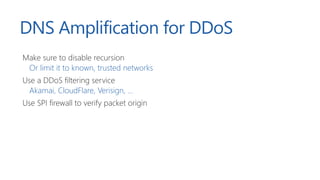
Make sure to disable recursion
Or limit it to known, trusted networks
Use a DDoS filtering service
Akamai, CloudFlare, Verisign, ...
Use SPI firewall to verify packet origin
DNS in application
architecture
DNS failover / load balancing
Simple “round-robin”
www.example.local. IN A 192.168.0.1.
www.example.local. IN A 192.168.0.2.
www.example.local. IN A 192.168.0.3.
Most DNS servers return different IP as first item in list
Issues
What if one of the addresses is unreachable?
What if the order is cached at ISP?
DNS failover / load balancing
Intelligent DNS server
e.g. Azure Traffic Manager / Amazon Route 53
Scenarios
Round-robin
Failover
Performance
Issues
What if one of the addresses is unreachable?  monitoring of endpoints
What if the order is cached at ISP?  low TTL (still gaps)
Azure Traffic Manager
DEMO
Content Delivery Network (CDN)
Serve origin content from edge location close to the user
www.cdnreviews.com
Content Delivery Network (CDN)
Serve origin content from edge location close to the user
Intelligent DNS approach
Check user IP address location, return DNS record closer to the user
Try nslookup myget-2e16.kxcdn.com
Use IP Anycast
Advertise the same IP for edge server in different networks
No logic needed in DNS
The DNS root servers use this as well
Configuration in DNS
Typical application configuration
Key/value pairs
Hierarchy
 Store as DNS records (TXT?)
Typically multiple environments
One special DNS server per environment
One master to which we can recurse (e.g. shared settings)
Configuration in DNS
DEMO
Configuration in DNS
Alternative: store just the hostnames per environment
api.app.local  different IP per environment
Downside to configuration in DNS
Still need to maintain “the phone book” when changes occur
Not very flexible with dynamic resources...
Caches, CACHES!
Service discovery
“Detect services on various devices on a network of computers with minimal
configuration.”
UPnP
Service Location Protocol (SLP)
Zero Configuration Networking (Zeroconf)
Simple way to find and list services without maintaining a directory
Every service announces itself
Service discovery
Multicast DNS (mDNS)
224.0.0.251 port 5353 - every machine on the network listens
DNS Service Discovery (DNS-SD)
Works with mDNS and DNS
SRV (name + type, port, hostname)
PTR (pointer)
A (service IP)
TXT (additional information)
You are probably already using this today!
Printer, Apple Bonjour, Office365, …
46ce01.local. A 192.168.1.101
46ce01._printer._tcp.local. SRV 515 46ce01.local
_printer._tcp.local. PTR 46ce01._printer._tcp.local.
Service Discovery
with mDNS and DNS-SD
DEMO
Abusing DNS
For fun and profit
Public hotspots
Connect to wifi
Captive portal
Usually intercepts HTTP(S) only
Usually allows DNS lookups
Public hotspots
HTTP over DNS
Custom client and server
Server
Identify client
Fetch upstream data and make it available as DNS records
Client
Expose itself as a local proxy
Make DNS lookups with custom server
Things to be aware of…
UDP packet size, maximum length of records, maximum # of records
Encrypt transport
HTTP over DNS
Local browser
HoD client
HoD server
Target HTTP server
Browser uses local HoD client as proxy HoD server makes upstream request
Translates into DNS response(s)
HTTP over DNS on the Internet
Local browser
HoD client
HoD server
Target HTTP server
ISP nameserver
HTTP over DNS
DEMO
IP over DNS
Same idea as HTTP over DNS: tunnel traffic
http://code.kryo.se/iodine/
More elaborate protocol:
User identification
Auto-optimize UDP packet size
Compression
Conclusion
Conclusion
DNS is a hierarchical system
Built in 1983, flexible and widely used
Record types
DNSSEC
Application architecture
Failover, load balancing, CDN
Configuration and service discovery
Fun
Thank you!
http://blog.maartenballiauw.be
@maartenballiauw
http://amzn.to/pronuget2

DNS for Developers - NDC Oslo 2016

  • 1.
  • 2.
    “Can we adda CNAME to the DNS?” Manager
  • 3.
  • 4.
  • 6.
    Who am I? MaartenBalliauw Antwerp, Belgium Software Engineer, Microsoft Founder, MyGet AZUG Focus on web ASP.NET MVC, Azure, SignalR, ... Former MVP Azure & ASPInsider Big passion: Azure http://blog.maartenballiauw.be @maartenballiauw Shameless self promotion: Pro NuGet - http://amzn.to/pronuget2
  • 7.
    Agenda The 101 stuff Howthe Internet works (the DNS part) DNS zones Security DNS in application architecture Failover, load balancing, CDN Configuration and service discovery DNS for fun and profit
  • 8.
    How the Internetworks (the DNS part)
  • 9.
  • 10.
    “Let’s Google!” We needan IP address for www.google.com Use Domain Name System (“phone book”) Map www.google.com to 216.58.213.100 / 2a00:1450:4009:80f::2004 After which the browser will do its HTTP magic
  • 11.
    “Let’s Google!” Check operatingsystem (hosts file, ...) Check DNS cache Ask home router Check DNS cache at ISP, not in cache? Iterate!
  • 12.
    “Let’s Google!” Ask rootservers where .com. lives Ask .com. authoritative server where google.com lives Ask .google.com. authoritative server for www.google.com. IP address
  • 13.
  • 14.
    DNS 2 types ofservers Authoritative “Owns the domain” Cache (recursor) “Resolves the domain for you”
  • 15.
    DNS Designed in 1983by Paul Mockapetris (University of California, Irvine) Converts hostnames to IP addresses Stores mail delivery information for a domain Stores other information for a domain (TXT records)
  • 16.
    How do Iget a domain name? TLD’s managed by separate organisations Verisign (.com) – DNS Belgium (.be) – EURid (.eu) - … Rules! Who can register a name? Ownership change procedures Disputes Technical rules Usually domain registration done by registrar E.g. DNSimple - http://bit.ly/dns4developers
  • 17.
  • 18.
    Root servers ICANN’s 13root servers http://root-servers.org/ Why only 13? UDP packets limited to 512 bytes Response with > 13 entries would be > 512 bytes There are more: anycast
  • 19.
    gTLD, ccTLD, iTLD,… servers Delegation from root servers to gTLD, ccTLD, iTLD, … servers List managed by IANA http://www.iana.org/domains/root/db “Where does .tld live?”
  • 20.
    Root servers area convention! Every OS has them, but they can be replaced E.g. www.opennicproject.org They have their own gTLD’s as well, e.g. .bit, .free, .null, .oss, … Not widely used (?) as it’s an alternate realm E.g. www.orsn.org Open Root Server Network Mirrors ICANN root servers Reduce over-dependence on the USA “Independent mode” in case political situation requires it
  • 21.
    Caches, caches everywhere! “Let’schange the IP address for our webserver in the DNS” Caches in recursive resolvers (e.g. at ISP’s) https://www.whatsmydns.net/ Caches in OS ipconfig /flushdns Caches in application (e.g. in IE) Restart browser Lower TTL beforehand
  • 22.
  • 23.
    DNS zone “A DomainName System (DNS) zone file is a text file that describes a DNS zone. A DNS zone is a subset, often a single domain, of the hierarchical domain name structure of the DNS. The zone file contains mappings between domain names and IP addresses and other resources, organized in the form of text representations of resource records (RR). A zone file may be either a DNS master file, authoritatively describing a zone, or it may be used to list the contents of a DNS cache. [1]“
  • 24.
    DNS zone $ORIGIN example.com.; designates the start of this zone file in the namespace $TTL 1h ; default expiration time of all resource records example.com. IN SOA ns.example.com. username.example.com. ( 2007120710 1d 2h 4w 1h ) example.com. IN NS ns ; ns.example.com is a nameserver for example.com example.com. IN NS ns.somewhere.example. ; another nameserver example.com. IN MX 10 mail.example.com. ; mail.example.com is the mailserver for example.com @ IN MX 20 mail2.example.com. ; equivalent to above line, "@" represents zone origin @ IN MX 50 mail3 ; equivalent to above line, but using a relative host name example.com. IN A 192.0.2.1 ; IPv4 address for example.com IN AAAA 2001:db8:10::1 ; IPv6 address for example.com ns IN A 192.0.2.2 ; IPv4 address for ns.example.com www IN CNAME example.com. ; www.example.com is an alias for example.com mail IN A 192.0.2.3 ; IPv4 address for mail.example.com mail2 IN A 192.0.2.4 ; IPv4 address for mail2.example.com mail3 IN A 192.0.2.5 ; IPv4 address for mail3.example.com
  • 25.
    DNS zone Contains recordsdescribing a domain Value + TTL At the minimum: Start of Authority (SOA) record “which server stores all the information about the website I want to look up” Name of authoritative master name server Email address of someone responsible for management of the name server Expiration parameters (serial #, slave refresh, slave retry time, slave expiration rime, cache duration or Time To Live)
  • 26.
    DNS zone Typical otherrecords: NS – Who are my nameservers? (or subdomain delegation) A – IPv4 address pointer AAAA – IPv6 address pointer CNAME – Reference to another record (NOT A REDIRECT) MX – Mail exchangers for the domain, with priorities TXT – Textual value, often used to validate domain ownership/spam rules/… SRV – Describes a service type and port
  • 27.
    PTR “Reverse DNS” usedfor e.g. diagnostics tools like ping and traceroute Email anti-spam uses this as well (check EHLO IP address)
  • 28.
    Zone transfer Usually morethan one nameserver for a zone 1 primary, other secondaries No need to maintain zones on every slave! Zone transfer Primary knows secondary IP’s (we don’t want to transfer to anyone out there) Secondary knows zone name, queries primary over TCP (53) to replicate data Uses SOA serial to check zone version & decide on update
  • 29.
  • 30.
    DNS cache poisoning Considerthis DNS zone… Consider this web page… $ORIGIN evil.com. $TTL 1h evil.com. IN SOA ns.evil.com. username.example.com. ( 2007120710 1d 2h 4w 1h ) evil.com. IN NS ns1.google.com. ns1.google.com. IN A 123.123.123.123 <!-- ... --> <img src="http://www.evil.com/image.gif"/> <!-- ... -->
  • 31.
  • 32.
    DNSSEC (Domain NameSystemSecurity Extensions) Set of extensions to DNS Origin verification Is the record really coming from the proper name server? Adds signing support (and delegation) Top-down the chain (root servers have DNSSEC, gTLD servers have DNSSEC, …) Why did that demo work? Custom resolver without DNSSEC  trust chain broken
  • 33.
    DNS Amplification forDDoS DNS recursion is awesome! (and often default) Lots of DNS servers out there have recursion enabled for all Lots of open resolvers out there Saturate a victim’s network connection by using open DNS resolvers UDP traffic has no source IP verification Spoof source traffic
  • 34.
    DNS Amplification forDDoS Attacker Victim Open DNS resolver Open DNS resolver Open DNS resolver
  • 35.
    DNS Amplification forDDoS Make sure to disable recursion Or limit it to known, trusted networks Use a DDoS filtering service Akamai, CloudFlare, Verisign, ... Use SPI firewall to verify packet origin
  • 36.
  • 37.
    DNS failover /load balancing Simple “round-robin” www.example.local. IN A 192.168.0.1. www.example.local. IN A 192.168.0.2. www.example.local. IN A 192.168.0.3. Most DNS servers return different IP as first item in list Issues What if one of the addresses is unreachable? What if the order is cached at ISP?
  • 38.
    DNS failover /load balancing Intelligent DNS server e.g. Azure Traffic Manager / Amazon Route 53 Scenarios Round-robin Failover Performance Issues What if one of the addresses is unreachable?  monitoring of endpoints What if the order is cached at ISP?  low TTL (still gaps)
  • 39.
  • 40.
    Content Delivery Network(CDN) Serve origin content from edge location close to the user www.cdnreviews.com
  • 41.
    Content Delivery Network(CDN) Serve origin content from edge location close to the user Intelligent DNS approach Check user IP address location, return DNS record closer to the user Try nslookup myget-2e16.kxcdn.com Use IP Anycast Advertise the same IP for edge server in different networks No logic needed in DNS The DNS root servers use this as well
  • 42.
    Configuration in DNS Typicalapplication configuration Key/value pairs Hierarchy  Store as DNS records (TXT?) Typically multiple environments One special DNS server per environment One master to which we can recurse (e.g. shared settings)
  • 43.
  • 44.
    Configuration in DNS Alternative:store just the hostnames per environment api.app.local  different IP per environment Downside to configuration in DNS Still need to maintain “the phone book” when changes occur Not very flexible with dynamic resources... Caches, CACHES!
  • 45.
    Service discovery “Detect serviceson various devices on a network of computers with minimal configuration.” UPnP Service Location Protocol (SLP) Zero Configuration Networking (Zeroconf) Simple way to find and list services without maintaining a directory Every service announces itself
  • 46.
    Service discovery Multicast DNS(mDNS) 224.0.0.251 port 5353 - every machine on the network listens DNS Service Discovery (DNS-SD) Works with mDNS and DNS SRV (name + type, port, hostname) PTR (pointer) A (service IP) TXT (additional information) You are probably already using this today! Printer, Apple Bonjour, Office365, … 46ce01.local. A 192.168.1.101 46ce01._printer._tcp.local. SRV 515 46ce01.local _printer._tcp.local. PTR 46ce01._printer._tcp.local.
  • 47.
  • 48.
  • 49.
    Public hotspots Connect towifi Captive portal Usually intercepts HTTP(S) only Usually allows DNS lookups
  • 50.
  • 51.
    HTTP over DNS Customclient and server Server Identify client Fetch upstream data and make it available as DNS records Client Expose itself as a local proxy Make DNS lookups with custom server Things to be aware of… UDP packet size, maximum length of records, maximum # of records Encrypt transport
  • 52.
    HTTP over DNS Localbrowser HoD client HoD server Target HTTP server Browser uses local HoD client as proxy HoD server makes upstream request Translates into DNS response(s)
  • 53.
    HTTP over DNSon the Internet Local browser HoD client HoD server Target HTTP server ISP nameserver
  • 54.
  • 55.
    IP over DNS Sameidea as HTTP over DNS: tunnel traffic http://code.kryo.se/iodine/ More elaborate protocol: User identification Auto-optimize UDP packet size Compression
  • 56.
  • 57.
    Conclusion DNS is ahierarchical system Built in 1983, flexible and widely used Record types DNSSEC Application architecture Failover, load balancing, CDN Configuration and service discovery Fun
  • 58.

Editor's Notes

  • #15 Run command line nslookup www.google.com Note that the response is from an unauthoritative server (meaning it is served from a cache somewhere in between our PC and the Internet) Dig provides us more info about how the name resolution happens dig A www.google.com +trace
  • #20 Maybe visit the site and look at a few of the servers – there are tonnes of them!
  • #32 Browser makes a request to a non-existent hostname Our DNS resolver learns that ns1.google.com is in an IP address that we own Our OS (or worse, our recursive DNS) caches this, I own Google on your machine 
  • #33 Open 02 CachePoisoning demo Walk through the code, explain the redirects that happen (our custom domain says it’s in Google’s DNS, for which we send the IP address in the response) Set machine’s nameserver to 127.0.0.1 Visit the custom HTML page Visit www.google.com Ping www.google.com and note the IP address is wrong
  • #41 Create new Traffic Manager endpoint in new portal (maartenba.trafficmanager.net) Set DNS TTL to 30 seconds to make the talk more enjoyable Add external endpoints: www.bing.com www.google.com Run nslookup set type=CNAME maartenba.trafficmanager.net See result, wait 30 seconds and try again See different result We can do this failover, round-robin, or “performance”
  • #43 Mention CDN’s exist with both approaches. Both have own advantages. No logic = no logic, just route. Logic = be smart, eg Cedexis does multi-CDN, picks host based on all kinds of parameters, uses monitoring, …
  • #45 Open 03 ConfigurationSample demo Explain ConfigurationServer class – it adds an entry per configuration value we want to store and serves it up as a TXT record Explain we could have multiple of the same, the client would just get multiple entries instead of one. Useful for failover scenarios etc. Show server Program.cs where we store some values, then run it Show client Program.cs where we fetch values, then run it Explain we could have multiple servers, to which we can recurse for shared settings across environments
  • #48 You are probably already using this today! (Office 365? Apple Bonjour)
  • #49 Open 04 ServiceDiscovery Run ServiceDiscovery.Client and see if there are any printers (or other) on the local network. Probably not but let’s check anyway. Open ServiceDiscovery.SampleService, explain what we are doing here We have a simple OWIN Web API running, nothing fancy Now let’s publish this service! ZeroconfService package from NuGet using (var service = new ZeroconfService.NetService( "local.", "_webapi._tcp", "Maarten's awesome API", 9999)) { service.Publish(); Console.ReadLine(); } Run the client again, see that our service is now discovered – zero configuration! The service tells everyone else where it lives and what it does.
  • #57 Open 05 HTTP over DNS Demonstrate the server – run the server project Use nslookup set type=TXT Query for www.google.com See that we get back a number of chunks – we need this as the DNS response can only contain a limited amount of data Get a chunk, 1.www.google.com Get another, 2.www.google.com Now look at the server code – Open HttpProxyingDnsServer Important work is in “ResolveLocal” Explain the code – we check if we request a chunk or not. If not, calculate number of chunks and return it as a TXT If we do want a chunk, fetch the chunk and the next chunks, return TXT records for each Now look at the custom client we created Create a DNS client Get the value for number of chunks Get the chunks and concatenate them Run the client as well, see what it does…