1
CSC 406: Net-Centric Computing
Lecture 5
Virtualization: Case Study
2nd
Semester (2022/2023 session) 1445h
FEDERAL UNIVERSITY BIRNIN KEBBI
DEPARTMENT OF COMPUTER SCIENCE
2
Reading
• Modern Operating Systems, Tanenbaum (4th
Edition): Chapter 7
• Tanenbaum (2nd Edition): 3.2
• Coulouris (5th Edition): 4.5, 7.7
• A compilation from the EMC Lecture Notes:
Cloud Infrastructure and Services
3
Outline
• Intro
• Requirements for Virtualization
• Type 1 and Type 2 Hypervisor
• Techniques for Efficient Virtualization
• Memory Virtualization
4
Intro
• A company with multiple servers connected with
high speed internet.
• File server, DB server, FTP server, ...
• Objective:
– One machine might not be able to handle the load.
– Reliability.
– Security.
5
Intro
• Problem
– Large companies support many service applications
• File server, mail server, web server, database server, ….
– Each service application demands its own
environment
• Specific version of operating system.
• Multiple processors and disks.
• Specialized configurations.
– Running multiple service applications on the same
server
• Vulnerable to conflicting demand.
• Load balancing might be hard.
6
Intro
7
Intro
• Solution: Virtualization
– Decouple [OS, service] pair from hardware.
– Multiplex lightly used services on common host
‐
hardware.
– Migrate services from host to host as needed.
– Introduce new [OS, service] pairs as needed
• Adding new services.
• Testing upgrades of existing services.
• Experimental usage.
8
Why it is a Good Solution?
• A failure in one virtual machine does not bring down any
others.
• Run multiple different operating systems on the same
hardware.
– Isolation
– Good utilization of resources.
– Economic solution, saves money.
– Useful in trying put new ideas (testing).
– Check pointing and migration is easy.
– Run legacy applications on OS that are no longer supported.
– Cloud.
9
Any Drawbacks?
• Are we putting all the eggs in one basket?
– Most service outages are not due to faulty
hardware but due to unreliable software.
– To implement virtual machines, only a hypervisor,
which is much smaller than a kernel is running in
supervisor mode. Therefore, two orders of
magnitudes of fewer bugs.
10
Virtual Machine
• A virtual machine provides interface identical
to underlying bare hardware
– I.e., all devices, interrupts, memory, page tables,
etc.
• Virtual Machine Operating System creates
illusion of multiple processors
– Each capable of executing independently
– No sharing, except via network protocols
– Clusters and SMP can be simulated
11
History
• 60s 70s: IBM developed hypervisors for their IBM
‐
System/360 and later releases.
• 70s: UCLA researchers, Gerald Popek and Robert Goldberg:
– definition of the formal requirements for virtualizations
– Distinguish between type1 and type2 hypervisor
• 90s: Stanford researchers
– Disco: Running Commodity Operating Systems on Scalable
Multiprocessors
– Founded Vmware
• Xen, KVM, VirtualBox, Hyper V, Parallels
‐
12
Requirements for Virtualization
• Boot them like real machines and install operating
system on them.
• Safety: the hypervisor should have full control of
the virtualized resources.
• Fidelity: the behavior of a program on a virtual
machine should be identical to that of the same
program running on bare hardware.
• Efficiency: much of the code in the virtual machine
should run without intervention by the hypervisor.
13
Safety
• Execute each command using an interpreter/emulator
– Simple instructions such as increment can be executed by
the interpreter.
– Unsafe instructions need to be simulated by the interpreter.
• The guest operating system should not be allowed to
disable interrupts for the entire machine or modify the
page table mapping. Yet, the guest operating system
should think that it has disabled interrupts.
14
Fidelity
• x86: instructions that behave differently if executed
in kernel mode than when executed in user mode.
← sensitive instructions
• x86: instructions that cause a trap if executed in
user mode. ← privileged instructions
• To guarantee that the behavior of running an
application in virtual machine has the same
behavior as running it on the bare hardware, the
sensitive instructions should be a subset of the
privileged instructions.
15
Virtualization Technology
• IBM 370 had the fidelity property.
• 386 had instructions that violates fidelity.
• Virtualization Technology (VT) introduced in 2005 for
Intel and AMD CPUs and solved this problem by
introducing containers to run the guest virtual
machines in them.
• Sensitive instructions executed inside the container
will trap to the hypervisor.
• Note: before 2005, vmware was rewriting sensitive
instructions on the fly.
16
Paravertualization
• It never aims to present a virtual machine that looks
• like the actual underlying hardware.
• Provides machine like software interface that explicitly
‐
exposes that it is a virtualized environment.
– Offers a set of hypercalls, which allow the guest to send explicit
requests to the hypervisor.
– Guests use hypercalls for privileged sensitive operations.
• Available since IBM VMs in 70s.
• Drawback: guest OS should be aware of the virtual machine
API.
• Xen 1.0 is an example.
17
Outline
• Requirements for Virtualization
• Type 1 and Type 2 Hypervisor
• Techniques for Efficient Virtualization
• Memory Virtualization
18
Type 1 and Type 2 Hypervisors
19
Guest and Host Operating Systems
• Guest Operating System:
– The operating system running on top of the
hypervisor.
– Applies to both type 1 and type 2 hypervisors.
• Host Operating System:
– The operating system running on the hardware.
– Applies only to type 2 hypervisor.
20
Outline
• Requirements for Virtualization
• Type 1 and Type 2 Hypervisor
• Techniques for Efficient Virtualization
• Memory Virtualization
21
Efficient Virtualization
• Virtual machines runs as a user process in user mode
– sensitive instructions not allowed.
• Guest operating system thinks that it is run in kernel mode. ←
virtual kernel mode
• Guest OS executes a sensitive instruction:
– CPU without VT: instruction fails, virtual machine crashes.
– CPU with VT: trap to the hypervisor, emulates instruction if issued
by guest operating .
22
Outline
• Requirements for Virtualization
• Type 1 and Type 2 Hypervisor
• Techniques for Efficient Virtualization
• Memory Virtualization
• I/O Virtualization
23
Memory Virtualization
• Why memory virtualization?
• Multilevel page table is used to define the mapping
between physical addresses and logical addresses.
• Each virtual machine thinks that it has all of the
physical memory.
• For a virtual machine to change the mapping of pages
in memory, it executes a sensitive instruction:
– Traps and will need to be executed by the hypervisor.
– In paravertualized OS, it will be performed through a
hypercall.
24
Shadow Page Table
• Each virtual machine thinking that it is the only one
allocating memory.
• Multiple virtual machines can allocate pages to the same
physical memory pages.
• The hypervisor needs to maintain the actual mapping
between what pages are allocated by the virtual memory
and what pages are actually allocated by the hypervisor. ←
shadow page table
• Challenge: every time a virtual machine change its page
table, they hypervisor needs to change its shadow page
table.
25
Extended Page Tables
• Handle the shadow page table using hardware, no
traps (software) involved.
• We now have: guest virtual address, guest
physical address, host (machine) physical address.
26
Case Study:
Virtualized Data Center
27
Classic Data Center (CDC)
28
Main Elements of a Classic Data
Center
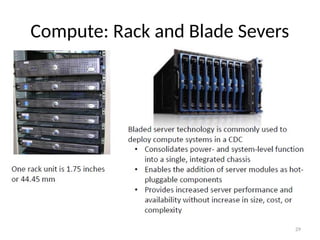
• Compute:
– Compute consists of physical components (hardware
devices) and logical components (software and
protocols).
• Storage:
– It is a resource that stores data persistently for
subsequent use.
• Network:
– Facilitates communication between clients and compute
systems or between compute systems and storage.
29
Compute: Rack and Blade Severs
30
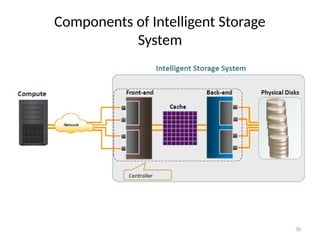
Components of Intelligent Storage
System
31
Network Attached Storage (NAS)
32
Storage Area Network (SAN)
• It is a high speed, dedicated network of servers and
‐
shared storage devices.
• Centralizes storage and management.
• Enables sharing of storage resources across multiple
servers at block level.
• Meets increasing storage demands efficiently with
better economies of scale.
• Common SAN deployments are:
– Fibre Channel (FC) SAN: uses FC protocol for communication.
– IP SAN: uses IP based protocols for communication.
‐
33
34
35
System/Compute Virtualization
• It is a technique of masking or abstracting the
physical compute hardware and enabling
multiple operating systems (OSs) to run
concurrently on a single or clustered physical
machine(s).
• A virtual machine (VM ) is a logical entity that
looks and behaves like physical machine.
• Goal: multiple VMs, each running a separate OS.
• Hypervisor or Virtual Machine Monitor: a
virtualization layer resides between hardware
and VMs.
– provides an interface based closely on the
underlying physical architecture.
– offers an identical interface to the underlying
physical architecture.
36
Advantages of Virtualization
37
Types of Hypervisor
38
Virtual Machines
• From a user’s perspective:
– Runs an operating system (OS) on
a physical machine.
– Contains virtual components
such as CPU, RAM, disk, and NIC.
• From a hypervisor’s perspective:
– Virtual machine (VM) is a
discrete set of files, such as:
• configuration file,
• virtual disk files,
• virtual BIOS file,
• VM swap file, and
• log file.
39
Virtual Machine Hardware
40
VM Hardware Components
41
VM Resource Management
• A process of allocating resources from physical machine
or clustered physical machines to virtual machines
(VMs) to optimize the utilization of resources.
• Goals of resource management:
– Controls utilization of resources.
– Prevents VMs from monopolizing resources.
– Allocates resources based on relative priority of VMs.
• Resources must be pooled to manage them centrally.
– A resource pool is a logical abstraction of aggregated
physical resources that are managed centrally.
42
Example of Resource Pool
Management
43
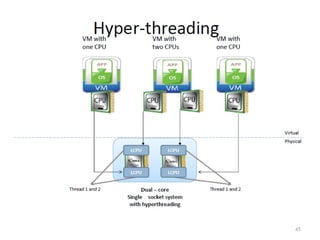
Optimizing CPU Resources
• Modern CPUs are equipped with multiple cores and
hyper threading
‐
– Multi core processors have multiple processing units
‐ (cores)
in a single CPU.
– Hyper threading makes a physical CPU appear as two or
‐
more logical CPUs.
• Allocating a CPU resource efficiently and fairly is critical.
• Hypervisor schedules virtual CPUs on the physical CPUs.
• Hypervisors support multi core, hyper threading,
‐ ‐ and
CPU load balancing features to optimize CPU
‐ resources.
44
Multi core Processors
‐
45
46
Optimizing Memory Resources
• Hypervisor manages a machine’s physical memory
– Part of this memory is used by the hypervisor.
– Rest is available for virtual machines (VMs).
• VMs can be configured with more memory than
physically available, called ‘memory over commitment’
– Memory optimization is done to allow over commitment.
• In order to effectively support memory over
commitment, the hypervisor provides efficient physical
memory reclamation techniques.
47
Outline
• Introduction
• Classic Data Centers
• Virtualized Data Centers
– Virtualized Compute
– Virtualized Storage
– Virtualized Network
48
Virtualized Data Storage
• It is the process of masking the underlying complexity of
physical storage resources and presenting the logical view
of these resources to compute systems.
• Logical to physical storage mapping is performed by
virtualization layer.
• Virtualization layer abstracts the identity of physical
storage devices
– Creates a storage pool from multiple, heterogeneous storage
arrays.
• Virtual volumes are created from the storage pools and are
assigned to the compute system.
49
Storage Virtualization at Different
Layers
50
Block Level Storage Virtualization
• Creates an abstraction layer at
SAN, between physical storage
resources and volumes
presented to compute
• Uses virtualization appliance
to perform mapping operation
• Makes underlying storage
infrastructure transparent to
compute
• Enables significant cost and
resource optimization
51
File Level Storage Virtualization
• Provides an abstraction in the
NAS/File servers environment
– Eliminates dependencies between
the file and its location
• Enables movement of files
between NAS systems without
impacting client access
• Provides opportunities to
optimize storage utilization
• Implemented using global
namespace
52
Outline
• Introduction
• Classic Data Centers
• Virtualized Data Centers
– Virtualized Compute
– Virtualized Storage
– Virtualized Network
53
Network Virtualization
• It is a process of logically segmenting or grouping physical
network(s) and making them operate as single or multiple
independent network(s) called “Virtual Network(s)”.
• Enables virtual networks to share network resources.
• Allows communication between nodes in a virtual network
without routing of frames.
• Enforces routing for communication between virtual
networks.
• Restricts management traffic, including ‘Network
Broadcast’, from propagating to other virtual network.
54
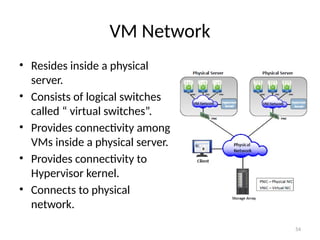
VM Network
• Resides inside a physical
server.
• Consists of logical switches
called “ virtual switches”.
• Provides connectivity among
VMs inside a physical server.
• Provides connectivity to
Hypervisor kernel.
• Connects to physical
network.

CSC_406_5_Virtualization - Case Study, it's base on virtualization

  • 1.
    1 CSC 406: Net-CentricComputing Lecture 5 Virtualization: Case Study 2nd Semester (2022/2023 session) 1445h FEDERAL UNIVERSITY BIRNIN KEBBI DEPARTMENT OF COMPUTER SCIENCE
  • 2.
    2 Reading • Modern OperatingSystems, Tanenbaum (4th Edition): Chapter 7 • Tanenbaum (2nd Edition): 3.2 • Coulouris (5th Edition): 4.5, 7.7 • A compilation from the EMC Lecture Notes: Cloud Infrastructure and Services
  • 3.
    3 Outline • Intro • Requirementsfor Virtualization • Type 1 and Type 2 Hypervisor • Techniques for Efficient Virtualization • Memory Virtualization
  • 4.
    4 Intro • A companywith multiple servers connected with high speed internet. • File server, DB server, FTP server, ... • Objective: – One machine might not be able to handle the load. – Reliability. – Security.
  • 5.
    5 Intro • Problem – Largecompanies support many service applications • File server, mail server, web server, database server, …. – Each service application demands its own environment • Specific version of operating system. • Multiple processors and disks. • Specialized configurations. – Running multiple service applications on the same server • Vulnerable to conflicting demand. • Load balancing might be hard.
  • 6.
  • 7.
    7 Intro • Solution: Virtualization –Decouple [OS, service] pair from hardware. – Multiplex lightly used services on common host ‐ hardware. – Migrate services from host to host as needed. – Introduce new [OS, service] pairs as needed • Adding new services. • Testing upgrades of existing services. • Experimental usage.
  • 8.
    8 Why it isa Good Solution? • A failure in one virtual machine does not bring down any others. • Run multiple different operating systems on the same hardware. – Isolation – Good utilization of resources. – Economic solution, saves money. – Useful in trying put new ideas (testing). – Check pointing and migration is easy. – Run legacy applications on OS that are no longer supported. – Cloud.
  • 9.
    9 Any Drawbacks? • Arewe putting all the eggs in one basket? – Most service outages are not due to faulty hardware but due to unreliable software. – To implement virtual machines, only a hypervisor, which is much smaller than a kernel is running in supervisor mode. Therefore, two orders of magnitudes of fewer bugs.
  • 10.
    10 Virtual Machine • Avirtual machine provides interface identical to underlying bare hardware – I.e., all devices, interrupts, memory, page tables, etc. • Virtual Machine Operating System creates illusion of multiple processors – Each capable of executing independently – No sharing, except via network protocols – Clusters and SMP can be simulated
  • 11.
    11 History • 60s 70s:IBM developed hypervisors for their IBM ‐ System/360 and later releases. • 70s: UCLA researchers, Gerald Popek and Robert Goldberg: – definition of the formal requirements for virtualizations – Distinguish between type1 and type2 hypervisor • 90s: Stanford researchers – Disco: Running Commodity Operating Systems on Scalable Multiprocessors – Founded Vmware • Xen, KVM, VirtualBox, Hyper V, Parallels ‐
  • 12.
    12 Requirements for Virtualization •Boot them like real machines and install operating system on them. • Safety: the hypervisor should have full control of the virtualized resources. • Fidelity: the behavior of a program on a virtual machine should be identical to that of the same program running on bare hardware. • Efficiency: much of the code in the virtual machine should run without intervention by the hypervisor.
  • 13.
    13 Safety • Execute eachcommand using an interpreter/emulator – Simple instructions such as increment can be executed by the interpreter. – Unsafe instructions need to be simulated by the interpreter. • The guest operating system should not be allowed to disable interrupts for the entire machine or modify the page table mapping. Yet, the guest operating system should think that it has disabled interrupts.
  • 14.
    14 Fidelity • x86: instructionsthat behave differently if executed in kernel mode than when executed in user mode. ← sensitive instructions • x86: instructions that cause a trap if executed in user mode. ← privileged instructions • To guarantee that the behavior of running an application in virtual machine has the same behavior as running it on the bare hardware, the sensitive instructions should be a subset of the privileged instructions.
  • 15.
    15 Virtualization Technology • IBM370 had the fidelity property. • 386 had instructions that violates fidelity. • Virtualization Technology (VT) introduced in 2005 for Intel and AMD CPUs and solved this problem by introducing containers to run the guest virtual machines in them. • Sensitive instructions executed inside the container will trap to the hypervisor. • Note: before 2005, vmware was rewriting sensitive instructions on the fly.
  • 16.
    16 Paravertualization • It neveraims to present a virtual machine that looks • like the actual underlying hardware. • Provides machine like software interface that explicitly ‐ exposes that it is a virtualized environment. – Offers a set of hypercalls, which allow the guest to send explicit requests to the hypervisor. – Guests use hypercalls for privileged sensitive operations. • Available since IBM VMs in 70s. • Drawback: guest OS should be aware of the virtual machine API. • Xen 1.0 is an example.
  • 17.
    17 Outline • Requirements forVirtualization • Type 1 and Type 2 Hypervisor • Techniques for Efficient Virtualization • Memory Virtualization
  • 18.
    18 Type 1 andType 2 Hypervisors
  • 19.
    19 Guest and HostOperating Systems • Guest Operating System: – The operating system running on top of the hypervisor. – Applies to both type 1 and type 2 hypervisors. • Host Operating System: – The operating system running on the hardware. – Applies only to type 2 hypervisor.
  • 20.
    20 Outline • Requirements forVirtualization • Type 1 and Type 2 Hypervisor • Techniques for Efficient Virtualization • Memory Virtualization
  • 21.
    21 Efficient Virtualization • Virtualmachines runs as a user process in user mode – sensitive instructions not allowed. • Guest operating system thinks that it is run in kernel mode. ← virtual kernel mode • Guest OS executes a sensitive instruction: – CPU without VT: instruction fails, virtual machine crashes. – CPU with VT: trap to the hypervisor, emulates instruction if issued by guest operating .
  • 22.
    22 Outline • Requirements forVirtualization • Type 1 and Type 2 Hypervisor • Techniques for Efficient Virtualization • Memory Virtualization • I/O Virtualization
  • 23.
    23 Memory Virtualization • Whymemory virtualization? • Multilevel page table is used to define the mapping between physical addresses and logical addresses. • Each virtual machine thinks that it has all of the physical memory. • For a virtual machine to change the mapping of pages in memory, it executes a sensitive instruction: – Traps and will need to be executed by the hypervisor. – In paravertualized OS, it will be performed through a hypercall.
  • 24.
    24 Shadow Page Table •Each virtual machine thinking that it is the only one allocating memory. • Multiple virtual machines can allocate pages to the same physical memory pages. • The hypervisor needs to maintain the actual mapping between what pages are allocated by the virtual memory and what pages are actually allocated by the hypervisor. ← shadow page table • Challenge: every time a virtual machine change its page table, they hypervisor needs to change its shadow page table.
  • 25.
    25 Extended Page Tables •Handle the shadow page table using hardware, no traps (software) involved. • We now have: guest virtual address, guest physical address, host (machine) physical address.
  • 26.
  • 27.
  • 28.
    28 Main Elements ofa Classic Data Center • Compute: – Compute consists of physical components (hardware devices) and logical components (software and protocols). • Storage: – It is a resource that stores data persistently for subsequent use. • Network: – Facilitates communication between clients and compute systems or between compute systems and storage.
  • 29.
  • 30.
  • 31.
  • 32.
    32 Storage Area Network(SAN) • It is a high speed, dedicated network of servers and ‐ shared storage devices. • Centralizes storage and management. • Enables sharing of storage resources across multiple servers at block level. • Meets increasing storage demands efficiently with better economies of scale. • Common SAN deployments are: – Fibre Channel (FC) SAN: uses FC protocol for communication. – IP SAN: uses IP based protocols for communication. ‐
  • 33.
  • 34.
  • 35.
    35 System/Compute Virtualization • Itis a technique of masking or abstracting the physical compute hardware and enabling multiple operating systems (OSs) to run concurrently on a single or clustered physical machine(s). • A virtual machine (VM ) is a logical entity that looks and behaves like physical machine. • Goal: multiple VMs, each running a separate OS. • Hypervisor or Virtual Machine Monitor: a virtualization layer resides between hardware and VMs. – provides an interface based closely on the underlying physical architecture. – offers an identical interface to the underlying physical architecture.
  • 36.
  • 37.
  • 38.
    38 Virtual Machines • Froma user’s perspective: – Runs an operating system (OS) on a physical machine. – Contains virtual components such as CPU, RAM, disk, and NIC. • From a hypervisor’s perspective: – Virtual machine (VM) is a discrete set of files, such as: • configuration file, • virtual disk files, • virtual BIOS file, • VM swap file, and • log file.
  • 39.
  • 40.
  • 41.
    41 VM Resource Management •A process of allocating resources from physical machine or clustered physical machines to virtual machines (VMs) to optimize the utilization of resources. • Goals of resource management: – Controls utilization of resources. – Prevents VMs from monopolizing resources. – Allocates resources based on relative priority of VMs. • Resources must be pooled to manage them centrally. – A resource pool is a logical abstraction of aggregated physical resources that are managed centrally.
  • 42.
    42 Example of ResourcePool Management
  • 43.
    43 Optimizing CPU Resources •Modern CPUs are equipped with multiple cores and hyper threading ‐ – Multi core processors have multiple processing units ‐ (cores) in a single CPU. – Hyper threading makes a physical CPU appear as two or ‐ more logical CPUs. • Allocating a CPU resource efficiently and fairly is critical. • Hypervisor schedules virtual CPUs on the physical CPUs. • Hypervisors support multi core, hyper threading, ‐ ‐ and CPU load balancing features to optimize CPU ‐ resources.
  • 44.
  • 45.
  • 46.
    46 Optimizing Memory Resources •Hypervisor manages a machine’s physical memory – Part of this memory is used by the hypervisor. – Rest is available for virtual machines (VMs). • VMs can be configured with more memory than physically available, called ‘memory over commitment’ – Memory optimization is done to allow over commitment. • In order to effectively support memory over commitment, the hypervisor provides efficient physical memory reclamation techniques.
  • 47.
    47 Outline • Introduction • ClassicData Centers • Virtualized Data Centers – Virtualized Compute – Virtualized Storage – Virtualized Network
  • 48.
    48 Virtualized Data Storage •It is the process of masking the underlying complexity of physical storage resources and presenting the logical view of these resources to compute systems. • Logical to physical storage mapping is performed by virtualization layer. • Virtualization layer abstracts the identity of physical storage devices – Creates a storage pool from multiple, heterogeneous storage arrays. • Virtual volumes are created from the storage pools and are assigned to the compute system.
  • 49.
  • 50.
    50 Block Level StorageVirtualization • Creates an abstraction layer at SAN, between physical storage resources and volumes presented to compute • Uses virtualization appliance to perform mapping operation • Makes underlying storage infrastructure transparent to compute • Enables significant cost and resource optimization
  • 51.
    51 File Level StorageVirtualization • Provides an abstraction in the NAS/File servers environment – Eliminates dependencies between the file and its location • Enables movement of files between NAS systems without impacting client access • Provides opportunities to optimize storage utilization • Implemented using global namespace
  • 52.
    52 Outline • Introduction • ClassicData Centers • Virtualized Data Centers – Virtualized Compute – Virtualized Storage – Virtualized Network
  • 53.
    53 Network Virtualization • Itis a process of logically segmenting or grouping physical network(s) and making them operate as single or multiple independent network(s) called “Virtual Network(s)”. • Enables virtual networks to share network resources. • Allows communication between nodes in a virtual network without routing of frames. • Enforces routing for communication between virtual networks. • Restricts management traffic, including ‘Network Broadcast’, from propagating to other virtual network.
  • 54.
    54 VM Network • Residesinside a physical server. • Consists of logical switches called “ virtual switches”. • Provides connectivity among VMs inside a physical server. • Provides connectivity to Hypervisor kernel. • Connects to physical network.