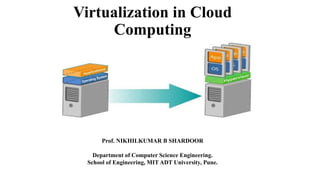
Virtualization in Cloud
Computing
Prof. NIKHILKUMAR B SHARDOOR
Department of Computer Science Engineering.
School of Engineering, MIT ADT University, Pune.
Content
• Introduction to Virtualization
• Why Virtualization
• Role of Virtualization in Cloud Computing
• Benefits of Virtualization
• Advantages and Disadvantages of Virtualization.
• VMM- Virtual Machine Monitor (Hypervisor)
• Types of Virtualization
• Full and Para Virtualization
• Server/Hardware Virtualization
• Network Virtualization
• Storage Virtualization
• Hardware Support for Virtualization.
• Case Study: Xen, KVM, HyperV and VMWare
Virtualization
Virtualization -- the abstraction of computer resources.
Defenition : Virtualization is a framework or methodology of dividing the resources of a computer into multiple
execution environments, by applying one or more concepts or technologies such as hardware and software
partitioning, timesharing, partial or complete machine simulation, emulation, and quality of service.
OR
Virtualization is the enabling technology and creates virtual machines that allows a single machine to act as if it
were many machines.
Virtualization hides the physical characteristics of computing resources from their users, be they applications, or end
users. This includes making a single physical resource (such as a server, an operating system, an application, or
storage device) appear to function as multiple virtual resources; it can also include making multiple physical resources
(such as storage devices or servers) appear as a single virtual resource.
Why Virtualization
• Consolidate the workloads of several under-utilized servers to fewer machines, perhaps a single machine.
• Provides secure, isolated sandboxes for running untrusted applications.
• Provides emulation of hardware, or hardware configuration that you do not have (such as multiple processors).
• Virtualization can also be used to simulate networks of independent computers.
• Virtual machines can be used to run multiple operating systems simultaneously. Some such systems may be hard
or impossible to run on newer real hardware.
• Allow for powerful debugging and performance monitoring. Operating systems can be debugged without losing
productivity.
• Virtual machines can isolate what they run, so they provide fault and error containment.
• Virtual machines are great tools for research and academic experiments. They encapsulate the entire state of a
running system. The state also provides an abstraction of the workload being run.
• Virtualization can enable existing operating systems to run on shared memory multiprocessors.
• Virtual machines can be used to create arbitrary test scenarios, and can lead to effective quality assurance.
Role of Virtualization in Cloud Computing
• Virtualization plays a major role in cloud computing as it provides virtual storage and computing services to
the cloud clients which is only possible through virtualization.
Virtualization in cloud computing include:
• Protection from system failures - you can duplicate your work using virtualization on the cloud, this way your
data is safe if there is a system failure.
• For combining local and network resources data storage virtualization
• Improve performance and capacity(storage capacity, network capacity etc).
• For grouping physical storage devices into the single unit.
• For reaching the high level of availability or improving availability of resources using virtualization.
• Virtual networks help IT professionals become efficient and agile at work
• Great way to reduce operational costs
Benefits of virtualization for cloud computing: Reduces capital expenses and maintenance costs through server
consolidation, reduces physical space needed in data centers. Resource Management, Migration, Maintainability, High
availability and Fault tolerance are other benefits
Advantages :
• It optimizes hardware resource utilization
• Saves energy and costs and makes it possible to run multiple applications and various operating systems on the same
SERVER at the same time.
• It increases the utilization, efficiency and flexibility of existing computer hardware.
• Provides ability to manage resources effectively.
• Increases efficiency of IT operations.
• Provides for easier backup and disaster recovery.
• Increases cost savings with reduced hardware expenditure.
Disadvantages of virtualization are almost negligible when compared to the multiple advantages it offers.
• Software licensing costs.
• Necessity to train IT staff in virtualization.
Benefits, Advantages and Disadvantages
Virtual Machine Monitor
• Virtual Machine Monitor (VMM) is a software program that enables the creation, management and
governance of virtual machines (VM) and manages the operation of a virtualized environment on top of a
physical host machine.
VMM is also known as Virtual Machine Manager or Hypervisor.
Hypervisor: A hypervisor or virtual machine monitor (VMM) is computer software, firmware or hardware that
creates and runs virtual machines. A computer on which a hypervisor runs one or more virtual machines is
called a host machine, and each virtual machine is called a guest machine.
Examples of this type of hypervisor include VMware Fusion, Oracle Virtual Box, Oracle VM for x86,
Solaris Zones, Parallels and VMware Workstation
Virtual Machine Monitor- Hypervisor
Hypervisor Types:
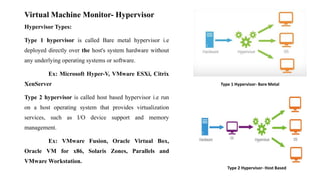
Type 1 hypervisor is called Bare metal hypervisor i.e
deployed directly over the host's system hardware without
any underlying operating systems or software.
Ex: Microsoft Hyper-V, VMware ESXi, Citrix
XenServer
Type 2 hypervisor is called host based hypervisor i.e run
on a host operating system that provides virtualization
services, such as I/O device support and memory
management.
Ex: VMware Fusion, Oracle Virtual Box,
Oracle VM for x86, Solaris Zones, Parallels and
VMware Workstation.
Type 1 Hypervisor- Bare Metal
Type 2 Hypervisor- Host Based
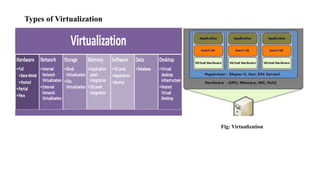
Types of Virtualization
Fig: Virtualization
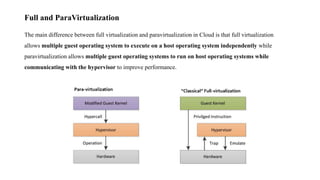
The main difference between full virtualization and paravirtualization in Cloud is that full virtualization
allows multiple guest operating system to execute on a host operating system independently while
paravirtualization allows multiple guest operating systems to run on host operating systems while
communicating with the hypervisor to improve performance.
Full and ParaVirtualization
Difference Between Full Virtualization and Paravirtualization in
Cloud
• Definition
Full virtualization is a common and cost-effective type of virtualization in which computer service requests are
separated from the physical hardware that facilitates them while paravirtualization is an enhancement of
virtualization technology in which a guest OS is recompiled prior to installation inside a virtual machine.
• Functionality
Thus, the main difference between full virtualization and paravirtualization is that full virtualization allows guest
operating systems to execute independently while paravirtualization allows guest operating systems to
communicate with the hypervisor.
• Accessing hardware
In full virtualization, guest operating system issues hardware calls to access hardware, whereas, in
paravirtualization, guest operating system directly communicates with the hypervisor using drivers. Hence, this
is also a difference between full virtualization and paravirtualization.
• Performance
Performance is another difference between full virtualization and paravirtualization. Performance is higher in
paravirtualization than in full virtualization.
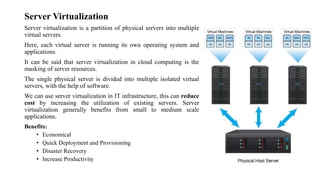
Server Virtualization
Server virtualization is a partition of physical servers into multiple
virtual servers.
Here, each virtual server is running its own operating system and
applications.
It can be said that server virtualization in cloud computing is the
masking of server resources.
The single physical server is divided into multiple isolated virtual
servers, with the help of software.
We can use server virtualization in IT infrastructure, this can reduce
cost by increasing the utilization of existing servers. Server
virtualization generally benefits from small to medium scale
applications.
Benefits:
• Economical
• Quick Deployment and Provisioning
• Disaster Recovery
• Increase Productivity
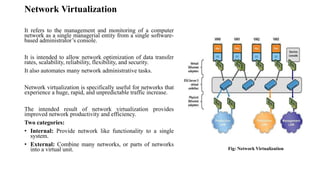
Network Virtualization
It refers to the management and monitoring of a computer
network as a single managerial entity from a single software-
based administrator’s console.
It is intended to allow network optimization of data transfer
rates, scalability, reliability, flexibility, and security.
It also automates many network administrative tasks.
Network virtualization is specifically useful for networks that
experience a huge, rapid, and unpredictable traffic increase.
The intended result of network virtualization provides
improved network productivity and efficiency.
Two categories:
• Internal: Provide network like functionality to a single
system.
• External: Combine many networks, or parts of networks
into a virtual unit. Fig: Network Virtualization
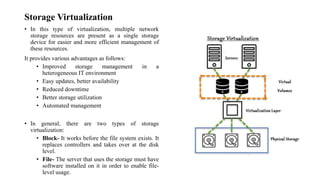
Storage Virtualization
• In this type of virtualization, multiple network
storage resources are present as a single storage
device for easier and more efficient management of
these resources.
It provides various advantages as follows:
• Improved storage management in a
heterogeneous IT environment
• Easy updates, better availability
• Reduced downtime
• Better storage utilization
• Automated management
• In general, there are two types of storage
virtualization:
• Block- It works before the file system exists. It
replaces controllers and takes over at the disk
level.
• File- The server that uses the storage must have
software installed on it in order to enable file-
level usage.
Hardware support for Virtualization
In early 2000 it became obvious that hardware support for virtualization was necessary, and Intel and AMD started
work on the first-generation virtualization extensions of the x86 architecture. In 2005 Intel released two Pentium 4
models supporting VT-x, and in 2006 AMD announced Pacifica and then several Athlon 64 models.
The challenges to virtualizing Intel architectures and then presents VT-x and VT-i virtualization architectures for
x86 and Itanium architectures, respectively. Software solutions at that time addressed some of the challenges, but
hardware solutions could improve not only performance but also security and, at the same time, simplify the
software systems.
The problems faced by virtualization of the x86 architecture:
• Ring deprivileging.
• Ring aliasing.
• Address space compression.
• Nonfaulting access to privileged state.
• Guest system calls.
• Interrupt virtualization.
• Access to hidden state.
• Ring compression.
• Frequent access to privileged resources increases VMM overhead.
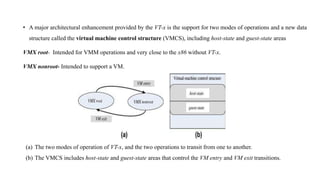
• A major architectural enhancement provided by the VT-x is the support for two modes of operations and a new data
structure called the virtual machine control structure (VMCS), including host-state and guest-state areas
VMX root- Intended for VMM operations and very close to the x86 without VT-x.
VMX nonroot- Intended to support a VM.
(a) The two modes of operation of VT-x, and the two operations to transit from one to another.
(b) The VMCS includes host-state and guest-state areas that control the VM entry and VM exit transitions.
Assignment : Prepare a CASE Study on following
• Xen
• KVM
• VMWare
• Hyper-V
Thank you ..!

Virtualization- Cloud Computing

  • 1.
    Virtualization in Cloud Computing Prof.NIKHILKUMAR B SHARDOOR Department of Computer Science Engineering. School of Engineering, MIT ADT University, Pune.
  • 2.
    Content • Introduction toVirtualization • Why Virtualization • Role of Virtualization in Cloud Computing • Benefits of Virtualization • Advantages and Disadvantages of Virtualization. • VMM- Virtual Machine Monitor (Hypervisor) • Types of Virtualization • Full and Para Virtualization • Server/Hardware Virtualization • Network Virtualization • Storage Virtualization • Hardware Support for Virtualization. • Case Study: Xen, KVM, HyperV and VMWare
  • 3.
    Virtualization Virtualization -- theabstraction of computer resources. Defenition : Virtualization is a framework or methodology of dividing the resources of a computer into multiple execution environments, by applying one or more concepts or technologies such as hardware and software partitioning, timesharing, partial or complete machine simulation, emulation, and quality of service. OR Virtualization is the enabling technology and creates virtual machines that allows a single machine to act as if it were many machines. Virtualization hides the physical characteristics of computing resources from their users, be they applications, or end users. This includes making a single physical resource (such as a server, an operating system, an application, or storage device) appear to function as multiple virtual resources; it can also include making multiple physical resources (such as storage devices or servers) appear as a single virtual resource.
  • 4.
    Why Virtualization • Consolidatethe workloads of several under-utilized servers to fewer machines, perhaps a single machine. • Provides secure, isolated sandboxes for running untrusted applications. • Provides emulation of hardware, or hardware configuration that you do not have (such as multiple processors). • Virtualization can also be used to simulate networks of independent computers. • Virtual machines can be used to run multiple operating systems simultaneously. Some such systems may be hard or impossible to run on newer real hardware. • Allow for powerful debugging and performance monitoring. Operating systems can be debugged without losing productivity. • Virtual machines can isolate what they run, so they provide fault and error containment. • Virtual machines are great tools for research and academic experiments. They encapsulate the entire state of a running system. The state also provides an abstraction of the workload being run. • Virtualization can enable existing operating systems to run on shared memory multiprocessors. • Virtual machines can be used to create arbitrary test scenarios, and can lead to effective quality assurance.
  • 5.
    Role of Virtualizationin Cloud Computing • Virtualization plays a major role in cloud computing as it provides virtual storage and computing services to the cloud clients which is only possible through virtualization. Virtualization in cloud computing include: • Protection from system failures - you can duplicate your work using virtualization on the cloud, this way your data is safe if there is a system failure. • For combining local and network resources data storage virtualization • Improve performance and capacity(storage capacity, network capacity etc). • For grouping physical storage devices into the single unit. • For reaching the high level of availability or improving availability of resources using virtualization. • Virtual networks help IT professionals become efficient and agile at work • Great way to reduce operational costs
  • 6.
    Benefits of virtualizationfor cloud computing: Reduces capital expenses and maintenance costs through server consolidation, reduces physical space needed in data centers. Resource Management, Migration, Maintainability, High availability and Fault tolerance are other benefits Advantages : • It optimizes hardware resource utilization • Saves energy and costs and makes it possible to run multiple applications and various operating systems on the same SERVER at the same time. • It increases the utilization, efficiency and flexibility of existing computer hardware. • Provides ability to manage resources effectively. • Increases efficiency of IT operations. • Provides for easier backup and disaster recovery. • Increases cost savings with reduced hardware expenditure. Disadvantages of virtualization are almost negligible when compared to the multiple advantages it offers. • Software licensing costs. • Necessity to train IT staff in virtualization. Benefits, Advantages and Disadvantages
  • 7.
    Virtual Machine Monitor •Virtual Machine Monitor (VMM) is a software program that enables the creation, management and governance of virtual machines (VM) and manages the operation of a virtualized environment on top of a physical host machine. VMM is also known as Virtual Machine Manager or Hypervisor. Hypervisor: A hypervisor or virtual machine monitor (VMM) is computer software, firmware or hardware that creates and runs virtual machines. A computer on which a hypervisor runs one or more virtual machines is called a host machine, and each virtual machine is called a guest machine. Examples of this type of hypervisor include VMware Fusion, Oracle Virtual Box, Oracle VM for x86, Solaris Zones, Parallels and VMware Workstation
  • 8.
    Virtual Machine Monitor-Hypervisor Hypervisor Types: Type 1 hypervisor is called Bare metal hypervisor i.e deployed directly over the host's system hardware without any underlying operating systems or software. Ex: Microsoft Hyper-V, VMware ESXi, Citrix XenServer Type 2 hypervisor is called host based hypervisor i.e run on a host operating system that provides virtualization services, such as I/O device support and memory management. Ex: VMware Fusion, Oracle Virtual Box, Oracle VM for x86, Solaris Zones, Parallels and VMware Workstation. Type 1 Hypervisor- Bare Metal Type 2 Hypervisor- Host Based
  • 9.
  • 10.
    The main differencebetween full virtualization and paravirtualization in Cloud is that full virtualization allows multiple guest operating system to execute on a host operating system independently while paravirtualization allows multiple guest operating systems to run on host operating systems while communicating with the hypervisor to improve performance. Full and ParaVirtualization
  • 11.
    Difference Between FullVirtualization and Paravirtualization in Cloud • Definition Full virtualization is a common and cost-effective type of virtualization in which computer service requests are separated from the physical hardware that facilitates them while paravirtualization is an enhancement of virtualization technology in which a guest OS is recompiled prior to installation inside a virtual machine. • Functionality Thus, the main difference between full virtualization and paravirtualization is that full virtualization allows guest operating systems to execute independently while paravirtualization allows guest operating systems to communicate with the hypervisor. • Accessing hardware In full virtualization, guest operating system issues hardware calls to access hardware, whereas, in paravirtualization, guest operating system directly communicates with the hypervisor using drivers. Hence, this is also a difference between full virtualization and paravirtualization. • Performance Performance is another difference between full virtualization and paravirtualization. Performance is higher in paravirtualization than in full virtualization.
  • 12.
    Server Virtualization Server virtualizationis a partition of physical servers into multiple virtual servers. Here, each virtual server is running its own operating system and applications. It can be said that server virtualization in cloud computing is the masking of server resources. The single physical server is divided into multiple isolated virtual servers, with the help of software. We can use server virtualization in IT infrastructure, this can reduce cost by increasing the utilization of existing servers. Server virtualization generally benefits from small to medium scale applications. Benefits: • Economical • Quick Deployment and Provisioning • Disaster Recovery • Increase Productivity
  • 13.
    Network Virtualization It refersto the management and monitoring of a computer network as a single managerial entity from a single software- based administrator’s console. It is intended to allow network optimization of data transfer rates, scalability, reliability, flexibility, and security. It also automates many network administrative tasks. Network virtualization is specifically useful for networks that experience a huge, rapid, and unpredictable traffic increase. The intended result of network virtualization provides improved network productivity and efficiency. Two categories: • Internal: Provide network like functionality to a single system. • External: Combine many networks, or parts of networks into a virtual unit. Fig: Network Virtualization
  • 14.
    Storage Virtualization • Inthis type of virtualization, multiple network storage resources are present as a single storage device for easier and more efficient management of these resources. It provides various advantages as follows: • Improved storage management in a heterogeneous IT environment • Easy updates, better availability • Reduced downtime • Better storage utilization • Automated management • In general, there are two types of storage virtualization: • Block- It works before the file system exists. It replaces controllers and takes over at the disk level. • File- The server that uses the storage must have software installed on it in order to enable file- level usage.
  • 15.
    Hardware support forVirtualization In early 2000 it became obvious that hardware support for virtualization was necessary, and Intel and AMD started work on the first-generation virtualization extensions of the x86 architecture. In 2005 Intel released two Pentium 4 models supporting VT-x, and in 2006 AMD announced Pacifica and then several Athlon 64 models. The challenges to virtualizing Intel architectures and then presents VT-x and VT-i virtualization architectures for x86 and Itanium architectures, respectively. Software solutions at that time addressed some of the challenges, but hardware solutions could improve not only performance but also security and, at the same time, simplify the software systems. The problems faced by virtualization of the x86 architecture: • Ring deprivileging. • Ring aliasing. • Address space compression. • Nonfaulting access to privileged state. • Guest system calls. • Interrupt virtualization. • Access to hidden state. • Ring compression. • Frequent access to privileged resources increases VMM overhead.
  • 16.
    • A majorarchitectural enhancement provided by the VT-x is the support for two modes of operations and a new data structure called the virtual machine control structure (VMCS), including host-state and guest-state areas VMX root- Intended for VMM operations and very close to the x86 without VT-x. VMX nonroot- Intended to support a VM. (a) The two modes of operation of VT-x, and the two operations to transit from one to another. (b) The VMCS includes host-state and guest-state areas that control the VM entry and VM exit transitions.
  • 17.
    Assignment : Preparea CASE Study on following • Xen • KVM • VMWare • Hyper-V
  • 18.