Netskope © 2015, Optiv Security Inc. © 2015
5 Highest-Impact CASB Use Cases
for Office 365
Netskope © 2015, Optiv Security Inc. © 2015
“By 2017, organizations that have made a strategic decision to
invest in cloud applications for mission-critical workloads will
consider CASBs to be an essential security control.”
© 2016 Netskope. All Rights Reserved. 2
© 2016 Netskope. All Rights Reserved.
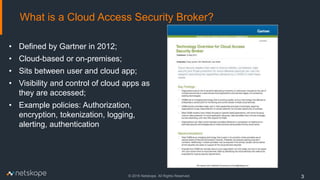
What is a Cloud Access Security Broker?
3
• Defined by Gartner in 2012;
• Cloud-based or on-premises;
• Sits between user and cloud app;
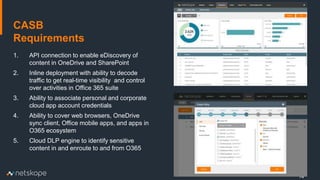
• Visibility and control of cloud apps as
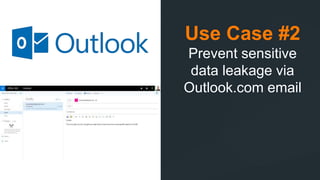
they are accessed;
• Example policies: Authorization,
encryption, tokenization, logging,
alerting, authentication
© 2016 Netskope. All Rights Reserved.
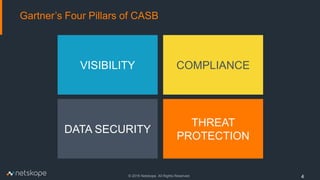
Gartner’s Four Pillars of CASB
4
VISIBILITY
DATA SECURITY
COMPLIANCE
THREAT
PROTECTION
What is driving the need for a CASB?
5
Netskope © 2015, Optiv Security Inc. © 2015
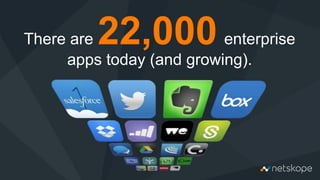
There are 22,000 enterprise
apps today (and growing).
© 2016 Netskope. All Rights Reserved.
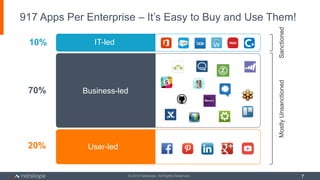
917 Apps Per Enterprise – It’s Easy to Buy and Use Them!
7
10%
70%
20%
MostlyUnsanctionedSanctioned
IT-led
Business-led
User-led
© 2016 Netskope. All Rights Reserved.
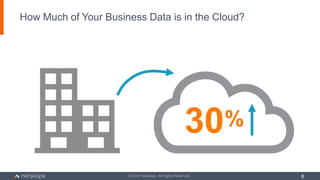
How Much of Your Business Data is in the Cloud?
8
30%
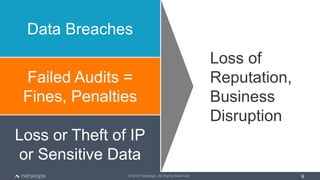
Data Breaches
Failed Audits =
Fines, Penalties
Loss or Theft of IP
or Sensitive Data
Loss of
Reputation,
Business
Disruption
© 2016 Netskope. All Rights Reserved. 9
© 2016 Netskope. Company Confidential
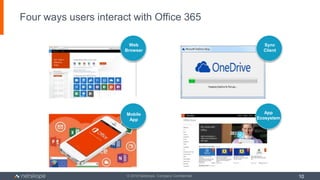
Four ways users interact with Office 365
10
Web
Browser
Mobile
App
App
Ecosystem
Sync
Client
© 2016 Netskope. Company Confidential
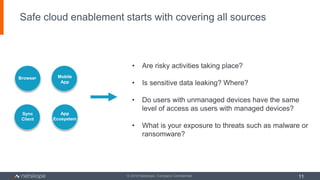
Safe cloud enablement starts with covering all sources
11
Browser
Sync
Client
Mobile
App
App
Ecosystem
• Are risky activities taking place?
• Is sensitive data leaking? Where?
• Do users with unmanaged devices have the same
level of access as users with managed devices?
• What is your exposure to threats such as malware or
ransomware?
5 Highest-Impact
CASB Use Cases
For Office 365
Use Case #1
Find sensitive data in
OneDrive and
SharePoint
Prevent sensitive data
leakage in Office 365
and to app ecosystem
14
1. API connection to enable eDiscovery of
content in OneDrive and SharePoint
2. Inline deployment with ability to decode
traffic to get real-time visibility and control
over activities in Office 365 suite
3. Ability to associate personal and corporate
cloud app account credentials
4. Ability to cover web browsers, OneDrive
sync client, Office mobile apps, and apps in
O365 ecosystem
5. Cloud DLP engine to identify sensitive
content in and enroute to and from O365
CASB
Requirements
Use Case #2
Prevent sensitive
data leakage via
Outlook.com email
16
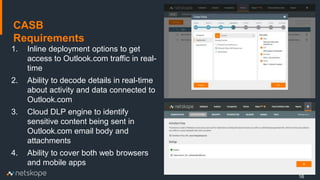
1. Inline deployment options to get
access to Outlook.com traffic in real-
time
2. Ability to decode details in real-time
about activity and data connected to
Outlook.com
3. Cloud DLP engine to identify
sensitive content being sent in
Outlook.com email body and
attachments
4. Ability to cover both web browsers
and mobile apps
CASB
Requirements
Netskope © 2015, Optiv Security Inc. © 2015
Use Case #3
Provide granular
access control to
Office 365 for
managed and
unmanaged devices
18
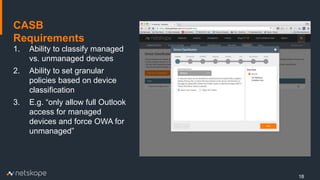
1. Ability to classify managed
vs. unmanaged devices
2. Ability to set granular
policies based on device
classification
3. E.g. “only allow full Outlook
access for managed
devices and force OWA for
unmanaged”
CASB
Requirements
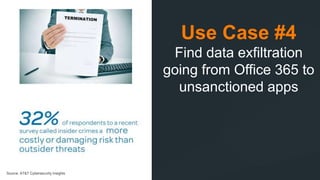
Use Case #4
Find data exfiltration
going from Office 365 to
unsanctioned apps
Source: AT&T Cybersecurity Insights
20
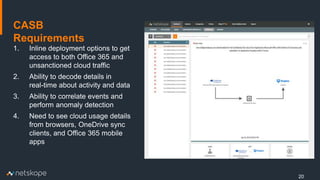
1. Inline deployment options to get
access to both Office 365 and
unsanctioned cloud traffic
2. Ability to decode details in
real-time about activity and data
3. Ability to correlate events and
perform anomaly detection
4. Need to see cloud usage details
from browsers, OneDrive sync
clients, and Office 365 mobile
apps
CASB
Requirements
Use Case #5
Find malware in
OneDrive and
SharePoint and
quarantine it
22
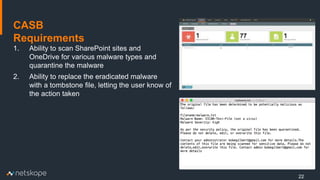
1. Ability to scan SharePoint sites and
OneDrive for various malware types and
quarantine the malware
2. Ability to replace the eradicated malware
with a tombstone file, letting the user know of
the action taken
CASB
Requirements
Netskope © 2015, Optiv Security Inc. © 2015
5:
Find malware in OneDrive
and SharePoint and
quarantine it
3:
Provide granular access control
to Office 365 for managed and
unmanaged devices
2:
Prevent sensitive data
leakage via Outlook.com
email
4:
Find data exfiltration going
from Office 365 to
unsanctioned apps
1:
Find sensitive data in OneDrive
and SharePoint and prevent
sensitive data leakage in Office
365 and to app ecosystem
Netskope © 2015, Optiv Security Inc. © 2015
THANK YOU!

5 Highest-Impact CASB Use Cases - Office 365

  • 1.
    Netskope © 2015,Optiv Security Inc. © 2015 5 Highest-Impact CASB Use Cases for Office 365
  • 2.
    Netskope © 2015,Optiv Security Inc. © 2015 “By 2017, organizations that have made a strategic decision to invest in cloud applications for mission-critical workloads will consider CASBs to be an essential security control.” © 2016 Netskope. All Rights Reserved. 2
  • 3.
    © 2016 Netskope.All Rights Reserved. What is a Cloud Access Security Broker? 3 • Defined by Gartner in 2012; • Cloud-based or on-premises; • Sits between user and cloud app; • Visibility and control of cloud apps as they are accessed; • Example policies: Authorization, encryption, tokenization, logging, alerting, authentication
  • 4.
    © 2016 Netskope.All Rights Reserved. Gartner’s Four Pillars of CASB 4 VISIBILITY DATA SECURITY COMPLIANCE THREAT PROTECTION
  • 5.
    What is drivingthe need for a CASB? 5
  • 6.
    Netskope © 2015,Optiv Security Inc. © 2015 There are 22,000 enterprise apps today (and growing).
  • 7.
    © 2016 Netskope.All Rights Reserved. 917 Apps Per Enterprise – It’s Easy to Buy and Use Them! 7 10% 70% 20% MostlyUnsanctionedSanctioned IT-led Business-led User-led
  • 8.
    © 2016 Netskope.All Rights Reserved. How Much of Your Business Data is in the Cloud? 8 30%
  • 9.
    Data Breaches Failed Audits= Fines, Penalties Loss or Theft of IP or Sensitive Data Loss of Reputation, Business Disruption © 2016 Netskope. All Rights Reserved. 9
  • 10.
    © 2016 Netskope.Company Confidential Four ways users interact with Office 365 10 Web Browser Mobile App App Ecosystem Sync Client
  • 11.
    © 2016 Netskope.Company Confidential Safe cloud enablement starts with covering all sources 11 Browser Sync Client Mobile App App Ecosystem • Are risky activities taking place? • Is sensitive data leaking? Where? • Do users with unmanaged devices have the same level of access as users with managed devices? • What is your exposure to threats such as malware or ransomware?
  • 12.
    5 Highest-Impact CASB UseCases For Office 365
  • 13.
    Use Case #1 Findsensitive data in OneDrive and SharePoint Prevent sensitive data leakage in Office 365 and to app ecosystem
  • 14.
    14 1. API connectionto enable eDiscovery of content in OneDrive and SharePoint 2. Inline deployment with ability to decode traffic to get real-time visibility and control over activities in Office 365 suite 3. Ability to associate personal and corporate cloud app account credentials 4. Ability to cover web browsers, OneDrive sync client, Office mobile apps, and apps in O365 ecosystem 5. Cloud DLP engine to identify sensitive content in and enroute to and from O365 CASB Requirements
  • 15.
    Use Case #2 Preventsensitive data leakage via Outlook.com email
  • 16.
    16 1. Inline deploymentoptions to get access to Outlook.com traffic in real- time 2. Ability to decode details in real-time about activity and data connected to Outlook.com 3. Cloud DLP engine to identify sensitive content being sent in Outlook.com email body and attachments 4. Ability to cover both web browsers and mobile apps CASB Requirements
  • 17.
    Netskope © 2015,Optiv Security Inc. © 2015 Use Case #3 Provide granular access control to Office 365 for managed and unmanaged devices
  • 18.
    18 1. Ability toclassify managed vs. unmanaged devices 2. Ability to set granular policies based on device classification 3. E.g. “only allow full Outlook access for managed devices and force OWA for unmanaged” CASB Requirements
  • 19.
    Use Case #4 Finddata exfiltration going from Office 365 to unsanctioned apps Source: AT&T Cybersecurity Insights
  • 20.
    20 1. Inline deploymentoptions to get access to both Office 365 and unsanctioned cloud traffic 2. Ability to decode details in real-time about activity and data 3. Ability to correlate events and perform anomaly detection 4. Need to see cloud usage details from browsers, OneDrive sync clients, and Office 365 mobile apps CASB Requirements
  • 21.
    Use Case #5 Findmalware in OneDrive and SharePoint and quarantine it
  • 22.
    22 1. Ability toscan SharePoint sites and OneDrive for various malware types and quarantine the malware 2. Ability to replace the eradicated malware with a tombstone file, letting the user know of the action taken CASB Requirements
  • 23.
    Netskope © 2015,Optiv Security Inc. © 2015 5: Find malware in OneDrive and SharePoint and quarantine it 3: Provide granular access control to Office 365 for managed and unmanaged devices 2: Prevent sensitive data leakage via Outlook.com email 4: Find data exfiltration going from Office 365 to unsanctioned apps 1: Find sensitive data in OneDrive and SharePoint and prevent sensitive data leakage in Office 365 and to app ecosystem
  • 24.
    Netskope © 2015,Optiv Security Inc. © 2015 THANK YOU!

Editor's Notes

  • #4 Official Gartner definition: CASBs are on-premises, or cloud-based, security policy enforcement points placed between cloud service consumers and cloud service providers to combine and interject enterprise security policies as the cloud-based resources are accessed. CASBs consolidate multiple types of security policy enforcement. Example security policies include authentication, SSO, authorization, credential mapping, device profiling, encryption, tokenization, logging, alerting, malware detection/prevention and so on.
  • #8 There are more than 900 cloud apps per enterprise, on average. If we look at how these applications make their way into the enterprise, about 10% are sanctioned by IT and include apps such as Office 365, Salesforce, Box, and a variety of business applications. IT often doesn’t know about the other 90%. Those fall under the Shadow IT category. Shadow IT is created by apps being brought in by users and lines-of-business, who today feel more empowered than ever because apps are easy to get and use. Whether sanctioned or Shadow IT, many of these apps has an important, and sometimes critical, role to play in the success of your organization.
  • #9 The real question, though, is how much of your data is in these apps? What do you think? Last year we did a study with Ponemon to examine the impact the cloud has on the probability and economic impact of a data breach. One of the question we asked IT and security professionals was how much business data they believe is in the cloud. Their (self-reported) estimate is about 30 percent. Whether it’s 30 percent or more than that, it’s only going up from here.
  • #14 Discover Cloud Apps and Assess Risk   Discovery is often the starting point for many of our customers. Netskope’s advanced Discovery can help you assess your risk, do due diligence on new cloud apps that you may be considering bringing into your organization, or perhaps getting your arms around what your cloud spend is.  
  • #18 Step 2: The next step is to understand how those cloud apps are being used. You need visibility into the details of what the activities are taking in account contextual details such as the app, user, specific activity, and device that was used.
  • #20 Netskope provides the most powerful cloud DLP solution. Not only does it support for than 3,000 data identifiers, 500+ file types and advanced features like proximity and Exact Match, but you can also uniquely apply our DLP and leverage deep context to scan content tied to a real-time activity for both sanctioned and unsanctioned apps as well as content that is resident in sanctioned apps.  
  • #22 This demo is the first phase of our Active Threat Protection, which is about finding and quarantining malware in sanctioned cloud apps. We recently announced Active Threat protection, supporting the ability to find and remediate malware and threats in real-time as they are uploaded, downloaded, or shared across unsanctioned or sanctioned cloud apps.  
  • #24 Here, in summary, are my 6 steps. I am confident if you follow these, you will have a safer cloud experience.