Exploiting IAM in GCP
Who am I?
● Formerly Security @ Apple, Netflix
● Startup experience: built cloud security software
● Currently Research @ Netskope
● Focused on AWS, GCP
My Organization
colin-demo-project
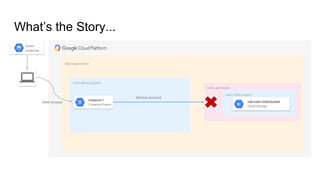
What’s the Story...
nsk-colin-child-bucket
colin_perimeter
colin-child-project
Service account
instance-1
Compute Engine
nsk-colin-child-bucket
Cloud Storage
Stolen
credential
Shell Access
My Organization
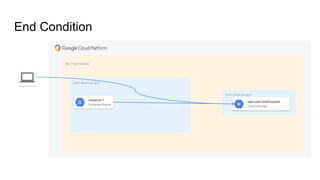
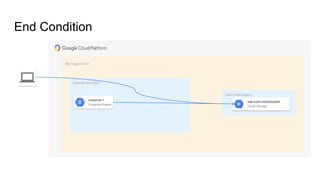
End Condition
colin-child-project
nsk-colin-child-bucket
Cloud Storage
colin-demo-project
instance-1
Compute Engine
Agenda
● IAM in GCP
● VPC Service Controls
● Service Account Deep Dive
● GCP Demo
● Q&A
IAM in GCP
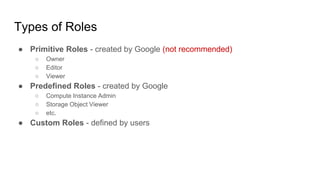
Types of Roles
● Primitive Roles - created by Google (not recommended)
○ Owner
○ Editor
○ Viewer
● Predefined Roles - created by Google
○ Compute Instance Admin
○ Storage Object Viewer
○ etc.
● Custom Roles - defined by users
VPC Service Controls
What are VPC Service Controls?
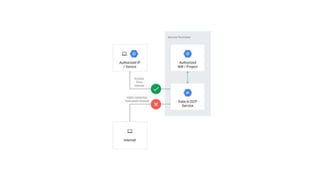
● Designed to mitigate Data Exfiltration risks
○ Create perimeters around your resources, such as Storage buckets
○ Control the movement of data past the boundaries of your perimeter
○ Set conditions to allow data flow outside of the perimeter
● Independent of IAM policies
○ IAM allow access would still be blocked based on the service control perimeter
Access Context Manager
● Another service that works in tandem with VPC service controls
● Allows admins to define the rules for access using certain criteria
○ Device type and operating system
○ IP address
○ User identity
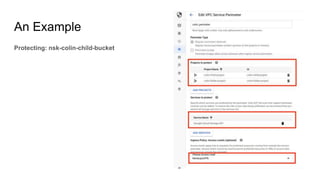
An Example
Protecting: nsk-colin-child-bucket
Combining the Controls
● Google says: IAM + VPC Service Controls = Defense in Depth
● IAM can be misconfigured, but the Service Controls protect you
● Everyone should be monitoring changes to these controls
○ What if someone changes the access level rule to allow all traffic from multiple countries?
○ What if somebody removes a service control perimeter?
Service Account Deep Dive
What is a Service Account?
● Identity for applications to authenticate
● Designed for non-human use
● Uses RSA keys instead of passwords
● Can’t access the web console
● Also considered resources – can apply bindings to them
More about Service Accounts
● A service account must be created in a Project
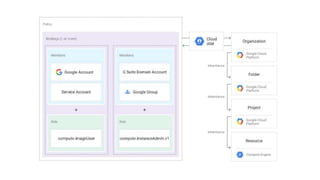
● IAM bindings can be granted at any level
● Elevated Bindings = bindings at the Folder, Organization
● Google creates some service accounts automatically
● Default account for Compute Engine, App Engine, etc.
● Accounts they will use for internal processing
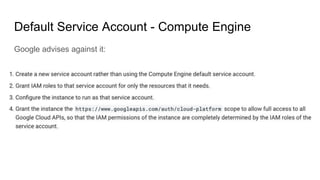
Default Service Account - Compute Engine
Google advises against it:
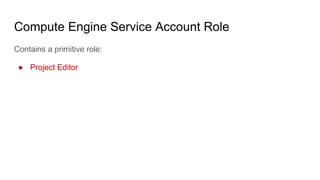
Compute Engine Service Account Role
Contains a primitive role:
● Project Editor
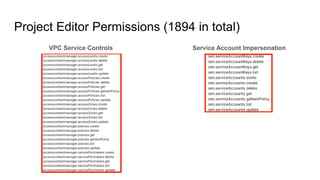
Service Account Impersonation
Project Editor Permissions (1894 in total)
VPC Service Controls
Binding at the Project level
colin-demo-project
Service Account User
Cloud IAM
Service Account 1
Cloud IAM
Service Account 2
Cloud IAM
Service Account 3
Cloud IAM
Service Account 4
Cloud IAM
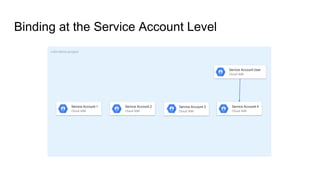
Binding at the Service Account Level
colin-demo-project
Service Account User
Cloud IAM
Service Account 1
Cloud IAM
Service Account 2
Cloud IAM
Service Account 3
Cloud IAM
Service Account 4
Cloud IAM
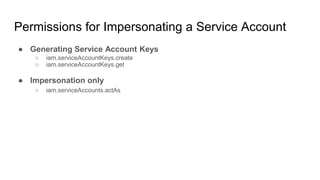
Permissions for Impersonating a Service Account
● Generating Service Account Keys
○ iam.serviceAccountKeys.create
○ iam.serviceAccountKeys.get
● Impersonation only
○ iam.serviceAccounts.actAs
Why Service Account Impersonation?
● Privilege Escalation
● It’s easy to lose track:
a. VMs could have service accounts
b. SSH keys could be applied project-wide
c. User can now operate as the service account from a VM
● Obfuscates your activity in GCP
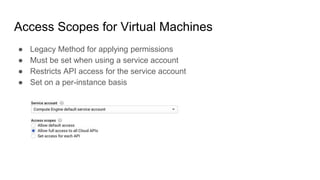
Access Scopes for Virtual Machines
● Legacy Method for applying permissions
● Must be set when using a service account
● Restricts API access for the service account
● Set on a per-instance basis
GCP Demo
My Organization
colin-demo-project
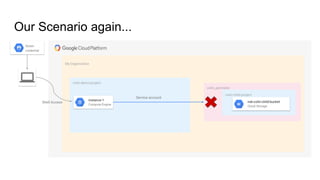
Our Scenario again...
nsk-colin-child-bucket
colin_perimeter
colin-child-project
Service account
instance-1
Compute Engine
nsk-colin-child-bucket
Cloud Storage
Stolen
credential
Shell Access
My Organization
IAM Flow
colin-demo-project
Stolen
credential
instance-1
Compute Engine
Default SA
Cloud IAM
Org Admin
Cloud IAM
Org Admin
Cloud IAM
Shell Access
SA Impersonation
colin_perimeter
IAM Binding
colin-child-project
nsk-colin-child-bucket
Cloud Storage
My Organization
End Condition
colin-child-project
nsk-colin-child-bucket
Cloud Storage
colin-demo-project
instance-1
Compute Engine
Key Takeaways
● Keep Service Accounts with elevated bindings in their own Project(s)
○ Keep public workloads out of the Project
○ Keep the Project under lock and key
○ Service accounts in the same Project may be able to see each other
● Bind permissions to specific Service Accounts whenever possible
● Don’t use Default Service Accounts
● Avoid using Primitive Roles
2019 © Netskope Confidential. All rights reserved.
Thank you!
Colin Estep
Netskope Threat Research
https://www.netskope.com/blog

Defcon 27 - Exploiting IAM in GCP

  • 1.
  • 2.
    Who am I? ●Formerly Security @ Apple, Netflix ● Startup experience: built cloud security software ● Currently Research @ Netskope ● Focused on AWS, GCP
  • 3.
    My Organization colin-demo-project What’s theStory... nsk-colin-child-bucket colin_perimeter colin-child-project Service account instance-1 Compute Engine nsk-colin-child-bucket Cloud Storage Stolen credential Shell Access
  • 4.
    My Organization End Condition colin-child-project nsk-colin-child-bucket CloudStorage colin-demo-project instance-1 Compute Engine
  • 5.
    Agenda ● IAM inGCP ● VPC Service Controls ● Service Account Deep Dive ● GCP Demo ● Q&A
  • 6.
  • 8.
    Types of Roles ●Primitive Roles - created by Google (not recommended) ○ Owner ○ Editor ○ Viewer ● Predefined Roles - created by Google ○ Compute Instance Admin ○ Storage Object Viewer ○ etc. ● Custom Roles - defined by users
  • 9.
  • 10.
    What are VPCService Controls? ● Designed to mitigate Data Exfiltration risks ○ Create perimeters around your resources, such as Storage buckets ○ Control the movement of data past the boundaries of your perimeter ○ Set conditions to allow data flow outside of the perimeter ● Independent of IAM policies ○ IAM allow access would still be blocked based on the service control perimeter
  • 12.
    Access Context Manager ●Another service that works in tandem with VPC service controls ● Allows admins to define the rules for access using certain criteria ○ Device type and operating system ○ IP address ○ User identity
  • 13.
  • 14.
    Combining the Controls ●Google says: IAM + VPC Service Controls = Defense in Depth ● IAM can be misconfigured, but the Service Controls protect you ● Everyone should be monitoring changes to these controls ○ What if someone changes the access level rule to allow all traffic from multiple countries? ○ What if somebody removes a service control perimeter?
  • 15.
  • 16.
    What is aService Account? ● Identity for applications to authenticate ● Designed for non-human use ● Uses RSA keys instead of passwords ● Can’t access the web console ● Also considered resources – can apply bindings to them
  • 17.
    More about ServiceAccounts ● A service account must be created in a Project ● IAM bindings can be granted at any level ● Elevated Bindings = bindings at the Folder, Organization ● Google creates some service accounts automatically ● Default account for Compute Engine, App Engine, etc. ● Accounts they will use for internal processing
  • 18.
    Default Service Account- Compute Engine Google advises against it:
  • 19.
    Compute Engine ServiceAccount Role Contains a primitive role: ● Project Editor
  • 20.
    Service Account Impersonation ProjectEditor Permissions (1894 in total) VPC Service Controls
  • 21.
    Binding at theProject level colin-demo-project Service Account User Cloud IAM Service Account 1 Cloud IAM Service Account 2 Cloud IAM Service Account 3 Cloud IAM Service Account 4 Cloud IAM
  • 22.
    Binding at theService Account Level colin-demo-project Service Account User Cloud IAM Service Account 1 Cloud IAM Service Account 2 Cloud IAM Service Account 3 Cloud IAM Service Account 4 Cloud IAM
  • 23.
    Permissions for Impersonatinga Service Account ● Generating Service Account Keys ○ iam.serviceAccountKeys.create ○ iam.serviceAccountKeys.get ● Impersonation only ○ iam.serviceAccounts.actAs
  • 24.
    Why Service AccountImpersonation? ● Privilege Escalation ● It’s easy to lose track: a. VMs could have service accounts b. SSH keys could be applied project-wide c. User can now operate as the service account from a VM ● Obfuscates your activity in GCP
  • 25.
    Access Scopes forVirtual Machines ● Legacy Method for applying permissions ● Must be set when using a service account ● Restricts API access for the service account ● Set on a per-instance basis
  • 26.
  • 27.
    My Organization colin-demo-project Our Scenarioagain... nsk-colin-child-bucket colin_perimeter colin-child-project Service account instance-1 Compute Engine nsk-colin-child-bucket Cloud Storage Stolen credential Shell Access
  • 28.
    My Organization IAM Flow colin-demo-project Stolen credential instance-1 ComputeEngine Default SA Cloud IAM Org Admin Cloud IAM Org Admin Cloud IAM Shell Access SA Impersonation colin_perimeter IAM Binding colin-child-project nsk-colin-child-bucket Cloud Storage
  • 29.
    My Organization End Condition colin-child-project nsk-colin-child-bucket CloudStorage colin-demo-project instance-1 Compute Engine
  • 31.
    Key Takeaways ● KeepService Accounts with elevated bindings in their own Project(s) ○ Keep public workloads out of the Project ○ Keep the Project under lock and key ○ Service accounts in the same Project may be able to see each other ● Bind permissions to specific Service Accounts whenever possible ● Don’t use Default Service Accounts ● Avoid using Primitive Roles
  • 32.
    2019 © NetskopeConfidential. All rights reserved. Thank you! Colin Estep Netskope Threat Research https://www.netskope.com/blog