Distributed System
Peer to Peer Services and File System
M.Jagadeesh
Assistant Professor
Department of Information Technology
MNMJEC
Chennai
Peer to Peer System
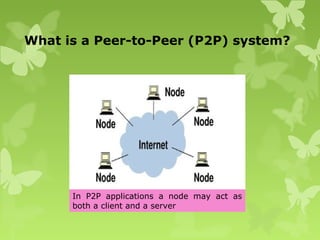
What is a Peer-to-Peer (P2P) system?
In P2P applications a node may act as
both a client and a server
What is a Peer-to-Peer (P2P) system?
 “All nodes are equals”
 Peer to peer is a type of architecture in which nodes are
interconnected with each other and share resources with each other
without the central controlling server.
 Objective to balance network traffic and reduce the load on the
primary host.
 P2P system allows us to construct such a distributed system or a
application in which all resources and data is contributed by
the hosts over the network.
 Their operation does not depend on the existence of any centrally
administrated systems.
 Bittorrent & Skype (VoIP)-examples of P2P applications which is
used for digital content distribution.
Characteristics of Peer-to-Peer systems
 Although they may differ in the resources that they contribute, all the nodes in
a peer-to-peer system have the same functional capabilities and
responsibilities.
 No Single point of failure.
 Its correct operation does not depend on the existence of any centrally
administered systems.
 Better scalability.
 The challenge of designing a P2P network - All the peers are connected to the
internet, but how do they know which address each peer has, and how does a
given peer make sure it is communicating with the correct peer?
 A key issue for their efficient operation is the choice of an algorithm for
the placement of data across many hosts and subsequent access to it in a
manner that balances the workload.
 Peer to-peer systems have many interesting
technical aspects like decentralized control, self-
organization, adaptation and scalability.
In order to get the peers in the P2P network to communicate correctly, you
therefore have to solve two problems:
 Peer Identification
 Peer Location
 Identifying peers meaning being able to distinguish each peer from each
other. Since millions of peers might be connected to the same P2P
network, you need to be able to address each peer individually. This is
done by assigning each peer a unique GUID (Globally Unique ID).
 Locating peers means finding the peer with a specific GUID on the
network. With potentially millions of peers in the P2P network, a peer
cannot keep a fully up-to-date list of all peers in the network. Peers are
joining and leaving the network all the time. If all peers have to know each
other, imagine how many messages they would have to send to each
other, to keep each others list of peers up to date. It would be pretty much
impossible.
 Instead of keeping a full list of all peers in the network, a peer keeps a
routing table with a subset of the peers in the network.
7
Example of Centralized P2P Systems:
Napster and its Legacy
 Napster
 Provided a means for users to share music files –
primarily MP3s
 Launched 1999 – several million users
 Not fully peer-to-peer since it used central servers to
maintain lists of connected systems and the files they
provided, while actual transactions were conducted
directly between machines
 Proved feasibility of a service using hardware and data
owned by ordinary Internet users
Napster and its legacy
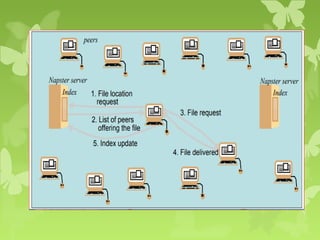
 Napster architecture included centralized indexes but
users supplied the files, which were stored and accessed
on their personnel systems.
 Napster method of operation as follows in step by step.
1.File location Request
2.List of peers offering the files
3.File request
4.File delivered
5.Index update
Napster and its legacy
 Napster used a (replicated) unified index of all available
music files.
 Object discovery and addressing is likely to become a
bottleneck.
 Music files are never updated, avoiding any need to
make all the replicas of file consistent after updates.
 No guarantees are require concerning the availability of
individual files – if a music file is temporarily
unavailable, it can be downloaded later when it
available. This reduces the requirement for dependability
of individual computers and their connections to the
internet.
Peer-to-Peer Middleware
 Peer To Peer Middleware
 To provide mechanism to access data resources anywhere
in network
 Functional Requirements :
 Peer clients need to locate and communicate with any
available resource, even though resources may be
widely distributed
 Add and remove resources at will
 Add and remove new hosts at will
 Interface to application programmers should be simple
and independent of types of distributed resources
Non-functional requirement
 Global Scalability
 Peer-to-peer middleware must be designed to support
applications that access millions of objects on hundred of
thousands of hosts.
 Load Balancing
 The performance of any system designed to exploit a large
number of computers depends upon the balanced distribution of
workload across them.
 For the systems we are considering, this will be achieved by a
random placement of resources together with the use of replicas
of heavily used resources.
 Optimization for local interactions between
neighbouring peers
 The middleware should aim to place resources close to the
nodes that access them the most.
Non-functional requirement
 Accommodating to highly dynamic host availability
 As hosts join the system, they must integrated into the
system and the load must be re-distributed to exploit their
new resources. When they leave the system, the system must
detect their departure and re-distribute their load and
resources.
 Security of data
 Trust must be built up by the use of authentication and
encryption mechanisms to ensure integrity and privacy of
information.
 Anonymity, deniability, and resistance to censorship
(in some applications)
 Host that hold data should be able to deny responsibility for
holding or supplying it.
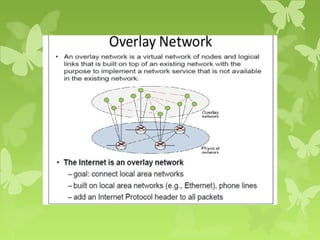
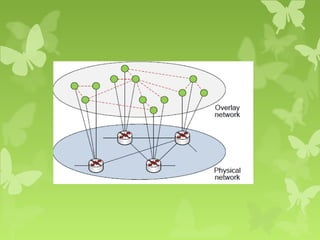
Overlay Networks
SKYPE AS OVERLAY NETWORK
 Skype is an application that provides video chat and
voice call services.
 Skype is available for Microsoft Windows, Macintosh, or
Linux, as well as Android, Blackberry, and both Apple
and Windows smartphones and tablets.
 Skype allows users to communicate over the Internet by
voice using a microphone, by video by using a webcam,
as well as with instant messaging.
 Skype-to-Skype calls to other users are free of charge
SKYPE ARCHITECTURE
 Skype is an overlay peer-to-peer network.
 There are two types of nodes in this overlay
network, ordinary hosts and super nodes (SN).
 An ordinary host is a Skype application that can be
used to place voice calls and send text messages.
 A super node is an ordinary host’s end-point on the
Skype network. Any node with a public IP address
having sufficient CPU, memory, and network
bandwidth is a candidate to become a super node.
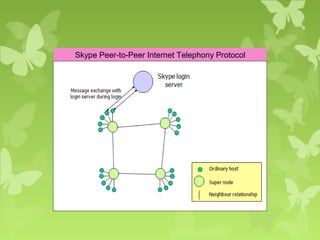
Skype Peer-to-Peer Internet Telephony Protocol
 An ordinary host must connect to a super node and must
register itself with the Skype login server for a
successful login.
 The Skype login server is an important entity in the
Skype network. User names and passwords are stored at
the login server.
 User authentication at login is also done at this server.
 This server also ensures that Skype login names are
unique across the Skype name space.
PROTOCOL
 Skype uses a proprietary Internet telephony (VoIP)
network called the Skype protocol.
 The protocol has not been made publicly available by
Skype, and official applications using the protocol
are closed-source.
 The main difference between Skype and standard
VoIP clients is that Skype operates on a peer-to-peer
model , rather than the more usual client–server
model.
Routing Overlays
 A routing overlay is a distributed algorithm for
a middleware layer responsible for routing
requests from any client to a host that holds
the object to which the request is addressed.
 Responsible for locating nodes and objects
 Implements a routing mechanism in the
application layer
 Ensures that any node can access any object
by routing each request thru a sequence of
nodes
 Exploits knowledge at each node to locate the destination
 Peer-to-peer systems usually store multiple replicas
of objects to ensure availability.
 In that case, the routing overlay maintains
knowledge of the location of all the available replicas
and delivers requests to the nearest ‘live’ node (i.e.
one that has not failed) that has a copy of the
relevant object.
 GUIDs (Globally Unique Identifiers) used to identify
nodes and objects. These are also known as opaque
identifiers, since they reveal nothing about the
locations of the objects to which they refer.
 Assigning GUIDs- Peers are assigned a GUID when
they join an existing network.
The main task of a routing overlay is the following:
o Routing of requests to objects:
A client wishing to invoke an operation on an object
submits a request including the object’s GUID to the
routing overlay, which routes the request to a node at
which a replica of the object resides.
The routing overlay must also perform some other
tasks:
1- Insertion of objects:
A node wishing to make a new object available to a peer-to-
peer service computes a GUID for the object and announces it
to the routing overlay, which then ensures that the object is
reachable by all other clients.
2- Deletion of objects:
When clients request the removal of objects from the service
the routing overlay must make them unavailable.
3- Node addition and removal:
Nodes (i.e., computers) may join and leave the service. When
a node joins the service, the routing overlay arranges for it to
assume some of the responsibilities of other nodes when a
node leaves.
2 types of overlays
1. Unstructured
2. Structured
Unstructured systems { do not impose any structure on the
overlay networks or loosely structured}
 E.g., Napster, Gnutella, Freenet, FastTrack, eDonkey2000,
BitTorrent
 Support complex search based on file metadata
 Low search efficiency, especially for unpopular files
Structured systems { impose particular structures on the overlay
networks}
 E.g., Distributed Hash Tables (DHTs)
 The topology of the peer network is tightly controlled
 Any file can be located in a small number of overlay hops
 Structured overlays use a number of different geometries (rings,
trees, hypercubes, tori, XOR, . . . )
Types of Routing Overlays
 DHT – Distributed Hash Tables
 put(GUID, data), remove(GUID) , value =
get(GUID)
 DOLR – Distributed Object Location and Routing
 Publish(GUID), unpublish(GUID)
 DOLR is a layer over the DHT that maps GUIDs and
address of nodes
Overlay Case Study
Pastry
What is a DHT
Hashing is a technique that is used to uniquely
identify a specific object from a group of similar
objects. A distributed hash table (DHT) is a
class of decentralised distributed system that has
(key, value) pairs and any participating node can
efficiently retrieve the value associated with a
given key.
Pastry
 Peer-to-peer Internet applications have recently been
popularized through file sharing applications like
Napster.
 Peer to-peer systems have many interesting technical
aspects like decentralized control, self-organization,
adaptation and scalability.
 One of the key problems in large-scale peer-to-peer
applications is to provide efficient algorithms for object
location and routing within the network.
 Here I present Pastry Routing algorithm.
What is Pastry?
 Pastry, a Routing algorithm define how a target node
is located in the overlay network of nodes connected
to the Internet.
 used to support a variety of peer-to-peer
applications, including global data storage, data
sharing, group communication.
 Several application have been built on top of Pastry
to day (publish/subscribe system called SCRIBE)
 Decentralized, structured P2P overlay in which
objects can be efficiently located and lookup queries
efficiently routed
 Uses a ring based overlay network .
 Node has a unique→ 128 bit nodeId.
 The nodes are conceptually organized as a ring,
arranged in ascending order of nodeIds.
 The nodeId is used to indicate a node’s position in a
circular nodeId space, which ranges from 0 to 2 128
-1
 The nodeId is assigned randomly when a node joins the
system. It is assumed that nodeIds are generated such
that the resulting set of nodeIds is uniformly distributed
in the 128-bit nodeId space.
Routing Idea
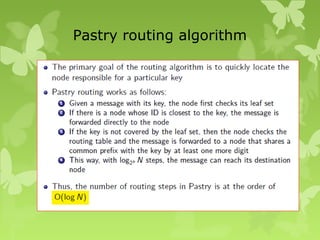
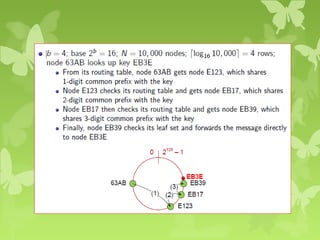
 The node first checks to find if the key is within the leaf
set. If so, it forwards the messages to the closest node (by
nodeId) in the leaf set.
 Otherwise, Pastry forwards the message to a node with
one more matching digit in the common prefix.
 In the rare case, when we are not able to find a node
that matches the first two criteria, we forward the
request to any node that is closer to the key than the
current nodeId.
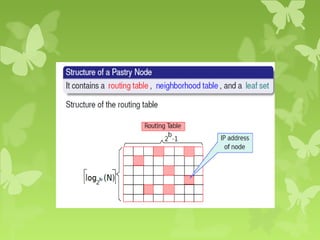
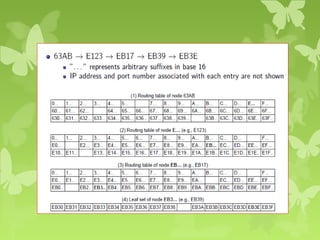
 Each node in Pastry maintains 3 tables:
 Routing table
 Leaf set
 Neighborhood set
 Routing table contains , where N
is the total number of Pastry nodes.
 Leaf set is a set of L nodes with numerically closest IDs
(L/2 larger and L/2 smaller than the ID of the current
node)
 Neighborhood set maintains information about nodes
that are close together in terms of network locality
Pastry routing algorithm
Distributed File System
DFS
 Stands for "Distributed File System“.
 A Distributed File System is a file system that may have files
on more than one machine.
 A distributed file system is a client/server-based application that
allows clients to access and process data stored on the server
as if it were on their own computer.
 Even when files are stored on multiple computers, DFS can
organize and display the files as if they are stored on one
computer.
 Users can also share files by copying them to a directory in the
DFS and can update files by editing existing documents.
 Since more than one client may access the same data
simultaneously, the server must have a mechanism in place
(such as maintaining information about the times of access) to
organize updates so that the client always receives the most
current version of data and that data conflicts do not arise.
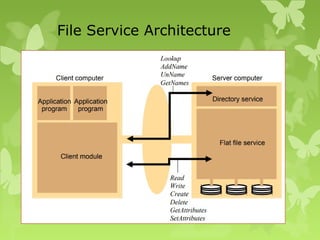
File Service Architecture
 An architecture that offers a clear separation of
the main concerns in providing access to files is
obtained by structuring the file service as three
components:
 A flat file service
 A directory service
 A client module.
File Service Architecture
Flat file service
 Concerned with the implementation of
operations on the contents of file.
 Unique File Identifiers (UFIDs) are used to
refer files in all requests for flat file service
operations.
Flat file service operations
1. Read
2. Write
3. Create
4. Delete
5. GetAttributes
6. SetAttributes
Read(FileId, i, n) :
Reads a sequence of up to n items from a file starting at item i.
Write(FileId, i, Data) :
Write a sequence of Data to a file, starting at item i.
Create() :
Creates a new file of length0 and delivers a UFID for it.
Delete(FileId) :
Removes the file from the file store.
GetAttributes(FileId) :
Returns the file attributes for the file.
SetAttributes(FileId, Attr) :
Sets the file attributes.
Directory service
 Provides mapping between text names for the
files and their UFIDs.
 Clients may obtain the UFID of a file by quoting its
text name to directory service.
 Directory service supports functions to add new
files to directories.
Directory service operations
1. Lookup
2. AddName
3. UnName
4. GetNames
Lookup(Dir, Name) :
Locates the text name in the directory and returns the relevant
UFID.
•If Name is not in the directory, throws an exception.
AddName(Dir, Name, File) :
If Name is not in the directory, adds(Name,File) to the directory
and updates the file’s attribute record.
•If Name is already in the directory: throws an exception.
UnName(Dir, Name) :
If Name is in the directory, the entry containing Name is
removed from the directory.
•If Name is not in the directory: throws an exception.
GetNames(Dir, Pattern):
Returns all the text names in the directory that match the regular
expression Pattern.
Client module
 It runs on each computer and provides integrated
service (flat file and directory) as a single API to
application programs.
 It holds information about the network locations of
flat-file and directory server processes.
Access control
In distributed implementations, access rights checks
have to be performed at the server .
Hierarchic file system
A hierarchic file system consists of a number of
directories arranged in a tree structure.
File Group
A file group is a collection of files that can be located
on any server.
Andrew file system (AFS)
An Andrew file system (AFS) is a location-independent
file system that uses a local cache to reduce the
workload and increase the performance of a distributed
computing environment. A first request for data to a
server from a workstation is satisfied by the server and
placed in a local cache. A second request for the same
data is satisfied from the local cache.
Intention is to support information sharing on a large
scale by minimizing client-server communication.
Achieved by transferring whole files between server and
client computers and caching them at clients until the
servers receives a more up-to-date version.
Problem of sharing files
 Caching files in the client side cache reduces
computation at the server side, thus enhancing
performance. However, the problem of sharing
files arises. To solve this, all clients with copies of
a file being modified by another client are not
informed the moment the client makes changes.
That client thus updates its copy, and the changes
are reflected in the distributed file system only
after the client closes the file.
Design characteristics
 Whole-file serving: entire contents of directories
and files transferred from server to client
 Whole file caching: when file transferred to
client it will be stored on that client’s local disk
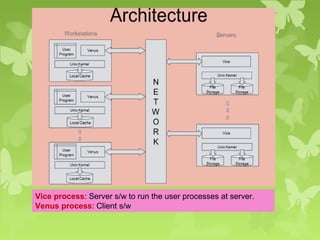
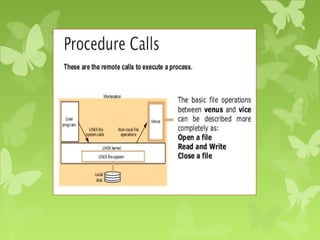
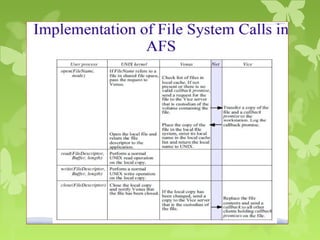
Vice process: Server s/w to run the user processes at server.
Venus process: Client s/w
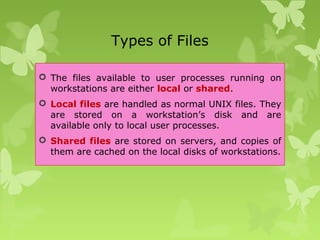
Types of Files
 The files available to user processes running on
workstations are either local or shared.
 Local files are handled as normal UNIX files. They
are stored on a workstation’s disk and are
available only to local user processes.
 Shared files are stored on servers, and copies of
them are cached on the local disks of workstations.
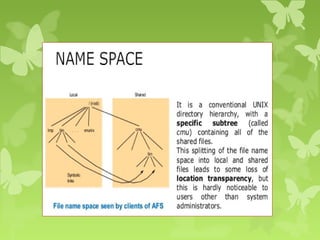
 Local files are used only for temporary files (/tmp)
and processes that are essential for workstation
startup.
 Other standard UNIX files (such as those normally
found in /bin, /lib and so on) are implemented as
symbolic links from local directories to files held in
the shared space.
 Users’ directories are in the shared space, enabling
users to access their files from any workstation
Cache consistency
 When Vice supplies a copy of a file to a Venus process it
also provides a callback promise.
 callback promise – a token issued by the Vice server
that is the custodian of the file, guaranteeing that it will
notify the Venus process when any other client modifies
the file.
 Callback have 2 states: valid and cancelled.
 When a server performs a request to update a file it
notifies all of the Venus processes to which it has issued
callback promises by sending a callback to each.
 When the Venus process receives a callback, it sets the
callback promise token for the relevant file to
cancelled.
 Whenever Venus handles an open on behalf of a client, it
checks the cache. If the required file is found in the
cache, then its token is checked. If its value is cancelled,
then a fresh copy of the file must be fetched from the
Vice server, but if the token is valid, then the cached
copy can be opened and used without reference to Vice.
What is File system?
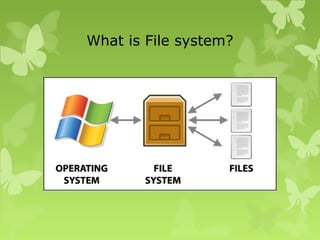
 A file system is a subsystem of operating system
that performs how data is stored, accessed and
managed.
 A file system is a hierarchical structure (file tree)
of files and directories.
 This file tree uses directories to organize data and
programs into groups, allowing the
management of several directories and files at
one time.
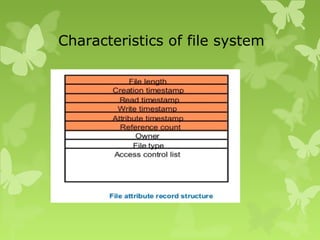
 Files contain both data and attributes.
Characteristics of file system
Distributed File system requirements
Related requirements in distributed file systems are:
1. Transparency
2. Concurrent file updates
3. File Replication
4. Hardware & Operating system Heterogeneity
5. Fault tolerance
6. Consistency
7. Security
8. Efficiency
Transparency
 Transparency defined as the concealment from the
user and application programmer of the separation
of components in a distributed system.
 Client programs should be unaware of the
distribution of files.
Forms of Transparencies in File
Services
1. Access transparency
2. Location transparency
3. Mobility transparency
4. Performance transparency
5. Scaling transparency
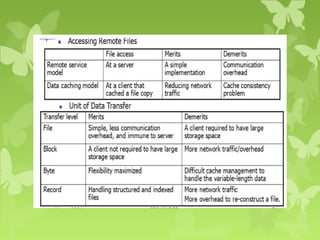
List of file accessing models
 The file accessing models of a distributed file system
mainly depends on two factors-the methods used for
accessing remote files and unit of data access:
 Accessing remote files
 Remote service model
 Data-caching model
 Unit of Data Transfer
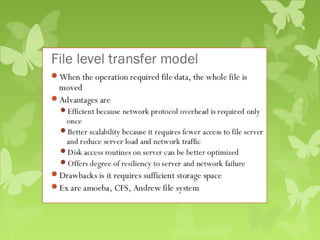
 File-level transfer model
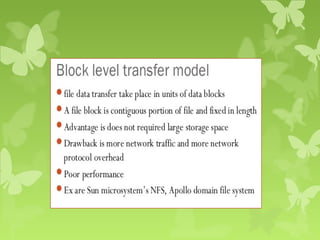
 Block-level transfer model
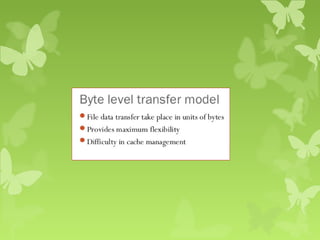
 Byte-level transfer model
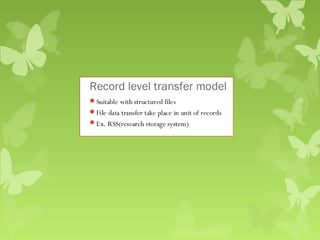
 Record-level transfer model
Remote service model
 Processing of client request is performed at
server’s node.
 Client request is delivered to server and server
machine performs on it and returns replies to
client.
 Request and replies transferred across network as
message.
 File server interface and communication protocol
must be designed carefully so as to minimize the
overhead of generating the messages.
 Every remote file access results in traffic
Data catching model
 Reduced the amount of network traffic by taking
advantage of locality feature.
 If requested data is not present locally then copied
it from server’s node to client node and catching
there.
 LRU is used to keep the cache size bounded
 Cache Consistency problem
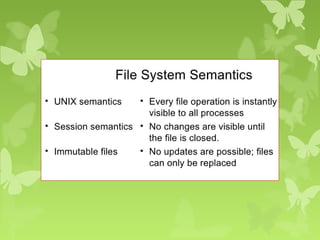
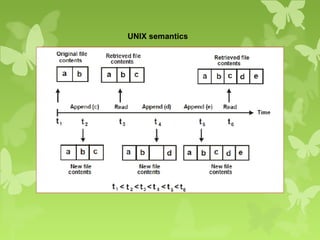
UNIX semantics
Session Semantics
 For this semantics, the following file access pattern
is assumed: A client opens a file, performs a series
of read/write operations on the file and finally
closes the file.
 A session is a series of file accesses made
between the open and close operations.
 Local changes to a file are not made permanent
until the file is closed. In the meantime, if another
user opens the file, she gets the original version.
 This approach is common in DFS’s.
Immutable shared-files semantics
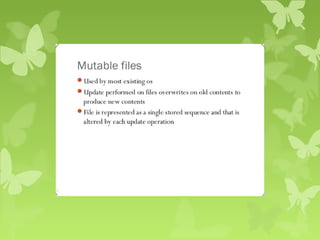
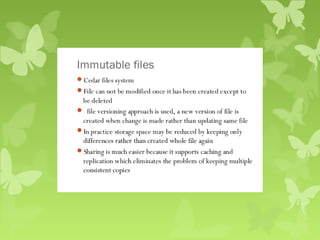
 This semantics is based on the use of the immutable file model.
 An immutable file cannot be modified once it has been created.
 The only operations on a file are, effectively, create, read, and
replace.
 According to this semantics, once the creator of the file declares it
to be sharable, the file is treated as immutable, so that it cannot
be modified anymore.
 Changes to the file are handled by creating a new updated version
of the file. Each version of the file is treated as an entirely new file.
 Therefore the semantics allows files to be shared only in the read-
only mode.
 If several users try to replace an existing file at the same time, one
is chosen: either the last to close, or non-deterministically.
Transaction-like semantics
 Transaction: a set of operations which must be
executed entirely, or not at all.
 Transactions will either commit or abort:
 Commit => successful completion (All)
 Abort => partial results are undone (Nothing)
 Transactions are delimited by two special
primitives:
Begin_transaction // or something similar
transaction operations
(read, write, open, close, etc.)
End_transaction
•
 If the transaction successfully reaches the end
statement, it “commits” and all changes become
permanent; otherwise it aborts.
Naming in Distributed Systems
What is naming in Distributed
systems?
 A name in a distributed system is a string of bits or
characters that refers to objects or entity and
subsequently use these names to refer to those objects.
 Example of entity? Hosts, printers, disks, files.
 A name is also called an identifier because it is used to
denote or identify an object.
 A name may also be thought of as a logical object that
identifies a physical object to which it is bound from
among a collection of physical objects. Therefore, the
correspondence between names and objects is the relation
of binding logical and physical objects for the purpose
of object identification.
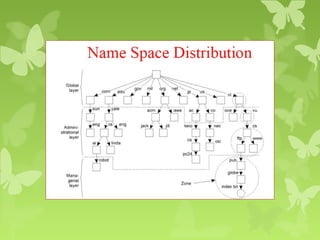
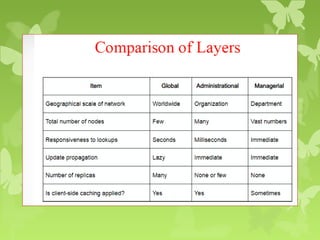
Name Space
 Name space map each address to a unique name
in two ways.
– Flat Name space
– Hierarchical Name Space.
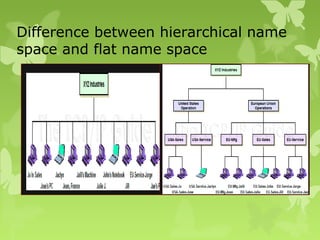
Difference between hierarchical name
space and flat name space
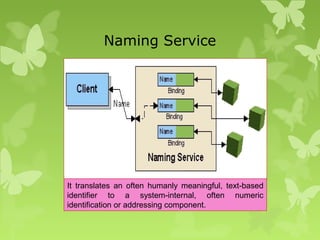
Naming Service
It translates an often humanly meaningful, text-based
identifier to a system-internal, often numeric
identification or addressing component.
Implementing Name Space
Naming service
A service that lets users to add/delete and
lookup names in large distributed systems
Examples
 COS (Common Object Services) Naming
 DNS (Domain Name System)
 LDAP (Lightweight Directory Access Protocol)
 NIS (Network Information System)
What is DNS?
The Domain Name Systems (DNS) is the phonebook of
the Internet. Humans access information online through
domain names, like nytimes.com or espn.com. Web
browsers interact through Internet Protocol (IP)
addresses. DNS translates domain names to
IP addresses so browsers can load Internet resources.
LDAP
Lightweight Directory Access Protocol
Understanding LDAP
 Lightweight Directory Access Protocol.
 LDAP is just a Open network protocol standard .
 designed to provide access to distributed
directories.
 using TCP/IP protocols.
 The phrase “write once read many times“
describes the best use of LDAP.
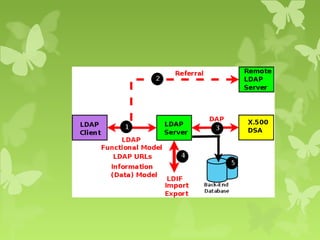
 Necessarily, it also defines and describes how data
is represented in the directory service (the Data
(Information Model).
 Finally, it defines how data is loaded (imported)
into and saved (exported) from a directory service.
 LDAP does not define how data is stored or
manipulated.
 LDAP is characterized as a write-once-read-many-
times service.
 That is to say, the type of data that would normally
be stored in an LDAP service would not be expected
to change on every access.
 To illustrate: LDAP would not be suitable for
maintaining banking transaction records since, by
their nature, they change on almost every access
(transaction).
 LDAP would, however, be eminently suitable for
maintaining details of the bank branches, hours of
opening, employees, and so on which change far
less frequently.
LDAP Directories are not good for
◦ Relational type data
◦ Data that is updated often
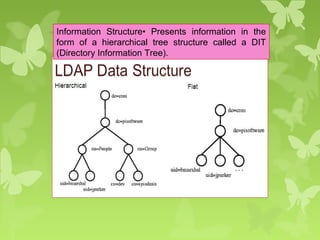
Information Structure• Presents information in the
form of a hierarchical tree structure called a DIT
(Directory Information Tree).

Peer to Peer services and File systems

  • 1.
    Distributed System Peer toPeer Services and File System M.Jagadeesh Assistant Professor Department of Information Technology MNMJEC Chennai
  • 2.
  • 3.
    What is aPeer-to-Peer (P2P) system? In P2P applications a node may act as both a client and a server
  • 4.
    What is aPeer-to-Peer (P2P) system?  “All nodes are equals”  Peer to peer is a type of architecture in which nodes are interconnected with each other and share resources with each other without the central controlling server.  Objective to balance network traffic and reduce the load on the primary host.  P2P system allows us to construct such a distributed system or a application in which all resources and data is contributed by the hosts over the network.  Their operation does not depend on the existence of any centrally administrated systems.  Bittorrent & Skype (VoIP)-examples of P2P applications which is used for digital content distribution.
  • 5.
    Characteristics of Peer-to-Peersystems  Although they may differ in the resources that they contribute, all the nodes in a peer-to-peer system have the same functional capabilities and responsibilities.  No Single point of failure.  Its correct operation does not depend on the existence of any centrally administered systems.  Better scalability.  The challenge of designing a P2P network - All the peers are connected to the internet, but how do they know which address each peer has, and how does a given peer make sure it is communicating with the correct peer?  A key issue for their efficient operation is the choice of an algorithm for the placement of data across many hosts and subsequent access to it in a manner that balances the workload.  Peer to-peer systems have many interesting technical aspects like decentralized control, self- organization, adaptation and scalability.
  • 6.
    In order toget the peers in the P2P network to communicate correctly, you therefore have to solve two problems:  Peer Identification  Peer Location  Identifying peers meaning being able to distinguish each peer from each other. Since millions of peers might be connected to the same P2P network, you need to be able to address each peer individually. This is done by assigning each peer a unique GUID (Globally Unique ID).  Locating peers means finding the peer with a specific GUID on the network. With potentially millions of peers in the P2P network, a peer cannot keep a fully up-to-date list of all peers in the network. Peers are joining and leaving the network all the time. If all peers have to know each other, imagine how many messages they would have to send to each other, to keep each others list of peers up to date. It would be pretty much impossible.  Instead of keeping a full list of all peers in the network, a peer keeps a routing table with a subset of the peers in the network.
  • 7.
    7 Example of CentralizedP2P Systems: Napster and its Legacy  Napster  Provided a means for users to share music files – primarily MP3s  Launched 1999 – several million users  Not fully peer-to-peer since it used central servers to maintain lists of connected systems and the files they provided, while actual transactions were conducted directly between machines  Proved feasibility of a service using hardware and data owned by ordinary Internet users
  • 8.
    Napster and itslegacy  Napster architecture included centralized indexes but users supplied the files, which were stored and accessed on their personnel systems.  Napster method of operation as follows in step by step. 1.File location Request 2.List of peers offering the files 3.File request 4.File delivered 5.Index update
  • 10.
    Napster and itslegacy  Napster used a (replicated) unified index of all available music files.  Object discovery and addressing is likely to become a bottleneck.  Music files are never updated, avoiding any need to make all the replicas of file consistent after updates.  No guarantees are require concerning the availability of individual files – if a music file is temporarily unavailable, it can be downloaded later when it available. This reduces the requirement for dependability of individual computers and their connections to the internet.
  • 11.
    Peer-to-Peer Middleware  PeerTo Peer Middleware  To provide mechanism to access data resources anywhere in network  Functional Requirements :  Peer clients need to locate and communicate with any available resource, even though resources may be widely distributed  Add and remove resources at will  Add and remove new hosts at will  Interface to application programmers should be simple and independent of types of distributed resources
  • 12.
    Non-functional requirement  GlobalScalability  Peer-to-peer middleware must be designed to support applications that access millions of objects on hundred of thousands of hosts.  Load Balancing  The performance of any system designed to exploit a large number of computers depends upon the balanced distribution of workload across them.  For the systems we are considering, this will be achieved by a random placement of resources together with the use of replicas of heavily used resources.  Optimization for local interactions between neighbouring peers  The middleware should aim to place resources close to the nodes that access them the most.
  • 13.
    Non-functional requirement  Accommodatingto highly dynamic host availability  As hosts join the system, they must integrated into the system and the load must be re-distributed to exploit their new resources. When they leave the system, the system must detect their departure and re-distribute their load and resources.  Security of data  Trust must be built up by the use of authentication and encryption mechanisms to ensure integrity and privacy of information.  Anonymity, deniability, and resistance to censorship (in some applications)  Host that hold data should be able to deny responsibility for holding or supplying it.
  • 14.
  • 17.
    SKYPE AS OVERLAYNETWORK  Skype is an application that provides video chat and voice call services.  Skype is available for Microsoft Windows, Macintosh, or Linux, as well as Android, Blackberry, and both Apple and Windows smartphones and tablets.  Skype allows users to communicate over the Internet by voice using a microphone, by video by using a webcam, as well as with instant messaging.  Skype-to-Skype calls to other users are free of charge
  • 18.
    SKYPE ARCHITECTURE  Skypeis an overlay peer-to-peer network.  There are two types of nodes in this overlay network, ordinary hosts and super nodes (SN).  An ordinary host is a Skype application that can be used to place voice calls and send text messages.  A super node is an ordinary host’s end-point on the Skype network. Any node with a public IP address having sufficient CPU, memory, and network bandwidth is a candidate to become a super node.
  • 19.
    Skype Peer-to-Peer InternetTelephony Protocol
  • 20.
     An ordinaryhost must connect to a super node and must register itself with the Skype login server for a successful login.  The Skype login server is an important entity in the Skype network. User names and passwords are stored at the login server.  User authentication at login is also done at this server.  This server also ensures that Skype login names are unique across the Skype name space.
  • 21.
    PROTOCOL  Skype usesa proprietary Internet telephony (VoIP) network called the Skype protocol.  The protocol has not been made publicly available by Skype, and official applications using the protocol are closed-source.  The main difference between Skype and standard VoIP clients is that Skype operates on a peer-to-peer model , rather than the more usual client–server model.
  • 22.
    Routing Overlays  Arouting overlay is a distributed algorithm for a middleware layer responsible for routing requests from any client to a host that holds the object to which the request is addressed.  Responsible for locating nodes and objects  Implements a routing mechanism in the application layer  Ensures that any node can access any object by routing each request thru a sequence of nodes  Exploits knowledge at each node to locate the destination
  • 23.
     Peer-to-peer systemsusually store multiple replicas of objects to ensure availability.  In that case, the routing overlay maintains knowledge of the location of all the available replicas and delivers requests to the nearest ‘live’ node (i.e. one that has not failed) that has a copy of the relevant object.  GUIDs (Globally Unique Identifiers) used to identify nodes and objects. These are also known as opaque identifiers, since they reveal nothing about the locations of the objects to which they refer.  Assigning GUIDs- Peers are assigned a GUID when they join an existing network.
  • 24.
    The main taskof a routing overlay is the following: o Routing of requests to objects: A client wishing to invoke an operation on an object submits a request including the object’s GUID to the routing overlay, which routes the request to a node at which a replica of the object resides.
  • 25.
    The routing overlaymust also perform some other tasks: 1- Insertion of objects: A node wishing to make a new object available to a peer-to- peer service computes a GUID for the object and announces it to the routing overlay, which then ensures that the object is reachable by all other clients. 2- Deletion of objects: When clients request the removal of objects from the service the routing overlay must make them unavailable. 3- Node addition and removal: Nodes (i.e., computers) may join and leave the service. When a node joins the service, the routing overlay arranges for it to assume some of the responsibilities of other nodes when a node leaves.
  • 26.
    2 types ofoverlays 1. Unstructured 2. Structured Unstructured systems { do not impose any structure on the overlay networks or loosely structured}  E.g., Napster, Gnutella, Freenet, FastTrack, eDonkey2000, BitTorrent  Support complex search based on file metadata  Low search efficiency, especially for unpopular files Structured systems { impose particular structures on the overlay networks}  E.g., Distributed Hash Tables (DHTs)  The topology of the peer network is tightly controlled  Any file can be located in a small number of overlay hops  Structured overlays use a number of different geometries (rings, trees, hypercubes, tori, XOR, . . . )
  • 27.
    Types of RoutingOverlays  DHT – Distributed Hash Tables  put(GUID, data), remove(GUID) , value = get(GUID)  DOLR – Distributed Object Location and Routing  Publish(GUID), unpublish(GUID)  DOLR is a layer over the DHT that maps GUIDs and address of nodes
  • 28.
  • 29.
    What is aDHT Hashing is a technique that is used to uniquely identify a specific object from a group of similar objects. A distributed hash table (DHT) is a class of decentralised distributed system that has (key, value) pairs and any participating node can efficiently retrieve the value associated with a given key.
  • 30.
    Pastry  Peer-to-peer Internetapplications have recently been popularized through file sharing applications like Napster.  Peer to-peer systems have many interesting technical aspects like decentralized control, self-organization, adaptation and scalability.  One of the key problems in large-scale peer-to-peer applications is to provide efficient algorithms for object location and routing within the network.  Here I present Pastry Routing algorithm.
  • 31.
    What is Pastry? Pastry, a Routing algorithm define how a target node is located in the overlay network of nodes connected to the Internet.  used to support a variety of peer-to-peer applications, including global data storage, data sharing, group communication.  Several application have been built on top of Pastry to day (publish/subscribe system called SCRIBE)  Decentralized, structured P2P overlay in which objects can be efficiently located and lookup queries efficiently routed
  • 32.
     Uses aring based overlay network .  Node has a unique→ 128 bit nodeId.  The nodes are conceptually organized as a ring, arranged in ascending order of nodeIds.  The nodeId is used to indicate a node’s position in a circular nodeId space, which ranges from 0 to 2 128 -1  The nodeId is assigned randomly when a node joins the system. It is assumed that nodeIds are generated such that the resulting set of nodeIds is uniformly distributed in the 128-bit nodeId space.
  • 33.
    Routing Idea  Thenode first checks to find if the key is within the leaf set. If so, it forwards the messages to the closest node (by nodeId) in the leaf set.  Otherwise, Pastry forwards the message to a node with one more matching digit in the common prefix.  In the rare case, when we are not able to find a node that matches the first two criteria, we forward the request to any node that is closer to the key than the current nodeId.
  • 35.
     Each nodein Pastry maintains 3 tables:  Routing table  Leaf set  Neighborhood set  Routing table contains , where N is the total number of Pastry nodes.  Leaf set is a set of L nodes with numerically closest IDs (L/2 larger and L/2 smaller than the ID of the current node)  Neighborhood set maintains information about nodes that are close together in terms of network locality
  • 36.
  • 39.
  • 40.
    DFS  Stands for"Distributed File System“.  A Distributed File System is a file system that may have files on more than one machine.  A distributed file system is a client/server-based application that allows clients to access and process data stored on the server as if it were on their own computer.  Even when files are stored on multiple computers, DFS can organize and display the files as if they are stored on one computer.  Users can also share files by copying them to a directory in the DFS and can update files by editing existing documents.  Since more than one client may access the same data simultaneously, the server must have a mechanism in place (such as maintaining information about the times of access) to organize updates so that the client always receives the most current version of data and that data conflicts do not arise.
  • 41.
    File Service Architecture An architecture that offers a clear separation of the main concerns in providing access to files is obtained by structuring the file service as three components:  A flat file service  A directory service  A client module.
  • 42.
  • 43.
    Flat file service Concerned with the implementation of operations on the contents of file.  Unique File Identifiers (UFIDs) are used to refer files in all requests for flat file service operations.
  • 44.
    Flat file serviceoperations 1. Read 2. Write 3. Create 4. Delete 5. GetAttributes 6. SetAttributes
  • 45.
    Read(FileId, i, n): Reads a sequence of up to n items from a file starting at item i. Write(FileId, i, Data) : Write a sequence of Data to a file, starting at item i. Create() : Creates a new file of length0 and delivers a UFID for it. Delete(FileId) : Removes the file from the file store. GetAttributes(FileId) : Returns the file attributes for the file. SetAttributes(FileId, Attr) : Sets the file attributes.
  • 46.
    Directory service  Providesmapping between text names for the files and their UFIDs.  Clients may obtain the UFID of a file by quoting its text name to directory service.  Directory service supports functions to add new files to directories.
  • 47.
    Directory service operations 1.Lookup 2. AddName 3. UnName 4. GetNames
  • 48.
    Lookup(Dir, Name) : Locatesthe text name in the directory and returns the relevant UFID. •If Name is not in the directory, throws an exception. AddName(Dir, Name, File) : If Name is not in the directory, adds(Name,File) to the directory and updates the file’s attribute record. •If Name is already in the directory: throws an exception. UnName(Dir, Name) : If Name is in the directory, the entry containing Name is removed from the directory. •If Name is not in the directory: throws an exception. GetNames(Dir, Pattern): Returns all the text names in the directory that match the regular expression Pattern.
  • 49.
    Client module  Itruns on each computer and provides integrated service (flat file and directory) as a single API to application programs.  It holds information about the network locations of flat-file and directory server processes.
  • 50.
    Access control In distributedimplementations, access rights checks have to be performed at the server .
  • 51.
    Hierarchic file system Ahierarchic file system consists of a number of directories arranged in a tree structure.
  • 52.
    File Group A filegroup is a collection of files that can be located on any server.
  • 53.
    Andrew file system(AFS) An Andrew file system (AFS) is a location-independent file system that uses a local cache to reduce the workload and increase the performance of a distributed computing environment. A first request for data to a server from a workstation is satisfied by the server and placed in a local cache. A second request for the same data is satisfied from the local cache. Intention is to support information sharing on a large scale by minimizing client-server communication. Achieved by transferring whole files between server and client computers and caching them at clients until the servers receives a more up-to-date version.
  • 54.
    Problem of sharingfiles  Caching files in the client side cache reduces computation at the server side, thus enhancing performance. However, the problem of sharing files arises. To solve this, all clients with copies of a file being modified by another client are not informed the moment the client makes changes. That client thus updates its copy, and the changes are reflected in the distributed file system only after the client closes the file.
  • 55.
    Design characteristics  Whole-fileserving: entire contents of directories and files transferred from server to client  Whole file caching: when file transferred to client it will be stored on that client’s local disk
  • 56.
    Vice process: Servers/w to run the user processes at server. Venus process: Client s/w
  • 57.
    Types of Files The files available to user processes running on workstations are either local or shared.  Local files are handled as normal UNIX files. They are stored on a workstation’s disk and are available only to local user processes.  Shared files are stored on servers, and copies of them are cached on the local disks of workstations.
  • 59.
     Local filesare used only for temporary files (/tmp) and processes that are essential for workstation startup.  Other standard UNIX files (such as those normally found in /bin, /lib and so on) are implemented as symbolic links from local directories to files held in the shared space.  Users’ directories are in the shared space, enabling users to access their files from any workstation
  • 62.
    Cache consistency  WhenVice supplies a copy of a file to a Venus process it also provides a callback promise.  callback promise – a token issued by the Vice server that is the custodian of the file, guaranteeing that it will notify the Venus process when any other client modifies the file.  Callback have 2 states: valid and cancelled.
  • 63.
     When aserver performs a request to update a file it notifies all of the Venus processes to which it has issued callback promises by sending a callback to each.  When the Venus process receives a callback, it sets the callback promise token for the relevant file to cancelled.  Whenever Venus handles an open on behalf of a client, it checks the cache. If the required file is found in the cache, then its token is checked. If its value is cancelled, then a fresh copy of the file must be fetched from the Vice server, but if the token is valid, then the cached copy can be opened and used without reference to Vice.
  • 64.
    What is Filesystem?
  • 65.
    What is Filesystem?  A file system is a subsystem of operating system that performs how data is stored, accessed and managed.  A file system is a hierarchical structure (file tree) of files and directories.  This file tree uses directories to organize data and programs into groups, allowing the management of several directories and files at one time.  Files contain both data and attributes.
  • 66.
  • 67.
    Distributed File systemrequirements Related requirements in distributed file systems are: 1. Transparency 2. Concurrent file updates 3. File Replication 4. Hardware & Operating system Heterogeneity 5. Fault tolerance 6. Consistency 7. Security 8. Efficiency
  • 68.
    Transparency  Transparency definedas the concealment from the user and application programmer of the separation of components in a distributed system.  Client programs should be unaware of the distribution of files.
  • 69.
    Forms of Transparenciesin File Services 1. Access transparency 2. Location transparency 3. Mobility transparency 4. Performance transparency 5. Scaling transparency
  • 77.
    List of fileaccessing models  The file accessing models of a distributed file system mainly depends on two factors-the methods used for accessing remote files and unit of data access:  Accessing remote files  Remote service model  Data-caching model  Unit of Data Transfer  File-level transfer model  Block-level transfer model  Byte-level transfer model  Record-level transfer model
  • 78.
    Remote service model Processing of client request is performed at server’s node.  Client request is delivered to server and server machine performs on it and returns replies to client.  Request and replies transferred across network as message.  File server interface and communication protocol must be designed carefully so as to minimize the overhead of generating the messages.  Every remote file access results in traffic
  • 79.
    Data catching model Reduced the amount of network traffic by taking advantage of locality feature.  If requested data is not present locally then copied it from server’s node to client node and catching there.  LRU is used to keep the cache size bounded  Cache Consistency problem
  • 86.
  • 87.
    Session Semantics  Forthis semantics, the following file access pattern is assumed: A client opens a file, performs a series of read/write operations on the file and finally closes the file.  A session is a series of file accesses made between the open and close operations.  Local changes to a file are not made permanent until the file is closed. In the meantime, if another user opens the file, she gets the original version.  This approach is common in DFS’s.
  • 88.
    Immutable shared-files semantics This semantics is based on the use of the immutable file model.  An immutable file cannot be modified once it has been created.  The only operations on a file are, effectively, create, read, and replace.  According to this semantics, once the creator of the file declares it to be sharable, the file is treated as immutable, so that it cannot be modified anymore.  Changes to the file are handled by creating a new updated version of the file. Each version of the file is treated as an entirely new file.  Therefore the semantics allows files to be shared only in the read- only mode.  If several users try to replace an existing file at the same time, one is chosen: either the last to close, or non-deterministically.
  • 89.
    Transaction-like semantics  Transaction:a set of operations which must be executed entirely, or not at all.  Transactions will either commit or abort:  Commit => successful completion (All)  Abort => partial results are undone (Nothing)
  • 90.
     Transactions aredelimited by two special primitives: Begin_transaction // or something similar transaction operations (read, write, open, close, etc.) End_transaction •  If the transaction successfully reaches the end statement, it “commits” and all changes become permanent; otherwise it aborts.
  • 91.
  • 92.
    What is namingin Distributed systems?  A name in a distributed system is a string of bits or characters that refers to objects or entity and subsequently use these names to refer to those objects.  Example of entity? Hosts, printers, disks, files.  A name is also called an identifier because it is used to denote or identify an object.  A name may also be thought of as a logical object that identifies a physical object to which it is bound from among a collection of physical objects. Therefore, the correspondence between names and objects is the relation of binding logical and physical objects for the purpose of object identification.
  • 93.
    Name Space  Namespace map each address to a unique name in two ways. – Flat Name space – Hierarchical Name Space.
  • 94.
    Difference between hierarchicalname space and flat name space
  • 95.
    Naming Service It translatesan often humanly meaningful, text-based identifier to a system-internal, often numeric identification or addressing component.
  • 96.
    Implementing Name Space Namingservice A service that lets users to add/delete and lookup names in large distributed systems Examples  COS (Common Object Services) Naming  DNS (Domain Name System)  LDAP (Lightweight Directory Access Protocol)  NIS (Network Information System)
  • 100.
    What is DNS? TheDomain Name Systems (DNS) is the phonebook of the Internet. Humans access information online through domain names, like nytimes.com or espn.com. Web browsers interact through Internet Protocol (IP) addresses. DNS translates domain names to IP addresses so browsers can load Internet resources.
  • 101.
  • 102.
    Understanding LDAP  LightweightDirectory Access Protocol.  LDAP is just a Open network protocol standard .  designed to provide access to distributed directories.  using TCP/IP protocols.  The phrase “write once read many times“ describes the best use of LDAP.
  • 103.
     Necessarily, italso defines and describes how data is represented in the directory service (the Data (Information Model).  Finally, it defines how data is loaded (imported) into and saved (exported) from a directory service.  LDAP does not define how data is stored or manipulated.
  • 105.
     LDAP ischaracterized as a write-once-read-many- times service.  That is to say, the type of data that would normally be stored in an LDAP service would not be expected to change on every access.  To illustrate: LDAP would not be suitable for maintaining banking transaction records since, by their nature, they change on almost every access (transaction).  LDAP would, however, be eminently suitable for maintaining details of the bank branches, hours of opening, employees, and so on which change far less frequently.
  • 106.
    LDAP Directories arenot good for ◦ Relational type data ◦ Data that is updated often
  • 107.
    Information Structure• Presentsinformation in the form of a hierarchical tree structure called a DIT (Directory Information Tree).