Chapter 13 Behind the Scenes:  The Internet: How it Works Source: http://www.danscartoons.com
Management of the Internet Who owns the Internet? Individuals Universities Government agencies Private companies Who manages the Internet? Nonprofit organizations User groups Who pays for the Internet? U.S. taxpayers Businesses Universities Other countries NB
Internet Networking A network of networks Worldwide network of  computer systems Protocol Set of rules for  communicating All computers connected to the Internet use common protocols so they can understand one another NB
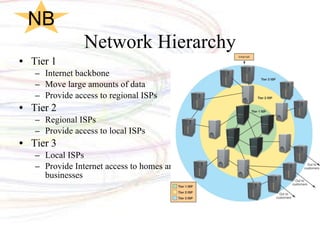
Network Hierarchy Tier 1 Internet backbone Move large amounts of data Provide access to regional ISPs Tier 2 Regional ISPs Provide access to local ISPs Tier 3 Local ISPs Provide Internet access to homes and businesses NB
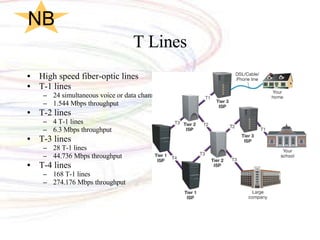
T Lines High speed fiber-optic lines T-1 lines 24 simultaneous voice or data channels 1.544 Mbps throughput T-2 lines 4 T-1 lines 6.3 Mbps throughput T-3 lines 28 T-1 lines 44.736 Mbps throughput T-4 lines 168 T-1 lines 274.176 Mbps throughput NB
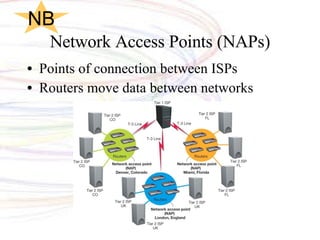
Network Access Points (NAPs) Points of connection between ISPs Routers move data between networks NB
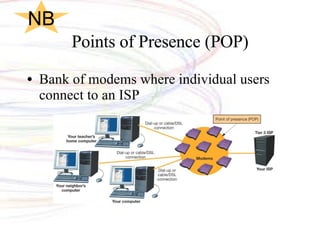
Points of Presence (POP) Bank of modems where individual users connect to an ISP NB
The Network Model of the Internet Internet communications follows the client/server network model Clients request services Servers respond to requests Types of servers include Web servers Host Web pages Commerce servers Enable the purchase of goods and services over the Internet File servers Provide remote storage space for files that users  can download See page 578 and Chapter 3. NB
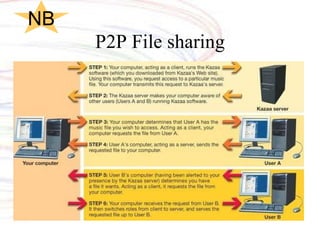
P2P File sharing NB
Data Transmission and Protocols Computer protocols are rules for electronic information exchange Open system protocols Any computer can communicate with other computers using the same protocols NB
TCP/IP Transmission Control Protocol (TCP) Prepares data for transmission Provides error-checking Enables resending lost data Internet Protocol (IP) Responsible for sending data from one computer to another NB
IP Addresses Unique number that identifies devices connected to the Internet Typical IP address 197.24.72.157 Static addressing means: Address never changes Dynamic address means:  Temporary address NB
Domain Names Name that takes the place of an IP address Sample domain name www. mywebsite .com Top-level domains (TLD) Portion of the domain name that follows the dot Sample top-level domain names .com ,  .org ,  .edu , and  .net Second-level domains Unique name within a top-level domain Sample second-level domain names Yahoo.com ,  Google.com , and  Unesco.org
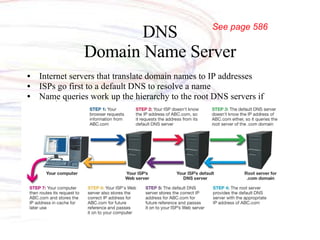
DNS Domain Name Server Internet servers that translate domain names to IP addresses ISPs go first to a default DNS to resolve a name Name queries work up the hierarchy to the root DNS servers if required See page 586
Other Protocols File Transfer Protocol (FTP) File-sharing protocol Files are downloaded and uploaded using  the Internet Telnet Protocol for connecting to a remote computer and a TCP/IP service Enables a client computer to control a server computer NB
HTTP and SSL Hypertext Transfer Protocol Protocol for transferring hypertext documents Hypertext documents are linked to other documents (through hyperlinks)  Secure Socket Layer Security protocols that protect sensitive information Encrypts data S-HTTP is used for individual messages NB
HTML/XHTML Hypertext Markup Language (HTML) Format for creating Web pages Extensible Hypertext Markup Language (XHTML) Successor to HTML Has much more stringent rules than HTML regarding tagging HTML/XHTML  are not programming languages but sets of rules for marking up blocks of text so that a browser knows how to display them  NB
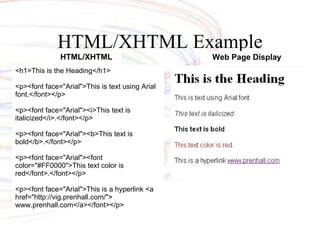
HTML/XHTML Example <h1>This is the Heading</h1> <p><font face=&quot;Arial&quot;>This is text using Arial font.</font></p> <p><font face=&quot;Arial&quot;><i>This text is italicized</i>.</font></p> <p><font face=&quot;Arial&quot;><b>This text is bold</b>.</font></p> <p><font face=&quot;Arial&quot;><font color=&quot;#FF0000&quot;>This text color is red</font>.</font></p> <p><font face=&quot;Arial&quot;>This is a hyperlink <a href=&quot;http://vig.prenhall.com/&quot;> www.prenhall.com</a></font></p> HTML/XHTML Web Page Display
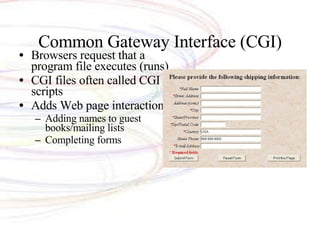
Common Gateway Interface (CGI) Browsers request that a program file executes (runs) CGI files often called CGI scripts Adds Web page interaction Adding names to guest books/mailing lists Completing forms
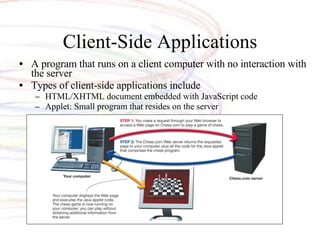
Client-Side Applications A program that runs on a client computer with no interaction with the server Types of client-side applications include HTML/XHTML document embedded with JavaScript code Applet: Small program that resides on the server
Extensible Markup Language (XML) Designed for information exchange Tools used to create your own markup language Used in e-commerce transactions NB
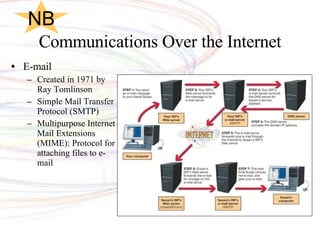
Communications Over the Internet E-mail Created in 1971 by Ray Tomlinson Simple Mail Transfer Protocol (SMTP) Multipurpose Internet Mail Extensions (MIME): Protocol for attaching files to e-mail NB
Communications over the Internet E-mail security Encryption  Private-key encryption Public-key encryption Secure data transmission software SafeMessage  NB
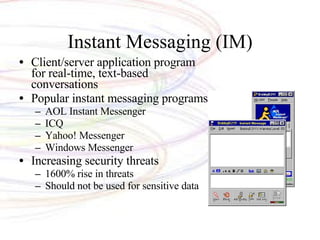
Instant Messaging (IM) Client/server application program for real-time, text-based conversations Popular instant messaging programs AOL Instant Messenger ICQ Yahoo! Messenger Windows Messenger Increasing security threats 1600% rise in threats Should not be used for sensitive data

Chapter 13

  • 1.
    Chapter 13 Behindthe Scenes: The Internet: How it Works Source: http://www.danscartoons.com
  • 2.
    Management of theInternet Who owns the Internet? Individuals Universities Government agencies Private companies Who manages the Internet? Nonprofit organizations User groups Who pays for the Internet? U.S. taxpayers Businesses Universities Other countries NB
  • 3.
    Internet Networking Anetwork of networks Worldwide network of computer systems Protocol Set of rules for communicating All computers connected to the Internet use common protocols so they can understand one another NB
  • 4.
    Network Hierarchy Tier1 Internet backbone Move large amounts of data Provide access to regional ISPs Tier 2 Regional ISPs Provide access to local ISPs Tier 3 Local ISPs Provide Internet access to homes and businesses NB
  • 5.
    T Lines Highspeed fiber-optic lines T-1 lines 24 simultaneous voice or data channels 1.544 Mbps throughput T-2 lines 4 T-1 lines 6.3 Mbps throughput T-3 lines 28 T-1 lines 44.736 Mbps throughput T-4 lines 168 T-1 lines 274.176 Mbps throughput NB
  • 6.
    Network Access Points(NAPs) Points of connection between ISPs Routers move data between networks NB
  • 7.
    Points of Presence(POP) Bank of modems where individual users connect to an ISP NB
  • 8.
    The Network Modelof the Internet Internet communications follows the client/server network model Clients request services Servers respond to requests Types of servers include Web servers Host Web pages Commerce servers Enable the purchase of goods and services over the Internet File servers Provide remote storage space for files that users can download See page 578 and Chapter 3. NB
  • 9.
  • 10.
    Data Transmission andProtocols Computer protocols are rules for electronic information exchange Open system protocols Any computer can communicate with other computers using the same protocols NB
  • 11.
    TCP/IP Transmission ControlProtocol (TCP) Prepares data for transmission Provides error-checking Enables resending lost data Internet Protocol (IP) Responsible for sending data from one computer to another NB
  • 12.
    IP Addresses Uniquenumber that identifies devices connected to the Internet Typical IP address 197.24.72.157 Static addressing means: Address never changes Dynamic address means: Temporary address NB
  • 13.
    Domain Names Namethat takes the place of an IP address Sample domain name www. mywebsite .com Top-level domains (TLD) Portion of the domain name that follows the dot Sample top-level domain names .com , .org , .edu , and .net Second-level domains Unique name within a top-level domain Sample second-level domain names Yahoo.com , Google.com , and Unesco.org
  • 14.
    DNS Domain NameServer Internet servers that translate domain names to IP addresses ISPs go first to a default DNS to resolve a name Name queries work up the hierarchy to the root DNS servers if required See page 586
  • 15.
    Other Protocols FileTransfer Protocol (FTP) File-sharing protocol Files are downloaded and uploaded using the Internet Telnet Protocol for connecting to a remote computer and a TCP/IP service Enables a client computer to control a server computer NB
  • 16.
    HTTP and SSLHypertext Transfer Protocol Protocol for transferring hypertext documents Hypertext documents are linked to other documents (through hyperlinks) Secure Socket Layer Security protocols that protect sensitive information Encrypts data S-HTTP is used for individual messages NB
  • 17.
    HTML/XHTML Hypertext MarkupLanguage (HTML) Format for creating Web pages Extensible Hypertext Markup Language (XHTML) Successor to HTML Has much more stringent rules than HTML regarding tagging HTML/XHTML are not programming languages but sets of rules for marking up blocks of text so that a browser knows how to display them NB
  • 18.
    HTML/XHTML Example <h1>Thisis the Heading</h1> <p><font face=&quot;Arial&quot;>This is text using Arial font.</font></p> <p><font face=&quot;Arial&quot;><i>This text is italicized</i>.</font></p> <p><font face=&quot;Arial&quot;><b>This text is bold</b>.</font></p> <p><font face=&quot;Arial&quot;><font color=&quot;#FF0000&quot;>This text color is red</font>.</font></p> <p><font face=&quot;Arial&quot;>This is a hyperlink <a href=&quot;http://vig.prenhall.com/&quot;> www.prenhall.com</a></font></p> HTML/XHTML Web Page Display
  • 19.
    Common Gateway Interface(CGI) Browsers request that a program file executes (runs) CGI files often called CGI scripts Adds Web page interaction Adding names to guest books/mailing lists Completing forms
  • 20.
    Client-Side Applications Aprogram that runs on a client computer with no interaction with the server Types of client-side applications include HTML/XHTML document embedded with JavaScript code Applet: Small program that resides on the server
  • 21.
    Extensible Markup Language(XML) Designed for information exchange Tools used to create your own markup language Used in e-commerce transactions NB
  • 22.
    Communications Over theInternet E-mail Created in 1971 by Ray Tomlinson Simple Mail Transfer Protocol (SMTP) Multipurpose Internet Mail Extensions (MIME): Protocol for attaching files to e-mail NB
  • 23.
    Communications over theInternet E-mail security Encryption Private-key encryption Public-key encryption Secure data transmission software SafeMessage NB
  • 24.
    Instant Messaging (IM)Client/server application program for real-time, text-based conversations Popular instant messaging programs AOL Instant Messenger ICQ Yahoo! Messenger Windows Messenger Increasing security threats 1600% rise in threats Should not be used for sensitive data

Editor's Notes

  • #2 This chapter takes you behind the scenes of the Internet. We look at how the Internet works and the various standards it follows. Along the way, we go behind the scenes of some Internet communication features, such as e-mail and instant messaging services, and discuss just how safe these features are and what you can do to make your communications even more secure.