Chapter 11 Behind the Scenes:  Databases and Information Systems Source: http://www.danscartoons.com
Databases  Electronic collections of related data Help us organize data Turn data into information
Advantages of Using Databases Store and retrieve large quantities of information Enable information sharing Provide data centralization Promote data integrity Allow for flexible use of data
Database Terminology Field Category of information displayed in columns Each field has a field name Field Name
Database Terminology Data types Text Numeric Computational Date Memo Object Hyperlink
Database Terminology Record A group of related fields Record
Database Terminology Table A group of related records Table
Database Terminology Primary key A field value unique to a record Primary Key
Database Types Relational databases Organize data in a table Link tables to each other through their primary keys Object-oriented databases Stores data in objects Handles unstructured data Multidimensional databases Stores data in multiple dimensions Can easily be customized Process data much faster
Database Management Systems (DBMS) Application software designed to capture and analyze data Four main operations of a DBMS are: Creating databases and entering data Viewing and sorting data Extracting data Outputting data
1. Creating Databases and  Entering Data Create field names: Identify each type of data Data dictionary
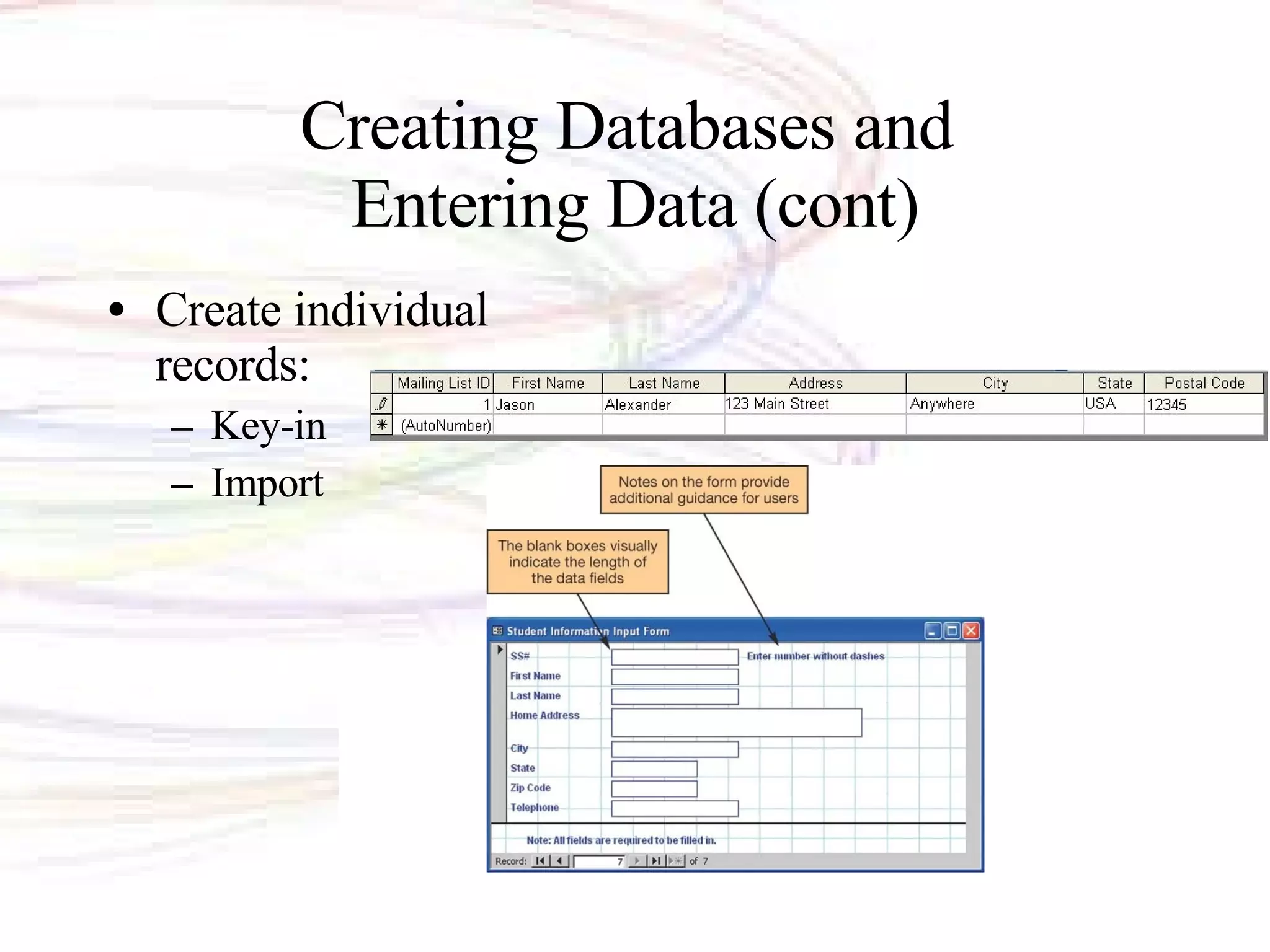
Creating Databases and  Entering Data (cont) Create individual records: Key-in Import
Data Validation Validation  Process of ensuring data entered into the database is correct (or at least reasonable) and complete Validation rules Range check Completeness check Consistency check Alphabetic/numeric checks
2. Viewing and Sorting Data Browse through records Sort records by field name Before sort After sort
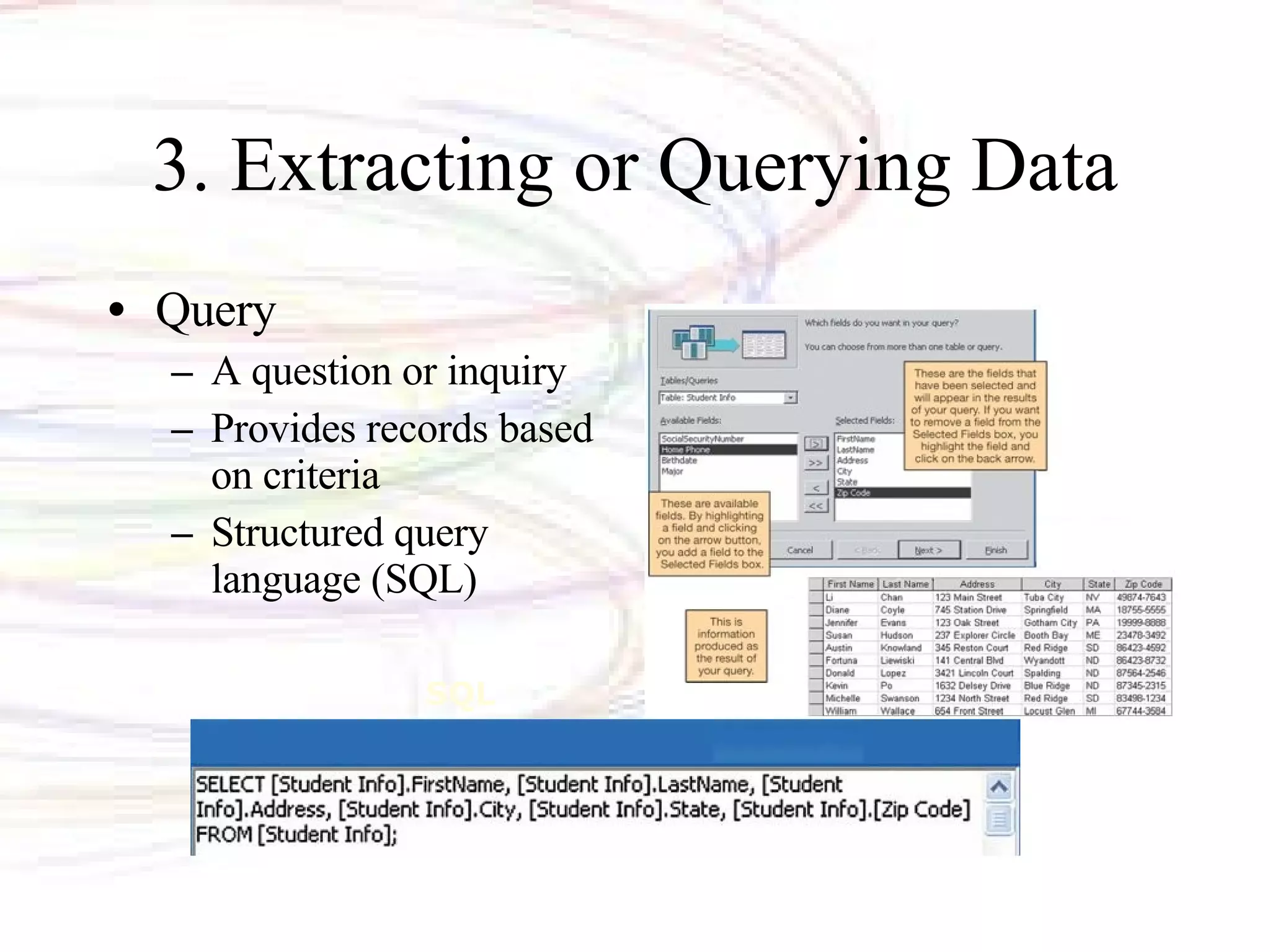
3. Extracting or Querying Data Query  A question or inquiry Provides records based on criteria Structured query language (SQL) SQL
4. Outputting Data Reports: Printed Summary data reports Export data
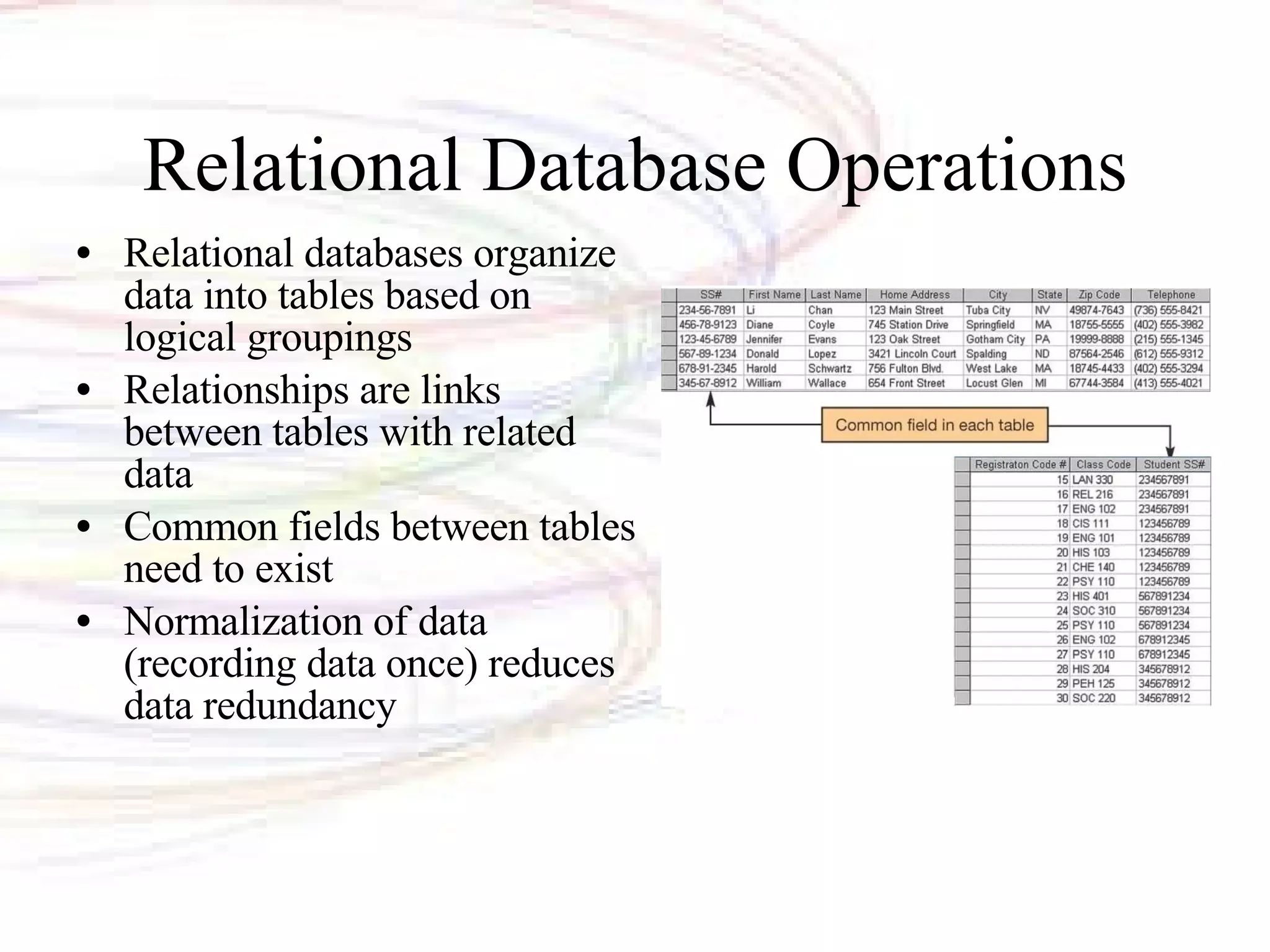
Relational Database Operations Relational databases organize data into tables based on logical groupings Relationships are links between tables with related data Common fields between tables need to exist Normalization of data (recording data once) reduces data redundancy
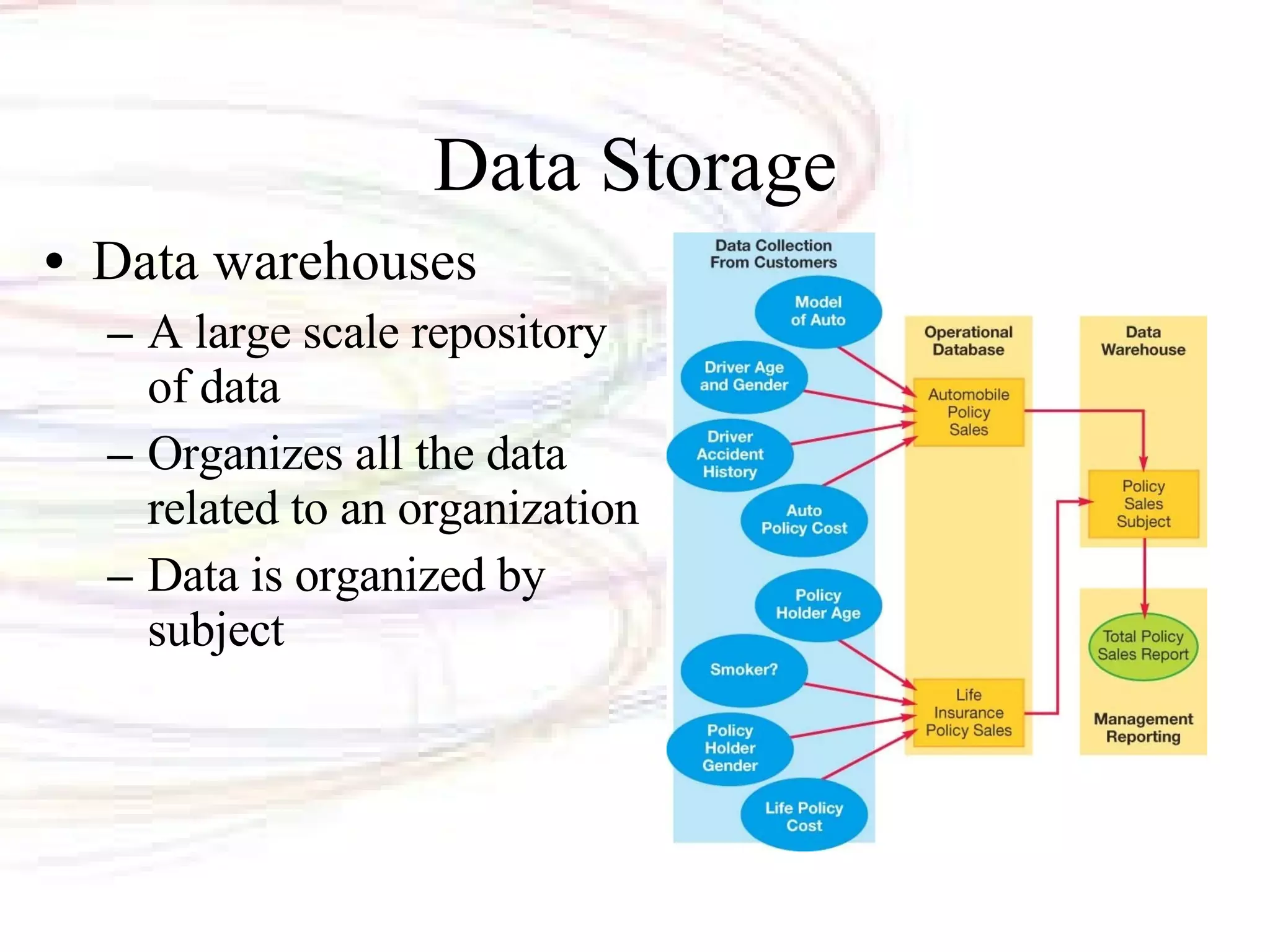
Data Storage Data warehouses A large scale repository of data Organizes all the data related to an organization Data is organized by subject
Source data Internal  sources Company databases, etc. External  sources  Suppliers, vendors, etc. Customers or Web site visitors  Clickstream data Populating Data Warehouses
Data staging Extract data from source Reformat the data Store the data Software programs/procedures created to extract the data and to reformat it for storage Data Staging
Small slices of data Data of a single department Data Marts
Data Warehouse
Managing Data:  Information Systems Information systems Software-based solutions used to gather and analyze information Functions performed by information systems include Acquiring data Processing data into information Storing data Providing output options
Information Systems Categories Office support Transaction processing Management  Decision support
Office Support Systems (OSS) Assist employees in day-to-day tasks Improve communications Microsoft Office
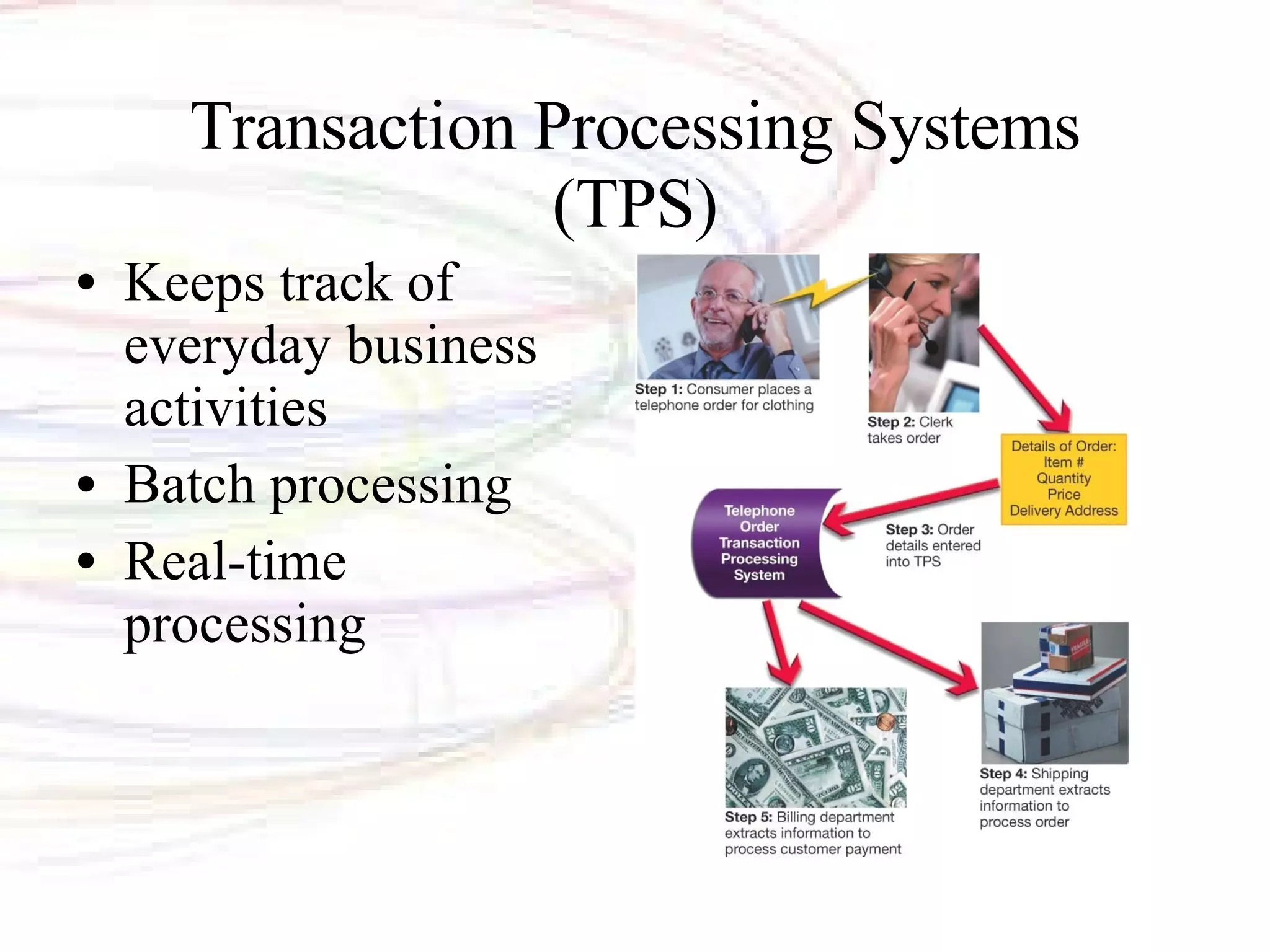
Transaction Processing Systems (TPS) Keeps track of everyday business activities Batch processing Real-time processing
Management Information Systems (MIS) Provides timely and accurate information for managers to make business decisions Detail report: Transactions that occur during a period of time Summary report: Consolidate detailed data Exception report: Show unusual conditions
Decision Support Systems (DSS) Help managers develop solutions for specific problems
Data Mining Process by which data are analyzed and investigated Objective is to spot patterns or trends within the data
Data Mining Methods Classification Define data classes Estimation Assign a value to data Affinity grouping or association rules Determine which data goes together Clustering Organize data into subgroups Description and visualization Provides a clear picture of what is happening

Chapter 11

  • 1.
    Chapter 11 Behindthe Scenes: Databases and Information Systems Source: http://www.danscartoons.com
  • 2.
    Databases Electroniccollections of related data Help us organize data Turn data into information
  • 3.
    Advantages of UsingDatabases Store and retrieve large quantities of information Enable information sharing Provide data centralization Promote data integrity Allow for flexible use of data
  • 4.
    Database Terminology FieldCategory of information displayed in columns Each field has a field name Field Name
  • 5.
    Database Terminology Datatypes Text Numeric Computational Date Memo Object Hyperlink
  • 6.
    Database Terminology RecordA group of related fields Record
  • 7.
    Database Terminology TableA group of related records Table
  • 8.
    Database Terminology Primarykey A field value unique to a record Primary Key
  • 9.
    Database Types Relationaldatabases Organize data in a table Link tables to each other through their primary keys Object-oriented databases Stores data in objects Handles unstructured data Multidimensional databases Stores data in multiple dimensions Can easily be customized Process data much faster
  • 10.
    Database Management Systems(DBMS) Application software designed to capture and analyze data Four main operations of a DBMS are: Creating databases and entering data Viewing and sorting data Extracting data Outputting data
  • 11.
    1. Creating Databasesand Entering Data Create field names: Identify each type of data Data dictionary
  • 12.
    Creating Databases and Entering Data (cont) Create individual records: Key-in Import
  • 13.
    Data Validation Validation Process of ensuring data entered into the database is correct (or at least reasonable) and complete Validation rules Range check Completeness check Consistency check Alphabetic/numeric checks
  • 14.
    2. Viewing andSorting Data Browse through records Sort records by field name Before sort After sort
  • 15.
    3. Extracting orQuerying Data Query A question or inquiry Provides records based on criteria Structured query language (SQL) SQL
  • 16.
    4. Outputting DataReports: Printed Summary data reports Export data
  • 17.
    Relational Database OperationsRelational databases organize data into tables based on logical groupings Relationships are links between tables with related data Common fields between tables need to exist Normalization of data (recording data once) reduces data redundancy
  • 18.
    Data Storage Datawarehouses A large scale repository of data Organizes all the data related to an organization Data is organized by subject
  • 19.
    Source data Internal sources Company databases, etc. External sources Suppliers, vendors, etc. Customers or Web site visitors Clickstream data Populating Data Warehouses
  • 20.
    Data staging Extractdata from source Reformat the data Store the data Software programs/procedures created to extract the data and to reformat it for storage Data Staging
  • 21.
    Small slices ofdata Data of a single department Data Marts
  • 22.
  • 23.
    Managing Data: Information Systems Information systems Software-based solutions used to gather and analyze information Functions performed by information systems include Acquiring data Processing data into information Storing data Providing output options
  • 24.
    Information Systems CategoriesOffice support Transaction processing Management Decision support
  • 25.
    Office Support Systems(OSS) Assist employees in day-to-day tasks Improve communications Microsoft Office
  • 26.
    Transaction Processing Systems(TPS) Keeps track of everyday business activities Batch processing Real-time processing
  • 27.
    Management Information Systems(MIS) Provides timely and accurate information for managers to make business decisions Detail report: Transactions that occur during a period of time Summary report: Consolidate detailed data Exception report: Show unusual conditions
  • 28.
    Decision Support Systems(DSS) Help managers develop solutions for specific problems
  • 29.
    Data Mining Processby which data are analyzed and investigated Objective is to spot patterns or trends within the data
  • 30.
    Data Mining MethodsClassification Define data classes Estimation Assign a value to data Affinity grouping or association rules Determine which data goes together Clustering Organize data into subgroups Description and visualization Provides a clear picture of what is happening

Editor's Notes

  • #2 This chapter explores the basic building blocks from which databases are created. We discuss important features of databases and the types of database programs organizations use. We also discuss the various types of information systems that use databases and explore modern data storage designs, such as data warehouses. Finally, we examine how data can be further analyzed (or “mined”) to yield information beyond the original scope of the database design.