Aadil khan,
Rajdhani Engineering College
Jaipur(India)
 It is the largest network in the world that
connects hundreds of thousands of individual
networks all over the world.
 The popular term for the Internet is the
“information highway”.
 Rather than moving through geographical space,
it moves your ideas and information through
cyberspace – the space of electronic movement
of ideas and information.
 No one owns it
 It has no formal management organization.
 As it was originally developed by the
Department of defense, this lack of
centralization made it less vulnerable to wartime
or terrorist attacks.
 To access the Internet, an existing network need
to pay a small registration fee and agree to
certain standards based on the TCP/IP
(Transmission Control Protocol/Internet
Protocol) .
 Send e-mail messages.
 Send (upload) or receive (down load) files
between computers.
 Participate in discussion groups, such as
mailing lists and newsgroups.
 Surfing the web.
 The Web (World Wide Web) consists of information
organized into Web pages containing text and
graphic images.
 It contains hypertext links, or highlighted keywords
and images that lead to related information.
 A collection of linked Web pages that has a common
theme or focus is called a Web site.
 The main page that all of the pages on a particular
Web site are organized around and link back to is
called the site’s home page.
 Many schools and businesses have direct
access to the Internet using special high-
speed communication lines and equipment.
 Students and employees can access
through the organization’s local area
networks (LAN) or through their own
personal computers.
 Another way to access the Internet is
through Internet Service Provider (ISP).
 To access the Internet, an existing network need
to pay a small registration fee and agree to
certain standards based on the TCP/IP
(Transmission Control Protocol/Internet Protocol)
reference model.
 Each organization pays for its own networks and
its own telephone bills, but those costs usually
exist independent of the internet.
 The regional Internet companies route and
forward all traffic, and the cost is still only that of
a local telephone call.
 A commercial organization with
permanent connection to the Internet that
sells temporary connections to
subscribers.
 Examples:
 Prodigy, America Online, Microsoft
network, AT&T Networks.
 Once you have your Internet connection,
then you need special software called a
browser to access the Web.
 Web browsers are used to connect you to
remote computers, open and transfer files,
display text and images.
 Web browsers are specialized programs.
 Examples of Web browser: Netscape
Navigator (Navigator) and Internet Explorer.
 Web is a collection of files that reside on computers,
called Web servers, that are located all over the
world and are connected to each other through the
Internet.
 When you use your Internet connection to become
part of the Web, your computer becomes a Web
client in a worldwide client/server network.
 A Web browser is the software that you run on your
computer to make it work as a web client.
 The public files on the web servers are ordinary
text files, much like the files used by word-
processing software.
 To allow Web browser software to read them,
the text must be formatted according to a
generally accepted standard.
 The standard used on the web is Hypertext
markup language (HTML).
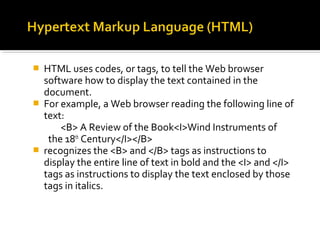
 HTML uses codes, or tags, to tell the Web browser
software how to display the text contained in the
document.
 For example, a Web browser reading the following line of
text:
<B> A Review of the Book<I>Wind Instruments of
the 18th
Century</I></B>
 recognizes the <B> and </B> tags as instructions to
display the entire line of text in bold and the <I> and </I>
tags as instructions to display the text enclosed by those
tags in italics.
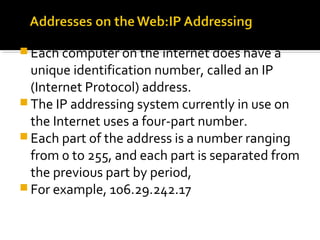
 Each computer on the internet does have a
unique identification number, called an IP
(Internet Protocol) address.
 The IP addressing system currently in use on
the Internet uses a four-part number.
 Each part of the address is a number ranging
from 0 to 255, and each part is separated from
the previous part by period,
 For example, 106.29.242.17
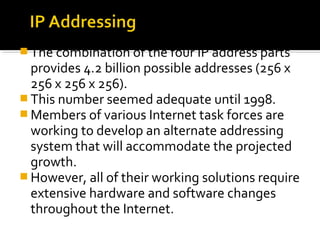
 The combination of the four IP address parts
provides 4.2 billion possible addresses (256 x
256 x 256 x 256).
 This number seemed adequate until 1998.
 Members of various Internet task forces are
working to develop an alternate addressing
system that will accommodate the projected
growth.
 However, all of their working solutions require
extensive hardware and software changes
throughout the Internet.
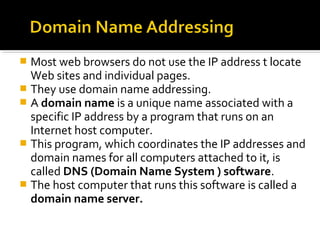
 Most web browsers do not use the IP address t locate
Web sites and individual pages.
 They use domain name addressing.
 A domain name is a unique name associated with a
specific IP address by a program that runs on an
Internet host computer.
 This program, which coordinates the IP addresses and
domain names for all computers attached to it, is
called DNS (Domain Name System ) software.
 The host computer that runs this software is called a
domain name server.
 Domain names can include any number of parts separated by
periods, however most domain names currently in use have
only three or four parts.
 Domain names follow hierarchical model that you can follow
from top to bottom if you read the name from the right to the
left.
 For example, the domain name gsb.uchicago.edu is the
computer connected to the Internet at the Graduate School of
Business (gsb), which is an academic unit of the University of
Chicago (uchicago), which is an educational institution (edu).
 No other computer on the Internet has the same domain
name.
 The IP address and the domain name each identify a particular
computer on the Internet.
 However, they do not indicate where a Web page’s HTML
document resides on that computer.
 To identify a Web pages exact location, Web browsers rely on
Uniform Resource Locator (URL).
 URL is a four-part addressing scheme that tells the Web
browser:
 What transfer protocol to use for transporting the file
 The domain name of the computer on which the file resides
 The pathname of the folder or directory on the computer on
which the file resides
 The name of the file
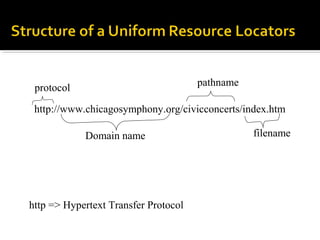
http://www.chicagosymphony.org/civicconcerts/index.htm
protocol
Domain name
pathname
filename
http => Hypertext Transfer Protocol
 The transfer protocol is the set of rules that the
computers use to move files from one computer to
another on the Internet.
 The most common transfer protocol used on the
Internet is the Hypertext Transfer Protocol (HTTP).
 Two other protocols that you can use on the
Internet are the File Transfer Protocol (FTP) and the
Telnet Protocol
 A number of search tools have been developed and
available to you on certain Web sites that provide
search services to help you find information.
 Examples:
 Yahoo  www.yahoo.com
 Excite  www.excite.com
 Lycos  www.lycos.com
 AltaVista  www/alta-vista.com
 MSN WebSearch  www.search.msn.com
 You can find information by two basic means.
 Search by Topic and Search by keywords.
 Some search services offer both methods, others
only one.
 Yahoo offers both.
 Search by Topic
You can navigate through topic lists
 Search by keywords
You can navigate by entering a keyword or phase
into a search text box.

Introduction about Internet

  • 1.
    Aadil khan, Rajdhani EngineeringCollege Jaipur(India)
  • 2.
     It isthe largest network in the world that connects hundreds of thousands of individual networks all over the world.  The popular term for the Internet is the “information highway”.  Rather than moving through geographical space, it moves your ideas and information through cyberspace – the space of electronic movement of ideas and information.
  • 3.
     No oneowns it  It has no formal management organization.  As it was originally developed by the Department of defense, this lack of centralization made it less vulnerable to wartime or terrorist attacks.  To access the Internet, an existing network need to pay a small registration fee and agree to certain standards based on the TCP/IP (Transmission Control Protocol/Internet Protocol) .
  • 4.
     Send e-mailmessages.  Send (upload) or receive (down load) files between computers.  Participate in discussion groups, such as mailing lists and newsgroups.  Surfing the web.
  • 5.
     The Web(World Wide Web) consists of information organized into Web pages containing text and graphic images.  It contains hypertext links, or highlighted keywords and images that lead to related information.  A collection of linked Web pages that has a common theme or focus is called a Web site.  The main page that all of the pages on a particular Web site are organized around and link back to is called the site’s home page.
  • 6.
     Many schoolsand businesses have direct access to the Internet using special high- speed communication lines and equipment.  Students and employees can access through the organization’s local area networks (LAN) or through their own personal computers.  Another way to access the Internet is through Internet Service Provider (ISP).
  • 7.
     To accessthe Internet, an existing network need to pay a small registration fee and agree to certain standards based on the TCP/IP (Transmission Control Protocol/Internet Protocol) reference model.  Each organization pays for its own networks and its own telephone bills, but those costs usually exist independent of the internet.  The regional Internet companies route and forward all traffic, and the cost is still only that of a local telephone call.
  • 8.
     A commercialorganization with permanent connection to the Internet that sells temporary connections to subscribers.  Examples:  Prodigy, America Online, Microsoft network, AT&T Networks.
  • 9.
     Once youhave your Internet connection, then you need special software called a browser to access the Web.  Web browsers are used to connect you to remote computers, open and transfer files, display text and images.  Web browsers are specialized programs.  Examples of Web browser: Netscape Navigator (Navigator) and Internet Explorer.
  • 10.
     Web isa collection of files that reside on computers, called Web servers, that are located all over the world and are connected to each other through the Internet.  When you use your Internet connection to become part of the Web, your computer becomes a Web client in a worldwide client/server network.  A Web browser is the software that you run on your computer to make it work as a web client.
  • 11.
     The publicfiles on the web servers are ordinary text files, much like the files used by word- processing software.  To allow Web browser software to read them, the text must be formatted according to a generally accepted standard.  The standard used on the web is Hypertext markup language (HTML).
  • 12.
     HTML usescodes, or tags, to tell the Web browser software how to display the text contained in the document.  For example, a Web browser reading the following line of text: <B> A Review of the Book<I>Wind Instruments of the 18th Century</I></B>  recognizes the <B> and </B> tags as instructions to display the entire line of text in bold and the <I> and </I> tags as instructions to display the text enclosed by those tags in italics.
  • 13.
     Each computeron the internet does have a unique identification number, called an IP (Internet Protocol) address.  The IP addressing system currently in use on the Internet uses a four-part number.  Each part of the address is a number ranging from 0 to 255, and each part is separated from the previous part by period,  For example, 106.29.242.17
  • 14.
     The combinationof the four IP address parts provides 4.2 billion possible addresses (256 x 256 x 256 x 256).  This number seemed adequate until 1998.  Members of various Internet task forces are working to develop an alternate addressing system that will accommodate the projected growth.  However, all of their working solutions require extensive hardware and software changes throughout the Internet.
  • 15.
     Most webbrowsers do not use the IP address t locate Web sites and individual pages.  They use domain name addressing.  A domain name is a unique name associated with a specific IP address by a program that runs on an Internet host computer.  This program, which coordinates the IP addresses and domain names for all computers attached to it, is called DNS (Domain Name System ) software.  The host computer that runs this software is called a domain name server.
  • 16.
     Domain namescan include any number of parts separated by periods, however most domain names currently in use have only three or four parts.  Domain names follow hierarchical model that you can follow from top to bottom if you read the name from the right to the left.  For example, the domain name gsb.uchicago.edu is the computer connected to the Internet at the Graduate School of Business (gsb), which is an academic unit of the University of Chicago (uchicago), which is an educational institution (edu).  No other computer on the Internet has the same domain name.
  • 17.
     The IPaddress and the domain name each identify a particular computer on the Internet.  However, they do not indicate where a Web page’s HTML document resides on that computer.  To identify a Web pages exact location, Web browsers rely on Uniform Resource Locator (URL).  URL is a four-part addressing scheme that tells the Web browser:  What transfer protocol to use for transporting the file  The domain name of the computer on which the file resides  The pathname of the folder or directory on the computer on which the file resides  The name of the file
  • 18.
  • 19.
     The transferprotocol is the set of rules that the computers use to move files from one computer to another on the Internet.  The most common transfer protocol used on the Internet is the Hypertext Transfer Protocol (HTTP).  Two other protocols that you can use on the Internet are the File Transfer Protocol (FTP) and the Telnet Protocol
  • 20.
     A numberof search tools have been developed and available to you on certain Web sites that provide search services to help you find information.  Examples:  Yahoo  www.yahoo.com  Excite  www.excite.com  Lycos  www.lycos.com  AltaVista  www/alta-vista.com  MSN WebSearch  www.search.msn.com
  • 21.
     You canfind information by two basic means.  Search by Topic and Search by keywords.  Some search services offer both methods, others only one.  Yahoo offers both.  Search by Topic You can navigate through topic lists  Search by keywords You can navigate by entering a keyword or phase into a search text box.