Objectives
In this chapter, you will learn about:
The origin, growth, and current structure of the
Internet
How packet-switched networks are combined to
form the Internet
How Internet protocols and Internet addressing
work
The history and use of markup languages on the
Web, including SGML, HTML, and XML
2
Objectives
How HTML tags and links work on the World Wide
Web
The differences among internets, intranets, and
extranets
Options for connecting to the Internet, including cost
and bandwidth factors
About Internet2 and the Semantic Web
3
The Internet and the World Wide Web
Computer network
Any technology that allows people to connect
computers to each other
The Internet
A large system of interconnected computer networks
spanning the globe
World Wide Web
A subset of computers on the Internet
4
Origins of the Internet
Early 1960s
U.S. Department of Defense funded research to
explore creating a worldwide network
In1969, Defense Department researchers
Connected four computers into network called
ARPANET
Throughout 1970s and 1980s
Academic researchers connected to ARPANET and
contributed to its technological developments
5
New Uses for the Internet
1972
E-mail was born
Mailing list
E-mail address that forwards any message received
to any user who has subscribed to the list
 Usenet
Started by group of students and programmers at
Duke University and the University of North
Carolina
6
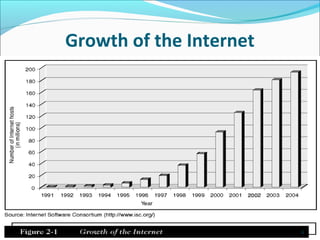
Growth of the Internet
In 1991, NSF
Eased restrictions on commercial Internet activity
Began implementing plans to privatize the Internet
Network access points (NAPs)
Basis of new structure Internet
Network access providers
Sell Internet access rights directly to larger
customers and indirectly to smaller firms and
individuals through ISPs
7
Growth of the Internet
8
Emergence of the World Wide Web
The Web
Software that runs on computers connected to the
Internet
Vannevar Bush
Speculated that engineers would eventually build a
memory extension device (the Memex)
In the 1960s
Ted Nelson described a similar system called hypertext
9
Emergence of the World Wide
Web (Continued)
Tim Berners-Lee
Developed code for hypertext server program
Hypertext server
Stores files written in hypertext markup language
Lets other computers connect to it and read files
Hypertext Markup Language (HTML)
Includes set of codes (or tags) attached to text
10
Packet-Switched Networks
Local area network (LAN)
Network of computers located close together
Wide area networks (WANs)
Networks of computers connected over greater
distances
Circuit
Combination of telephone lines and closed switches
that connect them to each other
11
Packet-Switched Networks
(Continued)
Circuit switching
Centrally controlled, single-connection model
Packets
Files and e-mail messages on a packet-switched network
that are broken down into small pieces
Travel from computer to computer along the
interconnected networks until they reach their
destinations
12
Routing Packets
Routing computers
Computers that decide how best to forward packets
Routing algorithms
Rules contained in programs on router computers that
determine the best path on which to send packet
Programs apply their routing algorithms to information
they have stored in routing tables
13
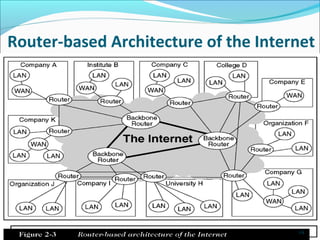
Router-based Architecture of the Internet
14
Internet Protocols
Protocol
Collection of rules for formatting, ordering, and error-
checking data sent across a network
Rules contributing to success of Internet
Independent networks should not require any internal
changes to be connected to the network
Packets that do not arrive at their destinations must be
retransmitted from their source network
Router computers act as receive-and-forward devices
No global control exists over the network
15
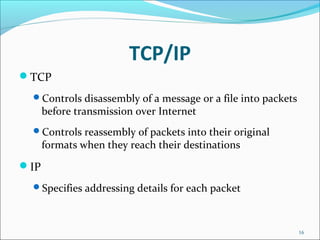
TCP/IP
TCP
Controls disassembly of a message or a file into packets
before transmission over Internet
Controls reassembly of packets into their original
formats when they reach their destinations
IP
Specifies addressing details for each packet
16
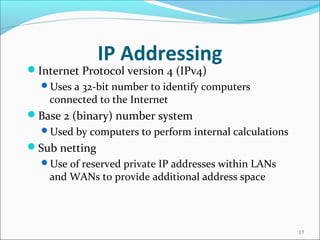
IP Addressing
Internet Protocol version 4 (IPv4)
Uses a 32-bit number to identify computers
connected to the Internet
Base 2 (binary) number system
Used by computers to perform internal calculations
Sub netting
Use of reserved private IP addresses within LANs
and WANs to provide additional address space
17
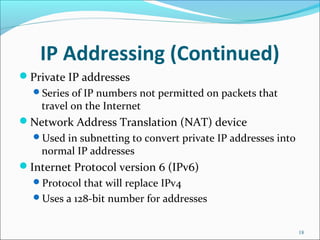
IP Addressing (Continued)
Private IP addresses
Series of IP numbers not permitted on packets that
travel on the Internet
Network Address Translation (NAT) device
Used in subnetting to convert private IP addresses into
normal IP addresses
Internet Protocol version 6 (IPv6)
Protocol that will replace IPv4
Uses a 128-bit number for addresses
18
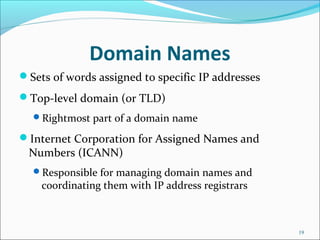
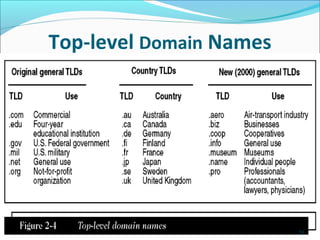
Domain Names
Sets of words assigned to specific IP addresses
Top-level domain (or TLD)
Rightmost part of a domain name
Internet Corporation for Assigned Names and
Numbers (ICANN)
Responsible for managing domain names and
coordinating them with IP address registrars
19
Top-level Domain Names
20
Web Page Request and Delivery Protocols
Web client computers
Run software called Web client software or Web
browser software
Web server computer
Runs software called Web server software
Client/server architecture
Combination of client computers running Web
client software and server computers running Web
server software
21
Web Page Request and Delivery
Protocols (Continued)
Hypertext Transfer Protocol (HTTP)
Set of rules for delivering Web page files over the
Internet
Uniform Resource Locator (URL)
Combination of the protocol name and domain
name
Allows user to locate a resource (the Web page) on
another computer (the Web server)
22
Electronic Mail Protocols
Electronic mail (e-mail)
Must also be formatted according to common set of
rules
 E-mail server
Computer devoted to handling e-mail
E-mail client software
Used to read and send e-mail
Example: Microsoft Outlook, Netscape Messenger
23
Electronic Mail Protocols (Continued)
Simple Mail Transfer Protocol (SMTP)
Specifies format of a mail message
 Post Office Protocol (POP)
POP message can tell the e-mail server to
 Send mail to user’s computer and delete it from e-mail
server
 Send mail to user’s computer and not delete it
 Simply ask whether new mail has arrived
Provides support for Multipurpose Internet Mail
Extensions (MIME)
24
Markup Languages and the Web
Text markup language
Specifies set of tags that are inserted into text
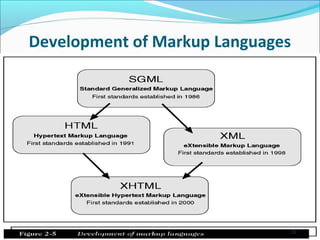
Standard Generalized Markup Language (SGML)
Older and complex text markup language
A meta language
World Wide Web Consortium (W3C)
Not-for-profit group that maintains standards for the
Web
25
Development of Markup Languages
26
Standard Generalized Markup Language
Offers a system of marking up documents that is
independent of any software application
Nonproprietary and platform independent
Offers user-defined tags
Costly to set up and maintain
27
Hypertext Markup Language (HTML)
Prevalent markup language used to create documents
on the Web today
HTML tags
Interpreted by Web browser and used by it to format
the display of the text
HTML Links
Linear hyperlink structure
Hierarchical hyperlink structure
28
Hypertext Markup Language
(HTML) (Continued)
Scripting languages and style sheets
Most common scripting languages
 JavaScript, JScript, Perl, and VBScript
Cascading Style Sheets (CSS)
 Sets of instructions that give Web developers more
control over the format of displayed pages
 Style sheet
 Usually stored in a separate file
 Referenced using the HTML style tag
29
Extensible Markup Language (XML)
Uses paired start and stop tags
Includes data management capabilities that HTML
cannot provide
Differences between XML and HTML
XML is not a markup language with defined tags
XML tags do not specify how text appears on a Web
page
30
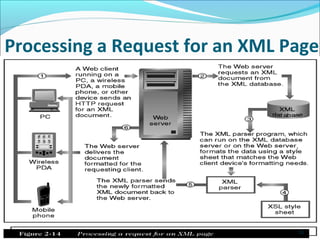
Processing a Request for an XML Page
31
Intranets and Extranets
Intranet
Interconnected network that does not extend beyond
organization that created it
Extranet
Intranet extended to include entities outside
boundaries of organization
Connects companies with suppliers, business partners,
or other authorized users
32
Public and Private Networks
Public network
Any computer network or telecommunications
network available to the public
Private network
A private, leased-line connection between two
companies that physically connects their intranets
Leased line
A permanent telephone connection between two
points
33
Virtual Private Network (VPN)
Extranet that uses public networks and their
protocols
IP tunneling
Effectively creates a private passageway through the
public Internet
Encapsulation
Process used by VPN software
VPN software
Must be installed on the computers at both ends of the
transmission
34
Internet Connection Options
Bandwidth
Amount of data that can travel through a
communication line per unit of time
Net bandwidth
Actual speed that information travels
Symmetric connections
Provide same bandwidth in both directions
Asymmetric connections
Provide different bandwidths for each direction
35
Voice-Grade Telephone
Connections
POTS, or plain old telephone service
Uses existing telephone lines and analog modem
Provide bandwidth between 28 and 56 Kbps
Digital Subscriber Line (DSL)
Connection methods do not use modem
Integrated Services Digital Network (ISDN)
Offers bandwidths between 128 Kbps and 256 Kbps
36
Broadband Connections
Operate at speeds of greater than 200 Kbps
Asymmetric digital subscriber (ADSL)
Transmission bandwidth is from 100 to 640 Kbps
upstream and from 1.5 to 9 Mbps downstream
Cable modems
Provide transmission speeds between 300 Kbps and 1
Mbps
DSL
Private line with no competing traffic
37
Leased-Line Connections
DS0 (digital signal zero)
Telephone line designed to carry 1 digital signal
T1 line (also called a DS1)
Carries 24 DS0 lines and operates at 1.544 Mbps
Fractional T1
Provides service speeds of 128 Kbps and upward in 128-
Kbps increments
T3 service (also called DS3)
Offers 44.736 Mbps
38
Wireless Connections
Bluetooth
Designed for personal use over short distances
Low-bandwidth technology, with speeds of up to
722 Kbps
Networks are called personal area networks (PANs)
or piconets
Consumes very little power
Devices can discover each other and exchange
information automatically
39
Wireless Ethernet (Wi-Fi or 802.11b)
Most common wireless connection technology for use
on LANs
Wireless access point (WAP)
Device that transmits network packets between Wi-Fi-
equipped computers and other devices
Has potential bandwidth of 11 Mbps and range of
about 300 feet
Devices are capable of roaming
40
Wireless Ethernet (Wi-Fi or 802.11b)
(Continued)
802.11a protocol
Capable of transmitting data at speeds up to 54
Mbps
802.11g protocol
Has 54 Mbps speed of 802.11a
Compatible with 802.11b devices
802.11n
Expected to offer speeds up to 320 Mbps
41
Fixed-Point Wireless
One version uses system of repeaters to forward radio
signal from ISP to customers
Repeaters
Transmitter-receiver devices (transceivers)
Mesh Routing
Directly transmits Wi-Fi packets through hundreds, or
even thousands, of short-range transceivers
42
Cellular Telephone Networks
Third-generation (3G) cell phones
Combine latest technologies available today
Short message service (SMS)
Protocol used to send and receive short text messages
Mobile commerce (m-commerce)
Describes the kinds of resources people might want to
access using wireless devices
43
Internet2 and the Semantic Web
Internet2
Experimental test bed for new networking technologies
Has achieved bandwidths of 10 Gbps and more on parts
of its network
Used by universities to conduct large collaborative
research projects
44
Internet2 and the Semantic Web
(Continued)
Semantic Web
Project by Tim Berners-Lee
 If successful
 Would result in words on Web pages being tagged (using
XML) with their meanings
Resource description framework (RDF)
Set of standards for XML syntax
Ontology
Set of standards that defines relationships among
RDF standards and specific XML tags
45
Summary
TCP/IP
Protocol suite used to create and transport information
packets across the Internet
POP, SMTP, and IMAP
Protocols that help manage e-mail
Languages derived from SGML
Hypertext Markup Language (HTML)
Extensible Markup Language (XML)
46
Summary
Intranets
Private internal networks
Extranet
Used when companies want to collaborate with
suppliers, partners, or customers
Internet2
Experimental network built by a consortium of research
universities and businesses
E-Commerce: The Second Wave, Fifth Annual Edition 47

Ch02 e commerce

  • 2.
    Objectives In this chapter,you will learn about: The origin, growth, and current structure of the Internet How packet-switched networks are combined to form the Internet How Internet protocols and Internet addressing work The history and use of markup languages on the Web, including SGML, HTML, and XML 2
  • 3.
    Objectives How HTML tagsand links work on the World Wide Web The differences among internets, intranets, and extranets Options for connecting to the Internet, including cost and bandwidth factors About Internet2 and the Semantic Web 3
  • 4.
    The Internet andthe World Wide Web Computer network Any technology that allows people to connect computers to each other The Internet A large system of interconnected computer networks spanning the globe World Wide Web A subset of computers on the Internet 4
  • 5.
    Origins of theInternet Early 1960s U.S. Department of Defense funded research to explore creating a worldwide network In1969, Defense Department researchers Connected four computers into network called ARPANET Throughout 1970s and 1980s Academic researchers connected to ARPANET and contributed to its technological developments 5
  • 6.
    New Uses forthe Internet 1972 E-mail was born Mailing list E-mail address that forwards any message received to any user who has subscribed to the list  Usenet Started by group of students and programmers at Duke University and the University of North Carolina 6
  • 7.
    Growth of theInternet In 1991, NSF Eased restrictions on commercial Internet activity Began implementing plans to privatize the Internet Network access points (NAPs) Basis of new structure Internet Network access providers Sell Internet access rights directly to larger customers and indirectly to smaller firms and individuals through ISPs 7
  • 8.
    Growth of theInternet 8
  • 9.
    Emergence of theWorld Wide Web The Web Software that runs on computers connected to the Internet Vannevar Bush Speculated that engineers would eventually build a memory extension device (the Memex) In the 1960s Ted Nelson described a similar system called hypertext 9
  • 10.
    Emergence of theWorld Wide Web (Continued) Tim Berners-Lee Developed code for hypertext server program Hypertext server Stores files written in hypertext markup language Lets other computers connect to it and read files Hypertext Markup Language (HTML) Includes set of codes (or tags) attached to text 10
  • 11.
    Packet-Switched Networks Local areanetwork (LAN) Network of computers located close together Wide area networks (WANs) Networks of computers connected over greater distances Circuit Combination of telephone lines and closed switches that connect them to each other 11
  • 12.
    Packet-Switched Networks (Continued) Circuit switching Centrallycontrolled, single-connection model Packets Files and e-mail messages on a packet-switched network that are broken down into small pieces Travel from computer to computer along the interconnected networks until they reach their destinations 12
  • 13.
    Routing Packets Routing computers Computersthat decide how best to forward packets Routing algorithms Rules contained in programs on router computers that determine the best path on which to send packet Programs apply their routing algorithms to information they have stored in routing tables 13
  • 14.
  • 15.
    Internet Protocols Protocol Collection ofrules for formatting, ordering, and error- checking data sent across a network Rules contributing to success of Internet Independent networks should not require any internal changes to be connected to the network Packets that do not arrive at their destinations must be retransmitted from their source network Router computers act as receive-and-forward devices No global control exists over the network 15
  • 16.
    TCP/IP TCP Controls disassembly ofa message or a file into packets before transmission over Internet Controls reassembly of packets into their original formats when they reach their destinations IP Specifies addressing details for each packet 16
  • 17.
    IP Addressing Internet Protocolversion 4 (IPv4) Uses a 32-bit number to identify computers connected to the Internet Base 2 (binary) number system Used by computers to perform internal calculations Sub netting Use of reserved private IP addresses within LANs and WANs to provide additional address space 17
  • 18.
    IP Addressing (Continued) PrivateIP addresses Series of IP numbers not permitted on packets that travel on the Internet Network Address Translation (NAT) device Used in subnetting to convert private IP addresses into normal IP addresses Internet Protocol version 6 (IPv6) Protocol that will replace IPv4 Uses a 128-bit number for addresses 18
  • 19.
    Domain Names Sets ofwords assigned to specific IP addresses Top-level domain (or TLD) Rightmost part of a domain name Internet Corporation for Assigned Names and Numbers (ICANN) Responsible for managing domain names and coordinating them with IP address registrars 19
  • 20.
  • 21.
    Web Page Requestand Delivery Protocols Web client computers Run software called Web client software or Web browser software Web server computer Runs software called Web server software Client/server architecture Combination of client computers running Web client software and server computers running Web server software 21
  • 22.
    Web Page Requestand Delivery Protocols (Continued) Hypertext Transfer Protocol (HTTP) Set of rules for delivering Web page files over the Internet Uniform Resource Locator (URL) Combination of the protocol name and domain name Allows user to locate a resource (the Web page) on another computer (the Web server) 22
  • 23.
    Electronic Mail Protocols Electronicmail (e-mail) Must also be formatted according to common set of rules  E-mail server Computer devoted to handling e-mail E-mail client software Used to read and send e-mail Example: Microsoft Outlook, Netscape Messenger 23
  • 24.
    Electronic Mail Protocols(Continued) Simple Mail Transfer Protocol (SMTP) Specifies format of a mail message  Post Office Protocol (POP) POP message can tell the e-mail server to  Send mail to user’s computer and delete it from e-mail server  Send mail to user’s computer and not delete it  Simply ask whether new mail has arrived Provides support for Multipurpose Internet Mail Extensions (MIME) 24
  • 25.
    Markup Languages andthe Web Text markup language Specifies set of tags that are inserted into text Standard Generalized Markup Language (SGML) Older and complex text markup language A meta language World Wide Web Consortium (W3C) Not-for-profit group that maintains standards for the Web 25
  • 26.
  • 27.
    Standard Generalized MarkupLanguage Offers a system of marking up documents that is independent of any software application Nonproprietary and platform independent Offers user-defined tags Costly to set up and maintain 27
  • 28.
    Hypertext Markup Language(HTML) Prevalent markup language used to create documents on the Web today HTML tags Interpreted by Web browser and used by it to format the display of the text HTML Links Linear hyperlink structure Hierarchical hyperlink structure 28
  • 29.
    Hypertext Markup Language (HTML)(Continued) Scripting languages and style sheets Most common scripting languages  JavaScript, JScript, Perl, and VBScript Cascading Style Sheets (CSS)  Sets of instructions that give Web developers more control over the format of displayed pages  Style sheet  Usually stored in a separate file  Referenced using the HTML style tag 29
  • 30.
    Extensible Markup Language(XML) Uses paired start and stop tags Includes data management capabilities that HTML cannot provide Differences between XML and HTML XML is not a markup language with defined tags XML tags do not specify how text appears on a Web page 30
  • 31.
    Processing a Requestfor an XML Page 31
  • 32.
    Intranets and Extranets Intranet Interconnectednetwork that does not extend beyond organization that created it Extranet Intranet extended to include entities outside boundaries of organization Connects companies with suppliers, business partners, or other authorized users 32
  • 33.
    Public and PrivateNetworks Public network Any computer network or telecommunications network available to the public Private network A private, leased-line connection between two companies that physically connects their intranets Leased line A permanent telephone connection between two points 33
  • 34.
    Virtual Private Network(VPN) Extranet that uses public networks and their protocols IP tunneling Effectively creates a private passageway through the public Internet Encapsulation Process used by VPN software VPN software Must be installed on the computers at both ends of the transmission 34
  • 35.
    Internet Connection Options Bandwidth Amountof data that can travel through a communication line per unit of time Net bandwidth Actual speed that information travels Symmetric connections Provide same bandwidth in both directions Asymmetric connections Provide different bandwidths for each direction 35
  • 36.
    Voice-Grade Telephone Connections POTS, orplain old telephone service Uses existing telephone lines and analog modem Provide bandwidth between 28 and 56 Kbps Digital Subscriber Line (DSL) Connection methods do not use modem Integrated Services Digital Network (ISDN) Offers bandwidths between 128 Kbps and 256 Kbps 36
  • 37.
    Broadband Connections Operate atspeeds of greater than 200 Kbps Asymmetric digital subscriber (ADSL) Transmission bandwidth is from 100 to 640 Kbps upstream and from 1.5 to 9 Mbps downstream Cable modems Provide transmission speeds between 300 Kbps and 1 Mbps DSL Private line with no competing traffic 37
  • 38.
    Leased-Line Connections DS0 (digitalsignal zero) Telephone line designed to carry 1 digital signal T1 line (also called a DS1) Carries 24 DS0 lines and operates at 1.544 Mbps Fractional T1 Provides service speeds of 128 Kbps and upward in 128- Kbps increments T3 service (also called DS3) Offers 44.736 Mbps 38
  • 39.
    Wireless Connections Bluetooth Designed forpersonal use over short distances Low-bandwidth technology, with speeds of up to 722 Kbps Networks are called personal area networks (PANs) or piconets Consumes very little power Devices can discover each other and exchange information automatically 39
  • 40.
    Wireless Ethernet (Wi-Fior 802.11b) Most common wireless connection technology for use on LANs Wireless access point (WAP) Device that transmits network packets between Wi-Fi- equipped computers and other devices Has potential bandwidth of 11 Mbps and range of about 300 feet Devices are capable of roaming 40
  • 41.
    Wireless Ethernet (Wi-Fior 802.11b) (Continued) 802.11a protocol Capable of transmitting data at speeds up to 54 Mbps 802.11g protocol Has 54 Mbps speed of 802.11a Compatible with 802.11b devices 802.11n Expected to offer speeds up to 320 Mbps 41
  • 42.
    Fixed-Point Wireless One versionuses system of repeaters to forward radio signal from ISP to customers Repeaters Transmitter-receiver devices (transceivers) Mesh Routing Directly transmits Wi-Fi packets through hundreds, or even thousands, of short-range transceivers 42
  • 43.
    Cellular Telephone Networks Third-generation(3G) cell phones Combine latest technologies available today Short message service (SMS) Protocol used to send and receive short text messages Mobile commerce (m-commerce) Describes the kinds of resources people might want to access using wireless devices 43
  • 44.
    Internet2 and theSemantic Web Internet2 Experimental test bed for new networking technologies Has achieved bandwidths of 10 Gbps and more on parts of its network Used by universities to conduct large collaborative research projects 44
  • 45.
    Internet2 and theSemantic Web (Continued) Semantic Web Project by Tim Berners-Lee  If successful  Would result in words on Web pages being tagged (using XML) with their meanings Resource description framework (RDF) Set of standards for XML syntax Ontology Set of standards that defines relationships among RDF standards and specific XML tags 45
  • 46.
    Summary TCP/IP Protocol suite usedto create and transport information packets across the Internet POP, SMTP, and IMAP Protocols that help manage e-mail Languages derived from SGML Hypertext Markup Language (HTML) Extensible Markup Language (XML) 46
  • 47.
    Summary Intranets Private internal networks Extranet Usedwhen companies want to collaborate with suppliers, partners, or customers Internet2 Experimental network built by a consortium of research universities and businesses E-Commerce: The Second Wave, Fifth Annual Edition 47