

The Internet
Chapter
VI?
The Internet is a worldwide collection of
interconnected networks.
Just how big the internet?
The Net, the internet’s nickname, links over a
million networks with even more internet host
server computers in every country in the world.
What is the
Internet?
Some Historical Perspective of the
Internet
A small group of computer scientist on both coasts of the
United States were busy creating a national network that
would enable the scientific community to share ideas over
communication links.
The Department of Defense’s Advance Research Project
Agency (ARPA) sponsored the
project, named, ARPANET, to unite a community of
geographically dispersed scientists by technology.
The first official demonstration linked UCLA with the
Stanford University, both in California but, this historic
event had no records ,photographs and reports.
By 1971, the ARPANET included more than 20
sites including Harvard.
By 1981, the ARPANET linked 200 sites.
ARPANET eventually lost its reason to exist as
other special-interest networks took its place.
In 1990, ARPANET was eliminated, leaving
behind a legacy of networks that evolved into the
internet.
The Transmission Control Protocol /
Internet Protocol (TCP/IP) are the
communications protocol that permits data
transmission over the internet.
Communications over the Net are built
around this two-layered protocol.
Protocol is a set of rules computers use to
talk to each other.
The Transmission Control Protocol (TCP) sets the
rules for the packaging of information into packets.
The Internet Protocol (IP) handles the address,
such that each packet is routed to its proper
destination.
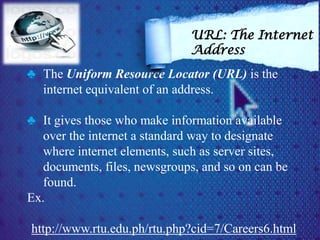
♣ The Uniform Resource Locator (URL) is the
internet equivalent of an address.
♣ It gives those who make information available
over the internet a standard way to designate
where internet elements, such as server sites,
documents, files, newsgroups, and so on can be
found.
Ex.
http://www.rtu.edu.ph/rtu.php?cid=7/Careers6.html
URL: The Internet
Address
http://www.rtu.edu.ph/rtu.php?cid=7/Careers6.html
specifies access method.
This indicator tells your client software to expect an
http (hyperText Transport Protocol) file.
http is the primary access method for interacting the
internet.
Access
Method
http://www.rtu.edu.ph/rtu.php?cid=7/Careers6.html
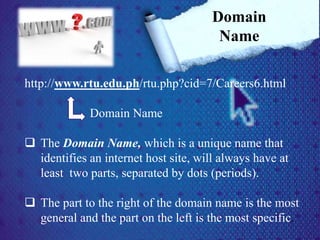
Domain Name
 The Domain Name, which is a unique name that
identifies an internet host site, will always have at
least two parts, separated by dots (periods).
 The part to the right of the domain name is the most
general and the part on the left is the most specific.
Domain
Name
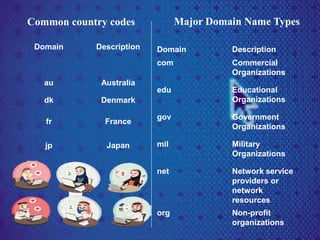
Domain Description
com Commercial
Organizations
edu Educational
Organizations
gov Government
Organizations
mil Military
Organizations
net Network service
providers or
network
resources
org Non-profit
organizations
Common country codes
Domain Description
au Australia
dk Denmark
fr France
jp Japan
Major Domain Name Types
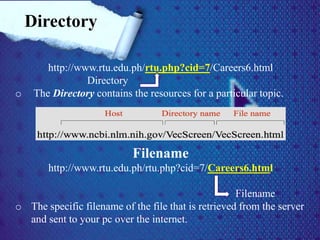
http://www.rtu.edu.ph/rtu.php?cid=7/Careers6.html
Directory
o The Directory contains the resources for a particular topic.
Filename
http://www.rtu.edu.ph/rtu.php?cid=7/Careers6.html
Filename
o The specific filename of the file that is retrieved from the server
and sent to your pc over the internet.
Directory
o The HTML (Hypertext Markup Language) is the
language used to compose and format most you see
when cruising the net.
Browsing is when browsers poke around the internet
with no particular destination in mind.
A ll the popular portals on the Net offer a menu tree
of categories, these includes Yahoo, Facebook,
Multiply, Google and others
Browsing
the Net
• An internal portals is always a good place to start.
These portal sites divide the wealth of resources on the
internet into about a dozen major categories (for ex.
Arts, business, computers, education, entertainment, h
ealth and so on)
• You may navigate through several levels of categories
before reaching the pages you want.
• Many pages have banner ads that entice us to click on
them and travel to totally unrelated site.
Search engine
Search Engine provides a resource discovery tool
to help you to find the information or service you
need.
The rules by which you enter the keywords and
phrases vary slightly between the search engines.
Using Search
Engine to
Search the Net
Read the search rules.
If you don’t get the results with one search
engine, try another.
The results of the search are seldom
exhausted .
Choose search words carefully.
Be persistent.
WWW: World Wide Web
 World Wide Web affectionately called the Web, is an
internet system that permits linking of multimedia
documents among servers on the internet
 By establishing a linked relationship between Web
documents, related information becomes easily
accessible
 These linked relationships are completely independent
of physical location.
Internet Applications:
The Web, FTP and
More
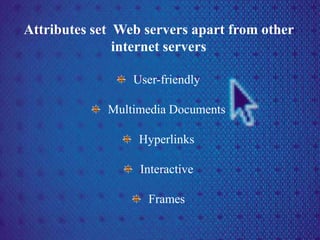
Attributes set Web servers apart from other
internet servers
User-friendly
Multimedia Documents
Hyperlinks
Interactive
Frames
The File Transfer Protocol (FTP) allows you
to download and upload files on the internet.
FTPing is a popular activity on the net.
You can download exciting games, colorful
art, music from up and coming artists and
applications programs basically anything that
can be stored digitally.
Many FTP sites invite users to contribute
(upload) files of their own.
FTP: Downloads
for the asking
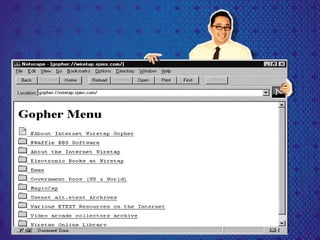
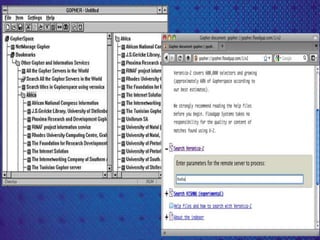
Gopherspace is the home of thousands of
gopher servers throughout the world.
The Gopher system, which predates the
World Wide Web, was developed at the
University of Minnesota.
It is designed for distributing, searching, and
retrieving documents over the Internet
Gopherspace: Go-for
Information
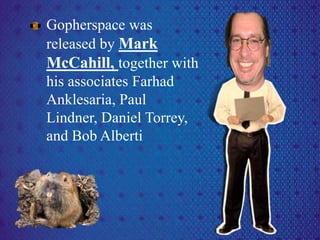
Gopherspace was
released by Mark
McCahill, together with
his associates Farhad
Anklesaria, Paul
Lindner, Daniel Torrey,
and Bob Alberti
Telnet:
Remote
Login
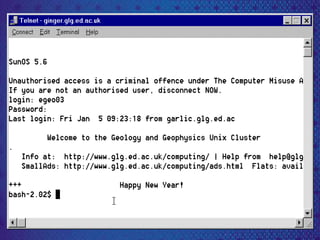
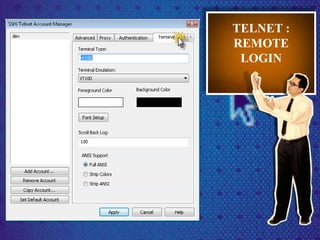
Telnet refers to a class of internet
application programs that lets you log
onto a remote computer using the Telnet
communication protocol.
Telnet is a terminal emulation protocol
that allows you to work from a PC as if
it were a terminal linked directly to a
host computer.
Once online to one of these sites, you
can run a normal interactive session as
if you were sitting at an on-site
terminal.
TELNET :
REMOTE
LOGIN
hi hello Communicating with
People: E-
mail, Newsgroup
and Chat
Electronic mail, most
commonly referred to
as email or e-mail since 1993,
is a method of exchanging
digital messages from an author
to one or more recipients.
Modern email operates across
the Internet or other computer
networks.
E-mail sent to a particular
person can be “opened” and
read by that person.
E-mail
on the
Net
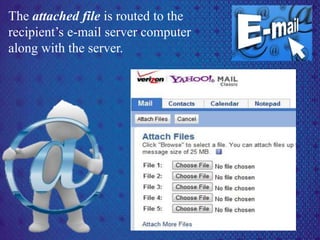
The attached file is routed to the
recipient’s e-mail server computer
along with the server.
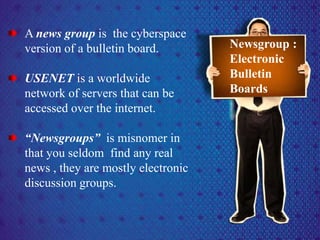
A news group is the cyberspace
version of a bulletin board.
USENET is a worldwide
network of servers that can be
accessed over the internet.
“Newsgroups” is misnomer in
that you seldom find any real
news , they are mostly electronic
discussion groups.
Newsgroup :
Electronic
Bulletin
Boards
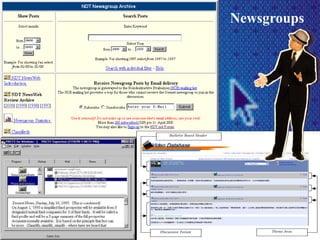
Newsgroups
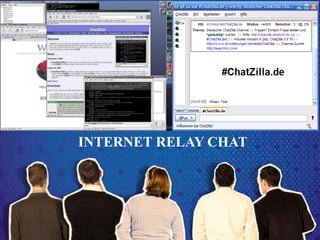
The Internet Relay Chat (IRC) protocol allows user
to join and participate in group chat sessions.
A chat session is when two or more internet users
carry on a typed, real-time, online conversation.
Chatting is a favorite past time of millions of
cybernauts.
INTERNET RELAY
CHAT: CHIT-CHAT
INTERNET RELAY CHAT
E-commerce is simply conducting business online
and that , of course, means the electronic transfer
of money of plenty of opportunity for fraud and
theft.
Issues on
the Net
Firewall is software that is designed to
restrict access to an organizations network
or its intranet. The firewalls screens
electronic traffic in both directions so that
organizational security is maintained.
Spam is unsolicited junk e-mail , mostly
advertising for commercial products or
services.
Spammers or those who send spam
unsuspecting people with political
messages.

the internet

  • 1.
  • 2.
    The Internet isa worldwide collection of interconnected networks. Just how big the internet? The Net, the internet’s nickname, links over a million networks with even more internet host server computers in every country in the world. What is the Internet?
  • 3.
    Some Historical Perspectiveof the Internet A small group of computer scientist on both coasts of the United States were busy creating a national network that would enable the scientific community to share ideas over communication links. The Department of Defense’s Advance Research Project Agency (ARPA) sponsored the project, named, ARPANET, to unite a community of geographically dispersed scientists by technology. The first official demonstration linked UCLA with the Stanford University, both in California but, this historic event had no records ,photographs and reports.
  • 4.
    By 1971, theARPANET included more than 20 sites including Harvard. By 1981, the ARPANET linked 200 sites. ARPANET eventually lost its reason to exist as other special-interest networks took its place. In 1990, ARPANET was eliminated, leaving behind a legacy of networks that evolved into the internet.
  • 5.
    The Transmission ControlProtocol / Internet Protocol (TCP/IP) are the communications protocol that permits data transmission over the internet. Communications over the Net are built around this two-layered protocol. Protocol is a set of rules computers use to talk to each other.
  • 6.
    The Transmission ControlProtocol (TCP) sets the rules for the packaging of information into packets. The Internet Protocol (IP) handles the address, such that each packet is routed to its proper destination.
  • 7.
    ♣ The UniformResource Locator (URL) is the internet equivalent of an address. ♣ It gives those who make information available over the internet a standard way to designate where internet elements, such as server sites, documents, files, newsgroups, and so on can be found. Ex. http://www.rtu.edu.ph/rtu.php?cid=7/Careers6.html URL: The Internet Address
  • 8.
    http://www.rtu.edu.ph/rtu.php?cid=7/Careers6.html specifies access method. Thisindicator tells your client software to expect an http (hyperText Transport Protocol) file. http is the primary access method for interacting the internet. Access Method
  • 9.
    http://www.rtu.edu.ph/rtu.php?cid=7/Careers6.html Domain Name  TheDomain Name, which is a unique name that identifies an internet host site, will always have at least two parts, separated by dots (periods).  The part to the right of the domain name is the most general and the part on the left is the most specific. Domain Name
  • 10.
    Domain Description com Commercial Organizations eduEducational Organizations gov Government Organizations mil Military Organizations net Network service providers or network resources org Non-profit organizations Common country codes Domain Description au Australia dk Denmark fr France jp Japan Major Domain Name Types
  • 11.
    http://www.rtu.edu.ph/rtu.php?cid=7/Careers6.html Directory o The Directorycontains the resources for a particular topic. Filename http://www.rtu.edu.ph/rtu.php?cid=7/Careers6.html Filename o The specific filename of the file that is retrieved from the server and sent to your pc over the internet. Directory
  • 12.
    o The HTML(Hypertext Markup Language) is the language used to compose and format most you see when cruising the net. Browsing is when browsers poke around the internet with no particular destination in mind. A ll the popular portals on the Net offer a menu tree of categories, these includes Yahoo, Facebook, Multiply, Google and others Browsing the Net
  • 13.
    • An internalportals is always a good place to start. These portal sites divide the wealth of resources on the internet into about a dozen major categories (for ex. Arts, business, computers, education, entertainment, h ealth and so on) • You may navigate through several levels of categories before reaching the pages you want. • Many pages have banner ads that entice us to click on them and travel to totally unrelated site.
  • 14.
  • 15.
    Search Engine providesa resource discovery tool to help you to find the information or service you need. The rules by which you enter the keywords and phrases vary slightly between the search engines. Using Search Engine to Search the Net
  • 16.
    Read the searchrules. If you don’t get the results with one search engine, try another. The results of the search are seldom exhausted . Choose search words carefully. Be persistent.
  • 17.
    WWW: World WideWeb  World Wide Web affectionately called the Web, is an internet system that permits linking of multimedia documents among servers on the internet  By establishing a linked relationship between Web documents, related information becomes easily accessible  These linked relationships are completely independent of physical location. Internet Applications: The Web, FTP and More
  • 18.
    Attributes set Webservers apart from other internet servers User-friendly Multimedia Documents Hyperlinks Interactive Frames
  • 19.
    The File TransferProtocol (FTP) allows you to download and upload files on the internet. FTPing is a popular activity on the net. You can download exciting games, colorful art, music from up and coming artists and applications programs basically anything that can be stored digitally. Many FTP sites invite users to contribute (upload) files of their own. FTP: Downloads for the asking
  • 20.
    Gopherspace is thehome of thousands of gopher servers throughout the world. The Gopher system, which predates the World Wide Web, was developed at the University of Minnesota. It is designed for distributing, searching, and retrieving documents over the Internet Gopherspace: Go-for Information
  • 21.
    Gopherspace was released byMark McCahill, together with his associates Farhad Anklesaria, Paul Lindner, Daniel Torrey, and Bob Alberti
  • 24.
    Telnet: Remote Login Telnet refers toa class of internet application programs that lets you log onto a remote computer using the Telnet communication protocol. Telnet is a terminal emulation protocol that allows you to work from a PC as if it were a terminal linked directly to a host computer. Once online to one of these sites, you can run a normal interactive session as if you were sitting at an on-site terminal.
  • 26.
  • 27.
    hi hello Communicatingwith People: E- mail, Newsgroup and Chat
  • 28.
    Electronic mail, most commonlyreferred to as email or e-mail since 1993, is a method of exchanging digital messages from an author to one or more recipients. Modern email operates across the Internet or other computer networks. E-mail sent to a particular person can be “opened” and read by that person. E-mail on the Net
  • 29.
    The attached fileis routed to the recipient’s e-mail server computer along with the server.
  • 30.
    A news groupis the cyberspace version of a bulletin board. USENET is a worldwide network of servers that can be accessed over the internet. “Newsgroups” is misnomer in that you seldom find any real news , they are mostly electronic discussion groups. Newsgroup : Electronic Bulletin Boards
  • 31.
  • 32.
    The Internet RelayChat (IRC) protocol allows user to join and participate in group chat sessions. A chat session is when two or more internet users carry on a typed, real-time, online conversation. Chatting is a favorite past time of millions of cybernauts. INTERNET RELAY CHAT: CHIT-CHAT
  • 33.
  • 34.
    E-commerce is simplyconducting business online and that , of course, means the electronic transfer of money of plenty of opportunity for fraud and theft. Issues on the Net
  • 35.
    Firewall is softwarethat is designed to restrict access to an organizations network or its intranet. The firewalls screens electronic traffic in both directions so that organizational security is maintained. Spam is unsolicited junk e-mail , mostly advertising for commercial products or services. Spammers or those who send spam unsuspecting people with political messages.

Editor's Notes

  • #2 Weirdowztignannyonalangyung report nyosamga ss. na slide. b^_________^d
  • #3 @janikkagavino: itoyung report motignanmonalang kung tama yungpagkaka summarize ko and dadaganmonalangng pictures and other icons if you want. 1st to 4th slide yungsayo.
  • #6 Nanawaganako kung sinoyung 2nd reporter ditopo start nung report nyo ate hanggnag slide 10
  • #7 2nd reporter doonsa may –there is a process-anghabakasinung process di koalam kung ilalagayko pa pero kung gusto moilagay type monalang.
  • #12 For the 3rd reporter this slide is the start of you report up to slide 13
  • #14 Dito end ng report mo 3rd reporter.
  • #16 Am kung sinoyung 4th reporter dito startng report monasasayonayun kung panomoitopahahabain.
  • #17 4th reporter dito end ng report mo.
  • #18 5th reporter ditopoyung start ng report nyo and yung end moehhyungsa pang 18 slide.
  • #20 Dito end ng report mo reporter #5.
  • #21 This is my report……
  • #31 @affyselorioditoyung start ng report mobekikang.
  • #34 Affyhanggangditoyungsayo.
  • #35 @kellydito start ng report mo ^__________^