University of Makeni
(UniMak)
Department of Information
Technology
Extension Training Programme
(ETP)
Introduction
Who am I?
And who are you?
Classroom Code(s)
Participation
Attendance
Assignments/Project
Collaboration*
Course Outline
Understanding HTTP
Building Static Sites with HTML 5
Enhancing presentation with CSS 3.0
Adding behavior with JavaScript
Server-side programming with PHP
Database Communication with SQL
Server-side communication with AJAX
Security best-practices for developers
Course Teaching Techniques
Theoretical-framework
Hands-on Lab work
Assignments
Ad-hoc projects
Communication Route(s)
Electronic
WhatsApp: (+232-30-198-359)
Electronic Mail:
yusufbrima@gmail.com
yusufbrima@yahoo.com
yusufbrima@outlook.com
Facebook : facebook.com/yusuf.brima
LinkedIn: Yusuf Brima
Face2face*
Course Pre-requisites
(Dependencies)
Prior knowledge of “basic computer usage
”
A computer to follow along
Internet Access (for project publishing on
the Internet)
An online transaction-enabled account
(e.g., Credit Card/MasterCard …)*
Tools and environments for
the course
Development Platform
Average/ Fair Performance Computer (RAM >=1GB &
Clock Cycles >= 1GHz)
Code Editor
PHP Development Server(s) Stack
LAMP
MAMP
XAMP
WAMP
Up-to-date Internet browser
Hosting provider
DNS Registrar
Tools and environments for
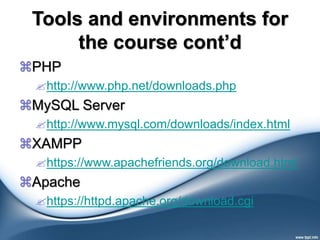
the course cont’d
PHP
http://www.php.net/downloads.php
MySQL Server
http://www.mysql.com/downloads/index.html
XAMPP
https://www.apachefriends.org/download.html
Apache
https://httpd.apache.org/download.cgi
Brief history of the
Internet
The INTERNET is a network of
computers, which links many different
types of computers all over the world.
 ARPANET was the first WAN and had
only four sites in 1969.
 In 1989, the U.S. government lifted
restrictions on the use of INTERNET, and
allow its usage for commercial purposes
as well.
The ARPANET
The INTERNET is a network of
computers, which links many different
types of computers all over the world.
 ARPANET was the first WAN and had
only four sites in 1969.
 In 1989, the U.S. government lifted
restrictions on the use of INTERNET, and
allow its usage for commercial purposes
as well.
Basic Services of the
Internet
Electronic Mail (E-Mail) –
Allow user to send a mail (message ) to
another internet user in any part of the world
in a near-real-time manner .
 File Transfer Protocol (FTP) –
Allow user to move a file from one computer
to another on the internet.
 Telnet –
Allow a user to log into another computer
somewhere on the internet .
Electronic Mail
(E-Mail)
E-Mail is a rapid and productive
communication tool because :
It is faster than Paper Mail .
Unlike telephone, The persons
communicating with each other need not to be
available at the same time.
Unlike Fax documents , Email documents can
be stored in a computer and be easily edited
using editing programs.
TELNET
Some common uses of telnet service are -
Using the computing power of the remote
computer.
Using a software on the remote computer.
Accessing remote computers data base or
achieve.
Logging into ones own computer from
another computer.
The World Wide Web
(WWW)
World Wide Web or W3 is the most
popular and promising method of
organizing and accessing information on
the INTERNET.
Hypertext is a new way of information storage
and retrieval that enables authors to structure
information in novel ways.
A properly designed hypertext document can
help users to locate desired type of
information rapidly.
The World Wide Web
(WWW) Cont’d
Hypertext documents enable this by using a
series of link.
A link is a special type of item in a hypertext
document connecting the document to
another document.
Hypertext documents on internet are known
as Web Pages.
Web Browsers
To use a computer as a Web client, a user
needs to load on it a special software tool known
as WWW Browser.
Browser provide following navigation facilities –
Do not require a user to login to a server computer.
Enable a user to visit a server computer’s site directly
and access information on it by specifying its URL
(Uniform Resource Locator).
Enable user to create and maintain a
personal hotlist of favorite URL.
Web Browsers
Cont’d
Maintain a history of server computers visited by user
in a surfing session.
 Enable a user to download information in various formats
Internet Search Engine
 Internet search engine is an application, which helps
users to locate Web sites containing useful information
and references.
 To search Information :
A user types the description of the information using
the user interface of the search engine.
The search engine then searches the requested
information on the WWW and returns the results to
the user.
Results enable the user to locate the requested
quickly from the last ocean of information available on
the internet.
Some Popular Search
Engines
Google
Yahoo
Bing
MSN
ASK
Hypertext documents enable this by using a
series of link.
A link is a special type of item in a hypertext
document connecting the document to
another document.
Hypertext documents on internet are known
as Web Pages.
Uses of the Internet
Some important current strategic of the
INTERNET are :
On-line communication
Software sharing
Organization promotion
Product promotion and feedback about products
On-line journals, magazines, Encyclopedia, and
dictionary
On-line shopping
…
Getting started with Web
Development
Domain Name Service
Hosting Provider (Web Host)
Virtual Private Server (VPS)
DNS -TCP/IP Addresses
Every host on the Internet must have a
unique IP address
The IP address is a 32-bit number which
we write in dotted decimal notation
The first part of the IP address is the
network address – the remainder is the
host ID
Network Address Example
216.58.208.195 – google.com.sl
157.240.1.35– Facebook.com
216.38.58.143 – statehouse.gov.sl
IP addresses are comfortable for
machines but not humans!
Obtaining an Internet Network
Address
IP network addresses must be unique, or the
Internet will not be stable
The Internet Network Information Centre
(InterNIC) was originally responsible for issuing
Internet network addresses
Today, the Internet Assigned Number Authority
(IANA) issues network addresses to Information
Service Providers (ISPs)
ISPs split networks up into subnets and sell
them on to their customers
Domain Name System (DNS)
IP addresses are used to identify hosts on a
TCP/IP network
Example: 216.38.58.143
Numbers are not ‘friendly’ – people prefer
names
DNS is a protocol used to map IP addresses to
textual names
E.g. www.statehouse.gov.sl maps to
216.38.58.143
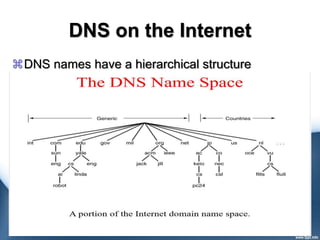
DNS on the Internet
DNS names have a hierarchical structure
Domain Name Registration
Select a unique easy-to-remember name.
Underscores are okay as well as dashes.
It must be at least two characters long and no
more than 63 characters maximum, excluding
the top level domain.
The first and last character cannot be a hyphen.
Domain names are not case-sensitive.
Check with Whois.net whether it's available or
not.
Domain Name Registration
Cont’d
 If it's available, then choose your domain name
extension. The most popular top-level domains may cost
higher than the less used ones.
 Go to checkout and pay for your domain name. You can
use either PayPal or a Credit Card.
 Edit your account at the domain registrar site to reflect
the domain name servers (at least 2) to point your
domain to.
 These domain name servers (DNS) are provided by your
web host and are needed to help translate numerical IP
addresses to human-readable domain names.
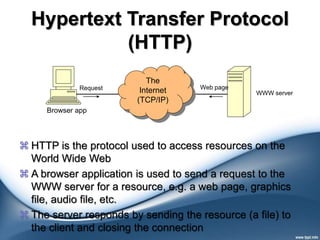
Hypertext Transfer Protocol
(HTTP)
Request
Browser app
WWW server
The
Internet
(TCP/IP)
Web page
 HTTP is the protocol used to access resources on the
World Wide Web
 A browser application is used to send a request to the
WWW server for a resource, e.g. a web page, graphics
file, audio file, etc.
 The server responds by sending the resource (a file) to
the client and closing the connection
Uniform Resource Locator
(URL)
 Hypertext documents enable this by using a series of link.
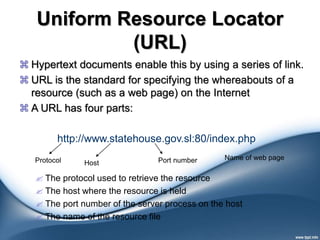
 URL is the standard for specifying the whereabouts of a
resource (such as a web page) on the Internet
 A URL has four parts:
 The protocol used to retrieve the resource
 The host where the resource is held
 The port number of the server process on the host
 The name of the resource file
http://www.statehouse.gov.sl:80/index.php
Protocol Host Port number Name of web page
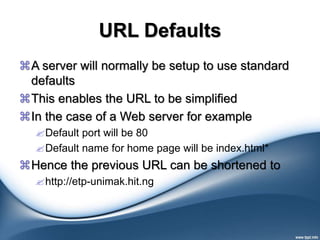
URL Defaults
A server will normally be setup to use standard
defaults
This enables the URL to be simplified
In the case of a Web server for example
Default port will be 80
Default name for home page will be index.html*
Hence the previous URL can be shortened to
http://etp-unimak.hit.ng
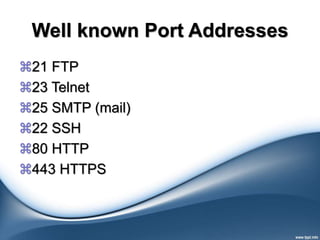
Well known Port Addresses
21 FTP
23 Telnet
25 SMTP (mail)
22 SSH
80 HTTP
443 HTTPS
WEB HOSTS
WWW provides a bi-directional communication
flow
At its core, a Web server serves static content to a
Web browser by loading a file from a disk and
serving it across the network to a user's Web
browser.
 Some companies that own computers acting as web
servers often offer web hosting services
 Web hosting is a service which allocates space for
customers to showcase their websites on computer
servers that are connected to the Internet 24/7.
Free web hosting
 Free, (sometimes) advertisement-supported web hosting,
and is often limited when compared to paid hosting.
 Good:
 Low cost.
 It's free.
 Good for family, hobby or personal sites.
 Free email is often an option.
 Bad:
 No domain names.
 Few, limited, or no software options.
 Limited security options.
 Limited or no database support.
 Limited technical support.
Shared Web Hosting
 One's website is placed on the same server as many other
sites, ranging from a few to hundreds or thousands.
 Typically, all domains may share a common pool of server
resources, such as RAM and the CPU. The features
available with this type of service can be quite extensive.
 Good: Low cost. Cost is shared with others. Good for small
business and average traffic. Multiple software options. Own
domain name. Good support.
 Bad: Reduced security due to many sites on one server.
Restrictions on traffic volume. Restricted database support.
Restricted software support.
Virtual Dedicated Server
 Dividing a server into virtual servers, where each user
feels like they're on their own dedicated server, but they're
actually sharing a server with many other users. The users
may have root access to their own virtual space. This is
also known as a virtual private server or VPS. Customers
are sometimes responsible for patching and maintaining
the server.
 Good: Low cost. Cost is shared with others. Good for small
business and average traffic. Multiple software options. Own
domain name. Good support.
 Bad: Reduced security due to many sites on one server.
Restrictions on traffic volume. Restricted database support.
Restricted software support.
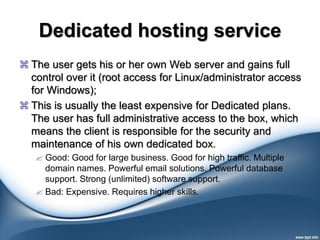
Dedicated hosting service
 The user gets his or her own Web server and gains full
control over it (root access for Linux/administrator access
for Windows);
 This is usually the least expensive for Dedicated plans.
The user has full administrative access to the box, which
means the client is responsible for the security and
maintenance of his own dedicated box.
 Good: Good for large business. Good for high traffic. Multiple
domain names. Powerful email solutions. Powerful database
support. Strong (unlimited) software support.
 Bad: Expensive. Requires higher skills.
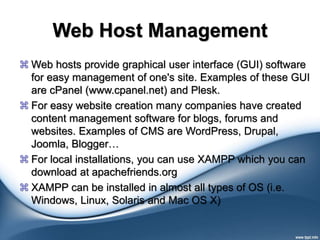
Web Host Management
 Web hosts provide graphical user interface (GUI) software
for easy management of one's site. Examples of these GUI
are cPanel (www.cpanel.net) and Plesk.
 For easy website creation many companies have created
content management software for blogs, forums and
websites. Examples of CMS are WordPress, Drupal,
Joomla, Blogger…
 For local installations, you can use XAMPP which you can
download at apachefriends.org
 XAMPP can be installed in almost all types of OS (i.e.
Windows, Linux, Solaris and Mac OS X)
The End
Good Bye

Introduction to internet

  • 1.
    University of Makeni (UniMak) Departmentof Information Technology Extension Training Programme (ETP)
  • 2.
  • 3.
  • 4.
    Course Outline Understanding HTTP BuildingStatic Sites with HTML 5 Enhancing presentation with CSS 3.0 Adding behavior with JavaScript Server-side programming with PHP Database Communication with SQL Server-side communication with AJAX Security best-practices for developers
  • 5.
    Course Teaching Techniques Theoretical-framework Hands-onLab work Assignments Ad-hoc projects
  • 6.
    Communication Route(s) Electronic WhatsApp: (+232-30-198-359) ElectronicMail: yusufbrima@gmail.com yusufbrima@yahoo.com yusufbrima@outlook.com Facebook : facebook.com/yusuf.brima LinkedIn: Yusuf Brima Face2face*
  • 7.
    Course Pre-requisites (Dependencies) Prior knowledgeof “basic computer usage ” A computer to follow along Internet Access (for project publishing on the Internet) An online transaction-enabled account (e.g., Credit Card/MasterCard …)*
  • 8.
    Tools and environmentsfor the course Development Platform Average/ Fair Performance Computer (RAM >=1GB & Clock Cycles >= 1GHz) Code Editor PHP Development Server(s) Stack LAMP MAMP XAMP WAMP Up-to-date Internet browser Hosting provider DNS Registrar
  • 9.
    Tools and environmentsfor the course cont’d PHP http://www.php.net/downloads.php MySQL Server http://www.mysql.com/downloads/index.html XAMPP https://www.apachefriends.org/download.html Apache https://httpd.apache.org/download.cgi
  • 10.
    Brief history ofthe Internet The INTERNET is a network of computers, which links many different types of computers all over the world.  ARPANET was the first WAN and had only four sites in 1969.  In 1989, the U.S. government lifted restrictions on the use of INTERNET, and allow its usage for commercial purposes as well.
  • 11.
    The ARPANET The INTERNETis a network of computers, which links many different types of computers all over the world.  ARPANET was the first WAN and had only four sites in 1969.  In 1989, the U.S. government lifted restrictions on the use of INTERNET, and allow its usage for commercial purposes as well.
  • 12.
    Basic Services ofthe Internet Electronic Mail (E-Mail) – Allow user to send a mail (message ) to another internet user in any part of the world in a near-real-time manner .  File Transfer Protocol (FTP) – Allow user to move a file from one computer to another on the internet.  Telnet – Allow a user to log into another computer somewhere on the internet .
  • 13.
    Electronic Mail (E-Mail) E-Mail isa rapid and productive communication tool because : It is faster than Paper Mail . Unlike telephone, The persons communicating with each other need not to be available at the same time. Unlike Fax documents , Email documents can be stored in a computer and be easily edited using editing programs.
  • 14.
    TELNET Some common usesof telnet service are - Using the computing power of the remote computer. Using a software on the remote computer. Accessing remote computers data base or achieve. Logging into ones own computer from another computer.
  • 15.
    The World WideWeb (WWW) World Wide Web or W3 is the most popular and promising method of organizing and accessing information on the INTERNET. Hypertext is a new way of information storage and retrieval that enables authors to structure information in novel ways. A properly designed hypertext document can help users to locate desired type of information rapidly.
  • 16.
    The World WideWeb (WWW) Cont’d Hypertext documents enable this by using a series of link. A link is a special type of item in a hypertext document connecting the document to another document. Hypertext documents on internet are known as Web Pages.
  • 17.
    Web Browsers To usea computer as a Web client, a user needs to load on it a special software tool known as WWW Browser. Browser provide following navigation facilities – Do not require a user to login to a server computer. Enable a user to visit a server computer’s site directly and access information on it by specifying its URL (Uniform Resource Locator). Enable user to create and maintain a personal hotlist of favorite URL.
  • 18.
    Web Browsers Cont’d Maintain ahistory of server computers visited by user in a surfing session.  Enable a user to download information in various formats
  • 19.
    Internet Search Engine Internet search engine is an application, which helps users to locate Web sites containing useful information and references.  To search Information : A user types the description of the information using the user interface of the search engine. The search engine then searches the requested information on the WWW and returns the results to the user. Results enable the user to locate the requested quickly from the last ocean of information available on the internet.
  • 20.
  • 21.
    Hypertext documents enablethis by using a series of link. A link is a special type of item in a hypertext document connecting the document to another document. Hypertext documents on internet are known as Web Pages.
  • 22.
    Uses of theInternet Some important current strategic of the INTERNET are : On-line communication Software sharing Organization promotion Product promotion and feedback about products On-line journals, magazines, Encyclopedia, and dictionary On-line shopping …
  • 23.
    Getting started withWeb Development Domain Name Service Hosting Provider (Web Host) Virtual Private Server (VPS)
  • 24.
    DNS -TCP/IP Addresses Everyhost on the Internet must have a unique IP address The IP address is a 32-bit number which we write in dotted decimal notation The first part of the IP address is the network address – the remainder is the host ID
  • 25.
    Network Address Example 216.58.208.195– google.com.sl 157.240.1.35– Facebook.com 216.38.58.143 – statehouse.gov.sl IP addresses are comfortable for machines but not humans!
  • 26.
    Obtaining an InternetNetwork Address IP network addresses must be unique, or the Internet will not be stable The Internet Network Information Centre (InterNIC) was originally responsible for issuing Internet network addresses Today, the Internet Assigned Number Authority (IANA) issues network addresses to Information Service Providers (ISPs) ISPs split networks up into subnets and sell them on to their customers
  • 27.
    Domain Name System(DNS) IP addresses are used to identify hosts on a TCP/IP network Example: 216.38.58.143 Numbers are not ‘friendly’ – people prefer names DNS is a protocol used to map IP addresses to textual names E.g. www.statehouse.gov.sl maps to 216.38.58.143
  • 28.
    DNS on theInternet DNS names have a hierarchical structure
  • 29.
    Domain Name Registration Selecta unique easy-to-remember name. Underscores are okay as well as dashes. It must be at least two characters long and no more than 63 characters maximum, excluding the top level domain. The first and last character cannot be a hyphen. Domain names are not case-sensitive. Check with Whois.net whether it's available or not.
  • 30.
    Domain Name Registration Cont’d If it's available, then choose your domain name extension. The most popular top-level domains may cost higher than the less used ones.  Go to checkout and pay for your domain name. You can use either PayPal or a Credit Card.  Edit your account at the domain registrar site to reflect the domain name servers (at least 2) to point your domain to.  These domain name servers (DNS) are provided by your web host and are needed to help translate numerical IP addresses to human-readable domain names.
  • 31.
    Hypertext Transfer Protocol (HTTP) Request Browserapp WWW server The Internet (TCP/IP) Web page  HTTP is the protocol used to access resources on the World Wide Web  A browser application is used to send a request to the WWW server for a resource, e.g. a web page, graphics file, audio file, etc.  The server responds by sending the resource (a file) to the client and closing the connection
  • 32.
    Uniform Resource Locator (URL) Hypertext documents enable this by using a series of link.  URL is the standard for specifying the whereabouts of a resource (such as a web page) on the Internet  A URL has four parts:  The protocol used to retrieve the resource  The host where the resource is held  The port number of the server process on the host  The name of the resource file http://www.statehouse.gov.sl:80/index.php Protocol Host Port number Name of web page
  • 33.
    URL Defaults A serverwill normally be setup to use standard defaults This enables the URL to be simplified In the case of a Web server for example Default port will be 80 Default name for home page will be index.html* Hence the previous URL can be shortened to http://etp-unimak.hit.ng
  • 34.
    Well known PortAddresses 21 FTP 23 Telnet 25 SMTP (mail) 22 SSH 80 HTTP 443 HTTPS
  • 35.
    WEB HOSTS WWW providesa bi-directional communication flow At its core, a Web server serves static content to a Web browser by loading a file from a disk and serving it across the network to a user's Web browser.  Some companies that own computers acting as web servers often offer web hosting services  Web hosting is a service which allocates space for customers to showcase their websites on computer servers that are connected to the Internet 24/7.
  • 36.
    Free web hosting Free, (sometimes) advertisement-supported web hosting, and is often limited when compared to paid hosting.  Good:  Low cost.  It's free.  Good for family, hobby or personal sites.  Free email is often an option.  Bad:  No domain names.  Few, limited, or no software options.  Limited security options.  Limited or no database support.  Limited technical support.
  • 37.
    Shared Web Hosting One's website is placed on the same server as many other sites, ranging from a few to hundreds or thousands.  Typically, all domains may share a common pool of server resources, such as RAM and the CPU. The features available with this type of service can be quite extensive.  Good: Low cost. Cost is shared with others. Good for small business and average traffic. Multiple software options. Own domain name. Good support.  Bad: Reduced security due to many sites on one server. Restrictions on traffic volume. Restricted database support. Restricted software support.
  • 38.
    Virtual Dedicated Server Dividing a server into virtual servers, where each user feels like they're on their own dedicated server, but they're actually sharing a server with many other users. The users may have root access to their own virtual space. This is also known as a virtual private server or VPS. Customers are sometimes responsible for patching and maintaining the server.  Good: Low cost. Cost is shared with others. Good for small business and average traffic. Multiple software options. Own domain name. Good support.  Bad: Reduced security due to many sites on one server. Restrictions on traffic volume. Restricted database support. Restricted software support.
  • 39.
    Dedicated hosting service The user gets his or her own Web server and gains full control over it (root access for Linux/administrator access for Windows);  This is usually the least expensive for Dedicated plans. The user has full administrative access to the box, which means the client is responsible for the security and maintenance of his own dedicated box.  Good: Good for large business. Good for high traffic. Multiple domain names. Powerful email solutions. Powerful database support. Strong (unlimited) software support.  Bad: Expensive. Requires higher skills.
  • 40.
    Web Host Management Web hosts provide graphical user interface (GUI) software for easy management of one's site. Examples of these GUI are cPanel (www.cpanel.net) and Plesk.  For easy website creation many companies have created content management software for blogs, forums and websites. Examples of CMS are WordPress, Drupal, Joomla, Blogger…  For local installations, you can use XAMPP which you can download at apachefriends.org  XAMPP can be installed in almost all types of OS (i.e. Windows, Linux, Solaris and Mac OS X)
  • 41.