Internet and Ethics
The Internet
What is the Internet?
 A global network connecting millions of computers.
 A network of computer networks which operates world-wide
using a common set of communications protocols.
 International network of networks utilizing TCP/IP
(Transmission Control Protocol/Internet Protocol).
 The Internet is a worldwide, publicly accessible series of
interconnected computer networks that transmit data by
packet switching using the standard Internet Protocol (IP).
The Internet
 The Internet and the World Wide Web are not synonymous.
 The Internet is a collection of interconnected computer
networks,
 In contrast, theWeb is a collection of interconnected
documents and other resources, linked by hyperlinks and
URLs.
 The World Wide Web is one of the services accessible via
the Internet, along with many others including e-mail, file
sharing and others.
History of the Internet
 Internet originated in 1060’s by US DOD,ARPNET (Advanced Research Projects
Agency Network), a vehicle for secure communications in event of nuclear war.
 Expanded to include a reluctant consortium of universities who were benefiting
from DOD grants.
 Consortium expanded role to include communications between scientists,
researchers, engineers etc. related to DOD or member universities.
 Network goes under the control of the National Science Foundation,
commercial use is prohibited.
 1995 US congress opens Internet to full commercial use
 The WWW and HTML code are the necessary components for Internet to
reach market potential.
History of the Internet
 TheWWW and HTML code are the necessary
components for Internet to reach market potential.
 The actual Web was originally conceived as a way for
physicists to share their research data.
 In 1989, Tim Berners-Lee led a team at Switzerland's
European Particle Physics Laboratory (CERN) in
developing the initial World Wide Web standards.
 One of the greatest things about the Internet is that
nobody really owns it.
Computer Networks
A computer network is a set of two or more computers that are able to
communicate with each other.
What are clients and servers?
 A computer is a server whenever it is configured to respond to requests
by other computers via a network.
 Any computer than requests data or services from another is a client.
 Any computer than requests data or services from another is a client,
even if that computer is also a server.
 a computer must have "server software" to provide the instructions on
its role. Likewise, a client computer must have "client software" to
instruct it on requesting services from a server
TCP/IP
 TCP/IP (Transmission Control Protocol/Internet Protocol) is the
basic communication language or protocol of the Internet.
 It can also be used as a communications protocol in a private network
(either an intranet or an extranet).
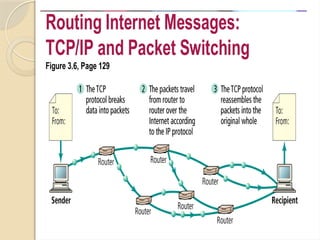
 TCP/IP is a two-layer program.The higher layer,Transmission Control
Protocol, manages the assembling of a message or file into smaller packets
that are transmitted over the Internet and received by a TCP layer that
reassembles the packets into the original message.
 The lower layer, Internet Protocol, handles the address part of each packet
so that it gets to the right destination. Every machine on the Internet has a
unique identifying number, called an IP Address. Devices on the network
check this address to see where to forward the message.
TCP/IP
 A typical IP address looks like this:
◦ 216.27.61.137
 Packets from the same message may be routed
differently than others, but will be reassembled at the
destination.
 TCP/IP uses the client/server model of communication
in which a computer user (a client) requests and is
provided a service (such as sending a Web page) by
another computer (a server) in the network.
Routing Internet Messages:
TCP/IP and Packet Switching
Figure 3.6, Page 129
URL
 Uniform (Universal) Resource Locator (URL)– can be thought of as the unique
address of an Internet website or page and is sometimes referred to informally as a
"web address.“
◦ http://www.boutell.com/newfaq/definitions/url.html
A URL is made up of several parts:
 The first part is the protocol, which tells the web browser what sort of server it will
be talking to. In this example, the protocol is http (web server). (ftp URLs, which work
just like http URLs but link to things on FTP servers rather than web servers)
 The second part of the example URL above is the fully qualified domain name of the
web site to connect to. In this case, the fully qualified domain name is
www.boutell.com.
 The term "domain name" usually refers only to the last part of the name, in this case
boutell.com which has been registered for that particular company's exclusive use.
 The third part of the example URL is the path at which this particular web page is
located on the web server. In this case, the path is /newfaq/basic/url.html. It is similar
to a filename.
DNS
 Domain Name System (DNS)- Every time you use a domain
name, you use the Internet's DNS servers to translate the human-
readable domain name into the machine-readable IP address.
 "Top-domain" refers to the top-level domain name, indicating the
nature of the computer system containing the account.
 The following are the common top-level domain names in the
United States:
◦ com - Business and commercial interests
◦ edu - Universities and other educational institutions
◦ gov - State and federal government
◦ mil - Military systems
◦ net - Special Internet systems
◦ org - Nonprofit and other organizations
DNS
 Within every top-level domain there is a
huge list of second-level domains.
 For example, in the .COM first-level
domain there is:
◦ HowStuffWorks
◦ Yahoo
◦ Microsoft
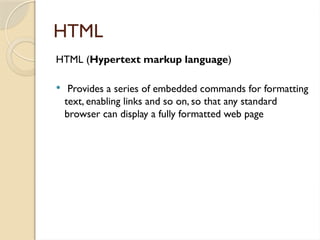
HTML
HTML (Hypertext markup language)
 Provides a series of embedded commands for formatting
text, enabling links and so on, so that any standard
browser can display a fully formatted web page
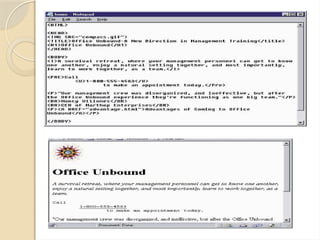
Copyright © 2004 Pearson Education, Inc.
Figure 3.20, Page 166
Slide 3-71
Code and Web Page
HTTP
 HTTP (Hyper-Text Transfer Protocol) – This is the
protocol used to transfer data over the World Wide
Web.
 That’s why all Web site addresses begin with "http://”.
Whenever you type a URL into your browser and hit
Enter, your computer sends an HTTP request to the
appropriate Web server.
 The Web server, which is designed to handle HTTP
requests, then sends to you the requested HTML page.
Web Browser
 Client software that communicate with web servers via HTTP
protocol.
 It translates HTML pages and image data into a nicely formatted
on-screen display.
 Examples of browsers include:
◦ Microsoft Internet Explorer,
◦ Firefox ,
◦ Apple's Safari browser and
◦ Opera shareware browser.
 The Lynx browser is the most frequently used text-only browser
and has been adapted to serve the needs of the vision-impaired.
Web Server
 Web servers are the computers that actually run web
sites.
 The term "web server" also refers to the piece of
software that runs on those computers, accepting
HTTP connections from web browsers and delivering
web pages and other files to them, as well as processing
form submissions.
 The most common web server software is Apache,
followed by Microsoft Internet Information
Server (IIS)
ISP
 ISP (Internet Service Provider) – In
order to connect to the Internet, you
need an ISP. It is the company that you
pay a monthly fee to in order to use the
Internet.
 Who are the ISPs in Trinidad?
Searching the web
 Carefully SelectYour Search Terms
 Broad or general terms will return thousands of
possible sites. Try to use terms that are more specific
to your topic.
 To narrow your terms, look at sites that you already
have found and that are relevant to your topic.
Identify possible search terms from those sites.
 You also can combine terms, using Boolean Operators
Searching the web
Using Meta Search Engines
 Meta search engines search other search engines.
Often they also search smaller, less well known
search engines and specialized sites.
 Here are several helpful Meta Search Engines:
◦ Ask Jeeves
◦ Dogpile
◦ MetaCrawler
◦ All4One
Searching the web
Using Search Engines
 Search engines use key words and phrases to
search the Internet. Many allow you to enter
questions rather than simply a few search terms.
 Here are several helpful search engines:
◦ Google
◦ HotBot
◦ DuckDuckGo
◦ Lycos
Searching the web
Using Catalogues/Indexes
 Catalogues, which also are called indexes, list websites by category. Each
category has subcategories that help you locate sites related to your topic.
 Often catalogues include a search utility for searching the categorized sites;
the search tool usually does not search other web sites not indexed in the
categories, though.
 Many search engines and meta search engines include catalogues as part of
their larger site.
 Two helpful catalogues follow:
◦ Yahoo
◦ About.com
Online Sources
 Information on the Internet, particularly theWorld WideWeb, seems to
be exploding with each passing day.
 Just as we don't believe everything we hear on the radio, read in a
newspaper, or see onT.V., we can't believe everything on the Internet.
 There are five basic criteria that you can use to evaluate Internet sites,
which are very similar to the criteria used for evaluating other
resources.
◦ Accuracy
◦ Authority
◦ Objectivity
◦ Currency
◦ Coverage
Email
 E-mail is the method through which you can send messages to other
Net users.
 Internet email addresses always follow this format:
◦ username@domain.top-domain
 "Username" is, of course, the user name of the person holding the
account.
 "Domain" refers to the name of the computer that holds the user's
account (usually a close match to the service name).
 "Top-domain" refers to the top-level domain name, indicating the nature
of the computer system containing the account.
Email Etiquette
 Follow the conventions for standard business writing.
 Don't assume that your E-mail messages are private.
 Don't assume that your E-mail messages will be read
and acted on immediately.
 Do not send unsolicited E-mail, particularly
commercial mass mailings. Known as "spamming"
 When writing, do not type in ALL CAPS.
Computer Ethics
What is Ethics?
 Ethics refers to the principles of right and wrong that individuals, acting as free
moral agents, use to make choices to guide their behaviour.
What is Computer Ethics?
 Ethical problems aggravated, transformed or created by computer
technology(Walter Maner). Some old ethical problems, he said.Were made
worse by computers.
 The study of the way in which computers pose new versions of standard moral
problems and moral dilemmas, exacerbating the old problems, and forcing us to
apply ordinary moral norms in uncharted realms. (Deborah Johnson)
 A field concerned with “policy vacuums”, and “conceptual muddles” regarding
the social and ethical use of information technology.
Computer Ethics
There are a number of questions that are frequently discussed under the
rubric of computer ethics.
 Computers in the Workplace: Loss of jobs, Creation of jobs, Health and
safety
 Computer Crime and Security: Identity theft, hacking, malicious software
 Privacy and Anonymity
 Intellectual Property: piracy
 Professional responsibility: to employer, to client, to society
 Information rich vs Information poor
Computer applications in Engineering
 Computer-aided engineering (often referred to as CAE) is the use of
information technology for supporting engineers in tasks such as
analysis, simulation, design, manufacture, planning, diagnosis and repair.
 Software tools that have been developed for providing support to
these activities are considered CAE tools.
 CAE tools are being used, for example, to analyze the robustness and
performance of components and assemblies.
 It encompasses simulation, validation and optimization of products
and manufacturing tools.
 In the future, CAE systems will be major providers of information to
help support design teams in decision making.
Computer applications in Engineering
CAE areas covered include:
 Stress analysis on components and assemblies using FEA (Finite
Element Analysis);
 Thermal and fluid flow analysis Computational fluid dynamics (CFD);
 Kinematics;
 Mechanical event simulation (MES).
 Analysis tools for process simulation for operations such as casting,
molding, and die press forming.
 Optimization of the product or process.
Internet and Ethics Saftey Guidelines for Technology Use

Internet and Ethics Saftey Guidelines for Technology Use

  • 1.
  • 2.
    The Internet What isthe Internet?  A global network connecting millions of computers.  A network of computer networks which operates world-wide using a common set of communications protocols.  International network of networks utilizing TCP/IP (Transmission Control Protocol/Internet Protocol).  The Internet is a worldwide, publicly accessible series of interconnected computer networks that transmit data by packet switching using the standard Internet Protocol (IP).
  • 3.
    The Internet  TheInternet and the World Wide Web are not synonymous.  The Internet is a collection of interconnected computer networks,  In contrast, theWeb is a collection of interconnected documents and other resources, linked by hyperlinks and URLs.  The World Wide Web is one of the services accessible via the Internet, along with many others including e-mail, file sharing and others.
  • 4.
    History of theInternet  Internet originated in 1060’s by US DOD,ARPNET (Advanced Research Projects Agency Network), a vehicle for secure communications in event of nuclear war.  Expanded to include a reluctant consortium of universities who were benefiting from DOD grants.  Consortium expanded role to include communications between scientists, researchers, engineers etc. related to DOD or member universities.  Network goes under the control of the National Science Foundation, commercial use is prohibited.  1995 US congress opens Internet to full commercial use  The WWW and HTML code are the necessary components for Internet to reach market potential.
  • 5.
    History of theInternet  TheWWW and HTML code are the necessary components for Internet to reach market potential.  The actual Web was originally conceived as a way for physicists to share their research data.  In 1989, Tim Berners-Lee led a team at Switzerland's European Particle Physics Laboratory (CERN) in developing the initial World Wide Web standards.  One of the greatest things about the Internet is that nobody really owns it.
  • 6.
    Computer Networks A computernetwork is a set of two or more computers that are able to communicate with each other. What are clients and servers?  A computer is a server whenever it is configured to respond to requests by other computers via a network.  Any computer than requests data or services from another is a client.  Any computer than requests data or services from another is a client, even if that computer is also a server.  a computer must have "server software" to provide the instructions on its role. Likewise, a client computer must have "client software" to instruct it on requesting services from a server
  • 7.
    TCP/IP  TCP/IP (TransmissionControl Protocol/Internet Protocol) is the basic communication language or protocol of the Internet.  It can also be used as a communications protocol in a private network (either an intranet or an extranet).  TCP/IP is a two-layer program.The higher layer,Transmission Control Protocol, manages the assembling of a message or file into smaller packets that are transmitted over the Internet and received by a TCP layer that reassembles the packets into the original message.  The lower layer, Internet Protocol, handles the address part of each packet so that it gets to the right destination. Every machine on the Internet has a unique identifying number, called an IP Address. Devices on the network check this address to see where to forward the message.
  • 8.
    TCP/IP  A typicalIP address looks like this: ◦ 216.27.61.137  Packets from the same message may be routed differently than others, but will be reassembled at the destination.  TCP/IP uses the client/server model of communication in which a computer user (a client) requests and is provided a service (such as sending a Web page) by another computer (a server) in the network.
  • 9.
    Routing Internet Messages: TCP/IPand Packet Switching Figure 3.6, Page 129
  • 10.
    URL  Uniform (Universal)Resource Locator (URL)– can be thought of as the unique address of an Internet website or page and is sometimes referred to informally as a "web address.“ ◦ http://www.boutell.com/newfaq/definitions/url.html A URL is made up of several parts:  The first part is the protocol, which tells the web browser what sort of server it will be talking to. In this example, the protocol is http (web server). (ftp URLs, which work just like http URLs but link to things on FTP servers rather than web servers)  The second part of the example URL above is the fully qualified domain name of the web site to connect to. In this case, the fully qualified domain name is www.boutell.com.  The term "domain name" usually refers only to the last part of the name, in this case boutell.com which has been registered for that particular company's exclusive use.  The third part of the example URL is the path at which this particular web page is located on the web server. In this case, the path is /newfaq/basic/url.html. It is similar to a filename.
  • 11.
    DNS  Domain NameSystem (DNS)- Every time you use a domain name, you use the Internet's DNS servers to translate the human- readable domain name into the machine-readable IP address.  "Top-domain" refers to the top-level domain name, indicating the nature of the computer system containing the account.  The following are the common top-level domain names in the United States: ◦ com - Business and commercial interests ◦ edu - Universities and other educational institutions ◦ gov - State and federal government ◦ mil - Military systems ◦ net - Special Internet systems ◦ org - Nonprofit and other organizations
  • 12.
    DNS  Within everytop-level domain there is a huge list of second-level domains.  For example, in the .COM first-level domain there is: ◦ HowStuffWorks ◦ Yahoo ◦ Microsoft
  • 13.
    HTML HTML (Hypertext markuplanguage)  Provides a series of embedded commands for formatting text, enabling links and so on, so that any standard browser can display a fully formatted web page
  • 14.
    Copyright © 2004Pearson Education, Inc. Figure 3.20, Page 166 Slide 3-71 Code and Web Page
  • 15.
    HTTP  HTTP (Hyper-TextTransfer Protocol) – This is the protocol used to transfer data over the World Wide Web.  That’s why all Web site addresses begin with "http://”. Whenever you type a URL into your browser and hit Enter, your computer sends an HTTP request to the appropriate Web server.  The Web server, which is designed to handle HTTP requests, then sends to you the requested HTML page.
  • 16.
    Web Browser  Clientsoftware that communicate with web servers via HTTP protocol.  It translates HTML pages and image data into a nicely formatted on-screen display.  Examples of browsers include: ◦ Microsoft Internet Explorer, ◦ Firefox , ◦ Apple's Safari browser and ◦ Opera shareware browser.  The Lynx browser is the most frequently used text-only browser and has been adapted to serve the needs of the vision-impaired.
  • 17.
    Web Server  Webservers are the computers that actually run web sites.  The term "web server" also refers to the piece of software that runs on those computers, accepting HTTP connections from web browsers and delivering web pages and other files to them, as well as processing form submissions.  The most common web server software is Apache, followed by Microsoft Internet Information Server (IIS)
  • 18.
    ISP  ISP (InternetService Provider) – In order to connect to the Internet, you need an ISP. It is the company that you pay a monthly fee to in order to use the Internet.  Who are the ISPs in Trinidad?
  • 19.
    Searching the web Carefully SelectYour Search Terms  Broad or general terms will return thousands of possible sites. Try to use terms that are more specific to your topic.  To narrow your terms, look at sites that you already have found and that are relevant to your topic. Identify possible search terms from those sites.  You also can combine terms, using Boolean Operators
  • 20.
    Searching the web UsingMeta Search Engines  Meta search engines search other search engines. Often they also search smaller, less well known search engines and specialized sites.  Here are several helpful Meta Search Engines: ◦ Ask Jeeves ◦ Dogpile ◦ MetaCrawler ◦ All4One
  • 21.
    Searching the web UsingSearch Engines  Search engines use key words and phrases to search the Internet. Many allow you to enter questions rather than simply a few search terms.  Here are several helpful search engines: ◦ Google ◦ HotBot ◦ DuckDuckGo ◦ Lycos
  • 22.
    Searching the web UsingCatalogues/Indexes  Catalogues, which also are called indexes, list websites by category. Each category has subcategories that help you locate sites related to your topic.  Often catalogues include a search utility for searching the categorized sites; the search tool usually does not search other web sites not indexed in the categories, though.  Many search engines and meta search engines include catalogues as part of their larger site.  Two helpful catalogues follow: ◦ Yahoo ◦ About.com
  • 23.
    Online Sources  Informationon the Internet, particularly theWorld WideWeb, seems to be exploding with each passing day.  Just as we don't believe everything we hear on the radio, read in a newspaper, or see onT.V., we can't believe everything on the Internet.  There are five basic criteria that you can use to evaluate Internet sites, which are very similar to the criteria used for evaluating other resources. ◦ Accuracy ◦ Authority ◦ Objectivity ◦ Currency ◦ Coverage
  • 24.
    Email  E-mail isthe method through which you can send messages to other Net users.  Internet email addresses always follow this format: ◦ username@domain.top-domain  "Username" is, of course, the user name of the person holding the account.  "Domain" refers to the name of the computer that holds the user's account (usually a close match to the service name).  "Top-domain" refers to the top-level domain name, indicating the nature of the computer system containing the account.
  • 25.
    Email Etiquette  Followthe conventions for standard business writing.  Don't assume that your E-mail messages are private.  Don't assume that your E-mail messages will be read and acted on immediately.  Do not send unsolicited E-mail, particularly commercial mass mailings. Known as "spamming"  When writing, do not type in ALL CAPS.
  • 26.
    Computer Ethics What isEthics?  Ethics refers to the principles of right and wrong that individuals, acting as free moral agents, use to make choices to guide their behaviour. What is Computer Ethics?  Ethical problems aggravated, transformed or created by computer technology(Walter Maner). Some old ethical problems, he said.Were made worse by computers.  The study of the way in which computers pose new versions of standard moral problems and moral dilemmas, exacerbating the old problems, and forcing us to apply ordinary moral norms in uncharted realms. (Deborah Johnson)  A field concerned with “policy vacuums”, and “conceptual muddles” regarding the social and ethical use of information technology.
  • 27.
    Computer Ethics There area number of questions that are frequently discussed under the rubric of computer ethics.  Computers in the Workplace: Loss of jobs, Creation of jobs, Health and safety  Computer Crime and Security: Identity theft, hacking, malicious software  Privacy and Anonymity  Intellectual Property: piracy  Professional responsibility: to employer, to client, to society  Information rich vs Information poor
  • 28.
    Computer applications inEngineering  Computer-aided engineering (often referred to as CAE) is the use of information technology for supporting engineers in tasks such as analysis, simulation, design, manufacture, planning, diagnosis and repair.  Software tools that have been developed for providing support to these activities are considered CAE tools.  CAE tools are being used, for example, to analyze the robustness and performance of components and assemblies.  It encompasses simulation, validation and optimization of products and manufacturing tools.  In the future, CAE systems will be major providers of information to help support design teams in decision making.
  • 29.
    Computer applications inEngineering CAE areas covered include:  Stress analysis on components and assemblies using FEA (Finite Element Analysis);  Thermal and fluid flow analysis Computational fluid dynamics (CFD);  Kinematics;  Mechanical event simulation (MES).  Analysis tools for process simulation for operations such as casting, molding, and die press forming.  Optimization of the product or process.