ECE 1010 ECE Problem Solving I


MATLAB                                                      3
Functions
Overview
In this chapter we start studying the many, many, mathematical
functions that are included in MATLAB. Some time will be spent
introducing complex variables and how MATLAB handles them.
Later we will learn how to write custom (user written) functions
which are a special form of m-file. Two dimensional plotting
functions will be introduced. We will also explore programming
constructs for flow control (if-else-elseif code blocks)
and looping (for loop etc.). Next data analysis functions will be
investigated, which includes sample statistics and histogram plot-
ting functions.


Chapter 3: Overview                                            3–1
ECE 1010 ECE Problem Solving I


Mathematical Functions
Common Math Functions
                        Table 3.1: Common math functions

    Function             Description      Function         Description
  abs(x)             x                  sqrt(x)            x
  round(x) nearest integer              fix(x)         nearest integer
  floor(x) nearest integer              ceil(x)        nearest integer
           toward – ∞                                  toward ∞
  sign(x)                               rem(x,y) the remainder
                     – 1, x < 0
                                                of x ⁄ y
                     0, x = 0
                    
                     1, x > 0
  exp(x)                x               log(x)         natural log ln x
                    e

  log10(x) log base 10
           log 10 x

Examples:
            » x = [-5.5 5.5];
            » round(x)
            ans =     -6    6
            » fix(x)
            ans =     -5    5
            » floor(x)
            ans =     -6    5
            » ceil(x)

Chapter 3: Mathematical Functions                                        3–2
ECE 1010 ECE Problem Solving I


            ans =     -5            6
            » sign(x)
            ans =     -1            1
            » rem(23,6)
            ans =      5

Trigonometric and Hyperbolic Functions
 • Unlike pocket calculators, the trigonometric functions always
   assume the input argument is in radians
 • The inverse trigonometric functions produce outputs that are
   in radians
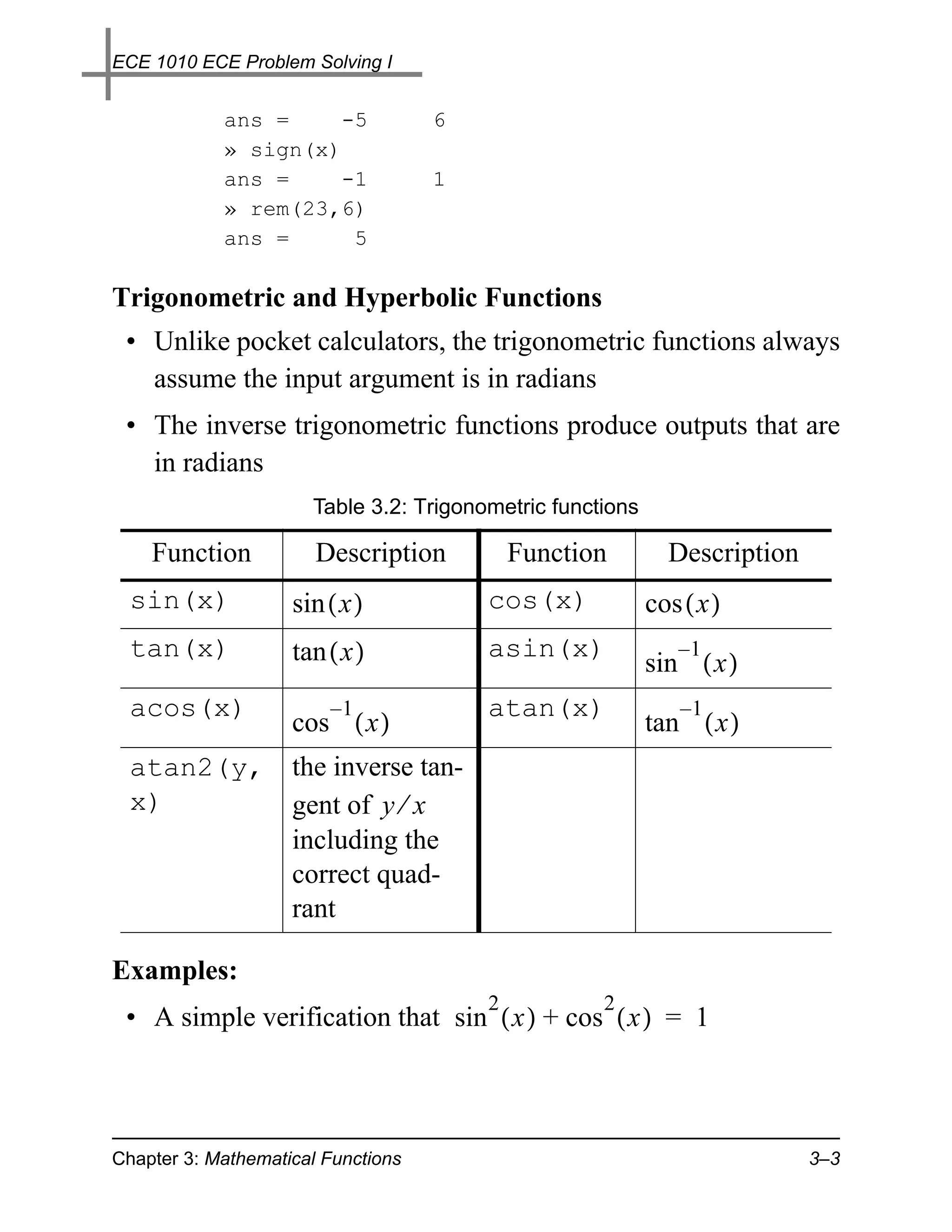
                      Table 3.2: Trigonometric functions

    Function           Description          Function         Description
  sin(x)            sin ( x )           cos(x)             cos ( x )
  tan(x)            tan ( x )           asin(x)               –1
                                                           sin ( x )
  acos(x)               –1              atan(x)                –1
                    cos ( x )                              tan ( x )
  atan2(y,          the inverse tan-
  x)                gent of y ⁄ x
                    including the
                    correct quad-
                    rant

Examples:
                                        2           2
 • A simple verification that sin ( x ) + cos ( x ) = 1


Chapter 3: Mathematical Functions                                          3–3
ECE 1010 ECE Problem Solving I


      » x = 0:pi/10:pi;
      » [x' sin(x)' cos(x)' (sin(x).^2+cos(x).^2)']
      ans =
               0         0    1.0000    1.0000
          0.3142    0.3090    0.9511    1.0000
          0.6283    0.5878    0.8090    1.0000
          0.9425    0.8090    0.5878    1.0000
          1.2566    0.9511    0.3090    1.0000
          1.5708    1.0000    0.0000    1.0000
          1.8850    0.9511   -0.3090    1.0000
          2.1991    0.8090   -0.5878    1.0000
          2.5133    0.5878   -0.8090    1.0000
          2.8274    0.3090   -0.9511    1.0000
          3.1416    0.0000   -1.0000    1.0000
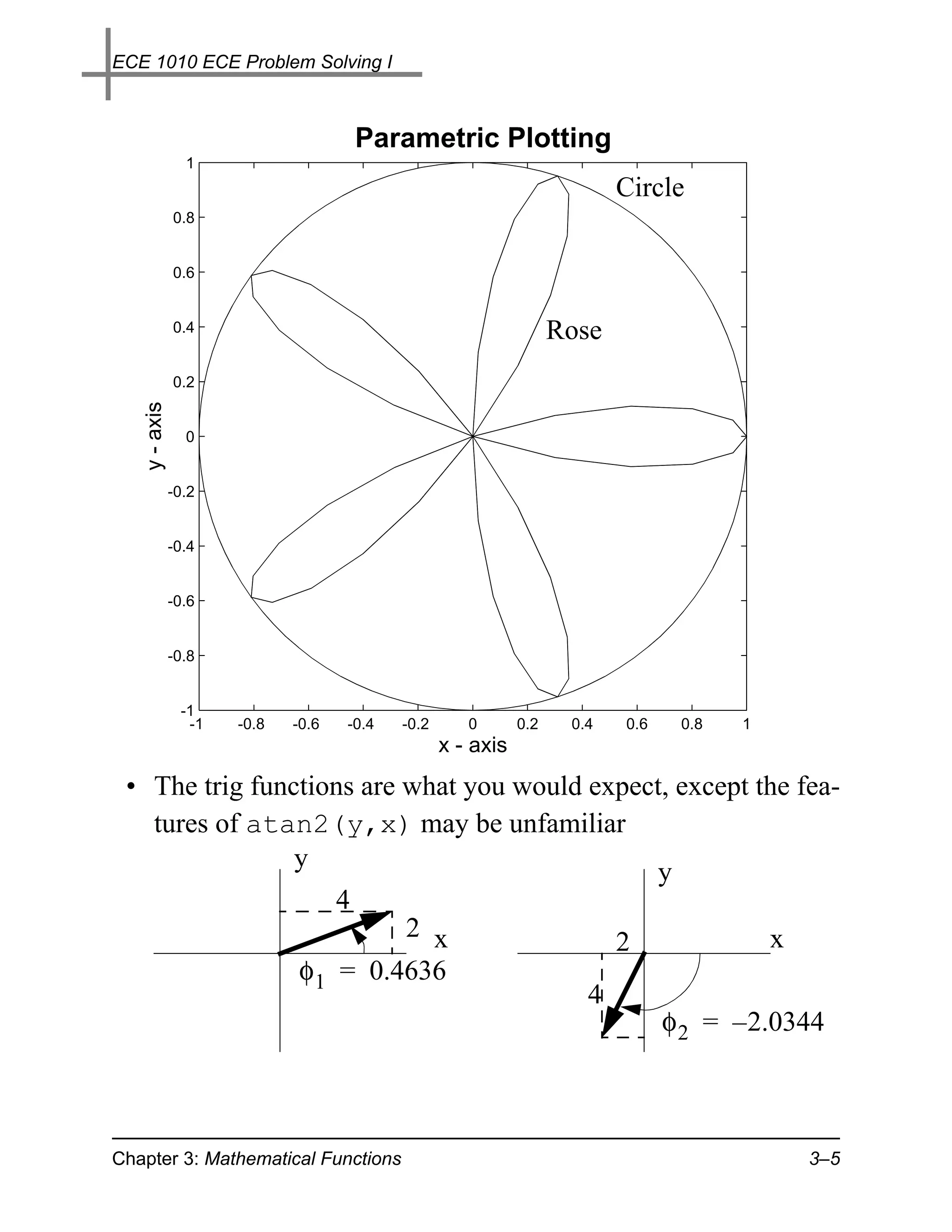
 • Parametric plotting:
    – Verify that by plotting sin θ versus cos θ for 0 ≤ θ ≤ 2π we
      obtain a circle
» theta = 0:2*pi/100:2*pi;  % Span 0 to 2pi with 100 pts
» plot(cos(theta),sin(theta)); axis('square')
» title('Parametric Plotting','fontsize',18)
» ylabel('y - axis','fontsize',14)
» xlabel('x - axis','fontsize',14)
» figure(2)
» hold
Current plot held
» plot(cos(5*theta).*cos(theta), ...
    cos(5*theta).*sin(theta)); % A five-leaved rose


Chapter 3: Mathematical Functions                              3–4
ECE 1010 ECE Problem Solving I


                                       Parametric Plotting
                1
                                                                         Circle
              0.8


              0.6


              0.4                                                 Rose
              0.2
   y - axis


                0


              -0.2


              -0.4


              -0.6


              -0.8


               -1
                -1   -0.8   -0.6   -0.4   -0.2      0       0.2    0.4   0.6    0.8   1
                                                 x - axis
 • The trig functions are what you would expect, except the fea-
   tures of atan2(y,x) may be unfamiliar
                y                              y
                                   4
                                     2 x                                 2                x
                            φ 1 = 0.4636
                                                                     4
                                                                               φ 2 = – 2.0344


Chapter 3: Mathematical Functions                                                             3–5
ECE 1010 ECE Problem Solving I


      » [atan(2/4) atan2(2,4)]
          ans =    0.4636    0.4636 % the same
      » [atan(-4/-2) atan2(-4,-2)]
          ans =    1.1071   -2.0344 % different; why?
                                                x
 • The hyperbolic functions are defined in terms of e
                            Table 3.3: Hyperbolic functions

    Function            Description            Function          Description
  sinh(x)              x         –x           cosh(x)           x         –x
                     e –e                                     e –e
                     -----------------
                                     -                        -----------------
                                                                              -
                             2                                        2
  tanh(x)               x         –x          asinh(x)                            2
                     e –e
                     ------------------                        ln ( x + x + 1 )
                        x          –x
                     e +e
  acosh(x)                                2   atanh(x)           1+x
                     ln ( x + x – 1 )                         ln -----------, x ≤ 1
                                                                           -
                                                                 1–x

 • There are no special concerns in the use of these functions
   except that atanh requires an argument that must not
   exceed an absolute value of one

Complex Number Functions
 • Before discussing these functions we first review a few facts
   about complex variable theory
 • In electrical engineering complex numbers appear frequently
 • A complex number is an ordered pair of real numbers1

   1. Tom M. Apostle, Mathematical Analysis, second edition, Addison Wesley,
      p. 15, 1974.

Chapter 3: Mathematical Functions                                                     3–6
ECE 1010 ECE Problem Solving I


    denoted ( a, b )
    – The first number, a, is called the real part, while the second
      number, b, is called the imaginary part
    – For algebraic manipulation purposes we write ( a, b )
        = a + ib = a + jb where i = j = – 1 ; electrical
      engineers typically use j since i is often used to denote cur-
      rent
    Note:        –1 × –1 = –1 ⇒ j × j = –1
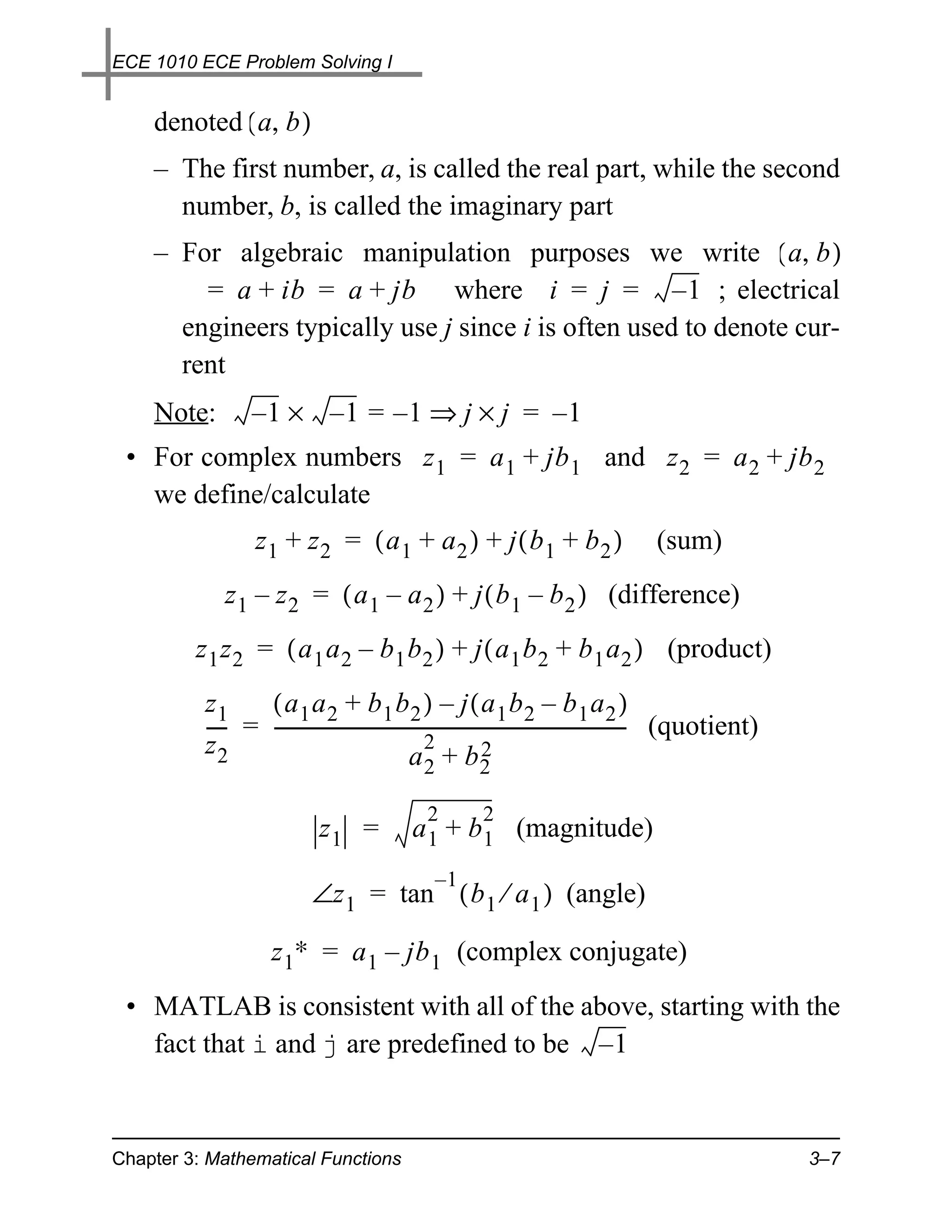
 • For complex numbers z 1 = a 1 + jb 1 and z 2 = a 2 + jb 2
   we define/calculate
                  z1 + z2 = ( a1 + a2 ) + j ( b1 + b2 )                              (sum)
             z 1 – z 2 = ( a 1 – a 2 ) + j ( b 1 – b 2 ) (difference)
         z 1 z 2 = ( a 1 a 2 – b 1 b 2 ) + j ( a 1 b 2 + b 1 a 2 ) (product)
          z1     ( a1 a2 + b1 b2 ) – j ( a1 b2 – b1 a2 )
          ---- = --------------------------------------------------------------------------- (quotient)
                                                                                           -
          z2                                     2            2
                                              a +b
                                              2         2

                                               2        2
                             z1 =           a 1 + b 1 (magnitude)
                                                  –1
                           ∠z 1 = tan ( b 1 ⁄ a 1 ) (angle)

                     z 1∗ = a 1 – jb 1 (complex conjugate)
 • MATLAB is consistent with all of the above, starting with the
   fact that i and j are predefined to be – 1


Chapter 3: Mathematical Functions                                                                         3–7
ECE 1010 ECE Problem Solving I


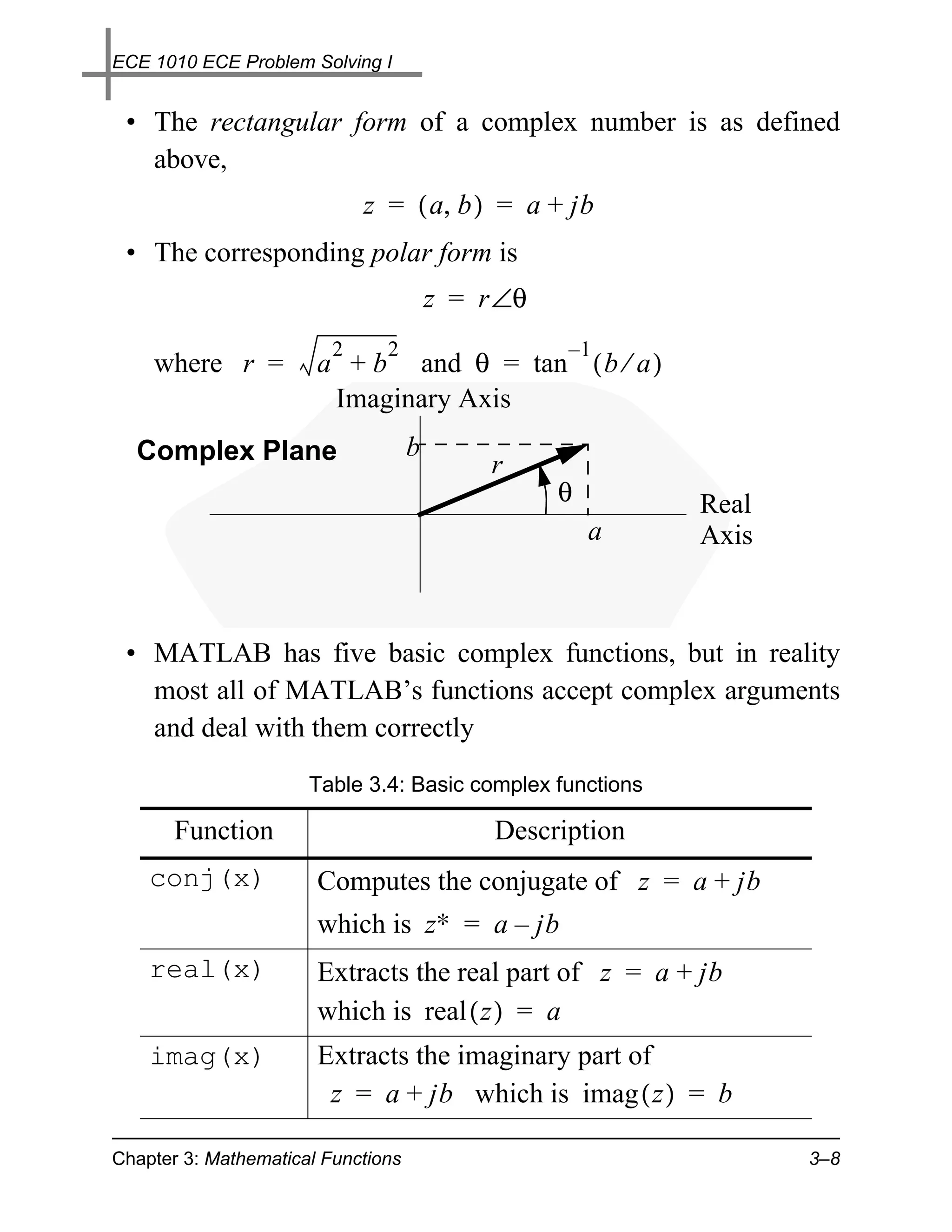
 • The rectangular form of a complex number is as defined
   above,
                             z = ( a, b ) = a + jb
 • The corresponding polar form is
                                        z = r ∠θ
                         2     2                   –1
    where r =          a + b and θ = tan ( b ⁄ a )
                        Imaginary Axis
  Complex Plane                     b
                                             r
                                                   θ       Real
                                                       a   Axis


 • MATLAB has five basic complex functions, but in reality
   most all of MATLAB’s functions accept complex arguments
   and deal with them correctly
                      Table 3.4: Basic complex functions

       Function                              Description
    conj(x)            Computes the conjugate of z = a + jb
                       which is z∗ = a – jb
    real(x)            Extracts the real part of z = a + jb
                       which is real ( z ) = a
    imag(x)            Extracts the imaginary part of
                        z = a + jb which is imag ( z ) = b

Chapter 3: Mathematical Functions                                 3–8
ECE 1010 ECE Problem Solving I


                      Table 3.4: Basic complex functions

       Function                                 Description
    angle(x)           computes the angle of z = a + jb using
                       atan2 which is
                       atan2(imag(z),real(z))
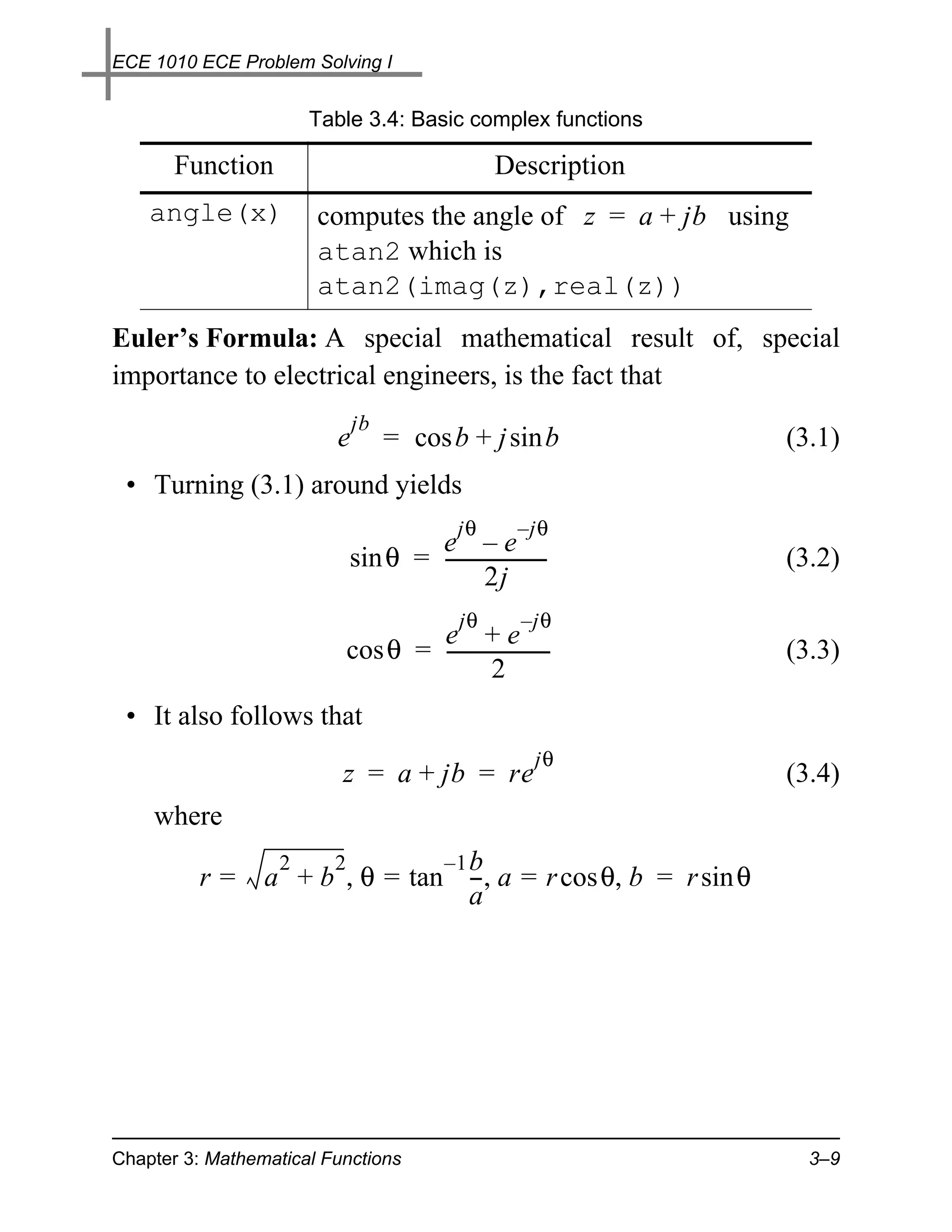
Euler’s Formula: A special mathematical result of, special
importance to electrical engineers, is the fact that
                             jb
                         e        = cos b + j sin b             (3.1)
 • Turning (3.1) around yields
                                          jθ       – jθ
                                   e –e
                           sin θ = ---------------------
                                                       -        (3.2)
                                            2j
                                          jθ        – jθ
                                  e +e
                          cos θ = ---------------------
                                                      -         (3.3)
                                            2
 • It also follows that
                                                      jθ
                          z = a + jb = re                       (3.4)
    where
                  2   2         –1 b
         r=      a + b , θ = tan --, a = r cos θ, b = r sin θ
                                   -
                                   a


Chapter 3: Mathematical Functions                                 3–9
ECE 1010 ECE Problem Solving I


 • Some examples:
      » z1 = 2+j*4; z2 = -5+j*7;
      » [z1 z2]
      ans =
         2.0000 + 4.0000i -5.0000 + 7.0000i
      » [real(z1) imag(z1) abs(z1) angle(z1)]
      ans =
         2.0000    4.0000    4.4721    1.1071
      » [conj(z1) conj(z2)]
      ans =
         2.0000 - 4.0000i -5.0000 - 7.0000i
      » [z1+z2 z1-z2 z1*z2 z1/z2]
      ans =
        -3.0000 +11.0000i   7.0000 - 3.0000i
       -38.0000 - 6.0000i   0.2432 - 0.4595i

Polar Plots: When dealing with complex numbers we often deal
with the polar form. The plot command which directly plots vec-
tors of magnitude and angle is polar(theta,r)
 • This function is also useful for general plotting
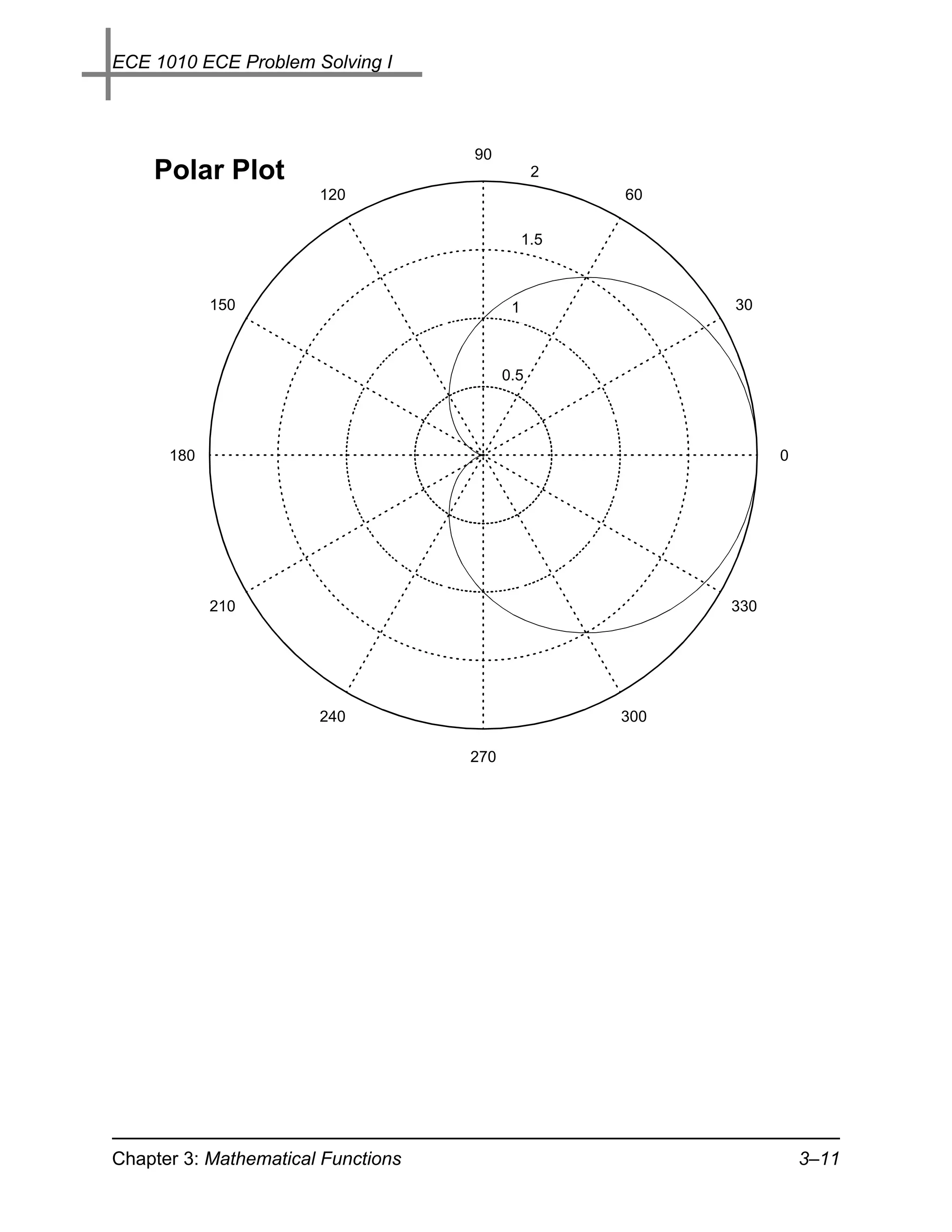
 • As an example the equation of a cardioid in polar form, with
   parameter a, is
                       r = a ( 1 + cos θ ), 0 ≤ θ ≤ 2π
» theta = 0:2*pi/100:2*pi;             % Span 0 to 2pi with 100 pts
» r = 1+cos(theta);
» polar(theta,r)


Chapter 3: Mathematical Functions                              3–10
ECE 1010 ECE Problem Solving I


                                    90
    Polar Plot                                  2
                       120                           60

                                               1.5


            150                            1               30


                                          0.5


      180                                                        0


            210                                            330


                       240                           300

                                    270


Chapter 3: Mathematical Functions                                    3–11

1010n3a

  • 1.
    ECE 1010 ECEProblem Solving I MATLAB 3 Functions Overview In this chapter we start studying the many, many, mathematical functions that are included in MATLAB. Some time will be spent introducing complex variables and how MATLAB handles them. Later we will learn how to write custom (user written) functions which are a special form of m-file. Two dimensional plotting functions will be introduced. We will also explore programming constructs for flow control (if-else-elseif code blocks) and looping (for loop etc.). Next data analysis functions will be investigated, which includes sample statistics and histogram plot- ting functions. Chapter 3: Overview 3–1
  • 2.
    ECE 1010 ECEProblem Solving I Mathematical Functions Common Math Functions Table 3.1: Common math functions Function Description Function Description abs(x) x sqrt(x) x round(x) nearest integer fix(x) nearest integer floor(x) nearest integer ceil(x) nearest integer toward – ∞ toward ∞ sign(x) rem(x,y) the remainder  – 1, x < 0  of x ⁄ y  0, x = 0   1, x > 0 exp(x) x log(x) natural log ln x e log10(x) log base 10 log 10 x Examples: » x = [-5.5 5.5]; » round(x) ans = -6 6 » fix(x) ans = -5 5 » floor(x) ans = -6 5 » ceil(x) Chapter 3: Mathematical Functions 3–2
  • 3.
    ECE 1010 ECEProblem Solving I ans = -5 6 » sign(x) ans = -1 1 » rem(23,6) ans = 5 Trigonometric and Hyperbolic Functions • Unlike pocket calculators, the trigonometric functions always assume the input argument is in radians • The inverse trigonometric functions produce outputs that are in radians Table 3.2: Trigonometric functions Function Description Function Description sin(x) sin ( x ) cos(x) cos ( x ) tan(x) tan ( x ) asin(x) –1 sin ( x ) acos(x) –1 atan(x) –1 cos ( x ) tan ( x ) atan2(y, the inverse tan- x) gent of y ⁄ x including the correct quad- rant Examples: 2 2 • A simple verification that sin ( x ) + cos ( x ) = 1 Chapter 3: Mathematical Functions 3–3
  • 4.
    ECE 1010 ECEProblem Solving I » x = 0:pi/10:pi; » [x' sin(x)' cos(x)' (sin(x).^2+cos(x).^2)'] ans = 0 0 1.0000 1.0000 0.3142 0.3090 0.9511 1.0000 0.6283 0.5878 0.8090 1.0000 0.9425 0.8090 0.5878 1.0000 1.2566 0.9511 0.3090 1.0000 1.5708 1.0000 0.0000 1.0000 1.8850 0.9511 -0.3090 1.0000 2.1991 0.8090 -0.5878 1.0000 2.5133 0.5878 -0.8090 1.0000 2.8274 0.3090 -0.9511 1.0000 3.1416 0.0000 -1.0000 1.0000 • Parametric plotting: – Verify that by plotting sin θ versus cos θ for 0 ≤ θ ≤ 2π we obtain a circle » theta = 0:2*pi/100:2*pi; % Span 0 to 2pi with 100 pts » plot(cos(theta),sin(theta)); axis('square') » title('Parametric Plotting','fontsize',18) » ylabel('y - axis','fontsize',14) » xlabel('x - axis','fontsize',14) » figure(2) » hold Current plot held » plot(cos(5*theta).*cos(theta), ... cos(5*theta).*sin(theta)); % A five-leaved rose Chapter 3: Mathematical Functions 3–4
  • 5.
    ECE 1010 ECEProblem Solving I Parametric Plotting 1 Circle 0.8 0.6 0.4 Rose 0.2 y - axis 0 -0.2 -0.4 -0.6 -0.8 -1 -1 -0.8 -0.6 -0.4 -0.2 0 0.2 0.4 0.6 0.8 1 x - axis • The trig functions are what you would expect, except the fea- tures of atan2(y,x) may be unfamiliar y y 4 2 x 2 x φ 1 = 0.4636 4 φ 2 = – 2.0344 Chapter 3: Mathematical Functions 3–5
  • 6.
    ECE 1010 ECEProblem Solving I » [atan(2/4) atan2(2,4)] ans = 0.4636 0.4636 % the same » [atan(-4/-2) atan2(-4,-2)] ans = 1.1071 -2.0344 % different; why? x • The hyperbolic functions are defined in terms of e Table 3.3: Hyperbolic functions Function Description Function Description sinh(x) x –x cosh(x) x –x e –e e –e ----------------- - ----------------- - 2 2 tanh(x) x –x asinh(x) 2 e –e ------------------ ln ( x + x + 1 ) x –x e +e acosh(x) 2 atanh(x) 1+x ln ( x + x – 1 ) ln -----------, x ≤ 1 - 1–x • There are no special concerns in the use of these functions except that atanh requires an argument that must not exceed an absolute value of one Complex Number Functions • Before discussing these functions we first review a few facts about complex variable theory • In electrical engineering complex numbers appear frequently • A complex number is an ordered pair of real numbers1 1. Tom M. Apostle, Mathematical Analysis, second edition, Addison Wesley, p. 15, 1974. Chapter 3: Mathematical Functions 3–6
  • 7.
    ECE 1010 ECEProblem Solving I denoted ( a, b ) – The first number, a, is called the real part, while the second number, b, is called the imaginary part – For algebraic manipulation purposes we write ( a, b ) = a + ib = a + jb where i = j = – 1 ; electrical engineers typically use j since i is often used to denote cur- rent Note: –1 × –1 = –1 ⇒ j × j = –1 • For complex numbers z 1 = a 1 + jb 1 and z 2 = a 2 + jb 2 we define/calculate z1 + z2 = ( a1 + a2 ) + j ( b1 + b2 ) (sum) z 1 – z 2 = ( a 1 – a 2 ) + j ( b 1 – b 2 ) (difference) z 1 z 2 = ( a 1 a 2 – b 1 b 2 ) + j ( a 1 b 2 + b 1 a 2 ) (product) z1 ( a1 a2 + b1 b2 ) – j ( a1 b2 – b1 a2 ) ---- = --------------------------------------------------------------------------- (quotient) - z2 2 2 a +b 2 2 2 2 z1 = a 1 + b 1 (magnitude) –1 ∠z 1 = tan ( b 1 ⁄ a 1 ) (angle) z 1∗ = a 1 – jb 1 (complex conjugate) • MATLAB is consistent with all of the above, starting with the fact that i and j are predefined to be – 1 Chapter 3: Mathematical Functions 3–7
  • 8.
    ECE 1010 ECEProblem Solving I • The rectangular form of a complex number is as defined above, z = ( a, b ) = a + jb • The corresponding polar form is z = r ∠θ 2 2 –1 where r = a + b and θ = tan ( b ⁄ a ) Imaginary Axis Complex Plane b r θ Real a Axis • MATLAB has five basic complex functions, but in reality most all of MATLAB’s functions accept complex arguments and deal with them correctly Table 3.4: Basic complex functions Function Description conj(x) Computes the conjugate of z = a + jb which is z∗ = a – jb real(x) Extracts the real part of z = a + jb which is real ( z ) = a imag(x) Extracts the imaginary part of z = a + jb which is imag ( z ) = b Chapter 3: Mathematical Functions 3–8
  • 9.
    ECE 1010 ECEProblem Solving I Table 3.4: Basic complex functions Function Description angle(x) computes the angle of z = a + jb using atan2 which is atan2(imag(z),real(z)) Euler’s Formula: A special mathematical result of, special importance to electrical engineers, is the fact that jb e = cos b + j sin b (3.1) • Turning (3.1) around yields jθ – jθ e –e sin θ = --------------------- - (3.2) 2j jθ – jθ e +e cos θ = --------------------- - (3.3) 2 • It also follows that jθ z = a + jb = re (3.4) where 2 2 –1 b r= a + b , θ = tan --, a = r cos θ, b = r sin θ - a Chapter 3: Mathematical Functions 3–9
  • 10.
    ECE 1010 ECEProblem Solving I • Some examples: » z1 = 2+j*4; z2 = -5+j*7; » [z1 z2] ans = 2.0000 + 4.0000i -5.0000 + 7.0000i » [real(z1) imag(z1) abs(z1) angle(z1)] ans = 2.0000 4.0000 4.4721 1.1071 » [conj(z1) conj(z2)] ans = 2.0000 - 4.0000i -5.0000 - 7.0000i » [z1+z2 z1-z2 z1*z2 z1/z2] ans = -3.0000 +11.0000i 7.0000 - 3.0000i -38.0000 - 6.0000i 0.2432 - 0.4595i Polar Plots: When dealing with complex numbers we often deal with the polar form. The plot command which directly plots vec- tors of magnitude and angle is polar(theta,r) • This function is also useful for general plotting • As an example the equation of a cardioid in polar form, with parameter a, is r = a ( 1 + cos θ ), 0 ≤ θ ≤ 2π » theta = 0:2*pi/100:2*pi; % Span 0 to 2pi with 100 pts » r = 1+cos(theta); » polar(theta,r) Chapter 3: Mathematical Functions 3–10
  • 11.
    ECE 1010 ECEProblem Solving I 90 Polar Plot 2 120 60 1.5 150 1 30 0.5 180 0 210 330 240 300 270 Chapter 3: Mathematical Functions 3–11