Dr. Vazi Okhandiar, DBA, MSCS, PMP, MCT
www.nrclc.com. (714) 505-3475
Build a Dashboard in an Hour
Using Microsoft PowerPivot in Excel
NR Computer Learning Center
NR Computer Learning Center (NRCLC)
•Established in 2002
•Provide Computer Training
•Microsoft Partner
 Hands-on classroom training
 Online Training
 Virtual Live Training
 Private Lesson
Dr. Vazi Okhandiar
Over 30 years of teaching experience in Computer Science &
IT courses and Microsoft Products and working in IT industry.
Worked for the World Bank, General Motors, HP/EDS,
Toyota, CSC, Olympus, and Mitsubishi, as well as numerous
small and medium-sized enterprises.
Education:
• DBA, Walden University
• MBA, University of California, Irvine
• Masters in Computer Science, Illinois Institute of
Technology, Chicago
• Bachelor’s Degree in Electrical Engineering,
University of California, Irvine.
Microsoft Certified Trainer (MCT) by Microsoft and Certified
Project Management Professional (PMP) by PMI
Agenda
• Introduction to dashboard
• Import Raw Data in Power Pivot
• Build Dashboard using Power Pivot
• Q & A
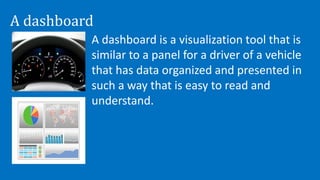
A dashboard
A dashboard is a visualization tool that is
similar to a panel for a driver of a vehicle
that has data organized and presented in
such a way that is easy to read and
understand.
Benefit of Digital Dashboards
• Visual presentation of performance measures
• Ability to identify efficiencies/inefficiencies
• Ability to identify and correct negative trends
• Ability to identify new trends.
• Ability to make more informed decision
• Align strategies and organizational goals
• Increase overall revenue
PowerPivot is a Free add-on for Microsoft Excel that enables a
user to:
• Import millions of row of data sources into a single Excel
workbook
• Create relationships between heterogeneous data
• Create calculated columns and measures using formulas
• Supports Visualize Tool – PivotTable, PivotChart, Slicers,
Sparkline
PowerPivot
7
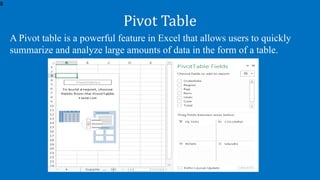
A Pivot table is a powerful feature in Excel that allows users to quickly
summarize and analyze large amounts of data in the form of a table.
Pivot Table
8
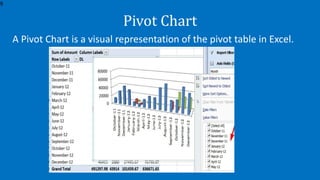
A Pivot Chart is a visual representation of the pivot table in Excel.
Pivot Chart
9
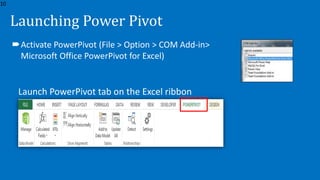
Launching Power Pivot
Launch PowerPivot tab on the Excel ribbon
Activate PowerPivot (File > Option > COM Add-in>
Microsoft Office PowerPivot for Excel)
10
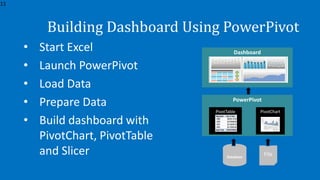
Building Dashboard Using PowerPivot
• Start Excel
• Launch PowerPivot
• Load Data
• Prepare Data
• Build dashboard with
PivotChart, PivotTable
and Slicer Database
File
PowerPivot
PivotTable
11
PivotChart
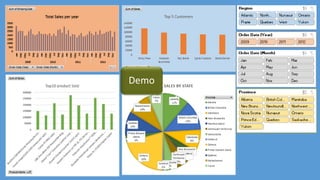
Dashboard
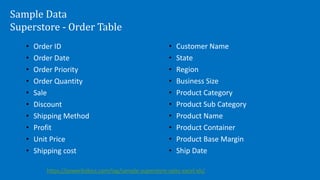
Sample Data
Superstore - Order Table
• Order ID
• Order Date
• Order Priority
• Order Quantity
• Sale
• Discount
• Shipping Method
• Profit
• Unit Price
• Shipping cost
• Customer Name
• State
• Region
• Business Size
• Product Category
• Product Sub Category
• Product Name
• Product Container
• Product Base Margin
• Ship Date
https://powerbidocs.com/tag/sample-superstore-sales-excel-xls/
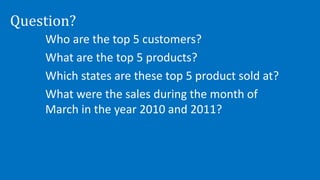
Question?
Who are the top 5 customers?
What are the top 5 products?
Which states are these top 5 product sold at?
What were the sales during the month of
March in the year 2010 and 2011?
Dr. Vazi Okhandiar
www.nrclc.com
714-505-3475
Facebook.com/nrclc
Twitter.com/nrclc
info@nrclc.com

Building Dashboard with Excel

  • 1.
    Dr. Vazi Okhandiar,DBA, MSCS, PMP, MCT www.nrclc.com. (714) 505-3475 Build a Dashboard in an Hour Using Microsoft PowerPivot in Excel NR Computer Learning Center
  • 2.
    NR Computer LearningCenter (NRCLC) •Established in 2002 •Provide Computer Training •Microsoft Partner  Hands-on classroom training  Online Training  Virtual Live Training  Private Lesson
  • 3.
    Dr. Vazi Okhandiar Over30 years of teaching experience in Computer Science & IT courses and Microsoft Products and working in IT industry. Worked for the World Bank, General Motors, HP/EDS, Toyota, CSC, Olympus, and Mitsubishi, as well as numerous small and medium-sized enterprises. Education: • DBA, Walden University • MBA, University of California, Irvine • Masters in Computer Science, Illinois Institute of Technology, Chicago • Bachelor’s Degree in Electrical Engineering, University of California, Irvine. Microsoft Certified Trainer (MCT) by Microsoft and Certified Project Management Professional (PMP) by PMI
  • 4.
    Agenda • Introduction todashboard • Import Raw Data in Power Pivot • Build Dashboard using Power Pivot • Q & A
  • 5.
    A dashboard A dashboardis a visualization tool that is similar to a panel for a driver of a vehicle that has data organized and presented in such a way that is easy to read and understand.
  • 6.
    Benefit of DigitalDashboards • Visual presentation of performance measures • Ability to identify efficiencies/inefficiencies • Ability to identify and correct negative trends • Ability to identify new trends. • Ability to make more informed decision • Align strategies and organizational goals • Increase overall revenue
  • 7.
    PowerPivot is aFree add-on for Microsoft Excel that enables a user to: • Import millions of row of data sources into a single Excel workbook • Create relationships between heterogeneous data • Create calculated columns and measures using formulas • Supports Visualize Tool – PivotTable, PivotChart, Slicers, Sparkline PowerPivot 7
  • 8.
    A Pivot tableis a powerful feature in Excel that allows users to quickly summarize and analyze large amounts of data in the form of a table. Pivot Table 8
  • 9.
    A Pivot Chartis a visual representation of the pivot table in Excel. Pivot Chart 9
  • 10.
    Launching Power Pivot LaunchPowerPivot tab on the Excel ribbon Activate PowerPivot (File > Option > COM Add-in> Microsoft Office PowerPivot for Excel) 10
  • 11.
    Building Dashboard UsingPowerPivot • Start Excel • Launch PowerPivot • Load Data • Prepare Data • Build dashboard with PivotChart, PivotTable and Slicer Database File PowerPivot PivotTable 11 PivotChart Dashboard
  • 12.
    Sample Data Superstore -Order Table • Order ID • Order Date • Order Priority • Order Quantity • Sale • Discount • Shipping Method • Profit • Unit Price • Shipping cost • Customer Name • State • Region • Business Size • Product Category • Product Sub Category • Product Name • Product Container • Product Base Margin • Ship Date https://powerbidocs.com/tag/sample-superstore-sales-excel-xls/
  • 13.
    Question? Who are thetop 5 customers? What are the top 5 products? Which states are these top 5 product sold at? What were the sales during the month of March in the year 2010 and 2011?
  • 15.

Editor's Notes

  • #13 https://powerbidocs.com/tag/sample-superstore-sales-excel-xls/
  • #16 Power Map: https://www.microsoft.com/en-us/download/details.aspx?id=38395