Microsoft Business Intelligence


Give Your Data Meaning—
PowerPivot for Excel 2010                                 Top New Features
PowerPivot for Excel 2010 is a data analysis tool that    PowerPivot for Excel 2010 enables you to empower
delivers unmatched computational power directly           your insight and decision-making, to share and
within the application users already know and love—       collaborate with confidence, and to help improve IT
Microsoft Excel.                                          efficiency:
You can transform enormous quantities of data with        • Excel-Based In-Memory Analysis. Overcomes
incredible speed into meaningful information to get the     existing limitations for massive data analysis on
answers you need in seconds. You can effortlessly           the desktop with efficient compression
share your findings with others. PowerPivot can even        algorithms to load even the biggest data sets
help your IT department improve operational                 into memory.
efficiencies through SharePoint-based management
                                                          • Data Analysis Expressions (DAX). Puts
tools.
                                                            powerful relational capabilities into the hands of
                                                            power users who want to create advanced
                                                            analytics applications.
                                                          • SharePoint Integration. Enables users to share
                                                            data models and analysis, and because the
                                                            solutions are in SharePoint, you can configure
                                                            refresh cycles to ensure the data remains
                                                            current automatically.
                                                          • Virtually Unlimited Support of Data Sources.
                                                            Provides the foundation to load and combine
                                                            source data from any location for massive data
                                                            analysis on the desktop, including relational
                                                            databases, multidimensional sources, cloud
                                                            services, data feeds, Excel files, text files, and
                                                            data from the Web.
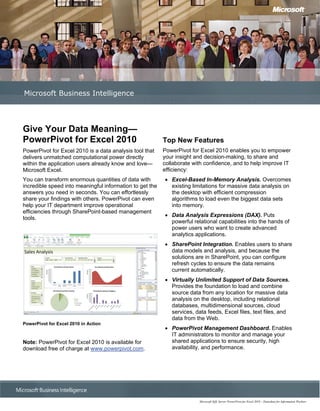
PowerPivot for Excel 2010 in Action
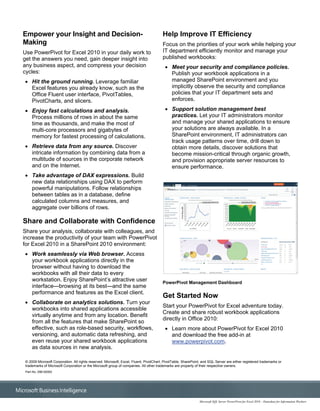
                                                          • PowerPivot Management Dashboard. Enables
                                                            IT administrators to monitor and manage your
Note: PowerPivot for Excel 2010 is available for            shared applications to ensure security, high
download free of charge at www.powerpivot.com.              availability, and performance.


                                                                        Microsoft SQL Server PowerPivot for Excel 2010 – Datasheet for Information Workers
Empower your Insight and Decision-                                                      Help Improve IT Efficiency
Making                                                                                  Focus on the priorities of your work while helping your
Use PowerPivot for Excel 2010 in your daily work to                                     IT department efficiently monitor and manage your
get the answers you need, gain deeper insight into                                      published workbooks:
any business aspect, and compress your decision                                          • Meet your security and compliance policies.
cycles:                                                                                    Publish your workbook applications in a
• Hit the ground running. Leverage familiar                                                managed SharePoint environment and you
  Excel features you already know, such as the                                             implicitly observe the security and compliance
  Office Fluent user interface, PivotTables,                                               policies that your IT department sets and
  PivotCharts, and slicers.                                                                enforces.

• Enjoy fast calculations and analysis.                                                  • Support solution management best
  Process millions of rows in about the same                                               practices. Let your IT administrators monitor
  time as thousands, and make the most of                                                  and manage your shared applications to ensure
  multi-core processors and gigabytes of                                                   your solutions are always available. In a
  memory for fastest processing of calculations.                                           SharePoint environment, IT administrators can
                                                                                           track usage patterns over time, drill down to
• Retrieve data from any source. Discover                                                  obtain more details, discover solutions that
  intricate information by combining data from a                                           become mission-critical through organic growth,
  multitude of sources in the corporate network                                            and provision appropriate server resources to
  and on the Internet.                                                                     ensure performance.
• Take advantage of DAX expressions. Build
  new data relationships using DAX to perform
  powerful manipulations. Follow relationships
  between tables as in a database, define
  calculated columns and measures, and
  aggregate over billions of rows.

Share and Collaborate with Confidence
Share your analysis, collaborate with colleagues, and
increase the productivity of your team with PowerPivot
for Excel 2010 in a SharePoint 2010 environment:
• Work seamlessly via Web browser. Access
  your workbook applications directly in the
  browser without having to download the
  workbooks with all their data to every
  workstation. Enjoy SharePoint’s attractive user                                       PowerPivot Management Dashboard
  interface—browsing at its best—and the same
  performance and features as the Excel client.
                                                                                        Get Started Now
• Collaborate on analytics solutions. Turn your
                                                                                        Start your PowerPivot for Excel adventure today.
  workbooks into shared applications accessible
                                                                                        Create and share robust workbook applications
  virtually anytime and from any location. Benefit
                                                                                        directly in Office 2010:
  from all the features that make SharePoint so
  effective, such as role-based security, workflows,                                     • Learn more about PowerPivot for Excel 2010
  versioning, and automatic data refreshing, and                                           and download the free add-in at
  even reuse your shared workbook applications                                             www.powerpivot.com.
  as data sources in new analysis.

 © 2009 Microsoft Corporation. All rights reserved. Microsoft, Excel, Fluent, PivotChart, PivotTable, SharePoint, and SQL Server are either registered trademarks or
 trademarks of Microsoft Corporation or the Microsoft group of companies. All other trademarks are property of their respective owners.
 Part No. 098-00000


                                                                                                               Microsoft SQL Server PowerPivot for Excel 2010 – Datasheet for Information Workers

Power pivot datasheet__iw

  • 1.
    Microsoft Business Intelligence GiveYour Data Meaning— PowerPivot for Excel 2010 Top New Features PowerPivot for Excel 2010 is a data analysis tool that PowerPivot for Excel 2010 enables you to empower delivers unmatched computational power directly your insight and decision-making, to share and within the application users already know and love— collaborate with confidence, and to help improve IT Microsoft Excel. efficiency: You can transform enormous quantities of data with • Excel-Based In-Memory Analysis. Overcomes incredible speed into meaningful information to get the existing limitations for massive data analysis on answers you need in seconds. You can effortlessly the desktop with efficient compression share your findings with others. PowerPivot can even algorithms to load even the biggest data sets help your IT department improve operational into memory. efficiencies through SharePoint-based management • Data Analysis Expressions (DAX). Puts tools. powerful relational capabilities into the hands of power users who want to create advanced analytics applications. • SharePoint Integration. Enables users to share data models and analysis, and because the solutions are in SharePoint, you can configure refresh cycles to ensure the data remains current automatically. • Virtually Unlimited Support of Data Sources. Provides the foundation to load and combine source data from any location for massive data analysis on the desktop, including relational databases, multidimensional sources, cloud services, data feeds, Excel files, text files, and data from the Web. PowerPivot for Excel 2010 in Action • PowerPivot Management Dashboard. Enables IT administrators to monitor and manage your Note: PowerPivot for Excel 2010 is available for shared applications to ensure security, high download free of charge at www.powerpivot.com. availability, and performance. Microsoft SQL Server PowerPivot for Excel 2010 – Datasheet for Information Workers
  • 2.
    Empower your Insightand Decision- Help Improve IT Efficiency Making Focus on the priorities of your work while helping your Use PowerPivot for Excel 2010 in your daily work to IT department efficiently monitor and manage your get the answers you need, gain deeper insight into published workbooks: any business aspect, and compress your decision • Meet your security and compliance policies. cycles: Publish your workbook applications in a • Hit the ground running. Leverage familiar managed SharePoint environment and you Excel features you already know, such as the implicitly observe the security and compliance Office Fluent user interface, PivotTables, policies that your IT department sets and PivotCharts, and slicers. enforces. • Enjoy fast calculations and analysis. • Support solution management best Process millions of rows in about the same practices. Let your IT administrators monitor time as thousands, and make the most of and manage your shared applications to ensure multi-core processors and gigabytes of your solutions are always available. In a memory for fastest processing of calculations. SharePoint environment, IT administrators can track usage patterns over time, drill down to • Retrieve data from any source. Discover obtain more details, discover solutions that intricate information by combining data from a become mission-critical through organic growth, multitude of sources in the corporate network and provision appropriate server resources to and on the Internet. ensure performance. • Take advantage of DAX expressions. Build new data relationships using DAX to perform powerful manipulations. Follow relationships between tables as in a database, define calculated columns and measures, and aggregate over billions of rows. Share and Collaborate with Confidence Share your analysis, collaborate with colleagues, and increase the productivity of your team with PowerPivot for Excel 2010 in a SharePoint 2010 environment: • Work seamlessly via Web browser. Access your workbook applications directly in the browser without having to download the workbooks with all their data to every workstation. Enjoy SharePoint’s attractive user PowerPivot Management Dashboard interface—browsing at its best—and the same performance and features as the Excel client. Get Started Now • Collaborate on analytics solutions. Turn your Start your PowerPivot for Excel adventure today. workbooks into shared applications accessible Create and share robust workbook applications virtually anytime and from any location. Benefit directly in Office 2010: from all the features that make SharePoint so effective, such as role-based security, workflows, • Learn more about PowerPivot for Excel 2010 versioning, and automatic data refreshing, and and download the free add-in at even reuse your shared workbook applications www.powerpivot.com. as data sources in new analysis. © 2009 Microsoft Corporation. All rights reserved. Microsoft, Excel, Fluent, PivotChart, PivotTable, SharePoint, and SQL Server are either registered trademarks or trademarks of Microsoft Corporation or the Microsoft group of companies. All other trademarks are property of their respective owners. Part No. 098-00000 Microsoft SQL Server PowerPivot for Excel 2010 – Datasheet for Information Workers