Downloaded 41 times



![List
List
• General Purpose
• Most widely used data structure
• Change size as needed
• Uses square bracket “[…]”
• Allow duplicate values
Tuple
• Immutable (Can’t add or change)
• Useful for fixed data
• Faster the lists
• Sequence type
• Uses round bracket “(…)”
• Allow duplicate values
Set
• Store non-duplicate items
• immutable
• Very fast access vs Lists
• Math Set Ops
• Change size as needed
• Unordered, unchangeable
• Uses curly bracket “{…}”
• duplicate values ignored
Dictionary
• Store non-duplicate items
• Key/value pairs
• Change size as needed
• Unordered
• Duplicate values ignored
• Uses curly bracket “{…}”](https://image.slidesharecdn.com/python-datastructure-ss-230709182708-98765270/85/Python-Data-Structures-5-320.jpg)
![Lists
A list can be created for storing any type of data that can be stored as a variable.
A set is written with square brackets “[ .. ]”.
FORMAT :
variable_name = [ value1, …, value n]
Example:
myList1 = [] # Create an empty list
myList2 = [1, 2, 3]
myList3 =[1, “Hello”, 3]
myList4 = [0] *3 #[0, 0, 0]](https://image.slidesharecdn.com/python-datastructure-ss-230709182708-98765270/85/Python-Data-Structures-6-320.jpg)
![index
The first element of a List is index as 0 instead of 1.
The highest element number is one less than total number of elements.
Original: Value = [0, 0, 0, 0, 0]
Value[0] = 10
Value[1] = 1
Value[2] = 30
UpdatedValue = [10, 1, 30, 0, 0]
index 0 1 2 3 4
value 10 1 30 0 0
index 0 1 2 3 4
value 0 0 0 0 0](https://image.slidesharecdn.com/python-datastructure-ss-230709182708-98765270/85/Python-Data-Structures-7-320.jpg)
![Example (Slicing)
myList = [10, “Apple”, 12, 13, 14]
print (myList[1:2]) => [‘Apple’]
print (myList[:2] => [10, ‘Apple’]
print (myList[2:]) => [12, 13, 14]
print (myList[-3:-1]) => [13, 14]
if 12 in myList:
print(myList)
else:
print("Not found") => [10, ‘Apple’, 12, 13, 14]
index 0 1 2 3 4
value 10 Apple 12 13 14](https://image.slidesharecdn.com/python-datastructure-ss-230709182708-98765270/85/Python-Data-Structures-8-320.jpg)
![Example (Updating List)
myList = [10, “Apple”, 12, 13, 14]
myList[1:2] = [20, 30]
print (myList) => Output: [10, 20, 30, 12, 13, 14]
myList.insert (3, 40)
print(myList) => Output: [10, 20, 30, 40, 12, 13, 14]
myList.append(15)
print(myList) => Output: [10, 20, 30, 40, 12, 13, 14, 15]
del myList[2]
print (myList) => Output: [10, 20, 40, 12, 13, 14, 15]
del myList[1:4]
print (myList) => Output: [10, 13, 14, 15]
myList.clear()
print(myList) => Output: []
index 0 1 2 3 4
value 10 Apple 12 13 14](https://image.slidesharecdn.com/python-datastructure-ss-230709182708-98765270/85/Python-Data-Structures-9-320.jpg)
![Example (Merging lists)
myList1 = [10, 20, 30]
myList2 = [40, 50, 60, 70, 80]
newList1 = myList1 + myList2
or
for index in myList2:
myList1.append(index)
or
myList1.extend(myList2)
print (myList1)
Output: [10, 20, 30, 40, 50, 60, 70, 80]](https://image.slidesharecdn.com/python-datastructure-ss-230709182708-98765270/85/Python-Data-Structures-10-320.jpg)
![Tuple
List
• General Purpose
• Most widely used data structure
• Change size as needed
• Sequence type
• Sortable
• Uses square bracket “[…]”
• Allow duplicate values
Tuple
• Immutable (Can’t add or change)
• Useful for fixed data
• Faster than lists
• Uses round bracket “(…)”
• Allow duplicate values
Set
• Store non-duplicate items
• immutable
• Very fast access vs Lists
• Math Set Ops
• Change size as needed
• Unordered, unchangeable
• Uses curly bracket “{…}”
• duplicate values ignored
Dictionary
• Store non-duplicate items
• Key/value pairs
• Change size as needed
• Unordered
• Duplicate values ignored
• Uses curly bracket “{…}”](https://image.slidesharecdn.com/python-datastructure-ss-230709182708-98765270/85/Python-Data-Structures-11-320.jpg)
![Examples (Tuple)
myTuple = ("Apple", 10, "Orange", "Grapes", 20.0, 10)
print(myTuple[3]) => Grapes
print(myTuple[-1]) => 10
print(myTuple[2:4]) => (‘Orange’, ‘Grapes’)
print(myTuple[:4]) => (‘Apple’, 10, ‘Orange’, ‘Grapes’)
print(myTuple[2:]) => (‘Orange’, ‘Grapes’, 20.0, 10)
print(myTuple[-4:-1]) => (‘Orange’, ‘Grapes’, 20.0)](https://image.slidesharecdn.com/python-datastructure-ss-230709182708-98765270/85/Python-Data-Structures-12-320.jpg)
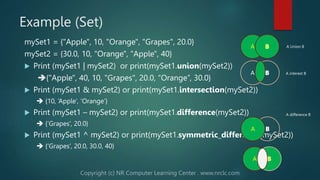
![Sets
List
• General Purpose
• Most widely used data structure
• Change size as needed
• Sequence type
• Sortable
• Uses square bracket “[…]”
• Allow duplicate values
Tuple
• Immutable (Can’t add or change)
• Useful for fixed data
• Faster the lists
• Sequence type
• Uses round bracket “(…)”
• Allow duplicate values
Set
• immutable
• Math Set Ops
• Change size as needed
• Uses curly bracket “{…}”
• duplicate values ignored
Dictionary
• Store non-duplicate items
• Key/value pairs
• Change size as needed
• Unordered
• Duplicate values ignored
• Uses curly bracket “{…}”](https://image.slidesharecdn.com/python-datastructure-ss-230709182708-98765270/85/Python-Data-Structures-13-320.jpg)
![Dictionary
List
• General Purpose
• Most widely used data structure
• Change size as needed
• Sequence type
• Sortable
• Uses square bracket “[…]”
• Allow duplicate values
Tuple
• Immutable (Can’t add or change)
• Useful for fixed data
• Faster the lists
• Sequence type
• Uses round bracket “(…)”
• Allow duplicate values
Set
• immutable
• Very fast access vs Lists
• Math Set Ops
• Change size as needed
• Uses curly bracket “{…}”
• duplicate values ignored
Dictionary
• Store non-duplicate items
• Key: value pairs
• Mutable
• Unordered
• Uses curly bracket “{…}”](https://image.slidesharecdn.com/python-datastructure-ss-230709182708-98765270/85/Python-Data-Structures-15-320.jpg)
![Example (Dictionary)
myFriends = {"Sandy":25, "John": 20, "Jane": 22}
print(Friends.items()) output: ('Sandy’,25), ('John', 20), ('Jane', 22)
print(Friends.keys()) output: ‘Sandy’, ‘John’, ‘Jane’
print(Friends.values()) output: 25, 20. 22
print(myFriends["Sandy“]) output: 25
myFriends["Sandy"] = 30
print (myFriends.items()) output: ('Sandy',30), ('John', 20), ('Jane', 22)
myFriends.update({"Sandy": 40})
print (myFriends.items()) output: ('Sandy’,40), ('John', 20), ('Jane', 22)
myFriends.pop("Sandy")
print (myFriends.items()) output: ('John', 20), ('Jane', 22)
myFriends.popitem()
print (myFriends.items()) output: ('Sandy', 25), ('John', 20)
del myFriends["Sandy"]
print (myFriends.items()) output: ('John', 20), ('Jane', 22)
del myFriends
print (myFriends.items()) output: Error](https://image.slidesharecdn.com/python-datastructure-ss-230709182708-98765270/85/Python-Data-Structures-16-320.jpg)
![Sample Code
myD = {"URL": "Uniform Resource Locator", "CPU": "Central Processing Unit",
"RAM": "Random Access Memory"}
print("=>" + str(myD.keys()))
print("=>"+ str(myD.values()))
print("=>" + str(myD.items()))
print(myD["URL"])
del myD["CPU"]
print("Size: " + str(len(myD)))
myKeys = list(myD.keys())
myValues = list(myD.values())
for J in range(len(myD)):
print(str(J +1) + ". "+ myKeys[ J ] + ": " + (myValues[ J ]))
OUTPUT:
dict_keys(['URL', 'CPU', 'RAM'])
dict_values(['Uniform Resource Locator',
'Central Processing Unit', 'Random
Access Memory'])
dict_items([('URL', 'Uniform Resource
Locator'), ('CPU', 'Central Processing
Unit'), ('RAM', 'Random Access
Memory')])
Uniform Resource Locator
Size: 2
1. URL: Uniform Resource Locator
2. RAM: Random Access Memory](https://image.slidesharecdn.com/python-datastructure-ss-230709182708-98765270/85/Python-Data-Structures-17-320.jpg)
![Data Structure
List
• mutable
• Uses square bracket “[value, …]”
• General Purpose
• Most widely used data structure
• Allow duplicate values
Tuple
• Immutable
• Uses round bracket “(value, …)”
• Useful for fixed data
• Allow duplicate values
Sets
• Immutable
• Uses curly bracket “{value, …}”
• Math Set Ops
• duplicate values ignored
Dictionary
• Mutable
• Uses curly bracket “{key: value, …}”
• Key/value pairs
• Non-duplicate keys
• Unordered](https://image.slidesharecdn.com/python-datastructure-ss-230709182708-98765270/85/Python-Data-Structures-18-320.jpg)


The document provides an overview of data structures in Python, including lists, tuples, sets, and dictionaries, detailing their properties, usage, and syntax. Dr. Vazi Okhandiar, an experienced computer science educator, offers insights into effective data organization for efficient programming. Additionally, the document features examples of creating, updating, and manipulating these data structures, as well as links for further practice and learning resources.


