DBMS
File Organization for Conventional DBMS
Bishal Ghimire
bishal.ghimire@gmail.com
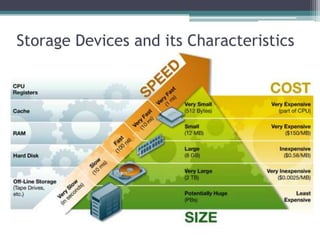
Storage Devices and its Characteristics
Storage Hierarchy
• Primary Storage is the top level and is made up of
CPU registers, CPU cache and memory which are
the only components that are directly accessible to
the systems CPU. The CPU can continuously read
data stored in these areas and execute all
instructions as required quickly in a uniform
manner. Secondary Storage differs from primary
storage in that it is not directly accessible by the
CPU. A system uses input/output (I/O) channels to
connect to the secondary storage which control the
data flow through a system when required and on
request
Storage Hierarchy
• Secondary storage is non-volatile so does not
lose data when it is powered down so
consequently modern computer systems tend to
have a more secondary storage than primary
storage. All secondary storage today consist of
hard disk drives (HDD), usually set up in a RAID
configuration, however older installations also
included removable media such us magneto
optical or MO
Storage Hierarchy
• Tertiary Storage is mainly used as backup and
archival of data and although based on the
slowest devices can be classed as the most
important in terms of data protection against a
variety of disasters that can affect an IT
infrastructure. Most devices in this segment are
automated via robotics and software to reduce
management costs and risk of human error and
consist primarily of disk & tape based back up
devices
Storage Hierarchy
• Offline Storage is the final category and is
where removable types of storage media sit such
as tape cartridges and optical disc such as CD
and DVD. Offline storage is can be used to
transfer data between systems but also allow for
data to be secured offsite to ensure companies
always have a copy of valuable data in the event
of a disaster.
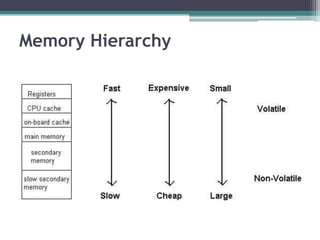
Memory Hierarchy
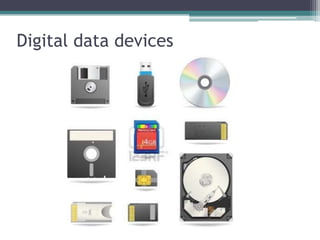
Digital data devices
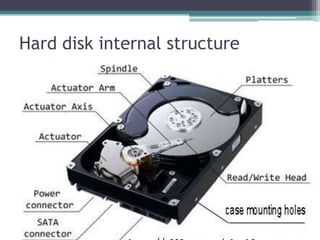
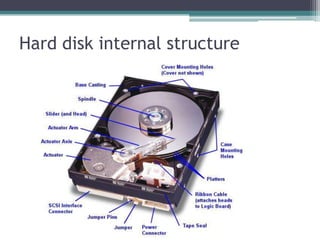
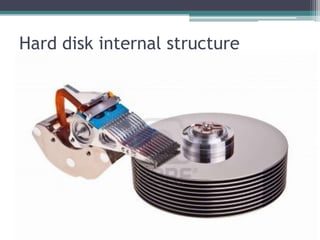
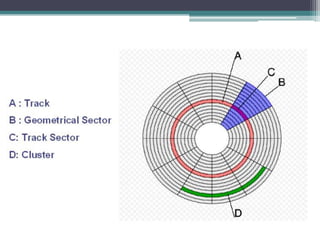
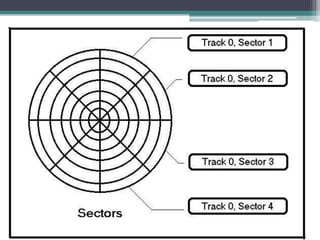
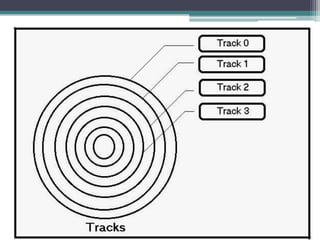
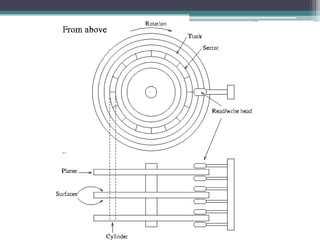
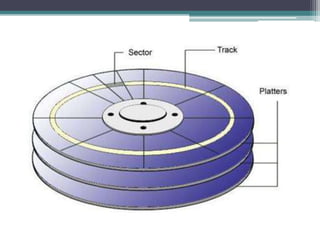
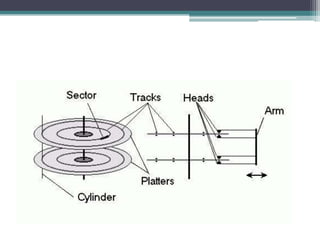
Hard disk internal structure
Checksum
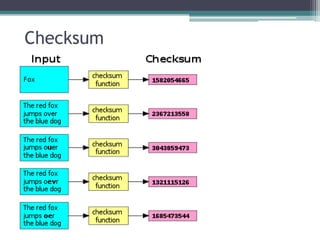
Checksum
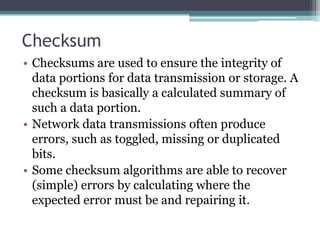
• Checksums are used to ensure the integrity of
data portions for data transmission or storage. A
checksum is basically a calculated summary of
such a data portion.
• Network data transmissions often produce
errors, such as toggled, missing or duplicated
bits.
• Some checksum algorithms are able to recover
(simple) errors by calculating where the
expected error must be and repairing it.
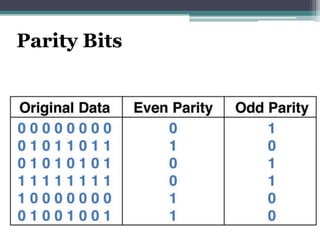
Parity Bits
Disk Subsystem
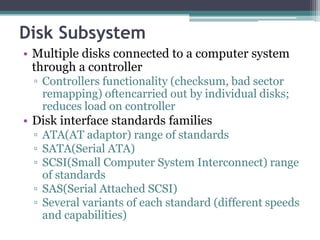
• Multiple disks connected to a computer system
through a controller
â–« Controllers functionality (checksum, bad sector
remapping) oftencarried out by individual disks;
reduces load on controller
• Disk interface standards families
â–« ATA(AT adaptor) range of standards
â–« SATA(Serial ATA)
â–« SCSI(Small Computer System Interconnect) range
of standards
â–« SAS(Serial Attached SCSI)
â–« Several variants of each standard (different speeds
and capabilities)
Disk Subsystem
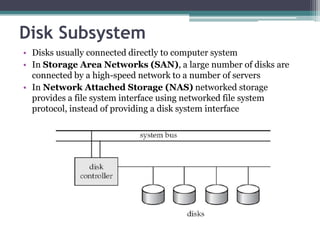
• Disks usually connected directly to computer system
• In Storage Area Networks (SAN), a large number of disks are
connected by a high-speed network to a number of servers
• In Network Attached Storage (NAS) networked storage
provides a file system interface using networked file system
protocol, instead of providing a disk system interface
RAID - redundant array of independent
disks
• RAID is short for redundant array
of independent (or inexpensive) disks. It is a
category of disk drives that employ two or more
drives in combination for fault tolerance and
performance. RAID disk drives are used
frequently on servers but aren't generally
necessary for personal computers. RAID allows
you to store the same data redundantly (in
multiple paces) in a balanced way to improve
overall storage performance.
• Level 0: Striped Disk Array without Fault Tolerance
Provides data striping(spreading out blocks of each
file across multiple disk drives) but no redundancy.
This improves performance but does not deliver
fault tolerance. If one drive fails then all data in the
array is lost.
• Level 1: Mirroring and Duplexing
Provides disk mirroring. Level 1 provides twice the
read transaction rate of single disks and the same
write transaction rate as single disks.
• Level 2: Error-Correcting Coding
Not a typical implementation and rarely used, Level
2 stripes data at the bit level rather than the block
level.
• Level 3: Bit-Interleaved Parity
Provides byte-level striping with a dedicated parity
disk. Level 3, which cannot service simultaneous
multiple requests, also is rarely used.
• Level 4: Dedicated Parity Drive
A commonly used implementation of RAID, Level 4
provides block-level striping (like Level 0) with a
parity disk. If a data disk fails, the parity data is used
to create a replacement disk. A disadvantage to
Level 4 is that the parity disk can create write
bottlenecks.
• Level 5: Block Interleaved Distributed Parity
Provides data striping at the byte level and also
stripe error correction information. This results in
excellent performance and good fault tolerance.
Level 5 is one of the most popular implementations
of RAID.
Performance Measures of Disks
• Access time: the time from when a read or write request is issued
to when data transfer begins. To access data on a given sector of a
disk, the arm first must move so that it is positioned over the correct
track, and then must wait for the sector to appear under it as the
disk rotates. The time for repositioning the arm is called seek time,
and it increases with the distance the arm must move. Typical seek
time range from 2 to 30 milliseconds. Average seek time is the
average of the seek time, measured over a sequence of (uniformly
distributed) random requests, and it is about one third of the worst-
case seek time.
• Once the seek has occurred, the time spent waiting for the sector to
be accesses to appear under the head is called rotational latency
time. Average rotational latency time is about half of the time for a
full rotation of the disk. (Typical rotational speeds of disks ranges
from 60 to 120 rotations per second).
• The access time is then the sum of the seek time and the latency and
ranges from 10 to 40 milli-sec.
Performance Measures of Disks
• data transfer rate, the rate at which data can be
retrieved from or stored to the disk. Current disk
systems support transfer rate from 1 to 5
megabytes per second.
• reliability, measured by the mean time to
failure. The typical mean time to failure of disks
today ranges from 30,000 to 800,000 hours
(about 3.4 to 91 years).
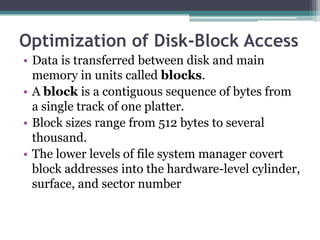
Optimization of Disk-Block Access
• Data is transferred between disk and main
memory in units called blocks.
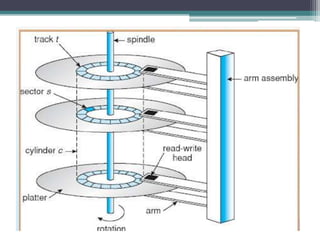
• A block is a contiguous sequence of bytes from
a single track of one platter.
• Block sizes range from 512 bytes to several
thousand.
• The lower levels of file system manager covert
block addresses into the hardware-level cylinder,
surface, and sector number
• Access to data on disk is several orders of magnitude
slower than is access to data in main memory.
Optimization techniques besides buffering of blocks
in main memory. Scheduling: If several blocks
from a cylinder need to be transferred, we may save
time by requesting them in the order in which they
pass under the heads. A commonly used disk-arm
scheduling algorithm is the elevator algorithm.
• File organization. Organize blocks on disk in a
way that corresponds closely to the manner that we
expect data to be accessed. For example, store
related information on the same track, or physically
close tracks, or adjacent cylinders in order to
minimize seek time. IBM mainframe OS's provide
programmers fine control on placement of files but
increase programmer's burden.
• Nonvolatile write buffers. Use nonvolatile
RAM (such as battery-back-up RAM) to speed
up disk writes drastically (first write to
nonvolatile RAM buffer and inform OS that
writes completed).
• Log disk. Another approach to reducing write
latency is to use a log disk, a disk devoted to
writing a sequential log. All access to the log disk
is sequential, essentially eliminating seek time,
and several consecutive blocks can be written at
once, making writes to log disk several times
faster than random writes.
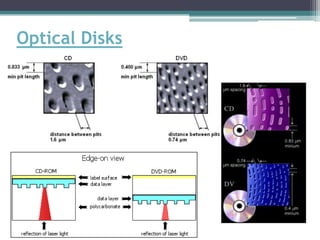
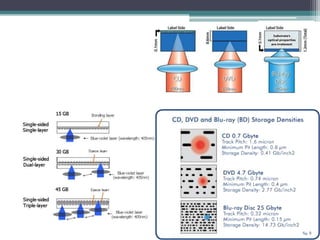
Optical Disks
04.01 file organization

04.01 file organization

  • 1.
    DBMS File Organization forConventional DBMS Bishal Ghimire bishal.ghimire@gmail.com
  • 2.
    Storage Devices andits Characteristics
  • 3.
    Storage Hierarchy • PrimaryStorage is the top level and is made up of CPU registers, CPU cache and memory which are the only components that are directly accessible to the systems CPU. The CPU can continuously read data stored in these areas and execute all instructions as required quickly in a uniform manner. Secondary Storage differs from primary storage in that it is not directly accessible by the CPU. A system uses input/output (I/O) channels to connect to the secondary storage which control the data flow through a system when required and on request
  • 4.
    Storage Hierarchy • Secondarystorage is non-volatile so does not lose data when it is powered down so consequently modern computer systems tend to have a more secondary storage than primary storage. All secondary storage today consist of hard disk drives (HDD), usually set up in a RAID configuration, however older installations also included removable media such us magneto optical or MO
  • 5.
    Storage Hierarchy • TertiaryStorage is mainly used as backup and archival of data and although based on the slowest devices can be classed as the most important in terms of data protection against a variety of disasters that can affect an IT infrastructure. Most devices in this segment are automated via robotics and software to reduce management costs and risk of human error and consist primarily of disk & tape based back up devices
  • 6.
    Storage Hierarchy • OfflineStorage is the final category and is where removable types of storage media sit such as tape cartridges and optical disc such as CD and DVD. Offline storage is can be used to transfer data between systems but also allow for data to be secured offsite to ensure companies always have a copy of valuable data in the event of a disaster.
  • 7.
  • 8.
  • 9.
  • 10.
  • 11.
  • 19.
  • 20.
    Checksum • Checksums areused to ensure the integrity of data portions for data transmission or storage. A checksum is basically a calculated summary of such a data portion. • Network data transmissions often produce errors, such as toggled, missing or duplicated bits. • Some checksum algorithms are able to recover (simple) errors by calculating where the expected error must be and repairing it.
  • 21.
  • 22.
    Disk Subsystem • Multipledisks connected to a computer system through a controller ▫ Controllers functionality (checksum, bad sector remapping) oftencarried out by individual disks; reduces load on controller • Disk interface standards families ▫ ATA(AT adaptor) range of standards ▫ SATA(Serial ATA) ▫ SCSI(Small Computer System Interconnect) range of standards ▫ SAS(Serial Attached SCSI) ▫ Several variants of each standard (different speeds and capabilities)
  • 23.
    Disk Subsystem • Disksusually connected directly to computer system • In Storage Area Networks (SAN), a large number of disks are connected by a high-speed network to a number of servers • In Network Attached Storage (NAS) networked storage provides a file system interface using networked file system protocol, instead of providing a disk system interface
  • 24.
    RAID - redundantarray of independent disks • RAID is short for redundant array of independent (or inexpensive) disks. It is a category of disk drives that employ two or more drives in combination for fault tolerance and performance. RAID disk drives are used frequently on servers but aren't generally necessary for personal computers. RAID allows you to store the same data redundantly (in multiple paces) in a balanced way to improve overall storage performance.
  • 25.
    • Level 0:Striped Disk Array without Fault Tolerance Provides data striping(spreading out blocks of each file across multiple disk drives) but no redundancy. This improves performance but does not deliver fault tolerance. If one drive fails then all data in the array is lost. • Level 1: Mirroring and Duplexing Provides disk mirroring. Level 1 provides twice the read transaction rate of single disks and the same write transaction rate as single disks. • Level 2: Error-Correcting Coding Not a typical implementation and rarely used, Level 2 stripes data at the bit level rather than the block level.
  • 26.
    • Level 3:Bit-Interleaved Parity Provides byte-level striping with a dedicated parity disk. Level 3, which cannot service simultaneous multiple requests, also is rarely used. • Level 4: Dedicated Parity Drive A commonly used implementation of RAID, Level 4 provides block-level striping (like Level 0) with a parity disk. If a data disk fails, the parity data is used to create a replacement disk. A disadvantage to Level 4 is that the parity disk can create write bottlenecks. • Level 5: Block Interleaved Distributed Parity Provides data striping at the byte level and also stripe error correction information. This results in excellent performance and good fault tolerance. Level 5 is one of the most popular implementations of RAID.
  • 27.
    Performance Measures ofDisks • Access time: the time from when a read or write request is issued to when data transfer begins. To access data on a given sector of a disk, the arm first must move so that it is positioned over the correct track, and then must wait for the sector to appear under it as the disk rotates. The time for repositioning the arm is called seek time, and it increases with the distance the arm must move. Typical seek time range from 2 to 30 milliseconds. Average seek time is the average of the seek time, measured over a sequence of (uniformly distributed) random requests, and it is about one third of the worst- case seek time. • Once the seek has occurred, the time spent waiting for the sector to be accesses to appear under the head is called rotational latency time. Average rotational latency time is about half of the time for a full rotation of the disk. (Typical rotational speeds of disks ranges from 60 to 120 rotations per second). • The access time is then the sum of the seek time and the latency and ranges from 10 to 40 milli-sec.
  • 28.
    Performance Measures ofDisks • data transfer rate, the rate at which data can be retrieved from or stored to the disk. Current disk systems support transfer rate from 1 to 5 megabytes per second. • reliability, measured by the mean time to failure. The typical mean time to failure of disks today ranges from 30,000 to 800,000 hours (about 3.4 to 91 years).
  • 29.
    Optimization of Disk-BlockAccess • Data is transferred between disk and main memory in units called blocks. • A block is a contiguous sequence of bytes from a single track of one platter. • Block sizes range from 512 bytes to several thousand. • The lower levels of file system manager covert block addresses into the hardware-level cylinder, surface, and sector number
  • 30.
    • Access todata on disk is several orders of magnitude slower than is access to data in main memory. Optimization techniques besides buffering of blocks in main memory. Scheduling: If several blocks from a cylinder need to be transferred, we may save time by requesting them in the order in which they pass under the heads. A commonly used disk-arm scheduling algorithm is the elevator algorithm. • File organization. Organize blocks on disk in a way that corresponds closely to the manner that we expect data to be accessed. For example, store related information on the same track, or physically close tracks, or adjacent cylinders in order to minimize seek time. IBM mainframe OS's provide programmers fine control on placement of files but increase programmer's burden.
  • 31.
    • Nonvolatile writebuffers. Use nonvolatile RAM (such as battery-back-up RAM) to speed up disk writes drastically (first write to nonvolatile RAM buffer and inform OS that writes completed). • Log disk. Another approach to reducing write latency is to use a log disk, a disk devoted to writing a sequential log. All access to the log disk is sequential, essentially eliminating seek time, and several consecutive blocks can be written at once, making writes to log disk several times faster than random writes.
  • 32.