Disk and Drivers
• Hard Drives
• RAID
• SSD
2
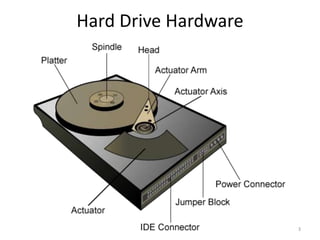
Hard Drive Hardware
3
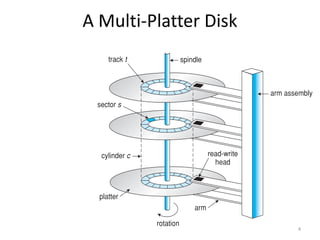
A Multi-Platter Disk
4
Addressing and Geometry
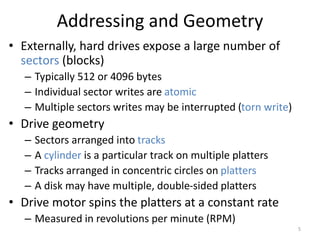
• Externally, hard drives expose a large number of
sectors (blocks)
– Typically 512 or 4096 bytes
– Individual sector writes are atomic
– Multiple sectors writes may be interrupted (torn write)
• Drive geometry
– Sectors arranged into tracks
– A cylinder is a particular track on multiple platters
– Tracks arranged in concentric circles on platters
– A disk may have multiple, double-sided platters
• Drive motor spins the platters at a constant rate
– Measured in revolutions per minute (RPM)
5
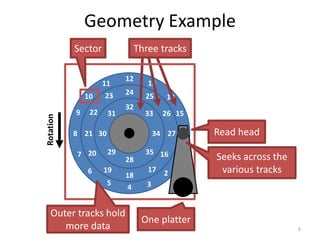
Geometry Example
6
0
1
4
8
12
34
28
32
30
35
29
33
31
27
24
21
18
25
26
17
16
23
22
20
19
13
14
15
2
3
11
10
9
6
5
7
Rotation Three tracks
One platter
Sector
Outer tracks hold
more data
Read head
Seeks across the
various tracks
Common Disk Interfaces
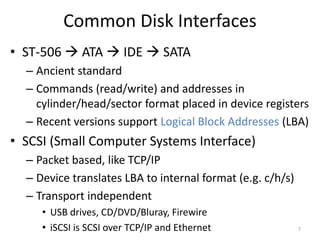
• ST-506  ATA  IDE  SATA
– Ancient standard
– Commands (read/write) and addresses in
cylinder/head/sector format placed in device registers
– Recent versions support Logical Block Addresses (LBA)
• SCSI (Small Computer Systems Interface)
– Packet based, like TCP/IP
– Device translates LBA to internal format (e.g. c/h/s)
– Transport independent
• USB drives, CD/DVD/Bluray, Firewire
• iSCSI is SCSI over TCP/IP and Ethernet 7
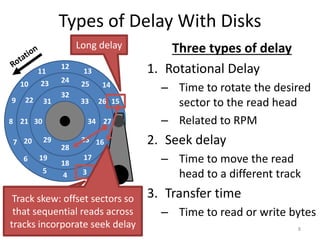
Types of Delay With Disks
8
Three types of delay
1. Rotational Delay
– Time to rotate the desired
sector to the read head
– Related to RPM
2. Seek delay
– Time to move the read
head to a different track
3. Transfer time
– Time to read or write bytes
0
1
4
8
12
34
28
32
30
35
29
33
31
27
24
21
18
25
26
17
16
23
22
20
19
13
14
15
2
3
11
10
9
6
5
7
Short delay
Long delay
Track skew: offset sectors so
that sequential reads across
tracks incorporate seek delay
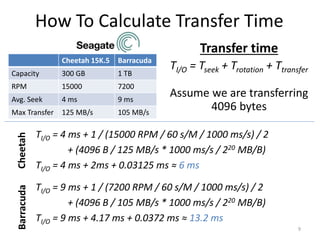
How To Calculate Transfer Time
Cheetah 15K.5 Barracuda
Capacity 300 GB 1 TB
RPM 15000 7200
Avg. Seek 4 ms 9 ms
Max Transfer 125 MB/s 105 MB/s
9
Transfer time
TI/O = Tseek + Trotation + Ttransfer
Assume we are transferring
4096 bytes
TI/O = 4 ms + 1 / (15000 RPM / 60 s/M / 1000 ms/s) / 2
+ (4096 B / 125 MB/s * 1000 ms/s / 220 MB/B)
TI/O = 4 ms + 2ms + 0.03125 ms ≈ 6 ms
Cheetah
Barracuda
TI/O = 9 ms + 1 / (7200 RPM / 60 s/M / 1000 ms/s) / 2
+ (4096 B / 105 MB/s * 1000 ms/s / 220 MB/B)
TI/O = 9 ms + 4.17 ms + 0.0372 ms ≈ 13.2 ms
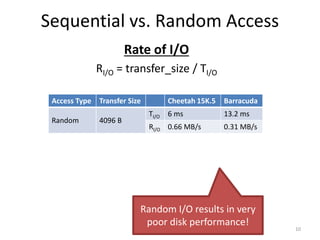
Sequential vs. Random Access
Rate of I/O
RI/O = transfer_size / TI/O
10
Access Type Transfer Size Cheetah 15K.5 Barracuda
Random 4096 B
TI/O 6 ms 13.2 ms
RI/O 0.66 MB/s 0.31 MB/s
Sequential 100 MB
TI/O 800 ms 950 ms
RI/O 125 MB/s 105 MB/s
Max Transfer Rate 125 MB/s 105MB/s
Random I/O results in very
poor disk performance!
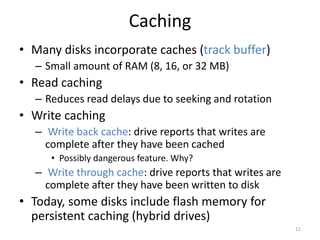
Caching
• Many disks incorporate caches (track buffer)
– Small amount of RAM (8, 16, or 32 MB)
• Read caching
– Reduces read delays due to seeking and rotation
• Write caching
– Write back cache: drive reports that writes are
complete after they have been cached
• Possibly dangerous feature. Why?
– Write through cache: drive reports that writes are
complete after they have been written to disk
• Today, some disks include flash memory for
persistent caching (hybrid drives)
11
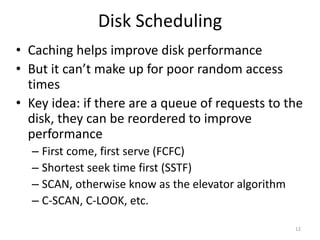
Disk Scheduling
• Caching helps improve disk performance
• But it can’t make up for poor random access
times
• Key idea: if there are a queue of requests to the
disk, they can be reordered to improve
performance
– First come, first serve (FCFC)
– Shortest seek time first (SSTF)
– SCAN, otherwise know as the elevator algorithm
– C-SCAN, C-LOOK, etc.
12
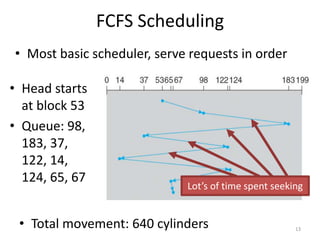
FCFS Scheduling
• Head starts
at block 53
• Queue: 98,
183, 37,
122, 14,
124, 65, 67
13
• Total movement: 640 cylinders
Lot’s of time spent seeking
• Most basic scheduler, serve requests in order
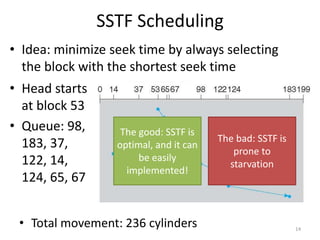
SSTF Scheduling
• Idea: minimize seek time by always selecting
the block with the shortest seek time
14
• Total movement: 236 cylinders
• Head starts
at block 53
• Queue: 98,
183, 37,
122, 14,
124, 65, 67
The good: SSTF is
optimal, and it can
be easily
implemented!
The bad: SSTF is
prone to
starvation
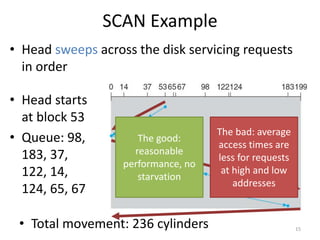
SCAN Example
• Head sweeps across the disk servicing requests
in order
15
• Total movement: 236 cylinders
• Head starts
at block 53
• Queue: 98,
183, 37,
122, 14,
124, 65, 67
The good:
reasonable
performance, no
starvation
The bad: average
access times are
less for requests
at high and low
addresses
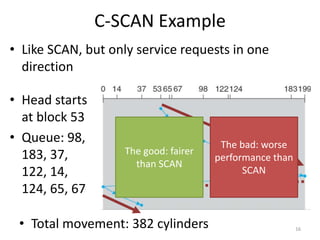
C-SCAN Example
• Like SCAN, but only service requests in one
direction
16
• Total movement: 382 cylinders
• Head starts
at block 53
• Queue: 98,
183, 37,
122, 14,
124, 65, 67
The good: fairer
than SCAN
The bad: worse
performance than
SCAN
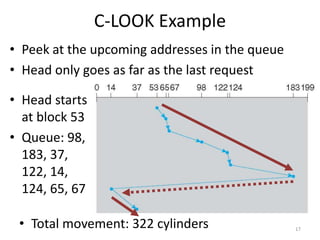
C-LOOK Example
• Peek at the upcoming addresses in the queue
• Head only goes as far as the last request
17
• Total movement: 322 cylinders
• Head starts
at block 53
• Queue: 98,
183, 37,
122, 14,
124, 65, 67
Implementing Disk Scheduling
• We have talked about several scheduling problems
that take place in the kernel
– Process scheduling
– Page swapping
• Where should disk scheduling be implemented?
– OS scheduling
• OS can implement SSTF or LOOK by ordering the queue by LBA
• However, the OS cannot account for rotation delay
– On-disk scheduling
• Disk knows the exact position of the head and platters
• Can implement more advanced schedulers (SPTF)
• But, requires specialized hardware and drivers 18
Command Queuing
• Feature where a disk stores of queue of
pending read/write requests
– Called Native Command Queuing (NCQ) in SATA
• Disk may reorder items in the queue to
improve performance
– E.g. batch operations to close sectors/tracks
• Supported by SCSI and modern SATA drives
• Tagged command queuing: allows the host to
place constraints on command re-ordering
19
• Hard Drives
• RAID
• SSD
20
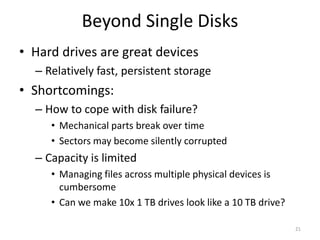
Beyond Single Disks
• Hard drives are great devices
– Relatively fast, persistent storage
• Shortcomings:
– How to cope with disk failure?
• Mechanical parts break over time
• Sectors may become silently corrupted
– Capacity is limited
• Managing files across multiple physical devices is
cumbersome
• Can we make 10x 1 TB drives look like a 10 TB drive?
21
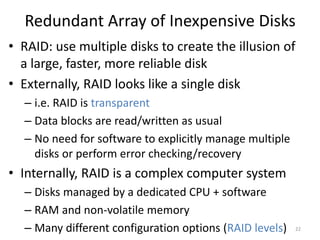
Redundant Array of Inexpensive Disks
• RAID: use multiple disks to create the illusion of
a large, faster, more reliable disk
• Externally, RAID looks like a single disk
– i.e. RAID is transparent
– Data blocks are read/written as usual
– No need for software to explicitly manage multiple
disks or perform error checking/recovery
• Internally, RAID is a complex computer system
– Disks managed by a dedicated CPU + software
– RAM and non-volatile memory
– Many different configuration options (RAID levels) 22
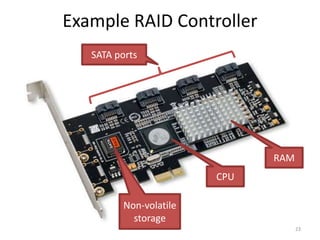
Example RAID Controller
23
SATA ports
CPU
RAM
Non-volatile
storage
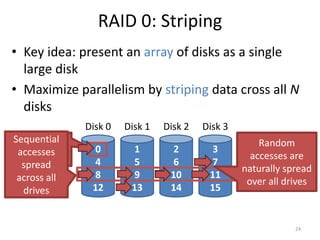
RAID 0: Striping
• Key idea: present an array of disks as a single
large disk
• Maximize parallelism by striping data cross all N
disks
24
0
4
8
12
Disk 0
1
5
9
13
Disk 1
2
6
10
14
Disk 2
3
7
11
15
Disk 3
Stripe
Data block =
512 bytes
Random
accesses are
naturally spread
over all drives
Sequential
accesses
spread
across all
drives
Addressing Blocks
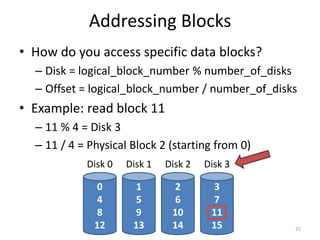
• How do you access specific data blocks?
– Disk = logical_block_number % number_of_disks
– Offset = logical_block_number / number_of_disks
• Example: read block 11
– 11 % 4 = Disk 3
– 11 / 4 = Physical Block 2 (starting from 0)
25
0
4
8
12
Disk 0
1
5
9
13
Disk 1
2
6
10
14
Disk 2
3
7
11
15
Disk 3
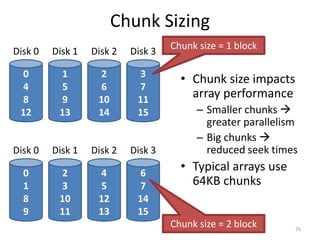
Chunk Sizing
26
0
4
8
12
Disk 0
1
5
9
13
Disk 1
2
6
10
14
Disk 2
3
7
11
15
Disk 3
0
1
8
9
Disk 0
2
3
10
11
Disk 1
4
5
12
13
Disk 2
6
7
14
15
Disk 3
Chunk size = 1 block
Chunk size = 2 block
• Chunk size impacts
array performance
– Smaller chunks 
greater parallelism
– Big chunks 
reduced seek times
• Typical arrays use
64KB chunks
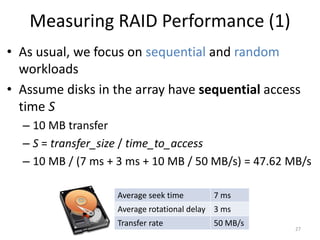
Measuring RAID Performance (1)
• As usual, we focus on sequential and random
workloads
• Assume disks in the array have sequential access
time S
– 10 MB transfer
– S = transfer_size / time_to_access
– 10 MB / (7 ms + 3 ms + 10 MB / 50 MB/s) = 47.62 MB/s
27
Average seek time 7 ms
Average rotational delay 3 ms
Transfer rate 50 MB/s
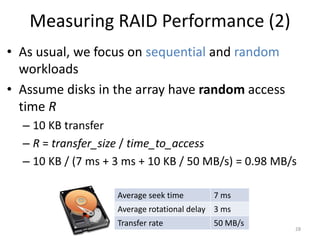
Measuring RAID Performance (2)
• As usual, we focus on sequential and random
workloads
• Assume disks in the array have random access
time R
– 10 KB transfer
– R = transfer_size / time_to_access
– 10 KB / (7 ms + 3 ms + 10 KB / 50 MB/s) = 0.98 MB/s
28
Average seek time 7 ms
Average rotational delay 3 ms
Transfer rate 50 MB/s
Analysis of RAID 0
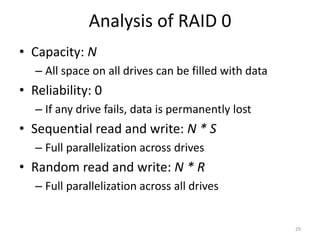
• Capacity: N
– All space on all drives can be filled with data
• Reliability: 0
– If any drive fails, data is permanently lost
• Sequential read and write: N * S
– Full parallelization across drives
• Random read and write: N * R
– Full parallelization across all drives
29
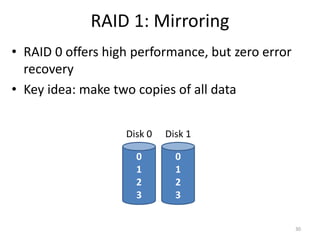
RAID 1: Mirroring
30
0
1
2
3
Disk 0
0
1
2
3
Disk 1
• RAID 0 offers high performance, but zero error
recovery
• Key idea: make two copies of all data
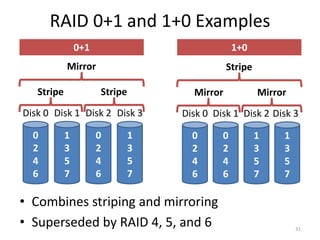
RAID 0+1 and 1+0 Examples
31
0
2
4
6
Disk 0
0
2
4
6
Disk 1
1
3
5
7
Disk 2
1
3
5
7
Disk 3
0
2
4
6
Disk 0
1
3
5
7
Disk 1
0
2
4
6
Disk 2
1
3
5
7
Disk 3
Stripe Stripe
Mirror
Mirror Mirror
Stripe
• Combines striping and mirroring
• Superseded by RAID 4, 5, and 6
0+1 1+0
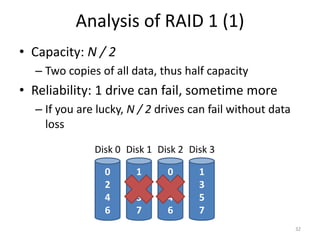
Analysis of RAID 1 (1)
• Capacity: N / 2
– Two copies of all data, thus half capacity
• Reliability: 1 drive can fail, sometime more
– If you are lucky, N / 2 drives can fail without data
loss
32
0
2
4
6
Disk 0
1
3
5
7
Disk 1
0
2
4
6
Disk 2
1
3
5
7
Disk 3
Analysis of RAID 1 (2)
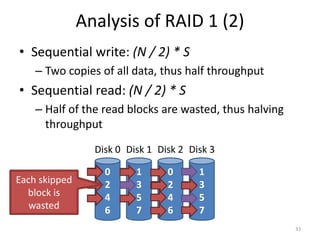
• Sequential write: (N / 2) * S
– Two copies of all data, thus half throughput
• Sequential read: (N / 2) * S
– Half of the read blocks are wasted, thus halving
throughput
33
0
2
4
6
Disk 0
1
3
5
7
Disk 1
0
2
4
6
Disk 2
1
3
5
7
Disk 3
Each skipped
block is
wasted
Analysis of RAID 1 (3)
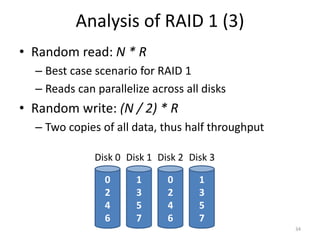
• Random read: N * R
– Best case scenario for RAID 1
– Reads can parallelize across all disks
• Random write: (N / 2) * R
– Two copies of all data, thus half throughput
34
0
2
4
6
Disk 0
1
3
5
7
Disk 1
0
2
4
6
Disk 2
1
3
5
7
Disk 3
The Consistent Update Problem
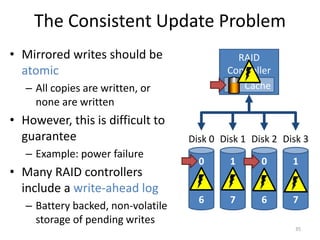
• Mirrored writes should be
atomic
– All copies are written, or
none are written
• However, this is difficult to
guarantee
– Example: power failure
• Many RAID controllers
include a write-ahead log
– Battery backed, non-volatile
storage of pending writes
35
0
2
4
6
Disk 0
1
3
5
7
Disk 1
0
2
4
6
Disk 2
1
3
5
7
Disk 3
RAID
Controller
Cache
Decreasing the Cost of Reliability
• RAID 1 offers highly reliable data storage
• But, it uses N / 2 of the array capacity
• Can we achieve the same level of reliability
without wasting so much capacity?
– Yes!
– Use information coding techniques to build light-
weight error recovery mechanisms
36
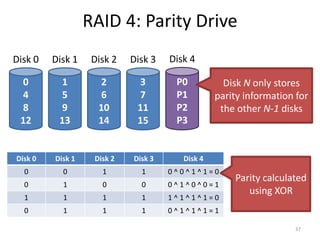
RAID 4: Parity Drive
37
0
4
8
12
Disk 0
1
5
9
13
Disk 1
2
6
10
14
Disk 2
3
7
11
15
Disk 3
P0
P1
P2
P3
Disk 4
Disk 0 Disk 1 Disk 2 Disk 3 Disk 4
0 0 1 1 0 ^ 0 ^ 1 ^ 1 = 0
0 1 0 0 0 ^ 1 ^ 0 ^ 0 = 1
1 1 1 1 1 ^ 1 ^ 1 ^ 1 = 0
0 1 1 1 0 ^ 1 ^ 1 ^ 1 = 1
Disk N only stores
parity information for
the other N-1 disks
Parity calculated
using XOR
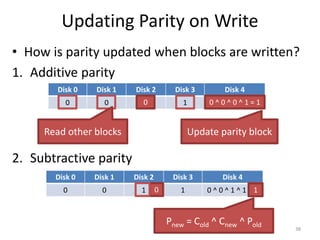
Updating Parity on Write
• How is parity updated when blocks are written?
1. Additive parity
38
2. Subtractive parity
Disk 0 Disk 1 Disk 2 Disk 3 Disk 4
0 0 1 1 0 ^ 0 ^ 1 ^ 1 = 0
0 0 ^ 0 ^ 0 ^ 1 = 1
Read other blocks Update parity block
Disk 0 Disk 1 Disk 2 Disk 3 Disk 4
0 0 1 1 0 ^ 0 ^ 1 ^ 1 = 0
0 1
Pnew = Cold ^ Cnew ^ Pold
0
4
8
12
Disk 0
1
5
9
13
Disk 1
2
6
10
14
Disk 2
3
7
11
15
Disk 3
P0
P1
P2
P3
Disk 4
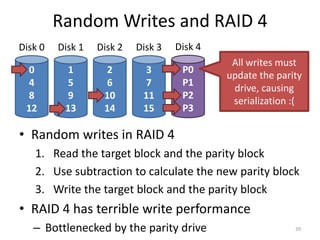
Random Writes and RAID 4
39
• Random writes in RAID 4
1. Read the target block and the parity block
2. Use subtraction to calculate the new parity block
3. Write the target block and the parity block
• RAID 4 has terrible write performance
– Bottlenecked by the parity drive
All writes must
update the parity
drive, causing
serialization :(
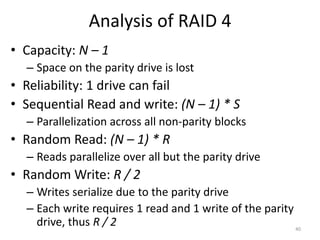
Analysis of RAID 4
• Capacity: N – 1
– Space on the parity drive is lost
• Reliability: 1 drive can fail
• Sequential Read and write: (N – 1) * S
– Parallelization across all non-parity blocks
• Random Read: (N – 1) * R
– Reads parallelize over all but the parity drive
• Random Write: R / 2
– Writes serialize due to the parity drive
– Each write requires 1 read and 1 write of the parity
drive, thus R / 2 40
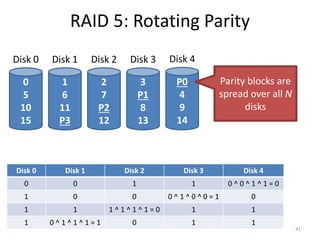
RAID 5: Rotating Parity
41
0
5
10
15
Disk 0
1
6
11
P3
Disk 1
2
7
P2
12
Disk 2
3
P1
8
13
Disk 3
P0
4
9
14
Disk 4
Disk 0 Disk 1 Disk 2 Disk 3 Disk 4
0 0 1 1 0 ^ 0 ^ 1 ^ 1 = 0
1 0 0 0 ^ 1 ^ 0 ^ 0 = 1 0
1 1 1 ^ 1 ^ 1 ^ 1 = 0 1 1
1 0 ^ 1 ^ 1 ^ 1 = 1 0 1 1
Parity blocks are
spread over all N
disks
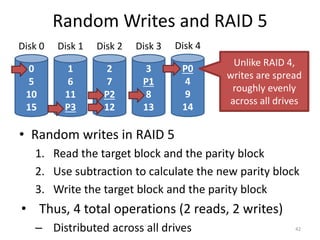
Random Writes and RAID 5
• Random writes in RAID 5
1. Read the target block and the parity block
2. Use subtraction to calculate the new parity block
3. Write the target block and the parity block
• Thus, 4 total operations (2 reads, 2 writes)
– Distributed across all drives 42
0
5
10
15
Disk 0
1
6
11
P3
Disk 1
2
7
P2
12
Disk 2
3
P1
8
13
Disk 3
P0
4
9
14
Disk 4
Unlike RAID 4,
writes are spread
roughly evenly
across all drives
Analysis of Raid 5
• Capacity: N – 1 [same as RAID 4]
• Reliability: 1 drive can fail [same as RAID 4]
• Sequential Read and write: (N – 1) * S [same]
– Parallelization across all non-parity blocks
• Random Read: N * R [vs. (N – 1) * R]
– Unlike RAID 4, reads parallelize over all drives
• Random Write: N / 4 * R [vs. R / 2 for RAID 4]
– Unlike RAID 4, writes parallelize over all drives
– Each write requires 2 reads and 2 write, hence N / 4
43
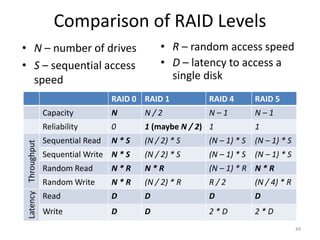
Comparison of RAID Levels
RAID 0 RAID 1 RAID 4 RAID 5
Capacity N N / 2 N – 1 N – 1
Reliability 0 1 (maybe N / 2) 1 1
Throughput
Sequential Read N * S (N / 2) * S (N – 1) * S (N – 1) * S
Sequential Write N * S (N / 2) * S (N – 1) * S (N – 1) * S
Random Read N * R N * R (N – 1) * R N * R
Random Write N * R (N / 2) * R R / 2 (N / 4) * R
Latency
Read D D D D
Write D D 2 * D 2 * D
44
• N – number of drives
• S – sequential access
speed
• R – random access speed
• D – latency to access a
single disk
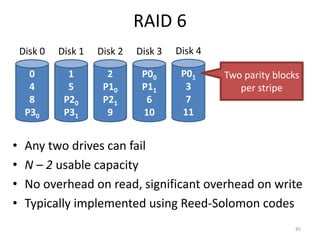
RAID 6
• Any two drives can fail
• N – 2 usable capacity
• No overhead on read, significant overhead on write
• Typically implemented using Reed-Solomon codes
45
0
4
8
P30
Disk 0
1
5
P20
P31
Disk 1
2
P10
P21
9
Disk 2
P00
P11
6
10
Disk 3
P01
3
7
11
Disk 4
Two parity blocks
per stripe
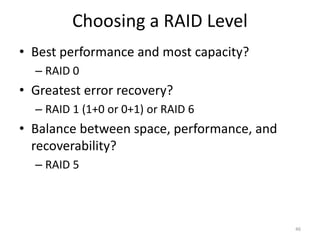
Choosing a RAID Level
• Best performance and most capacity?
– RAID 0
• Greatest error recovery?
– RAID 1 (1+0 or 0+1) or RAID 6
• Balance between space, performance, and
recoverability?
– RAID 5
46
Other Considerations
• Many RAID systems include a hot spare
– An idle, unused disk installed in the system
– If a drive fails, the array is immediately rebuilt using
the hot spare
• RAID can be implemented in hardware or software
– Hardware is faster and more reliable…
– But, migrating a hardware RAID array to a different
hardware controller almost never works
– Software arrays are simpler to migrate and cheaper,
but have worse performance and weaker reliability
• Due to the consistent update problem
47
• Hard Drives
• RAID
• SSD
48
Beyond Spinning Disks
• Hard drives have been around since 1956
– The cheapest way to store large amounts of data
– Sizes are still increasing rapidly
• However, hard drives are typically the slowest
component in most computers
– CPU and RAM operate at GHz
– PCI-X and Ethernet are GB/s
• Hard drives are not suitable for mobile devices
– Fragile mechanical components can break
– The disk motor is extremely power hungry
49
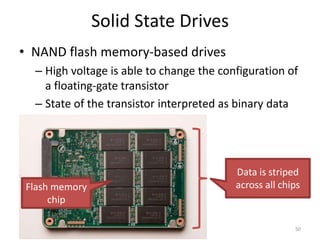
Solid State Drives
• NAND flash memory-based drives
– High voltage is able to change the configuration of
a floating-gate transistor
– State of the transistor interpreted as binary data
50
Flash memory
chip
Data is striped
across all chips
Advantages of SSDs
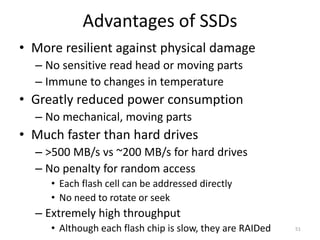
• More resilient against physical damage
– No sensitive read head or moving parts
– Immune to changes in temperature
• Greatly reduced power consumption
– No mechanical, moving parts
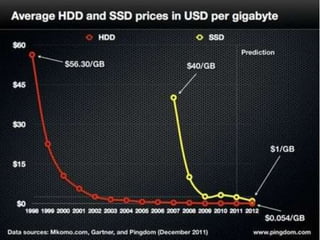
• Much faster than hard drives
– >500 MB/s vs ~200 MB/s for hard drives
– No penalty for random access
• Each flash cell can be addressed directly
• No need to rotate or seek
– Extremely high throughput
• Although each flash chip is slow, they are RAIDed 51
52
Challenges with Flash
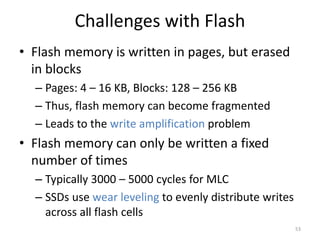
• Flash memory is written in pages, but erased
in blocks
– Pages: 4 – 16 KB, Blocks: 128 – 256 KB
– Thus, flash memory can become fragmented
– Leads to the write amplification problem
• Flash memory can only be written a fixed
number of times
– Typically 3000 – 5000 cycles for MLC
– SSDs use wear leveling to evenly distribute writes
across all flash cells
53
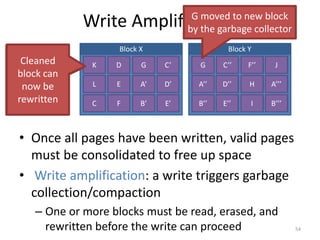
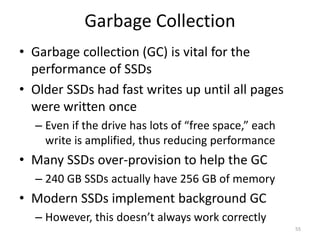
Write Amplification
• Once all pages have been written, valid pages
must be consolidated to free up space
• Write amplification: a write triggers garbage
collection/compaction
– One or more blocks must be read, erased, and
rewritten before the write can proceed 54
Block X Block Y
A
B
C
D
E
F
G
A’
B’
C’
D’
E’
F’
D’’
E’’
F’’
H
I
J
A’’’
B’’’
A’’
B’’
C’’
Stale pages
cannot be
overwritten
or erased
individually
G
K
L
G moved to new block
by the garbage collector
Cleaned
block can
now be
rewritten
Garbage Collection
• Garbage collection (GC) is vital for the
performance of SSDs
• Older SSDs had fast writes up until all pages
were written once
– Even if the drive has lots of “free space,” each
write is amplified, thus reducing performance
• Many SSDs over-provision to help the GC
– 240 GB SSDs actually have 256 GB of memory
• Modern SSDs implement background GC
– However, this doesn’t always work correctly
55
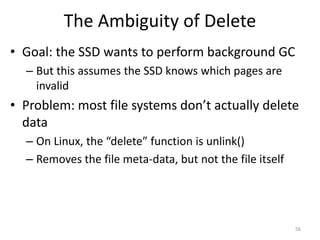
The Ambiguity of Delete
• Goal: the SSD wants to perform background GC
– But this assumes the SSD knows which pages are
invalid
• Problem: most file systems don’t actually delete
data
– On Linux, the “delete” function is unlink()
– Removes the file meta-data, but not the file itself
56
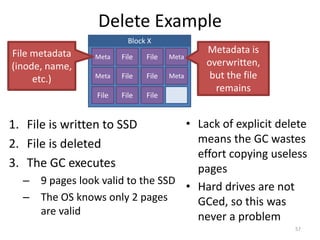
Delete Example
1. File is written to SSD
2. File is deleted
3. The GC executes
– 9 pages look valid to the SSD
– The OS knows only 2 pages
are valid
57
Block X
Meta
Meta
File
File
File
File
File
File
File
Meta
Meta
File metadata
(inode, name,
etc.)
Metadata is
overwritten,
but the file
remains
• Lack of explicit delete
means the GC wastes
effort copying useless
pages
• Hard drives are not
GCed, so this was
never a problem
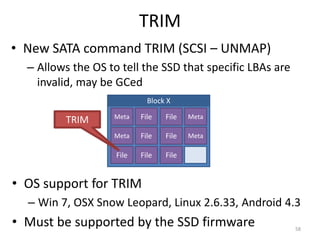
TRIM
• New SATA command TRIM (SCSI – UNMAP)
– Allows the OS to tell the SSD that specific LBAs are
invalid, may be GCed
58
• OS support for TRIM
– Win 7, OSX Snow Leopard, Linux 2.6.33, Android 4.3
• Must be supported by the SSD firmware
Block X
Meta
Meta
File
File
File
File
File
File
File
Meta
Meta
TRIM
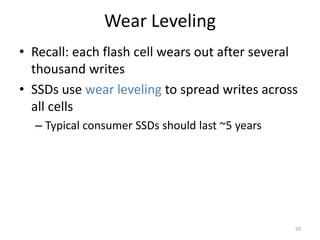
Wear Leveling
• Recall: each flash cell wears out after several
thousand writes
• SSDs use wear leveling to spread writes across
all cells
– Typical consumer SSDs should last ~5 years
59
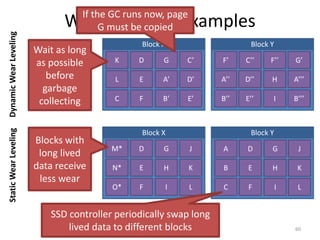
Wear Leveling Examples
60
Block X Block Y
A
B
C
D
E
F
G
A’
B’
C’
D’
E’
F’
D’’
E’’
F’’
H
I
G’
A’’’
B’’’
A’’
B’’
C’’
K
L
Wait as long
as possible
before
garbage
collecting
Block X Block Y
A
B
C
D
E
F
G
H
I
J
K
L
M
N
O
M’
N’
O’
M’’
N’’
O’’
M’’’
N’’’
O’’’
M*
N*
O*
A
B
C
D
E
F
G
H
I
J
K
L
M*
N*
SSD controller periodically swap long
lived data to different blocks
Blocks with
long lived
data receive
less wear
If the GC runs now, page
G must be copied
O*
Dynamic
Wear
Leveling
Static
Wear
Leveling
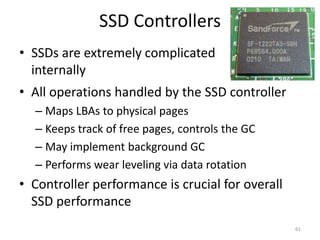
SSD Controllers
• All operations handled by the SSD controller
– Maps LBAs to physical pages
– Keeps track of free pages, controls the GC
– May implement background GC
– Performs wear leveling via data rotation
• Controller performance is crucial for overall
SSD performance
61
• SSDs are extremely complicated
internally
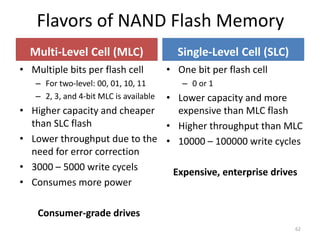
Flavors of NAND Flash Memory
Multi-Level Cell (MLC)
• One bit per flash cell
– 0 or 1
• Lower capacity and more
expensive than MLC flash
• Higher throughput than MLC
• 10000 – 100000 write cycles
Expensive, enterprise drives
Single-Level Cell (SLC)
• Multiple bits per flash cell
– For two-level: 00, 01, 10, 11
– 2, 3, and 4-bit MLC is available
• Higher capacity and cheaper
than SLC flash
• Lower throughput due to the
need for error correction
• 3000 – 5000 write cycels
• Consumes more power
Consumer-grade drives
62

9_Storage_Devices.pptx

  • 1.
  • 2.
    • Hard Drives •RAID • SSD 2
  • 3.
  • 4.
  • 5.
    Addressing and Geometry •Externally, hard drives expose a large number of sectors (blocks) – Typically 512 or 4096 bytes – Individual sector writes are atomic – Multiple sectors writes may be interrupted (torn write) • Drive geometry – Sectors arranged into tracks – A cylinder is a particular track on multiple platters – Tracks arranged in concentric circles on platters – A disk may have multiple, double-sided platters • Drive motor spins the platters at a constant rate – Measured in revolutions per minute (RPM) 5
  • 6.
    Geometry Example 6 0 1 4 8 12 34 28 32 30 35 29 33 31 27 24 21 18 25 26 17 16 23 22 20 19 13 14 15 2 3 11 10 9 6 5 7 Rotation Threetracks One platter Sector Outer tracks hold more data Read head Seeks across the various tracks
  • 7.
    Common Disk Interfaces •ST-506  ATA  IDE  SATA – Ancient standard – Commands (read/write) and addresses in cylinder/head/sector format placed in device registers – Recent versions support Logical Block Addresses (LBA) • SCSI (Small Computer Systems Interface) – Packet based, like TCP/IP – Device translates LBA to internal format (e.g. c/h/s) – Transport independent • USB drives, CD/DVD/Bluray, Firewire • iSCSI is SCSI over TCP/IP and Ethernet 7
  • 8.
    Types of DelayWith Disks 8 Three types of delay 1. Rotational Delay – Time to rotate the desired sector to the read head – Related to RPM 2. Seek delay – Time to move the read head to a different track 3. Transfer time – Time to read or write bytes 0 1 4 8 12 34 28 32 30 35 29 33 31 27 24 21 18 25 26 17 16 23 22 20 19 13 14 15 2 3 11 10 9 6 5 7 Short delay Long delay Track skew: offset sectors so that sequential reads across tracks incorporate seek delay
  • 9.
    How To CalculateTransfer Time Cheetah 15K.5 Barracuda Capacity 300 GB 1 TB RPM 15000 7200 Avg. Seek 4 ms 9 ms Max Transfer 125 MB/s 105 MB/s 9 Transfer time TI/O = Tseek + Trotation + Ttransfer Assume we are transferring 4096 bytes TI/O = 4 ms + 1 / (15000 RPM / 60 s/M / 1000 ms/s) / 2 + (4096 B / 125 MB/s * 1000 ms/s / 220 MB/B) TI/O = 4 ms + 2ms + 0.03125 ms ≈ 6 ms Cheetah Barracuda TI/O = 9 ms + 1 / (7200 RPM / 60 s/M / 1000 ms/s) / 2 + (4096 B / 105 MB/s * 1000 ms/s / 220 MB/B) TI/O = 9 ms + 4.17 ms + 0.0372 ms ≈ 13.2 ms
  • 10.
    Sequential vs. RandomAccess Rate of I/O RI/O = transfer_size / TI/O 10 Access Type Transfer Size Cheetah 15K.5 Barracuda Random 4096 B TI/O 6 ms 13.2 ms RI/O 0.66 MB/s 0.31 MB/s Sequential 100 MB TI/O 800 ms 950 ms RI/O 125 MB/s 105 MB/s Max Transfer Rate 125 MB/s 105MB/s Random I/O results in very poor disk performance!
  • 11.
    Caching • Many disksincorporate caches (track buffer) – Small amount of RAM (8, 16, or 32 MB) • Read caching – Reduces read delays due to seeking and rotation • Write caching – Write back cache: drive reports that writes are complete after they have been cached • Possibly dangerous feature. Why? – Write through cache: drive reports that writes are complete after they have been written to disk • Today, some disks include flash memory for persistent caching (hybrid drives) 11
  • 12.
    Disk Scheduling • Cachinghelps improve disk performance • But it can’t make up for poor random access times • Key idea: if there are a queue of requests to the disk, they can be reordered to improve performance – First come, first serve (FCFC) – Shortest seek time first (SSTF) – SCAN, otherwise know as the elevator algorithm – C-SCAN, C-LOOK, etc. 12
  • 13.
    FCFS Scheduling • Headstarts at block 53 • Queue: 98, 183, 37, 122, 14, 124, 65, 67 13 • Total movement: 640 cylinders Lot’s of time spent seeking • Most basic scheduler, serve requests in order
  • 14.
    SSTF Scheduling • Idea:minimize seek time by always selecting the block with the shortest seek time 14 • Total movement: 236 cylinders • Head starts at block 53 • Queue: 98, 183, 37, 122, 14, 124, 65, 67 The good: SSTF is optimal, and it can be easily implemented! The bad: SSTF is prone to starvation
  • 15.
    SCAN Example • Headsweeps across the disk servicing requests in order 15 • Total movement: 236 cylinders • Head starts at block 53 • Queue: 98, 183, 37, 122, 14, 124, 65, 67 The good: reasonable performance, no starvation The bad: average access times are less for requests at high and low addresses
  • 16.
    C-SCAN Example • LikeSCAN, but only service requests in one direction 16 • Total movement: 382 cylinders • Head starts at block 53 • Queue: 98, 183, 37, 122, 14, 124, 65, 67 The good: fairer than SCAN The bad: worse performance than SCAN
  • 17.
    C-LOOK Example • Peekat the upcoming addresses in the queue • Head only goes as far as the last request 17 • Total movement: 322 cylinders • Head starts at block 53 • Queue: 98, 183, 37, 122, 14, 124, 65, 67
  • 18.
    Implementing Disk Scheduling •We have talked about several scheduling problems that take place in the kernel – Process scheduling – Page swapping • Where should disk scheduling be implemented? – OS scheduling • OS can implement SSTF or LOOK by ordering the queue by LBA • However, the OS cannot account for rotation delay – On-disk scheduling • Disk knows the exact position of the head and platters • Can implement more advanced schedulers (SPTF) • But, requires specialized hardware and drivers 18
  • 19.
    Command Queuing • Featurewhere a disk stores of queue of pending read/write requests – Called Native Command Queuing (NCQ) in SATA • Disk may reorder items in the queue to improve performance – E.g. batch operations to close sectors/tracks • Supported by SCSI and modern SATA drives • Tagged command queuing: allows the host to place constraints on command re-ordering 19
  • 20.
    • Hard Drives •RAID • SSD 20
  • 21.
    Beyond Single Disks •Hard drives are great devices – Relatively fast, persistent storage • Shortcomings: – How to cope with disk failure? • Mechanical parts break over time • Sectors may become silently corrupted – Capacity is limited • Managing files across multiple physical devices is cumbersome • Can we make 10x 1 TB drives look like a 10 TB drive? 21
  • 22.
    Redundant Array ofInexpensive Disks • RAID: use multiple disks to create the illusion of a large, faster, more reliable disk • Externally, RAID looks like a single disk – i.e. RAID is transparent – Data blocks are read/written as usual – No need for software to explicitly manage multiple disks or perform error checking/recovery • Internally, RAID is a complex computer system – Disks managed by a dedicated CPU + software – RAM and non-volatile memory – Many different configuration options (RAID levels) 22
  • 23.
    Example RAID Controller 23 SATAports CPU RAM Non-volatile storage
  • 24.
    RAID 0: Striping •Key idea: present an array of disks as a single large disk • Maximize parallelism by striping data cross all N disks 24 0 4 8 12 Disk 0 1 5 9 13 Disk 1 2 6 10 14 Disk 2 3 7 11 15 Disk 3 Stripe Data block = 512 bytes Random accesses are naturally spread over all drives Sequential accesses spread across all drives
  • 25.
    Addressing Blocks • Howdo you access specific data blocks? – Disk = logical_block_number % number_of_disks – Offset = logical_block_number / number_of_disks • Example: read block 11 – 11 % 4 = Disk 3 – 11 / 4 = Physical Block 2 (starting from 0) 25 0 4 8 12 Disk 0 1 5 9 13 Disk 1 2 6 10 14 Disk 2 3 7 11 15 Disk 3
  • 26.
    Chunk Sizing 26 0 4 8 12 Disk 0 1 5 9 13 Disk1 2 6 10 14 Disk 2 3 7 11 15 Disk 3 0 1 8 9 Disk 0 2 3 10 11 Disk 1 4 5 12 13 Disk 2 6 7 14 15 Disk 3 Chunk size = 1 block Chunk size = 2 block • Chunk size impacts array performance – Smaller chunks  greater parallelism – Big chunks  reduced seek times • Typical arrays use 64KB chunks
  • 27.
    Measuring RAID Performance(1) • As usual, we focus on sequential and random workloads • Assume disks in the array have sequential access time S – 10 MB transfer – S = transfer_size / time_to_access – 10 MB / (7 ms + 3 ms + 10 MB / 50 MB/s) = 47.62 MB/s 27 Average seek time 7 ms Average rotational delay 3 ms Transfer rate 50 MB/s
  • 28.
    Measuring RAID Performance(2) • As usual, we focus on sequential and random workloads • Assume disks in the array have random access time R – 10 KB transfer – R = transfer_size / time_to_access – 10 KB / (7 ms + 3 ms + 10 KB / 50 MB/s) = 0.98 MB/s 28 Average seek time 7 ms Average rotational delay 3 ms Transfer rate 50 MB/s
  • 29.
    Analysis of RAID0 • Capacity: N – All space on all drives can be filled with data • Reliability: 0 – If any drive fails, data is permanently lost • Sequential read and write: N * S – Full parallelization across drives • Random read and write: N * R – Full parallelization across all drives 29
  • 30.
    RAID 1: Mirroring 30 0 1 2 3 Disk0 0 1 2 3 Disk 1 • RAID 0 offers high performance, but zero error recovery • Key idea: make two copies of all data
  • 31.
    RAID 0+1 and1+0 Examples 31 0 2 4 6 Disk 0 0 2 4 6 Disk 1 1 3 5 7 Disk 2 1 3 5 7 Disk 3 0 2 4 6 Disk 0 1 3 5 7 Disk 1 0 2 4 6 Disk 2 1 3 5 7 Disk 3 Stripe Stripe Mirror Mirror Mirror Stripe • Combines striping and mirroring • Superseded by RAID 4, 5, and 6 0+1 1+0
  • 32.
    Analysis of RAID1 (1) • Capacity: N / 2 – Two copies of all data, thus half capacity • Reliability: 1 drive can fail, sometime more – If you are lucky, N / 2 drives can fail without data loss 32 0 2 4 6 Disk 0 1 3 5 7 Disk 1 0 2 4 6 Disk 2 1 3 5 7 Disk 3
  • 33.
    Analysis of RAID1 (2) • Sequential write: (N / 2) * S – Two copies of all data, thus half throughput • Sequential read: (N / 2) * S – Half of the read blocks are wasted, thus halving throughput 33 0 2 4 6 Disk 0 1 3 5 7 Disk 1 0 2 4 6 Disk 2 1 3 5 7 Disk 3 Each skipped block is wasted
  • 34.
    Analysis of RAID1 (3) • Random read: N * R – Best case scenario for RAID 1 – Reads can parallelize across all disks • Random write: (N / 2) * R – Two copies of all data, thus half throughput 34 0 2 4 6 Disk 0 1 3 5 7 Disk 1 0 2 4 6 Disk 2 1 3 5 7 Disk 3
  • 35.
    The Consistent UpdateProblem • Mirrored writes should be atomic – All copies are written, or none are written • However, this is difficult to guarantee – Example: power failure • Many RAID controllers include a write-ahead log – Battery backed, non-volatile storage of pending writes 35 0 2 4 6 Disk 0 1 3 5 7 Disk 1 0 2 4 6 Disk 2 1 3 5 7 Disk 3 RAID Controller Cache
  • 36.
    Decreasing the Costof Reliability • RAID 1 offers highly reliable data storage • But, it uses N / 2 of the array capacity • Can we achieve the same level of reliability without wasting so much capacity? – Yes! – Use information coding techniques to build light- weight error recovery mechanisms 36
  • 37.
    RAID 4: ParityDrive 37 0 4 8 12 Disk 0 1 5 9 13 Disk 1 2 6 10 14 Disk 2 3 7 11 15 Disk 3 P0 P1 P2 P3 Disk 4 Disk 0 Disk 1 Disk 2 Disk 3 Disk 4 0 0 1 1 0 ^ 0 ^ 1 ^ 1 = 0 0 1 0 0 0 ^ 1 ^ 0 ^ 0 = 1 1 1 1 1 1 ^ 1 ^ 1 ^ 1 = 0 0 1 1 1 0 ^ 1 ^ 1 ^ 1 = 1 Disk N only stores parity information for the other N-1 disks Parity calculated using XOR
  • 38.
    Updating Parity onWrite • How is parity updated when blocks are written? 1. Additive parity 38 2. Subtractive parity Disk 0 Disk 1 Disk 2 Disk 3 Disk 4 0 0 1 1 0 ^ 0 ^ 1 ^ 1 = 0 0 0 ^ 0 ^ 0 ^ 1 = 1 Read other blocks Update parity block Disk 0 Disk 1 Disk 2 Disk 3 Disk 4 0 0 1 1 0 ^ 0 ^ 1 ^ 1 = 0 0 1 Pnew = Cold ^ Cnew ^ Pold
  • 39.
    0 4 8 12 Disk 0 1 5 9 13 Disk 1 2 6 10 14 Disk2 3 7 11 15 Disk 3 P0 P1 P2 P3 Disk 4 Random Writes and RAID 4 39 • Random writes in RAID 4 1. Read the target block and the parity block 2. Use subtraction to calculate the new parity block 3. Write the target block and the parity block • RAID 4 has terrible write performance – Bottlenecked by the parity drive All writes must update the parity drive, causing serialization :(
  • 40.
    Analysis of RAID4 • Capacity: N – 1 – Space on the parity drive is lost • Reliability: 1 drive can fail • Sequential Read and write: (N – 1) * S – Parallelization across all non-parity blocks • Random Read: (N – 1) * R – Reads parallelize over all but the parity drive • Random Write: R / 2 – Writes serialize due to the parity drive – Each write requires 1 read and 1 write of the parity drive, thus R / 2 40
  • 41.
    RAID 5: RotatingParity 41 0 5 10 15 Disk 0 1 6 11 P3 Disk 1 2 7 P2 12 Disk 2 3 P1 8 13 Disk 3 P0 4 9 14 Disk 4 Disk 0 Disk 1 Disk 2 Disk 3 Disk 4 0 0 1 1 0 ^ 0 ^ 1 ^ 1 = 0 1 0 0 0 ^ 1 ^ 0 ^ 0 = 1 0 1 1 1 ^ 1 ^ 1 ^ 1 = 0 1 1 1 0 ^ 1 ^ 1 ^ 1 = 1 0 1 1 Parity blocks are spread over all N disks
  • 42.
    Random Writes andRAID 5 • Random writes in RAID 5 1. Read the target block and the parity block 2. Use subtraction to calculate the new parity block 3. Write the target block and the parity block • Thus, 4 total operations (2 reads, 2 writes) – Distributed across all drives 42 0 5 10 15 Disk 0 1 6 11 P3 Disk 1 2 7 P2 12 Disk 2 3 P1 8 13 Disk 3 P0 4 9 14 Disk 4 Unlike RAID 4, writes are spread roughly evenly across all drives
  • 43.
    Analysis of Raid5 • Capacity: N – 1 [same as RAID 4] • Reliability: 1 drive can fail [same as RAID 4] • Sequential Read and write: (N – 1) * S [same] – Parallelization across all non-parity blocks • Random Read: N * R [vs. (N – 1) * R] – Unlike RAID 4, reads parallelize over all drives • Random Write: N / 4 * R [vs. R / 2 for RAID 4] – Unlike RAID 4, writes parallelize over all drives – Each write requires 2 reads and 2 write, hence N / 4 43
  • 44.
    Comparison of RAIDLevels RAID 0 RAID 1 RAID 4 RAID 5 Capacity N N / 2 N – 1 N – 1 Reliability 0 1 (maybe N / 2) 1 1 Throughput Sequential Read N * S (N / 2) * S (N – 1) * S (N – 1) * S Sequential Write N * S (N / 2) * S (N – 1) * S (N – 1) * S Random Read N * R N * R (N – 1) * R N * R Random Write N * R (N / 2) * R R / 2 (N / 4) * R Latency Read D D D D Write D D 2 * D 2 * D 44 • N – number of drives • S – sequential access speed • R – random access speed • D – latency to access a single disk
  • 45.
    RAID 6 • Anytwo drives can fail • N – 2 usable capacity • No overhead on read, significant overhead on write • Typically implemented using Reed-Solomon codes 45 0 4 8 P30 Disk 0 1 5 P20 P31 Disk 1 2 P10 P21 9 Disk 2 P00 P11 6 10 Disk 3 P01 3 7 11 Disk 4 Two parity blocks per stripe
  • 46.
    Choosing a RAIDLevel • Best performance and most capacity? – RAID 0 • Greatest error recovery? – RAID 1 (1+0 or 0+1) or RAID 6 • Balance between space, performance, and recoverability? – RAID 5 46
  • 47.
    Other Considerations • ManyRAID systems include a hot spare – An idle, unused disk installed in the system – If a drive fails, the array is immediately rebuilt using the hot spare • RAID can be implemented in hardware or software – Hardware is faster and more reliable… – But, migrating a hardware RAID array to a different hardware controller almost never works – Software arrays are simpler to migrate and cheaper, but have worse performance and weaker reliability • Due to the consistent update problem 47
  • 48.
    • Hard Drives •RAID • SSD 48
  • 49.
    Beyond Spinning Disks •Hard drives have been around since 1956 – The cheapest way to store large amounts of data – Sizes are still increasing rapidly • However, hard drives are typically the slowest component in most computers – CPU and RAM operate at GHz – PCI-X and Ethernet are GB/s • Hard drives are not suitable for mobile devices – Fragile mechanical components can break – The disk motor is extremely power hungry 49
  • 50.
    Solid State Drives •NAND flash memory-based drives – High voltage is able to change the configuration of a floating-gate transistor – State of the transistor interpreted as binary data 50 Flash memory chip Data is striped across all chips
  • 51.
    Advantages of SSDs •More resilient against physical damage – No sensitive read head or moving parts – Immune to changes in temperature • Greatly reduced power consumption – No mechanical, moving parts • Much faster than hard drives – >500 MB/s vs ~200 MB/s for hard drives – No penalty for random access • Each flash cell can be addressed directly • No need to rotate or seek – Extremely high throughput • Although each flash chip is slow, they are RAIDed 51
  • 52.
  • 53.
    Challenges with Flash •Flash memory is written in pages, but erased in blocks – Pages: 4 – 16 KB, Blocks: 128 – 256 KB – Thus, flash memory can become fragmented – Leads to the write amplification problem • Flash memory can only be written a fixed number of times – Typically 3000 – 5000 cycles for MLC – SSDs use wear leveling to evenly distribute writes across all flash cells 53
  • 54.
    Write Amplification • Onceall pages have been written, valid pages must be consolidated to free up space • Write amplification: a write triggers garbage collection/compaction – One or more blocks must be read, erased, and rewritten before the write can proceed 54 Block X Block Y A B C D E F G A’ B’ C’ D’ E’ F’ D’’ E’’ F’’ H I J A’’’ B’’’ A’’ B’’ C’’ Stale pages cannot be overwritten or erased individually G K L G moved to new block by the garbage collector Cleaned block can now be rewritten
  • 55.
    Garbage Collection • Garbagecollection (GC) is vital for the performance of SSDs • Older SSDs had fast writes up until all pages were written once – Even if the drive has lots of “free space,” each write is amplified, thus reducing performance • Many SSDs over-provision to help the GC – 240 GB SSDs actually have 256 GB of memory • Modern SSDs implement background GC – However, this doesn’t always work correctly 55
  • 56.
    The Ambiguity ofDelete • Goal: the SSD wants to perform background GC – But this assumes the SSD knows which pages are invalid • Problem: most file systems don’t actually delete data – On Linux, the “delete” function is unlink() – Removes the file meta-data, but not the file itself 56
  • 57.
    Delete Example 1. Fileis written to SSD 2. File is deleted 3. The GC executes – 9 pages look valid to the SSD – The OS knows only 2 pages are valid 57 Block X Meta Meta File File File File File File File Meta Meta File metadata (inode, name, etc.) Metadata is overwritten, but the file remains • Lack of explicit delete means the GC wastes effort copying useless pages • Hard drives are not GCed, so this was never a problem
  • 58.
    TRIM • New SATAcommand TRIM (SCSI – UNMAP) – Allows the OS to tell the SSD that specific LBAs are invalid, may be GCed 58 • OS support for TRIM – Win 7, OSX Snow Leopard, Linux 2.6.33, Android 4.3 • Must be supported by the SSD firmware Block X Meta Meta File File File File File File File Meta Meta TRIM
  • 59.
    Wear Leveling • Recall:each flash cell wears out after several thousand writes • SSDs use wear leveling to spread writes across all cells – Typical consumer SSDs should last ~5 years 59
  • 60.
    Wear Leveling Examples 60 BlockX Block Y A B C D E F G A’ B’ C’ D’ E’ F’ D’’ E’’ F’’ H I G’ A’’’ B’’’ A’’ B’’ C’’ K L Wait as long as possible before garbage collecting Block X Block Y A B C D E F G H I J K L M N O M’ N’ O’ M’’ N’’ O’’ M’’’ N’’’ O’’’ M* N* O* A B C D E F G H I J K L M* N* SSD controller periodically swap long lived data to different blocks Blocks with long lived data receive less wear If the GC runs now, page G must be copied O* Dynamic Wear Leveling Static Wear Leveling
  • 61.
    SSD Controllers • Alloperations handled by the SSD controller – Maps LBAs to physical pages – Keeps track of free pages, controls the GC – May implement background GC – Performs wear leveling via data rotation • Controller performance is crucial for overall SSD performance 61 • SSDs are extremely complicated internally
  • 62.
    Flavors of NANDFlash Memory Multi-Level Cell (MLC) • One bit per flash cell – 0 or 1 • Lower capacity and more expensive than MLC flash • Higher throughput than MLC • 10000 – 100000 write cycles Expensive, enterprise drives Single-Level Cell (SLC) • Multiple bits per flash cell – For two-level: 00, 01, 10, 11 – 2, 3, and 4-bit MLC is available • Higher capacity and cheaper than SLC flash • Lower throughput due to the need for error correction • 3000 – 5000 write cycels • Consumes more power Consumer-grade drives 62