XML presentation
By Alejandro herreño y Miguel Teheran
2.1 XML (Extensible Markup Language)
XML stands for Extensible Markup Language. It is a text-based markup language
derived from Standard Generalized Markup Language (SGML).
Main characteristics:
● XML is extensible
● XML carries the data, does not present it
● XML is a public standard
2.2 XML Documents
What‘s in an XML document?
• Elements
• Attributes
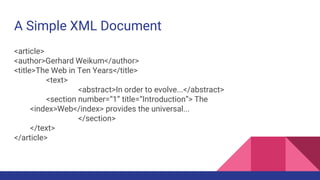
A Simple XML Document
<article>
<author>Gerhard Weikum</author>
<title>The Web in Ten Years</title>
<text>
<abstract>In order to evolve...</abstract>
<section number=“1” title=“Introduction”> The
<index>Web</index> provides the universal...
</section>
</text>
</article>
DEMO
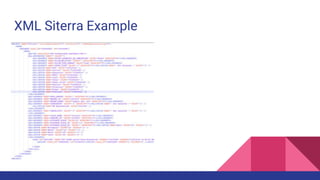
REPRESENTACIÓN CONCEPTUAL DE ENTIDADE DE SITERRA EN UN XML
XML Siterra Example
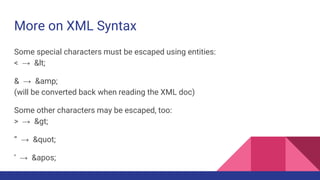
More on XML Syntax
Some special characters must be escaped using entities:
< → &lt;
& → &amp;
(will be converted back when reading the XML doc)
Some other characters may be escaped, too:
> → &gt;
“ → &quot;
‘ → &apos;
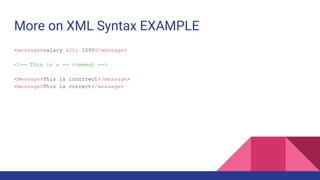
More on XML Syntax EXAMPLE
<message>salary &lt; 1000</message>
<!-- This is a -- comment -->
<Message>This is incorrect</message>
<message>This is correct</message>
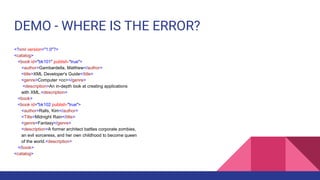
DEMO - WHERE IS THE ERROR?
<?xml version="1.0"?>
<catalog>
<book id="bk101" publish-"true">
<author>Gambardella, Matthew</author>
<title>XML Developer's Guide</title>
<genre>Computer <cc></genre>
<description>An in-depth look at creating applications
with XML.<description>
<book>
<book id="bk102 publish-"true">
<author>Ralls, Kim</author>
<Title>Midnight Rain</title>
<genre>Fantasy</genre>
<description>A former architect battles corporate zombies,
an evil sorceress, and her own childhood to become queen
of the world.<description>
</book>
<catalog>
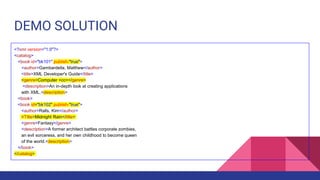
DEMO SOLUTION
<?xml version="1.0"?>
<catalog>
<book id="bk101" publish-"true">
<author>Gambardella, Matthew</author>
<title>XML Developer's Guide</title>
<genre>Computer <cc></genre>
<description>An in-depth look at creating applications
with XML.<description>
<book>
<book id="bk102" publish-"true">
<author>Ralls, Kim</author>
<Title>Midnight Rain</title>
<genre>Fantasy</genre>
<description>A former architect battles corporate zombies,
an evil sorceress, and her own childhood to become queen
of the world.<description>
</book>
</catalog>
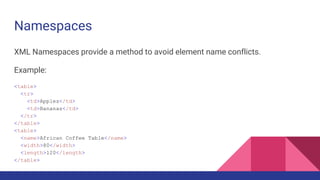
Namespaces
XML Namespaces provide a method to avoid element name conflicts.
Example:
<table>
<tr>
<td>Apples</td>
<td>Bananas</td>
</tr>
</table>
<table>
<name>African Coffee Table</name>
<width>80</width>
<length>120</length>
</table>
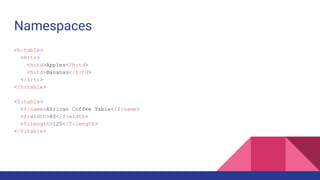
Namespaces
<h:table>
<h:tr>
<h:td>Apples</h:td>
<h:td>Bananas</h:td>
</h:tr>
</h:table>
<f:table>
<f:name>African Coffee Table</f:name>
<f:width>80</f:width>
<f:length>120</f:length>
</f:table>
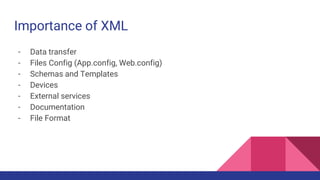
Importance of XML
- Data transfer
- Files Config (App.config, Web.config)
- Schemas and Templates
- Devices
- External services
- Documentation
- File Format
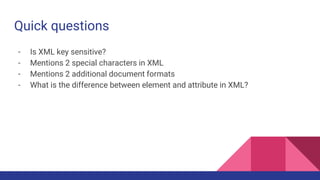
Quick questions
- Is XML key sensitive?
- Mentions 2 special characters in XML
- Mentions 2 additional document formats
- What is the difference between element and attribute in XML?
Querying XML Data
Querying XML with XPath and XQuery
XPath and XQuery are query languages for XML data, both standardized by the W3C and
supported by various database products. Their search capabilities include
•logical conditions over element and attribute content (first-order predicate logic a la SQL;
simple conditions only in XPath)
•regular expressions for pattern matching of element names along paths or subtrees within
XML data + joins, grouping, aggregation, transformation, etc. (XQuery only)
In contrast to database query languages like SQL an XML query does not necessarily (need
to) know a fixed structural schema for the underlying data. A query result is a set of
qualifying nodes, paths, subtrees, or subgraphs from the underyling data graph, or a set of
XML documents constructed from this raw result
XPath
XPath is a simple language to identify parts of the XML document (for further
processing)
• XPath operates on the tree representation of the document
• Result of an XPath expression is a set of elements or attributes
• Discuss abbreviated version of XPath
Elements of XPath
• An XPath expression usually is a location path that consists of location steps, separated by /:
/article/text/abstract: selects all abstractelements
• A leading / always means the root element
• Each location step is evaluated in the context of a node in the tree, the so-called context node
• Possible location steps:
–child element x: select all child elements with name x –Attribute @x: select all attributes with name x
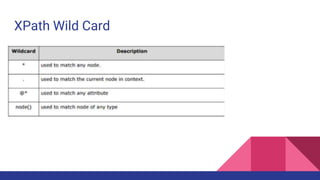
–Wildcards *(any child), @*(any attribute)
–Multiple matches, separated by |: x|y|z
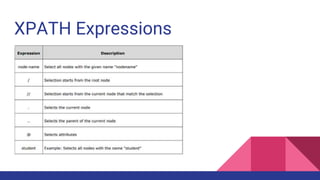
XPATH Expressions
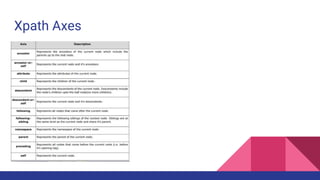
Xpath Axes
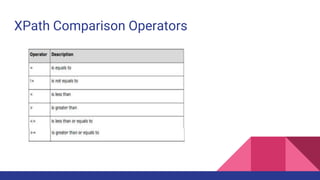
XPath Comparison Operators
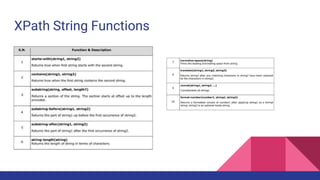
XPath String Functions
XPath Wild Card
XPATH Additional Concepts
● Absolute Path / Relative Path
● Axes
XPath by Example
EXPRESSIONS
● / -----DOCUMENT FROM THE ROOT NODE
● //TASK ----- ALL THE TASK NODE
● //TASK/@ADHOC --- THE VALUE OF THE TASK ATRIBUTE "ADHOC"
● //BLL:PROPERTY --- ALL THE PROPERTY ELEMENTS
● //BLL:PROPERTY[1] --- THE FIRST PROPERTY ELEMENT
● //BLL:PROPERTY[@DATATYPE] ---- ALL THE PROPERTY WITH AN ARGUMENT "DATATYPE "
● //TASK
AXES
● //BLL:PROPERTIES/child::node() --- CHILD NODES OF PROPERTIES
● //BLL:PROPERTY[1]/following::node() --- FOLLOWING NODES
OPERATORS
● //BLL:OPTION[@NAME = "Carrier"
● //BLL:PROPERTY[@NAME="EVENT_TYPE"]/BLL:OPTIONS/Equipment_Upgrade/text() --- text

Xml presentation

  • 1.
    XML presentation By Alejandroherreño y Miguel Teheran
  • 2.
    2.1 XML (ExtensibleMarkup Language) XML stands for Extensible Markup Language. It is a text-based markup language derived from Standard Generalized Markup Language (SGML). Main characteristics: ● XML is extensible ● XML carries the data, does not present it ● XML is a public standard
  • 3.
    2.2 XML Documents What‘sin an XML document? • Elements • Attributes
  • 4.
    A Simple XMLDocument <article> <author>Gerhard Weikum</author> <title>The Web in Ten Years</title> <text> <abstract>In order to evolve...</abstract> <section number=“1” title=“Introduction”> The <index>Web</index> provides the universal... </section> </text> </article>
  • 5.
    DEMO REPRESENTACIÓN CONCEPTUAL DEENTIDADE DE SITERRA EN UN XML
  • 6.
  • 7.
    More on XMLSyntax Some special characters must be escaped using entities: < → &lt; & → &amp; (will be converted back when reading the XML doc) Some other characters may be escaped, too: > → &gt; “ → &quot; ‘ → &apos;
  • 8.
    More on XMLSyntax EXAMPLE <message>salary &lt; 1000</message> <!-- This is a -- comment --> <Message>This is incorrect</message> <message>This is correct</message>
  • 9.
    DEMO - WHEREIS THE ERROR? <?xml version="1.0"?> <catalog> <book id="bk101" publish-"true"> <author>Gambardella, Matthew</author> <title>XML Developer's Guide</title> <genre>Computer <cc></genre> <description>An in-depth look at creating applications with XML.<description> <book> <book id="bk102 publish-"true"> <author>Ralls, Kim</author> <Title>Midnight Rain</title> <genre>Fantasy</genre> <description>A former architect battles corporate zombies, an evil sorceress, and her own childhood to become queen of the world.<description> </book> <catalog>
  • 10.
    DEMO SOLUTION <?xml version="1.0"?> <catalog> <bookid="bk101" publish-"true"> <author>Gambardella, Matthew</author> <title>XML Developer's Guide</title> <genre>Computer <cc></genre> <description>An in-depth look at creating applications with XML.<description> <book> <book id="bk102" publish-"true"> <author>Ralls, Kim</author> <Title>Midnight Rain</title> <genre>Fantasy</genre> <description>A former architect battles corporate zombies, an evil sorceress, and her own childhood to become queen of the world.<description> </book> </catalog>
  • 11.
    Namespaces XML Namespaces providea method to avoid element name conflicts. Example: <table> <tr> <td>Apples</td> <td>Bananas</td> </tr> </table> <table> <name>African Coffee Table</name> <width>80</width> <length>120</length> </table>
  • 12.
  • 13.
    Importance of XML -Data transfer - Files Config (App.config, Web.config) - Schemas and Templates - Devices - External services - Documentation - File Format
  • 14.
    Quick questions - IsXML key sensitive? - Mentions 2 special characters in XML - Mentions 2 additional document formats - What is the difference between element and attribute in XML?
  • 15.
  • 16.
    Querying XML withXPath and XQuery XPath and XQuery are query languages for XML data, both standardized by the W3C and supported by various database products. Their search capabilities include •logical conditions over element and attribute content (first-order predicate logic a la SQL; simple conditions only in XPath) •regular expressions for pattern matching of element names along paths or subtrees within XML data + joins, grouping, aggregation, transformation, etc. (XQuery only) In contrast to database query languages like SQL an XML query does not necessarily (need to) know a fixed structural schema for the underlying data. A query result is a set of qualifying nodes, paths, subtrees, or subgraphs from the underyling data graph, or a set of XML documents constructed from this raw result
  • 17.
    XPath XPath is asimple language to identify parts of the XML document (for further processing) • XPath operates on the tree representation of the document • Result of an XPath expression is a set of elements or attributes • Discuss abbreviated version of XPath
  • 18.
    Elements of XPath •An XPath expression usually is a location path that consists of location steps, separated by /: /article/text/abstract: selects all abstractelements • A leading / always means the root element • Each location step is evaluated in the context of a node in the tree, the so-called context node • Possible location steps: –child element x: select all child elements with name x –Attribute @x: select all attributes with name x –Wildcards *(any child), @*(any attribute) –Multiple matches, separated by |: x|y|z
  • 19.
  • 20.
  • 21.
  • 22.
  • 23.
  • 24.
    XPATH Additional Concepts ●Absolute Path / Relative Path ● Axes
  • 25.
    XPath by Example EXPRESSIONS ●/ -----DOCUMENT FROM THE ROOT NODE ● //TASK ----- ALL THE TASK NODE ● //TASK/@ADHOC --- THE VALUE OF THE TASK ATRIBUTE "ADHOC" ● //BLL:PROPERTY --- ALL THE PROPERTY ELEMENTS ● //BLL:PROPERTY[1] --- THE FIRST PROPERTY ELEMENT ● //BLL:PROPERTY[@DATATYPE] ---- ALL THE PROPERTY WITH AN ARGUMENT "DATATYPE " ● //TASK AXES ● //BLL:PROPERTIES/child::node() --- CHILD NODES OF PROPERTIES ● //BLL:PROPERTY[1]/following::node() --- FOLLOWING NODES OPERATORS ● //BLL:OPTION[@NAME = "Carrier" ● //BLL:PROPERTY[@NAME="EVENT_TYPE"]/BLL:OPTIONS/Equipment_Upgrade/text() --- text