UNIT I UML DIAGRAMS
Introduction to OOAD – Unified Process –
UML diagrams – Use Case – Class Diagrams–
Interaction Diagrams – State Diagrams –
Activity Diagrams –
Package, component and Deployment Diagrams.
Unified Process (UP)
Introduction
• A software development process describes an approach to building,
deploying, and possibly maintaining software.
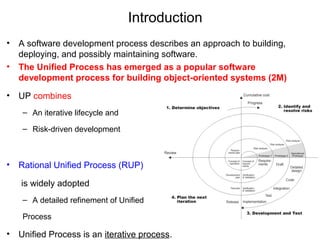
• The Unified Process has emerged as a popular software
development process for building object-oriented systems (2M)
• UP combines
– An iterative lifecycle and
– Risk-driven development
• Rational Unified Process (RUP)
is widely adopted
– A detailed refinement of Unified
Process
• Unified Process is an iterative process.
Iterative Development
• Central ideas in iterative development are
– Small steps,
– Rapid feedback, and
– Adaptation
• Here, s/w development is organized
– Into a series of short, fixed-length mini-projects called iterations;
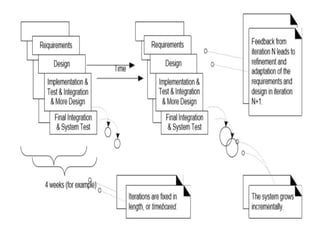
• Each iteration includes its own requirements analysis, design, implementation, and
testing activities.
– the outcome of each is a tested, integrated, and executable system.
• The system grows incrementally over time, iteration by iteration, and thus
this approach is also known as iterative and incremental development
Iterative and incremental development.
• Each iteration includes its own
– Requirements analysis,
– Design,
– Implementation, and
– Testing activities.
• This approach is also known as iterative & incremental development
System may not be eligible for production deployment
Until after many iterations; for example, 10 or 15 iterations.
Result of each iteration is an executable but incomplete system
Feedback and Adaptation
• In this approach,
– End-users have a chance to quickly see a partial system, and
– Give feedback that helps for requirements clarification
• Feedback from building and testing
– Provides an opportunity to modify or adapt understanding of requirements or
design.
 This early feedback is worth its weight in gold
 End-users have a chance to quickly see a partial system and say, "Yes, that's
what I asked for, but now that I try it, what I really want is something slightly
different."1 This "yes...but" process is not a sign of failure;
Benefits of Iterative Development:
early rather than late mitigation of high risks (technical,
requirements, objectives, usability, and so forth)
early visible progress
early feedback, user engagement, and adaptation, leading to a
refined system that more closely meets the real needs of the
stakeholders
managed complexity; the team is not overwhelmed by "analysis
paralysis" or very long and complex steps
the learning within an iteration can be methodically used to improve
the development process itself, iteration by iteration
UP Phases
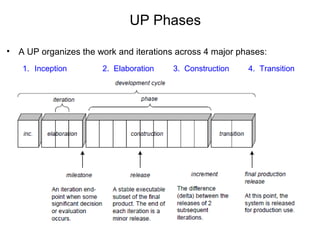
• A UP organizes the work and iterations across 4 major phases:
1. Inception 2. Elaboration 3. Construction 4. Transition
Inception and Elaboration
• Inception is not a requirement phase
– It is a feasibility phase, where investigation is done to support the decision to
continue or stop.
– Approximate vision, business case, scope, and vague estimates.
• Elaboration is also not a requirement phase or design phase
– It is a phase, where core architecture is iteratively implemented and high risk
issues are mitigated.
– The development cycle composed of many iterations,
and it is ends in the release of a system into production
Elaboration
• Elaboration includes
– Refined vision,
– Iterative implementation of the core architecture,
– Resolution of high risks,
– Identification of most requirements and scope,
– More realistic estimates.
UP Phases• Construction
– Iterative implementation of the remaining lower risk and easier elements, and
– Preparation for deployment.
• Transition
– Beta testing & Deployment.
Beta testing:
Beta testing also known as user testing takes place at the end users site
by the end users to validate the usability, functionality, compatibility,
and reliability
UP Disciplines
• A discipline is a set of activities (and related artifacts) in one subject area.
• UP Disciples are originally called as workflows
• UP describes work activities, such as writing a use case, within the
disciplines
• In UP, an artifact is the general term for any work product :
– Such as code, Web graphics, DB schema, text documents, diagrams, models,
& so on.
Types of UP Disciplines
• There are 9 disciplines in UP
– Business Modeling
– Requirements
– Design
– Implementation
– Test
– Deployment
– Configuration & Change Management
– Project Management
– Environment
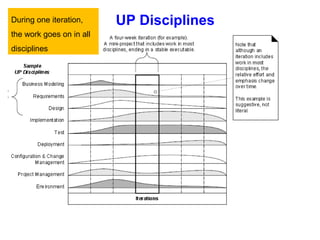
UP DisciplinesDuring one iteration,
the work goes on in all
disciplines
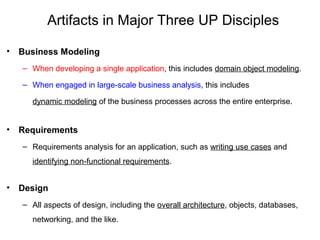
Artifacts in Major Three UP Disciples
• Business Modeling
– When developing a single application, this includes domain object modeling.
– When engaged in large-scale business analysis, this includes
dynamic modeling of the business processes across the entire enterprise.
• Requirements
– Requirements analysis for an application, such as writing use cases and
identifying non-functional requirements.
• Design
– All aspects of design, including the overall architecture, objects, databases,
networking, and the like.
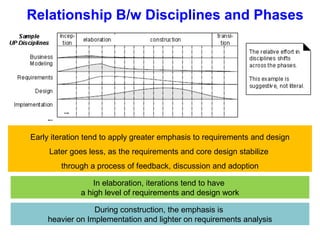
Relationship B/w Disciplines and Phases
In elaboration, iterations tend to have
a high level of requirements and design work
Early iteration tend to apply greater emphasis to requirements and design
Later goes less, as the requirements and core design stabilize
through a process of feedback, discussion and adoption
During construction, the emphasis is
heavier on Implementation and lighter on requirements analysis
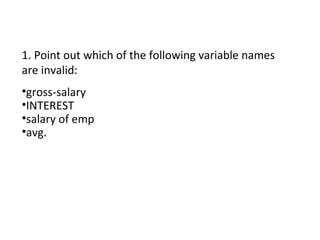
1. Point out which of the following variable names
are invalid:
•gross-salary
•INTEREST
•salary of emp
•avg.
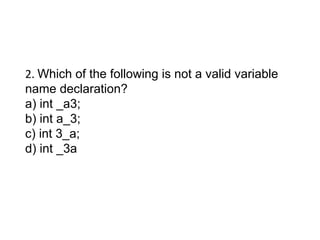
2. Which of the following is not a valid variable
name declaration?
a) int _a3;
b) int a_3;
c) int 3_a;
d) int _3a
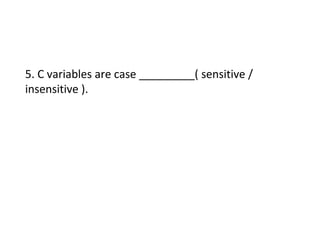
5. C variables are case _________( sensitive /
insensitive ).
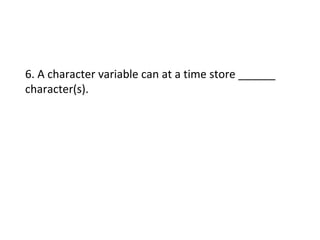
6. A character variable can at a time store ______
character(s).
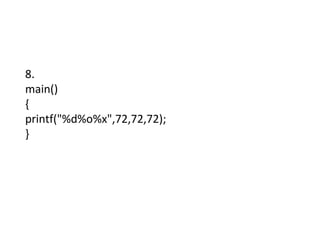
8.
main()
{
printf("%d%o%x",72,72,72);
}

03 unified process

  • 1.
    UNIT I UMLDIAGRAMS Introduction to OOAD – Unified Process – UML diagrams – Use Case – Class Diagrams– Interaction Diagrams – State Diagrams – Activity Diagrams – Package, component and Deployment Diagrams.
  • 2.
  • 3.
    Introduction • A softwaredevelopment process describes an approach to building, deploying, and possibly maintaining software. • The Unified Process has emerged as a popular software development process for building object-oriented systems (2M) • UP combines – An iterative lifecycle and – Risk-driven development • Rational Unified Process (RUP) is widely adopted – A detailed refinement of Unified Process • Unified Process is an iterative process.
  • 4.
    Iterative Development • Centralideas in iterative development are – Small steps, – Rapid feedback, and – Adaptation • Here, s/w development is organized – Into a series of short, fixed-length mini-projects called iterations; • Each iteration includes its own requirements analysis, design, implementation, and testing activities. – the outcome of each is a tested, integrated, and executable system. • The system grows incrementally over time, iteration by iteration, and thus this approach is also known as iterative and incremental development
  • 5.
    Iterative and incrementaldevelopment. • Each iteration includes its own – Requirements analysis, – Design, – Implementation, and – Testing activities. • This approach is also known as iterative & incremental development System may not be eligible for production deployment Until after many iterations; for example, 10 or 15 iterations. Result of each iteration is an executable but incomplete system
  • 7.
    Feedback and Adaptation •In this approach, – End-users have a chance to quickly see a partial system, and – Give feedback that helps for requirements clarification • Feedback from building and testing – Provides an opportunity to modify or adapt understanding of requirements or design.  This early feedback is worth its weight in gold  End-users have a chance to quickly see a partial system and say, "Yes, that's what I asked for, but now that I try it, what I really want is something slightly different."1 This "yes...but" process is not a sign of failure;
  • 8.
    Benefits of IterativeDevelopment: early rather than late mitigation of high risks (technical, requirements, objectives, usability, and so forth) early visible progress early feedback, user engagement, and adaptation, leading to a refined system that more closely meets the real needs of the stakeholders managed complexity; the team is not overwhelmed by "analysis paralysis" or very long and complex steps the learning within an iteration can be methodically used to improve the development process itself, iteration by iteration
  • 9.
    UP Phases • AUP organizes the work and iterations across 4 major phases: 1. Inception 2. Elaboration 3. Construction 4. Transition
  • 10.
    Inception and Elaboration •Inception is not a requirement phase – It is a feasibility phase, where investigation is done to support the decision to continue or stop. – Approximate vision, business case, scope, and vague estimates. • Elaboration is also not a requirement phase or design phase – It is a phase, where core architecture is iteratively implemented and high risk issues are mitigated. – The development cycle composed of many iterations, and it is ends in the release of a system into production
  • 11.
    Elaboration • Elaboration includes –Refined vision, – Iterative implementation of the core architecture, – Resolution of high risks, – Identification of most requirements and scope, – More realistic estimates.
  • 12.
    UP Phases• Construction –Iterative implementation of the remaining lower risk and easier elements, and – Preparation for deployment. • Transition – Beta testing & Deployment. Beta testing: Beta testing also known as user testing takes place at the end users site by the end users to validate the usability, functionality, compatibility, and reliability
  • 13.
    UP Disciplines • Adiscipline is a set of activities (and related artifacts) in one subject area. • UP Disciples are originally called as workflows • UP describes work activities, such as writing a use case, within the disciplines • In UP, an artifact is the general term for any work product : – Such as code, Web graphics, DB schema, text documents, diagrams, models, & so on.
  • 14.
    Types of UPDisciplines • There are 9 disciplines in UP – Business Modeling – Requirements – Design – Implementation – Test – Deployment – Configuration & Change Management – Project Management – Environment
  • 15.
    UP DisciplinesDuring oneiteration, the work goes on in all disciplines
  • 16.
    Artifacts in MajorThree UP Disciples • Business Modeling – When developing a single application, this includes domain object modeling. – When engaged in large-scale business analysis, this includes dynamic modeling of the business processes across the entire enterprise. • Requirements – Requirements analysis for an application, such as writing use cases and identifying non-functional requirements. • Design – All aspects of design, including the overall architecture, objects, databases, networking, and the like.
  • 17.
    Relationship B/w Disciplinesand Phases In elaboration, iterations tend to have a high level of requirements and design work Early iteration tend to apply greater emphasis to requirements and design Later goes less, as the requirements and core design stabilize through a process of feedback, discussion and adoption During construction, the emphasis is heavier on Implementation and lighter on requirements analysis
  • 18.
    1. Point outwhich of the following variable names are invalid: •gross-salary •INTEREST •salary of emp •avg.
  • 19.
    2. Which ofthe following is not a valid variable name declaration? a) int _a3; b) int a_3; c) int 3_a; d) int _3a
  • 20.
    5. C variablesare case _________( sensitive / insensitive ).
  • 21.
    6. A charactervariable can at a time store ______ character(s).
  • 22.