Department of Information Technology 1Data base Technologies (ITB4201)
Introduction to XML
Dr. C.V. Suresh Babu
Professor
Department of IT
Hindustan Institute of Science & Technology
Department of Information Technology 2Data base Technologies (ITB4201)
Action Plan
 What is XML?
 Syntax of XML Document
 DTD (Document Type Definition)
 XML Query Language
 XML Databases
 XML Schema
 Oracle JDBC
 Quiz
Department of Information Technology 3Data base Technologies (ITB4201)
Introduction to XML
 XML stands for EXtensible Markup Language
 XML was designed to describe data.
 XML tags are not predefined unlike HTML
 XML DTD and XML Schema define rules to describe data
 XML example of semi structured data
Department of Information Technology 4Data base Technologies (ITB4201)
The Difference Between XML and HTML
XML and HTML were designed with different goals:
• XML was designed to carry data - with focus on what data is
• HTML was designed to display data - with focus on how data
looks
• XML tags are not predefined like HTML tags are
4
Department of Information Technology 5Data base Technologies (ITB4201)
XML Does Not Use Predefined Tags
• The XML language has no predefined tags.
• The tags in the example above (like <to> and <from>) are not
defined in any XML standard. These tags are "invented" by the
author of the XML document.
• HTML works with predefined tags like <p>, <h1>, <table>, etc.
• With XML, the author must define both the tags and the
document structure.
5
Department of Information Technology 6Data base Technologies (ITB4201)
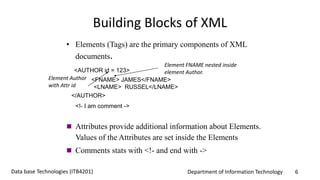
Building Blocks of XML
• Elements (Tags) are the primary components of XML
documents.
<AUTHOR id = 123>
<FNAME> JAMES</FNAME>
<LNAME> RUSSEL</LNAME>
</AUTHOR>
<!- I am comment ->
Element FNAME nested inside
element Author.
 Attributes provide additional information about Elements.
Values of the Attributes are set inside the Elements
Element Author
with Attr id
 Comments stats with <!- and end with ->
Department of Information Technology 7Data base Technologies (ITB4201)
XML DTD (Document Type Definition)
 A DTD is a set of rules that allow us to specify our own set of
elements and attributes.
 DTD is grammar to indicate what tags are legal in XML
documents.
 XML Document is valid if it has an attached DTD and
document is structured according to rules defined in DTD.
Department of Information Technology 8Data base Technologies (ITB4201)
DTD Example
<BOOKLIST>
<BOOK GENRE = “Science”
FORMAT = “Hardcover”>
<AUTHOR>
<FIRSTNAME> RICHRD
</FIRSTNAME>
<LASTNAME> KARTER
</LASTNAME>
</AUTHOR>
</BOOK>
</BOOKS>
<!DOCTYPE BOOKLIST[
<!ELEMENT BOOKLIST(BOOK)*>
<!ELEMENT BOOK(AUTHOR)>
<!ELEMENT
AUTHOR(FIRSTNAME,LASTNAM
E)>
<!ELEMENT
FIRSTNAME(#PCDATA)>
<!ELEMENT>LASTNAME(#PCDATA)
>
<!ATTLIST BOOK GENRE
(Science|Fiction)#REQUIRED>
<!ATTLIST BOOK FORMAT
(Paperback|Hardcover)
“PaperBack”>]>
Xml Document And
Corresponding DTD
Department of Information Technology 9Data base Technologies (ITB4201)
XML Schema
 Serves same purpose as database schema
 Schemas are written in XML
 Set of pre-defined simple types (such as string, integer)
 Allows creation of user-defined complex types
Department of Information Technology 10Data base Technologies (ITB4201)
XML Schema
• RDBMS Schema (s_id integer, s_name string, s_status string)
<Students>
<Student id=“p1”>
<Name>Allan</Name>
<Age>62</Age>
<Email>allan@abc.com
</Email>
</Student>
</Students>
 XMLSchema
<xs:schema>
<xs:complexType name = “StudnetType”>
<xs:attribute name=“id” type=“xs:string” />
<xs:element name=“Name” type=“xs:string />
<xs:element name=“Age” type=“xs:integer” />
<xs:element name=“Email” type=“xs:string” />
</xs:complexType>
<xs:element name=“Student”
type=“StudentType” />
</xs:schema>XML Document and Schema
Department of Information Technology 11Data base Technologies (ITB4201)
XML Query Languages
• Requirement
Same functionality as database query languages (such as SQL)
to process Web data
• Advantages
• Query selective portions of the document (no need to
transport entire document)
• Smaller data size mean lesser communication cost
Department of Information Technology 12Data base Technologies (ITB4201)
XQuery
• XQuery to XML is same as SQL to RDBMS
• Most databases supports XQuery
• XQuery is built on XPath operators
(XPath is a language that defines path expressions to locate
document data)
Department of Information Technology 13Data base Technologies (ITB4201)
XPath Example
<Student id=“s1”>
<Name>John</Name>
<Age>22</Age>
<Email>jhn@xyz.com</Email>
</Student>
XPath: /Student[Name=“John”]/Email
Extracts: <Email> element with value “jhn@xyz.com”
Department of Information Technology 14Data base Technologies (ITB4201)
Oracle and XML
• XML Support in Oracle
XDK (XML Developer Kit)
XML Parser for PL/SQL
XPath
XSLT
Department of Information Technology 15Data base Technologies (ITB4201)
Oracle and XML
• XML documents are stored as XML Type ( data type for
XML ) in Oracle
 Internally CLOB is used to store XML
 To store XML in database create table with one
XMLType column
 Each row will contain one of XML records from XML
document
 Database Table: XML Document
 Database Row : XML Record
Department of Information Technology 16Data base Technologies (ITB4201)
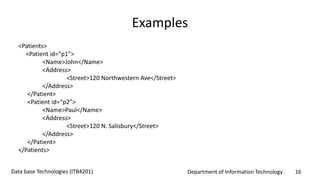
Examples
<Patients>
<Patient id=“p1”>
<Name>John</Name>
<Address>
<Street>120 Northwestern Ave</Street>
</Address>
</Patient>
<Patient id=“p2”>
<Name>Paul</Name>
<Address>
<Street>120 N. Salisbury</Street>
</Address>
</Patient>
</Patients>
Department of Information Technology 17Data base Technologies (ITB4201)
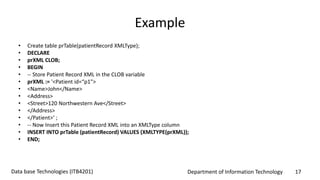
Example
• Create table prTable(patientRecord XMLType);
• DECLARE
• prXML CLOB;
• BEGIN
• -- Store Patient Record XML in the CLOB variable
• prXML := '<Patient id=“p1">
• <Name>John</Name>
• <Address>
• <Street>120 Northwestern Ave</Street>
• </Address>
• </Patient>‘ ;
• -- Now Insert this Patient Record XML into an XMLType column
• INSERT INTO prTable (patientRecord) VALUES (XMLTYPE(prXML));
• END;
Department of Information Technology 18Data base Technologies (ITB4201)
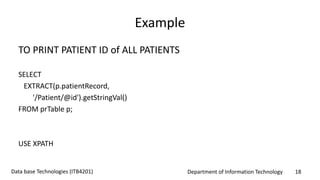
Example
TO PRINT PATIENT ID of ALL PATIENTS
SELECT
EXTRACT(p.patientRecord,
'/Patient/@id').getStringVal()
FROM prTable p;
USE XPATH
Department of Information Technology 19Data base Technologies (ITB4201)
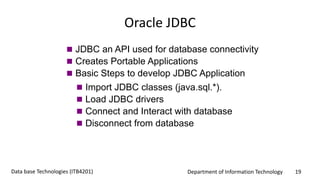
Oracle JDBC
 JDBC an API used for database connectivity
 Creates Portable Applications
 Basic Steps to develop JDBC Application
 Import JDBC classes (java.sql.*).
 Load JDBC drivers
 Connect and Interact with database
 Disconnect from database
Department of Information Technology 20Data base Technologies (ITB4201)
Oracle JDBC
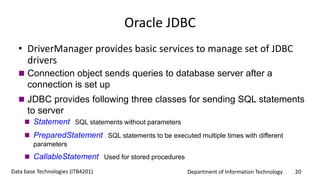
• DriverManager provides basic services to manage set of JDBC
drivers
 Connection object sends queries to database server after a
connection is set up
 JDBC provides following three classes for sending SQL statements
to server
 Statement SQL statements without parameters
 PreparedStatement SQL statements to be executed multiple times with different
parameters
 CallableStatement Used for stored procedures
Department of Information Technology 21Data base Technologies (ITB4201)
Oracle JDBC
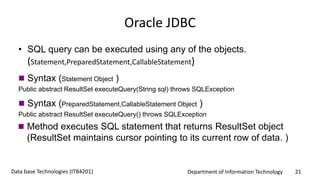
• SQL query can be executed using any of the objects.
(Statement,PreparedStatement,CallableStatement)
 Syntax (Statement Object )
Public abstract ResultSet executeQuery(String sql) throws SQLException
 Syntax (PreparedStatement,CallableStatement Object )
Public abstract ResultSet executeQuery() throws SQLException
 Method executes SQL statement that returns ResultSet object
(ResultSet maintains cursor pointing to its current row of data. )
Department of Information Technology 22Data base Technologies (ITB4201)
XML Simplifies Things
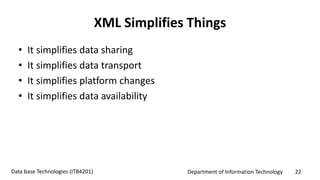
• It simplifies data sharing
• It simplifies data transport
• It simplifies platform changes
• It simplifies data availability
Department of Information Technology 23Data base Technologies (ITB4201)
Summary
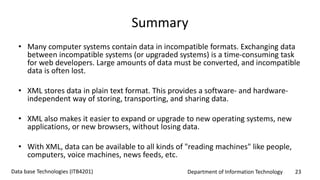
• Many computer systems contain data in incompatible formats. Exchanging data
between incompatible systems (or upgraded systems) is a time-consuming task
for web developers. Large amounts of data must be converted, and incompatible
data is often lost.
• XML stores data in plain text format. This provides a software- and hardware-
independent way of storing, transporting, and sharing data.
• XML also makes it easier to expand or upgrade to new operating systems, new
applications, or new browsers, without losing data.
• With XML, data can be available to all kinds of "reading machines" like people,
computers, voice machines, news feeds, etc.
Department of Information Technology 24Data base Technologies (ITB4201)
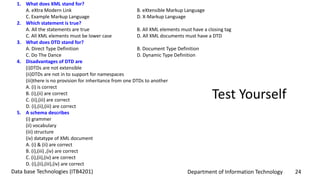
Test Yourself
1. What does XML stand for?
A. eXtra Modern Link B. eXtensible Markup Language
C. Example Markup Language D. X-Markup Language
2. Which statement is true?
A. All the statements are true B. All XML elements must have a closing tag
C. All XML elements must be lower case D. All XML documents must have a DTD
3. What does DTD stand for?
A. Direct Type Definition B. Document Type Definition
C. Do The Dance D. Dynamic Type Definition
4. Disadvantages of DTD are
(i)DTDs are not extensible
(ii)DTDs are not in to support for namespaces
(iii)there is no provision for inheritance from one DTDs to another
A. (i) is correct
B. (i),(ii) are correct
C. (ii),(iii) are correct
D. (i),(ii),(iii) are correct
5. A schema describes
(i) grammer
(ii) vocabulary
(iii) structure
(iv) datatype of XML document
A. (i) & (ii) are correct
B. (i),(iii) ,(iv) are correct
C. (i),(ii),(iv) are correct
D. (i),(ii),(iii),(iv) are correct
Department of Information Technology 25Data base Technologies (ITB4201)
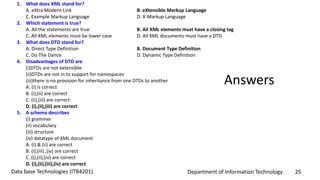
Answers
1. What does XML stand for?
A. eXtra Modern Link B. eXtensible Markup Language
C. Example Markup Language D. X-Markup Language
2. Which statement is true?
A. All the statements are true B. All XML elements must have a closing tag
C. All XML elements must be lower case D. All XML documents must have a DTD
3. What does DTD stand for?
A. Direct Type Definition B. Document Type Definition
C. Do The Dance D. Dynamic Type Definition
4. Disadvantages of DTD are
(i)DTDs are not extensible
(ii)DTDs are not in to support for namespaces
(iii)there is no provision for inheritance from one DTDs to another
A. (i) is correct
B. (i),(ii) are correct
C. (ii),(iii) are correct
D. (i),(ii),(iii) are correct
5. A schema describes
(i) grammer
(ii) vocabulary
(iii) structure
(iv) datatype of XML document
A. (i) & (ii) are correct
B. (i),(iii) ,(iv) are correct
C. (i),(ii),(iv) are correct
D. (i),(ii),(iii),(iv) are correct

Introduction to XML

  • 1.
    Department of InformationTechnology 1Data base Technologies (ITB4201) Introduction to XML Dr. C.V. Suresh Babu Professor Department of IT Hindustan Institute of Science & Technology
  • 2.
    Department of InformationTechnology 2Data base Technologies (ITB4201) Action Plan  What is XML?  Syntax of XML Document  DTD (Document Type Definition)  XML Query Language  XML Databases  XML Schema  Oracle JDBC  Quiz
  • 3.
    Department of InformationTechnology 3Data base Technologies (ITB4201) Introduction to XML  XML stands for EXtensible Markup Language  XML was designed to describe data.  XML tags are not predefined unlike HTML  XML DTD and XML Schema define rules to describe data  XML example of semi structured data
  • 4.
    Department of InformationTechnology 4Data base Technologies (ITB4201) The Difference Between XML and HTML XML and HTML were designed with different goals: • XML was designed to carry data - with focus on what data is • HTML was designed to display data - with focus on how data looks • XML tags are not predefined like HTML tags are 4
  • 5.
    Department of InformationTechnology 5Data base Technologies (ITB4201) XML Does Not Use Predefined Tags • The XML language has no predefined tags. • The tags in the example above (like <to> and <from>) are not defined in any XML standard. These tags are "invented" by the author of the XML document. • HTML works with predefined tags like <p>, <h1>, <table>, etc. • With XML, the author must define both the tags and the document structure. 5
  • 6.
    Department of InformationTechnology 6Data base Technologies (ITB4201) Building Blocks of XML • Elements (Tags) are the primary components of XML documents. <AUTHOR id = 123> <FNAME> JAMES</FNAME> <LNAME> RUSSEL</LNAME> </AUTHOR> <!- I am comment -> Element FNAME nested inside element Author.  Attributes provide additional information about Elements. Values of the Attributes are set inside the Elements Element Author with Attr id  Comments stats with <!- and end with ->
  • 7.
    Department of InformationTechnology 7Data base Technologies (ITB4201) XML DTD (Document Type Definition)  A DTD is a set of rules that allow us to specify our own set of elements and attributes.  DTD is grammar to indicate what tags are legal in XML documents.  XML Document is valid if it has an attached DTD and document is structured according to rules defined in DTD.
  • 8.
    Department of InformationTechnology 8Data base Technologies (ITB4201) DTD Example <BOOKLIST> <BOOK GENRE = “Science” FORMAT = “Hardcover”> <AUTHOR> <FIRSTNAME> RICHRD </FIRSTNAME> <LASTNAME> KARTER </LASTNAME> </AUTHOR> </BOOK> </BOOKS> <!DOCTYPE BOOKLIST[ <!ELEMENT BOOKLIST(BOOK)*> <!ELEMENT BOOK(AUTHOR)> <!ELEMENT AUTHOR(FIRSTNAME,LASTNAM E)> <!ELEMENT FIRSTNAME(#PCDATA)> <!ELEMENT>LASTNAME(#PCDATA) > <!ATTLIST BOOK GENRE (Science|Fiction)#REQUIRED> <!ATTLIST BOOK FORMAT (Paperback|Hardcover) “PaperBack”>]> Xml Document And Corresponding DTD
  • 9.
    Department of InformationTechnology 9Data base Technologies (ITB4201) XML Schema  Serves same purpose as database schema  Schemas are written in XML  Set of pre-defined simple types (such as string, integer)  Allows creation of user-defined complex types
  • 10.
    Department of InformationTechnology 10Data base Technologies (ITB4201) XML Schema • RDBMS Schema (s_id integer, s_name string, s_status string) <Students> <Student id=“p1”> <Name>Allan</Name> <Age>62</Age> <Email>allan@abc.com </Email> </Student> </Students>  XMLSchema <xs:schema> <xs:complexType name = “StudnetType”> <xs:attribute name=“id” type=“xs:string” /> <xs:element name=“Name” type=“xs:string /> <xs:element name=“Age” type=“xs:integer” /> <xs:element name=“Email” type=“xs:string” /> </xs:complexType> <xs:element name=“Student” type=“StudentType” /> </xs:schema>XML Document and Schema
  • 11.
    Department of InformationTechnology 11Data base Technologies (ITB4201) XML Query Languages • Requirement Same functionality as database query languages (such as SQL) to process Web data • Advantages • Query selective portions of the document (no need to transport entire document) • Smaller data size mean lesser communication cost
  • 12.
    Department of InformationTechnology 12Data base Technologies (ITB4201) XQuery • XQuery to XML is same as SQL to RDBMS • Most databases supports XQuery • XQuery is built on XPath operators (XPath is a language that defines path expressions to locate document data)
  • 13.
    Department of InformationTechnology 13Data base Technologies (ITB4201) XPath Example <Student id=“s1”> <Name>John</Name> <Age>22</Age> <Email>jhn@xyz.com</Email> </Student> XPath: /Student[Name=“John”]/Email Extracts: <Email> element with value “jhn@xyz.com”
  • 14.
    Department of InformationTechnology 14Data base Technologies (ITB4201) Oracle and XML • XML Support in Oracle XDK (XML Developer Kit) XML Parser for PL/SQL XPath XSLT
  • 15.
    Department of InformationTechnology 15Data base Technologies (ITB4201) Oracle and XML • XML documents are stored as XML Type ( data type for XML ) in Oracle  Internally CLOB is used to store XML  To store XML in database create table with one XMLType column  Each row will contain one of XML records from XML document  Database Table: XML Document  Database Row : XML Record
  • 16.
    Department of InformationTechnology 16Data base Technologies (ITB4201) Examples <Patients> <Patient id=“p1”> <Name>John</Name> <Address> <Street>120 Northwestern Ave</Street> </Address> </Patient> <Patient id=“p2”> <Name>Paul</Name> <Address> <Street>120 N. Salisbury</Street> </Address> </Patient> </Patients>
  • 17.
    Department of InformationTechnology 17Data base Technologies (ITB4201) Example • Create table prTable(patientRecord XMLType); • DECLARE • prXML CLOB; • BEGIN • -- Store Patient Record XML in the CLOB variable • prXML := '<Patient id=“p1"> • <Name>John</Name> • <Address> • <Street>120 Northwestern Ave</Street> • </Address> • </Patient>‘ ; • -- Now Insert this Patient Record XML into an XMLType column • INSERT INTO prTable (patientRecord) VALUES (XMLTYPE(prXML)); • END;
  • 18.
    Department of InformationTechnology 18Data base Technologies (ITB4201) Example TO PRINT PATIENT ID of ALL PATIENTS SELECT EXTRACT(p.patientRecord, '/Patient/@id').getStringVal() FROM prTable p; USE XPATH
  • 19.
    Department of InformationTechnology 19Data base Technologies (ITB4201) Oracle JDBC  JDBC an API used for database connectivity  Creates Portable Applications  Basic Steps to develop JDBC Application  Import JDBC classes (java.sql.*).  Load JDBC drivers  Connect and Interact with database  Disconnect from database
  • 20.
    Department of InformationTechnology 20Data base Technologies (ITB4201) Oracle JDBC • DriverManager provides basic services to manage set of JDBC drivers  Connection object sends queries to database server after a connection is set up  JDBC provides following three classes for sending SQL statements to server  Statement SQL statements without parameters  PreparedStatement SQL statements to be executed multiple times with different parameters  CallableStatement Used for stored procedures
  • 21.
    Department of InformationTechnology 21Data base Technologies (ITB4201) Oracle JDBC • SQL query can be executed using any of the objects. (Statement,PreparedStatement,CallableStatement)  Syntax (Statement Object ) Public abstract ResultSet executeQuery(String sql) throws SQLException  Syntax (PreparedStatement,CallableStatement Object ) Public abstract ResultSet executeQuery() throws SQLException  Method executes SQL statement that returns ResultSet object (ResultSet maintains cursor pointing to its current row of data. )
  • 22.
    Department of InformationTechnology 22Data base Technologies (ITB4201) XML Simplifies Things • It simplifies data sharing • It simplifies data transport • It simplifies platform changes • It simplifies data availability
  • 23.
    Department of InformationTechnology 23Data base Technologies (ITB4201) Summary • Many computer systems contain data in incompatible formats. Exchanging data between incompatible systems (or upgraded systems) is a time-consuming task for web developers. Large amounts of data must be converted, and incompatible data is often lost. • XML stores data in plain text format. This provides a software- and hardware- independent way of storing, transporting, and sharing data. • XML also makes it easier to expand or upgrade to new operating systems, new applications, or new browsers, without losing data. • With XML, data can be available to all kinds of "reading machines" like people, computers, voice machines, news feeds, etc.
  • 24.
    Department of InformationTechnology 24Data base Technologies (ITB4201) Test Yourself 1. What does XML stand for? A. eXtra Modern Link B. eXtensible Markup Language C. Example Markup Language D. X-Markup Language 2. Which statement is true? A. All the statements are true B. All XML elements must have a closing tag C. All XML elements must be lower case D. All XML documents must have a DTD 3. What does DTD stand for? A. Direct Type Definition B. Document Type Definition C. Do The Dance D. Dynamic Type Definition 4. Disadvantages of DTD are (i)DTDs are not extensible (ii)DTDs are not in to support for namespaces (iii)there is no provision for inheritance from one DTDs to another A. (i) is correct B. (i),(ii) are correct C. (ii),(iii) are correct D. (i),(ii),(iii) are correct 5. A schema describes (i) grammer (ii) vocabulary (iii) structure (iv) datatype of XML document A. (i) & (ii) are correct B. (i),(iii) ,(iv) are correct C. (i),(ii),(iv) are correct D. (i),(ii),(iii),(iv) are correct
  • 25.
    Department of InformationTechnology 25Data base Technologies (ITB4201) Answers 1. What does XML stand for? A. eXtra Modern Link B. eXtensible Markup Language C. Example Markup Language D. X-Markup Language 2. Which statement is true? A. All the statements are true B. All XML elements must have a closing tag C. All XML elements must be lower case D. All XML documents must have a DTD 3. What does DTD stand for? A. Direct Type Definition B. Document Type Definition C. Do The Dance D. Dynamic Type Definition 4. Disadvantages of DTD are (i)DTDs are not extensible (ii)DTDs are not in to support for namespaces (iii)there is no provision for inheritance from one DTDs to another A. (i) is correct B. (i),(ii) are correct C. (ii),(iii) are correct D. (i),(ii),(iii) are correct 5. A schema describes (i) grammer (ii) vocabulary (iii) structure (iv) datatype of XML document A. (i) & (ii) are correct B. (i),(iii) ,(iv) are correct C. (i),(ii),(iv) are correct D. (i),(ii),(iii),(iv) are correct