WEB TECHNOLOGY
XML NAMESPACE
What is XML ?
What is Namespace ?
 A namespace is a set of unique names. Namespace is a mechanisms by which
element and attribute name can be assigned to a group. The namespace is identified
by uri(uniform resource identifiers).
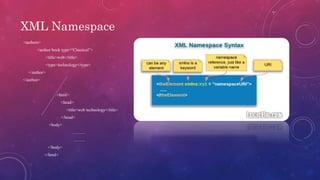
Syntax
 The Namespace starts with the keyword xmlns.
 The word name is the Namespace prefix.
 The URL is the Namespace identifier.
<element xmlns:name=“url”>
XML Namespace
<authors>
<author book type=“Classical”>
<title>web</title>
<type>technology</type>
</author>
</author>
<html>
<head>
<title>web technology</title>
</head>
<body>
………
……..
</body>
</html>
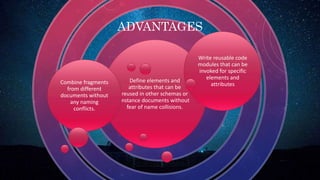
Define elements and
attributes that can be
reused in other schemas or
instance documents without
fear of name collisions.
Combine fragments
from different
documents without
any naming
conflicts.
Write reusable code
modules that can be
invoked for specific
elements and
attributes
ADVANTAGES
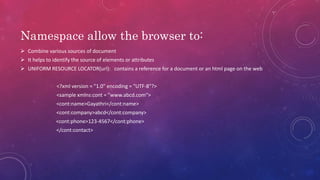
Namespace allow the browser to:
 Combine various sources of document
 It helps to identify the source of elements or attributes
 UNIFORM RESOURCE LOCATOR(url): contains a reference for a document or an html page on the web
<?xml version = "1.0" encoding = "UTF-8"?>
<sample xmlns:cont = "www.abcd.com">
<cont:name>Gayathri</cont:name>
<cont:company>abcd</cont:company>
<cont:phone>123-4567</cont:phone>
</cont:contact>
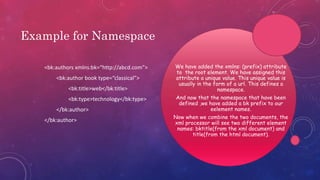
Example for Namespace
<bk:authors xmlns:bk=“http://abcd.com”>
<bk:author book type=“classical”>
<bk:title>web</bk:title>
<bk:type>technology</bk:type>
</bk:author>
</bk:author>
We have added the xmlns: (prefix) attribute
to the root element. We have assigned this
attribute a unique value. This unique value is
usually in the form of a url. This defines a
namespace.
And now that the namespace that have been
defined ,we have added a bk prefix to our
eelement names.
Now when we combine the two documents, the
xml processor will see two different element
names: bktitle(from the xml document) and
title(from the html document).
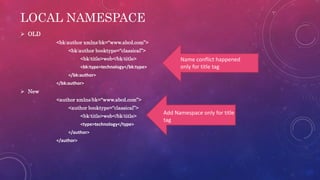
LOCAL NAMESPACE
 OLD
<bk:author xmlns:bk=“www.abcd.com”>
<bk:author booktype=“classical”>
<bk:title>web</bk:title>
<bk:type>technology</bk:type>
</bk:author>
</bk:author>
 New
<author xmlns:bk=“www.abcd.com”>
<author booktype=“classical”>
<bk:title>web</bk:title>
<type>technology</type>
</author>
</author>
Name conflict happened
only for title tag
Add Namespace only for title
tag
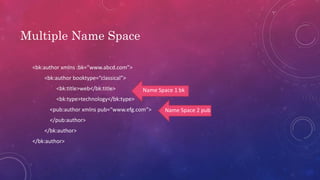
Multiple Name Space
<bk:author xmlns :bk=“www.abcd.com”>
<bk:author booktype=“classical”>
<bk:title>web</bk:title>
<bk:type>technology</bk:type>
<pub:author xmlns pub=“www.efg.com”>
</pub:author>
</bk:author>
</bk:author>
Name Space 1 bk
Name Space 2 pub
THANK YOU!
-S.GAYATHRI

Xml namespace

  • 1.
  • 2.
  • 3.
    What is Namespace?  A namespace is a set of unique names. Namespace is a mechanisms by which element and attribute name can be assigned to a group. The namespace is identified by uri(uniform resource identifiers).
  • 4.
    Syntax  The Namespacestarts with the keyword xmlns.  The word name is the Namespace prefix.  The URL is the Namespace identifier. <element xmlns:name=“url”>
  • 5.
    XML Namespace <authors> <author booktype=“Classical”> <title>web</title> <type>technology</type> </author> </author> <html> <head> <title>web technology</title> </head> <body> ……… …….. </body> </html>
  • 6.
    Define elements and attributesthat can be reused in other schemas or instance documents without fear of name collisions. Combine fragments from different documents without any naming conflicts. Write reusable code modules that can be invoked for specific elements and attributes ADVANTAGES
  • 7.
    Namespace allow thebrowser to:  Combine various sources of document  It helps to identify the source of elements or attributes  UNIFORM RESOURCE LOCATOR(url): contains a reference for a document or an html page on the web <?xml version = "1.0" encoding = "UTF-8"?> <sample xmlns:cont = "www.abcd.com"> <cont:name>Gayathri</cont:name> <cont:company>abcd</cont:company> <cont:phone>123-4567</cont:phone> </cont:contact>
  • 8.
    Example for Namespace <bk:authorsxmlns:bk=“http://abcd.com”> <bk:author book type=“classical”> <bk:title>web</bk:title> <bk:type>technology</bk:type> </bk:author> </bk:author> We have added the xmlns: (prefix) attribute to the root element. We have assigned this attribute a unique value. This unique value is usually in the form of a url. This defines a namespace. And now that the namespace that have been defined ,we have added a bk prefix to our eelement names. Now when we combine the two documents, the xml processor will see two different element names: bktitle(from the xml document) and title(from the html document).
  • 9.
    LOCAL NAMESPACE  OLD <bk:authorxmlns:bk=“www.abcd.com”> <bk:author booktype=“classical”> <bk:title>web</bk:title> <bk:type>technology</bk:type> </bk:author> </bk:author>  New <author xmlns:bk=“www.abcd.com”> <author booktype=“classical”> <bk:title>web</bk:title> <type>technology</type> </author> </author> Name conflict happened only for title tag Add Namespace only for title tag
  • 10.
    Multiple Name Space <bk:authorxmlns :bk=“www.abcd.com”> <bk:author booktype=“classical”> <bk:title>web</bk:title> <bk:type>technology</bk:type> <pub:author xmlns pub=“www.efg.com”> </pub:author> </bk:author> </bk:author> Name Space 1 bk Name Space 2 pub
  • 11.