1
Internet Control Message Protocol
(ICMP)
K. PALANIVEL
Systems Analyst, Computer Centre
Pondicherry University, Puducherry – 605014.
LECTURE 5
COMS 525: TCPIP
COURSE
TOPIC
Overview
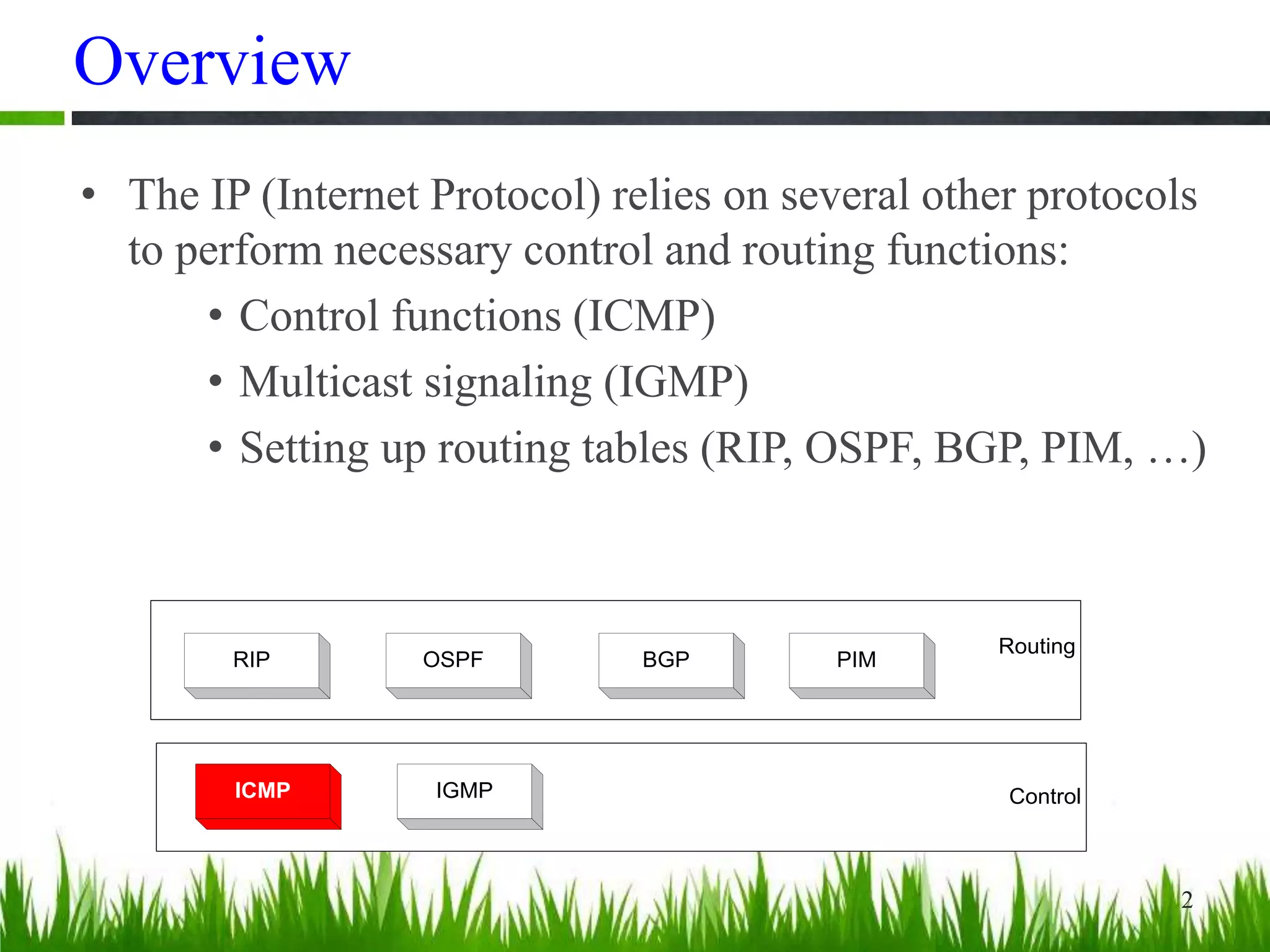
• The IP (Internet Protocol) relies on several other protocols
to perform necessary control and routing functions:
• Control functions (ICMP)
• Multicast signaling (IGMP)
• Setting up routing tables (RIP, OSPF, BGP, PIM, …)
2
Control
Routing
ICMP IGMP
RIP OSPF BGP PIM
Overview
• The Internet Control Message Protocol (ICMP)
is a helper protocol that supports IP with facility
for
– Error reporting
– Simple queries
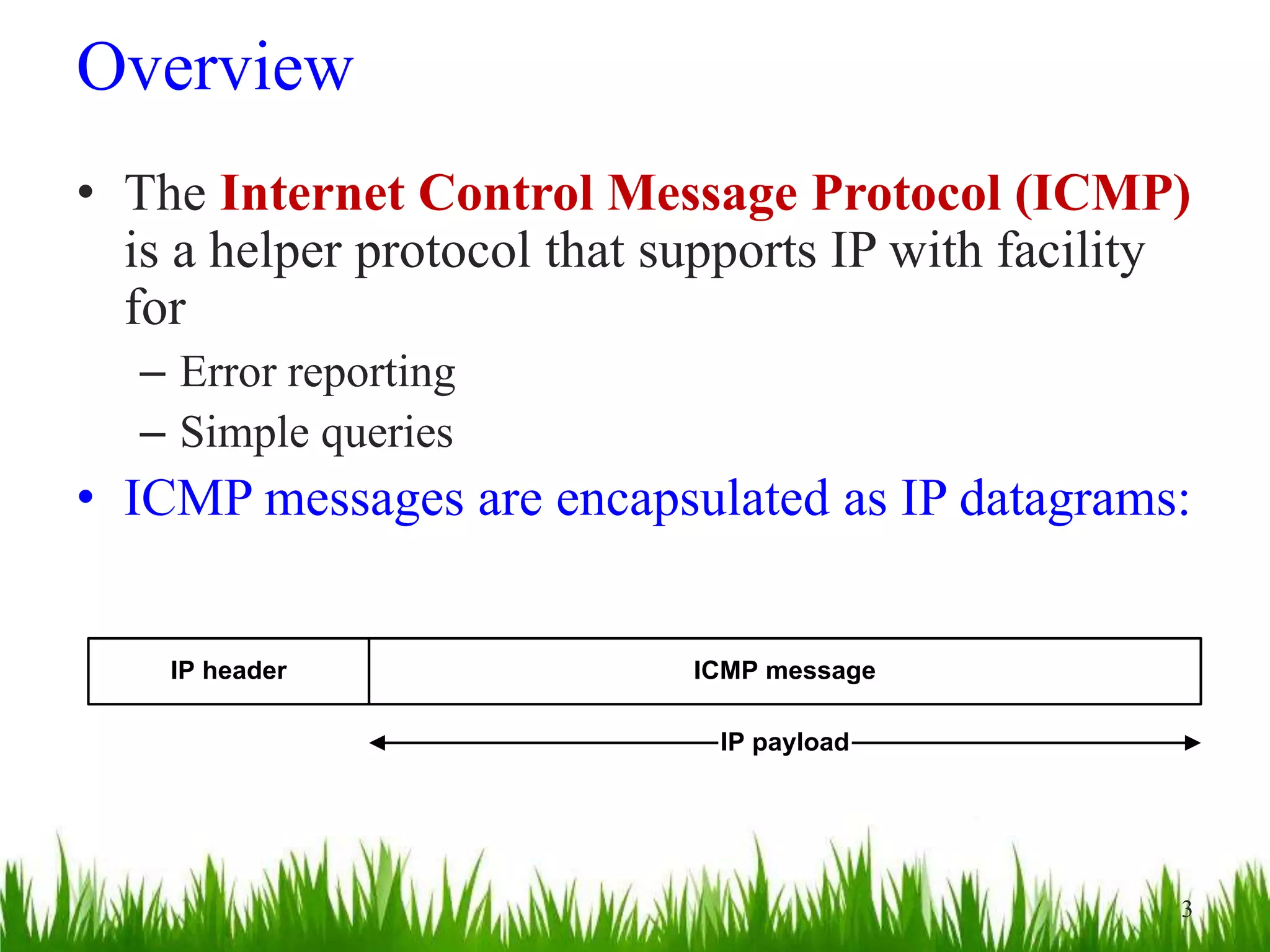
• ICMP messages are encapsulated as IP datagrams:
IP header ICMP message
IP payload
3
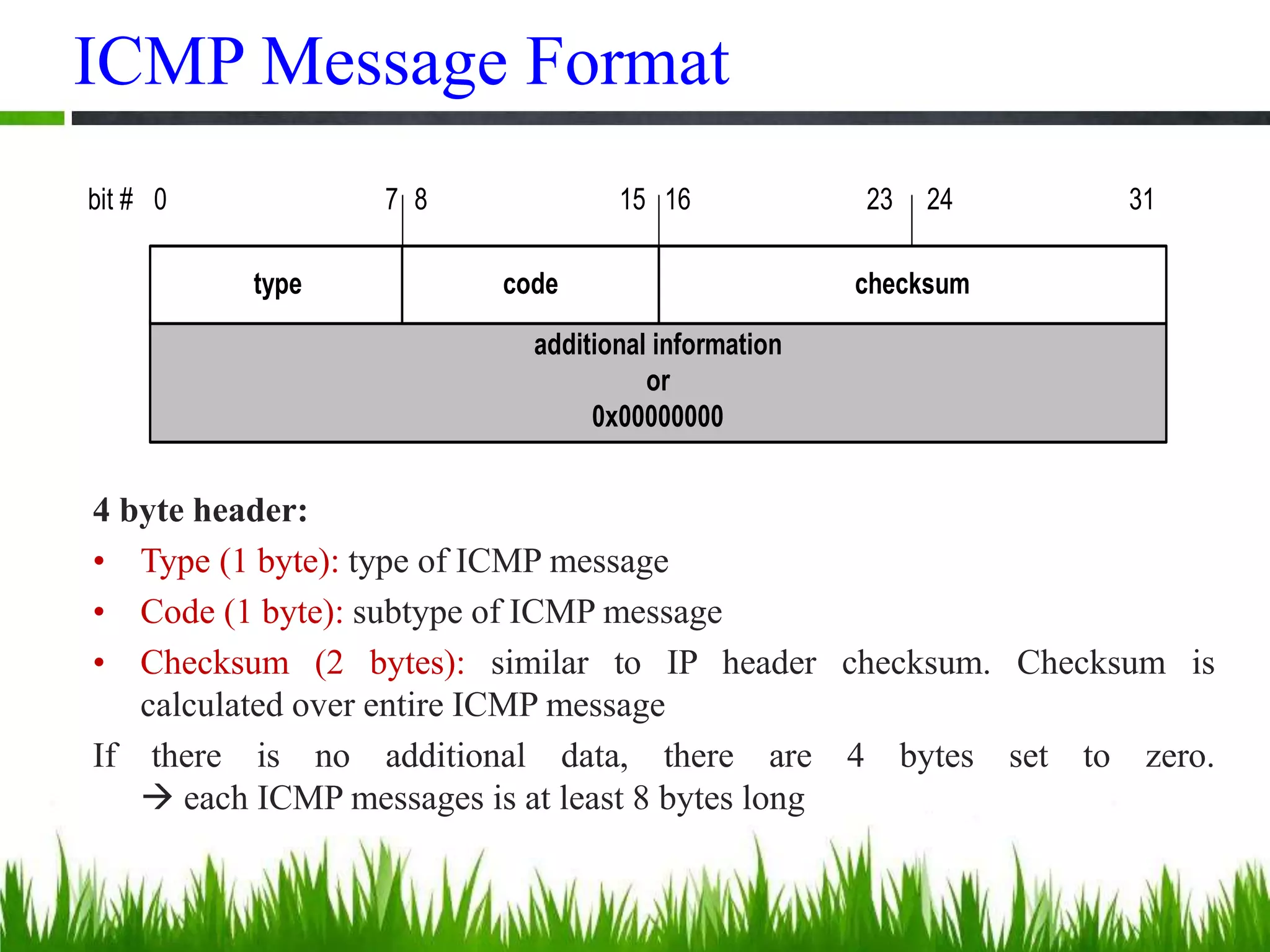
ICMP Message Format
additional information
or
0x00000000
type code checksum
bit # 0 15 23 248 317 16
4 byte header:
• Type (1 byte): type of ICMP message
• Code (1 byte): subtype of ICMP message
• Checksum (2 bytes): similar to IP header checksum. Checksum is
calculated over entire ICMP message
If there is no additional data, there are 4 bytes set to zero.
 each ICMP messages is at least 8 bytes long
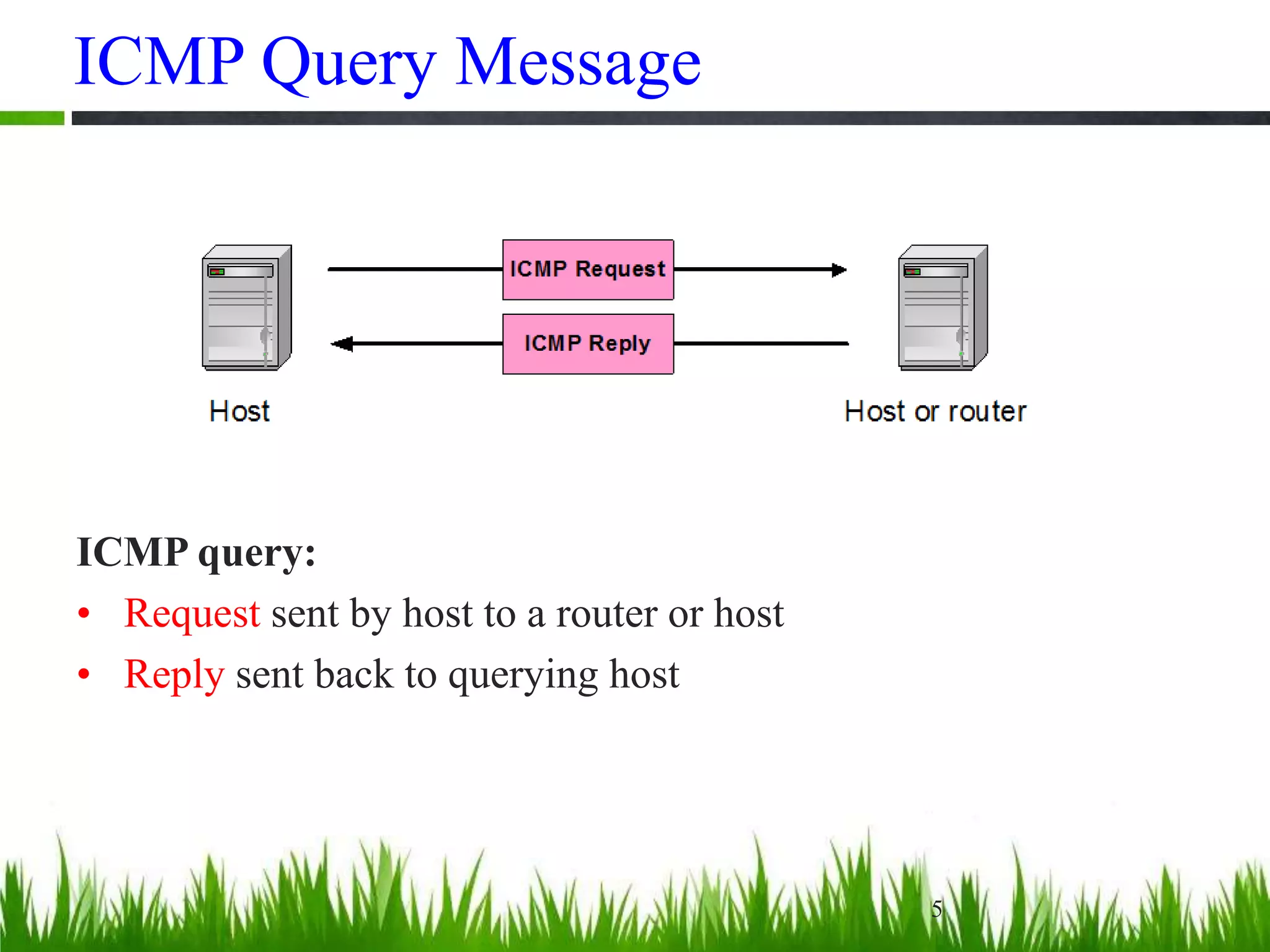
ICMP Query Message
5
ICMP query:
• Request sent by host to a router or host
• Reply sent back to querying host
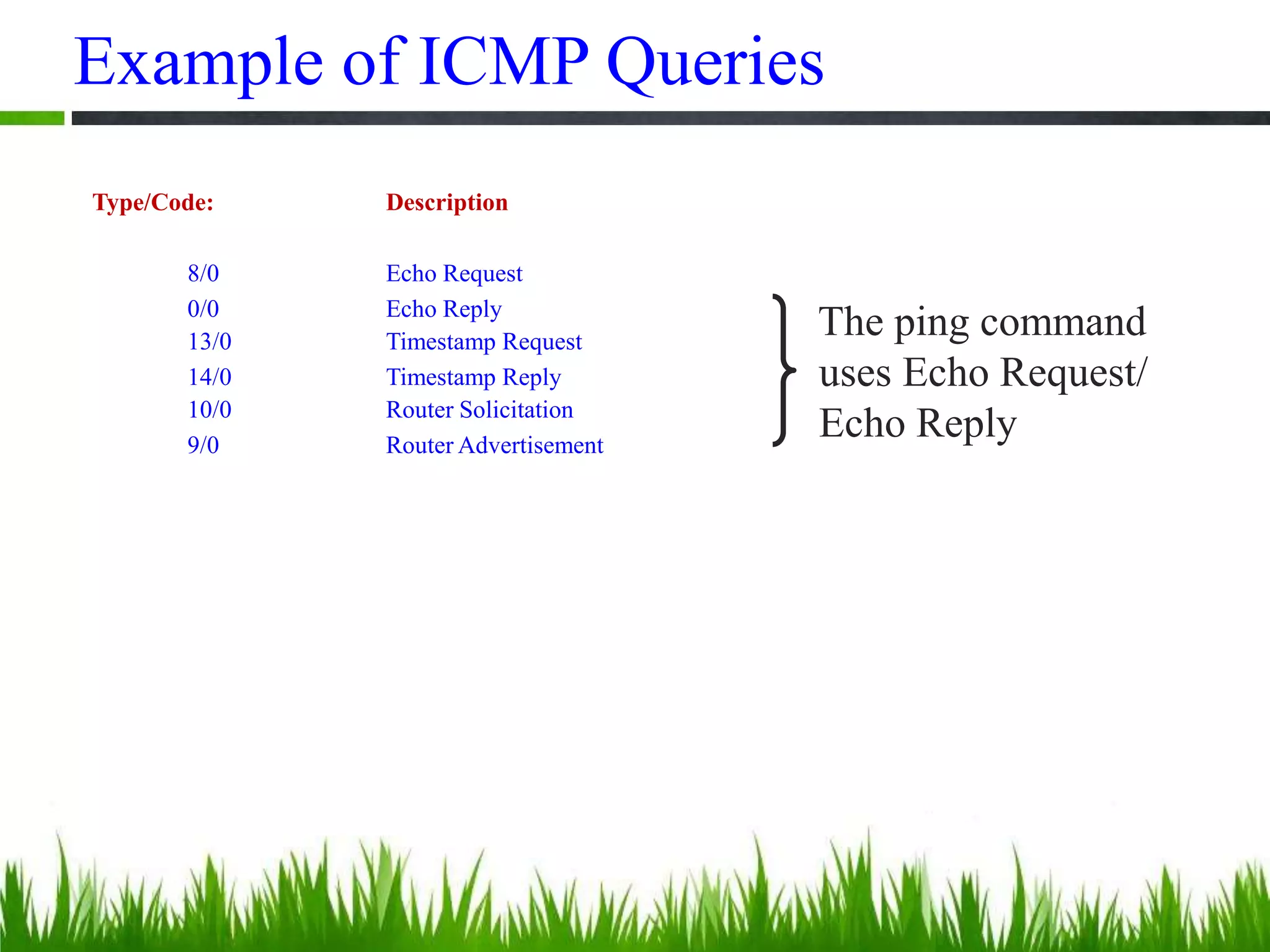
Example of ICMP Queries
Type/Code: Description
8/0 Echo Request
0/0 Echo Reply
13/0 Timestamp Request
14/0 Timestamp Reply
10/0 Router Solicitation
9/0 Router Advertisement
The ping command
uses Echo Request/
Echo Reply
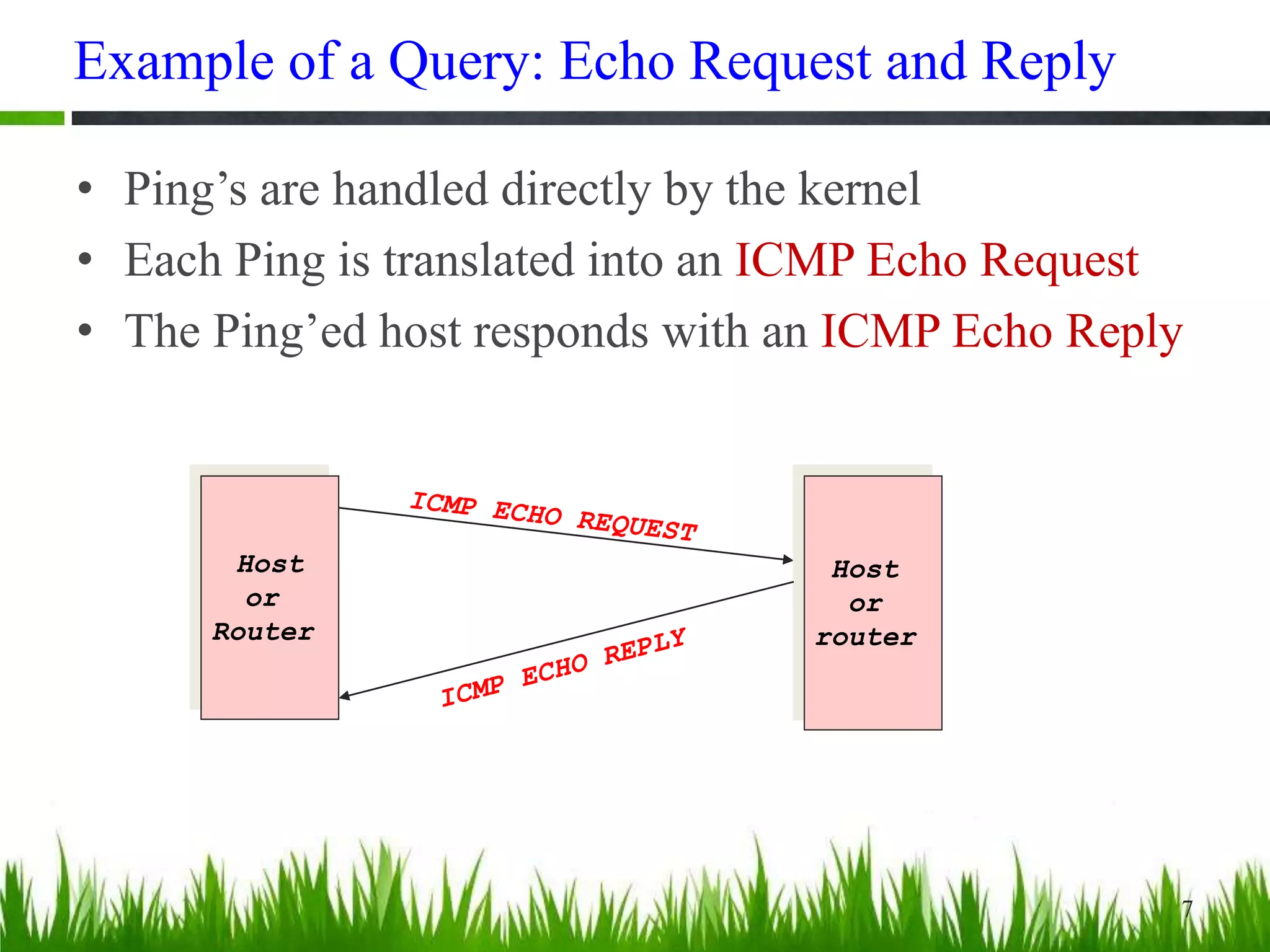
Example of a Query: Echo Request and Reply
• Ping’s are handled directly by the kernel
• Each Ping is translated into an ICMP Echo Request
• The Ping’ed host responds with an ICMP Echo Reply
7
Host
or
Router
Host
or
router
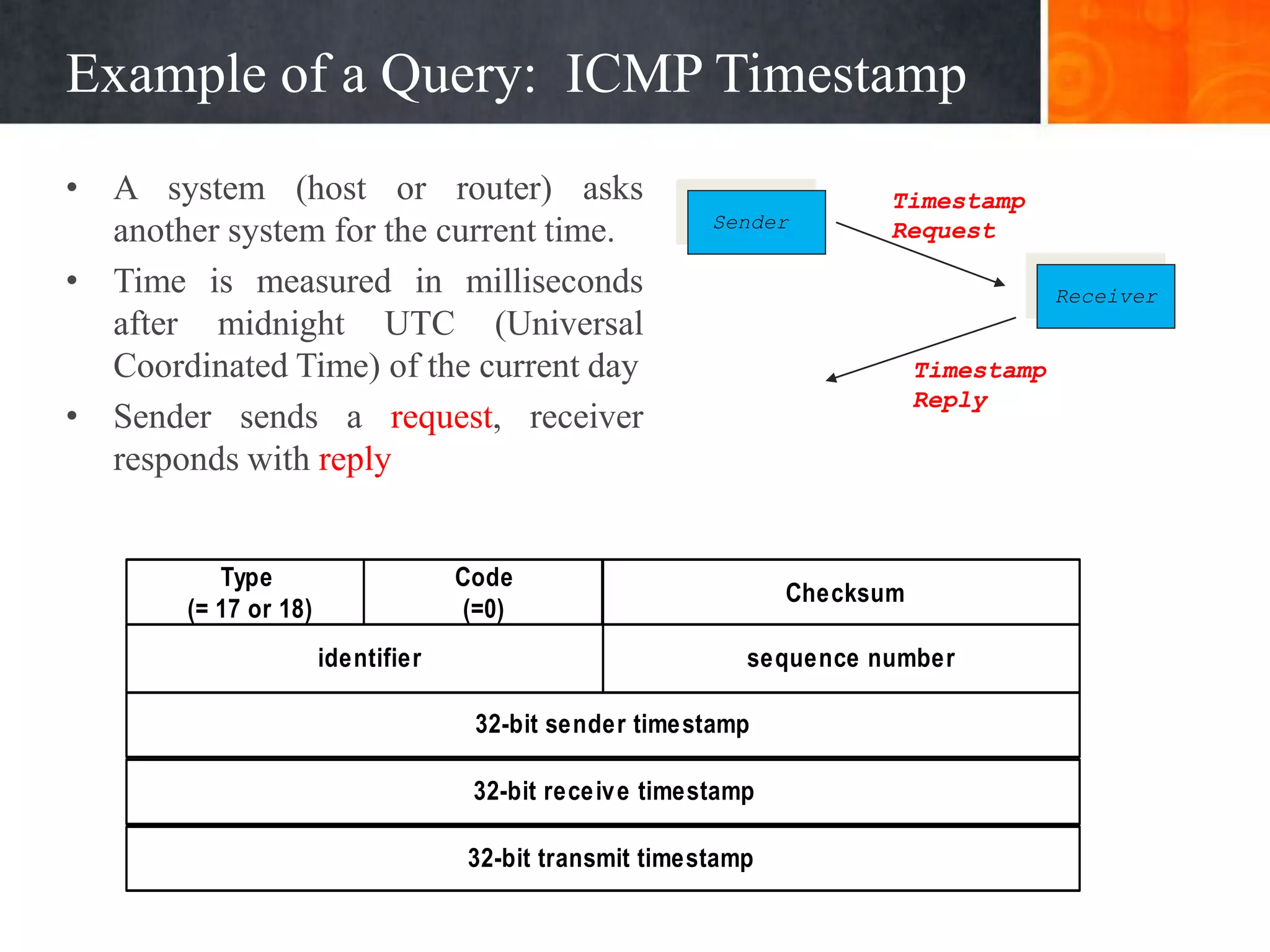
Example of a Query: ICMP Timestamp
• A system (host or router) asks
another system for the current time.
• Time is measured in milliseconds
after midnight UTC (Universal
Coordinated Time) of the current day
• Sender sends a request, receiver
responds with reply
Type
(= 17 or 18)
Code
(=0)
Checksum
32-bit sender timestamp
identifier sequence number
32-bit receive timestamp
32-bit transmit timestamp
Sender
Receiver
Timestamp
Request
Timestamp
Reply
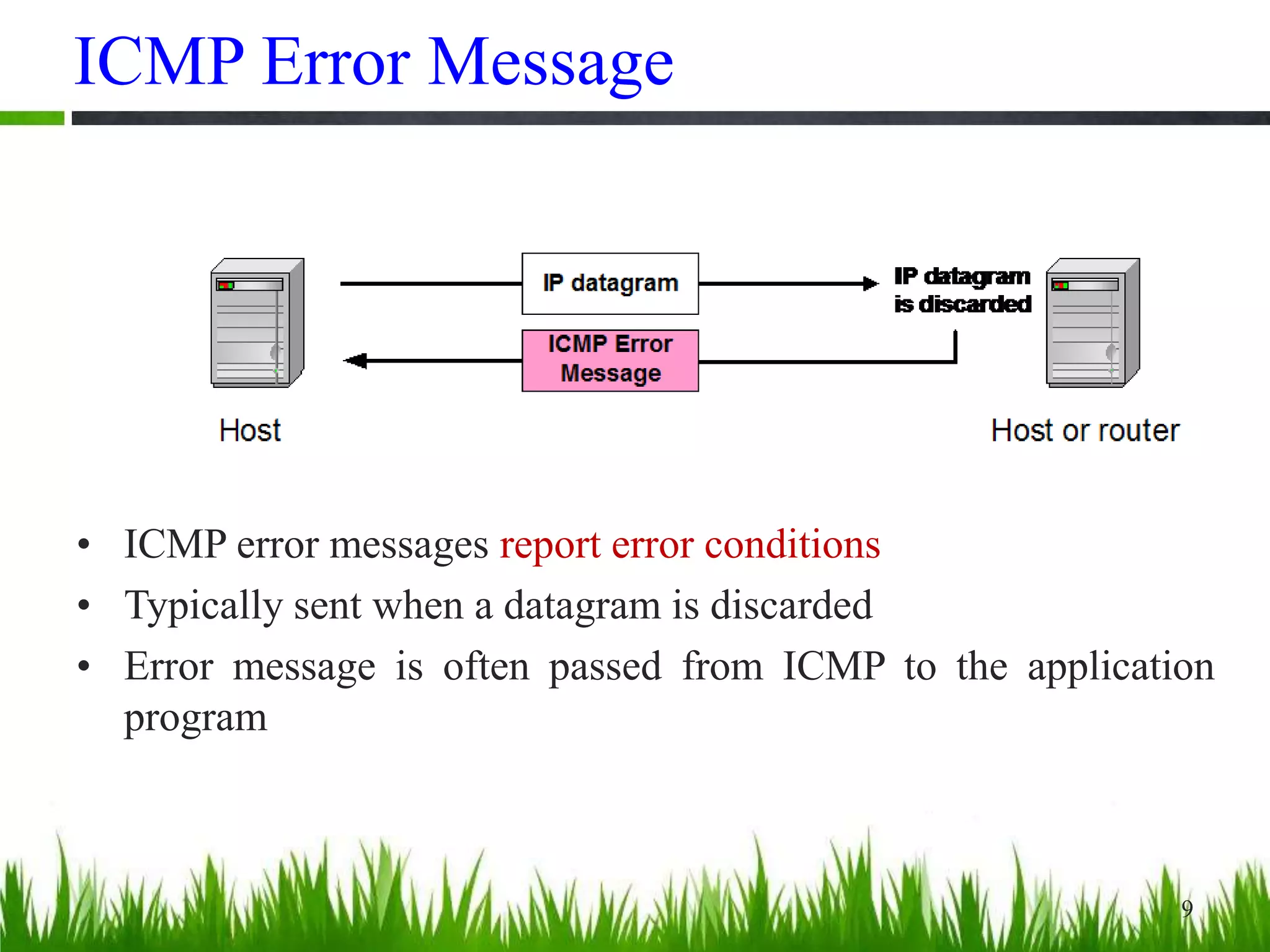
ICMP Error Message
9
• ICMP error messages report error conditions
• Typically sent when a datagram is discarded
• Error message is often passed from ICMP to the application
program
ICMP Error Message
10
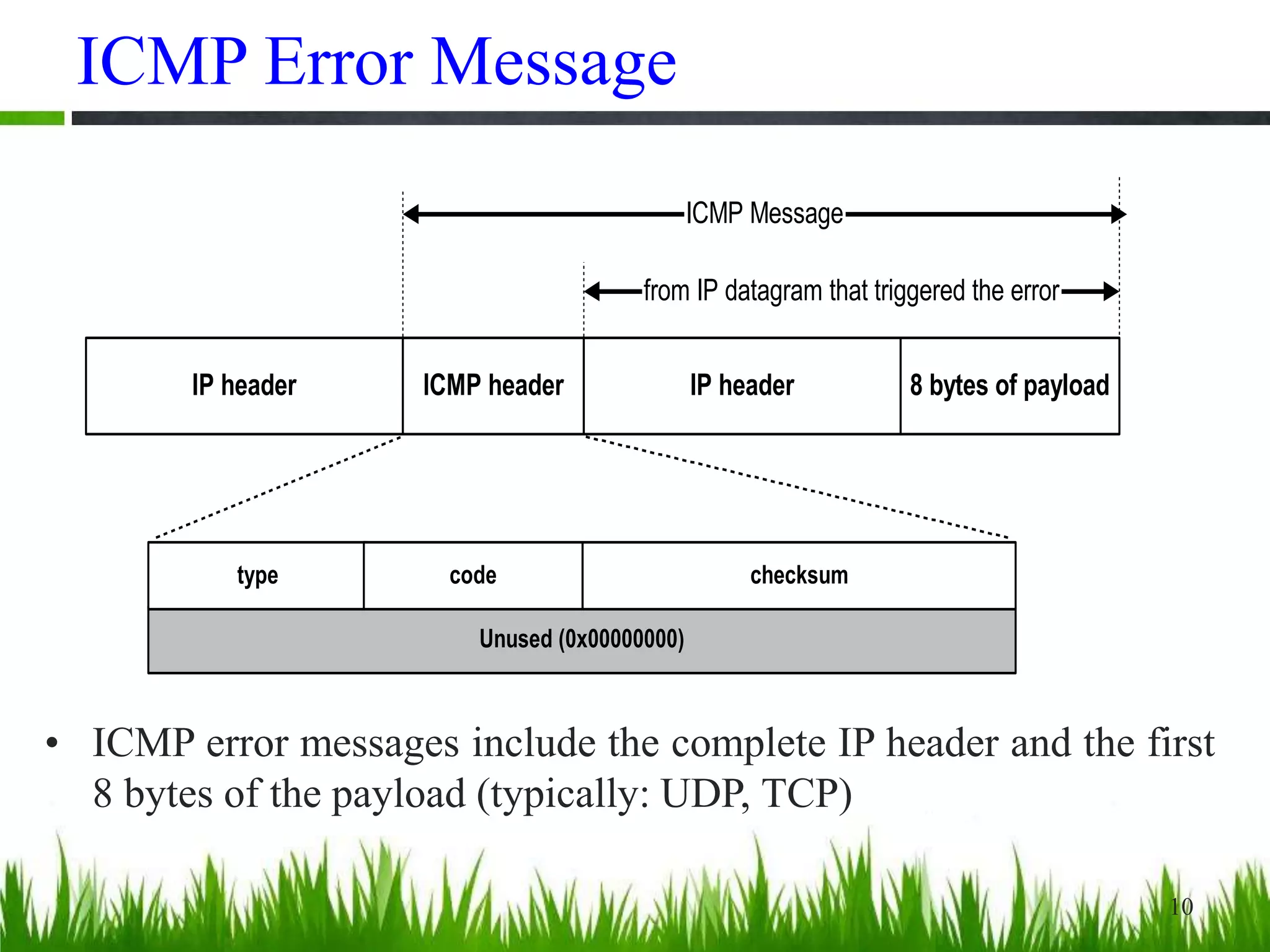
• ICMP error messages include the complete IP header and the first
8 bytes of the payload (typically: UDP, TCP)
Unused (0x00000000)
IP header ICMP header IP header 8 bytes of payload
ICMP Message
from IP datagram that triggered the error
type code checksum
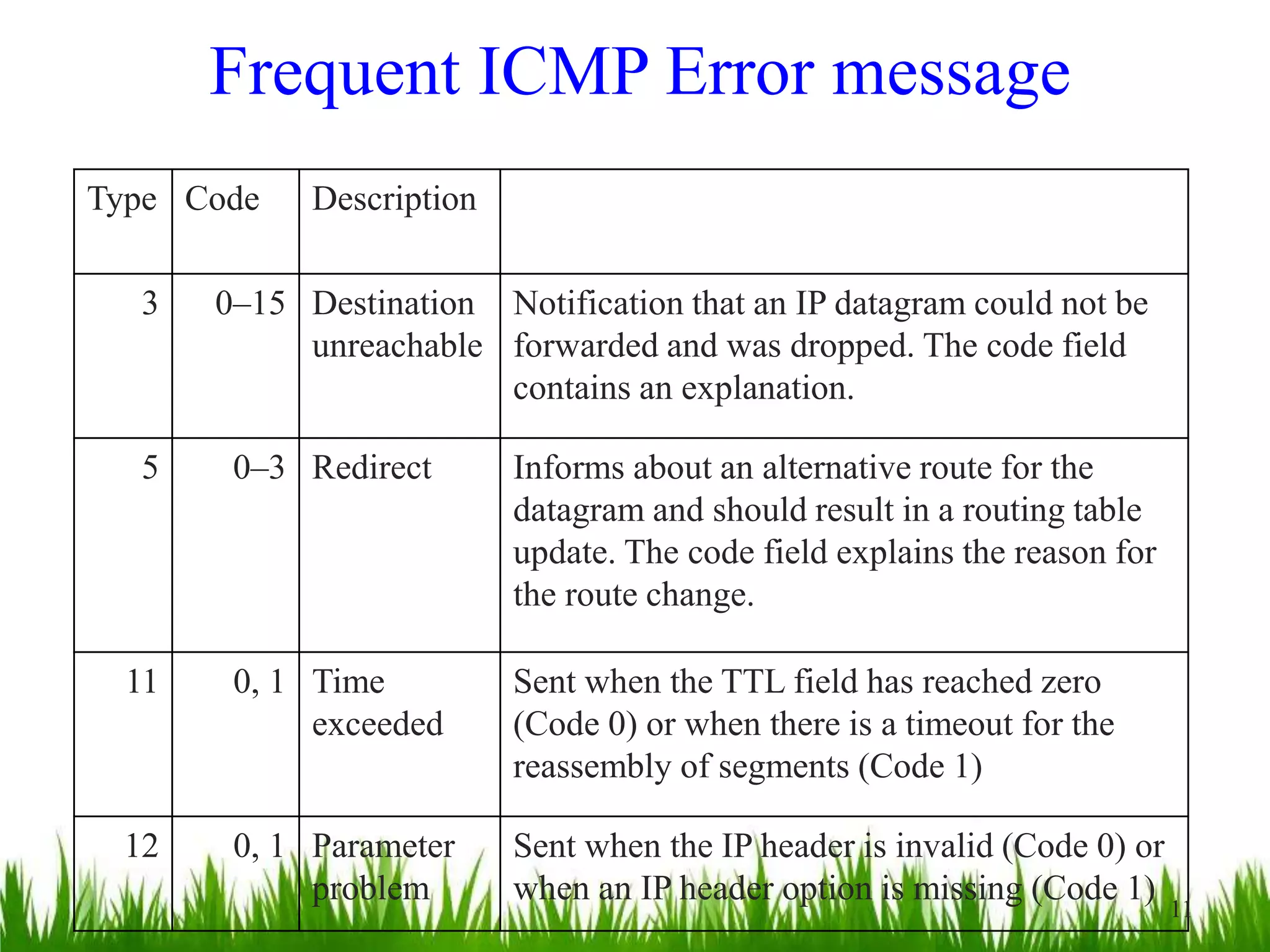
Frequent ICMP Error message
Type Code Description
3 0–15 Destination
unreachable
Notification that an IP datagram could not be
forwarded and was dropped. The code field
contains an explanation.
5 0–3 Redirect Informs about an alternative route for the
datagram and should result in a routing table
update. The code field explains the reason for
the route change.
11 0, 1 Time
exceeded
Sent when the TTL field has reached zero
(Code 0) or when there is a timeout for the
reassembly of segments (Code 1)
12 0, 1 Parameter
problem
Sent when the IP header is invalid (Code 0) or
when an IP header option is missing (Code 1)
11
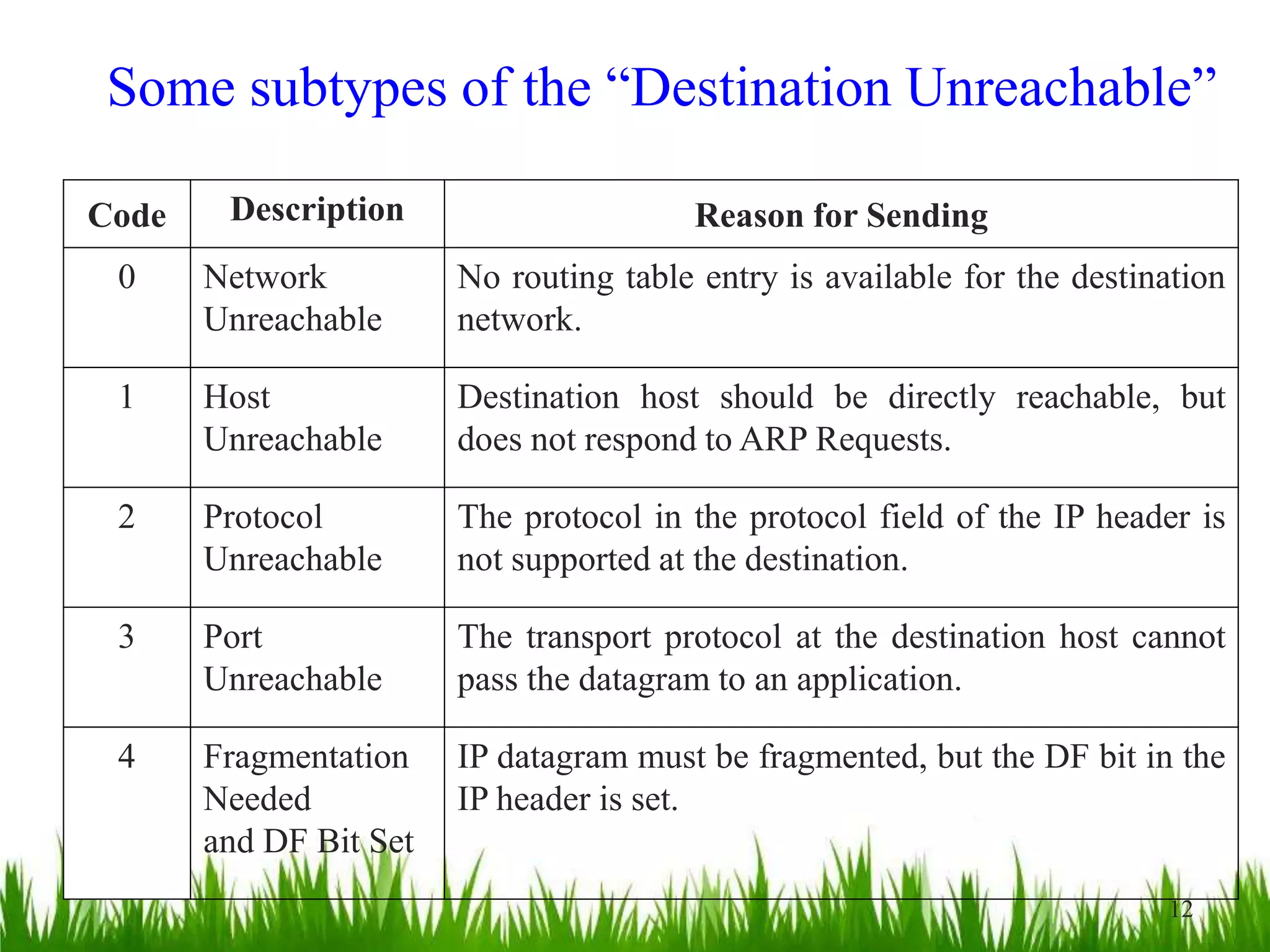
Some subtypes of the “Destination Unreachable”
Code Description Reason for Sending
0 Network
Unreachable
No routing table entry is available for the destination
network.
1 Host
Unreachable
Destination host should be directly reachable, but
does not respond to ARP Requests.
2 Protocol
Unreachable
The protocol in the protocol field of the IP header is
not supported at the destination.
3 Port
Unreachable
The transport protocol at the destination host cannot
pass the datagram to an application.
4 Fragmentation
Needed
and DF Bit Set
IP datagram must be fragmented, but the DF bit in the
IP header is set.
12
Example: ICMP Port Unreachable
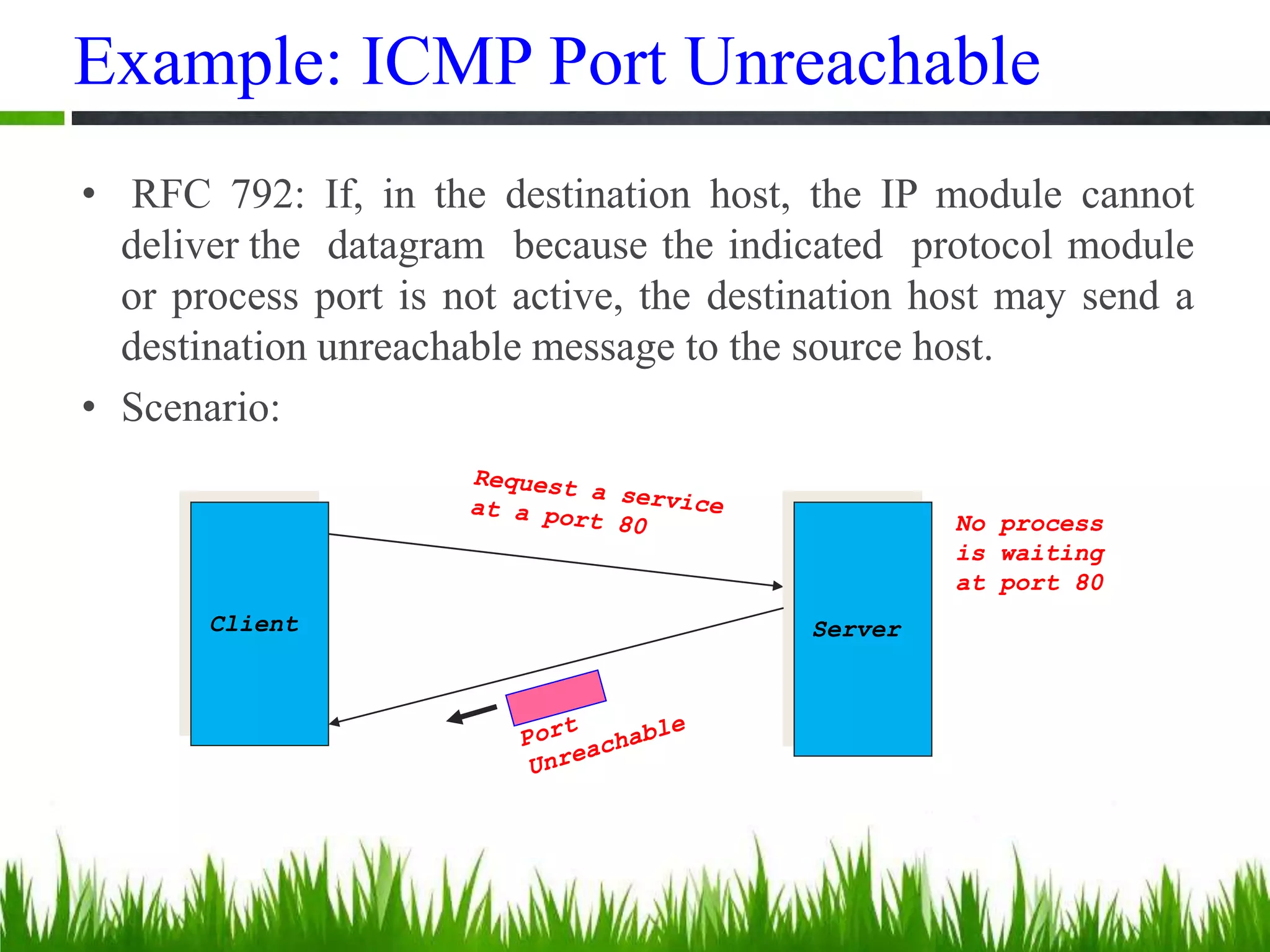
• RFC 792: If, in the destination host, the IP module cannot
deliver the datagram because the indicated protocol module
or process port is not active, the destination host may send a
destination unreachable message to the source host.
• Scenario:
Client Server
No process
is waiting
at port 80
QUESTIONS ???

05 coms 525 tcpip - icmp

  • 1.
    1 Internet Control MessageProtocol (ICMP) K. PALANIVEL Systems Analyst, Computer Centre Pondicherry University, Puducherry – 605014. LECTURE 5 COMS 525: TCPIP COURSE TOPIC
  • 2.
    Overview • The IP(Internet Protocol) relies on several other protocols to perform necessary control and routing functions: • Control functions (ICMP) • Multicast signaling (IGMP) • Setting up routing tables (RIP, OSPF, BGP, PIM, …) 2 Control Routing ICMP IGMP RIP OSPF BGP PIM
  • 3.
    Overview • The InternetControl Message Protocol (ICMP) is a helper protocol that supports IP with facility for – Error reporting – Simple queries • ICMP messages are encapsulated as IP datagrams: IP header ICMP message IP payload 3
  • 4.
    ICMP Message Format additionalinformation or 0x00000000 type code checksum bit # 0 15 23 248 317 16 4 byte header: • Type (1 byte): type of ICMP message • Code (1 byte): subtype of ICMP message • Checksum (2 bytes): similar to IP header checksum. Checksum is calculated over entire ICMP message If there is no additional data, there are 4 bytes set to zero.  each ICMP messages is at least 8 bytes long
  • 5.
    ICMP Query Message 5 ICMPquery: • Request sent by host to a router or host • Reply sent back to querying host
  • 6.
    Example of ICMPQueries Type/Code: Description 8/0 Echo Request 0/0 Echo Reply 13/0 Timestamp Request 14/0 Timestamp Reply 10/0 Router Solicitation 9/0 Router Advertisement The ping command uses Echo Request/ Echo Reply
  • 7.
    Example of aQuery: Echo Request and Reply • Ping’s are handled directly by the kernel • Each Ping is translated into an ICMP Echo Request • The Ping’ed host responds with an ICMP Echo Reply 7 Host or Router Host or router
  • 8.
    Example of aQuery: ICMP Timestamp • A system (host or router) asks another system for the current time. • Time is measured in milliseconds after midnight UTC (Universal Coordinated Time) of the current day • Sender sends a request, receiver responds with reply Type (= 17 or 18) Code (=0) Checksum 32-bit sender timestamp identifier sequence number 32-bit receive timestamp 32-bit transmit timestamp Sender Receiver Timestamp Request Timestamp Reply
  • 9.
    ICMP Error Message 9 •ICMP error messages report error conditions • Typically sent when a datagram is discarded • Error message is often passed from ICMP to the application program
  • 10.
    ICMP Error Message 10 •ICMP error messages include the complete IP header and the first 8 bytes of the payload (typically: UDP, TCP) Unused (0x00000000) IP header ICMP header IP header 8 bytes of payload ICMP Message from IP datagram that triggered the error type code checksum
  • 11.
    Frequent ICMP Errormessage Type Code Description 3 0–15 Destination unreachable Notification that an IP datagram could not be forwarded and was dropped. The code field contains an explanation. 5 0–3 Redirect Informs about an alternative route for the datagram and should result in a routing table update. The code field explains the reason for the route change. 11 0, 1 Time exceeded Sent when the TTL field has reached zero (Code 0) or when there is a timeout for the reassembly of segments (Code 1) 12 0, 1 Parameter problem Sent when the IP header is invalid (Code 0) or when an IP header option is missing (Code 1) 11
  • 12.
    Some subtypes ofthe “Destination Unreachable” Code Description Reason for Sending 0 Network Unreachable No routing table entry is available for the destination network. 1 Host Unreachable Destination host should be directly reachable, but does not respond to ARP Requests. 2 Protocol Unreachable The protocol in the protocol field of the IP header is not supported at the destination. 3 Port Unreachable The transport protocol at the destination host cannot pass the datagram to an application. 4 Fragmentation Needed and DF Bit Set IP datagram must be fragmented, but the DF bit in the IP header is set. 12
  • 13.
    Example: ICMP PortUnreachable • RFC 792: If, in the destination host, the IP module cannot deliver the datagram because the indicated protocol module or process port is not active, the destination host may send a destination unreachable message to the source host. • Scenario: Client Server No process is waiting at port 80
  • 14.