1
IP - The Internet Protocol
K. PALANIVEL
Systems Analyst, Computer Centre
Pondicherry University, Puducherry – 605014.
LECTURE 10
COMS 525: TCPIP
COURSE
TOPIC
IP - Internet Protocol
 The Internet Protocol is the principal
communications protocol in the Internet
protocol suite for relaying datagrams across
network boundaries.
 Its routing function enables internetworking,
and essentially establishes the Internet
2
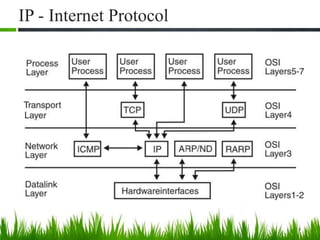
IP - Internet Protocol
 IP (Internet Protocol) is a Network Layer Protocol.
 IP’s current version is Version 4 (IPv4).
3
Network
Layer
Link Layer
IP
ARP
Network
Access
Media
ICMP IGMP
Transport
Layer
TCP UDP
IP - Internet Protocol
4
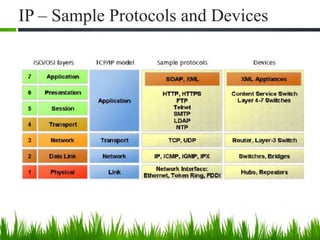
IP – Sample Protocols and Devices
5
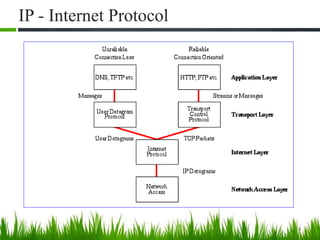
IP - Internet Protocol
6
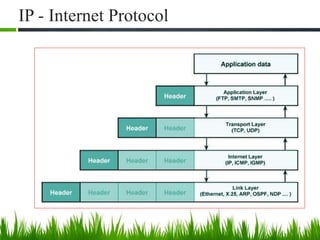
IP - Internet Protocol
7
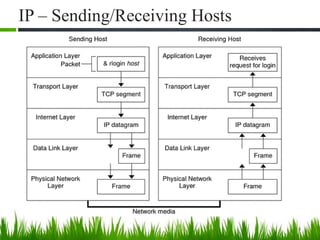
IP – Sending/Receiving Hosts
8
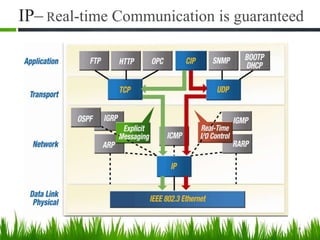
IP– Real-time Communication is guaranteed
9
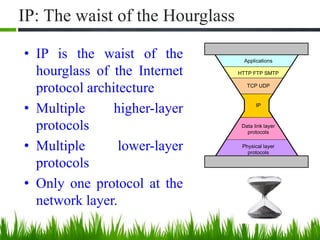
IP: The waist of the Hourglass
• IP is the waist of the
hourglass of the Internet
protocol architecture
• Multiple higher-layer
protocols
• Multiple lower-layer
protocols
• Only one protocol at the
network layer.
10
Applications
HTTP FTP SMTP
TCP UDP
IP
Data link layer
protocols
Physical layer
protocols
Application protocol
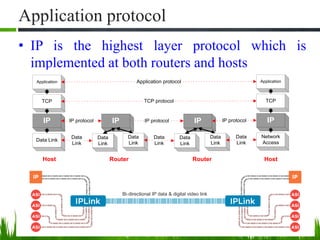
• IP is the highest layer protocol which is
implemented at both routers and hosts
11
Application
TCP
IP
Data Link
Application
TCP
IP
Network
Access
Application protocol
TCP protocol
IP protocol IP protocol
Data
Link
Data
Link
IP
Data
Link
Data
Link
IP
Data
Link
Data
Link
Data
Link
IP protocol
RouterRouter HostHost
IP Service
 Delivery service of IP is minimal
 IP provide provides an unreliable connectionless best effort service
(also called: “datagram service”).
◦ Unreliable: IP does not make an attempt to recover lost packets
◦ Connectionless: Each packet (“datagram”) is handled
independently. IP is not aware that packets between hosts may be
sent in a logical sequence
◦ Best effort: IP does not make guarantees on the service (no
throughput guarantee, no delay guarantee,…)
 Consequences:
 Higher layer protocols have to deal with losses or with
duplicate packets
• Packets may be delivered out-of-sequence
12
IP Features
• Internet Protocol is connectionless and unreliable
protocol.
• It ensures no guarantee of successfully transmission of
data.
• In order to make it reliable, it must be paired with
reliable protocol such as TCP at the transport layer.
• Internet protocol transmits the data in form of a datagram
13
IP Service
• IP supports the following services:
• one-to-one (unicast)
• one-to-all (broadcast)
• one-to-several (multicast)
• IP multicast also supports a many-to-many service.
• IP multicast requires support of other protocols (IGMP,
multicast routing)
14
unicast broadcast multicast
IP Datagram Format
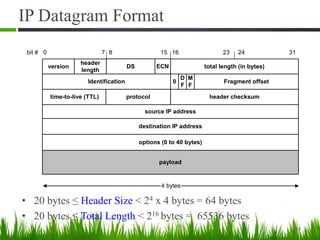
• 20 bytes ≤ Header Size < 24 x 4 bytes = 64 bytes
• 20 bytes ≤ Total Length < 216 bytes = 65536 bytes
15
ECNversion
header
length
DS total length (in bytes)
Identification Fragment offset
source IP address
destination IP address
options (0 to 40 bytes)
payload
4 bytes
time-to-live (TTL) protocol header checksum
bit # 0 15 23 248 317 16
0
M
F
D
F
IP Datagram Format
IP Datagram Format
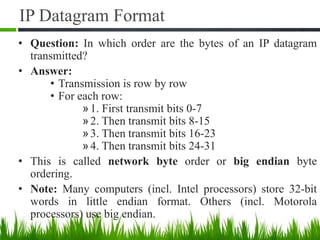
• Question: In which order are the bytes of an IP datagram
transmitted?
• Answer:
• Transmission is row by row
• For each row:
»1. First transmit bits 0-7
»2. Then transmit bits 8-15
»3. Then transmit bits 16-23
»4. Then transmit bits 24-31
• This is called network byte order or big endian byte
ordering.
• Note: Many computers (incl. Intel processors) store 32-bit
words in little endian format. Others (incl. Motorola
processors) use big endian.
17
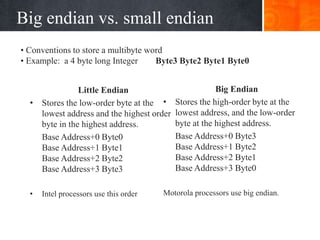
Big endian vs. small endian
Little Endian
• Stores the low-order byte at the
lowest address and the highest order
byte in the highest address.
Base Address+0 Byte0
Base Address+1 Byte1
Base Address+2 Byte2
Base Address+3 Byte3
• Intel processors use this order
Big Endian
• Stores the high-order byte at the
lowest address, and the low-order
byte at the highest address.
Base Address+0 Byte3
Base Address+1 Byte2
Base Address+2 Byte1
Base Address+3 Byte0
Motorola processors use big endian.
• Conventions to store a multibyte word
• Example: a 4 byte long Integer Byte3 Byte2 Byte1 Byte0
Fields of the IP Header
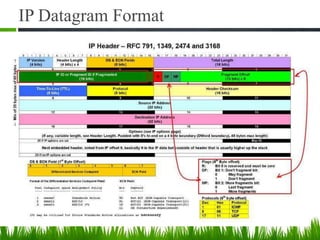
• Version (4 bits): current version is 4, next version will be 6.
• Header length (4 bits): length of IP header, in multiples of 4
bytes
• DS/ECN field (1 byte)
– This field was previously called as Type-of-Service (TOS)
field. The role of this field has been re-defined, but is
“backwards compatible” to TOS interpretation
– Differentiated Service (DS) (6 bits):
• Used to specify service level (currently not supported in
the Internet)
– Explicit Congestion Notification (ECN) (2 bits):
• New feedback mechanism used by TCP
Fields of the IP Header
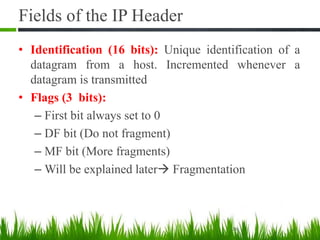
• Identification (16 bits): Unique identification of a
datagram from a host. Incremented whenever a
datagram is transmitted
• Flags (3 bits):
– First bit always set to 0
– DF bit (Do not fragment)
– MF bit (More fragments)
– Will be explained later Fragmentation
20
Fields of the IP Header
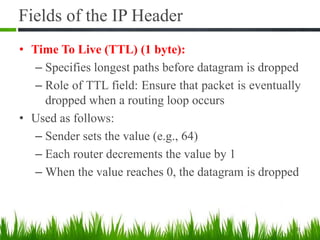
• Time To Live (TTL) (1 byte):
– Specifies longest paths before datagram is dropped
– Role of TTL field: Ensure that packet is eventually
dropped when a routing loop occurs
• Used as follows:
– Sender sets the value (e.g., 64)
– Each router decrements the value by 1
– When the value reaches 0, the datagram is dropped
21
Fields of the IP Header
• Protocol (1 byte)
• Specifies the higher-layer protocol.
• Used for demultiplexing to higher layers.
• Header checksum (2 bytes): A simple 16-bit long checksum
which is computed for the header of the datagram.
22
IP
1 = ICMP 2 = IGMP
6 = TCP 17 = UDP
4 = IP-in-IP
encapsulation
Fields of the IP Header
• Options:
• Security restrictions
• Record Route: each router that processes the packet
adds its IP address to the header.
• Timestamp: each router that processes the packet adds
its IP address and time to the header.
• (loose) Source Routing: specifies a list of routers that
must be traversed.
• (strict) Source Routing: specifies a list of the only
routers that can be traversed.
• Padding: Padding bytes are added to ensure that header ends
on a 4-byte boundary
23
Maximum Transmission Unit
• Maximum size of IP datagram is 65535, but the data link layer
protocol generally imposes a limit that is much smaller.
• Example:
– Ethernet frames have a maximum payload of 1500 bytes
 IP datagrams encapsulated in Ethernet frame cannot be
longer than 1500 bytes
• The limit on the maximum IP datagram size, imposed by the
data link protocol is called maximum transmission unit
(MTU)
24
• MTUs for various data link protocols:
Ethernet: 1500 FDDI: 4352
802.3: 1492 ATM AAL5: 9180
802.5: 4464 PPP: negotiated
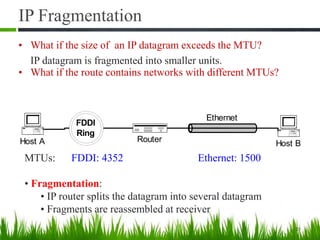
IP Fragmentation
FDDI
Ring
RouterHost A Host B
Ethernet
25
MTUs: FDDI: 4352 Ethernet: 1500
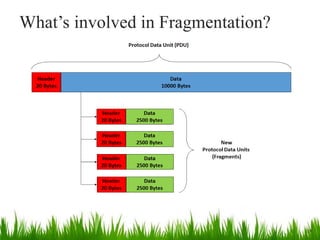
• Fragmentation:
• IP router splits the datagram into several datagram
• Fragments are reassembled at receiver
• What if the size of an IP datagram exceeds the MTU?
IP datagram is fragmented into smaller units.
• What if the route contains networks with different MTUs?
Where is Fragmentation done?
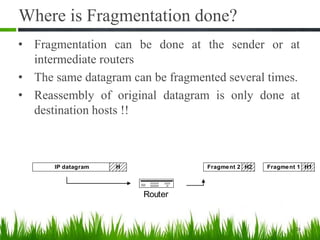
• Fragmentation can be done at the sender or at
intermediate routers
• The same datagram can be fragmented several times.
• Reassembly of original datagram is only done at
destination hosts !!
26
Router
IP datagram H Fragment 1 H1Fragment 2 H2
What’s involved in Fragmentation?
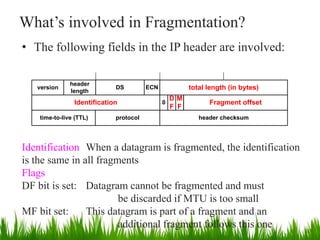
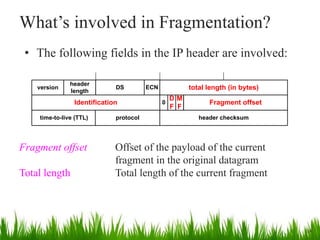
• The following fields in the IP header are involved:
ECNversion
header
length
DS total length (in bytes)
Identification Fragment offset
time-to-live (TTL) protocol header checksum
0
M
F
D
F
27
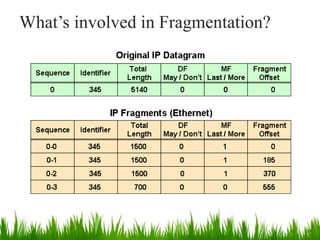
Identification When a datagram is fragmented, the identification
is the same in all fragments
Flags
DF bit is set: Datagram cannot be fragmented and must
be discarded if MTU is too small
MF bit set: This datagram is part of a fragment and an
additional fragment follows this one
What’s involved in Fragmentation?
• The following fields in the IP header are involved:
ECNversion
header
length
DS total length (in bytes)
Identification Fragment offset
time-to-live (TTL) protocol header checksum
0
M
F
D
F
28
Fragment offset Offset of the payload of the current
fragment in the original datagram
Total length Total length of the current fragment
What’s involved in Fragmentation?
29
What’s involved in Fragmentation?
30
Example of Fragmentation
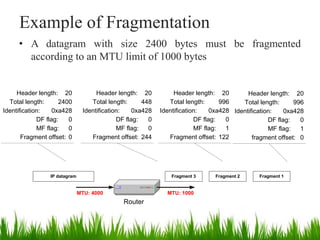
• A datagram with size 2400 bytes must be fragmented
according to an MTU limit of 1000 bytes
IP datagram
Router
Fragment 2Fragment 3
MTU: 1000MTU: 4000
Fragment 1
Header length: 20
Total length: 2400
Identification: 0xa428
DF flag: 0
MF flag: 0
Fragment offset: 0
Header length: 20
Total length: 996
Identification: 0xa428
DF flag: 0
MF flag: 1
fragment offset: 0
Header length: 20
Total length: 996
Identification: 0xa428
DF flag: 0
MF flag: 1
Fragment offset: 122
Header length: 20
Total length: 448
Identification: 0xa428
DF flag: 0
MF flag: 0
Fragment offset: 244
Determining the length of fragments
• To determine the size of the fragments we recall that,
since there are only 13 bits available for the fragment
offset, the offset is given as a multiple of eight bytes.
• As a result, the first and second fragment have a size of
996 bytes (and not 1000 bytes).
• This number is chosen since 976 is the largest number
smaller than 1000–20= 980 that is divisible by eight.
• The payload for the first and second fragments is 976
bytes long, with bytes 0 through 975 of the original IP
payload in the first fragment, and bytes 976 through 1951
in the second fragment.
32
• The payload of the third fragment has the remaining
428 bytes, from byte 1952 through 2379.
• With these considerations, we can determine the
values of the fragment offset, which are 0, 976 / 8 =
122, and 1952 / 8 = 244, respectively, for the first,
second and third fragment.
33
Determining the length of fragments
QUESTIONS ???

10 coms 525 tcpip - internet protocol - ip

  • 1.
    1 IP - TheInternet Protocol K. PALANIVEL Systems Analyst, Computer Centre Pondicherry University, Puducherry – 605014. LECTURE 10 COMS 525: TCPIP COURSE TOPIC
  • 2.
    IP - InternetProtocol  The Internet Protocol is the principal communications protocol in the Internet protocol suite for relaying datagrams across network boundaries.  Its routing function enables internetworking, and essentially establishes the Internet 2
  • 3.
    IP - InternetProtocol  IP (Internet Protocol) is a Network Layer Protocol.  IP’s current version is Version 4 (IPv4). 3 Network Layer Link Layer IP ARP Network Access Media ICMP IGMP Transport Layer TCP UDP
  • 4.
    IP - InternetProtocol 4
  • 5.
    IP – SampleProtocols and Devices 5
  • 6.
    IP - InternetProtocol 6
  • 7.
    IP - InternetProtocol 7
  • 8.
  • 9.
  • 10.
    IP: The waistof the Hourglass • IP is the waist of the hourglass of the Internet protocol architecture • Multiple higher-layer protocols • Multiple lower-layer protocols • Only one protocol at the network layer. 10 Applications HTTP FTP SMTP TCP UDP IP Data link layer protocols Physical layer protocols
  • 11.
    Application protocol • IPis the highest layer protocol which is implemented at both routers and hosts 11 Application TCP IP Data Link Application TCP IP Network Access Application protocol TCP protocol IP protocol IP protocol Data Link Data Link IP Data Link Data Link IP Data Link Data Link Data Link IP protocol RouterRouter HostHost
  • 12.
    IP Service  Deliveryservice of IP is minimal  IP provide provides an unreliable connectionless best effort service (also called: “datagram service”). ◦ Unreliable: IP does not make an attempt to recover lost packets ◦ Connectionless: Each packet (“datagram”) is handled independently. IP is not aware that packets between hosts may be sent in a logical sequence ◦ Best effort: IP does not make guarantees on the service (no throughput guarantee, no delay guarantee,…)  Consequences:  Higher layer protocols have to deal with losses or with duplicate packets • Packets may be delivered out-of-sequence 12
  • 13.
    IP Features • InternetProtocol is connectionless and unreliable protocol. • It ensures no guarantee of successfully transmission of data. • In order to make it reliable, it must be paired with reliable protocol such as TCP at the transport layer. • Internet protocol transmits the data in form of a datagram 13
  • 14.
    IP Service • IPsupports the following services: • one-to-one (unicast) • one-to-all (broadcast) • one-to-several (multicast) • IP multicast also supports a many-to-many service. • IP multicast requires support of other protocols (IGMP, multicast routing) 14 unicast broadcast multicast
  • 15.
    IP Datagram Format •20 bytes ≤ Header Size < 24 x 4 bytes = 64 bytes • 20 bytes ≤ Total Length < 216 bytes = 65536 bytes 15 ECNversion header length DS total length (in bytes) Identification Fragment offset source IP address destination IP address options (0 to 40 bytes) payload 4 bytes time-to-live (TTL) protocol header checksum bit # 0 15 23 248 317 16 0 M F D F
  • 16.
  • 17.
    IP Datagram Format •Question: In which order are the bytes of an IP datagram transmitted? • Answer: • Transmission is row by row • For each row: »1. First transmit bits 0-7 »2. Then transmit bits 8-15 »3. Then transmit bits 16-23 »4. Then transmit bits 24-31 • This is called network byte order or big endian byte ordering. • Note: Many computers (incl. Intel processors) store 32-bit words in little endian format. Others (incl. Motorola processors) use big endian. 17
  • 18.
    Big endian vs.small endian Little Endian • Stores the low-order byte at the lowest address and the highest order byte in the highest address. Base Address+0 Byte0 Base Address+1 Byte1 Base Address+2 Byte2 Base Address+3 Byte3 • Intel processors use this order Big Endian • Stores the high-order byte at the lowest address, and the low-order byte at the highest address. Base Address+0 Byte3 Base Address+1 Byte2 Base Address+2 Byte1 Base Address+3 Byte0 Motorola processors use big endian. • Conventions to store a multibyte word • Example: a 4 byte long Integer Byte3 Byte2 Byte1 Byte0
  • 19.
    Fields of theIP Header • Version (4 bits): current version is 4, next version will be 6. • Header length (4 bits): length of IP header, in multiples of 4 bytes • DS/ECN field (1 byte) – This field was previously called as Type-of-Service (TOS) field. The role of this field has been re-defined, but is “backwards compatible” to TOS interpretation – Differentiated Service (DS) (6 bits): • Used to specify service level (currently not supported in the Internet) – Explicit Congestion Notification (ECN) (2 bits): • New feedback mechanism used by TCP
  • 20.
    Fields of theIP Header • Identification (16 bits): Unique identification of a datagram from a host. Incremented whenever a datagram is transmitted • Flags (3 bits): – First bit always set to 0 – DF bit (Do not fragment) – MF bit (More fragments) – Will be explained later Fragmentation 20
  • 21.
    Fields of theIP Header • Time To Live (TTL) (1 byte): – Specifies longest paths before datagram is dropped – Role of TTL field: Ensure that packet is eventually dropped when a routing loop occurs • Used as follows: – Sender sets the value (e.g., 64) – Each router decrements the value by 1 – When the value reaches 0, the datagram is dropped 21
  • 22.
    Fields of theIP Header • Protocol (1 byte) • Specifies the higher-layer protocol. • Used for demultiplexing to higher layers. • Header checksum (2 bytes): A simple 16-bit long checksum which is computed for the header of the datagram. 22 IP 1 = ICMP 2 = IGMP 6 = TCP 17 = UDP 4 = IP-in-IP encapsulation
  • 23.
    Fields of theIP Header • Options: • Security restrictions • Record Route: each router that processes the packet adds its IP address to the header. • Timestamp: each router that processes the packet adds its IP address and time to the header. • (loose) Source Routing: specifies a list of routers that must be traversed. • (strict) Source Routing: specifies a list of the only routers that can be traversed. • Padding: Padding bytes are added to ensure that header ends on a 4-byte boundary 23
  • 24.
    Maximum Transmission Unit •Maximum size of IP datagram is 65535, but the data link layer protocol generally imposes a limit that is much smaller. • Example: – Ethernet frames have a maximum payload of 1500 bytes  IP datagrams encapsulated in Ethernet frame cannot be longer than 1500 bytes • The limit on the maximum IP datagram size, imposed by the data link protocol is called maximum transmission unit (MTU) 24 • MTUs for various data link protocols: Ethernet: 1500 FDDI: 4352 802.3: 1492 ATM AAL5: 9180 802.5: 4464 PPP: negotiated
  • 25.
    IP Fragmentation FDDI Ring RouterHost AHost B Ethernet 25 MTUs: FDDI: 4352 Ethernet: 1500 • Fragmentation: • IP router splits the datagram into several datagram • Fragments are reassembled at receiver • What if the size of an IP datagram exceeds the MTU? IP datagram is fragmented into smaller units. • What if the route contains networks with different MTUs?
  • 26.
    Where is Fragmentationdone? • Fragmentation can be done at the sender or at intermediate routers • The same datagram can be fragmented several times. • Reassembly of original datagram is only done at destination hosts !! 26 Router IP datagram H Fragment 1 H1Fragment 2 H2
  • 27.
    What’s involved inFragmentation? • The following fields in the IP header are involved: ECNversion header length DS total length (in bytes) Identification Fragment offset time-to-live (TTL) protocol header checksum 0 M F D F 27 Identification When a datagram is fragmented, the identification is the same in all fragments Flags DF bit is set: Datagram cannot be fragmented and must be discarded if MTU is too small MF bit set: This datagram is part of a fragment and an additional fragment follows this one
  • 28.
    What’s involved inFragmentation? • The following fields in the IP header are involved: ECNversion header length DS total length (in bytes) Identification Fragment offset time-to-live (TTL) protocol header checksum 0 M F D F 28 Fragment offset Offset of the payload of the current fragment in the original datagram Total length Total length of the current fragment
  • 29.
    What’s involved inFragmentation? 29
  • 30.
    What’s involved inFragmentation? 30
  • 31.
    Example of Fragmentation •A datagram with size 2400 bytes must be fragmented according to an MTU limit of 1000 bytes IP datagram Router Fragment 2Fragment 3 MTU: 1000MTU: 4000 Fragment 1 Header length: 20 Total length: 2400 Identification: 0xa428 DF flag: 0 MF flag: 0 Fragment offset: 0 Header length: 20 Total length: 996 Identification: 0xa428 DF flag: 0 MF flag: 1 fragment offset: 0 Header length: 20 Total length: 996 Identification: 0xa428 DF flag: 0 MF flag: 1 Fragment offset: 122 Header length: 20 Total length: 448 Identification: 0xa428 DF flag: 0 MF flag: 0 Fragment offset: 244
  • 32.
    Determining the lengthof fragments • To determine the size of the fragments we recall that, since there are only 13 bits available for the fragment offset, the offset is given as a multiple of eight bytes. • As a result, the first and second fragment have a size of 996 bytes (and not 1000 bytes). • This number is chosen since 976 is the largest number smaller than 1000–20= 980 that is divisible by eight. • The payload for the first and second fragments is 976 bytes long, with bytes 0 through 975 of the original IP payload in the first fragment, and bytes 976 through 1951 in the second fragment. 32
  • 33.
    • The payloadof the third fragment has the remaining 428 bytes, from byte 1952 through 2379. • With these considerations, we can determine the values of the fragment offset, which are 0, 976 / 8 = 122, and 1952 / 8 = 244, respectively, for the first, second and third fragment. 33 Determining the length of fragments
  • 34.