Lesson IPv4 Subneting
Content
 What is IP?
 Public and Private IP address?
 Subnet mask Vs. Prefix length
 The way to assign IP address
 Network IP, Host IP and Broadcast IP
 How to covert IPv4 to binary?
 How to covert Subnet mask to binary?
 CIDR vs VLSM
What is IP?
The Internet Protocol that
computing devices such as
personal computers, tablets,
and smartphones use to
identify itself and
communicate with other
devices in the IP network.
What is IP?
IPv4 address structure
 32 bits
 4 octets ( 1 octet = 8 bits)
 ( . )
 Each octet from 0 to 255
 232 = 4,294,967,296
Network portion (Network ID)
: It tells us which network the
device is part of .
Host portion (Host ID) : It
identifies that unique device
within the network.
IP address
• CIDR
• Class A
0.0.0.0 126.255.255.255
• Class B
128.0.0.0 191.255.255.255
• Class C
192.0.0.0 223.255.255.255
• Class D
224.0.0.0 239.255.255.255
• Class E
240.0.0.0 255.255.255.255
Private IP address
• Class A
• 10.0.0.0/8 IP addresses: 10.0.0.0 - 10.255.255.255
• Class B
• 172.16.0.0/12 IP addresses: 172.16.0.0 - 172.31.255.255
• Class C
• 192.168.0.0/16 IP addresses: 192.168.0.0 - 192.168.255.255
Subnet mask Vs. Prefix length
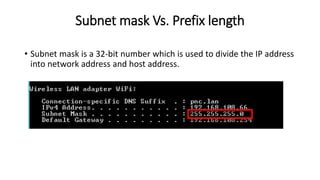
• Subnet mask is a 32-bit number which is used to divide the IP address
into network address and host address.
Subnet mask Vs. Prefix length
•The prefix length is another way of expressing
the subnet mask.
Example: 192.168.10.0/24
The way to assign IP address
Network IP, Host IP and Broadcast IP
Network IP Host IP Broadcast IP
192.168.0.0/24 192.168.0.1 – 192.168.0.254 192.168.0.255
172.16.1.0/16 172.16.1.1 – 172.16.255.254 172.16.255.255
Identify IPv4
192.168.1.1/24
Network ID = Network IP 192.168.1.0
Host ID = Host IP 1 - 254
Prefix length = Subnet Mask 255.255.255.0

I pv4 subneting

  • 1.
  • 2.
    Content  What isIP?  Public and Private IP address?  Subnet mask Vs. Prefix length  The way to assign IP address  Network IP, Host IP and Broadcast IP  How to covert IPv4 to binary?  How to covert Subnet mask to binary?  CIDR vs VLSM
  • 3.
    What is IP? TheInternet Protocol that computing devices such as personal computers, tablets, and smartphones use to identify itself and communicate with other devices in the IP network.
  • 4.
    What is IP? IPv4address structure  32 bits  4 octets ( 1 octet = 8 bits)  ( . )  Each octet from 0 to 255  232 = 4,294,967,296
  • 5.
    Network portion (NetworkID) : It tells us which network the device is part of . Host portion (Host ID) : It identifies that unique device within the network.
  • 6.
    IP address • CIDR •Class A 0.0.0.0 126.255.255.255 • Class B 128.0.0.0 191.255.255.255 • Class C 192.0.0.0 223.255.255.255 • Class D 224.0.0.0 239.255.255.255 • Class E 240.0.0.0 255.255.255.255
  • 7.
    Private IP address •Class A • 10.0.0.0/8 IP addresses: 10.0.0.0 - 10.255.255.255 • Class B • 172.16.0.0/12 IP addresses: 172.16.0.0 - 172.31.255.255 • Class C • 192.168.0.0/16 IP addresses: 192.168.0.0 - 192.168.255.255
  • 8.
    Subnet mask Vs.Prefix length • Subnet mask is a 32-bit number which is used to divide the IP address into network address and host address.
  • 9.
    Subnet mask Vs.Prefix length •The prefix length is another way of expressing the subnet mask. Example: 192.168.10.0/24
  • 10.
    The way toassign IP address
  • 11.
    Network IP, HostIP and Broadcast IP Network IP Host IP Broadcast IP 192.168.0.0/24 192.168.0.1 – 192.168.0.254 192.168.0.255 172.16.1.0/16 172.16.1.1 – 172.16.255.254 172.16.255.255
  • 12.
    Identify IPv4 192.168.1.1/24 Network ID= Network IP 192.168.1.0 Host ID = Host IP 1 - 254 Prefix length = Subnet Mask 255.255.255.0