Created by HI-TECH Vijay Kumar Sharma - 1 -
Variable Length Subnet Masks
(VLSM)
http://www.kumarvijaybaswa.blogspot.com
Email: - vk_9010@yahoo.com
Created by HI-TECH Vijay Kumar Sharma - 2 -
Contents
……………………………………………………………………………………
 IP Addressing Overview
 What an IP Address?
 IP Address Format
 IP Address Class and Range
 Planning to Address the Network
 Why Plan, design and document
 The Use of a hierarchal or structural IP Addressing
Scheme
 Benefits of a hierarchical network design
 The use of Subnet in Structuring the Network
 Let’s talk Subnet Mask
 Humans see Decimals; Computer sees Binary
 IP Address Classes, decimals and binary Summarized
 Basic Subletting Process
 Variable Length Subnet Masks (VLSM)
 Benefits of VLSM
 Implementing VLSM
 VLSM Practice
http://www.kumarvijaybaswa.blogspot.com
Email: - vk_9010@yahoo.com
Created by HI-TECH Vijay Kumar Sharma - 3 -
VLSM (Variable Length Subnet Mask)
Variable Length Subnet Mask (VLSM) is means to specify a deferent subnet mask
for the same network number on different subnets. With VLSM, a network
administrator can use a long mask on network with few hosts and a short mask on
subnets with many hosts. To use VLSM, the routing protocol must support it.
IP Addressing Overview
My aim of writing this eBook is to teach you how to subnet using VLSM the easy way.
I promised myself to go straight to VLSM, but I won’t be doing some readers justice without
giving an overview of what IP addressing is. If you are writing the CCNA exam or you are a
network administrator, the thorough knowledge of TCP/IP especially IP addressing and sub-
netting is a must!
IP Addressing
IP address is numeric identifier assigned to each computer or device on a TCP/IP network. It
designates the specific location of a device on the network .It allows hosts on one network to
communicate with a host on different network regardless of the type of LANS. An IP address is a
software (logical) address not a hardware address Like MAC.
Basic IP Terminologies
Bit: - A bit is one digit either a 1 or a 0.
Byte: - A byte is 8-bits or digits.
Octet: - An octet is made up of 8-bit binary number. The term byte and octet are
completely interchangeable.
The format of an IP address is 32-bits structures and hierarchical numeric address, written as four
numbers separated by periods. In other word these 32 bits are divided into four sections, referred
to as octets, each containing 8-bits.You can depict an IP address using one of three methods:
Dotted-decimal, as in 172.16.30.56
Binary, as in 10101100.00010000.00011110.00111000
Hexadecimal, as in AC.10.1E.38
Note:-The communication between hosts or devices (PCs, server, printers) on different
network is made possible through IP addresses...
Before we go further, let’s see how to find your IP address of your computer.
The easiest way is to use the command prompt; for other ways see ways to find your IP address.
In the command prompt: - (Windows XP, Windows Vista, and Windows 7)
Click Start, and then select All Programs.
Click Accessories, and then select Command Prompt.
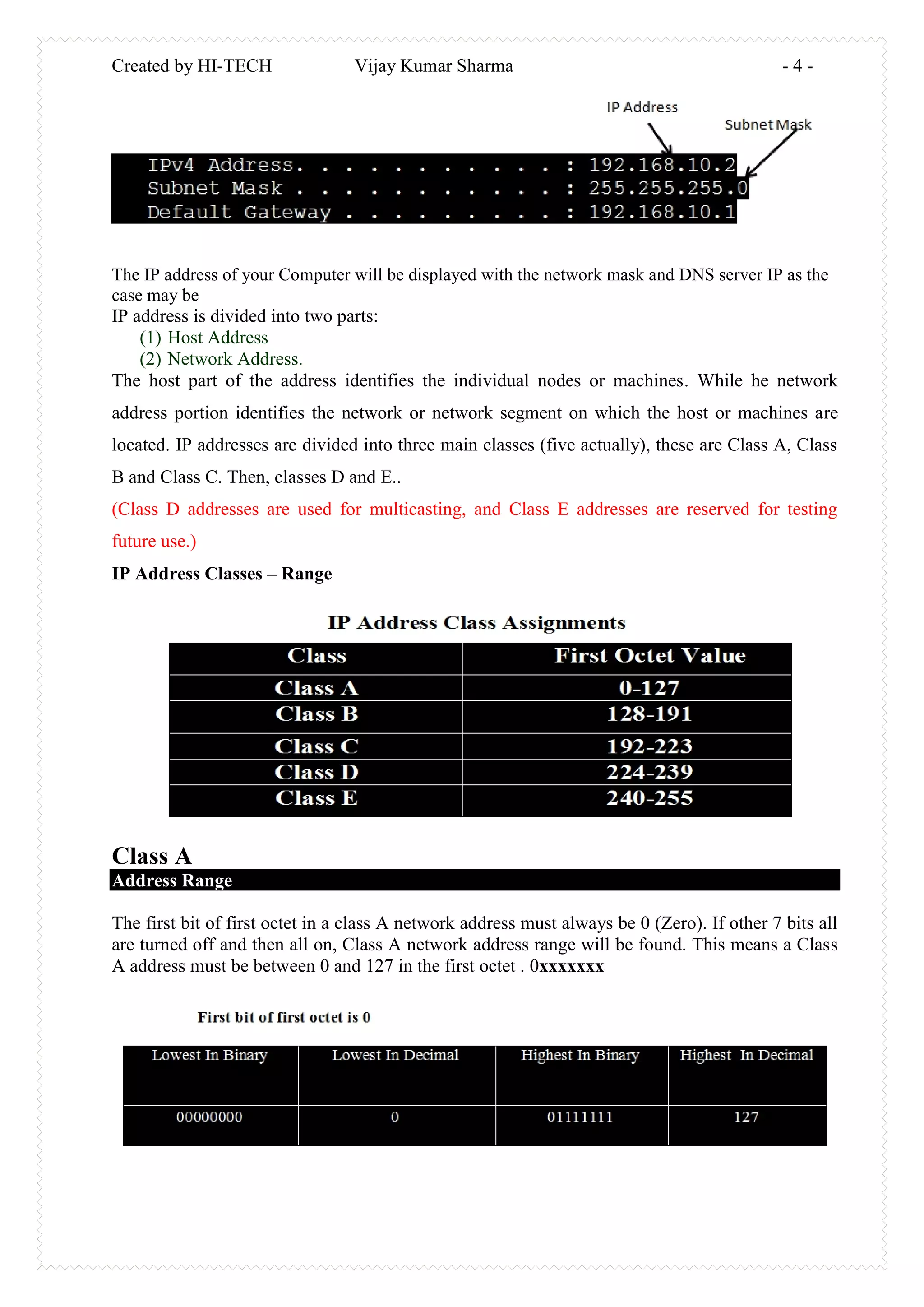
At the command prompt, enter: ipconfig
Tap the enter tab.
Created by HI-TECH Vijay Kumar Sharma - 4 -
The IP address of your Computer will be displayed with the network mask and DNS server IP as the
case may be
IP address is divided into two parts:
(1) Host Address
(2) Network Address.
The host part of the address identifies the individual nodes or machines. While he network
address portion identifies the network or network segment on which the host or machines are
located. IP addresses are divided into three main classes (five actually), these are Class A, Class
B and Class C. Then, classes D and E..
(Class D addresses are used for multicasting, and Class E addresses are reserved for testing
future use.)
IP Address Classes – Range
Class A
Address Range
The first bit of first octet in a class A network address must always be 0 (Zero). If other 7 bits all
are turned off and then all on, Class A network address range will be found. This means a Class
A address must be between 0 and 127 in the first octet . 0xxxxxxx
Created by HI-TECH Vijay Kumar Sharma - 5 -
Addresses
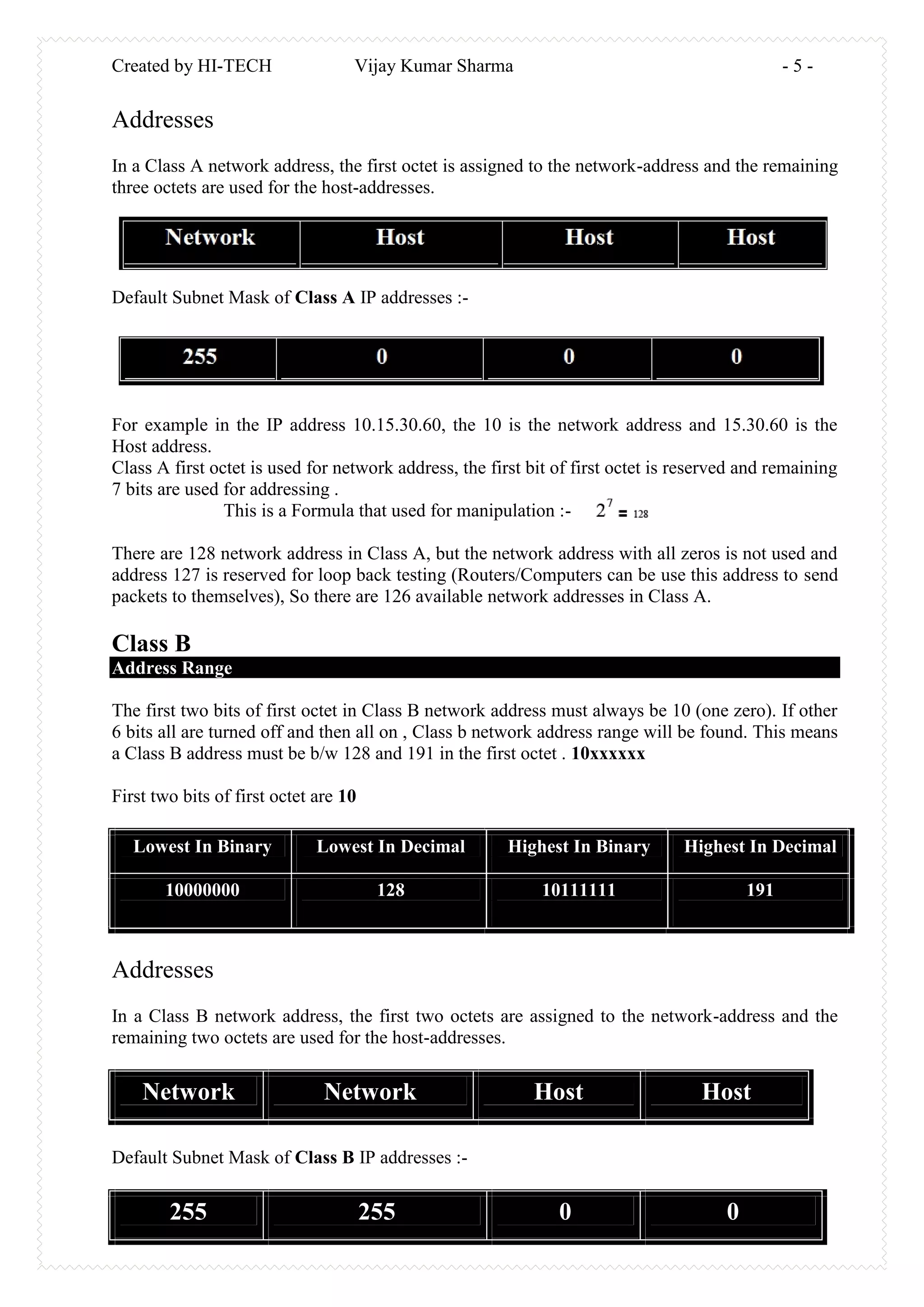
In a Class A network address, the first octet is assigned to the network-address and the remaining
three octets are used for the host-addresses.
Default Subnet Mask of Class A IP addresses :-
For example in the IP address 10.15.30.60, the 10 is the network address and 15.30.60 is the
Host address.
Class A first octet is used for network address, the first bit of first octet is reserved and remaining
7 bits are used for addressing .
This is a Formula that used for manipulation :-
There are 128 network address in Class A, but the network address with all zeros is not used and
address 127 is reserved for loop back testing (Routers/Computers can be use this address to send
packets to themselves), So there are 126 available network addresses in Class A.
Class B
Address Range
The first two bits of first octet in Class B network address must always be 10 (one zero). If other
6 bits all are turned off and then all on , Class b network address range will be found. This means
a Class B address must be b/w 128 and 191 in the first octet . 10xxxxxx
First two bits of first octet are 10
Lowest In Binary Lowest In Decimal Highest In Binary Highest In Decimal
10000000 128 10111111 191
Addresses
In a Class B network address, the first two octets are assigned to the network-address and the
remaining two octets are used for the host-addresses.
Network Network Host Host
Default Subnet Mask of Class B IP addresses :-
255 255 0 0
Created by HI-TECH Vijay Kumar Sharma - 6 -
Class C
Address Range
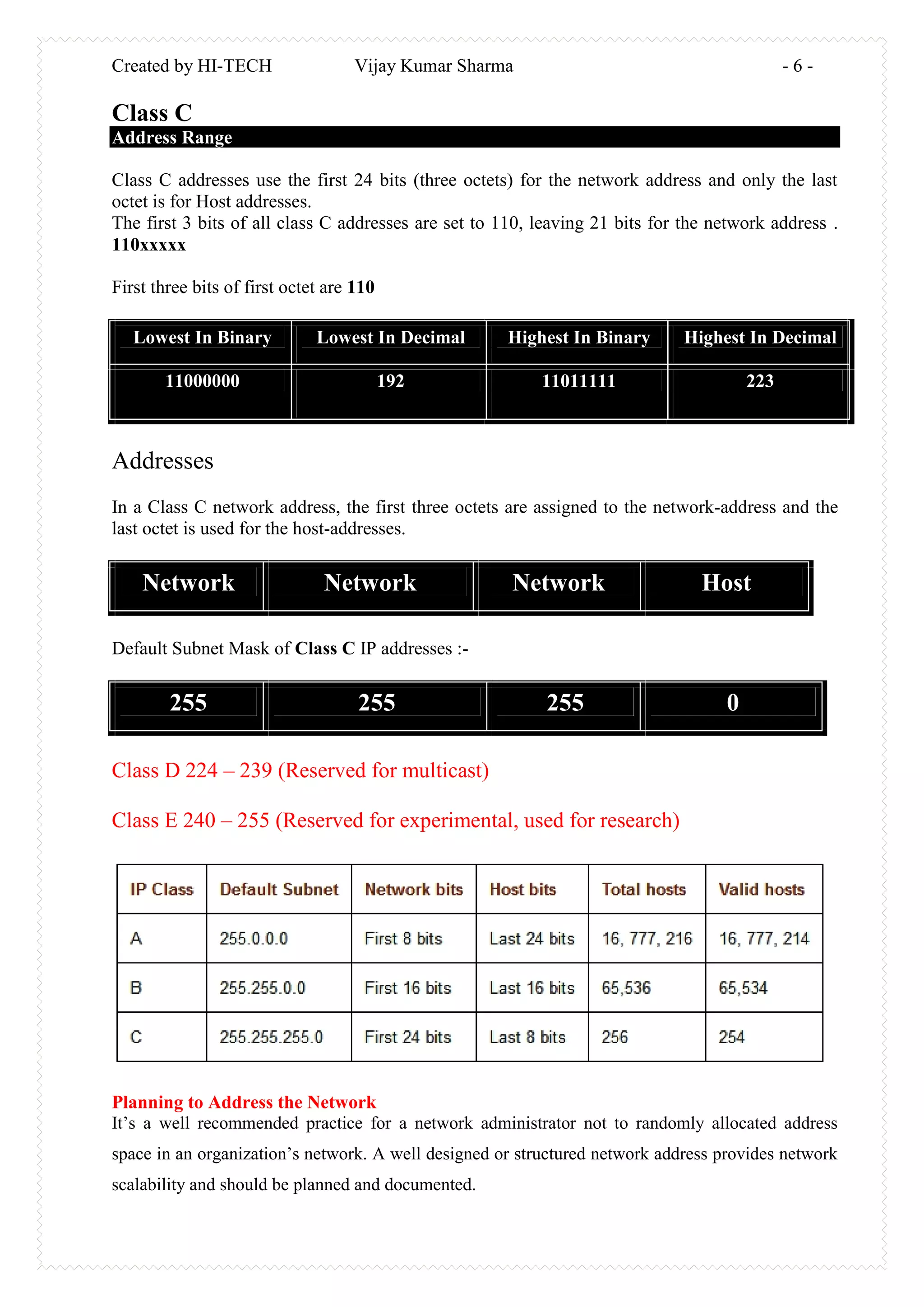
Class C addresses use the first 24 bits (three octets) for the network address and only the last
octet is for Host addresses.
The first 3 bits of all class C addresses are set to 110, leaving 21 bits for the network address .
110xxxxx
First three bits of first octet are 110
Lowest In Binary Lowest In Decimal Highest In Binary Highest In Decimal
11000000 192 11011111 223
Addresses
In a Class C network address, the first three octets are assigned to the network-address and the
last octet is used for the host-addresses.
Network Network Network Host
Default Subnet Mask of Class C IP addresses :-
255 255 255 0
Class D 224 – 239 (Reserved for multicast)
Class E 240 – 255 (Reserved for experimental, used for research)
Planning to Address the Network
It’s a well recommended practice for a network administrator not to randomly allocated address
space in an organization’s network. A well designed or structured network address provides network
scalability and should be planned and documented.
Created by HI-TECH Vijay Kumar Sharma - 7 -
Why Plan, design and document?
Planning, design and documenting your network IP addressing helps in the Prevention of
duplication of addresses
 Prevention of duplication of addresses: To err is human they say, so by proper planning
for network addressing and design, each host in the organization network must be
allocated with a unique IP address. This prevents the assignment of an IP address to more
than one host.
 It ensures in the Proper control access to the network: By planning and documenting
of allocation of addresses, the security and accessibility of network devices such as
servers are easily controlled. For example, if an organization server that provides
resources to internal or external network is randomly addressed, blocking access to its
address is difficult and clients may not be able to locate this resource
 It helps in the Monitoring of network security and performance: Similarly, we need
to monitor the security and performance of the network hosts and the network as a whole.
As part of the monitoring process, we examine network traffic looking for addresses that
are generating or receiving excessive packets. If we have proper planning and
documentation of the network addressing, we can identify the device on the network that
has a problematic address.
The Use of a hierarchal or structural IP Addressing Scheme
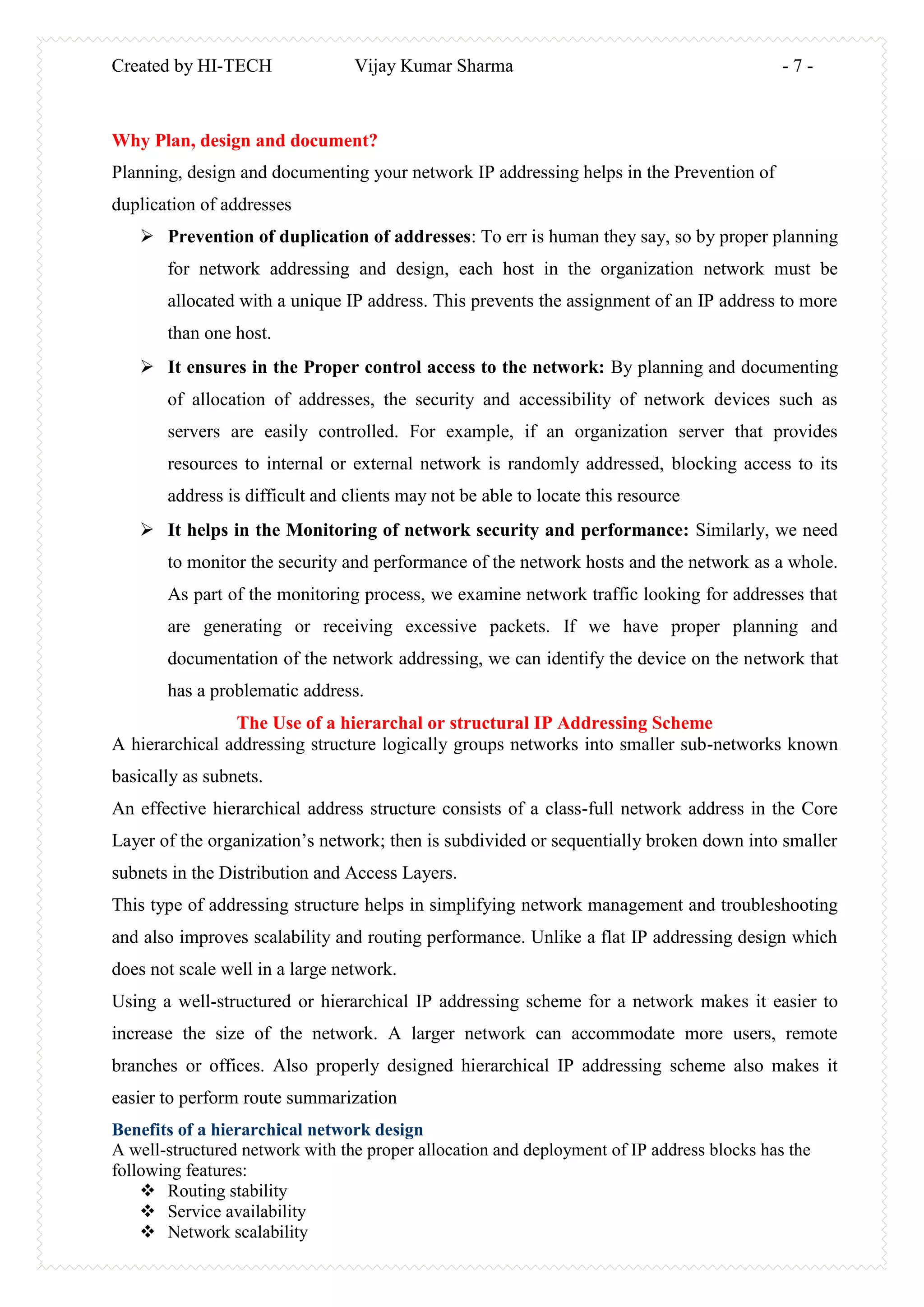
A hierarchical addressing structure logically groups networks into smaller sub-networks known
basically as subnets.
An effective hierarchical address structure consists of a class-full network address in the Core
Layer of the organization’s network; then is subdivided or sequentially broken down into smaller
subnets in the Distribution and Access Layers.
This type of addressing structure helps in simplifying network management and troubleshooting
and also improves scalability and routing performance. Unlike a flat IP addressing design which
does not scale well in a large network.
Using a well-structured or hierarchical IP addressing scheme for a network makes it easier to
increase the size of the network. A larger network can accommodate more users, remote
branches or offices. Also properly designed hierarchical IP addressing scheme also makes it
easier to perform route summarization
Benefits of a hierarchical network design
A well-structured network with the proper allocation and deployment of IP address blocks has the
following features:
 Routing stability
 Service availability
 Network scalability
Created by HI-TECH Vijay Kumar Sharma - 8 -
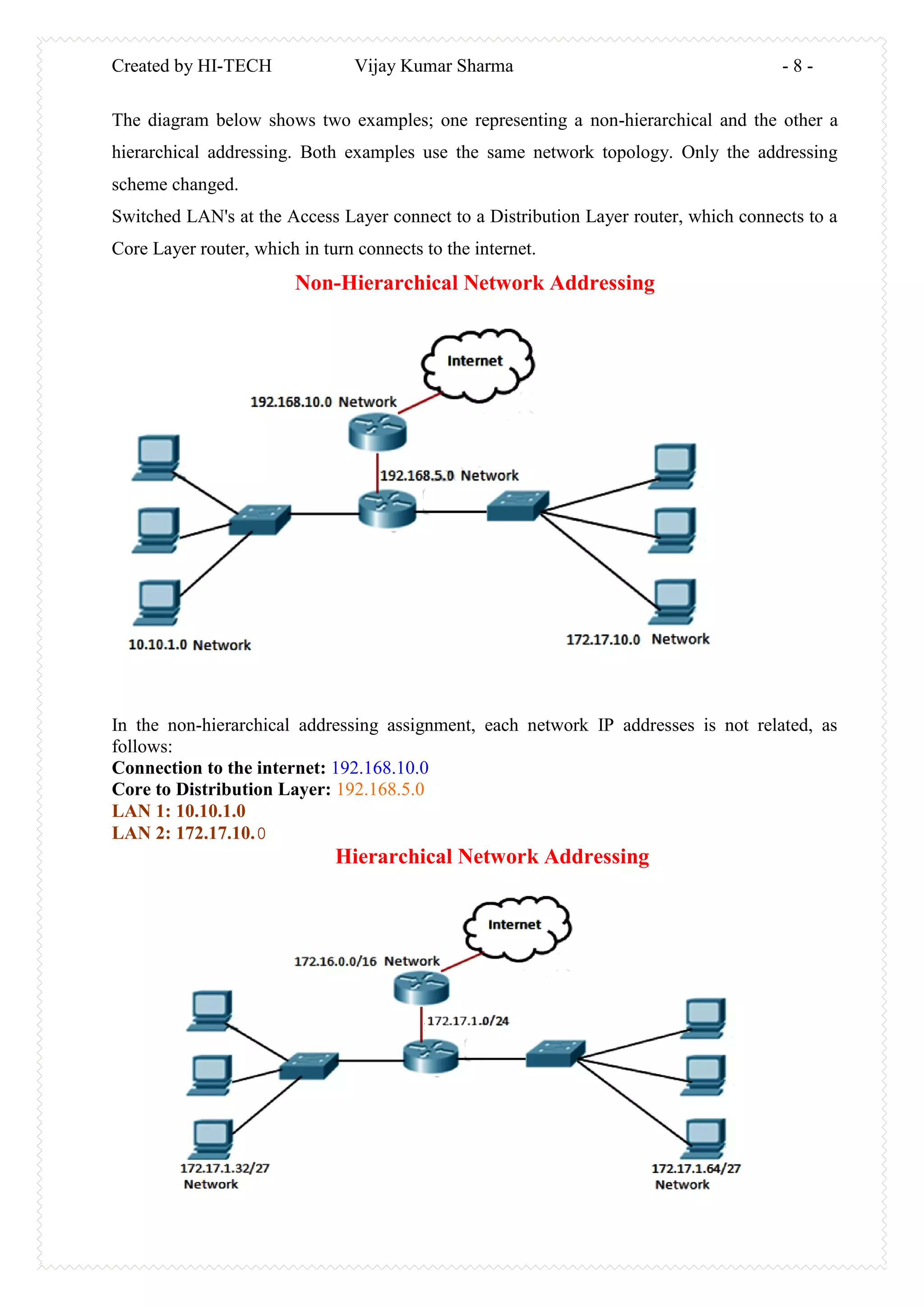
The diagram below shows two examples; one representing a non-hierarchical and the other a
hierarchical addressing. Both examples use the same network topology. Only the addressing
scheme changed.
Switched LAN's at the Access Layer connect to a Distribution Layer router, which connects to a
Core Layer router, which in turn connects to the internet.
Non-Hierarchical Network Addressing
In the non-hierarchical addressing assignment, each network IP addresses is not related, as
follows:
Connection to the internet: 192.168.10.0
Core to Distribution Layer: 192.168.5.0
LAN 1: 10.10.1.0
LAN 2: 172.17.10.0
Hierarchical Network Addressing

Vlsm

  • 1.
    Created by HI-TECHVijay Kumar Sharma - 1 - Variable Length Subnet Masks (VLSM) http://www.kumarvijaybaswa.blogspot.com Email: - vk_9010@yahoo.com
  • 2.
    Created by HI-TECHVijay Kumar Sharma - 2 - Contents ……………………………………………………………………………………  IP Addressing Overview  What an IP Address?  IP Address Format  IP Address Class and Range  Planning to Address the Network  Why Plan, design and document  The Use of a hierarchal or structural IP Addressing Scheme  Benefits of a hierarchical network design  The use of Subnet in Structuring the Network  Let’s talk Subnet Mask  Humans see Decimals; Computer sees Binary  IP Address Classes, decimals and binary Summarized  Basic Subletting Process  Variable Length Subnet Masks (VLSM)  Benefits of VLSM  Implementing VLSM  VLSM Practice http://www.kumarvijaybaswa.blogspot.com Email: - vk_9010@yahoo.com
  • 3.
    Created by HI-TECHVijay Kumar Sharma - 3 - VLSM (Variable Length Subnet Mask) Variable Length Subnet Mask (VLSM) is means to specify a deferent subnet mask for the same network number on different subnets. With VLSM, a network administrator can use a long mask on network with few hosts and a short mask on subnets with many hosts. To use VLSM, the routing protocol must support it. IP Addressing Overview My aim of writing this eBook is to teach you how to subnet using VLSM the easy way. I promised myself to go straight to VLSM, but I won’t be doing some readers justice without giving an overview of what IP addressing is. If you are writing the CCNA exam or you are a network administrator, the thorough knowledge of TCP/IP especially IP addressing and sub- netting is a must! IP Addressing IP address is numeric identifier assigned to each computer or device on a TCP/IP network. It designates the specific location of a device on the network .It allows hosts on one network to communicate with a host on different network regardless of the type of LANS. An IP address is a software (logical) address not a hardware address Like MAC. Basic IP Terminologies Bit: - A bit is one digit either a 1 or a 0. Byte: - A byte is 8-bits or digits. Octet: - An octet is made up of 8-bit binary number. The term byte and octet are completely interchangeable. The format of an IP address is 32-bits structures and hierarchical numeric address, written as four numbers separated by periods. In other word these 32 bits are divided into four sections, referred to as octets, each containing 8-bits.You can depict an IP address using one of three methods: Dotted-decimal, as in 172.16.30.56 Binary, as in 10101100.00010000.00011110.00111000 Hexadecimal, as in AC.10.1E.38 Note:-The communication between hosts or devices (PCs, server, printers) on different network is made possible through IP addresses... Before we go further, let’s see how to find your IP address of your computer. The easiest way is to use the command prompt; for other ways see ways to find your IP address. In the command prompt: - (Windows XP, Windows Vista, and Windows 7) Click Start, and then select All Programs. Click Accessories, and then select Command Prompt. At the command prompt, enter: ipconfig Tap the enter tab.
  • 4.
    Created by HI-TECHVijay Kumar Sharma - 4 - The IP address of your Computer will be displayed with the network mask and DNS server IP as the case may be IP address is divided into two parts: (1) Host Address (2) Network Address. The host part of the address identifies the individual nodes or machines. While he network address portion identifies the network or network segment on which the host or machines are located. IP addresses are divided into three main classes (five actually), these are Class A, Class B and Class C. Then, classes D and E.. (Class D addresses are used for multicasting, and Class E addresses are reserved for testing future use.) IP Address Classes – Range Class A Address Range The first bit of first octet in a class A network address must always be 0 (Zero). If other 7 bits all are turned off and then all on, Class A network address range will be found. This means a Class A address must be between 0 and 127 in the first octet . 0xxxxxxx
  • 5.
    Created by HI-TECHVijay Kumar Sharma - 5 - Addresses In a Class A network address, the first octet is assigned to the network-address and the remaining three octets are used for the host-addresses. Default Subnet Mask of Class A IP addresses :- For example in the IP address 10.15.30.60, the 10 is the network address and 15.30.60 is the Host address. Class A first octet is used for network address, the first bit of first octet is reserved and remaining 7 bits are used for addressing . This is a Formula that used for manipulation :- There are 128 network address in Class A, but the network address with all zeros is not used and address 127 is reserved for loop back testing (Routers/Computers can be use this address to send packets to themselves), So there are 126 available network addresses in Class A. Class B Address Range The first two bits of first octet in Class B network address must always be 10 (one zero). If other 6 bits all are turned off and then all on , Class b network address range will be found. This means a Class B address must be b/w 128 and 191 in the first octet . 10xxxxxx First two bits of first octet are 10 Lowest In Binary Lowest In Decimal Highest In Binary Highest In Decimal 10000000 128 10111111 191 Addresses In a Class B network address, the first two octets are assigned to the network-address and the remaining two octets are used for the host-addresses. Network Network Host Host Default Subnet Mask of Class B IP addresses :- 255 255 0 0
  • 6.
    Created by HI-TECHVijay Kumar Sharma - 6 - Class C Address Range Class C addresses use the first 24 bits (three octets) for the network address and only the last octet is for Host addresses. The first 3 bits of all class C addresses are set to 110, leaving 21 bits for the network address . 110xxxxx First three bits of first octet are 110 Lowest In Binary Lowest In Decimal Highest In Binary Highest In Decimal 11000000 192 11011111 223 Addresses In a Class C network address, the first three octets are assigned to the network-address and the last octet is used for the host-addresses. Network Network Network Host Default Subnet Mask of Class C IP addresses :- 255 255 255 0 Class D 224 – 239 (Reserved for multicast) Class E 240 – 255 (Reserved for experimental, used for research) Planning to Address the Network It’s a well recommended practice for a network administrator not to randomly allocated address space in an organization’s network. A well designed or structured network address provides network scalability and should be planned and documented.
  • 7.
    Created by HI-TECHVijay Kumar Sharma - 7 - Why Plan, design and document? Planning, design and documenting your network IP addressing helps in the Prevention of duplication of addresses  Prevention of duplication of addresses: To err is human they say, so by proper planning for network addressing and design, each host in the organization network must be allocated with a unique IP address. This prevents the assignment of an IP address to more than one host.  It ensures in the Proper control access to the network: By planning and documenting of allocation of addresses, the security and accessibility of network devices such as servers are easily controlled. For example, if an organization server that provides resources to internal or external network is randomly addressed, blocking access to its address is difficult and clients may not be able to locate this resource  It helps in the Monitoring of network security and performance: Similarly, we need to monitor the security and performance of the network hosts and the network as a whole. As part of the monitoring process, we examine network traffic looking for addresses that are generating or receiving excessive packets. If we have proper planning and documentation of the network addressing, we can identify the device on the network that has a problematic address. The Use of a hierarchal or structural IP Addressing Scheme A hierarchical addressing structure logically groups networks into smaller sub-networks known basically as subnets. An effective hierarchical address structure consists of a class-full network address in the Core Layer of the organization’s network; then is subdivided or sequentially broken down into smaller subnets in the Distribution and Access Layers. This type of addressing structure helps in simplifying network management and troubleshooting and also improves scalability and routing performance. Unlike a flat IP addressing design which does not scale well in a large network. Using a well-structured or hierarchical IP addressing scheme for a network makes it easier to increase the size of the network. A larger network can accommodate more users, remote branches or offices. Also properly designed hierarchical IP addressing scheme also makes it easier to perform route summarization Benefits of a hierarchical network design A well-structured network with the proper allocation and deployment of IP address blocks has the following features:  Routing stability  Service availability  Network scalability
  • 8.
    Created by HI-TECHVijay Kumar Sharma - 8 - The diagram below shows two examples; one representing a non-hierarchical and the other a hierarchical addressing. Both examples use the same network topology. Only the addressing scheme changed. Switched LAN's at the Access Layer connect to a Distribution Layer router, which connects to a Core Layer router, which in turn connects to the internet. Non-Hierarchical Network Addressing In the non-hierarchical addressing assignment, each network IP addresses is not related, as follows: Connection to the internet: 192.168.10.0 Core to Distribution Layer: 192.168.5.0 LAN 1: 10.10.1.0 LAN 2: 172.17.10.0 Hierarchical Network Addressing