Leader name :
Haider Chaudhary BITM-F15-034
Members name :
Umair Shahid BITM-F15-023
Rana Abuzar BITM-F15-0
Aneeq Rajpoot BITM-F15-020
BS(IT) 1st Semester section:(A)
Topic Name
Communication Devices
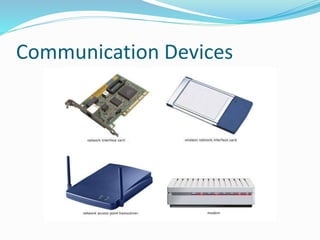
 A communication device is a hardware device capable
of transmitting an analog or digital signal over the
telephone, other communication wire, or wirelessly.
The best example of a communication device is a
computer Modem, which is capable of sending and
receiving a signal to allow computers to talk to other
computers over the telephone. Other examples of
communication devices include a network interface
card (NIC), Wi-Fi devices, and an access point.
Communication Devices
History of Communication devices
 The first means of communication was, of course, the
human voice but about 3,200 BC writing was invented
in Iraq and Egypt. It was invented about 1,500 BC in
China.
 The only American civilization to invent a true system
of writing were the Mayans.
 Communication 1500-1800 The next major
improvement in communication was the invention of
printing. The Chinese invented printing with blocks in
the 6th century AD but the first known printed book
was the Diamond Sutra of 686.
History of Communication devices
 The first newspapers were printed in the 17th century.
The first newspaper in England was printed in 1641.
(However the word newspaper was not recorded until
1670). The first successful daily newspaper in Britain
was printed in 1702.
 Communication in the 19th Century Communication
became far more efficient in the 19th century. In the
early 19th century the recipient of a letter had to pay
the postage, not the sender. Then in 1840 Rowland Hill
invented the Penny Post.
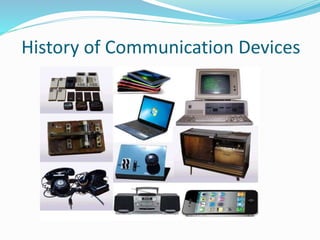
History of Communication Devices
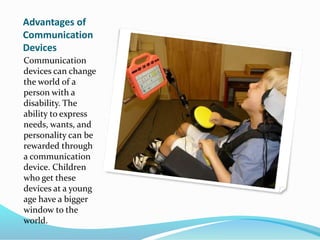
Advantages of
Communication
Devices
Communication
devices can change
the world of a
person with a
disability. The
ability to express
needs, wants, and
personality can be
rewarded through
a communication
device. Children
who get these
devices at a young
age have a bigger
window to the
world.
Advantages of Communication Devices
 Convenience is a major factor in the use of electronic
communication devices. There is a greater level of ease
attached to the use of the Internet and cell phones to
communicate. Email enables you to send messages
without much movement and effort compared to
sending mail by post. The Internet is also a wealth of
resources such as books, journals, and online stores
where you can access anything you want. Cell phones
are a source of convenience; they allow you to make a
call to anyone irrespective of time, and distance.
Advantages of Communication Devices
 Electronic communication devices are easily accessible
to people who would otherwise not have other modes
of communication. In developing countries people
who never owned a home telephone have cell phones.
Cell phones also continue to evolve at a rapid rate.

Many are now available that provide three or four ways
to communicate, such as Internet connections, text
messaging and standard phone links
Some communication devices are as follow:
• Modem
• Router
• Hub
• Network Cards
• Laptop
• Fax Machine
• Mobile Phones
• Bluetooth
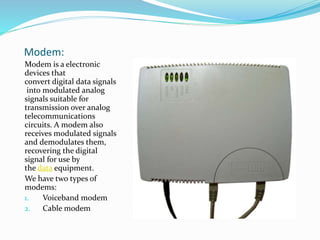
Modem:
Modem is a electronic
devices that
convert digital data signals
into modulated analog
signals suitable for
transmission over analog
telecommunications
circuits. A modem also
receives modulated signals
and demodulates them,
recovering the digital
signal for use by
the data equipment.
We have two types of
modems:
1. Voiceband modem
2. Cable modem
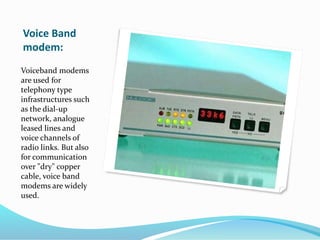
Voice Band modem:
 They enable digital terminal equipment to
communicate over telephone channels, which are
designed around the narrow bandwidth requirements
of the human voice.
 Modems operate in part by communicating with each
other, and to do this they must follow matching
protocols, or operating standards. Worldwide
standards for voiceband modems are established by
the V-series of recommendations published by the
Telecommunication Standardization sector of
theInternational Telecommunication Union (ITU).
Voice Band
modem:
Voiceband modems
are used for
telephony type
infrastructures such
as the dial-up
network, analogue
leased lines and
voice channels of
radio links. But also
for communication
over "dry" copper
cable, voice band
modems are widely
used.
Cable modem:
 Cable modem support the transmission of data over
hybrid fibre-coaxial channels, which were originally
designed to provide high-bandwidth television service.
 A cable modem connects to a cable television system
at the subscriber’s premises and enables two-way
transmission of data over the cable system, generally to
an Internet service provider (ISP).
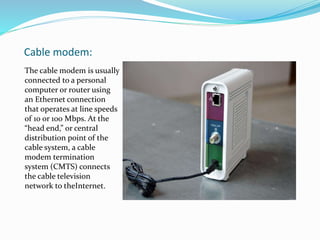
Cable modem:
The cable modem is usually
connected to a personal
computer or router using
an Ethernet connection
that operates at line speeds
of 10 or 100 Mbps. At the
“head end,” or central
distribution point of the
cable system, a cable
modem termination
system (CMTS) connects
the cable television
network to theInternet.
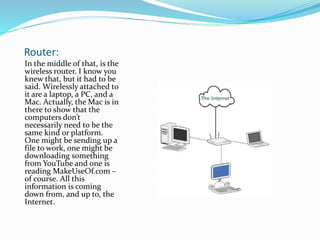
Router:
In the middle of that, is the
wireless router. I know you
knew that, but it had to be
said. Wirelessly attached to
it are a laptop, a PC, and a
Mac. Actually, the Mac is in
there to show that the
computers don’t
necessarily need to be the
same kind or platform.
One might be sending up a
file to work, one might be
downloading something
from YouTube and one is
reading MakeUseOf.com –
of course. All this
information is coming
down from, and up to, the
Internet.
Router:
 The router can only talk to one of these things at a
time.
 The process I’m about to talk about just happens so
fast that it seems to happen all at once.
 Let’s say that the Mac is uploading a file to work, the
laptop is watching YouTube and the PC is surfing
MakeUseOf.com. Each communication happens in
small packets of data.
Hub:
 Hub is defined as one common point for connecting
all networks devices. Various LAN segments are
connected to hub in order to organize the working of
network.
 Fifteen to 20 years ago, hubs were the preferred
method interconnecting network devices like PC's,
routers, network printers and more.
There are two Type of hubs:
1. Passive hub
2. Active hub
Hub:
1. Passive hub 2. Active hub
 The passive hub is just a
connector. It connect
different wires coming
from different branches
 It regenerate or implify
the signal before the
transmission
Hub:
 When referring to a network, a hub is the most basic
networking device that connects multiple computers
or other network devices together. Unlike a
network switch or router, a network hub has no
routing tables or intelligence on where to send
information and broadcasts all network data across
each connection. Most hubs can detect basic network
errors such as collisions, but having all information
broadcast to multiple ports can be a security risk and
cause bottlenecks. In the past, network hubs were
popular because they were cheaper than a switch or a
router.
Hub:
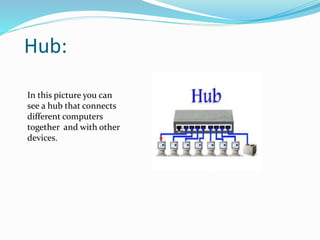
In this picture you can
see a hub that connects
different computers
together and with other
devices.
Network Card:
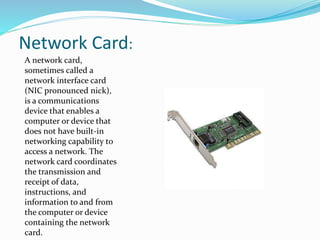
A network card,
sometimes called a
network interface card
(NIC pronounced nick),
is a communications
device that enables a
computer or device that
does not have built-in
networking capability to
access a network. The
network card coordinates
the transmission and
receipt of data,
instructions, and
information to and from
the computer or device
containing the network
card.
Network Card:
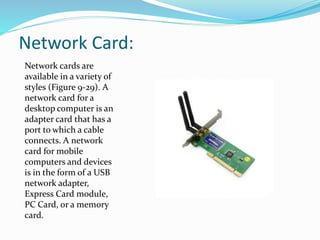
Network cards are
available in a variety of
styles (Figure 9-29). A
network card for a
desktop computer is an
adapter card that has a
port to which a cable
connects. A network
card for mobile
computers and devices
is in the form of a USB
network adapter,
Express Card module,
PC Card, or a memory
card.
Laptop:
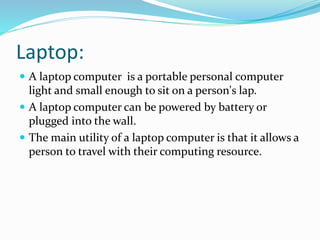
 A laptop computer is a portable personal computer
light and small enough to sit on a person's lap.
 A laptop computer can be powered by battery or
plugged into the wall.
 The main utility of a laptop computer is that it allows a
person to travel with their computing resource.
Laptop:
 We can communicate with laptop through connecting
it to internet. We can make video calls with different
users and communicate our thoughts.
 Laptop computers can communicate with other laptop
computers in several ways, each depending on what
type of hardware and software is available. Laptop to
laptop communication is used to share information
from one laptop to another and encompasses anything
from work
Laptop:
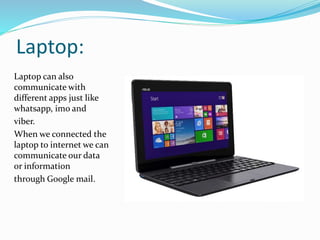
Laptop can also
communicate with
different apps just like
whatsapp, imo and
viber.
When we connected the
laptop to internet we can
communicate our data
or information
through Google mail.
Fax Machine:
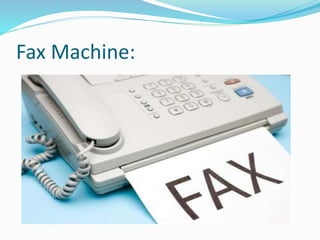
Fax Machine
 A device that sends and receives printed pages or images ov
er telephone
lines by digitizing the material with an internal optical sca
nner andtransmitting the information as electronic signals.
 From Alexander Bain's 1843 invention to today's internet
based fax systems (and everything in between) Alexander
Bain - Developed an Experimental Fax Machine between
1843 and 1846. Arthur Korn - Developed Fax Machine for
Transmitting Photographs. Edouard Belin - Inventor of the
Belinographe.
Fax Machine:
Fax Machine:
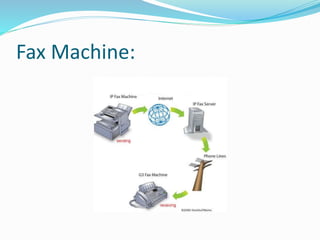
 A fax machine is also called telefax.
 The machine scans the document.
 It transfers the image of that document into a signal
 That signal is sent down a telephone line to another
fax machine
 The other machine decodes the signal and reproduces
the document
Fax Machine:
 You can walk into nearly any office and you'll find a
fax machine. Connected to a normal phone line, a fax
machine allows you to transmit pieces of paper to
someone else instantly! Even with FedEx and e-mail, it
is nearly impossible to do business without one of
these machines today.
Mobile Phone:
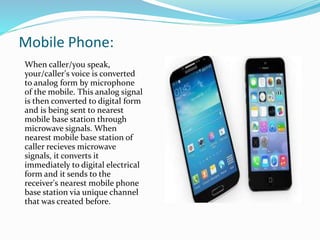
 A mobile phone is a wireless handheld device that
allows users to make calls and send text messages,
among other features. The earliest generation of
mobile phones could only make and receive calls.
Today’s mobile phones, however, are packed with
many additional features, such as Web browsers,
games, cameras, video players and even navigational
systems. Mobile phone may also be known as a cellular
phone or simply cellphone.
Mobile Phone:
When caller/you speak,
your/caller's voice is converted
to analog form by microphone
of the mobile. This analog signal
is then converted to digital form
and is being sent to nearest
mobile base station through
microwave signals. When
nearest mobile base station of
caller recieves microwave
signals, it converts it
immediately to digital electrical
form and it sends to the
receiver's nearest mobile phone
base station via unique channel
that was created before.
Bluetooth:
 A Bluetooth device works by using radio waves instead
of wires or cables to connect with your cell phone,
smartp
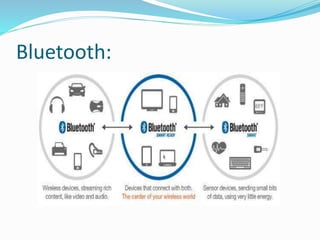
 Bluetooth is a wireless short-range communications
technology standard found in millions of products we
use every day – including headsets, smartphones,
laptops and portable speakers. A product with
Bluetooth technology, such as a Bluetooth headset, has
a tiny computer chip inside that contains the
Bluetooth radio, and software that makes connectivity
between devices possible.hone or computer.
Bluetooth:
Communication devices

Communication devices

  • 3.
    Leader name : HaiderChaudhary BITM-F15-034 Members name : Umair Shahid BITM-F15-023 Rana Abuzar BITM-F15-0 Aneeq Rajpoot BITM-F15-020 BS(IT) 1st Semester section:(A)
  • 4.
  • 5.
    Communication Devices  Acommunication device is a hardware device capable of transmitting an analog or digital signal over the telephone, other communication wire, or wirelessly. The best example of a communication device is a computer Modem, which is capable of sending and receiving a signal to allow computers to talk to other computers over the telephone. Other examples of communication devices include a network interface card (NIC), Wi-Fi devices, and an access point.
  • 6.
  • 7.
    History of Communicationdevices  The first means of communication was, of course, the human voice but about 3,200 BC writing was invented in Iraq and Egypt. It was invented about 1,500 BC in China.  The only American civilization to invent a true system of writing were the Mayans.  Communication 1500-1800 The next major improvement in communication was the invention of printing. The Chinese invented printing with blocks in the 6th century AD but the first known printed book was the Diamond Sutra of 686.
  • 8.
    History of Communicationdevices  The first newspapers were printed in the 17th century. The first newspaper in England was printed in 1641. (However the word newspaper was not recorded until 1670). The first successful daily newspaper in Britain was printed in 1702.  Communication in the 19th Century Communication became far more efficient in the 19th century. In the early 19th century the recipient of a letter had to pay the postage, not the sender. Then in 1840 Rowland Hill invented the Penny Post.
  • 9.
  • 10.
    Advantages of Communication Devices Communication devices canchange the world of a person with a disability. The ability to express needs, wants, and personality can be rewarded through a communication device. Children who get these devices at a young age have a bigger window to the world.
  • 11.
    Advantages of CommunicationDevices  Convenience is a major factor in the use of electronic communication devices. There is a greater level of ease attached to the use of the Internet and cell phones to communicate. Email enables you to send messages without much movement and effort compared to sending mail by post. The Internet is also a wealth of resources such as books, journals, and online stores where you can access anything you want. Cell phones are a source of convenience; they allow you to make a call to anyone irrespective of time, and distance.
  • 12.
    Advantages of CommunicationDevices  Electronic communication devices are easily accessible to people who would otherwise not have other modes of communication. In developing countries people who never owned a home telephone have cell phones. Cell phones also continue to evolve at a rapid rate. Many are now available that provide three or four ways to communicate, such as Internet connections, text messaging and standard phone links
  • 13.
    Some communication devicesare as follow: • Modem • Router • Hub • Network Cards • Laptop • Fax Machine • Mobile Phones • Bluetooth
  • 14.
    Modem: Modem is aelectronic devices that convert digital data signals into modulated analog signals suitable for transmission over analog telecommunications circuits. A modem also receives modulated signals and demodulates them, recovering the digital signal for use by the data equipment. We have two types of modems: 1. Voiceband modem 2. Cable modem
  • 15.
    Voice Band modem: They enable digital terminal equipment to communicate over telephone channels, which are designed around the narrow bandwidth requirements of the human voice.  Modems operate in part by communicating with each other, and to do this they must follow matching protocols, or operating standards. Worldwide standards for voiceband modems are established by the V-series of recommendations published by the Telecommunication Standardization sector of theInternational Telecommunication Union (ITU).
  • 16.
    Voice Band modem: Voiceband modems areused for telephony type infrastructures such as the dial-up network, analogue leased lines and voice channels of radio links. But also for communication over "dry" copper cable, voice band modems are widely used.
  • 17.
    Cable modem:  Cablemodem support the transmission of data over hybrid fibre-coaxial channels, which were originally designed to provide high-bandwidth television service.  A cable modem connects to a cable television system at the subscriber’s premises and enables two-way transmission of data over the cable system, generally to an Internet service provider (ISP).
  • 18.
    Cable modem: The cablemodem is usually connected to a personal computer or router using an Ethernet connection that operates at line speeds of 10 or 100 Mbps. At the “head end,” or central distribution point of the cable system, a cable modem termination system (CMTS) connects the cable television network to theInternet.
  • 19.
    Router: In the middleof that, is the wireless router. I know you knew that, but it had to be said. Wirelessly attached to it are a laptop, a PC, and a Mac. Actually, the Mac is in there to show that the computers don’t necessarily need to be the same kind or platform. One might be sending up a file to work, one might be downloading something from YouTube and one is reading MakeUseOf.com – of course. All this information is coming down from, and up to, the Internet.
  • 20.
    Router:  The routercan only talk to one of these things at a time.  The process I’m about to talk about just happens so fast that it seems to happen all at once.  Let’s say that the Mac is uploading a file to work, the laptop is watching YouTube and the PC is surfing MakeUseOf.com. Each communication happens in small packets of data.
  • 21.
    Hub:  Hub isdefined as one common point for connecting all networks devices. Various LAN segments are connected to hub in order to organize the working of network.  Fifteen to 20 years ago, hubs were the preferred method interconnecting network devices like PC's, routers, network printers and more. There are two Type of hubs: 1. Passive hub 2. Active hub
  • 22.
    Hub: 1. Passive hub2. Active hub  The passive hub is just a connector. It connect different wires coming from different branches  It regenerate or implify the signal before the transmission
  • 23.
    Hub:  When referringto a network, a hub is the most basic networking device that connects multiple computers or other network devices together. Unlike a network switch or router, a network hub has no routing tables or intelligence on where to send information and broadcasts all network data across each connection. Most hubs can detect basic network errors such as collisions, but having all information broadcast to multiple ports can be a security risk and cause bottlenecks. In the past, network hubs were popular because they were cheaper than a switch or a router.
  • 24.
    Hub: In this pictureyou can see a hub that connects different computers together and with other devices.
  • 25.
    Network Card: A networkcard, sometimes called a network interface card (NIC pronounced nick), is a communications device that enables a computer or device that does not have built-in networking capability to access a network. The network card coordinates the transmission and receipt of data, instructions, and information to and from the computer or device containing the network card.
  • 26.
    Network Card: Network cardsare available in a variety of styles (Figure 9-29). A network card for a desktop computer is an adapter card that has a port to which a cable connects. A network card for mobile computers and devices is in the form of a USB network adapter, Express Card module, PC Card, or a memory card.
  • 27.
    Laptop:  A laptopcomputer is a portable personal computer light and small enough to sit on a person's lap.  A laptop computer can be powered by battery or plugged into the wall.  The main utility of a laptop computer is that it allows a person to travel with their computing resource.
  • 28.
    Laptop:  We cancommunicate with laptop through connecting it to internet. We can make video calls with different users and communicate our thoughts.  Laptop computers can communicate with other laptop computers in several ways, each depending on what type of hardware and software is available. Laptop to laptop communication is used to share information from one laptop to another and encompasses anything from work
  • 29.
    Laptop: Laptop can also communicatewith different apps just like whatsapp, imo and viber. When we connected the laptop to internet we can communicate our data or information through Google mail.
  • 30.
  • 31.
    Fax Machine  Adevice that sends and receives printed pages or images ov er telephone lines by digitizing the material with an internal optical sca nner andtransmitting the information as electronic signals.  From Alexander Bain's 1843 invention to today's internet based fax systems (and everything in between) Alexander Bain - Developed an Experimental Fax Machine between 1843 and 1846. Arthur Korn - Developed Fax Machine for Transmitting Photographs. Edouard Belin - Inventor of the Belinographe.
  • 32.
  • 33.
    Fax Machine:  Afax machine is also called telefax.  The machine scans the document.  It transfers the image of that document into a signal  That signal is sent down a telephone line to another fax machine  The other machine decodes the signal and reproduces the document
  • 34.
    Fax Machine:  Youcan walk into nearly any office and you'll find a fax machine. Connected to a normal phone line, a fax machine allows you to transmit pieces of paper to someone else instantly! Even with FedEx and e-mail, it is nearly impossible to do business without one of these machines today.
  • 35.
    Mobile Phone:  Amobile phone is a wireless handheld device that allows users to make calls and send text messages, among other features. The earliest generation of mobile phones could only make and receive calls. Today’s mobile phones, however, are packed with many additional features, such as Web browsers, games, cameras, video players and even navigational systems. Mobile phone may also be known as a cellular phone or simply cellphone.
  • 36.
    Mobile Phone: When caller/youspeak, your/caller's voice is converted to analog form by microphone of the mobile. This analog signal is then converted to digital form and is being sent to nearest mobile base station through microwave signals. When nearest mobile base station of caller recieves microwave signals, it converts it immediately to digital electrical form and it sends to the receiver's nearest mobile phone base station via unique channel that was created before.
  • 37.
    Bluetooth:  A Bluetoothdevice works by using radio waves instead of wires or cables to connect with your cell phone, smartp  Bluetooth is a wireless short-range communications technology standard found in millions of products we use every day – including headsets, smartphones, laptops and portable speakers. A product with Bluetooth technology, such as a Bluetooth headset, has a tiny computer chip inside that contains the Bluetooth radio, and software that makes connectivity between devices possible.hone or computer.
  • 38.