© 2010 Pearson Addison-Wesley. All rights reserved.
Addison Wesley
is an imprint of
Designing the User Interface:
Strategies for Effective Human-Computer Interaction
Fifth Edition
Ben Shneiderman & Catherine Plaisant
in collaboration with
Maxine S. Cohen and Steven M. Jacobs
CHAPTER 9:
Collaboration and Social Media Participation
1-3
© 2010 Pearson Addison-Wesley. All rights reserved.
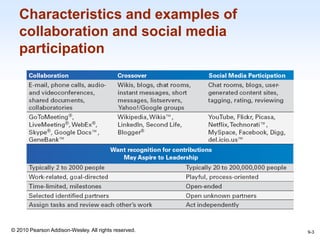
Characteristics and examples of
collaboration and social media
participation
9-3
1-4
© 2010 Pearson Addison-Wesley. All rights reserved.
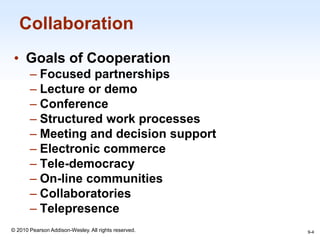
Collaboration
• Goals of Cooperation
– Focused partnerships
– Lecture or demo
– Conference
– Structured work processes
– Meeting and decision support
– Electronic commerce
– Tele-democracy
– On-line communities
– Collaboratories
– Telepresence
9-4
1-5
© 2010 Pearson Addison-Wesley. All rights reserved.
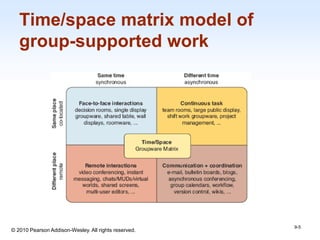
Time/space matrix model of
group-supported work
9-5
1-6
© 2010 Pearson Addison-Wesley. All rights reserved.
Asynchronous distributed interfaces:
Different place, different time
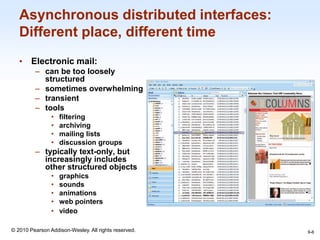
• Electronic mail:
– can be too loosely
structured
– sometimes overwhelming
– transient
– tools
• filtering
• archiving
• mailing lists
• discussion groups
– typically text-only, but
increasingly includes
other structured objects
• graphics
• sounds
• animations
• web pointers
• video
9-6
1-7
© 2010 Pearson Addison-Wesley. All rights reserved.
Asynchronous distributed interfaces:
Different place, different time (cont.)
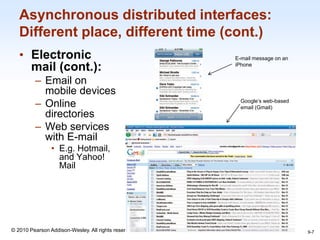
• Electronic
mail (cont.):
– Email on
mobile devices
– Online
directories
– Web services
with E-mail
• E.g. Hotmail,
and Yahoo!
Mail
9-7
E-mail message on an
iPhone
Google’s web-based
email (Gmail)
1-8
© 2010 Pearson Addison-Wesley. All rights reserved.
Asynchronous distributed interfaces:
Different place, different time (cont.)
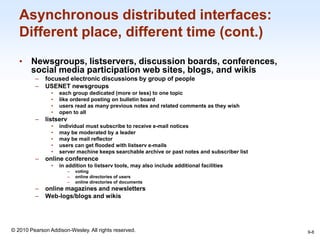
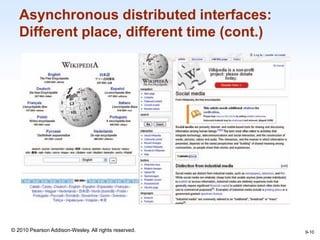
• Newsgroups, listservers, discussion boards, conferences,
social media participation web sites, blogs, and wikis
– focused electronic discussions by group of people
– USENET newsgroups
• each group dedicated (more or less) to one topic
• like ordered posting on bulletin board
• users read as many previous notes and related comments as they wish
• open to all
– listserv
• individual must subscribe to receive e-mail notices
• may be moderated by a leader
• may be mail reflector
• users can get flooded with listserv e-mails
• server machine keeps searchable archive or past notes and subscriber list
– online conference
• in addition to listserv tools, may also include additional facilities
– voting
– online directories of users
– online directories of documents
– online magazines and newsletters
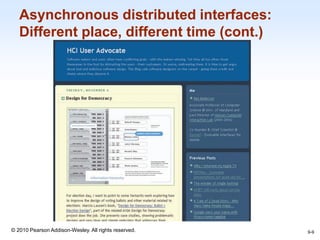
– Web-logs/blogs and wikis
9-8
1-9
© 2010 Pearson Addison-Wesley. All rights reserved.
Asynchronous distributed interfaces:
Different place, different time (cont.)
9-9
1-10
© 2010 Pearson Addison-Wesley. All rights reserved.
Asynchronous distributed interfaces:
Different place, different time (cont.)
9-10
1-11
© 2010 Pearson Addison-Wesley. All rights reserved.
Asynchronous distributed interfaces:
Different place, different time (cont.)
• Online and networked communities
– Group identity
– Patient support groups
– Impact on offline communities
– Community policies & freedom of speech
– Network communities can be controversial
• hackers
• hate groups
• para-military groups
– Distance education courses
– Reputation managers for online stores
9-11
1-12
© 2010 Pearson Addison-Wesley. All rights reserved.
Asynchronous distributed interfaces:
Different place, different time (cont.)
9-12
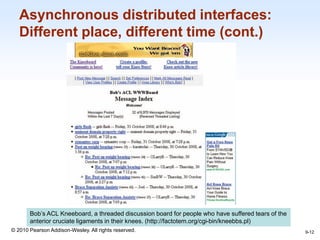
Bob’s ACL Kneeboard, a threaded discussion board for people who have suffered tears of the
anterior cruciate ligaments in their knees. (http://factotem.org/cgi-bin/kneebbs.pl)
1-13
© 2010 Pearson Addison-Wesley. All rights reserved.
Asynchronous distributed interfaces:
Different place, different time (cont.)
9-13
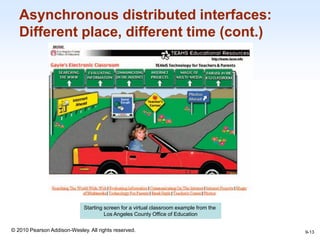
Starting screen for a virtual classroom example from the
Los Angeles County Office of Education
1-14
© 2010 Pearson Addison-Wesley. All rights reserved.
Asynchronous distributed interfaces:
Different place, different time (cont.)
9-14
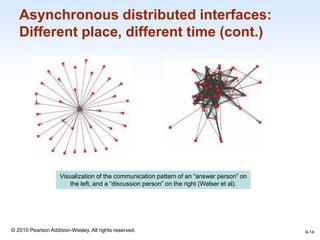
Visualization of the communication pattern of an “answer person” on
the left, and a “discussion person” on the right (Welser et al).
1-15
© 2010 Pearson Addison-Wesley. All rights reserved.
Synchronous distributed interfaces:
Different place, same time
• Synchronous distributed applications
– group editing
– shared screens for customer assistance
– give demonstrations simultaneously at
multiple sites
– allow sharing of information for various
applications
– interactive games
9-15
1-16
© 2010 Pearson Addison-Wesley. All rights reserved.
Synchronous distributed interfaces:
Different place, same time (cont.)
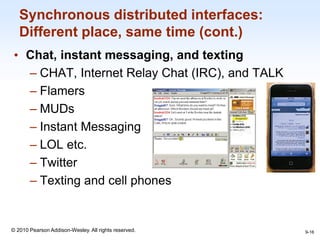
• Chat, instant messaging, and texting
– CHAT, Internet Relay Chat (IRC), and TALK
– Flamers
– MUDs
– Instant Messaging
– LOL etc.
– Twitter
– Texting and cell phones
9-16
1-17
© 2010 Pearson Addison-Wesley. All rights reserved.
Synchronous distributed interfaces:
Different place, same time (cont.)
9-17
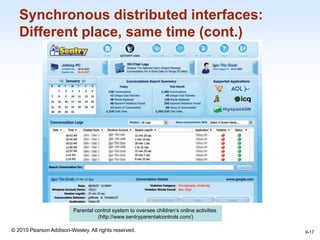
Parental control system to oversee children’s online activities
(http://www.sentryparentalcontrols.com/)
1-18
© 2010 Pearson Addison-Wesley. All rights reserved.
Synchronous distributed interfaces:
Different place, same time (cont.)
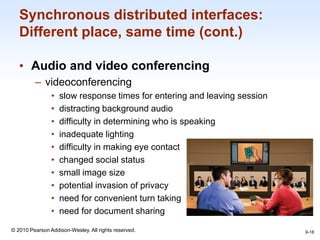
• Audio and video conferencing
– videoconferencing
• slow response times for entering and leaving session
• distracting background audio
• difficulty in determining who is speaking
• inadequate lighting
• difficulty in making eye contact
• changed social status
• small image size
• potential invasion of privacy
• need for convenient turn taking
• need for document sharing
9-18
1-19
© 2010 Pearson Addison-Wesley. All rights reserved.
Synchronous distributed interfaces:
Different place, same time (cont.)
• Audio and video conferencing (cont.)
– issues of ownership and control
• private and public workspaces
• identity of participants
• location of actions
• care with updating
– Whether audio or video conferencing is more
appealing than chat, IM, and texting, or more
effective than asynchronous text, depends on
the goals and the task environment
9-19
1-20
© 2010 Pearson Addison-Wesley. All rights reserved.
Face-to-face interfaces:
Same place, same time
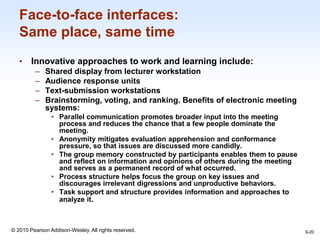
• Innovative approaches to work and learning include:
– Shared display from lecturer workstation
– Audience response units
– Text-submission workstations
– Brainstorming, voting, and ranking. Benefits of electronic meeting
systems:
• Parallel communication promotes broader input into the meeting
process and reduces the chance that a few people dominate the
meeting.
• Anonymity mitigates evaluation apprehension and conformance
pressure, so that issues are discussed more candidly.
• The group memory constructed by participants enables them to pause
and reflect on information and opinions of others during the meeting
and serves as a permanent record of what occurred.
• Process structure helps focus the group on key issues and
discourages irrelevant digressions and unproductive behaviors.
• Task support and structure provides information and approaches to
analyze it.
9-20
1-21
© 2010 Pearson Addison-Wesley. All rights reserved.
Face-to-face interfaces:
Same place, same time (cont.)
– File sharing
– Shared workspace
– Group activities
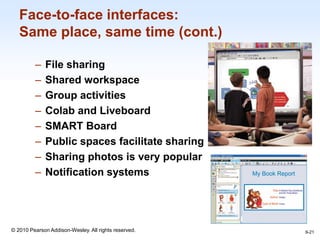
– Colab and Liveboard
– SMART Board
– Public spaces facilitate sharing
– Sharing photos is very popular
– Notification systems
9-21
1-22
© 2010 Pearson Addison-Wesley. All rights reserved.
Face-to-face interfaces:
Same place, same time (cont.)
• Electronic classrooms
– Active individual learning experiences include using
software during class time to:
– Write essays in English or poems in a foreign language
– Find antecedents of Impressionism in an art history library
of 9000 images
– Run business simulations to increase product quality
– Perform psychological statistical analyses
– Do landscaping with computer-assisted design and
graphics packages
– Compose computer programs and search the Internet
• Small teams and large teams
• Changes teaching style
9-22
1-23
© 2010 Pearson Addison-Wesley. All rights reserved.
Face-to-face interfaces:
Same place, same time (cont.)
9-23
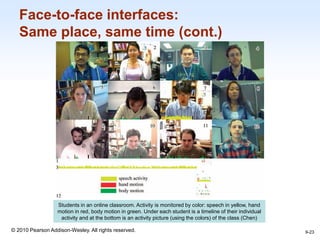
Students in an online classroom. Activity is monitored by color: speech in yellow, hand
motion in red, body motion in green. Under each student is a timeline of their individual
activity and at the bottom is an activity picture (using the colors) of the class (Chen)
1-24
© 2010 Pearson Addison-Wesley. All rights reserved.
Face-to-face interfaces:
Same place, same time (cont.)
9-24
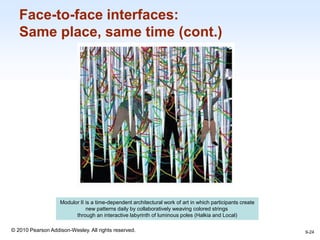
Modulor II is a time-dependent architectural work of art in which participants create
new patterns daily by collaboratively weaving colored strings
through an interactive labyrinth of luminous poles (Halkia and Local)
1-25
© 2010 Pearson Addison-Wesley. All rights reserved.
Questions for consideration
9-25

Chap09

  • 1.
    © 2010 PearsonAddison-Wesley. All rights reserved. Addison Wesley is an imprint of Designing the User Interface: Strategies for Effective Human-Computer Interaction Fifth Edition Ben Shneiderman & Catherine Plaisant in collaboration with Maxine S. Cohen and Steven M. Jacobs CHAPTER 9: Collaboration and Social Media Participation
  • 2.
    1-3 © 2010 PearsonAddison-Wesley. All rights reserved. Characteristics and examples of collaboration and social media participation 9-3
  • 3.
    1-4 © 2010 PearsonAddison-Wesley. All rights reserved. Collaboration • Goals of Cooperation – Focused partnerships – Lecture or demo – Conference – Structured work processes – Meeting and decision support – Electronic commerce – Tele-democracy – On-line communities – Collaboratories – Telepresence 9-4
  • 4.
    1-5 © 2010 PearsonAddison-Wesley. All rights reserved. Time/space matrix model of group-supported work 9-5
  • 5.
    1-6 © 2010 PearsonAddison-Wesley. All rights reserved. Asynchronous distributed interfaces: Different place, different time • Electronic mail: – can be too loosely structured – sometimes overwhelming – transient – tools • filtering • archiving • mailing lists • discussion groups – typically text-only, but increasingly includes other structured objects • graphics • sounds • animations • web pointers • video 9-6
  • 6.
    1-7 © 2010 PearsonAddison-Wesley. All rights reserved. Asynchronous distributed interfaces: Different place, different time (cont.) • Electronic mail (cont.): – Email on mobile devices – Online directories – Web services with E-mail • E.g. Hotmail, and Yahoo! Mail 9-7 E-mail message on an iPhone Google’s web-based email (Gmail)
  • 7.
    1-8 © 2010 PearsonAddison-Wesley. All rights reserved. Asynchronous distributed interfaces: Different place, different time (cont.) • Newsgroups, listservers, discussion boards, conferences, social media participation web sites, blogs, and wikis – focused electronic discussions by group of people – USENET newsgroups • each group dedicated (more or less) to one topic • like ordered posting on bulletin board • users read as many previous notes and related comments as they wish • open to all – listserv • individual must subscribe to receive e-mail notices • may be moderated by a leader • may be mail reflector • users can get flooded with listserv e-mails • server machine keeps searchable archive or past notes and subscriber list – online conference • in addition to listserv tools, may also include additional facilities – voting – online directories of users – online directories of documents – online magazines and newsletters – Web-logs/blogs and wikis 9-8
  • 8.
    1-9 © 2010 PearsonAddison-Wesley. All rights reserved. Asynchronous distributed interfaces: Different place, different time (cont.) 9-9
  • 9.
    1-10 © 2010 PearsonAddison-Wesley. All rights reserved. Asynchronous distributed interfaces: Different place, different time (cont.) 9-10
  • 10.
    1-11 © 2010 PearsonAddison-Wesley. All rights reserved. Asynchronous distributed interfaces: Different place, different time (cont.) • Online and networked communities – Group identity – Patient support groups – Impact on offline communities – Community policies & freedom of speech – Network communities can be controversial • hackers • hate groups • para-military groups – Distance education courses – Reputation managers for online stores 9-11
  • 11.
    1-12 © 2010 PearsonAddison-Wesley. All rights reserved. Asynchronous distributed interfaces: Different place, different time (cont.) 9-12 Bob’s ACL Kneeboard, a threaded discussion board for people who have suffered tears of the anterior cruciate ligaments in their knees. (http://factotem.org/cgi-bin/kneebbs.pl)
  • 12.
    1-13 © 2010 PearsonAddison-Wesley. All rights reserved. Asynchronous distributed interfaces: Different place, different time (cont.) 9-13 Starting screen for a virtual classroom example from the Los Angeles County Office of Education
  • 13.
    1-14 © 2010 PearsonAddison-Wesley. All rights reserved. Asynchronous distributed interfaces: Different place, different time (cont.) 9-14 Visualization of the communication pattern of an “answer person” on the left, and a “discussion person” on the right (Welser et al).
  • 14.
    1-15 © 2010 PearsonAddison-Wesley. All rights reserved. Synchronous distributed interfaces: Different place, same time • Synchronous distributed applications – group editing – shared screens for customer assistance – give demonstrations simultaneously at multiple sites – allow sharing of information for various applications – interactive games 9-15
  • 15.
    1-16 © 2010 PearsonAddison-Wesley. All rights reserved. Synchronous distributed interfaces: Different place, same time (cont.) • Chat, instant messaging, and texting – CHAT, Internet Relay Chat (IRC), and TALK – Flamers – MUDs – Instant Messaging – LOL etc. – Twitter – Texting and cell phones 9-16
  • 16.
    1-17 © 2010 PearsonAddison-Wesley. All rights reserved. Synchronous distributed interfaces: Different place, same time (cont.) 9-17 Parental control system to oversee children’s online activities (http://www.sentryparentalcontrols.com/)
  • 17.
    1-18 © 2010 PearsonAddison-Wesley. All rights reserved. Synchronous distributed interfaces: Different place, same time (cont.) • Audio and video conferencing – videoconferencing • slow response times for entering and leaving session • distracting background audio • difficulty in determining who is speaking • inadequate lighting • difficulty in making eye contact • changed social status • small image size • potential invasion of privacy • need for convenient turn taking • need for document sharing 9-18
  • 18.
    1-19 © 2010 PearsonAddison-Wesley. All rights reserved. Synchronous distributed interfaces: Different place, same time (cont.) • Audio and video conferencing (cont.) – issues of ownership and control • private and public workspaces • identity of participants • location of actions • care with updating – Whether audio or video conferencing is more appealing than chat, IM, and texting, or more effective than asynchronous text, depends on the goals and the task environment 9-19
  • 19.
    1-20 © 2010 PearsonAddison-Wesley. All rights reserved. Face-to-face interfaces: Same place, same time • Innovative approaches to work and learning include: – Shared display from lecturer workstation – Audience response units – Text-submission workstations – Brainstorming, voting, and ranking. Benefits of electronic meeting systems: • Parallel communication promotes broader input into the meeting process and reduces the chance that a few people dominate the meeting. • Anonymity mitigates evaluation apprehension and conformance pressure, so that issues are discussed more candidly. • The group memory constructed by participants enables them to pause and reflect on information and opinions of others during the meeting and serves as a permanent record of what occurred. • Process structure helps focus the group on key issues and discourages irrelevant digressions and unproductive behaviors. • Task support and structure provides information and approaches to analyze it. 9-20
  • 20.
    1-21 © 2010 PearsonAddison-Wesley. All rights reserved. Face-to-face interfaces: Same place, same time (cont.) – File sharing – Shared workspace – Group activities – Colab and Liveboard – SMART Board – Public spaces facilitate sharing – Sharing photos is very popular – Notification systems 9-21
  • 21.
    1-22 © 2010 PearsonAddison-Wesley. All rights reserved. Face-to-face interfaces: Same place, same time (cont.) • Electronic classrooms – Active individual learning experiences include using software during class time to: – Write essays in English or poems in a foreign language – Find antecedents of Impressionism in an art history library of 9000 images – Run business simulations to increase product quality – Perform psychological statistical analyses – Do landscaping with computer-assisted design and graphics packages – Compose computer programs and search the Internet • Small teams and large teams • Changes teaching style 9-22
  • 22.
    1-23 © 2010 PearsonAddison-Wesley. All rights reserved. Face-to-face interfaces: Same place, same time (cont.) 9-23 Students in an online classroom. Activity is monitored by color: speech in yellow, hand motion in red, body motion in green. Under each student is a timeline of their individual activity and at the bottom is an activity picture (using the colors) of the class (Chen)
  • 23.
    1-24 © 2010 PearsonAddison-Wesley. All rights reserved. Face-to-face interfaces: Same place, same time (cont.) 9-24 Modulor II is a time-dependent architectural work of art in which participants create new patterns daily by collaboratively weaving colored strings through an interactive labyrinth of luminous poles (Halkia and Local)
  • 24.
    1-25 © 2010 PearsonAddison-Wesley. All rights reserved. Questions for consideration 9-25