Online Learning Tools
Online Learning ToolsAsynchronous LearningStudent-Centered Teaching MethodUses online resources to facilitate information sharingTime and place for learning is controlled by the learner
Online Learning ToolsAsynchronous LearningBased on CONSTRUCTIVIST THEORY	Stresses PEER TO PEER INTERACTIONS
Online Learning ToolsAsynchronous LearningMost Popular ToolsEmailBlogsWikisThreaded ConferencesDiscussion Boards
Online Learning ToolsAsynchronous Learning Community5 Stages of DevelopmentCommunity has ACTIVE facilitator to nurture, guide, and monitor discourse among learnersFacilitator SUPPORTS interaction among group members as a means for knowledge construction and enhanced processing
Online Learning ToolsAsynchronous Learning Community5 Stages of Development3. Communities permit a certain amount of leniency for play within their discourse and thus allow the social development to build
Online Learning ToolsAsynchronous Learning Community5 Stages of Development4. Student-centered environment where instructor takes on multiple roles (instructional designers, facilitators, and assessors of grades and their teaching methods)Instructor establishes curriculum, methods and media for content deliveryInstructor facilitates the communication and directs the learningInstructor establishes a communal spiritInstructor reads, assesses, reinforces and encourages the interactions and learning happening
Online Learning ToolsAsynchronous Learning Community5 Stages of DevelopmentStudents are required to be actively involved and take responsibility for their learningStudents become proficient with the technology required for the courseStudents use new methods of communication with both peers and instructorsStudents strengthen their interdependency through collaboration with their peers
Online Learning ToolsSynchronous LearningLearners communicate in Real Time
Online Learning ToolsSynchronous LearningMost Popular ToolsChatInstant MessagingAudio/Video ConferencingWhite BoardsWeb ConferencingVirtual Space (Second Life)
Online Learning ToolsSynchronous LearningMost Popular ToolsText NotesMicrophone RightsBreakout Sessions
Online Learning ToolsSynchronous LearningWeb ConferencingBecoming increasingly interactiveTechnology developing to involve collaborative communicationWebinarElectronic Meeting SystemsVoIP (Voice over Internet Protocol)
Online Learning ToolsSynchronous LearningSynchronous  ConferencingOnline chat technologies that allows for computer-mediated communication, collaboration and learning Text-based, multi-user chat functionInstant messaging
Online Learning ToolsAsynchronous Learning BenefitsFreedom to learn 24-7Diverse population of learnersProvide high degree of interactivityStudents can express thoughts without interruptionProvides more time for reflectionMore efficient than synchronousAll materials, correspondence and interactions are electronically archived...Access is Timeless
Online Learning ToolsAsynchronous Learning WeaknessesTime and cost of creating the modules and setting up technologyTech skills of instructors and students may be inconsistentAccess to appropriate technology may be inequitable or inaccessible
Designing a Final ProjectPlan the course objectives according to the SlideShare for Online DiscussionsPlanningPresenceProvocationTools for SupportRecap

Online learning tools power point

  • 1.
  • 2.
    Online Learning ToolsAsynchronousLearningStudent-Centered Teaching MethodUses online resources to facilitate information sharingTime and place for learning is controlled by the learner
  • 3.
    Online Learning ToolsAsynchronousLearningBased on CONSTRUCTIVIST THEORY Stresses PEER TO PEER INTERACTIONS
  • 4.
    Online Learning ToolsAsynchronousLearningMost Popular ToolsEmailBlogsWikisThreaded ConferencesDiscussion Boards
  • 5.
    Online Learning ToolsAsynchronousLearning Community5 Stages of DevelopmentCommunity has ACTIVE facilitator to nurture, guide, and monitor discourse among learnersFacilitator SUPPORTS interaction among group members as a means for knowledge construction and enhanced processing
  • 6.
    Online Learning ToolsAsynchronousLearning Community5 Stages of Development3. Communities permit a certain amount of leniency for play within their discourse and thus allow the social development to build
  • 7.
    Online Learning ToolsAsynchronousLearning Community5 Stages of Development4. Student-centered environment where instructor takes on multiple roles (instructional designers, facilitators, and assessors of grades and their teaching methods)Instructor establishes curriculum, methods and media for content deliveryInstructor facilitates the communication and directs the learningInstructor establishes a communal spiritInstructor reads, assesses, reinforces and encourages the interactions and learning happening
  • 8.
    Online Learning ToolsAsynchronousLearning Community5 Stages of DevelopmentStudents are required to be actively involved and take responsibility for their learningStudents become proficient with the technology required for the courseStudents use new methods of communication with both peers and instructorsStudents strengthen their interdependency through collaboration with their peers
  • 9.
    Online Learning ToolsSynchronousLearningLearners communicate in Real Time
  • 10.
    Online Learning ToolsSynchronousLearningMost Popular ToolsChatInstant MessagingAudio/Video ConferencingWhite BoardsWeb ConferencingVirtual Space (Second Life)
  • 11.
    Online Learning ToolsSynchronousLearningMost Popular ToolsText NotesMicrophone RightsBreakout Sessions
  • 12.
    Online Learning ToolsSynchronousLearningWeb ConferencingBecoming increasingly interactiveTechnology developing to involve collaborative communicationWebinarElectronic Meeting SystemsVoIP (Voice over Internet Protocol)
  • 13.
    Online Learning ToolsSynchronousLearningSynchronous ConferencingOnline chat technologies that allows for computer-mediated communication, collaboration and learning Text-based, multi-user chat functionInstant messaging
  • 14.
    Online Learning ToolsAsynchronousLearning BenefitsFreedom to learn 24-7Diverse population of learnersProvide high degree of interactivityStudents can express thoughts without interruptionProvides more time for reflectionMore efficient than synchronousAll materials, correspondence and interactions are electronically archived...Access is Timeless
  • 15.
    Online Learning ToolsAsynchronousLearning WeaknessesTime and cost of creating the modules and setting up technologyTech skills of instructors and students may be inconsistentAccess to appropriate technology may be inequitable or inaccessible
  • 16.
    Designing a FinalProjectPlan the course objectives according to the SlideShare for Online DiscussionsPlanningPresenceProvocationTools for SupportRecap

Editor's Notes

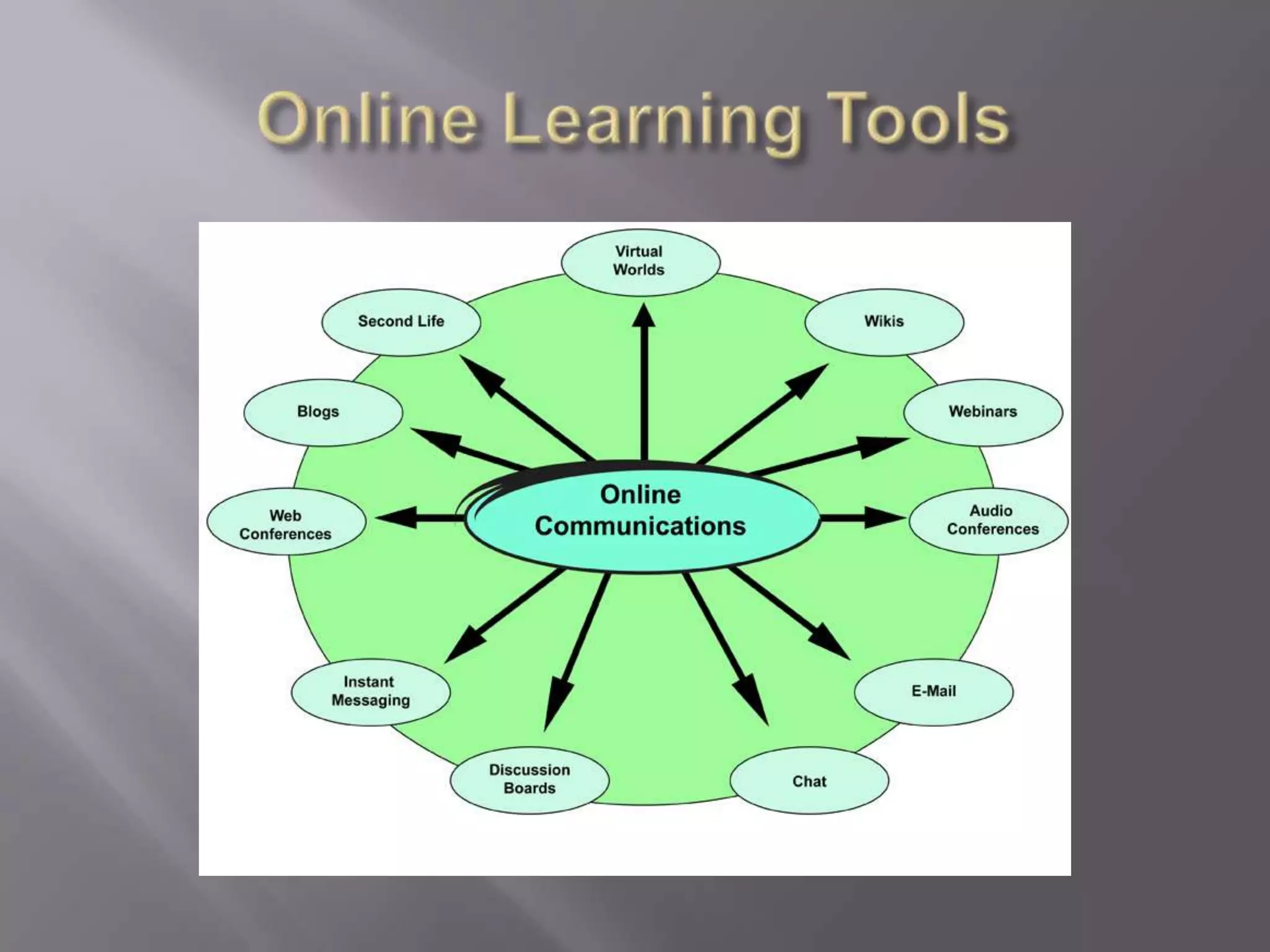
  • #2 The graphic organizer is a great tool to conceptualize visually the various tools for online learning and Web 2.0
  • #3 Asynchronous Learning Characteristics
  • #4 Asynchronous Learning Characteristics
  • #5 The Wikis and Blogs in English were excellent resource links. They provided a visual that had all the key principles that we learned thus far (contiguity, coherence, personalization, modality, and multimedia). I could not have understood wikis and blogs any more effectively than watching these two presentations.
  • #6 The five stages of development was important to me because it allowed me to focus on the roles of both learner and facilitator, and the importance of establishing an “online learning community.” I took an IDEAL facilitator course and I learned so much about the challenges of engaging learners that you will not see during the course. It was an eye opening experience but just as we strive to create a learning community in our physical classrooms, we also must do that in virtual space
  • #8 I really wanted to focus on key aspects of the instructor role because each was so important for instruction.
  • #9 Understanding the roles and responsibilities for students is important for the instructor because students are new to online learning as well. If we as instructors do not know the roles and responsibilities of our students then we will not be able to communicate clear expectations and it will impede their online learning experience.
  • #10 The learning occurs at a given time when all participants are brought together.
  • #11 I have never had a synchronous online experience other than this. We do not have chat, whiteboards, or conferencing, so I am not experienced enough to comment on these features as an experienced student.
  • #12 The reading about breakout sessions was important to me because I was amazed to find that we can pull small group in a virtual setting. Breakout sessions allow for the instructor to spend time individually with students while assigning virtual tasks for groups. Text notes are important for cognitive engagement and microphone rights allow for structured interactivity for learners regardless of location. The instruction can be individualized because you as an instructor can assess where each student is along the learning objectives continuum in your class.
  • #13 WEB CONFERENCINGA service that allows conferencing events to be shared with remote locations. A service that allows information to be shared simultaneously across geographically dispersed locations in nearly real time. Applications include meetings, training events, lectures, short presentations from any computer. Example WEBINARVOIP (Voice over Internet protocol)-allows for completely web-based communicationELECTRONIC MEETING SYSTEMS-provide a range of online facilitation tools such as brainstorming and categorization, a range of voting methods or structured discussions. SLIDE SHOW PRESENTATIONSLIVE OR STREAMING VIDEOWEB TOURS
  • #14 I am not experienced in this type of learning. All of my online learning before these ELN 101 and 102 has been asynchronous.
  • #15 A well designed course can pay dividends for businesses who can avoid travel and time constraints through asynchronous learning. The electronic archive function allows for an ongoing training orientation for companies to use when they hire new employees.
  • #16 I thought these were interesting facets to asynchronous learning. From reading this, along with our book, I realize that there’s not a lot of research to many of the multimedia principles to e-learning. It’s a new phase of learning and we are pioneers in this wonderful field.
  • #17 Each ELN 102Objective can go through this process and I can plan out how I would Design, Develop, Implement and Evaluate.I would be able to use some of the items on the HUGE list of communication tools from this chapter to develop content knowledge in all the principles we covered. (modality, multimedia, contiguity, personalization, etc.) I could use the Tips from the book to reinforce learning and provoke ongoing discussion. I could also use the rubrics to evaluate learning. After seeing this slide, I’m excited about what I can create as a final project because it gives a great structure that I can tie in with all of our learning objectives.I LOVED THIS WEEK. THE TOOLS I SAW WERE AWESOME. Everything I learned this week will help me as an instructional leader on my campus. Out of the sites listed to explore, I was fascinated with Adobe Connect. I thought it had the most user-friendly applicable presentations to me. I’m thinking of getting the software (CSS5) and playing around with it to learn more. I have lots of content I can present, and this would certainly provide options for me.