PROCESS: SETTING UP PHOTOSHOP
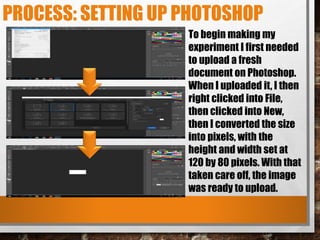
To begin making my
experiment I first needed
to upload a fresh
document on Photoshop.
When I uploaded it, I then
right clicked into File,
then clicked into New,
then I converted the size
into pixels, with the
height and width set at
120 by 80 pixels. With that
taken care off, the image
was ready to upload.
PROCESS: CREATING THE BACKGROUND
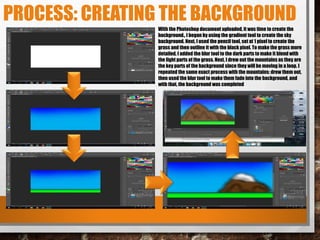
With the Photoshop document uploaded, it was time to create the
background., I began by using the gradient tool to create the sky
background. Next, I used the pencil tool, set at 1 pixel to create the
grass and then outline it with the black pixel. To make the grass more
detailed, I added the blur tool to the dark parts to make it blend with
the light parts of the grass. Next, I drew out the mountains as they are
the key parts of the background since they will be moving in a loop. I
repeated the same exact process with the mountains: drew them out,
then used the blur tool to make them fade into the background, and
with that, the background was completed
PROCESS: CREATING ALLY AND LAYERS
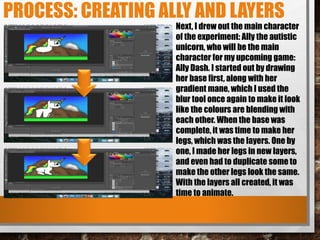
Next, I drew out the main character
of the experiment: Ally the autistic
unicorn, who will be the main
character for my upcoming game:
Ally Dash. I started out by drawing
her base first, along with her
gradient mane, which I used the
blur tool once again to make it look
like the colours are blending with
each other. When the base was
complete, it was time to make her
legs, which was the layers. One by
one, I made her legs in new layers,
and even had to duplicate some to
make the other legs look the same.
With the layers all created, it was
time to animate.
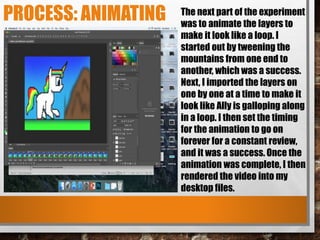
PROCESS: ANIMATING The next part of the experiment
was to animate the layers to
make it look like a loop. I
started out by tweening the
mountains from one end to
another, which was a success.
Next, I imported the layers on
one by one at a time to make it
look like Ally is galloping along
in a loop. I then set the timing
for the animation to go on
forever for a constant review,
and it was a success. Once the
animation was complete, I then
rendered the video into my
desktop files.
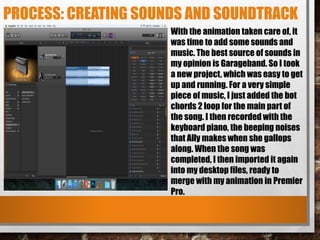
PROCESS: CREATING SOUNDS AND SOUNDTRACK
With the animation taken care of, it
was time to add some sounds and
music. The best source of sounds in
my opinion is Garageband. So I took
a new project, which was easy to get
up and running. For a very simple
piece of music, I just added the bot
chords 2 loop for the main part of
the song. I then recorded with the
keyboard piano, the beeping noises
that Ally makes when she gallops
along. When the song was
completed, I then imported it again
into my desktop files, ready to
merge with my animation in Premier
Pro.
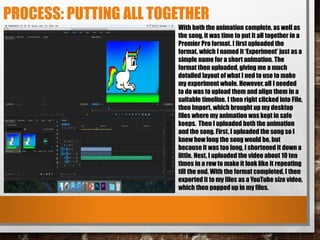
PROCESS: PUTTING ALL TOGETHER
With both the animation complete, as well as
the song, it was time to put it all together in a
Premier Pro format. I first uploaded the
format, which I named it ‘Experiment’ just as a
simple name for a short animation. The
format then uploaded, giving me a much
detailed layout of what I ned to use to make
my experiment whole. However, all I needed
to do was to upload them and align them in a
suitable timeline. I then right clicked into File,
then Import, which brought up my desktop
files where my animation was kept in safe
keeps. Then I uploaded both the animation
and the song. First, I uploaded the song so I
knew how long the song would be, but
because it was too long, I shortened it down a
little. Next, I uploaded the video about 10 ten
times in a row to make it look like it repeating
till the end. With the format completed, I then
exported it to my files as a YouTube size video,
which then popped up in my files.
REFLECTION
• WHAT ELEMENTS OF YOUR EXPERIMENT WILL YOU
INCLUDE IN YOUR FINAL PRODUCT?
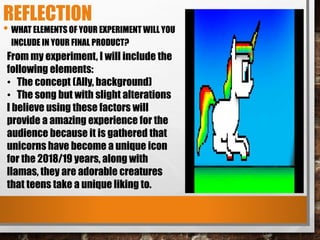
From my experiment, I will include the
following elements:
• The concept (Ally, background)
• The song but with slight alterations
I believe using these factors will
provide a amazing experience for the
audience because it is gathered that
unicorns have become a unique icon
for the 2018/19 years, along with
llamas, they are adorable creatures
that teens take a unique liking to.

1. production experiments

  • 2.
    PROCESS: SETTING UPPHOTOSHOP To begin making my experiment I first needed to upload a fresh document on Photoshop. When I uploaded it, I then right clicked into File, then clicked into New, then I converted the size into pixels, with the height and width set at 120 by 80 pixels. With that taken care off, the image was ready to upload.
  • 3.
    PROCESS: CREATING THEBACKGROUND With the Photoshop document uploaded, it was time to create the background., I began by using the gradient tool to create the sky background. Next, I used the pencil tool, set at 1 pixel to create the grass and then outline it with the black pixel. To make the grass more detailed, I added the blur tool to the dark parts to make it blend with the light parts of the grass. Next, I drew out the mountains as they are the key parts of the background since they will be moving in a loop. I repeated the same exact process with the mountains: drew them out, then used the blur tool to make them fade into the background, and with that, the background was completed
  • 4.
    PROCESS: CREATING ALLYAND LAYERS Next, I drew out the main character of the experiment: Ally the autistic unicorn, who will be the main character for my upcoming game: Ally Dash. I started out by drawing her base first, along with her gradient mane, which I used the blur tool once again to make it look like the colours are blending with each other. When the base was complete, it was time to make her legs, which was the layers. One by one, I made her legs in new layers, and even had to duplicate some to make the other legs look the same. With the layers all created, it was time to animate.
  • 5.
    PROCESS: ANIMATING Thenext part of the experiment was to animate the layers to make it look like a loop. I started out by tweening the mountains from one end to another, which was a success. Next, I imported the layers on one by one at a time to make it look like Ally is galloping along in a loop. I then set the timing for the animation to go on forever for a constant review, and it was a success. Once the animation was complete, I then rendered the video into my desktop files.
  • 6.
    PROCESS: CREATING SOUNDSAND SOUNDTRACK With the animation taken care of, it was time to add some sounds and music. The best source of sounds in my opinion is Garageband. So I took a new project, which was easy to get up and running. For a very simple piece of music, I just added the bot chords 2 loop for the main part of the song. I then recorded with the keyboard piano, the beeping noises that Ally makes when she gallops along. When the song was completed, I then imported it again into my desktop files, ready to merge with my animation in Premier Pro.
  • 7.
    PROCESS: PUTTING ALLTOGETHER With both the animation complete, as well as the song, it was time to put it all together in a Premier Pro format. I first uploaded the format, which I named it ‘Experiment’ just as a simple name for a short animation. The format then uploaded, giving me a much detailed layout of what I ned to use to make my experiment whole. However, all I needed to do was to upload them and align them in a suitable timeline. I then right clicked into File, then Import, which brought up my desktop files where my animation was kept in safe keeps. Then I uploaded both the animation and the song. First, I uploaded the song so I knew how long the song would be, but because it was too long, I shortened it down a little. Next, I uploaded the video about 10 ten times in a row to make it look like it repeating till the end. With the format completed, I then exported it to my files as a YouTube size video, which then popped up in my files.
  • 8.
    REFLECTION • WHAT ELEMENTSOF YOUR EXPERIMENT WILL YOU INCLUDE IN YOUR FINAL PRODUCT? From my experiment, I will include the following elements: • The concept (Ally, background) • The song but with slight alterations I believe using these factors will provide a amazing experience for the audience because it is gathered that unicorns have become a unique icon for the 2018/19 years, along with llamas, they are adorable creatures that teens take a unique liking to.

Editor's Notes

  • #3 Discuss the tools and processes used in your experiments
  • #4 Discuss the tools and processes used in your experiments
  • #5 Discuss the tools and processes used in your experiments
  • #6 Discuss the tools and processes used in your experiments
  • #7 Discuss the tools and processes used in your experiments
  • #8 Discuss the tools and processes used in your experiments