Experiments
Victoria Meadowcroft
Process
Process
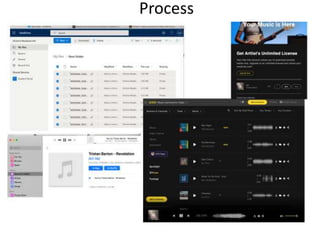
• I decided to experiment with some different music websites and see
where I could find the most applicable and free music for my film
trailer and so I tried a website called ‘Artist’ which offers a variety of
music options, from genres, moods and styles. Because I knew I was
going to create a small nature trailer, I filtered the search with nature
so that the most popular and varied songs appeared and after
listening to a few, I went with ‘ Revelations’ by Tristan Barton because
as soon as I listened to it I knew that it would fit the vibe that I
wanted to have throughout my whole video. In addition to this, I
selected this one because it is a calm song but still adds the slight bit
of mystery and danger and made the whole trailer seem mystical.
Once I had chosen the song, I downloaded into my one drive, so that I
could easily edit into my trailer on Premiere Pro.
Process
Process
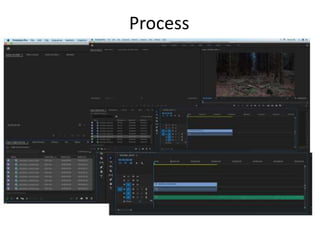
• Once I had downloaded the song and imported all
the necessary files, I then began to put them all
together in a certain order, so that each clip built
up to a major clip where the main beat of the song
is introduced, to make the short video more
cinematic and have more of an impact on my
audience. Throughout the process I made sure that
each clip syncs with the music, which makes it
seemingly smooth and more entertaining to keep
the audiences focus in check. I edited the video
using Premiere Pro.
Process
Process
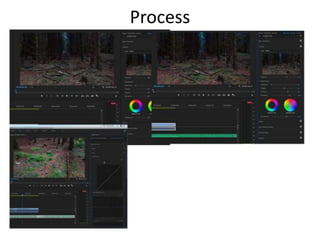
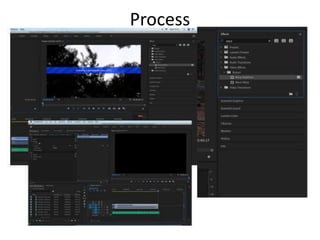
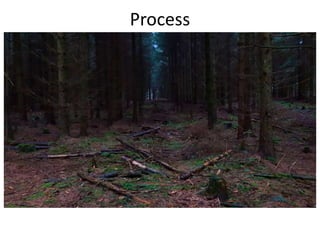
• Throughout the process of putting all the clips together, I realized that
the colours of the scenery were not to the standard that I wanted
them to be, to be able to give off that cinematic look, so I used a
technique called ‘Colourgradeing’, which allowed me to alter every
aspect of the colours, such as, the saturation, tint, hue etc.
Additionally a tool, which I newly discovered was something called
‘Curve’, which enables you to darken or lighten the imagery, which
came in handy because I wanted the forest imagery to appear dark
and empty, to consume my audience members. Furthermore, I did
this throughout the whole video, editing the saturation and making
certain aspects lighter or darker. In addition to this a particular detail
which I carried out throughout this fabrication was making the green
colours highly saturated so that they contrasted with the darker
sky/trees.
Process
Process
• Lastly, during the development of my short nature
trailer, I noticed that a few clips were not as
smooth as I had hoped, so to solve this I used an
effect which is called ‘Warp Stabilizer’, which can
be applied to clips to make them smoother and
reduce/get rid of any unstableness which occurred
whilst filming. Additionally, towards the end of the
scenes and the music, I added in a faded affect so
that when the video ends the music smoothly fades
out with it, it just gives it more of a professional
look, which is what I aim for when creating my
products.
Process
Process
Process
Process
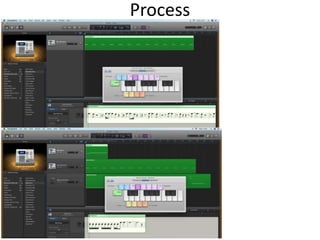
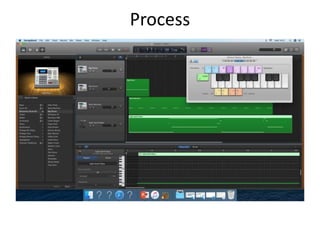
To get more of an idea on how to produce the right music for my film trailer, I decided to
experiment with the software called ‘ Garageband’ which allows you to choose beats,
rhythms and instruments from a wide range of choices. To begin with, I selected an
electoral instrument called ‘beat machine’ and you can either use a small piano keyboard
or a selected number of keys on a keyboard, but I didn’t have access to a one-handed
piano, so I used what I already had, and it turned out pretty well considering I had never
used the software so intricately before. Once I had created my bass line, I then moved
onto producing two other rhythms using the beat machine again and the ‘Agile synth
bass’. In addition to this, it was difficult to work it at first but then I got the hang of it and
really learnt my way around using an everyday keyboard to produce a short piece of
music. Lastly, when I had finished, I exported the piece as a mp3 so that I could insert it
into this PowerPoint and to make it easier to find/listen too.
Reflection
• What elements of your experiments will you
include in your final product?

4. production experiments

  • 1.
  • 2.
  • 3.
    Process • I decidedto experiment with some different music websites and see where I could find the most applicable and free music for my film trailer and so I tried a website called ‘Artist’ which offers a variety of music options, from genres, moods and styles. Because I knew I was going to create a small nature trailer, I filtered the search with nature so that the most popular and varied songs appeared and after listening to a few, I went with ‘ Revelations’ by Tristan Barton because as soon as I listened to it I knew that it would fit the vibe that I wanted to have throughout my whole video. In addition to this, I selected this one because it is a calm song but still adds the slight bit of mystery and danger and made the whole trailer seem mystical. Once I had chosen the song, I downloaded into my one drive, so that I could easily edit into my trailer on Premiere Pro.
  • 4.
  • 5.
    Process • Once Ihad downloaded the song and imported all the necessary files, I then began to put them all together in a certain order, so that each clip built up to a major clip where the main beat of the song is introduced, to make the short video more cinematic and have more of an impact on my audience. Throughout the process I made sure that each clip syncs with the music, which makes it seemingly smooth and more entertaining to keep the audiences focus in check. I edited the video using Premiere Pro.
  • 6.
  • 7.
    Process • Throughout theprocess of putting all the clips together, I realized that the colours of the scenery were not to the standard that I wanted them to be, to be able to give off that cinematic look, so I used a technique called ‘Colourgradeing’, which allowed me to alter every aspect of the colours, such as, the saturation, tint, hue etc. Additionally a tool, which I newly discovered was something called ‘Curve’, which enables you to darken or lighten the imagery, which came in handy because I wanted the forest imagery to appear dark and empty, to consume my audience members. Furthermore, I did this throughout the whole video, editing the saturation and making certain aspects lighter or darker. In addition to this a particular detail which I carried out throughout this fabrication was making the green colours highly saturated so that they contrasted with the darker sky/trees.
  • 8.
  • 9.
    Process • Lastly, duringthe development of my short nature trailer, I noticed that a few clips were not as smooth as I had hoped, so to solve this I used an effect which is called ‘Warp Stabilizer’, which can be applied to clips to make them smoother and reduce/get rid of any unstableness which occurred whilst filming. Additionally, towards the end of the scenes and the music, I added in a faded affect so that when the video ends the music smoothly fades out with it, it just gives it more of a professional look, which is what I aim for when creating my products.
  • 10.
  • 11.
  • 12.
  • 13.
    Process To get moreof an idea on how to produce the right music for my film trailer, I decided to experiment with the software called ‘ Garageband’ which allows you to choose beats, rhythms and instruments from a wide range of choices. To begin with, I selected an electoral instrument called ‘beat machine’ and you can either use a small piano keyboard or a selected number of keys on a keyboard, but I didn’t have access to a one-handed piano, so I used what I already had, and it turned out pretty well considering I had never used the software so intricately before. Once I had created my bass line, I then moved onto producing two other rhythms using the beat machine again and the ‘Agile synth bass’. In addition to this, it was difficult to work it at first but then I got the hang of it and really learnt my way around using an everyday keyboard to produce a short piece of music. Lastly, when I had finished, I exported the piece as a mp3 so that I could insert it into this PowerPoint and to make it easier to find/listen too.
  • 14.
    Reflection • What elementsof your experiments will you include in your final product?

Editor's Notes

  • #3 Discuss the tools and processes used in your experiments
  • #4 Discuss the tools and processes used in your experiments
  • #5 Discuss the tools and processes used in your experiments
  • #6 Discuss the tools and processes used in your experiments
  • #7 Discuss the tools and processes used in your experiments
  • #8 Discuss the tools and processes used in your experiments
  • #9 Discuss the tools and processes used in your experiments
  • #10 Discuss the tools and processes used in your experiments
  • #11 Discuss the tools and processes used in your experiments
  • #12 Discuss the tools and processes used in your experiments
  • #13 Discuss the tools and processes used in your experiments
  • #14 Discuss the tools and processes used in your experiments