Experiments
Laurence Archer
Process
● When creating a file in ‘Adobe Photoshop’
I made a extremely small image size, this is
so I can draw at the smallest scale
possible.
○ I chose to draw at this scale so I can
create a pixel art style of animation.
○ I needed the image to be small so
then when I create my animation it
will not take too long too draw the
background.
● I then also had to open the timeline
together so I can create new frames and
begin to create an animation.
○ This is done when you open your file
you select ‘Window<Timeline’.
Reflection
● Everything displayed in the previous slide will be used during production of my
animation.
○ This is because all the settings used in the software are essential for saving
time when creating the animation.
○ They will also be essential as I cannot create an animation without having the
settings on photoshop being used.
● These elements of my experiments will be vital for production as they are the
biggest way to save time during production of the animation.
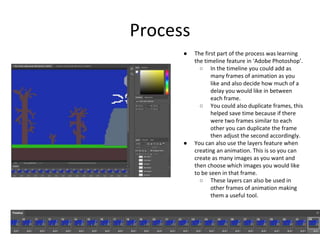
Process
● The first part of the process was learning
the timeline feature in ‘Adobe Photoshop’.
○ In the timeline you could add as
many frames of animation as you
like and also decide how much of a
delay you would like in between
each frame.
○ You could also duplicate frames, this
helped save time because if there
were two frames similar to each
other you can duplicate the frame
then adjust the second accordingly.
● You can also use the layers feature when
creating an animation. This is so you can
create as many images as you want and
then choose which images you would like
to be seen in that frame.
○ These layers can also be used in
other frames of animation making
them a useful tool.
Reflection
● Once again I will need to keep every element of my experiment in my final
production.
● The timeline feature used in the experiment will be vital when creating an
animation in ‘Adobe Photoshop’.
○ This will allow me to create new frames in the software, making it
possible to create animations in this software.
● The layers tool will also be extremely important as I can create seperate parts of
the image which allows me to not redraw every frame each time.
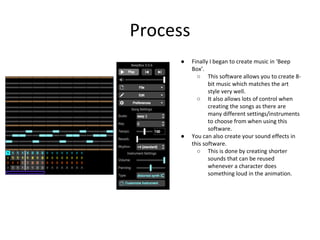
Process
● Finally I began to create music in ‘Beep
Box’.
○ This software allows you to create 8-
bit music which matches the art
style very well.
○ It also allows lots of control when
creating the songs as there are
many different settings/instruments
to choose from when using this
software.
● You can also create your sound effects in
this software.
○ This is done by creating shorter
sounds that can be reused
whenever a character does
something loud in the animation.
Reflection
● The main element that must be used in this experiment is the use of sound
effects.
○ This section allows me to create sound effects that match the 8-bit art
style used in the animation.
○ It also allows simple and easy creation of each sound effect in the
animation.
● I may be able to create music in ‘Garage Band’ if the tools in that software
can create a better soundtrack for the animation.

1. production experiments

  • 1.
  • 2.
    Process ● When creatinga file in ‘Adobe Photoshop’ I made a extremely small image size, this is so I can draw at the smallest scale possible. ○ I chose to draw at this scale so I can create a pixel art style of animation. ○ I needed the image to be small so then when I create my animation it will not take too long too draw the background. ● I then also had to open the timeline together so I can create new frames and begin to create an animation. ○ This is done when you open your file you select ‘Window<Timeline’.
  • 3.
    Reflection ● Everything displayedin the previous slide will be used during production of my animation. ○ This is because all the settings used in the software are essential for saving time when creating the animation. ○ They will also be essential as I cannot create an animation without having the settings on photoshop being used. ● These elements of my experiments will be vital for production as they are the biggest way to save time during production of the animation.
  • 4.
    Process ● The firstpart of the process was learning the timeline feature in ‘Adobe Photoshop’. ○ In the timeline you could add as many frames of animation as you like and also decide how much of a delay you would like in between each frame. ○ You could also duplicate frames, this helped save time because if there were two frames similar to each other you can duplicate the frame then adjust the second accordingly. ● You can also use the layers feature when creating an animation. This is so you can create as many images as you want and then choose which images you would like to be seen in that frame. ○ These layers can also be used in other frames of animation making them a useful tool.
  • 5.
    Reflection ● Once againI will need to keep every element of my experiment in my final production. ● The timeline feature used in the experiment will be vital when creating an animation in ‘Adobe Photoshop’. ○ This will allow me to create new frames in the software, making it possible to create animations in this software. ● The layers tool will also be extremely important as I can create seperate parts of the image which allows me to not redraw every frame each time.
  • 6.
    Process ● Finally Ibegan to create music in ‘Beep Box’. ○ This software allows you to create 8- bit music which matches the art style very well. ○ It also allows lots of control when creating the songs as there are many different settings/instruments to choose from when using this software. ● You can also create your sound effects in this software. ○ This is done by creating shorter sounds that can be reused whenever a character does something loud in the animation.
  • 7.
    Reflection ● The mainelement that must be used in this experiment is the use of sound effects. ○ This section allows me to create sound effects that match the 8-bit art style used in the animation. ○ It also allows simple and easy creation of each sound effect in the animation. ● I may be able to create music in ‘Garage Band’ if the tools in that software can create a better soundtrack for the animation.