FMP Experiment: Mouth
Movement (Smile)
Amy Watson
Process: Drawing Layers
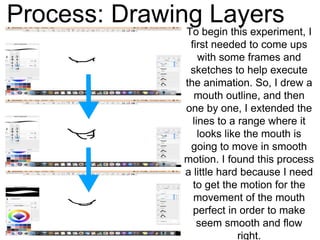
To begin this experiment, I
first needed to come ups
with some frames and
sketches to help execute
the animation. So, I drew a
mouth outline, and then
one by one, I extended the
lines to a range where it
looks like the mouth is
going to move in smooth
motion. I found this process
a little hard because I need
to get the motion for the
movement of the mouth
perfect in order to make
seem smooth and flow
right.
Process: Assembling In Dragonframe
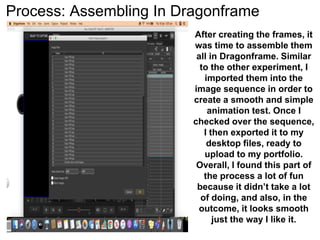
After creating the frames, it
was time to assemble them
all in Dragonframe. Similar
to the other experiment, I
imported them into the
image sequence in order to
create a smooth and simple
animation test. Once I
checked over the sequence,
I then exported it to my
desktop files, ready to
upload to my portfolio.
Overall, I found this part of
the process a lot of fun
because it didn’t take a lot
of doing, and also, in the
outcome, it looks smooth
just the way I like it.
Reflection
What elements will I be using within my final product?
I will use Dragonframe to
assemble the frames together in
order to create a nice and
smooth animation. I will also
use this style of mouth
movement to create a nice and
simple movement that is also
complex and fitting to speech
timing.

Mouth smile

  • 1.
  • 2.
    Process: Drawing Layers Tobegin this experiment, I first needed to come ups with some frames and sketches to help execute the animation. So, I drew a mouth outline, and then one by one, I extended the lines to a range where it looks like the mouth is going to move in smooth motion. I found this process a little hard because I need to get the motion for the movement of the mouth perfect in order to make seem smooth and flow right.
  • 3.
    Process: Assembling InDragonframe After creating the frames, it was time to assemble them all in Dragonframe. Similar to the other experiment, I imported them into the image sequence in order to create a smooth and simple animation test. Once I checked over the sequence, I then exported it to my desktop files, ready to upload to my portfolio. Overall, I found this part of the process a lot of fun because it didn’t take a lot of doing, and also, in the outcome, it looks smooth just the way I like it.
  • 4.
    Reflection What elements willI be using within my final product? I will use Dragonframe to assemble the frames together in order to create a nice and smooth animation. I will also use this style of mouth movement to create a nice and simple movement that is also complex and fitting to speech timing.