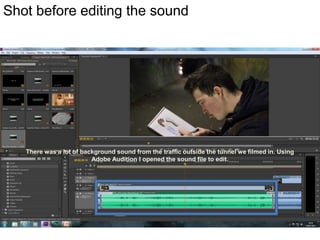
Shot before editing the sound

There was a lot of background sound from the traffic outside the tunnel we filmed in. Using
Adobe Audition I opened the sound file to edit.
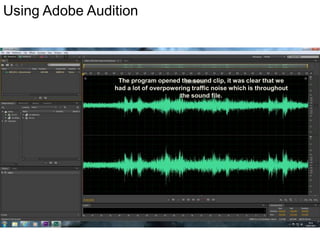
Using Adobe Audition

The program opened the sound clip, it was clear that we
had a lot of overpowering traffic noise which is throughout
the sound file.
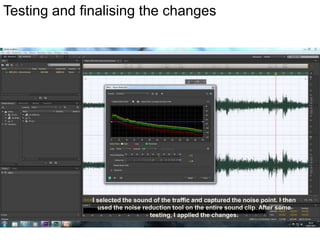
Testing and finalising the changes

I selected the sound of the traffic and captured the noise point. I then
used the noise reduction tool on the entire sound clip. After some
testing, I applied the changes.
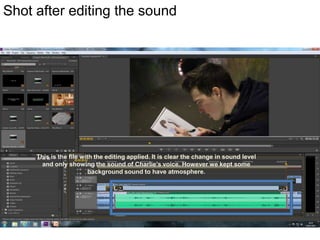
Shot after editing the sound

This is the file with the editing applied. It is clear the change in sound level
and only showing the sound of Charlie’s voice. However we kept some
background sound to have atmosphere.

Post 41 - Post Production Editing

  • 1.
    Shot before editingthe sound There was a lot of background sound from the traffic outside the tunnel we filmed in. Using Adobe Audition I opened the sound file to edit.
  • 2.
    Using Adobe Audition Theprogram opened the sound clip, it was clear that we had a lot of overpowering traffic noise which is throughout the sound file.
  • 3.
    Testing and finalisingthe changes I selected the sound of the traffic and captured the noise point. I then used the noise reduction tool on the entire sound clip. After some testing, I applied the changes.
  • 4.
    Shot after editingthe sound This is the file with the editing applied. It is clear the change in sound level and only showing the sound of Charlie’s voice. However we kept some background sound to have atmosphere.