Experiments
Claudia Slater
Process
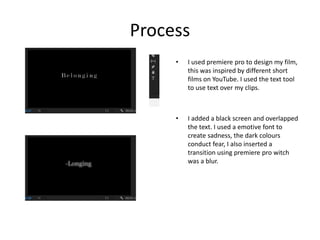
• I used premiere pro to design my film,
this was inspired by different short
films on YouTube. I used the text tool
to use text over my clips.
• I added a black screen and overlapped
the text. I used a emotive font to
create sadness, the dark colours
conduct fear, I also inserted a
transition using premiere pro witch
was a blur.
Process
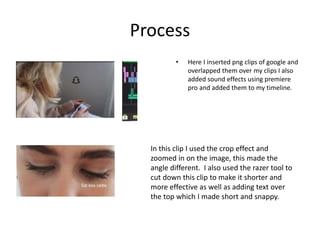
• Here I inserted png clips of google and
overlapped them over my clips I also
added sound effects using premiere
pro and added them to my timeline.
In this clip I used the crop effect and
zoomed in on the image, this made the
angle different. I also used the razer tool to
cut down this clip to make it shorter and
more effective as well as adding text over
the top which I made short and snappy.
Process
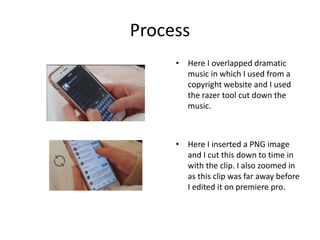
• Here I overlapped dramatic
music in which I used from a
copyright website and I used
the razer tool cut down the
music.
• Here I inserted a PNG image
and I cut this down to time in
with the clip. I also zoomed in
as this clip was far away before
I edited it on premiere pro.
Process
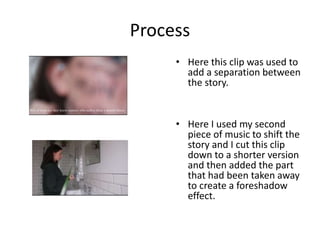
• Here this clip was used to
add a separation between
the story.
• Here I used my second
piece of music to shift the
story and I cut this clip
down to a shorter version
and then added the part
that had been taken away
to create a foreshadow
effect.
Process
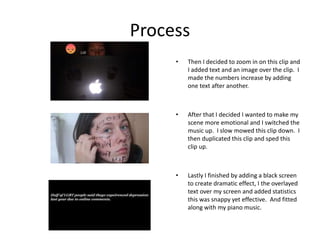
• Then I decided to zoom in on this clip and
I added text and an image over the clip. I
made the numbers increase by adding
one text after another.
• After that I decided I wanted to make my
scene more emotional and I switched the
music up. I slow mowed this clip down. I
then duplicated this clip and sped this
clip up.
• Lastly I finished by adding a black screen
to create dramatic effect, I the overlayed
text over my screen and added statistics
this was snappy yet effective. And fitted
along with my piano music.
Reflection
• What elements of your experiments will you
include in your final product?
• I will include short snappy clips using the razer
tool on premier pro as well as texts. I will also
cut down my clips to make them more
effective and include slow and fast versions.

3. production experiments (2)

  • 1.
  • 2.
    Process • I usedpremiere pro to design my film, this was inspired by different short films on YouTube. I used the text tool to use text over my clips. • I added a black screen and overlapped the text. I used a emotive font to create sadness, the dark colours conduct fear, I also inserted a transition using premiere pro witch was a blur.
  • 3.
    Process • Here Iinserted png clips of google and overlapped them over my clips I also added sound effects using premiere pro and added them to my timeline. In this clip I used the crop effect and zoomed in on the image, this made the angle different. I also used the razer tool to cut down this clip to make it shorter and more effective as well as adding text over the top which I made short and snappy.
  • 4.
    Process • Here Ioverlapped dramatic music in which I used from a copyright website and I used the razer tool cut down the music. • Here I inserted a PNG image and I cut this down to time in with the clip. I also zoomed in as this clip was far away before I edited it on premiere pro.
  • 5.
    Process • Here thisclip was used to add a separation between the story. • Here I used my second piece of music to shift the story and I cut this clip down to a shorter version and then added the part that had been taken away to create a foreshadow effect.
  • 6.
    Process • Then Idecided to zoom in on this clip and I added text and an image over the clip. I made the numbers increase by adding one text after another. • After that I decided I wanted to make my scene more emotional and I switched the music up. I slow mowed this clip down. I then duplicated this clip and sped this clip up. • Lastly I finished by adding a black screen to create dramatic effect, I the overlayed text over my screen and added statistics this was snappy yet effective. And fitted along with my piano music.
  • 7.
    Reflection • What elementsof your experiments will you include in your final product? • I will include short snappy clips using the razer tool on premier pro as well as texts. I will also cut down my clips to make them more effective and include slow and fast versions.

Editor's Notes

  • #3 Discuss the tools and processes used in your experiments
  • #4 Discuss the tools and processes used in your experiments
  • #5 Discuss the tools and processes used in your experiments
  • #6 Discuss the tools and processes used in your experiments
  • #7 Discuss the tools and processes used in your experiments