(zafar_ayub@hotmail.com)
                             Copyright revised for Zafar Ayub
    DATA COMMUNICATION AND
    NETWORK
    CHAPTER - 1
1   Compile by Zafar Ayub
WHAT IS DATA COMMUNICATION?
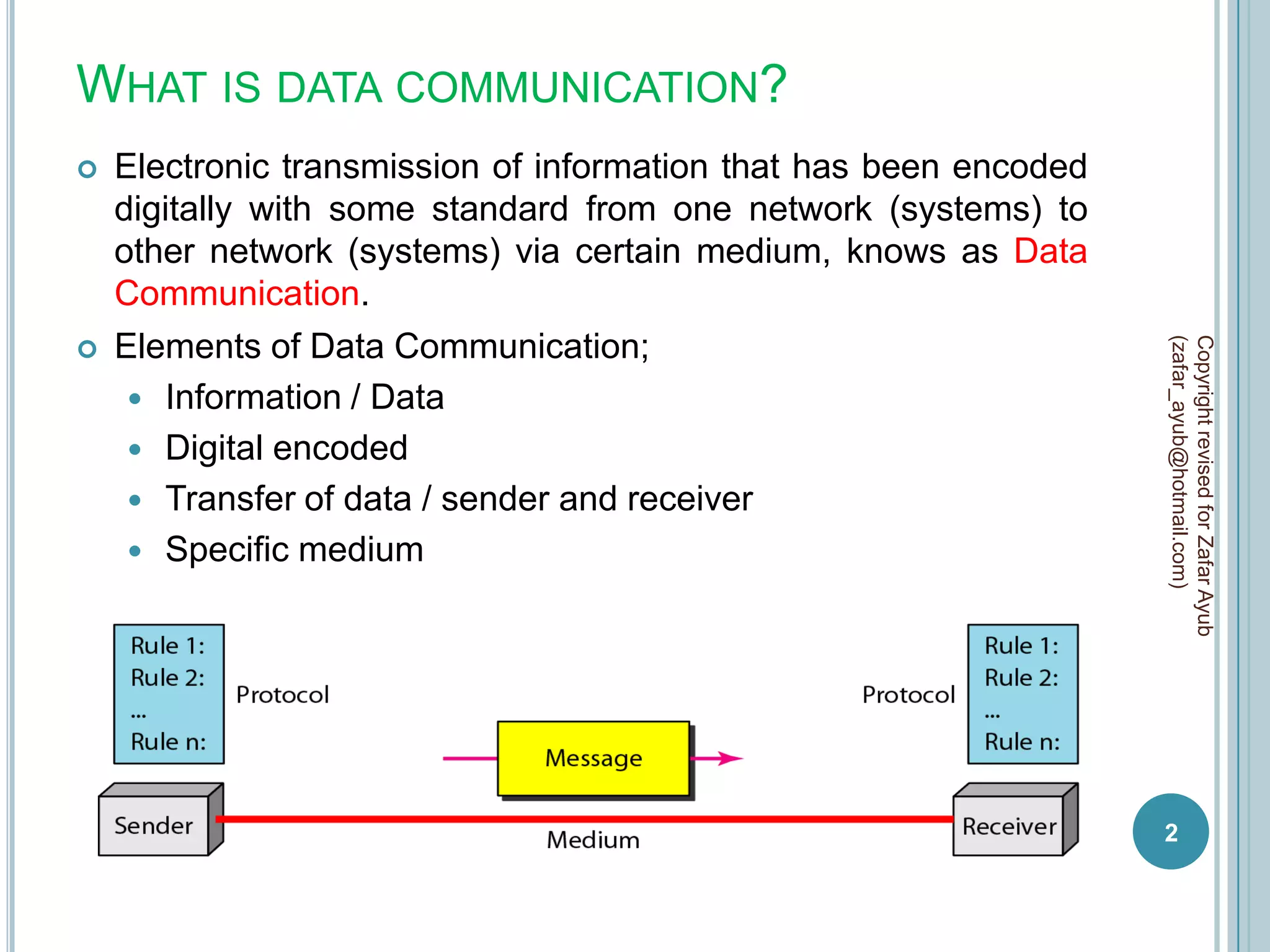
   Electronic transmission of information that has been encoded
    digitally with some standard from one network (systems) to
    other network (systems) via certain medium, knows as Data
    Communication.
    Elements of Data Communication;


                                                                   (zafar_ayub@hotmail.com)
                                                                   Copyright revised for Zafar Ayub


      Information / Data
      Digital encoded
      Transfer of data / sender and receiver
      Specific medium


                                                                   2
WHAT IS NETWORK?
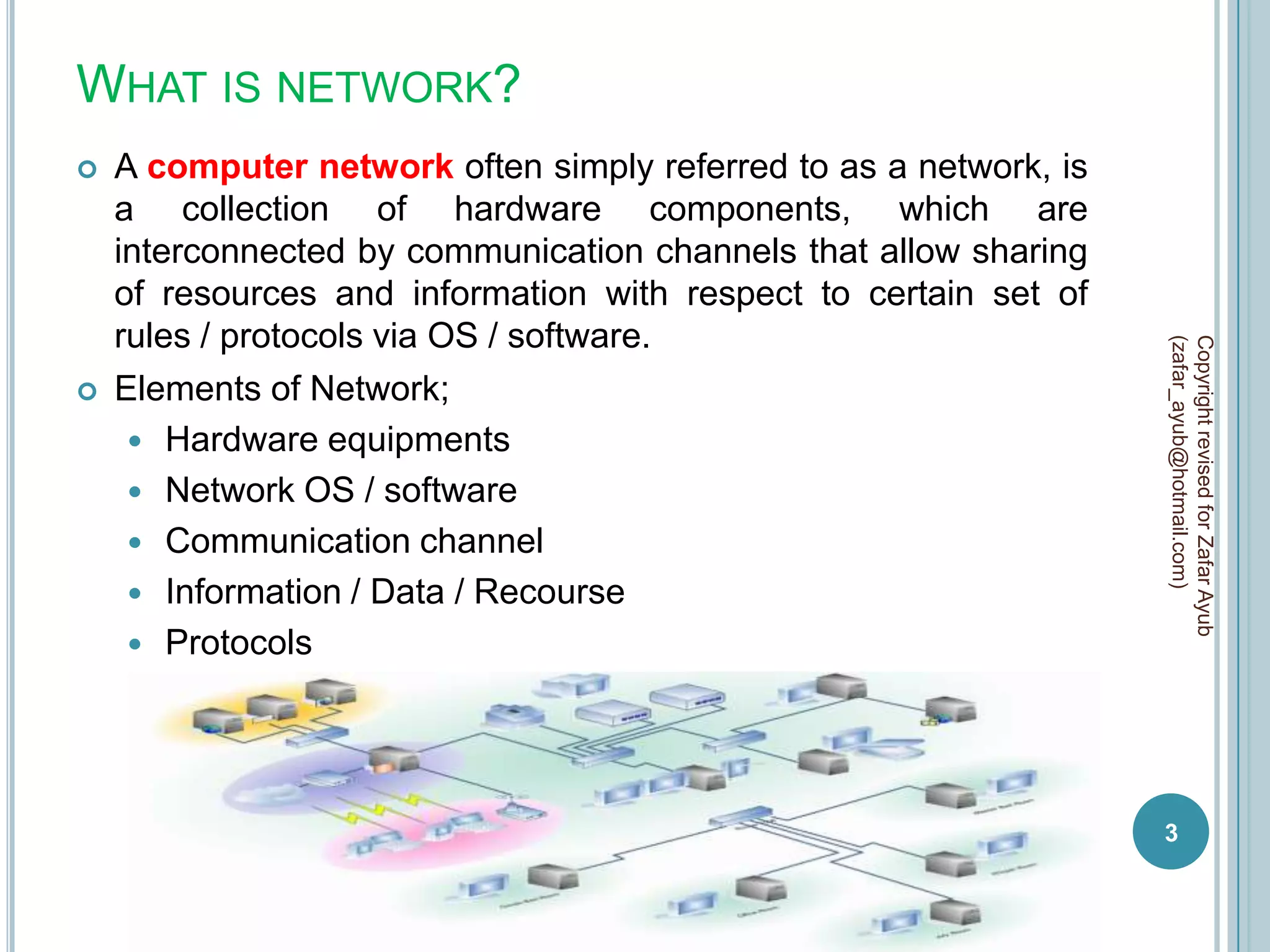
   A computer network often simply referred to as a network, is
    a collection of hardware components, which are
    interconnected by communication channels that allow sharing
    of resources and information with respect to certain set of
    rules / protocols via OS / software.


                                                                   (zafar_ayub@hotmail.com)
                                                                   Copyright revised for Zafar Ayub
   Elements of Network;
      Hardware equipments
      Network OS / software
      Communication channel
      Information / Data / Recourse
      Protocols


                                                                   3
TERMINOLOGIES
   Data transmission process between sender and receiver is
    refer to data communication, and deployed physical
    environment (hardware / software / protocols / channel ) is
    network.


                                                                         (zafar_ayub@hotmail.com)
                                                                         Copyright revised for Zafar Ayub
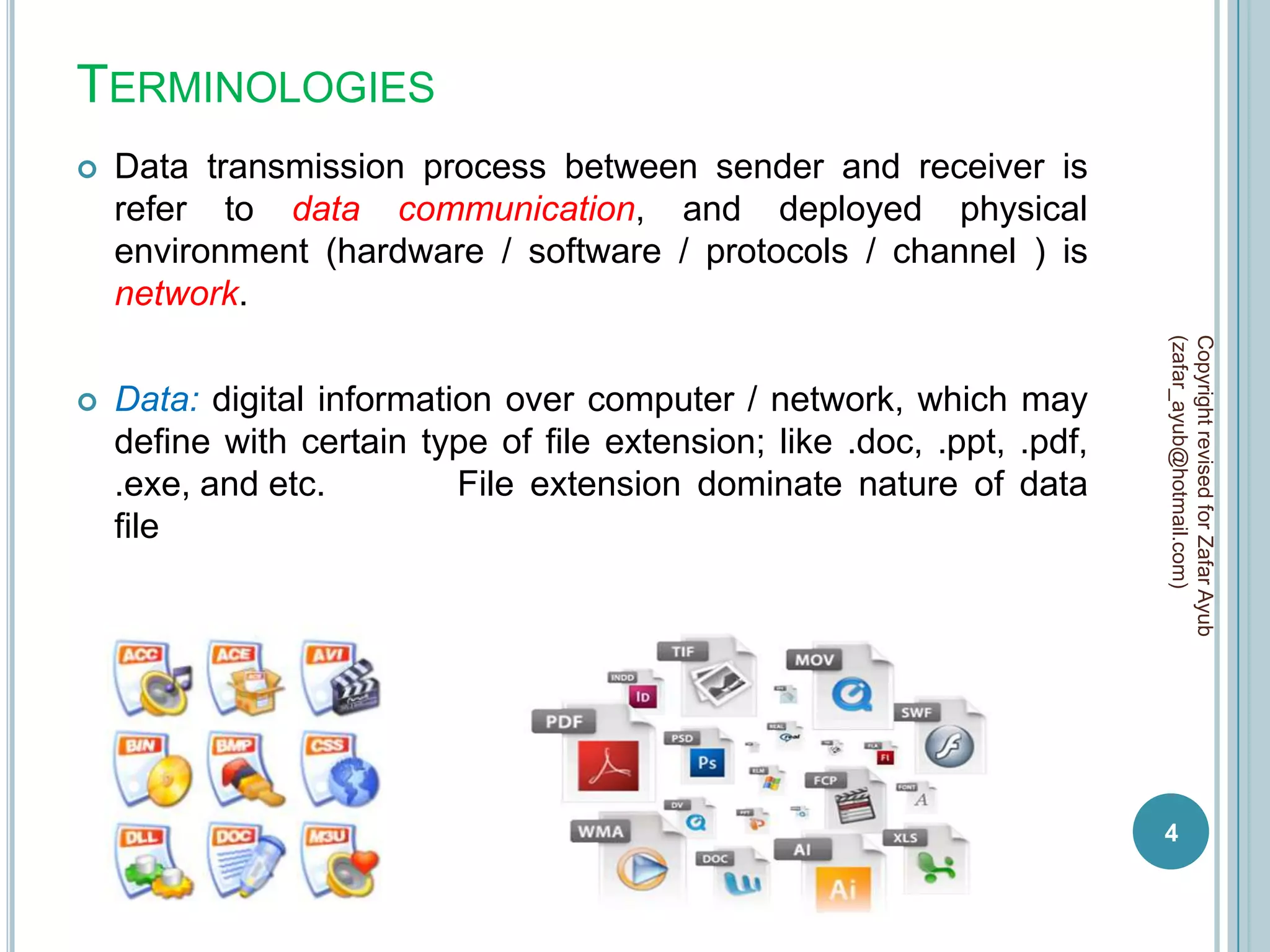
   Data: digital information over computer / network, which may
    define with certain type of file extension; like .doc, .ppt, .pdf,
    .exe, and etc.         File extension dominate nature of data
    file


                                                                         4
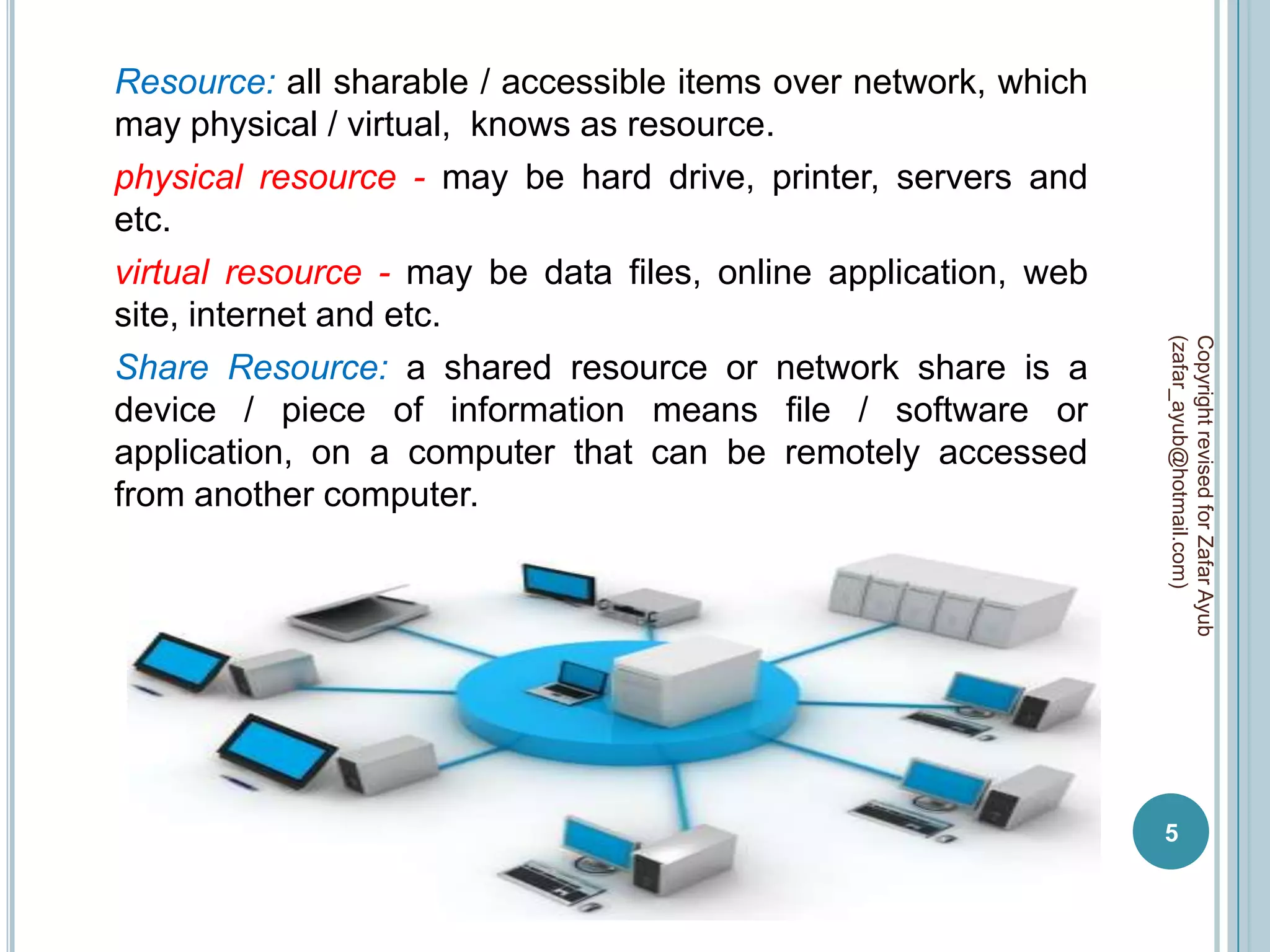
Resource: all sharable / accessible items over network, which
may physical / virtual, knows as resource.
physical resource - may be hard drive, printer, servers and
etc.
virtual resource - may be data files, online application, web
site, internet and etc.


                                                                (zafar_ayub@hotmail.com)
                                                                Copyright revised for Zafar Ayub
Share Resource: a shared resource or network share is a
device / piece of information means file / software or
application, on a computer that can be remotely accessed
from another computer.


                                                                5
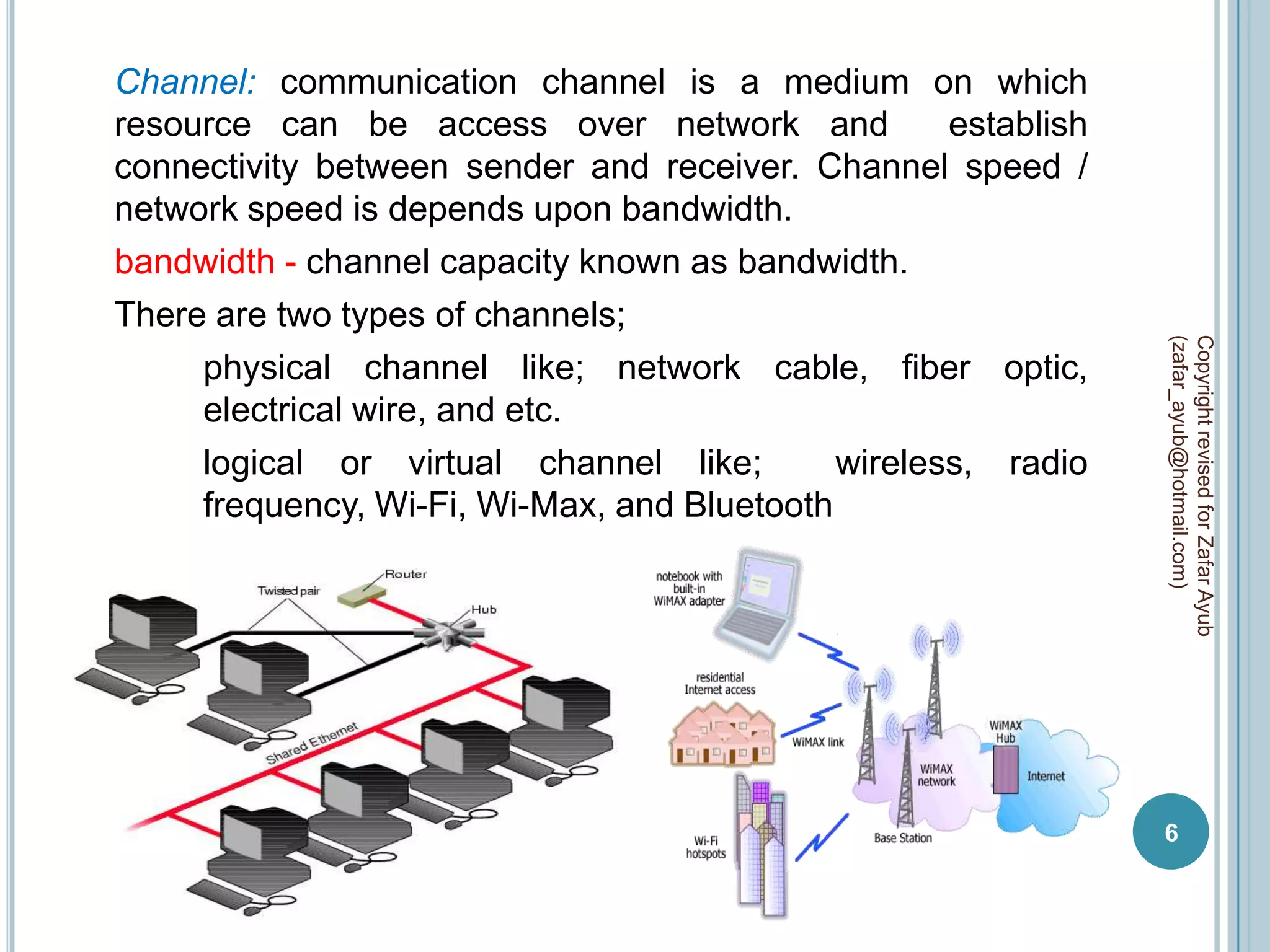
Channel: communication channel is a medium on which
resource can be access over network and             establish
connectivity between sender and receiver. Channel speed /
network speed is depends upon bandwidth.
bandwidth - channel capacity known as bandwidth.
There are two types of channels;


                                                                (zafar_ayub@hotmail.com)
                                                                Copyright revised for Zafar Ayub
     physical channel like; network cable, fiber optic,
     electrical wire, and etc.
     logical or virtual channel like;        wireless, radio
     frequency, Wi-Fi, Wi-Max, and Bluetooth


                                                                6
Protocols: a communications protocol is a system of digital
message formats and rules for exchanging those messages in
or between computer systems and in network /
telecommunications.
Protocols regulate the following characteristics of a network:
access method, allowed physical topologies, types of cabling,
and speed of data transfer.


                                                                 (zafar_ayub@hotmail.com)
                                                                 Copyright revised for Zafar Ayub
Protocols may include signaling, authentication, error
detection method, and network policies.
A protocol can be implement at hardware or software or both,
and with respect to assignment these are implemented like;
for web http, for security SSL, for email POP3 / SMTP, for LAN
network Ethernet, for routing BGP / RIP, etc.


                                                                 7
Digital Encryption: in encryption is the process of transforming
information / data using an algorithm to make it unreadable to
anyone (except those possessing special knowledge, usually
referred to as a key).
The result of the process is encrypted information and the
reverse process, i.e. to make the encrypted information
readable again is referred to as decryption.


                                                                   (zafar_ayub@hotmail.com)
                                                                   Copyright revised for Zafar Ayub
algorithm – set of steps for assembling / reassembling of data
with respect to define network technology.

Types of digital encryption;
Software Based Encryption – a software program to facilitate
encryption process on data / file with respect to 256-bit AES /
448-bit Blowfish algorithms. Hardware is only responsible to
deliver encrypted file to other end computer where again via
software program file may be decrypt for original data / file.

                                                                   8
Drawbacks
all encryption perform on data / file during file transfer.
data / file size is also increase with addition of certain
algorithms.
security risk for confidentiality documents.
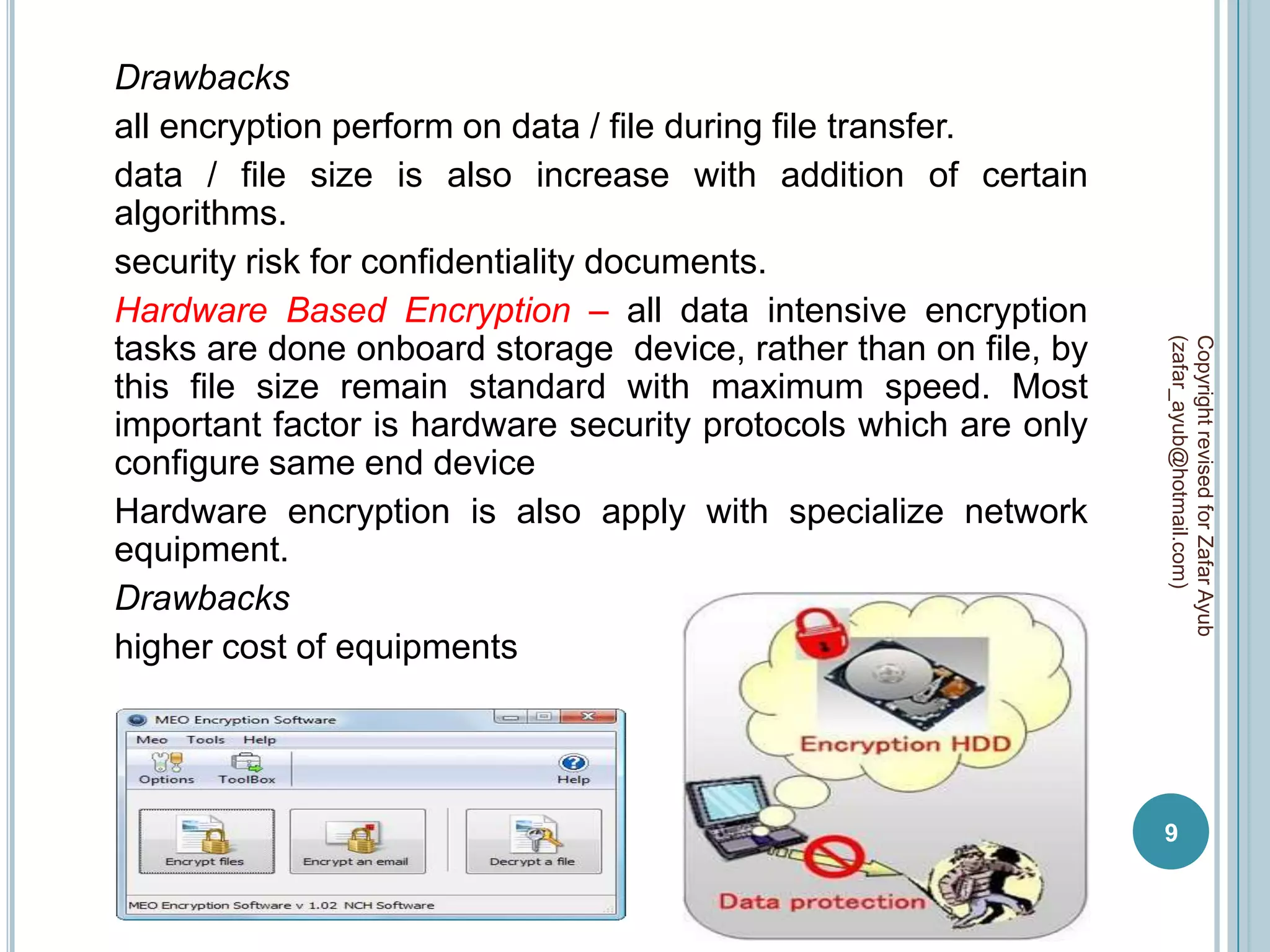
Hardware Based Encryption – all data intensive encryption
tasks are done onboard storage device, rather than on file, by


                                                                 (zafar_ayub@hotmail.com)
                                                                 Copyright revised for Zafar Ayub
this file size remain standard with maximum speed. Most
important factor is hardware security protocols which are only
configure same end device
Hardware encryption is also apply with specialize network
equipment.
Drawbacks
higher cost of equipments


                                                                 9
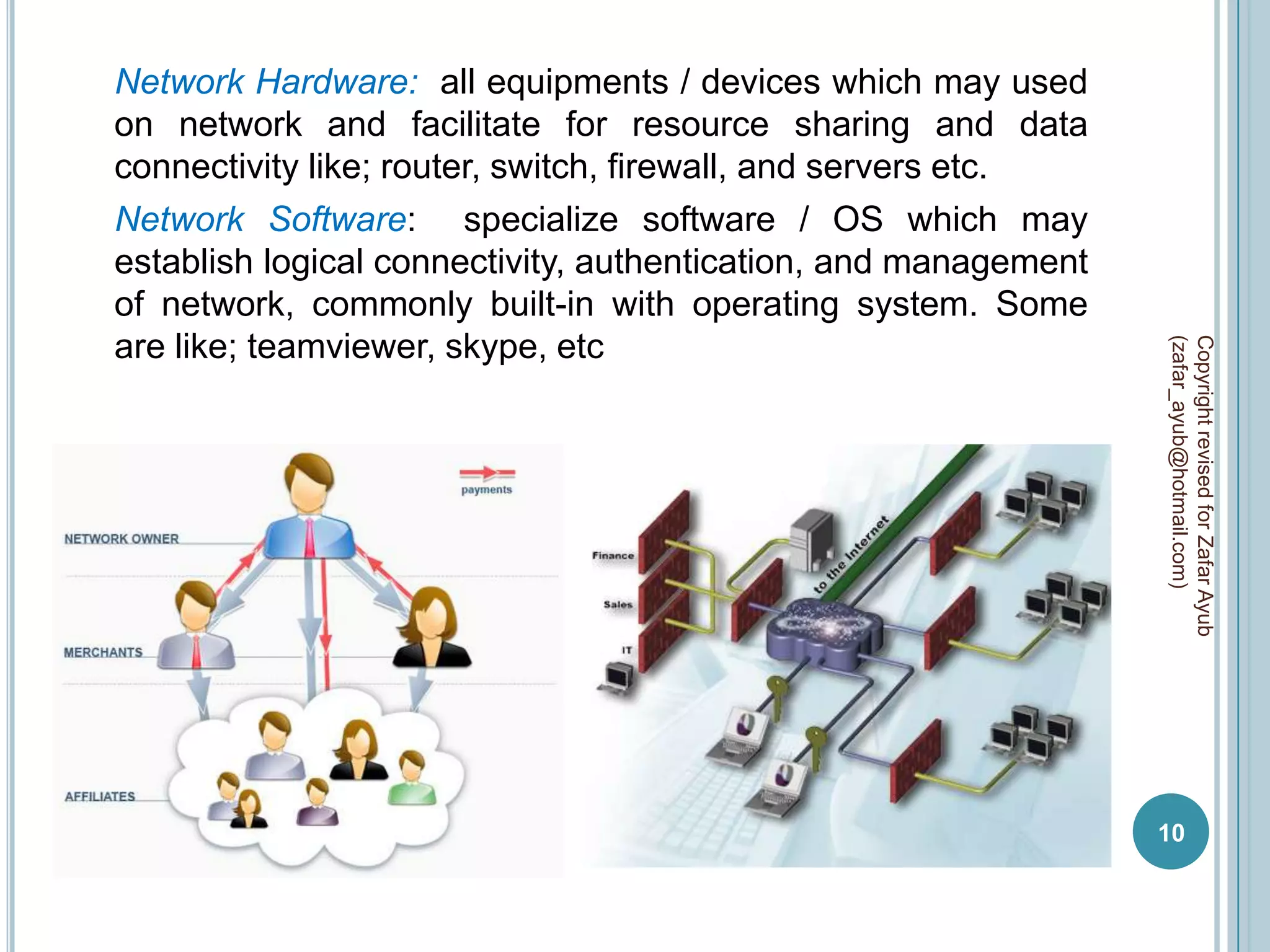
Network Hardware: all equipments / devices which may used
on network and facilitate for resource sharing and data
connectivity like; router, switch, firewall, and servers etc.
Network Software: specialize software / OS which may
establish logical connectivity, authentication, and management
of network, commonly built-in with operating system. Some
are like; teamviewer, skype, etc


                                                                 (zafar_ayub@hotmail.com)
                                                                 Copyright revised for Zafar Ayub
                                                                 10
Sender: a computer / device from which data / files are send
to specific destination.

Receiver a computer / device at which data / files are received
by source.


                                                                  (zafar_ayub@hotmail.com)
                                                                  Copyright revised for Zafar Ayub
                                                                  11
DATA TRANSMISSION
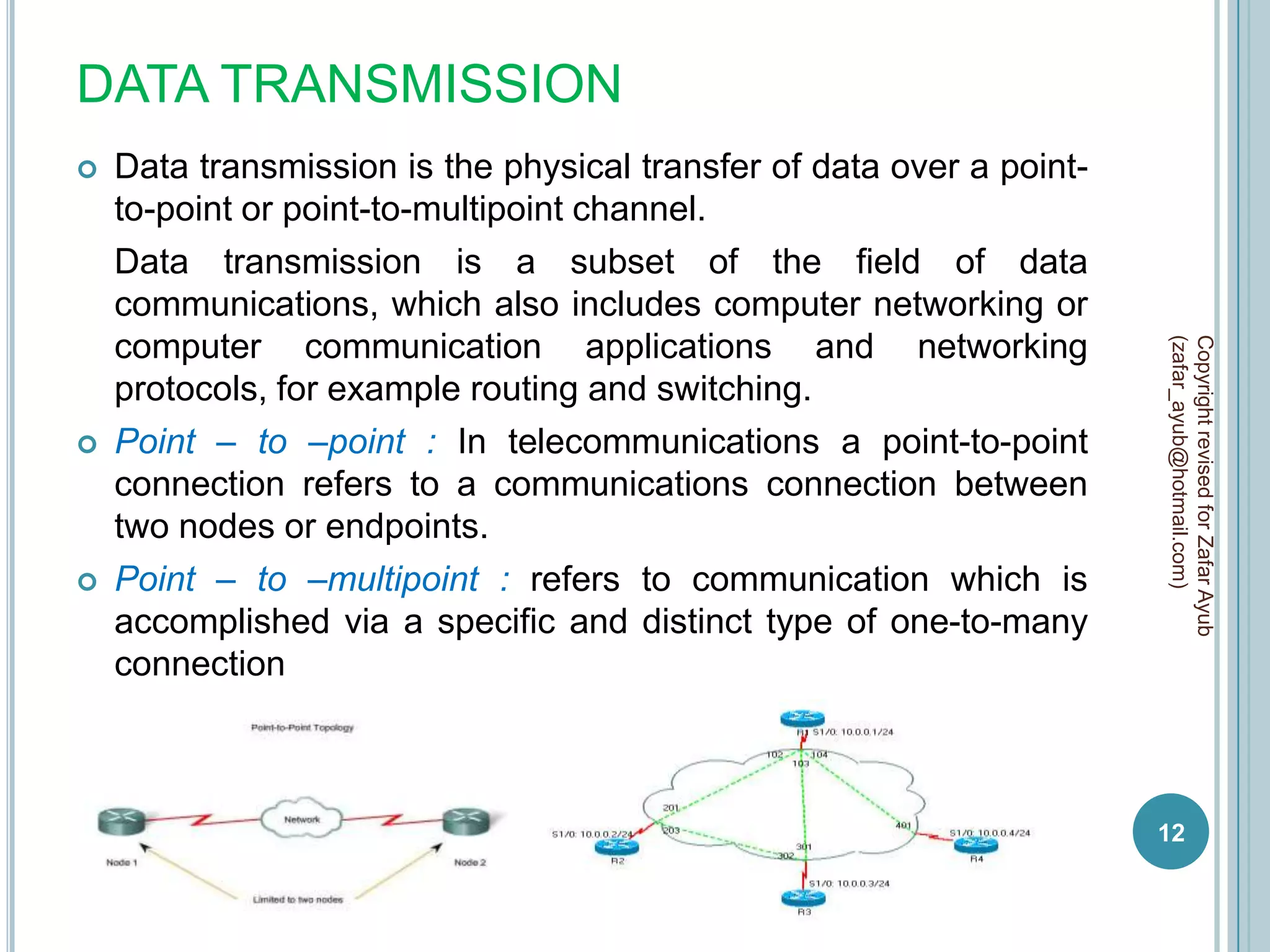
   Data transmission is the physical transfer of data over a point-
    to-point or point-to-multipoint channel.
    Data transmission is a subset of the field of data
    communications, which also includes computer networking or
    computer communication applications and networking


                                                                       (zafar_ayub@hotmail.com)
                                                                       Copyright revised for Zafar Ayub
    protocols, for example routing and switching.
   Point – to –point : In telecommunications a point-to-point
    connection refers to a communications connection between
    two nodes or endpoints.
   Point – to –multipoint : refers to communication which is
    accomplished via a specific and distinct type of one-to-many
    connection


                                                                       12
DATA COMMUNICATION TECHNIQUES
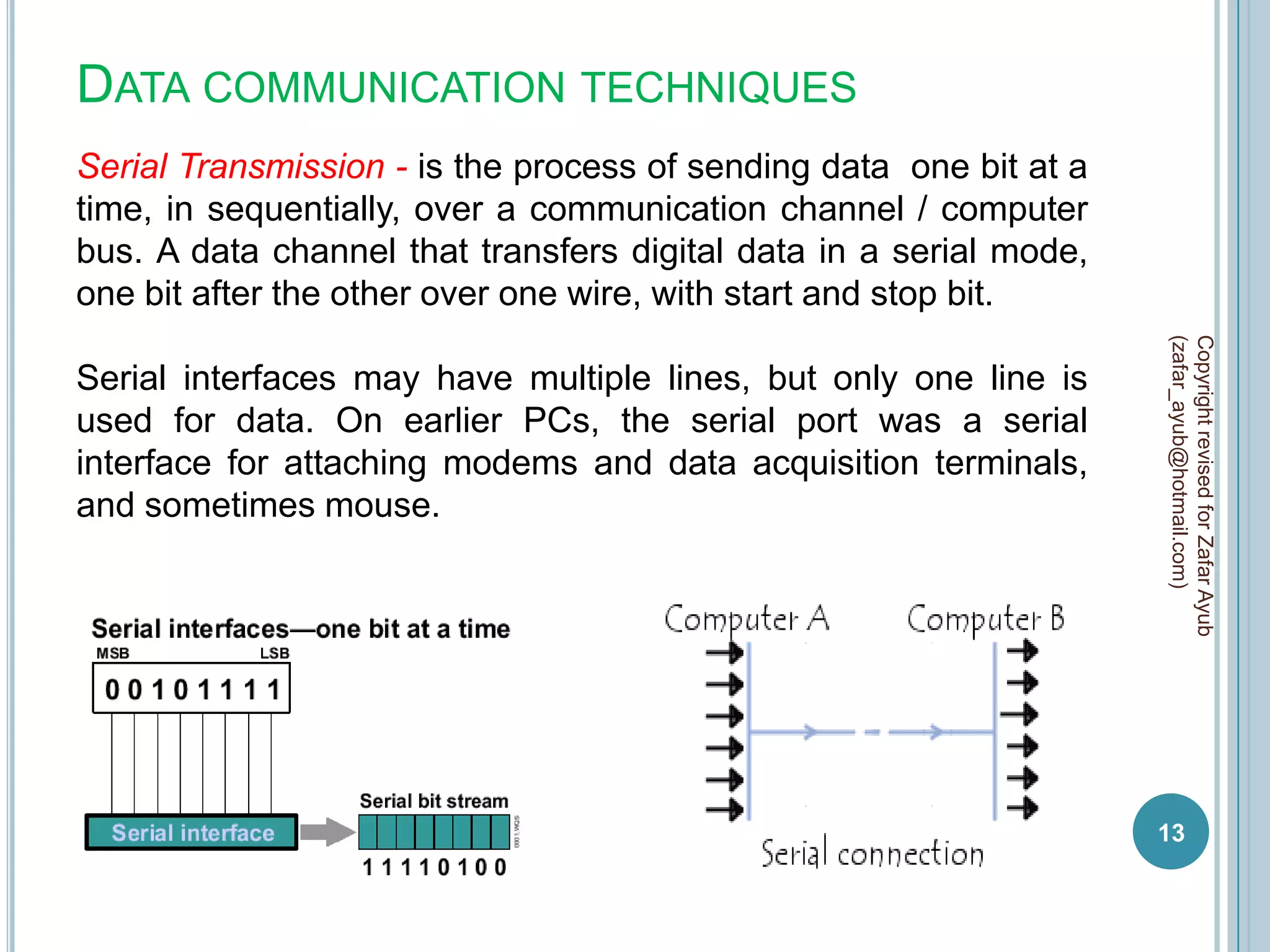
Serial Transmission - is the process of sending data one bit at a
time, in sequentially, over a communication channel / computer
bus. A data channel that transfers digital data in a serial mode,
one bit after the other over one wire, with start and stop bit.


                                                                    (zafar_ayub@hotmail.com)
                                                                    Copyright revised for Zafar Ayub
Serial interfaces may have multiple lines, but only one line is
used for data. On earlier PCs, the serial port was a serial
interface for attaching modems and data acquisition terminals,
and sometimes mouse.


                                                                    13
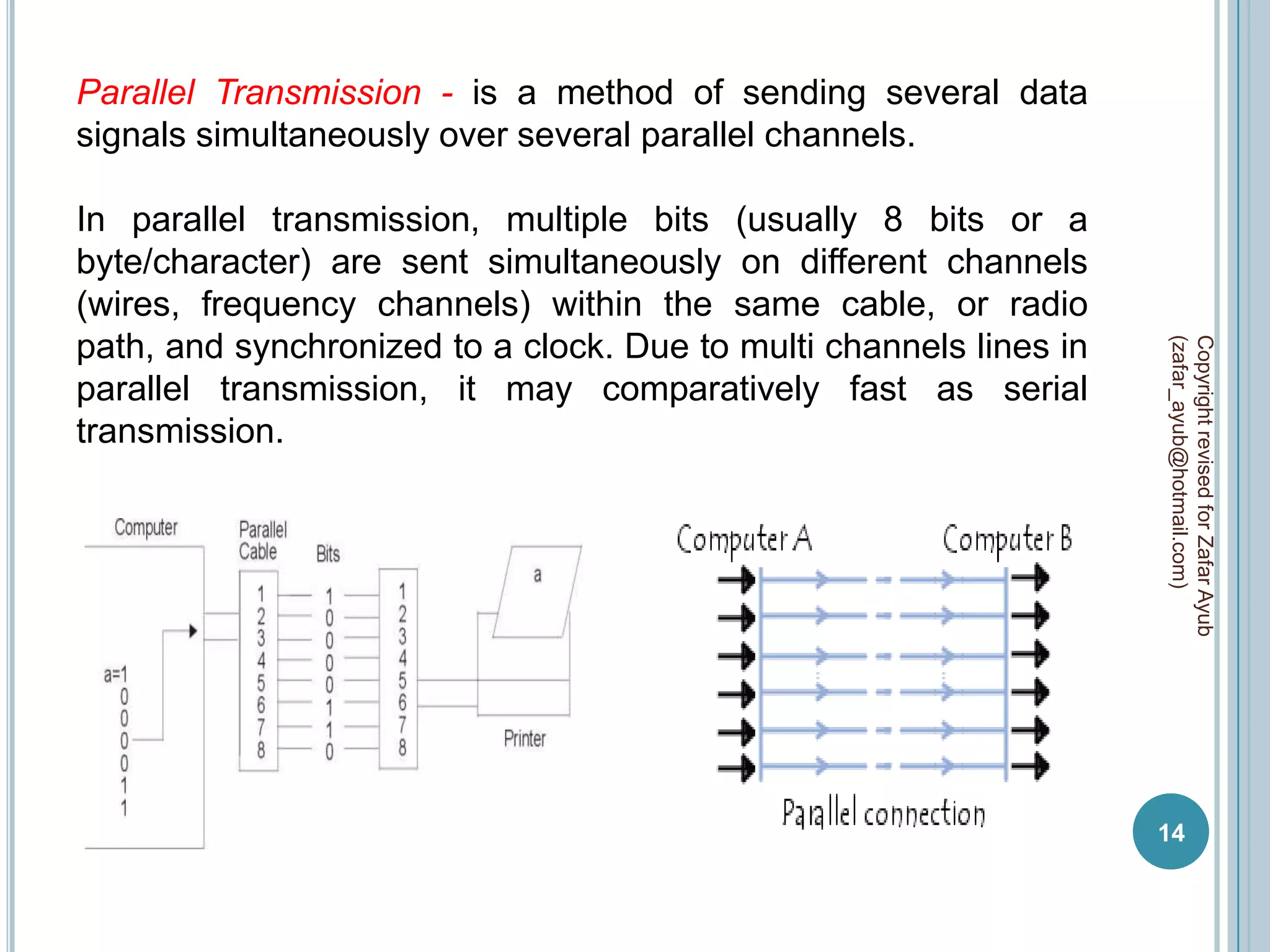
Parallel Transmission - is a method of sending several data
signals simultaneously over several parallel channels.

In parallel transmission, multiple bits (usually 8 bits or a
byte/character) are sent simultaneously on different channels
(wires, frequency channels) within the same cable, or radio
path, and synchronized to a clock. Due to multi channels lines in


                                                                    (zafar_ayub@hotmail.com)
                                                                    Copyright revised for Zafar Ayub
parallel transmission, it may comparatively fast as serial
transmission.


                                                                    14
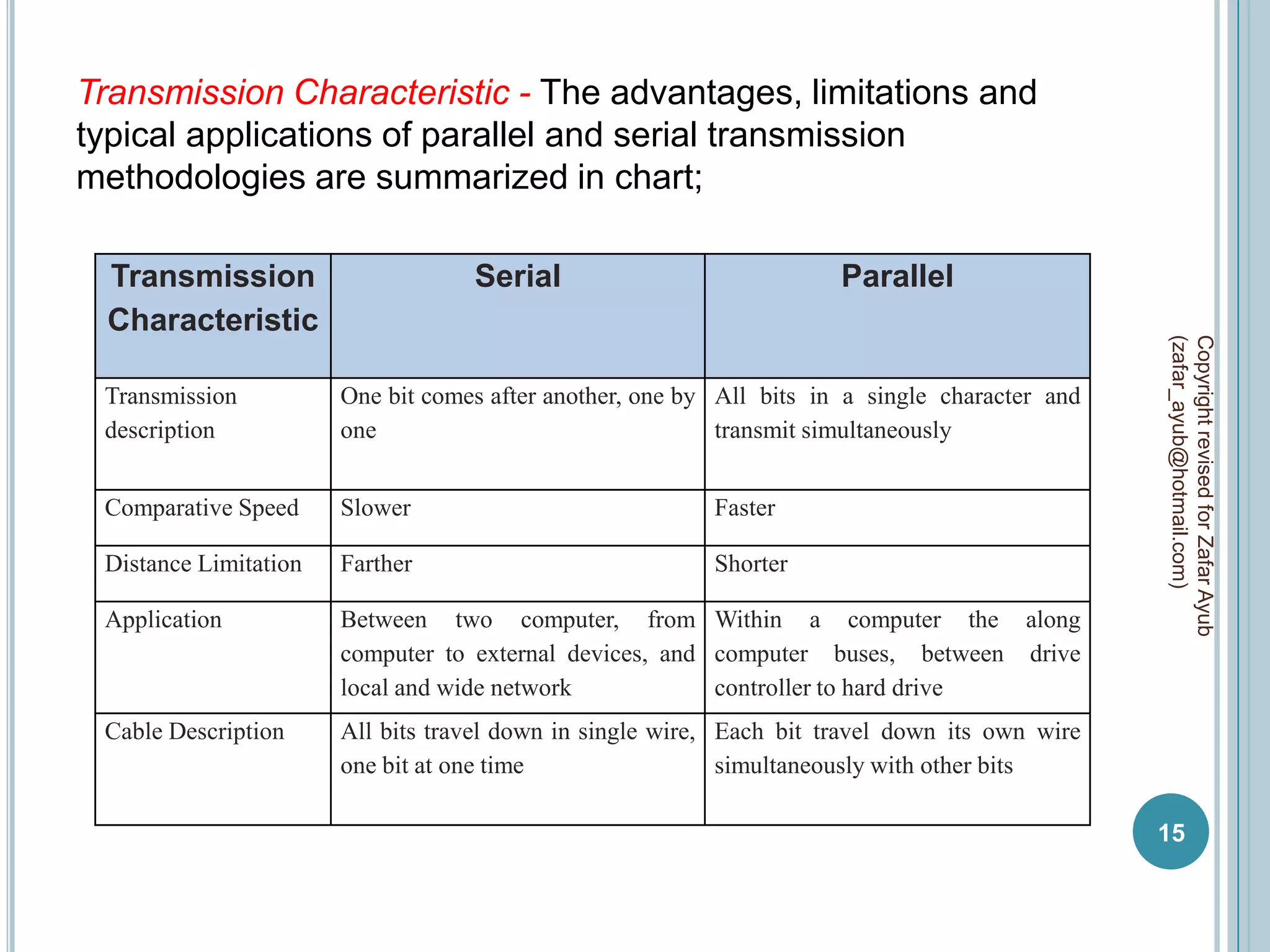
Transmission Characteristic - The advantages, limitations and
typical applications of parallel and serial transmission
methodologies are summarized in chart;

 Transmission                      Serial                             Parallel
 Characteristic


                                                                                                (zafar_ayub@hotmail.com)
                                                                                                Copyright revised for Zafar Ayub
 Transmission          One bit comes after another, one by All bits in a single character and
 description           one                                 transmit simultaneously


 Comparative Speed     Slower                             Faster

 Distance Limitation   Farther                            Shorter

 Application           Between two computer, from Within a computer the along
                       computer to external devices, and computer buses, between drive
                       local and wide network            controller to hard drive
 Cable Description     All bits travel down in single wire, Each bit travel down its own wire
                       one bit at one time                  simultaneously with other bits

                                                                                                15
DATA COMMUNICATION CHANNELS
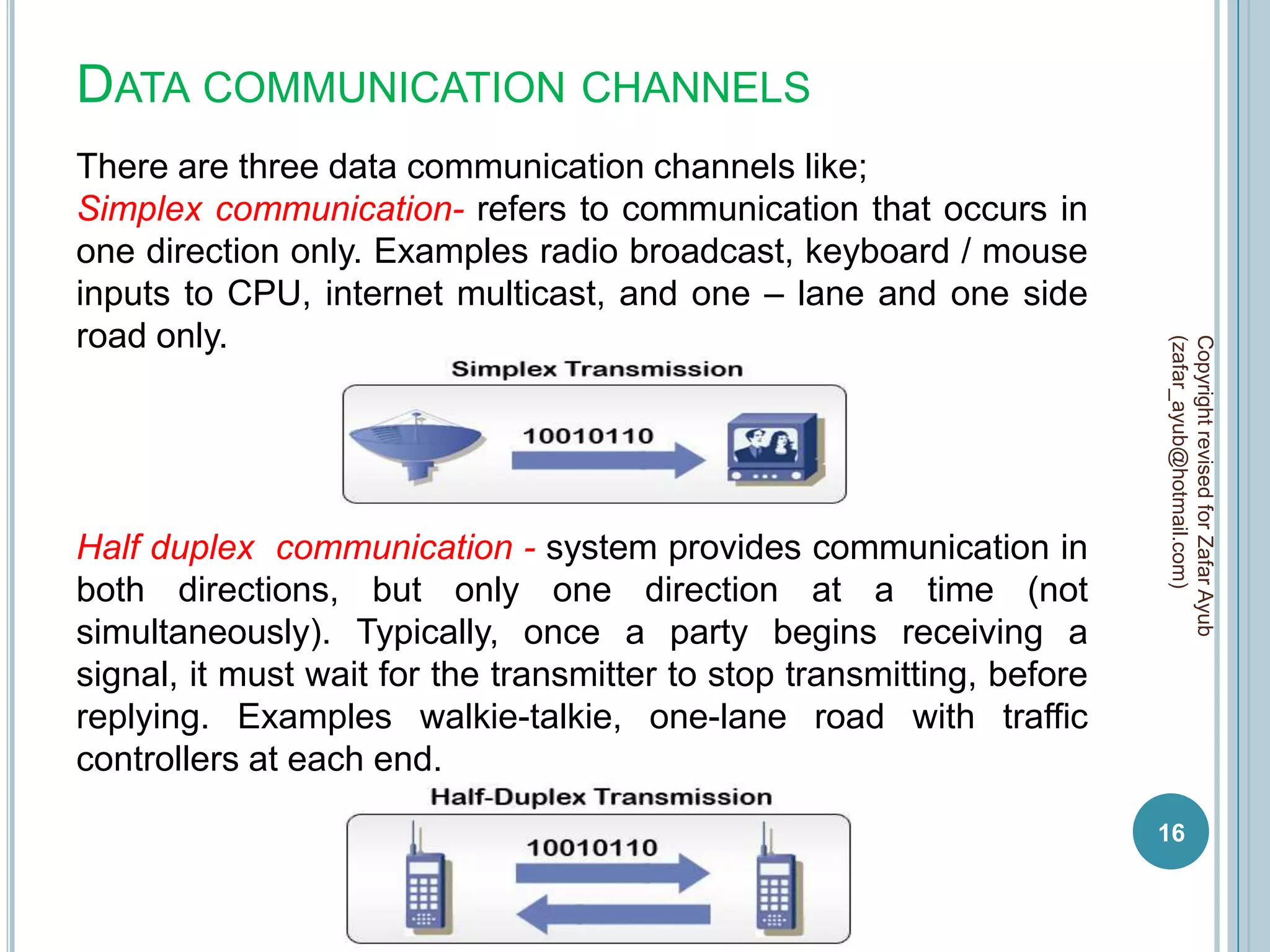
There are three data communication channels like;
Simplex communication- refers to communication that occurs in
one direction only. Examples radio broadcast, keyboard / mouse
inputs to CPU, internet multicast, and one – lane and one side
road only.


                                                                        (zafar_ayub@hotmail.com)
                                                                        Copyright revised for Zafar Ayub
Half duplex communication - system provides communication in
both directions, but only one direction at a time (not
simultaneously). Typically, once a party begins receiving a
signal, it must wait for the transmitter to stop transmitting, before
replying. Examples walkie-talkie, one-lane road with traffic
controllers at each end.
                                                                        16
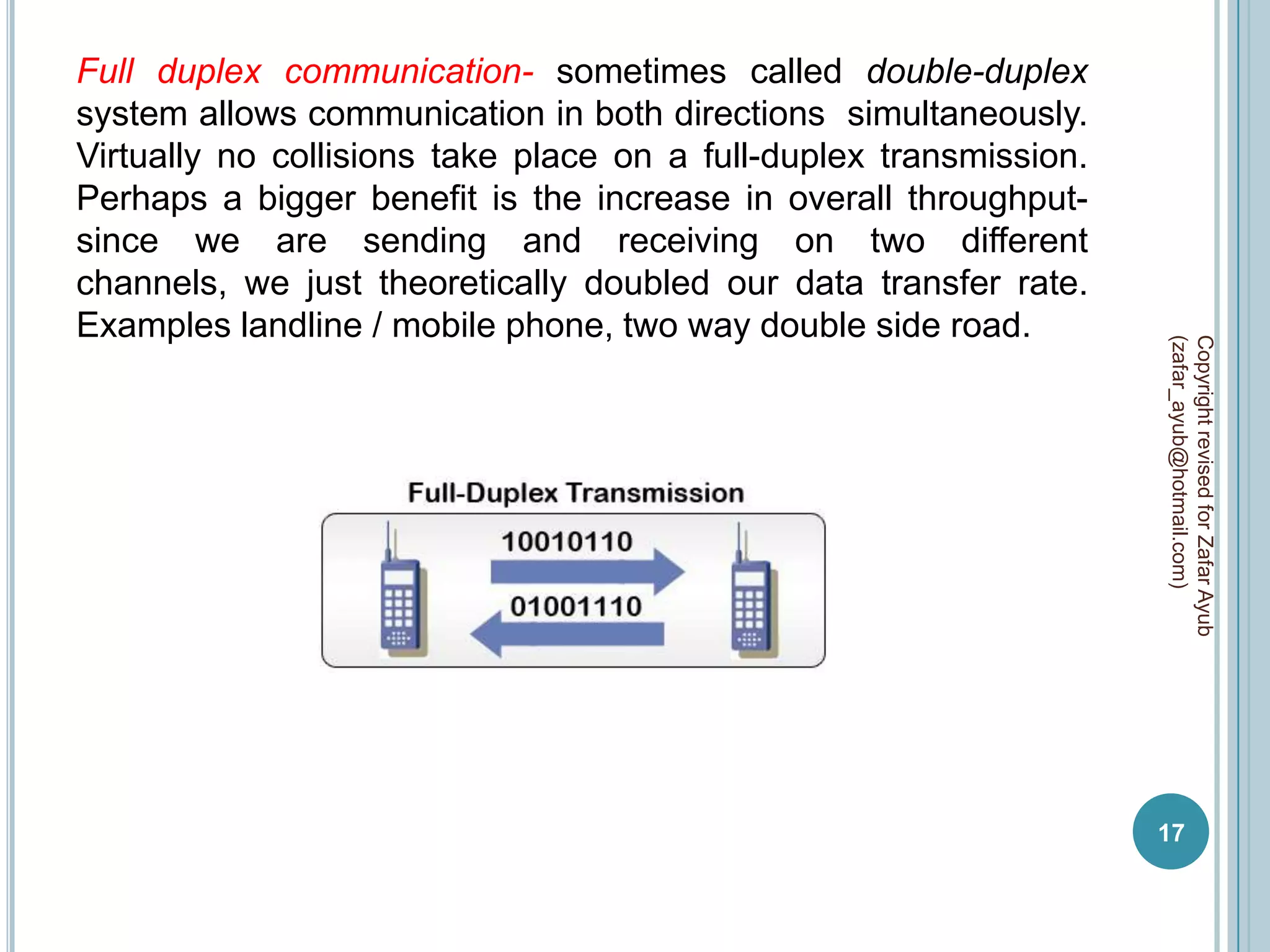
Full duplex communication- sometimes called double-duplex
system allows communication in both directions simultaneously.
Virtually no collisions take place on a full-duplex transmission.
Perhaps a bigger benefit is the increase in overall throughput-
since we are sending and receiving on two different
channels, we just theoretically doubled our data transfer rate.
Examples landline / mobile phone, two way double side road.


                                                                    (zafar_ayub@hotmail.com)
                                                                    Copyright revised for Zafar Ayub
                                                                    17
DATA COMMUNICATION MODES
Data communication modes define behavior of data flow during
communication which is based on interval of time.

When devices are communicating, they must be know when
ever data has to send or receive (in period of time). The two


                                                                  (zafar_ayub@hotmail.com)
                                                                  Copyright revised for Zafar Ayub
devices must establish and maintain some type of timing
between them so that signals are produced, transmitted, and
detected accurately.

There are two main alternatives to establishing and maintaining
the timing for the sampling of the signals. These two timing
alternatives are known as asynchronous and synchronous, also
known as data communication modes.

Data Link Layer : all synchronization occurs on the data link
layer (2nd layer of TCP/IP), where the data in form of frame.
                                                                  18
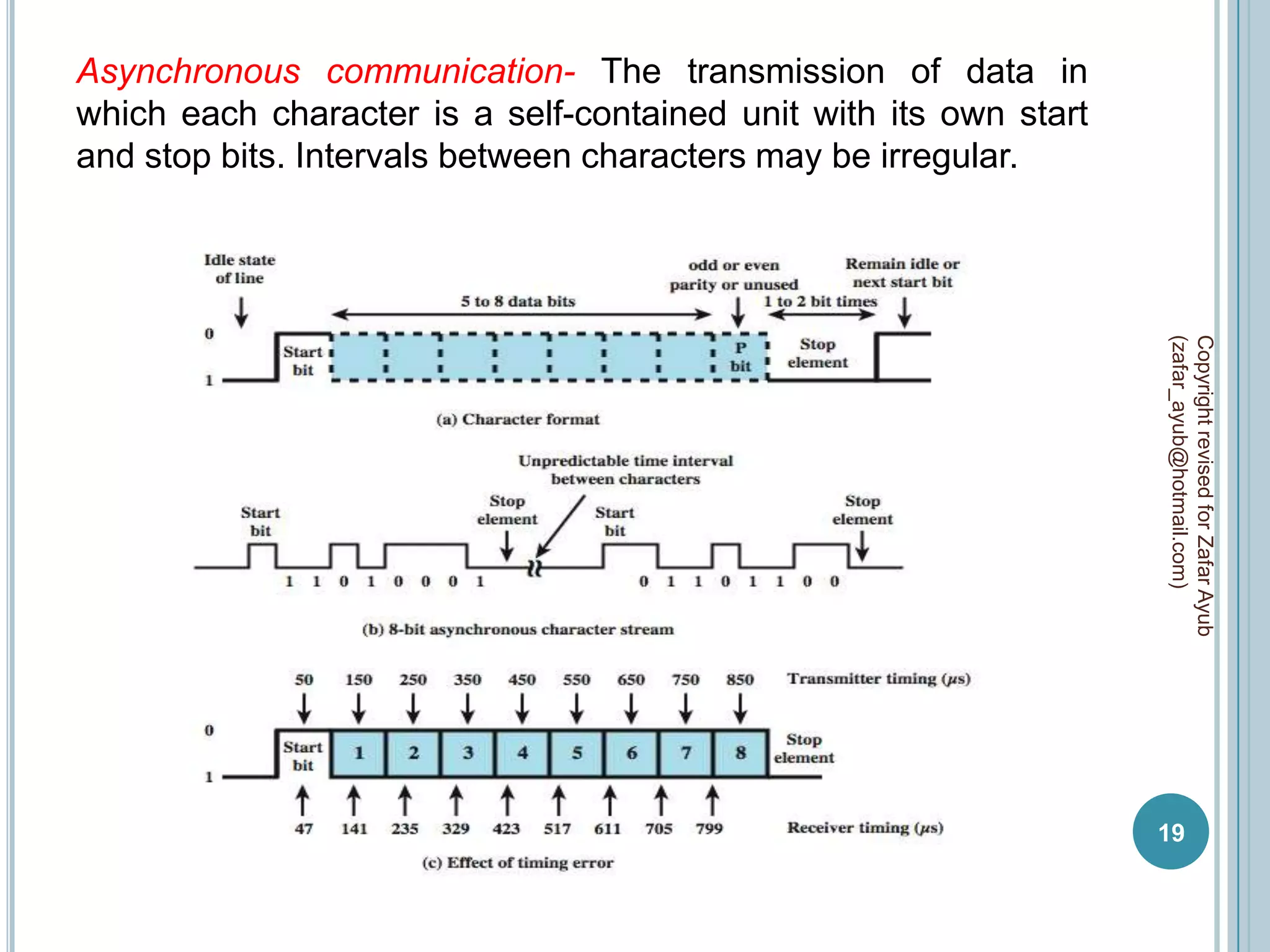
Asynchronous communication- The transmission of data in
which each character is a self-contained unit with its own start
and stop bits. Intervals between characters may be irregular.


                                                                   (zafar_ayub@hotmail.com)
                                                                   Copyright revised for Zafar Ayub
                                                                   19
 Start bit inform that transmission has to start with binary value
of “0”.
 Stop bit inform to equipment that transmission has been stop
with binary value of “1”.
 When no character is being transmitted, the line between
transmitter and receiver is in an idle state (binary 1 level).
 A minimum length for the stop element is specified, and this is


                                                                      (zafar_ayub@hotmail.com)
                                                                      Copyright revised for Zafar Ayub
usually 1, 1.5, or 2 times the duration of an ordinary bit.
 Data contain may be 5 -8 character bits.

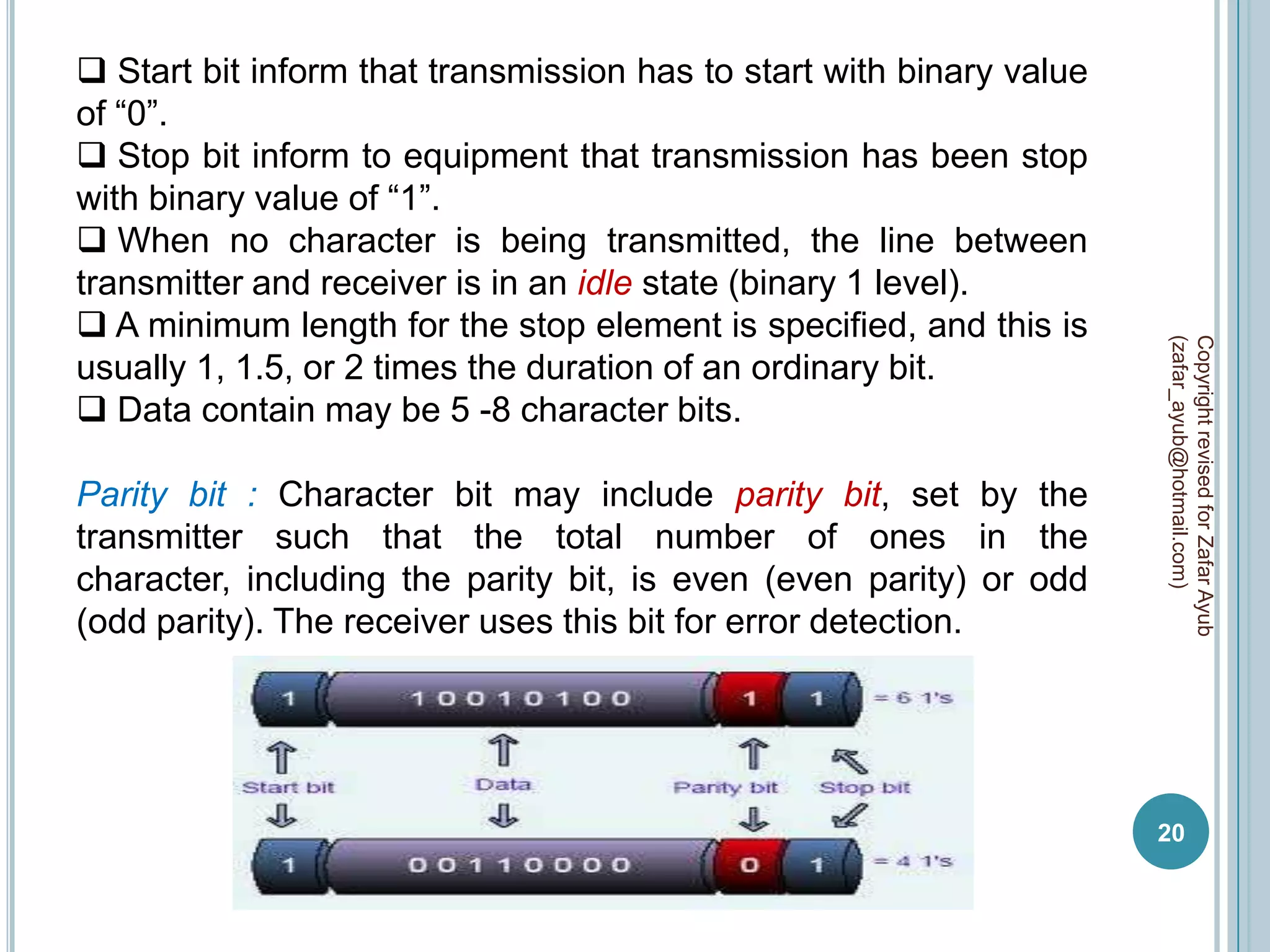
Parity bit : Character bit may include parity bit, set by the
transmitter such that the total number of ones in the
character, including the parity bit, is even (even parity) or odd
(odd parity). The receiver uses this bit for error detection.


                                                                      20
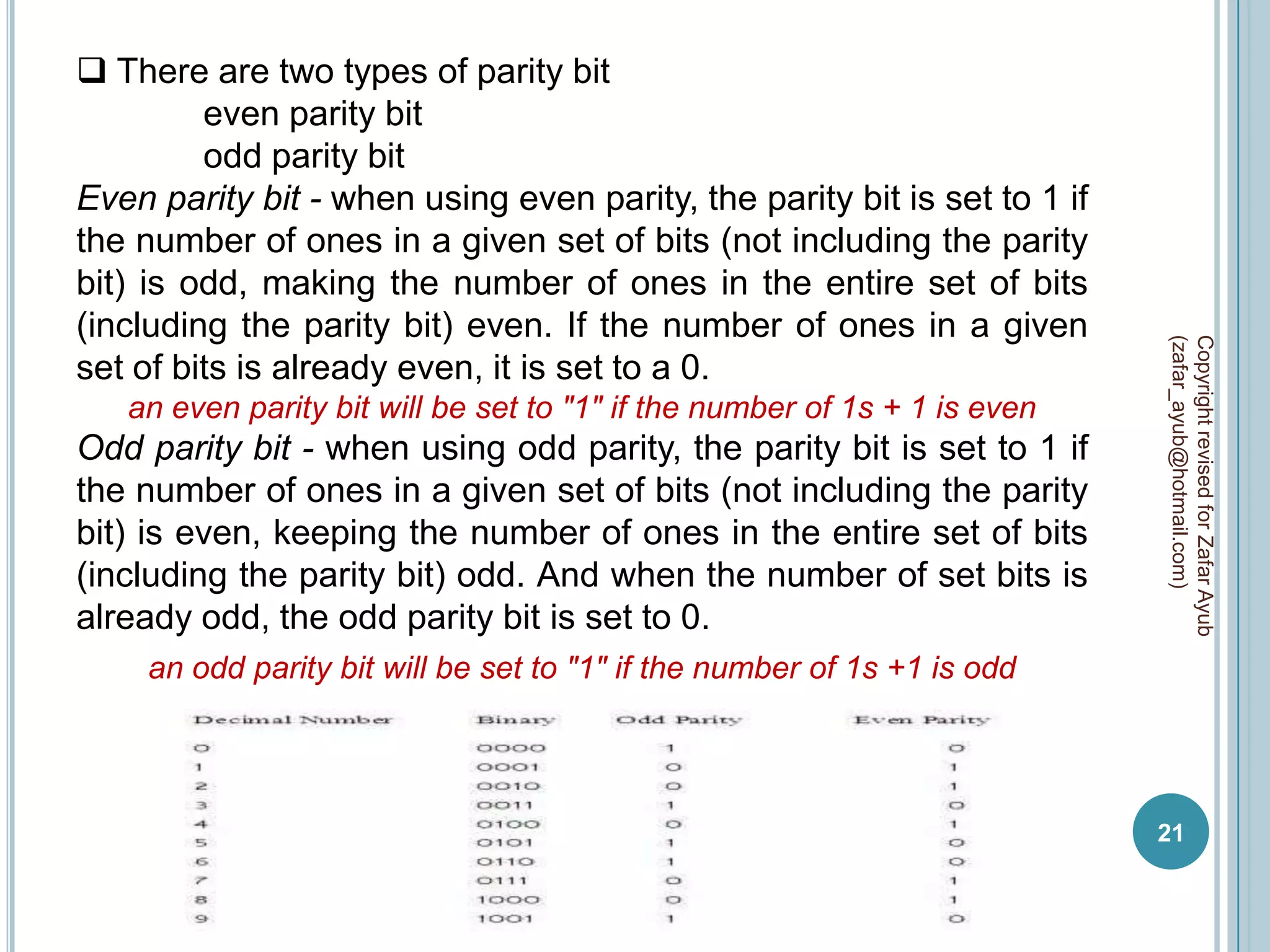
 There are two types of parity bit
         even parity bit
         odd parity bit
Even parity bit - when using even parity, the parity bit is set to 1 if
the number of ones in a given set of bits (not including the parity
bit) is odd, making the number of ones in the entire set of bits
(including the parity bit) even. If the number of ones in a given


                                                                           (zafar_ayub@hotmail.com)
                                                                           Copyright revised for Zafar Ayub
set of bits is already even, it is set to a 0.
   an even parity bit will be set to "1" if the number of 1s + 1 is even
Odd parity bit - when using odd parity, the parity bit is set to 1 if
the number of ones in a given set of bits (not including the parity
bit) is even, keeping the number of ones in the entire set of bits
(including the parity bit) odd. And when the number of set bits is
already odd, the odd parity bit is set to 0.
     an odd parity bit will be set to "1" if the number of 1s +1 is odd


                                                                           21
 at end of transmission no maximum value is
specified, because the stop element is the same as the idle
state, the transmitter will continue to transmit the stop element
until it is ready to send the next character.

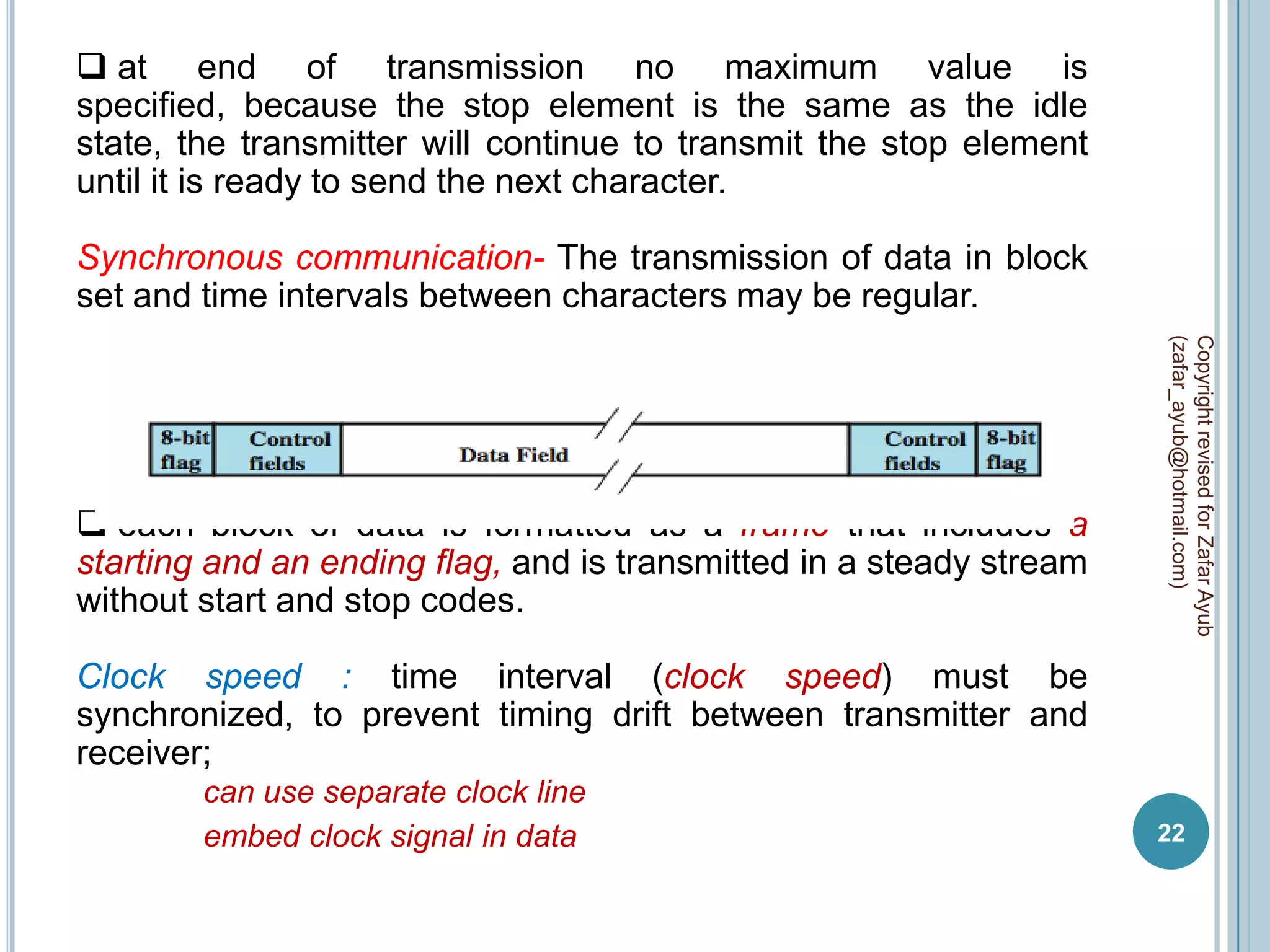
Synchronous communication- The transmission of data in block
set and time intervals between characters may be regular.


                                                                     (zafar_ayub@hotmail.com)
                                                                     Copyright revised for Zafar Ayub
 each block of data is formatted as a frame that includes a
starting and an ending flag, and is transmitted in a steady stream
without start and stop codes.

Clock speed : time interval (clock speed) must be
synchronized, to prevent timing drift between transmitter and
receiver;
        can use separate clock line
        embed clock signal in data                                   22
By adding clock line – add specific time of break between sender
and receiver.
By adding clock signal – add clock information in frame.

 In synchronous transmission, there is another level of
synchronization required, to allow the receiver to determine the
beginning and end of a block of data.


                                                                   (zafar_ayub@hotmail.com)
                                                                   Copyright revised for Zafar Ayub
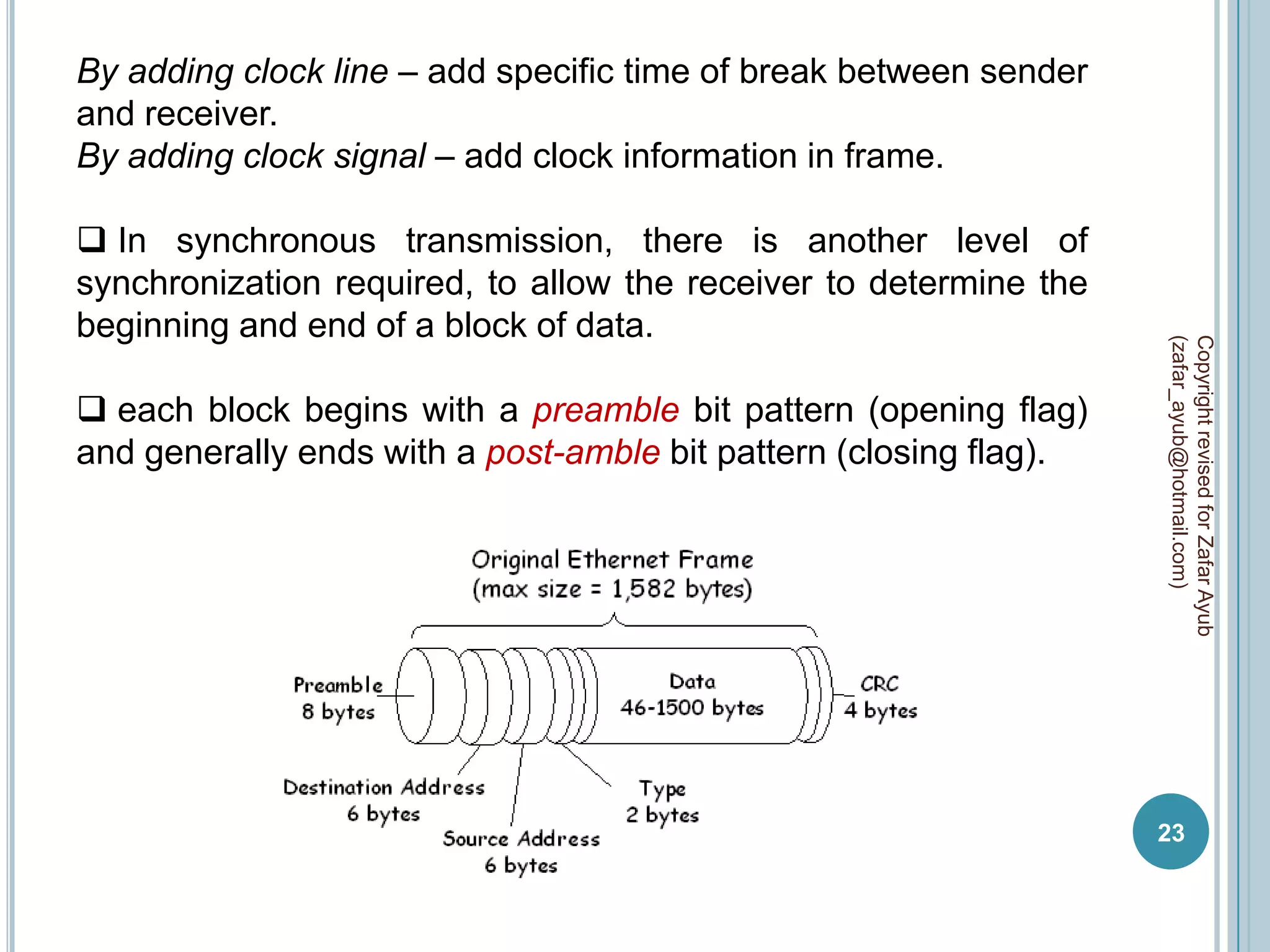
 each block begins with a preamble bit pattern (opening flag)
and generally ends with a post-amble bit pattern (closing flag).


                                                                   23
preamble bit – The preamble is a 64-bit (8 byte) field that
contains a synchronization pattern consisting of alternating ones
and zeros and ending with two consecutive ones. After
synchronization is established, the preamble is used to locate
the first bit of the packet. The preamble is generated by the LAN
interface card.


                                                                    (zafar_ayub@hotmail.com)
                                                                    Copyright revised for Zafar Ayub
post-amble bit    –   commonly    used   end   of   synchronous
transmission.

Control bit : start control bit contain destination MAC, source
MAC, and protocol; and similar stop control bit contain CRC
information.


                                                                    24
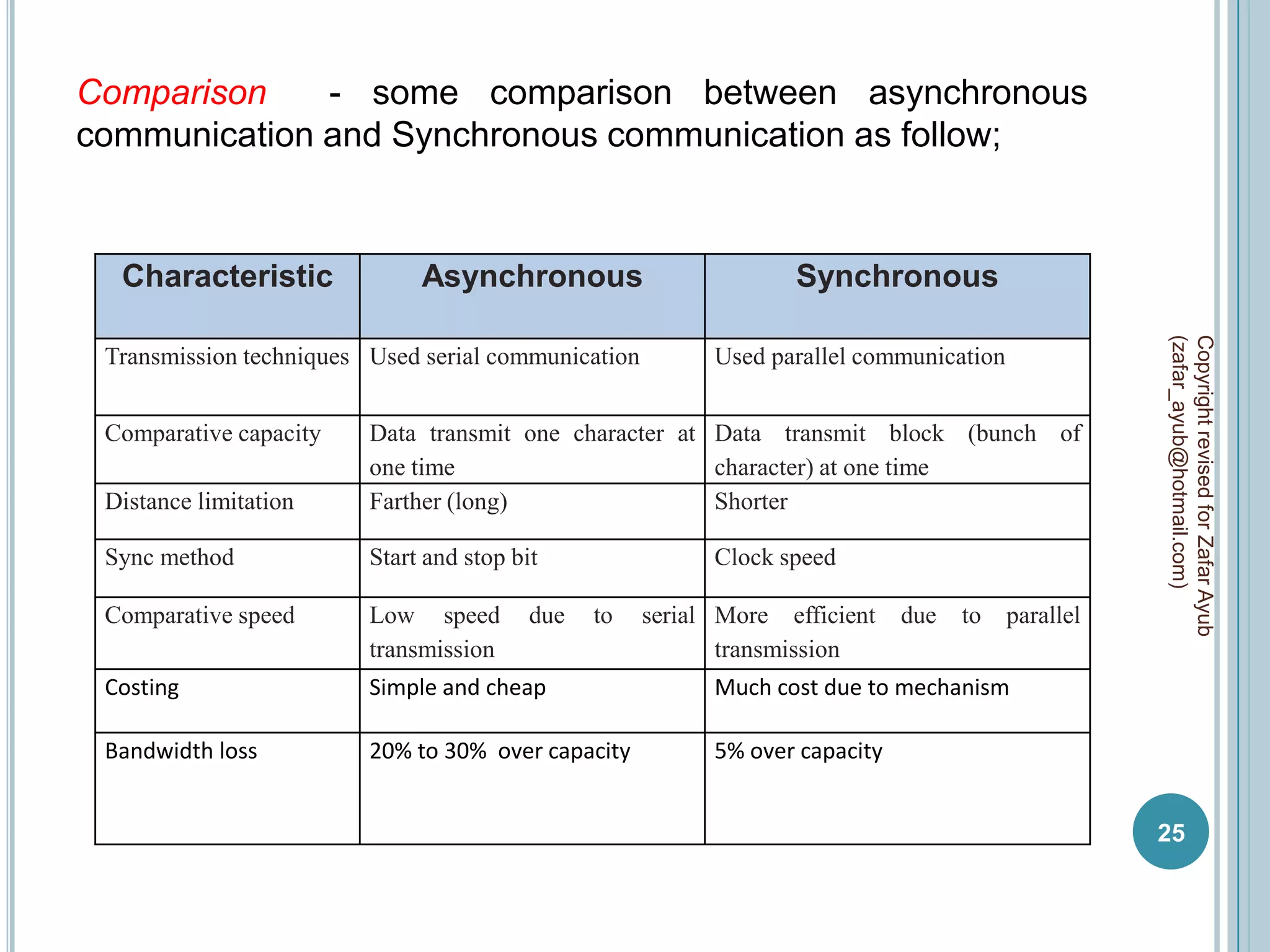
Comparison    - some comparison between asynchronous
communication and Synchronous communication as follow;


  Characteristic              Asynchronous                        Synchronous


                                                                                                    (zafar_ayub@hotmail.com)
                                                                                                    Copyright revised for Zafar Ayub
 Transmission techniques Used serial communication         Used parallel communication


 Comparative capacity    Data transmit one character at Data transmit block (bunch of
                         one time                       character) at one time
 Distance limitation     Farther (long)                 Shorter

 Sync method             Start and stop bit                Clock speed

 Comparative speed       Low speed        due   to   serial More efficient    due   to   parallel
                         transmission                       transmission
 Costing                 Simple and cheap                  Much cost due to mechanism

 Bandwidth loss          20% to 30% over capacity          5% over capacity


                                                                                                    25
DATA COMMUNICATION PORTS
For interconnection with other device every data communication
device have specific port / interface, by data communication
mechanism two types of ports are available;

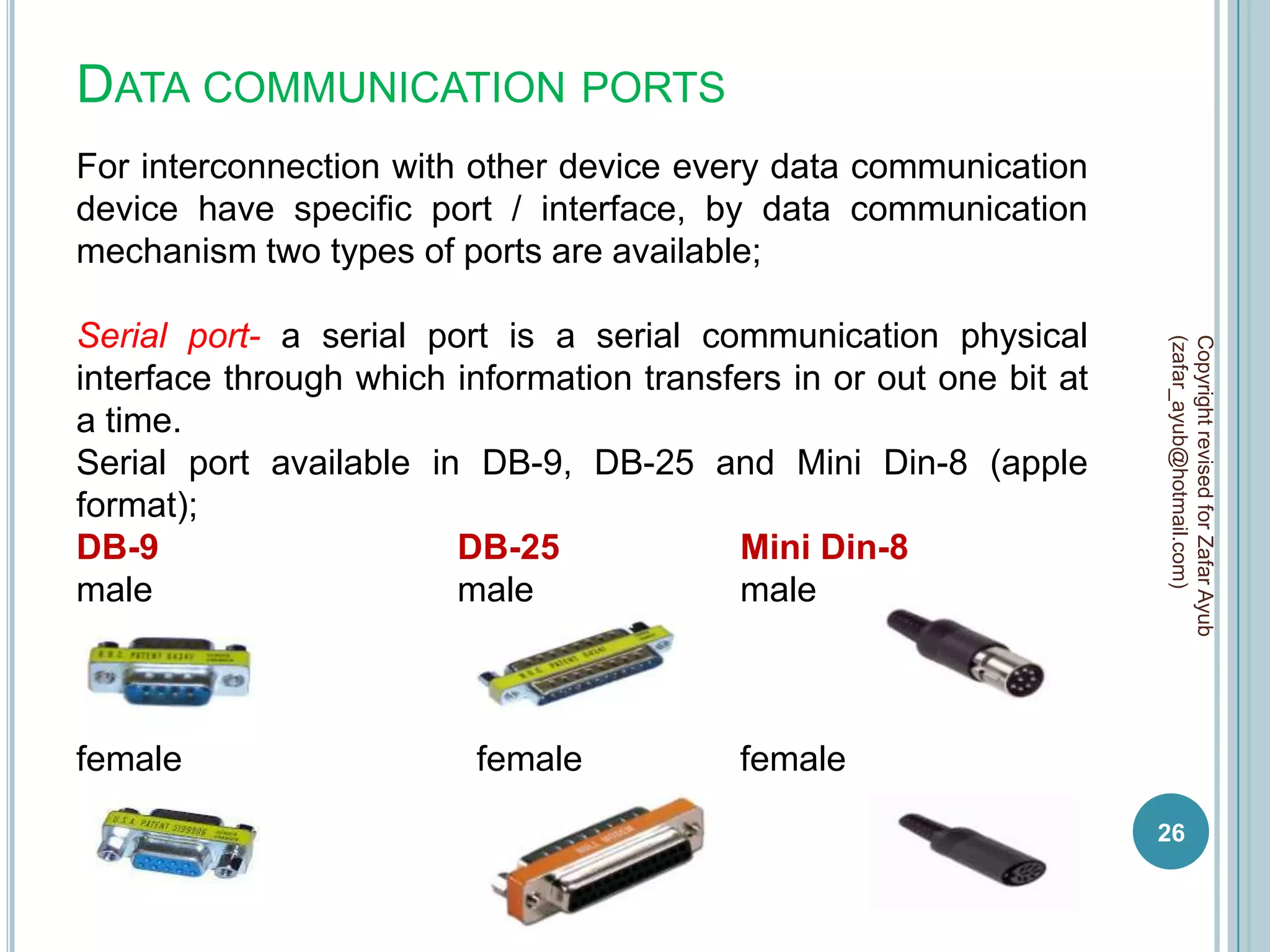
Serial port- a serial port is a serial communication physical


                                                                     (zafar_ayub@hotmail.com)
                                                                     Copyright revised for Zafar Ayub
interface through which information transfers in or out one bit at
a time.
Serial port available in DB-9, DB-25 and Mini Din-8 (apple
format);
DB-9                    DB-25             Mini Din-8
male                    male              male


female                    female           female
                                                                     26
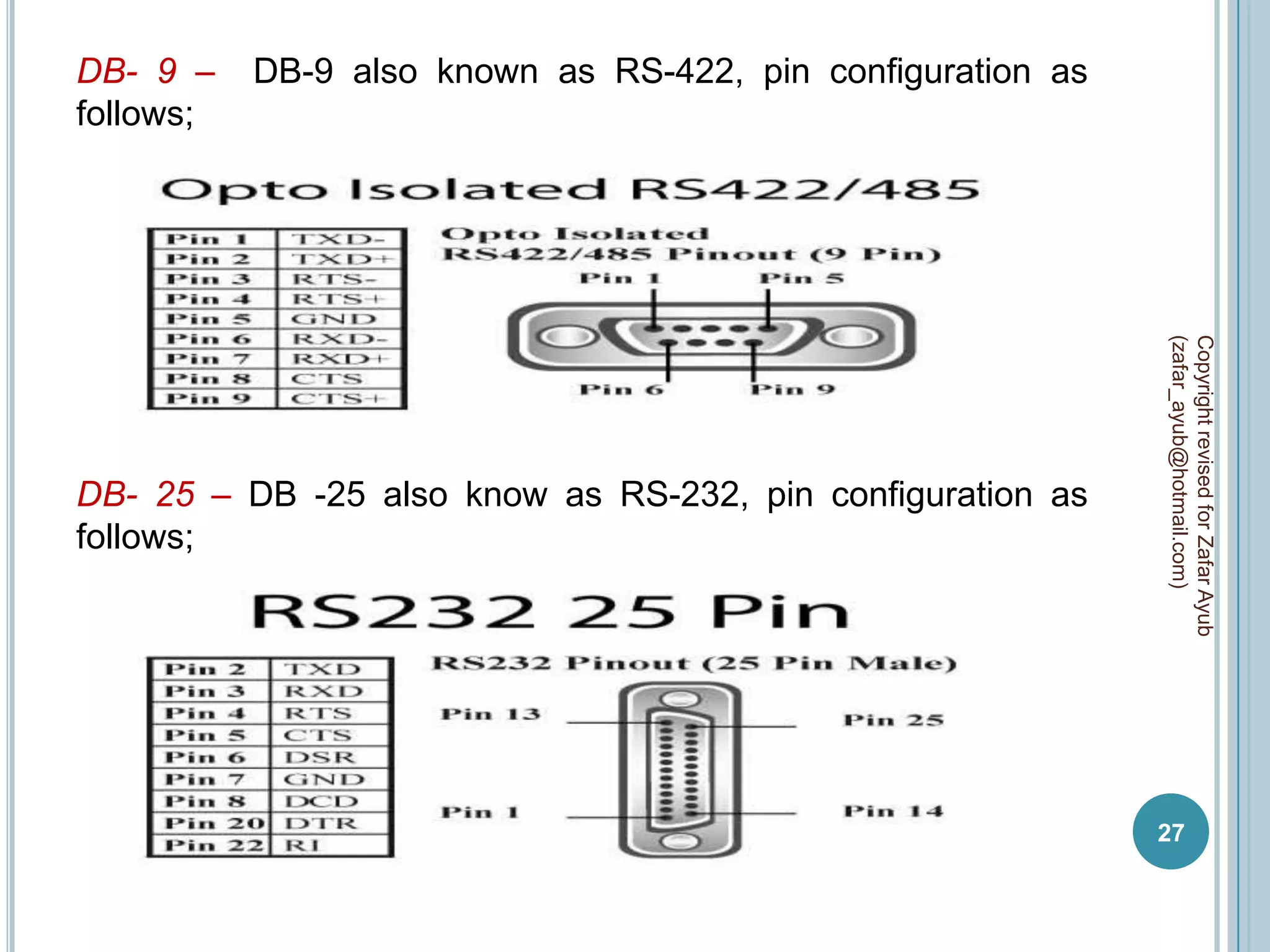
DB- 9 –    DB-9 also known as RS-422, pin configuration as
follows;


                                                             (zafar_ayub@hotmail.com)
                                                             Copyright revised for Zafar Ayub
DB- 25 – DB -25 also know as RS-232, pin configuration as
follows;


                                                             27
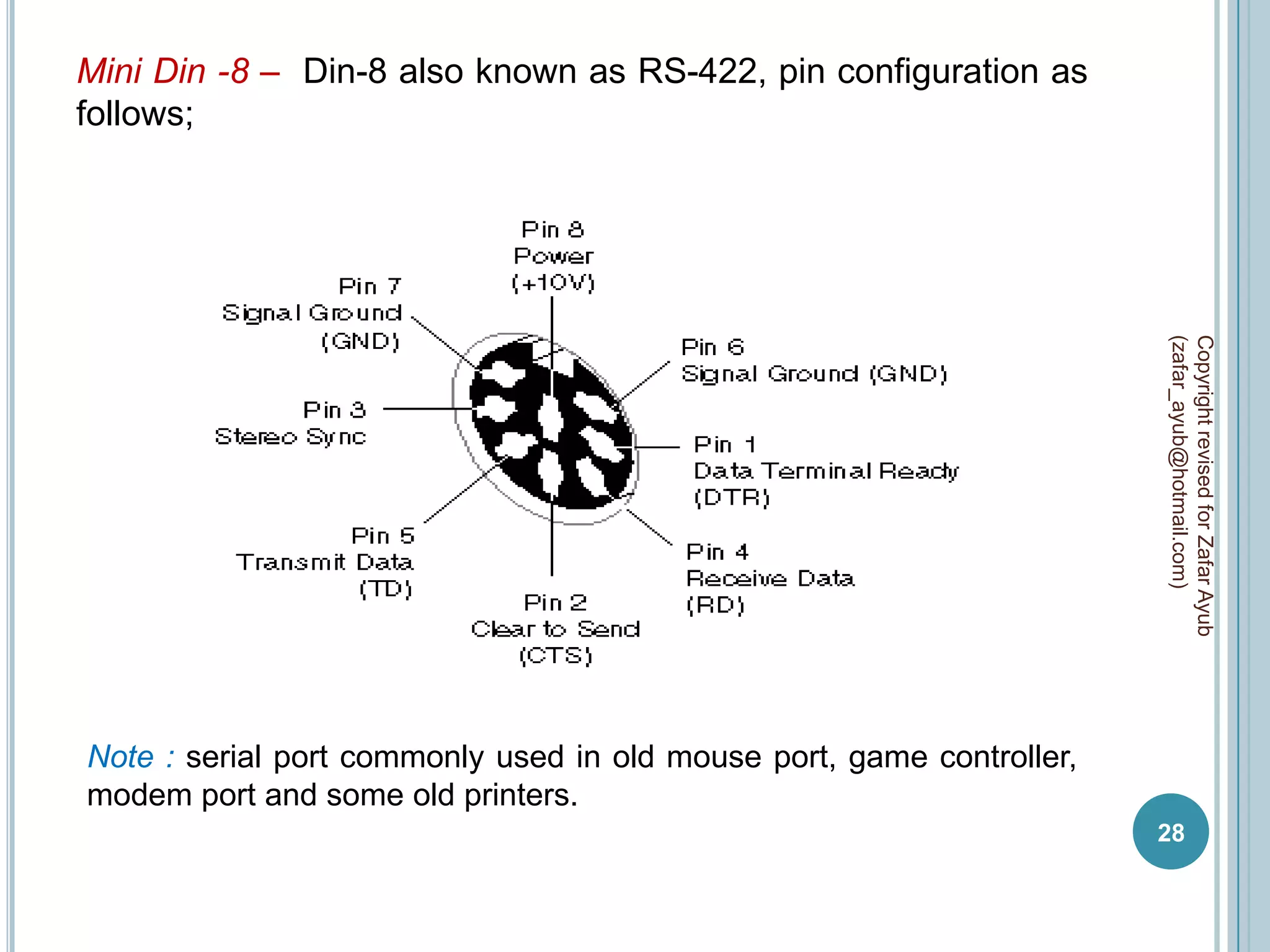
Mini Din -8 – Din-8 also known as RS-422, pin configuration as
follows;


                                                                       (zafar_ayub@hotmail.com)
                                                                       Copyright revised for Zafar Ayub
Note : serial port commonly used in old mouse port, game controller,
modem port and some old printers.
                                                                       28
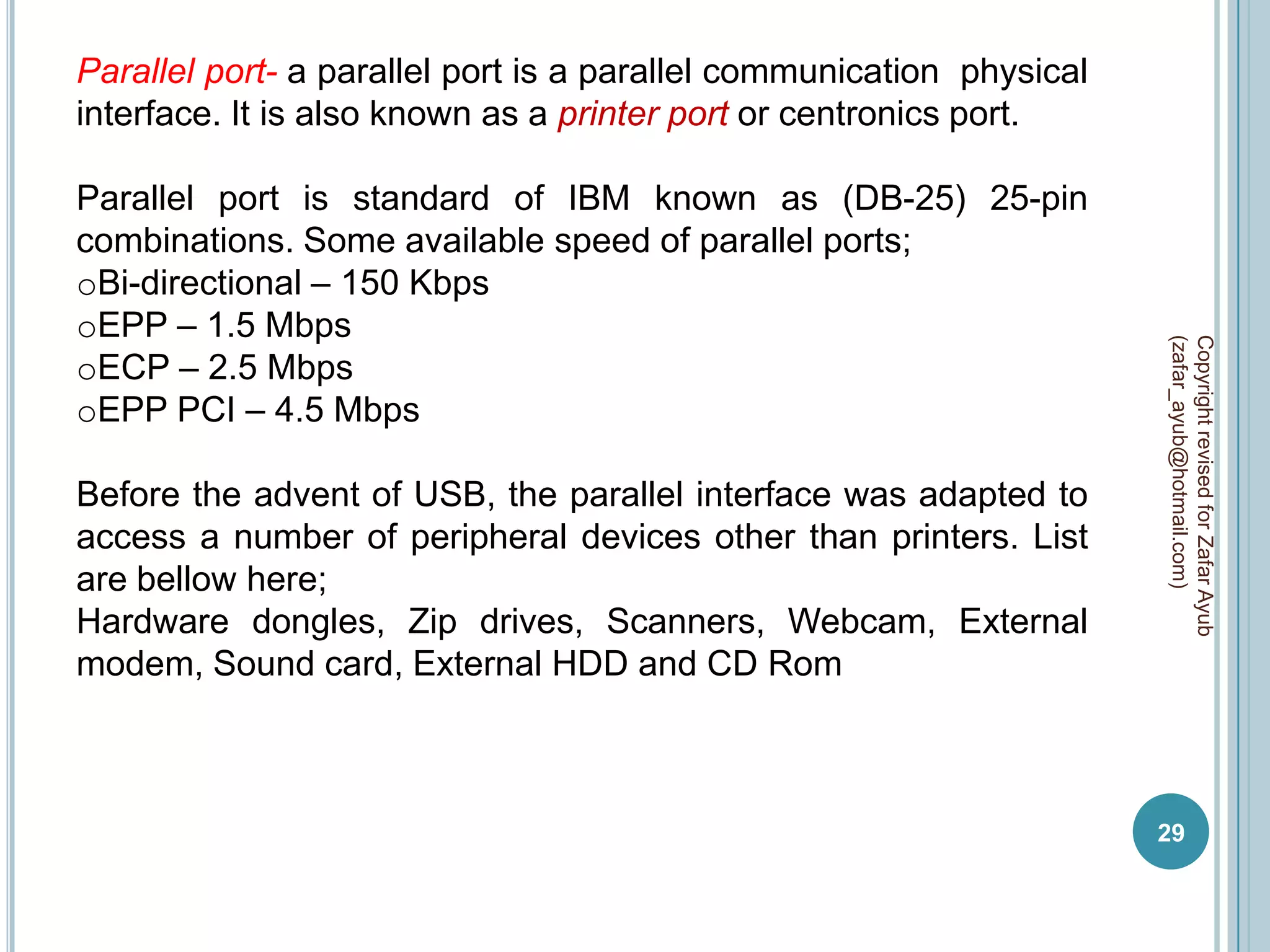
Parallel port- a parallel port is a parallel communication physical
interface. It is also known as a printer port or centronics port.

Parallel port is standard of IBM known as (DB-25) 25-pin
combinations. Some available speed of parallel ports;
oBi-directional – 150 Kbps
oEPP – 1.5 Mbps


                                                                      (zafar_ayub@hotmail.com)
                                                                      Copyright revised for Zafar Ayub
oECP – 2.5 Mbps
oEPP PCI – 4.5 Mbps

Before the advent of USB, the parallel interface was adapted to
access a number of peripheral devices other than printers. List
are bellow here;
Hardware dongles, Zip drives, Scanners, Webcam, External
modem, Sound card, External HDD and CD Rom


                                                                      29
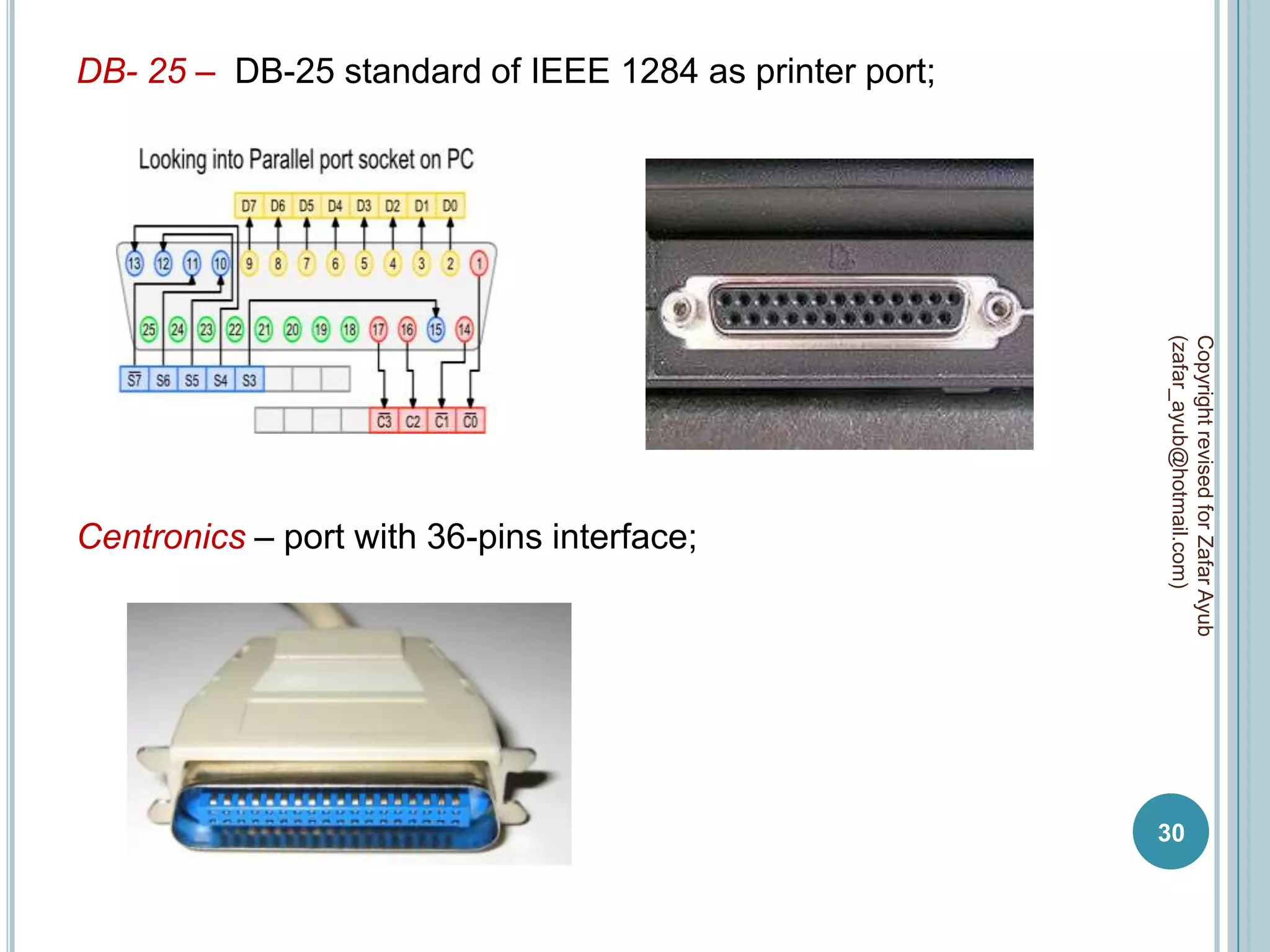
DB- 25 – DB-25 standard of IEEE 1284 as printer port;


                                                        (zafar_ayub@hotmail.com)
                                                        Copyright revised for Zafar Ayub
Centronics – port with 36-pins interface;


                                                        30
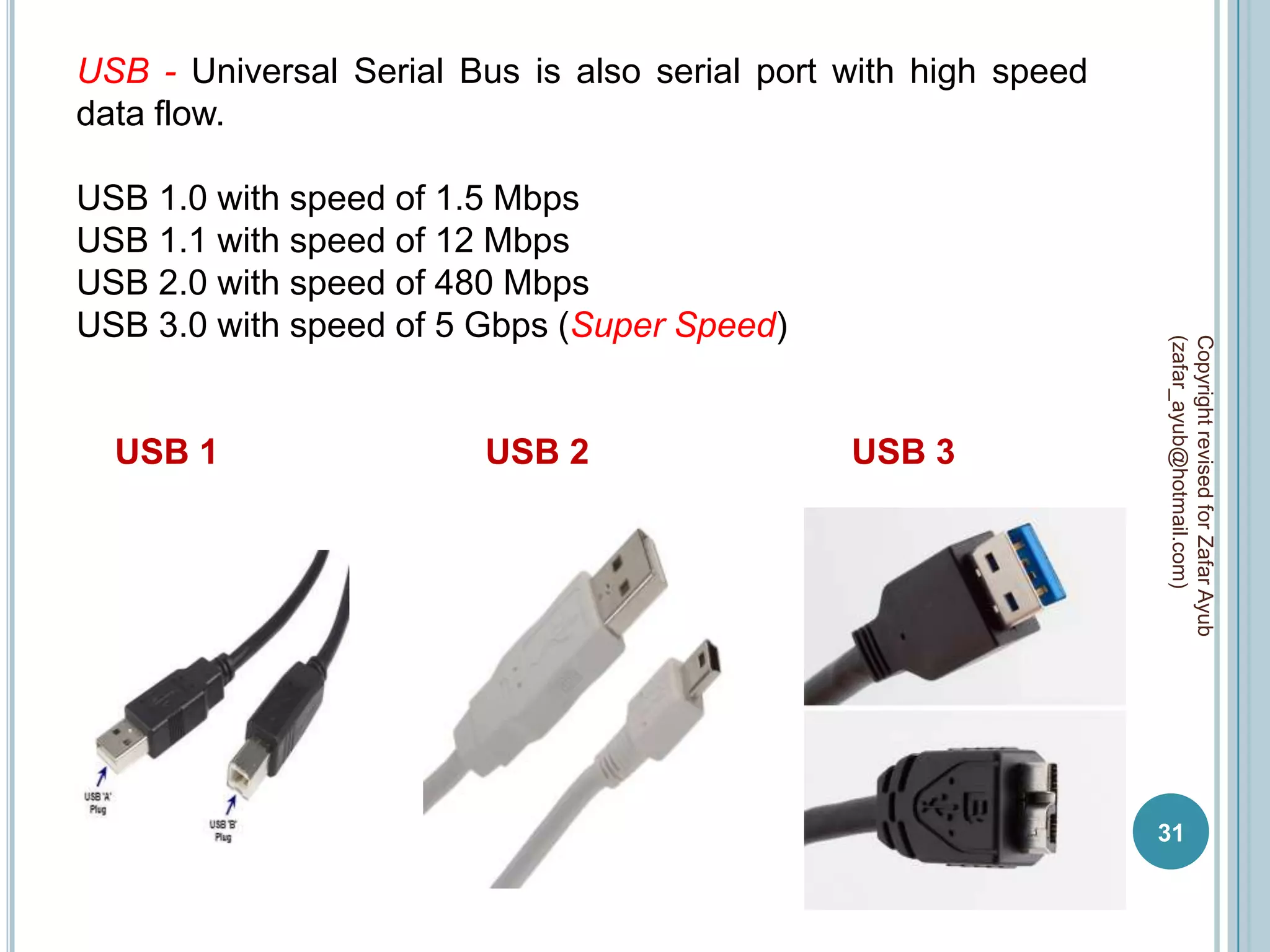
USB - Universal Serial Bus is also serial port with high speed
data flow.

USB 1.0 with speed of 1.5 Mbps
USB 1.1 with speed of 12 Mbps
USB 2.0 with speed of 480 Mbps
USB 3.0 with speed of 5 Gbps (Super Speed)


                                                                 (zafar_ayub@hotmail.com)
                                                                 Copyright revised for Zafar Ayub
  USB 1                  USB 2                 USB 3


                                                                 31
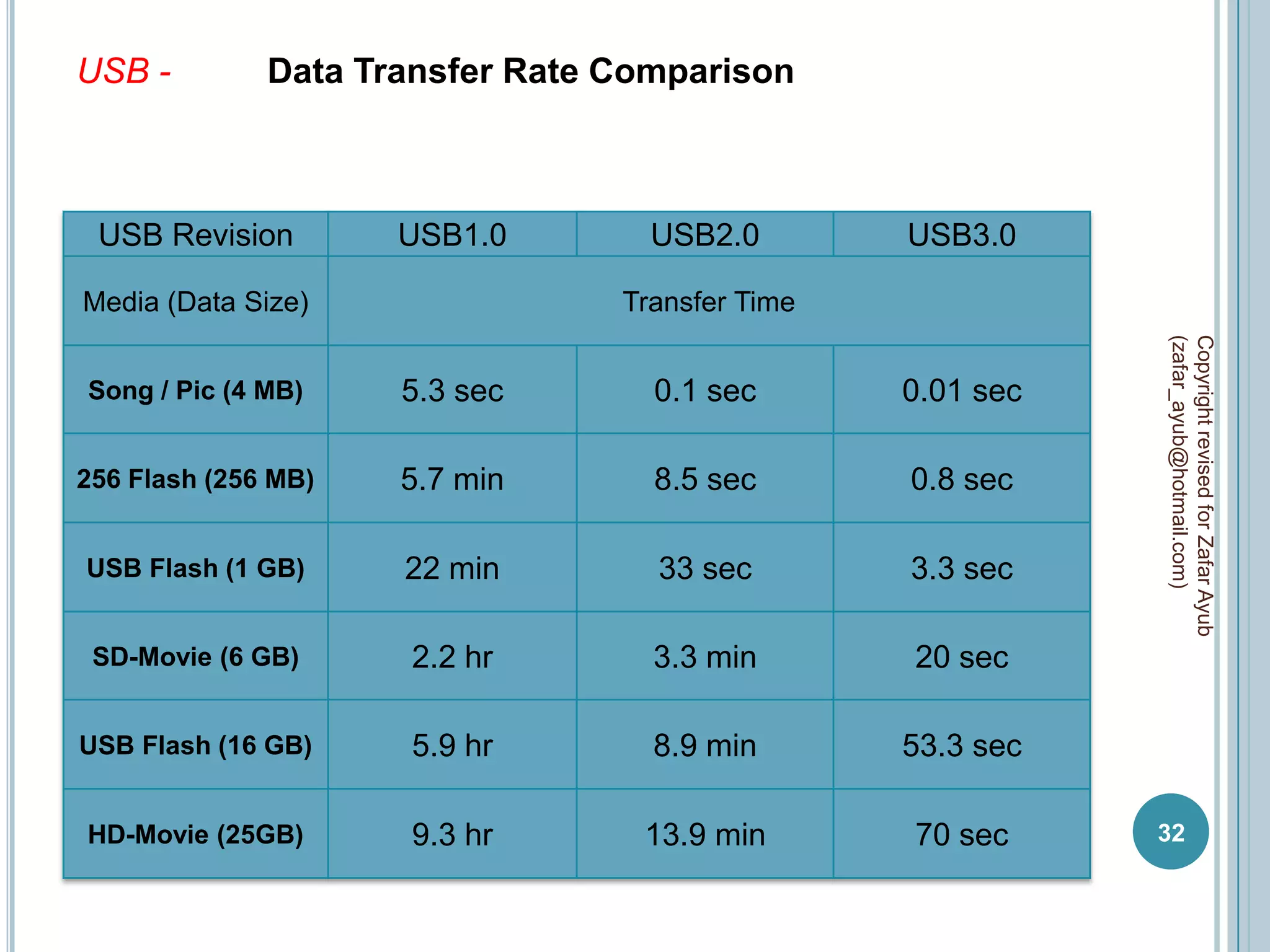
USB -         Data Transfer Rate Comparison


 USB Revision        USB1.0        USB2.0        USB3.0

Media (Data Size)                Transfer Time


                                                            (zafar_ayub@hotmail.com)
                                                            Copyright revised for Zafar Ayub
Song / Pic (4 MB)    5.3 sec       0.1 sec       0.01 sec

256 Flash (256 MB)   5.7 min       8.5 sec       0.8 sec

USB Flash (1 GB)     22 min        33 sec        3.3 sec

 SD-Movie (6 GB)     2.2 hr        3.3 min       20 sec

USB Flash (16 GB)    5.9 hr        8.9 min       53.3 sec

HD-Movie (25GB)      9.3 hr       13.9 min       70 sec     32
SIGNALS AND SYSTEM
A signal is an electric current or electromagnetic field used to
convey data from one place to another.

The simplest form of signal is a direct current (DC) that is
switched on and off; this is the principle by which the early


                                                                    (zafar_ayub@hotmail.com)
                                                                    Copyright revised for Zafar Ayub
telegraph worked. More complex signals consist of an
alternating-current (AC) or electromagnetic carrier that contains
one or more data streams.

Data is superimposed on a carrier current or wave by means of
a process called modulation. Signal modulation can be done in
either of two main ways: analog and digital.

Note : In recent years, digital modulation has been getting more
common, while analog modulation methods have been used less
and less. There are still plenty of analog signals
                                                                    33
around, however, and they will probably never become totally
extinct.
There are three data transmissions core aspect;

Data – Actual information being sent / received, possibly Analog
(continuous) or digital (discrete).
Analog Data – Takes on continuous values. Ex. Voice or video
Digital Data – Takes on discrete values. Ex. Text and integers


                                                                   (zafar_ayub@hotmail.com)
                                                                   Copyright revised for Zafar Ayub
Signal - Electronic or electromagnetic representation of
data, possibly Analog or digital.
Analog Signal – Continuously varying electromagnetic wave
representing data carried over a variety of medium.
Digital Signal – Sequence of voltage pulses representing data
transmitted over a wire medium

Transmission – Communication of data by sending                /
receiving, and processing data.
Analog Transmission – Communication of analog signals
Digital Transmission – Communication of digital signals
                                                                   34
Analog Signals - An analog signal is any continuous signals for
which the time is variable of the signal.


                                                                    (zafar_ayub@hotmail.com)
                                                                    Copyright revised for Zafar Ayub
Digital Signals - A digital signal is a physical signal that is a
representation    of a      sequence     of   discrete    values.


                                                                    35
Comparison - some comparison between analog and digital
signals as follow;

  Characteristic                   Analog                          Digital

 Number of range        Analog signals can have an Digital signals can have only a
                        infinite number of values in a limited number of values (1 / 0)


                                                                                           (zafar_ayub@hotmail.com)
                                                                                           Copyright revised for Zafar Ayub
                        range
 Type of data           Continuous                     Discrete

 Value of data          More exact values, but more    Not as exact as analog, but
                        difficult to work with         easier to work with
 Wave types             Sing waves                     Square waves
 Type of value          Negative / positive            Positive
 Medium                 Wire / un-wire                 Wire
 Device                 Amplifier for signals boosting Repeater for signals regenerating
                        (noise also be amplify)        (noise isn’t boost)
 Security               Non-encryption                 Encryption
 Capacity / Bandwidth   Low                            High

 Examples               Voice, video, file format on Text, integers, images, computer
                                                                                           36
                        tape, Radio / TV transmission format files (CD, HDD)
                        waves
Analog Signal Example - Telephones take sound vibrations and
turn them into electrical vibrations of the same shape before they
are transmitted over traditional telephone lines. Radio wave
transmissions work in the same way. Computers, which handle
data in digital form, require modems to turn signals from digital
to analog before transmitting those signals over communication
lines such as telephone lines that carry only analog signals. The


                                                                       (zafar_ayub@hotmail.com)
                                                                       Copyright revised for Zafar Ayub
signals are turned back into digital form (demodulated) at the
receiving end so that the computer can process the data in its
digital format.

Digital Signal Example - This is the principle behind compact
discs (CDs). The music itself exists in an analog form, as waves
in the air, but these sounds are then translated into a digital form
that is encoded onto the disk. When you play a compact disc,
the CD player reads the digital data, translates it back into its
original analog form, and sends it to the amplifier and eventually
the speakers.
                                                                       37

Data communication and network Chapter -1

  • 1.
    (zafar_ayub@hotmail.com) Copyright revised for Zafar Ayub DATA COMMUNICATION AND NETWORK CHAPTER - 1 1 Compile by Zafar Ayub
  • 2.
    WHAT IS DATACOMMUNICATION?  Electronic transmission of information that has been encoded digitally with some standard from one network (systems) to other network (systems) via certain medium, knows as Data Communication. Elements of Data Communication; (zafar_ayub@hotmail.com) Copyright revised for Zafar Ayub   Information / Data  Digital encoded  Transfer of data / sender and receiver  Specific medium 2
  • 3.
    WHAT IS NETWORK?  A computer network often simply referred to as a network, is a collection of hardware components, which are interconnected by communication channels that allow sharing of resources and information with respect to certain set of rules / protocols via OS / software. (zafar_ayub@hotmail.com) Copyright revised for Zafar Ayub  Elements of Network;  Hardware equipments  Network OS / software  Communication channel  Information / Data / Recourse  Protocols 3
  • 4.
    TERMINOLOGIES  Data transmission process between sender and receiver is refer to data communication, and deployed physical environment (hardware / software / protocols / channel ) is network. (zafar_ayub@hotmail.com) Copyright revised for Zafar Ayub  Data: digital information over computer / network, which may define with certain type of file extension; like .doc, .ppt, .pdf, .exe, and etc. File extension dominate nature of data file 4
  • 5.
    Resource: all sharable/ accessible items over network, which may physical / virtual, knows as resource. physical resource - may be hard drive, printer, servers and etc. virtual resource - may be data files, online application, web site, internet and etc. (zafar_ayub@hotmail.com) Copyright revised for Zafar Ayub Share Resource: a shared resource or network share is a device / piece of information means file / software or application, on a computer that can be remotely accessed from another computer. 5
  • 6.
    Channel: communication channelis a medium on which resource can be access over network and establish connectivity between sender and receiver. Channel speed / network speed is depends upon bandwidth. bandwidth - channel capacity known as bandwidth. There are two types of channels; (zafar_ayub@hotmail.com) Copyright revised for Zafar Ayub physical channel like; network cable, fiber optic, electrical wire, and etc. logical or virtual channel like; wireless, radio frequency, Wi-Fi, Wi-Max, and Bluetooth 6
  • 7.
    Protocols: a communicationsprotocol is a system of digital message formats and rules for exchanging those messages in or between computer systems and in network / telecommunications. Protocols regulate the following characteristics of a network: access method, allowed physical topologies, types of cabling, and speed of data transfer. (zafar_ayub@hotmail.com) Copyright revised for Zafar Ayub Protocols may include signaling, authentication, error detection method, and network policies. A protocol can be implement at hardware or software or both, and with respect to assignment these are implemented like; for web http, for security SSL, for email POP3 / SMTP, for LAN network Ethernet, for routing BGP / RIP, etc. 7
  • 8.
    Digital Encryption: inencryption is the process of transforming information / data using an algorithm to make it unreadable to anyone (except those possessing special knowledge, usually referred to as a key). The result of the process is encrypted information and the reverse process, i.e. to make the encrypted information readable again is referred to as decryption. (zafar_ayub@hotmail.com) Copyright revised for Zafar Ayub algorithm – set of steps for assembling / reassembling of data with respect to define network technology. Types of digital encryption; Software Based Encryption – a software program to facilitate encryption process on data / file with respect to 256-bit AES / 448-bit Blowfish algorithms. Hardware is only responsible to deliver encrypted file to other end computer where again via software program file may be decrypt for original data / file. 8
  • 9.
    Drawbacks all encryption performon data / file during file transfer. data / file size is also increase with addition of certain algorithms. security risk for confidentiality documents. Hardware Based Encryption – all data intensive encryption tasks are done onboard storage device, rather than on file, by (zafar_ayub@hotmail.com) Copyright revised for Zafar Ayub this file size remain standard with maximum speed. Most important factor is hardware security protocols which are only configure same end device Hardware encryption is also apply with specialize network equipment. Drawbacks higher cost of equipments 9
  • 10.
    Network Hardware: allequipments / devices which may used on network and facilitate for resource sharing and data connectivity like; router, switch, firewall, and servers etc. Network Software: specialize software / OS which may establish logical connectivity, authentication, and management of network, commonly built-in with operating system. Some are like; teamviewer, skype, etc (zafar_ayub@hotmail.com) Copyright revised for Zafar Ayub 10
  • 11.
    Sender: a computer/ device from which data / files are send to specific destination. Receiver a computer / device at which data / files are received by source. (zafar_ayub@hotmail.com) Copyright revised for Zafar Ayub 11
  • 12.
    DATA TRANSMISSION  Data transmission is the physical transfer of data over a point- to-point or point-to-multipoint channel. Data transmission is a subset of the field of data communications, which also includes computer networking or computer communication applications and networking (zafar_ayub@hotmail.com) Copyright revised for Zafar Ayub protocols, for example routing and switching.  Point – to –point : In telecommunications a point-to-point connection refers to a communications connection between two nodes or endpoints.  Point – to –multipoint : refers to communication which is accomplished via a specific and distinct type of one-to-many connection 12
  • 13.
    DATA COMMUNICATION TECHNIQUES SerialTransmission - is the process of sending data one bit at a time, in sequentially, over a communication channel / computer bus. A data channel that transfers digital data in a serial mode, one bit after the other over one wire, with start and stop bit. (zafar_ayub@hotmail.com) Copyright revised for Zafar Ayub Serial interfaces may have multiple lines, but only one line is used for data. On earlier PCs, the serial port was a serial interface for attaching modems and data acquisition terminals, and sometimes mouse. 13
  • 14.
    Parallel Transmission -is a method of sending several data signals simultaneously over several parallel channels. In parallel transmission, multiple bits (usually 8 bits or a byte/character) are sent simultaneously on different channels (wires, frequency channels) within the same cable, or radio path, and synchronized to a clock. Due to multi channels lines in (zafar_ayub@hotmail.com) Copyright revised for Zafar Ayub parallel transmission, it may comparatively fast as serial transmission. 14
  • 15.
    Transmission Characteristic -The advantages, limitations and typical applications of parallel and serial transmission methodologies are summarized in chart; Transmission Serial Parallel Characteristic (zafar_ayub@hotmail.com) Copyright revised for Zafar Ayub Transmission One bit comes after another, one by All bits in a single character and description one transmit simultaneously Comparative Speed Slower Faster Distance Limitation Farther Shorter Application Between two computer, from Within a computer the along computer to external devices, and computer buses, between drive local and wide network controller to hard drive Cable Description All bits travel down in single wire, Each bit travel down its own wire one bit at one time simultaneously with other bits 15
  • 16.
    DATA COMMUNICATION CHANNELS Thereare three data communication channels like; Simplex communication- refers to communication that occurs in one direction only. Examples radio broadcast, keyboard / mouse inputs to CPU, internet multicast, and one – lane and one side road only. (zafar_ayub@hotmail.com) Copyright revised for Zafar Ayub Half duplex communication - system provides communication in both directions, but only one direction at a time (not simultaneously). Typically, once a party begins receiving a signal, it must wait for the transmitter to stop transmitting, before replying. Examples walkie-talkie, one-lane road with traffic controllers at each end. 16
  • 17.
    Full duplex communication-sometimes called double-duplex system allows communication in both directions simultaneously. Virtually no collisions take place on a full-duplex transmission. Perhaps a bigger benefit is the increase in overall throughput- since we are sending and receiving on two different channels, we just theoretically doubled our data transfer rate. Examples landline / mobile phone, two way double side road. (zafar_ayub@hotmail.com) Copyright revised for Zafar Ayub 17
  • 18.
    DATA COMMUNICATION MODES Datacommunication modes define behavior of data flow during communication which is based on interval of time. When devices are communicating, they must be know when ever data has to send or receive (in period of time). The two (zafar_ayub@hotmail.com) Copyright revised for Zafar Ayub devices must establish and maintain some type of timing between them so that signals are produced, transmitted, and detected accurately. There are two main alternatives to establishing and maintaining the timing for the sampling of the signals. These two timing alternatives are known as asynchronous and synchronous, also known as data communication modes. Data Link Layer : all synchronization occurs on the data link layer (2nd layer of TCP/IP), where the data in form of frame. 18
  • 19.
    Asynchronous communication- Thetransmission of data in which each character is a self-contained unit with its own start and stop bits. Intervals between characters may be irregular. (zafar_ayub@hotmail.com) Copyright revised for Zafar Ayub 19
  • 20.
     Start bitinform that transmission has to start with binary value of “0”.  Stop bit inform to equipment that transmission has been stop with binary value of “1”.  When no character is being transmitted, the line between transmitter and receiver is in an idle state (binary 1 level).  A minimum length for the stop element is specified, and this is (zafar_ayub@hotmail.com) Copyright revised for Zafar Ayub usually 1, 1.5, or 2 times the duration of an ordinary bit.  Data contain may be 5 -8 character bits. Parity bit : Character bit may include parity bit, set by the transmitter such that the total number of ones in the character, including the parity bit, is even (even parity) or odd (odd parity). The receiver uses this bit for error detection. 20
  • 21.
     There aretwo types of parity bit even parity bit odd parity bit Even parity bit - when using even parity, the parity bit is set to 1 if the number of ones in a given set of bits (not including the parity bit) is odd, making the number of ones in the entire set of bits (including the parity bit) even. If the number of ones in a given (zafar_ayub@hotmail.com) Copyright revised for Zafar Ayub set of bits is already even, it is set to a 0. an even parity bit will be set to "1" if the number of 1s + 1 is even Odd parity bit - when using odd parity, the parity bit is set to 1 if the number of ones in a given set of bits (not including the parity bit) is even, keeping the number of ones in the entire set of bits (including the parity bit) odd. And when the number of set bits is already odd, the odd parity bit is set to 0. an odd parity bit will be set to "1" if the number of 1s +1 is odd 21
  • 22.
     at endof transmission no maximum value is specified, because the stop element is the same as the idle state, the transmitter will continue to transmit the stop element until it is ready to send the next character. Synchronous communication- The transmission of data in block set and time intervals between characters may be regular. (zafar_ayub@hotmail.com) Copyright revised for Zafar Ayub  each block of data is formatted as a frame that includes a starting and an ending flag, and is transmitted in a steady stream without start and stop codes. Clock speed : time interval (clock speed) must be synchronized, to prevent timing drift between transmitter and receiver; can use separate clock line embed clock signal in data 22
  • 23.
    By adding clockline – add specific time of break between sender and receiver. By adding clock signal – add clock information in frame.  In synchronous transmission, there is another level of synchronization required, to allow the receiver to determine the beginning and end of a block of data. (zafar_ayub@hotmail.com) Copyright revised for Zafar Ayub  each block begins with a preamble bit pattern (opening flag) and generally ends with a post-amble bit pattern (closing flag). 23
  • 24.
    preamble bit –The preamble is a 64-bit (8 byte) field that contains a synchronization pattern consisting of alternating ones and zeros and ending with two consecutive ones. After synchronization is established, the preamble is used to locate the first bit of the packet. The preamble is generated by the LAN interface card. (zafar_ayub@hotmail.com) Copyright revised for Zafar Ayub post-amble bit – commonly used end of synchronous transmission. Control bit : start control bit contain destination MAC, source MAC, and protocol; and similar stop control bit contain CRC information. 24
  • 25.
    Comparison - some comparison between asynchronous communication and Synchronous communication as follow; Characteristic Asynchronous Synchronous (zafar_ayub@hotmail.com) Copyright revised for Zafar Ayub Transmission techniques Used serial communication Used parallel communication Comparative capacity Data transmit one character at Data transmit block (bunch of one time character) at one time Distance limitation Farther (long) Shorter Sync method Start and stop bit Clock speed Comparative speed Low speed due to serial More efficient due to parallel transmission transmission Costing Simple and cheap Much cost due to mechanism Bandwidth loss 20% to 30% over capacity 5% over capacity 25
  • 26.
    DATA COMMUNICATION PORTS Forinterconnection with other device every data communication device have specific port / interface, by data communication mechanism two types of ports are available; Serial port- a serial port is a serial communication physical (zafar_ayub@hotmail.com) Copyright revised for Zafar Ayub interface through which information transfers in or out one bit at a time. Serial port available in DB-9, DB-25 and Mini Din-8 (apple format); DB-9 DB-25 Mini Din-8 male male male female female female 26
  • 27.
    DB- 9 – DB-9 also known as RS-422, pin configuration as follows; (zafar_ayub@hotmail.com) Copyright revised for Zafar Ayub DB- 25 – DB -25 also know as RS-232, pin configuration as follows; 27
  • 28.
    Mini Din -8– Din-8 also known as RS-422, pin configuration as follows; (zafar_ayub@hotmail.com) Copyright revised for Zafar Ayub Note : serial port commonly used in old mouse port, game controller, modem port and some old printers. 28
  • 29.
    Parallel port- aparallel port is a parallel communication physical interface. It is also known as a printer port or centronics port. Parallel port is standard of IBM known as (DB-25) 25-pin combinations. Some available speed of parallel ports; oBi-directional – 150 Kbps oEPP – 1.5 Mbps (zafar_ayub@hotmail.com) Copyright revised for Zafar Ayub oECP – 2.5 Mbps oEPP PCI – 4.5 Mbps Before the advent of USB, the parallel interface was adapted to access a number of peripheral devices other than printers. List are bellow here; Hardware dongles, Zip drives, Scanners, Webcam, External modem, Sound card, External HDD and CD Rom 29
  • 30.
    DB- 25 –DB-25 standard of IEEE 1284 as printer port; (zafar_ayub@hotmail.com) Copyright revised for Zafar Ayub Centronics – port with 36-pins interface; 30
  • 31.
    USB - UniversalSerial Bus is also serial port with high speed data flow. USB 1.0 with speed of 1.5 Mbps USB 1.1 with speed of 12 Mbps USB 2.0 with speed of 480 Mbps USB 3.0 with speed of 5 Gbps (Super Speed) (zafar_ayub@hotmail.com) Copyright revised for Zafar Ayub USB 1 USB 2 USB 3 31
  • 32.
    USB - Data Transfer Rate Comparison USB Revision USB1.0 USB2.0 USB3.0 Media (Data Size) Transfer Time (zafar_ayub@hotmail.com) Copyright revised for Zafar Ayub Song / Pic (4 MB) 5.3 sec 0.1 sec 0.01 sec 256 Flash (256 MB) 5.7 min 8.5 sec 0.8 sec USB Flash (1 GB) 22 min 33 sec 3.3 sec SD-Movie (6 GB) 2.2 hr 3.3 min 20 sec USB Flash (16 GB) 5.9 hr 8.9 min 53.3 sec HD-Movie (25GB) 9.3 hr 13.9 min 70 sec 32
  • 33.
    SIGNALS AND SYSTEM Asignal is an electric current or electromagnetic field used to convey data from one place to another. The simplest form of signal is a direct current (DC) that is switched on and off; this is the principle by which the early (zafar_ayub@hotmail.com) Copyright revised for Zafar Ayub telegraph worked. More complex signals consist of an alternating-current (AC) or electromagnetic carrier that contains one or more data streams. Data is superimposed on a carrier current or wave by means of a process called modulation. Signal modulation can be done in either of two main ways: analog and digital. Note : In recent years, digital modulation has been getting more common, while analog modulation methods have been used less and less. There are still plenty of analog signals 33 around, however, and they will probably never become totally extinct.
  • 34.
    There are threedata transmissions core aspect; Data – Actual information being sent / received, possibly Analog (continuous) or digital (discrete). Analog Data – Takes on continuous values. Ex. Voice or video Digital Data – Takes on discrete values. Ex. Text and integers (zafar_ayub@hotmail.com) Copyright revised for Zafar Ayub Signal - Electronic or electromagnetic representation of data, possibly Analog or digital. Analog Signal – Continuously varying electromagnetic wave representing data carried over a variety of medium. Digital Signal – Sequence of voltage pulses representing data transmitted over a wire medium Transmission – Communication of data by sending / receiving, and processing data. Analog Transmission – Communication of analog signals Digital Transmission – Communication of digital signals 34
  • 35.
    Analog Signals -An analog signal is any continuous signals for which the time is variable of the signal. (zafar_ayub@hotmail.com) Copyright revised for Zafar Ayub Digital Signals - A digital signal is a physical signal that is a representation of a sequence of discrete values. 35
  • 36.
    Comparison - somecomparison between analog and digital signals as follow; Characteristic Analog Digital Number of range Analog signals can have an Digital signals can have only a infinite number of values in a limited number of values (1 / 0) (zafar_ayub@hotmail.com) Copyright revised for Zafar Ayub range Type of data Continuous Discrete Value of data More exact values, but more Not as exact as analog, but difficult to work with easier to work with Wave types Sing waves Square waves Type of value Negative / positive Positive Medium Wire / un-wire Wire Device Amplifier for signals boosting Repeater for signals regenerating (noise also be amplify) (noise isn’t boost) Security Non-encryption Encryption Capacity / Bandwidth Low High Examples Voice, video, file format on Text, integers, images, computer 36 tape, Radio / TV transmission format files (CD, HDD) waves
  • 37.
    Analog Signal Example- Telephones take sound vibrations and turn them into electrical vibrations of the same shape before they are transmitted over traditional telephone lines. Radio wave transmissions work in the same way. Computers, which handle data in digital form, require modems to turn signals from digital to analog before transmitting those signals over communication lines such as telephone lines that carry only analog signals. The (zafar_ayub@hotmail.com) Copyright revised for Zafar Ayub signals are turned back into digital form (demodulated) at the receiving end so that the computer can process the data in its digital format. Digital Signal Example - This is the principle behind compact discs (CDs). The music itself exists in an analog form, as waves in the air, but these sounds are then translated into a digital form that is encoded onto the disk. When you play a compact disc, the CD player reads the digital data, translates it back into its original analog form, and sends it to the amplifier and eventually the speakers. 37