VLSI Design and Layout Practice Lect5 – Stick Diagram & Scalable Design Rules   Danny Wen-Yaw Chung Institute of Electronic Engineering Chung-Yuan Christian University Sept. 2008
IC Layout Concept and Examples I. Stick Diagram II. Design Rules  III. Layout Verification   Ref:  http://140.135.9.56/XMS/
 
 
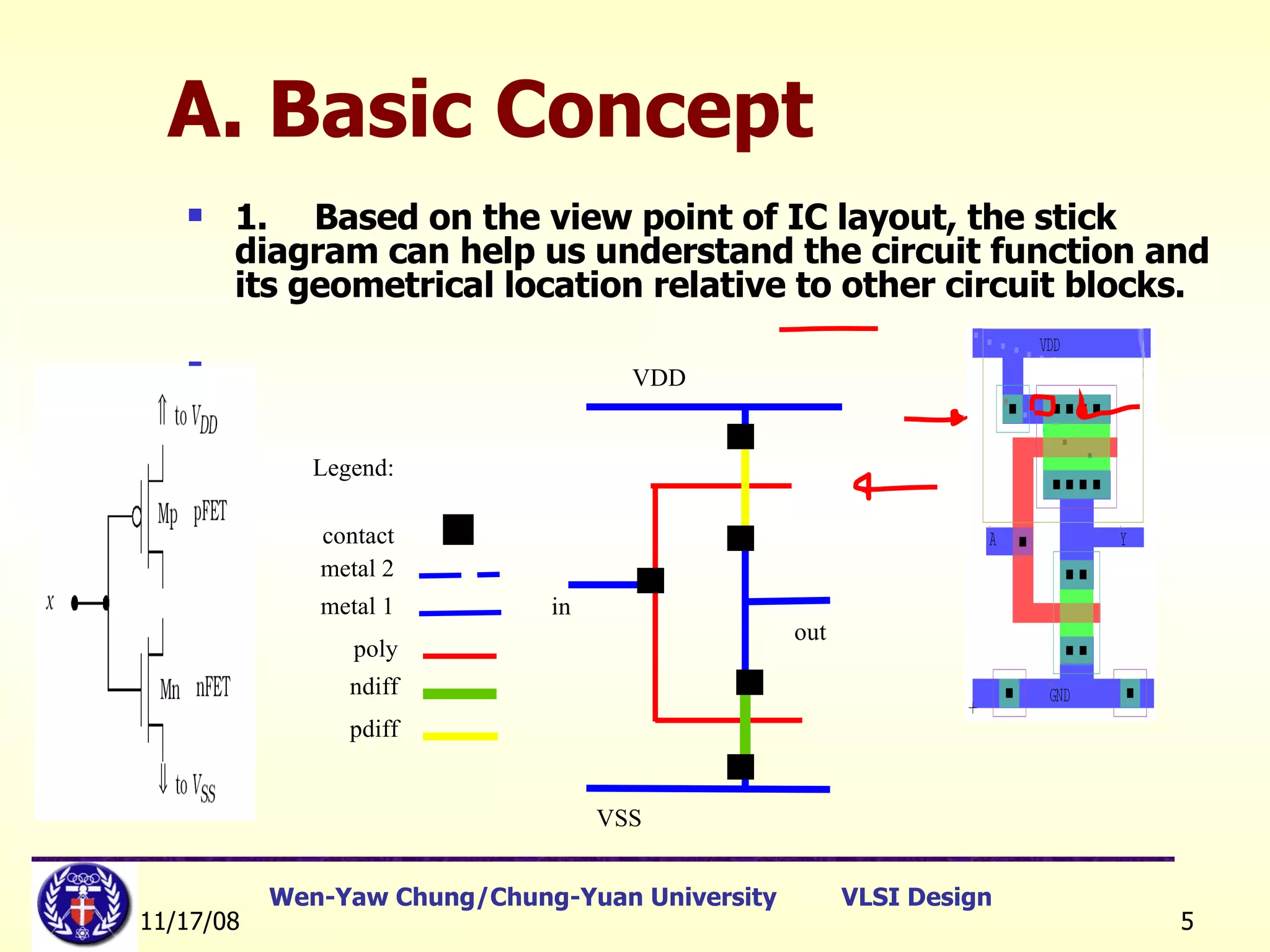
A. Basic Concept   1. Based on the view point of IC layout, the stick diagram can help us understand the circuit function and its geometrical location relative to other circuit blocks. Legend: contact metal 2 metal 1 poly ndiff pdiff VDD in VSS out ■
A. Basic Concept 2.  Although the stick diagram is an abstract presentation of real layout, it can use  graphical symbols  or  legend  to allocate the circuit to 2-diomensional plane and reach the aim same as the  physical layout  does.  3. The stick diagram is similar to a backbone of the real layout but  without the real size and aspect ratio of the devices , it still can reflect the real condition to layout of the silicon chip.
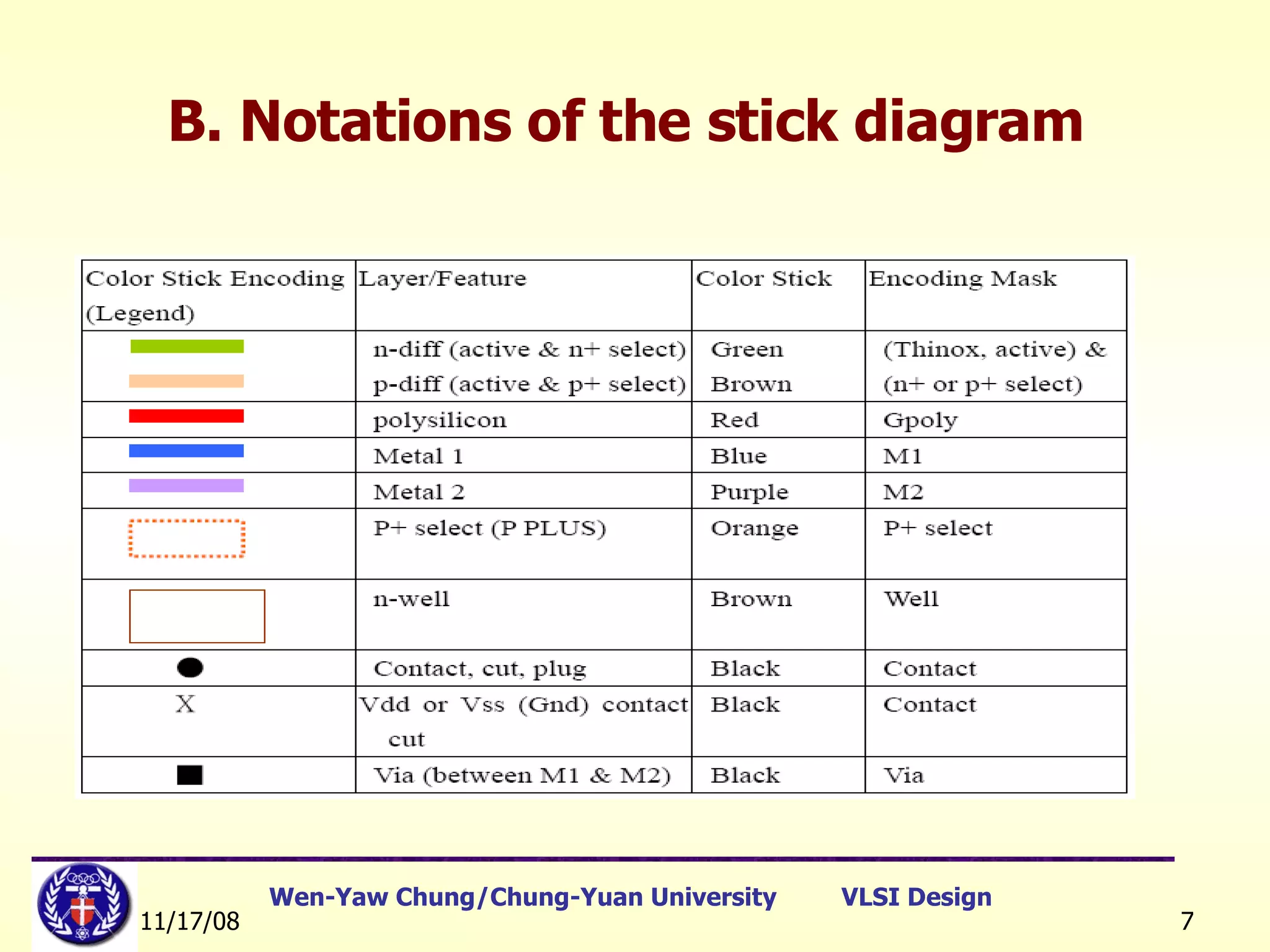
B. Notations of the stick diagram
Stick Diagram Intermediate representation between the transistor level and the mask (layout) level.  Gives topological information (identifies different layers and their relationship) Assumes that wires have no width. It is possible to translate stick diagram automatically to layout with correct design rules. [Ref]:   教育部顧問室 「超大型積體電路與系統設計」教育改進計畫  EDA 聯盟 – 推廣課程  Chap.1
Stick Diagram 1. When the same material (on the same layer) touch or cross, they are connected and belong to the same electrical node. 2. When  polysilicon  crosses N or P  diffusion , an N or P transistor is formed.  Polysilicon is drawn on top of diffusion. Diffusion must be drawn connecting the source and the drain. Gate is automatically self-aligned during fabrication. [Ref]:   教育部顧問室 「超大型積體電路與系統設計」教育改進計畫  EDA 聯盟 – 推廣課程  Chap.1
Stick Diagram 3. When a metal line needs to be connected to one of the other three conductors, a  contact  cut ( via ) is required. [Ref]:   教育部顧問室 「超大型積體電路與系統設計」教育改進計畫  EDA 聯盟 – 推廣課程  Chap.1
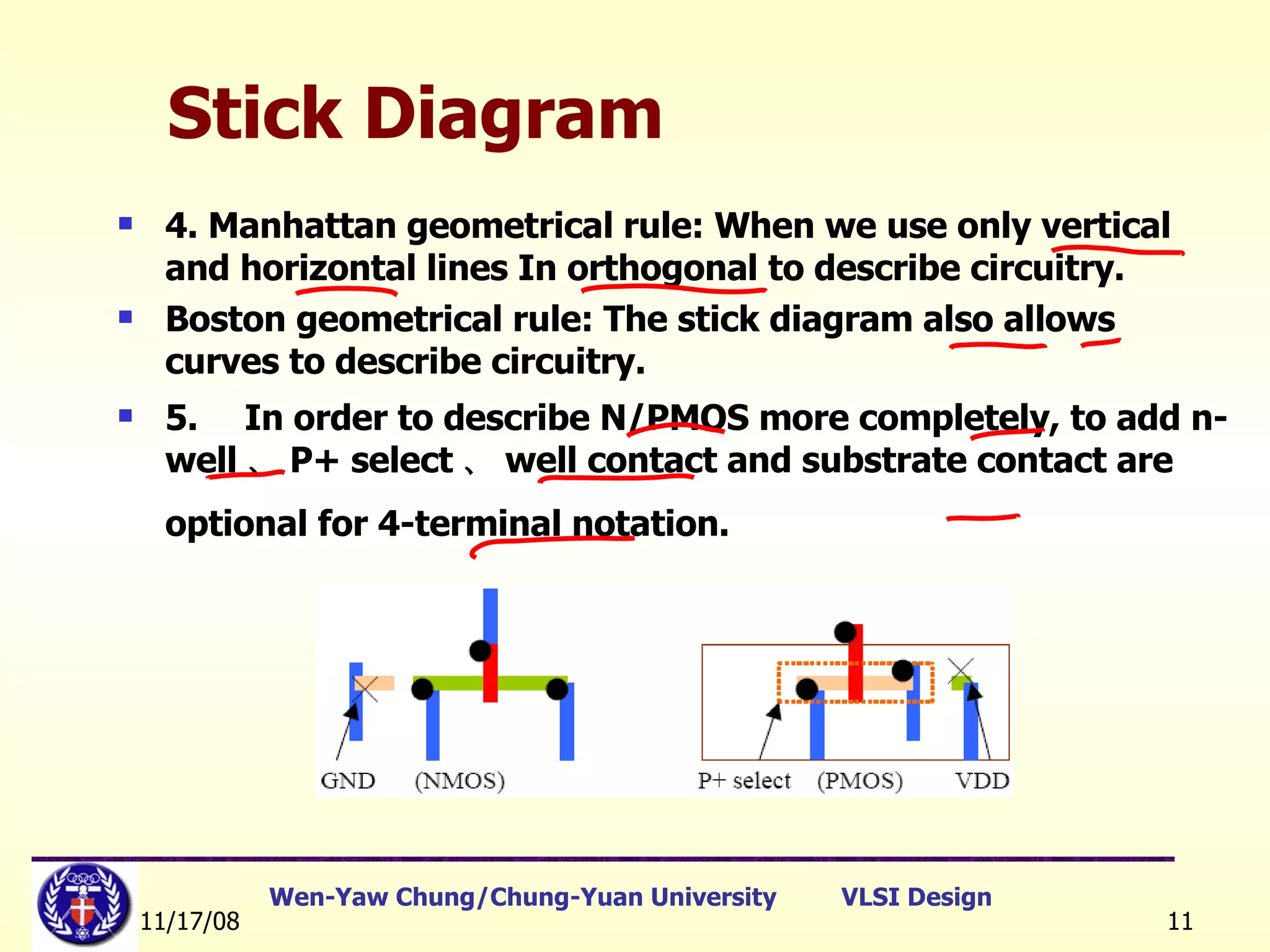
Stick Diagram 4. Manhattan geometrical rule: When we use only vertical and horizontal lines In orthogonal to describe circuitry. Boston geometrical rule: The stick diagram also allows curves to describe circuitry.  5. In order to describe N/PMOS more completely, to add n-well 、 P+ select 、 well contact and substrate contact are optional for 4-terminal notation.
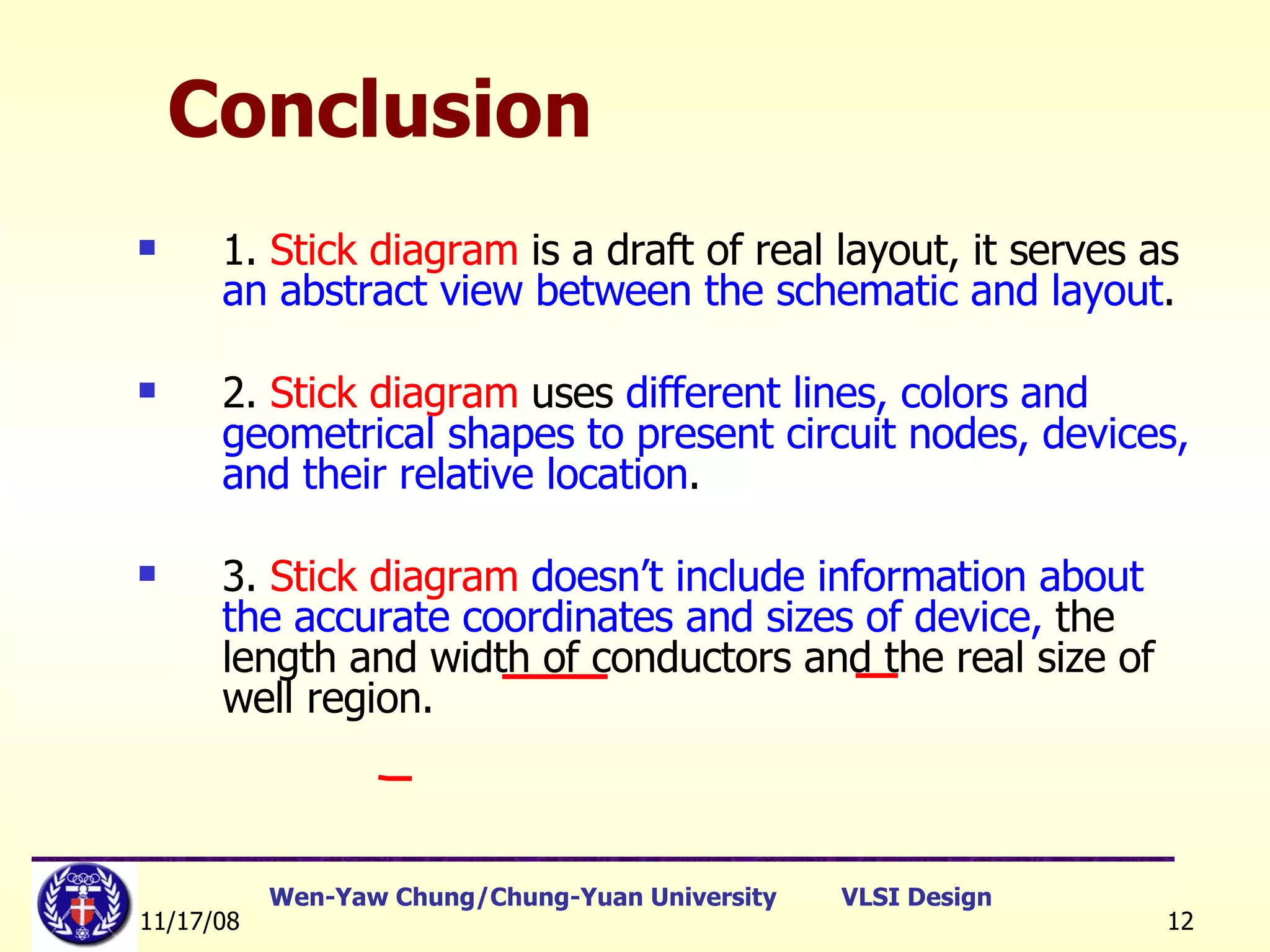
Conclusion 1.  Stick diagram  is a draft of real layout, it serves as  an abstract view between the schematic and layout . 2.  Stick diagram  uses  different lines, colors and geometrical shapes to present circuit nodes, devices, and their relative location . 3.  Stick diagram   doesn’t include information about the accurate coordinates and sizes of device,  the length and width of conductors and the real size of well region.
CMOS Inverter Stick Diagrams Basic layout More area efficient layout [Ref]:   教育部顧問室 「超大型積體電路與系統設計」教育改進計畫  EDA 聯盟 – 推廣課程  Chap.1
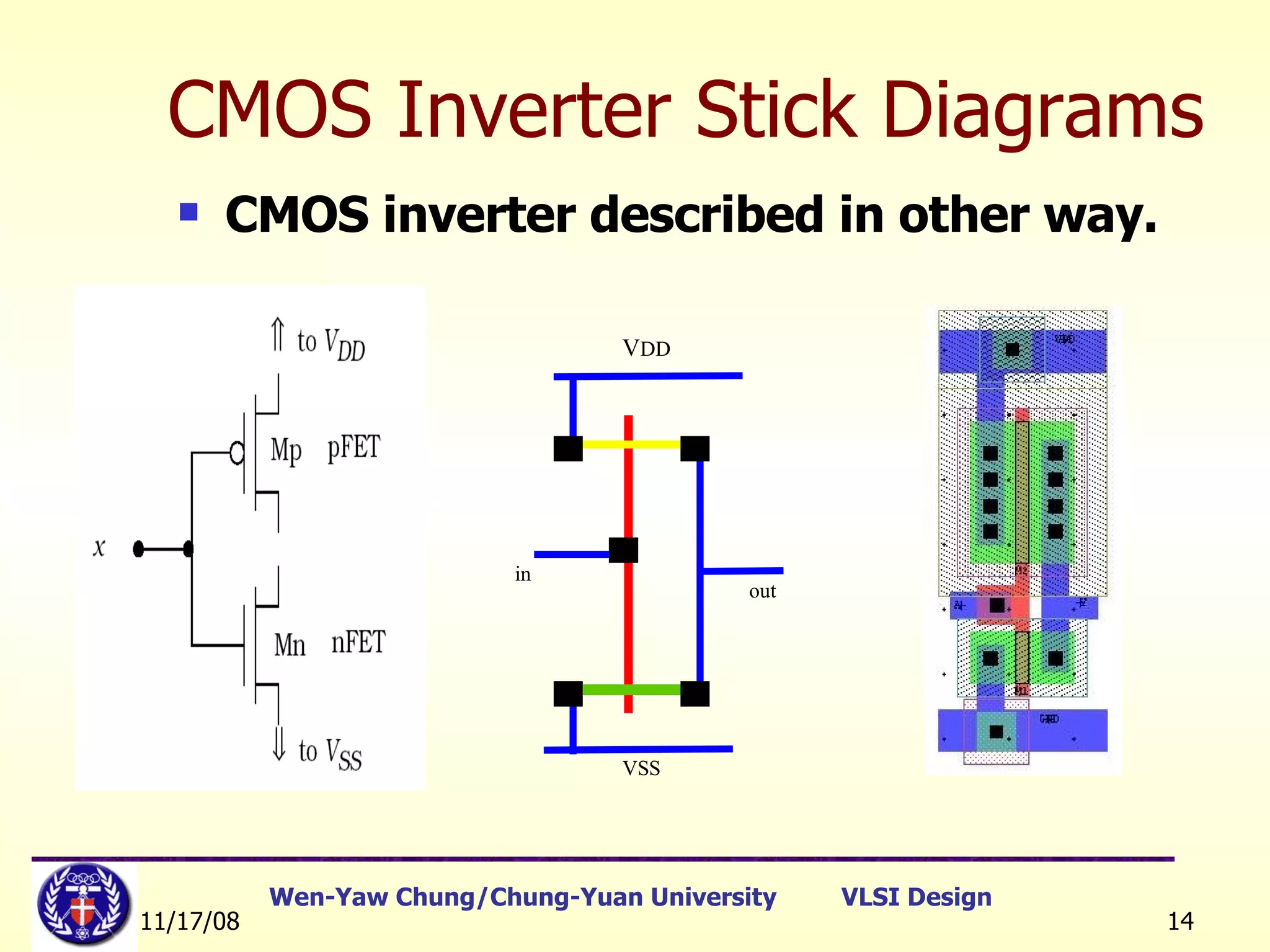
CMOS inverter described in other way. CMOS Inverter Stick Diagrams V DD in VSS out
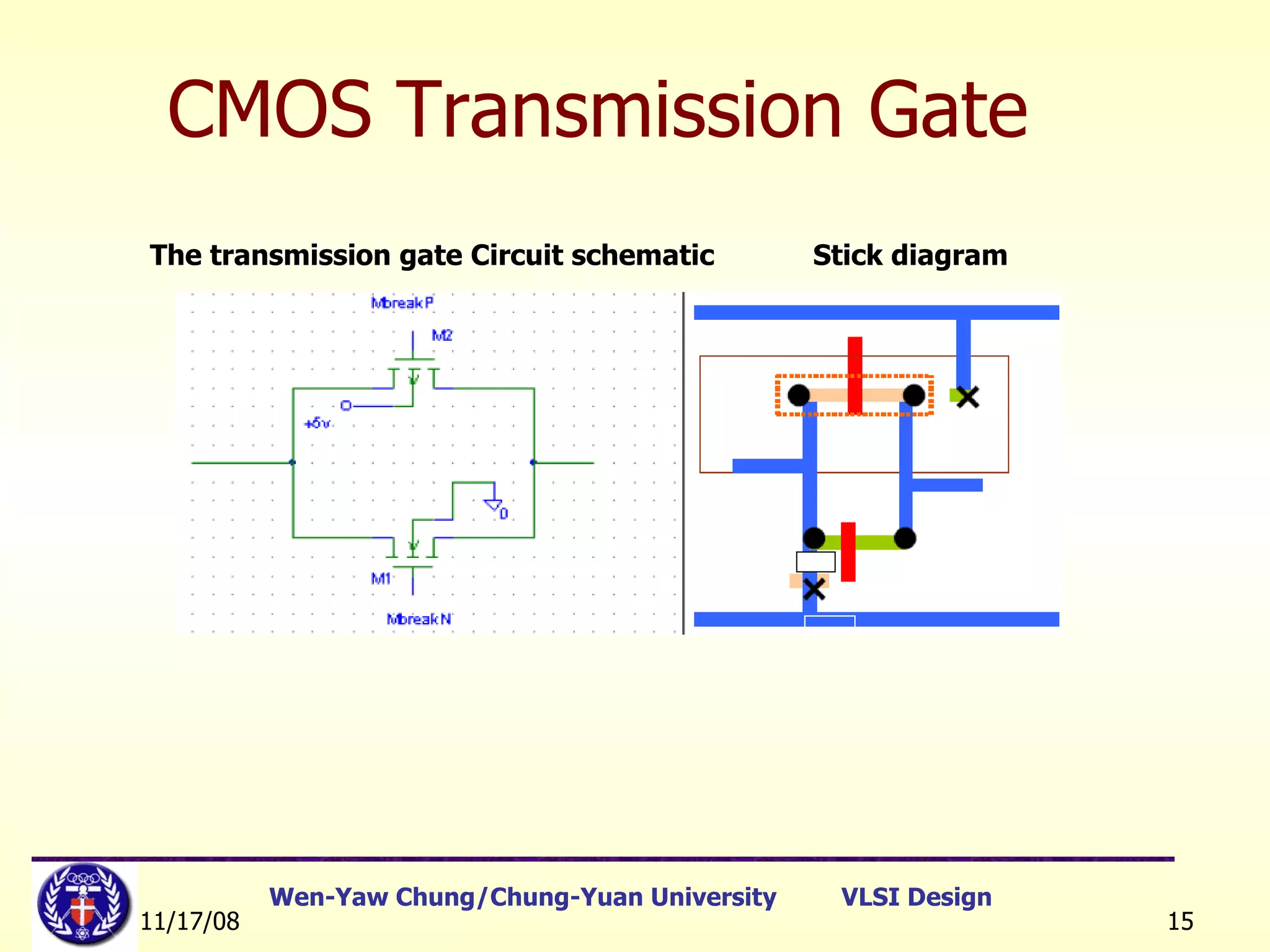
CMOS Transmission Gate The transmission gate Circuit schematic  Stick diagram
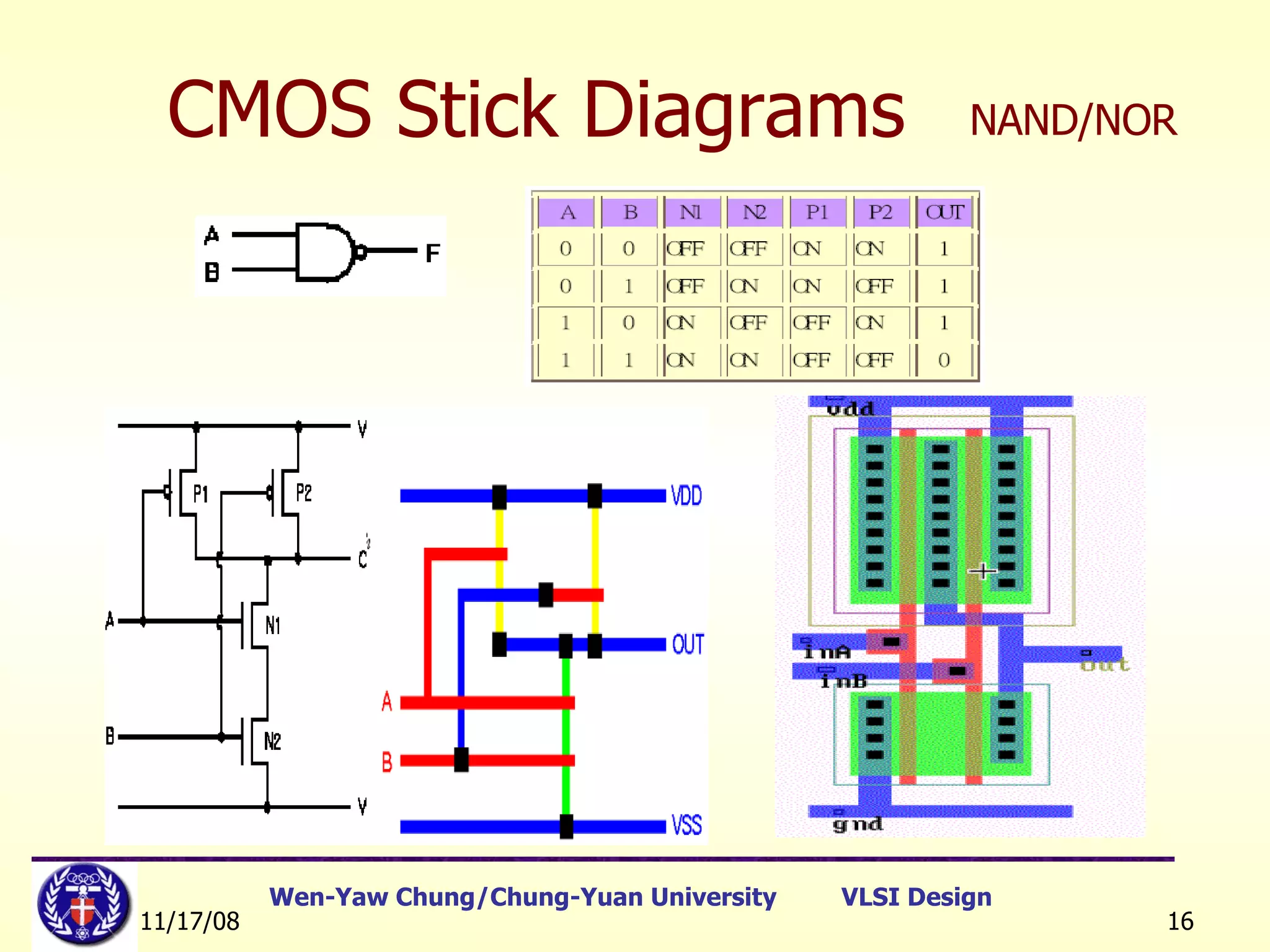
CMOS Stick Diagrams NAND/NOR
[Ref]:   教育部顧問室 「超大型積體電路與系統設計」教育改進計畫  EDA 聯盟 – 推廣課程  Chap.1 CMOS Stick Diagrams NAND
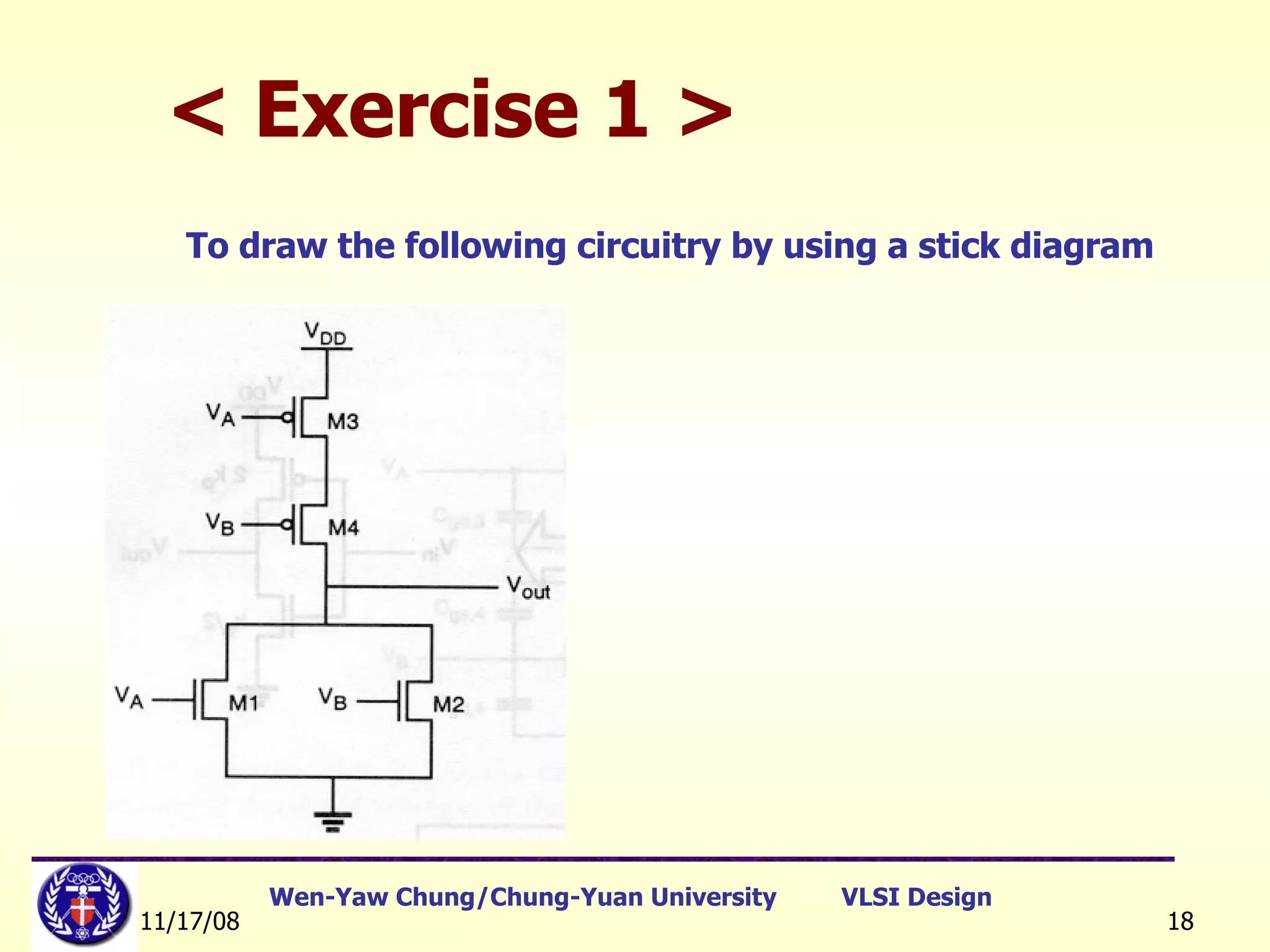
< Exercise 1 > To draw the following circuitry by using a stick diagram
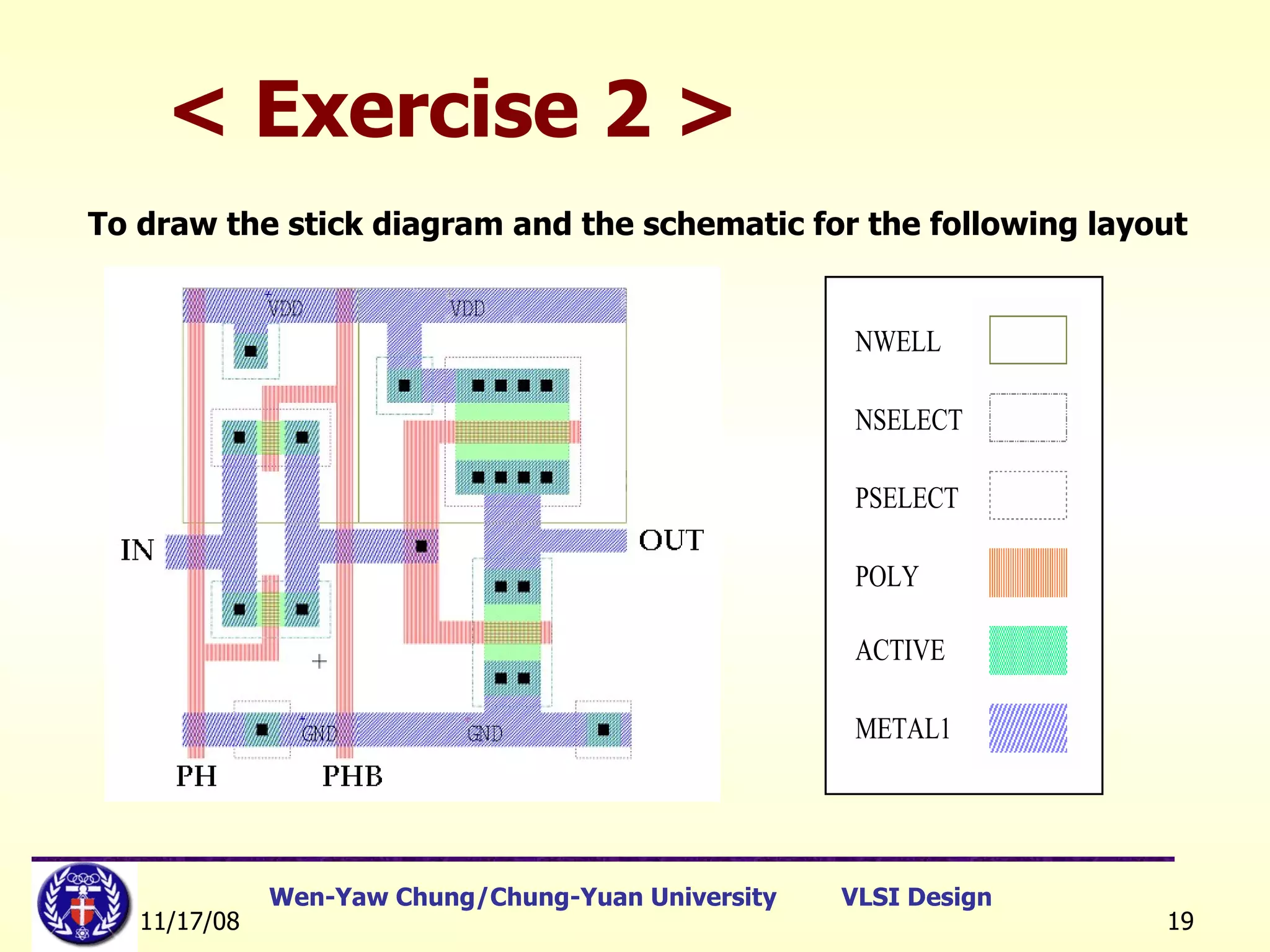
< Exercise 2 >   To draw the stick diagram and the schematic for the following layout
CMOS Stick Diagrams [Ref]:   教育部顧問室 「超大型積體電路與系統設計」教育改進計畫  EDA 聯盟 – 推廣課程  Chap.1 NOR
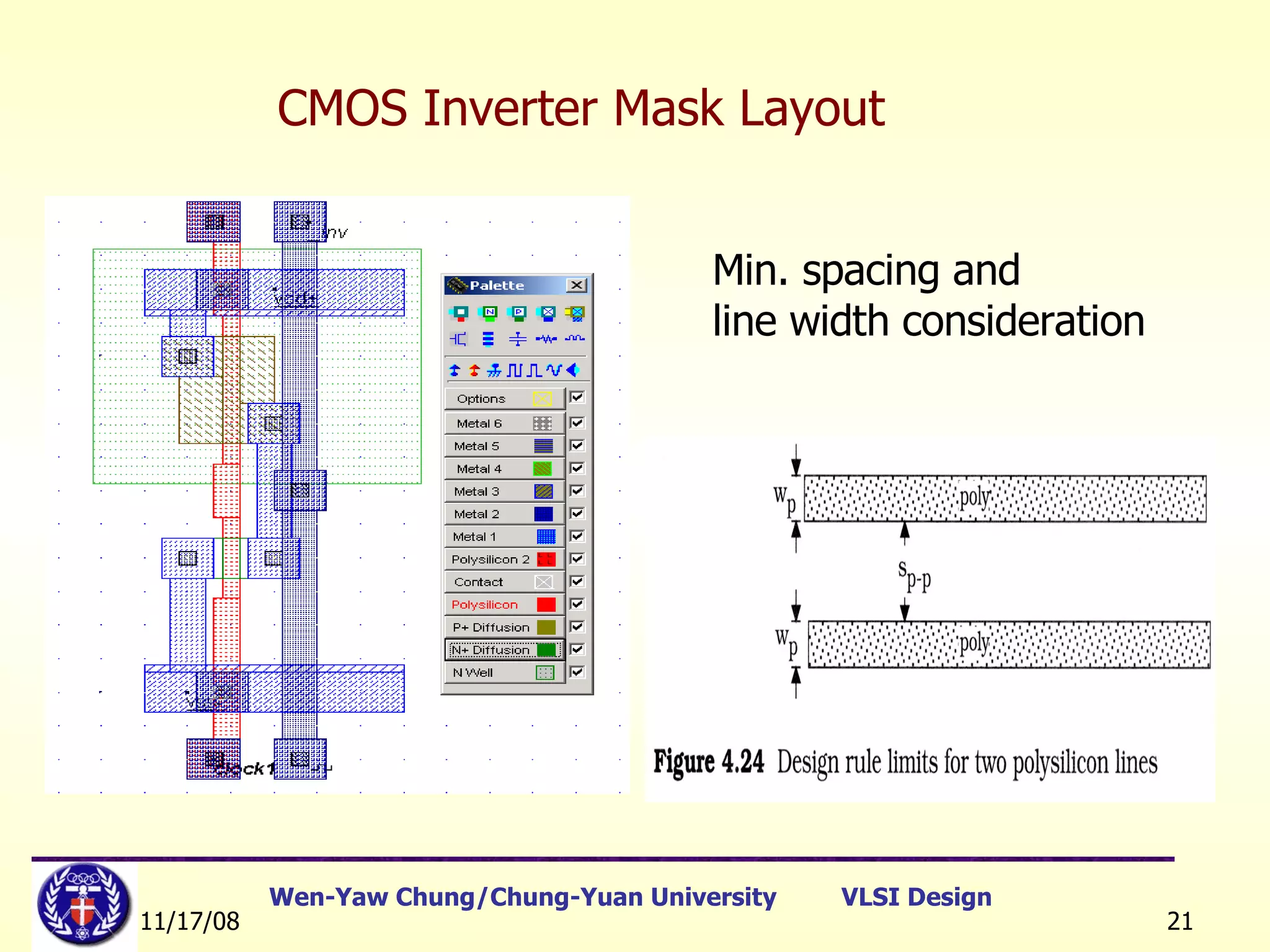
CMOS Inverter Mask Layout Min. spacing and line width consideration
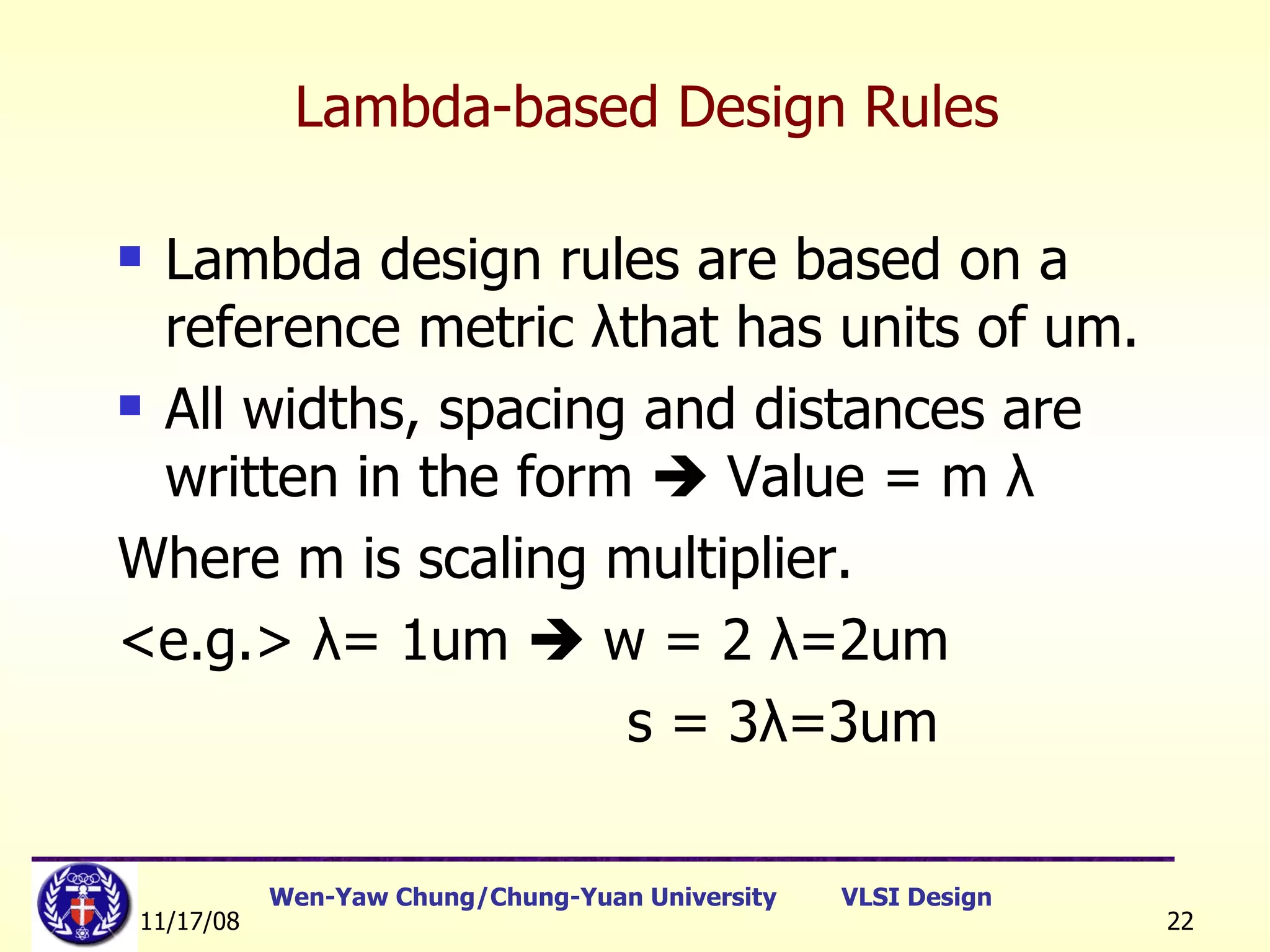
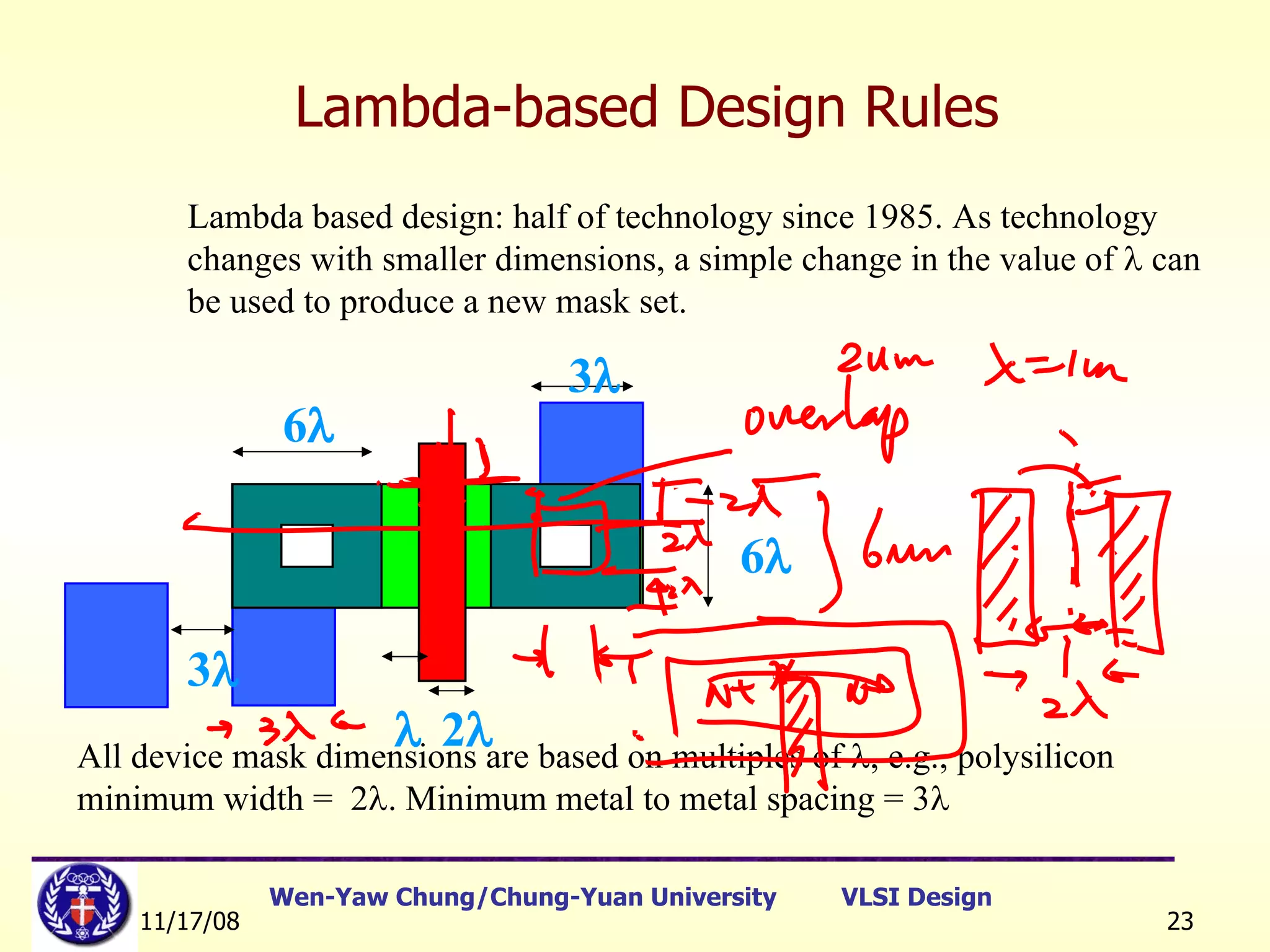
Lambda design rules are based on a reference metric  λ that has units of um. All widths, spacing and distances are written in the form    Value = m  λ Where m is scaling multiplier. <e.g.>  λ = 1um    w = 2  λ =2um s = 3 λ =3um Lambda-based Design Rules
Lambda based design: half of technology since 1985. As technology changes with smaller dimensions, a simple change in the value of    can be used to produce a new mask set. All device mask dimensions are based on multiples of   , e.g., polysilicon minimum width =  2  . Minimum metal to metal spacing = 3  Lambda-based Design Rules 6  2  6   3  3 
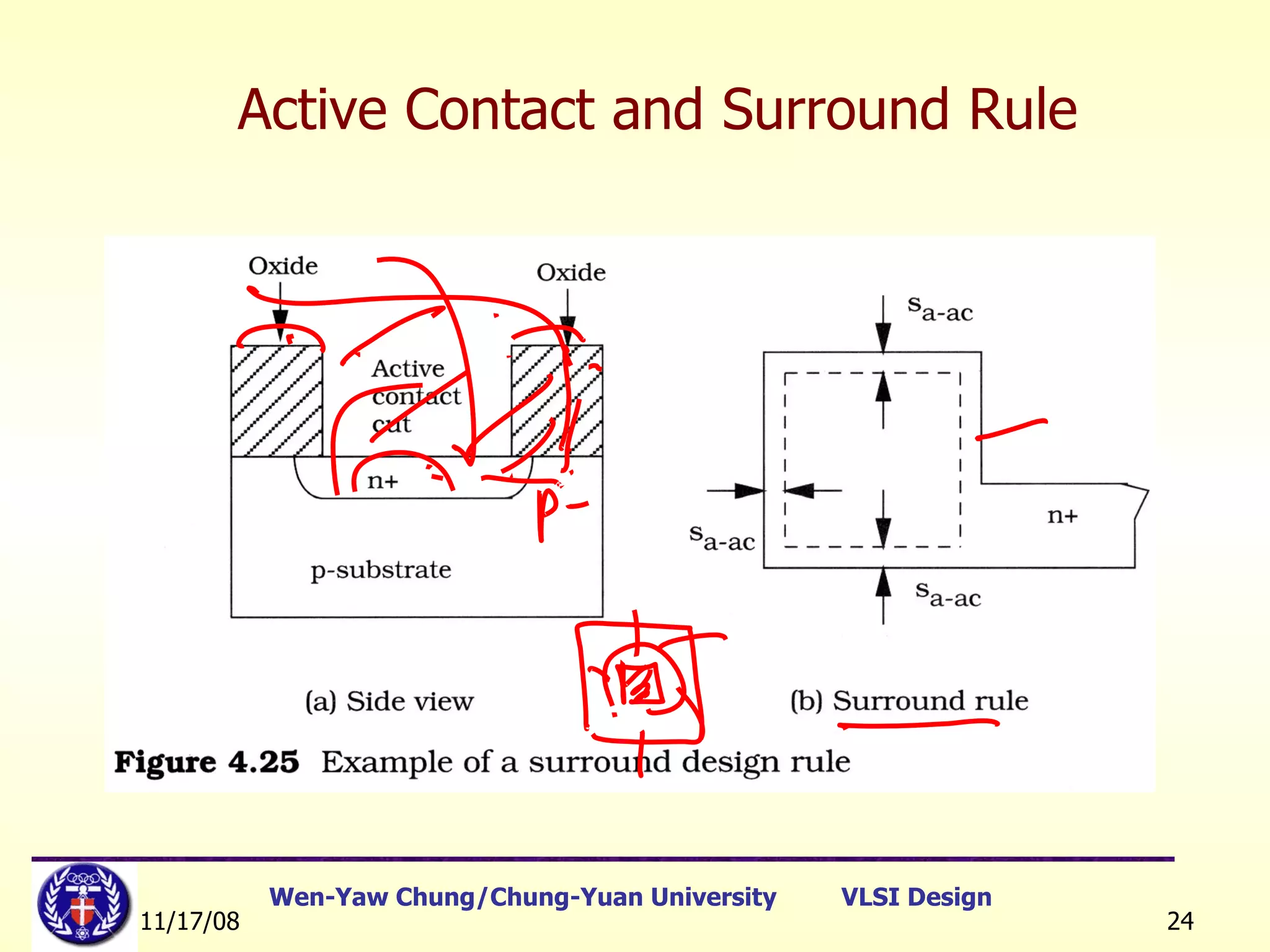
Active Contact and Surround Rule
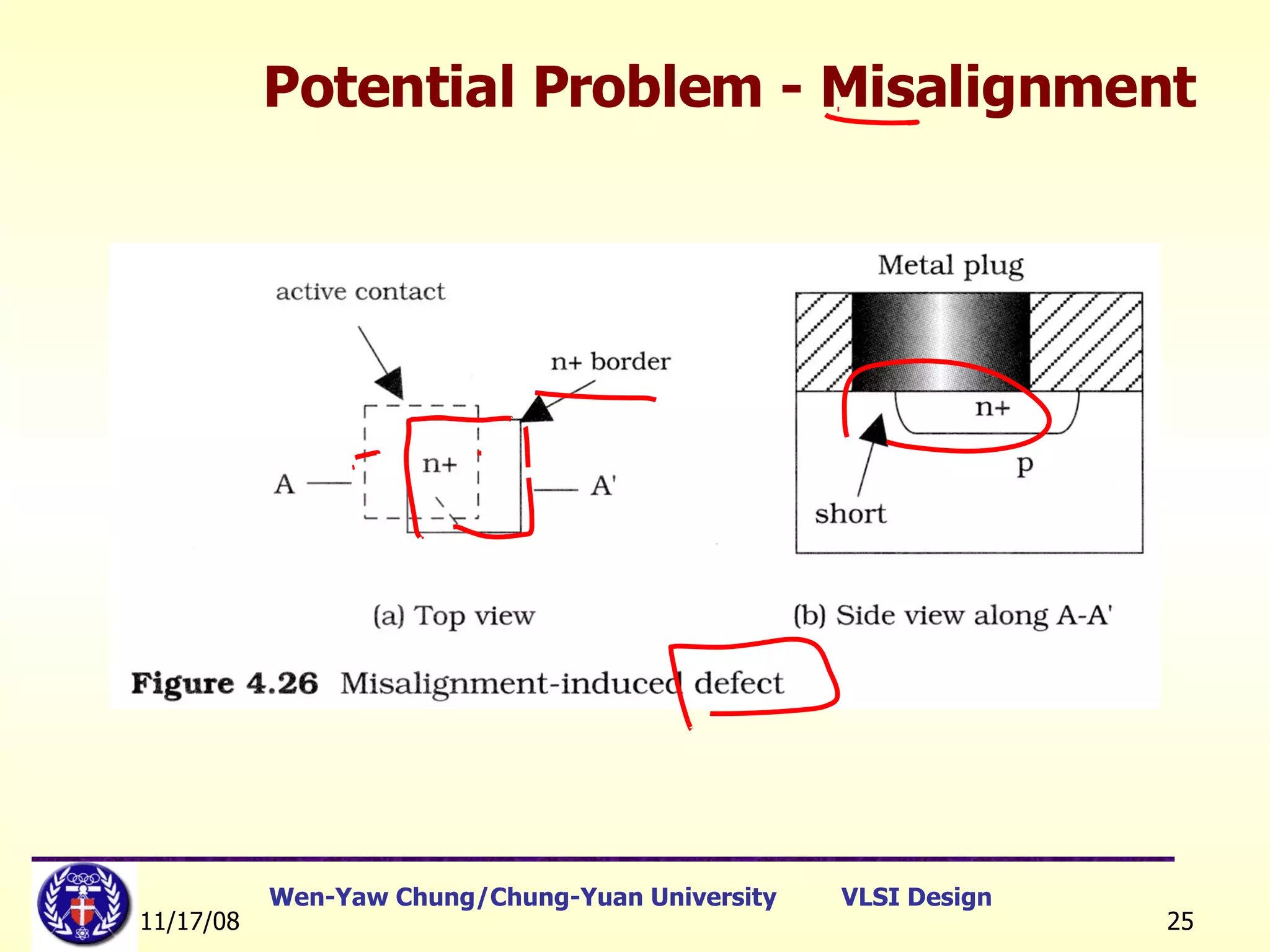
Potential Problem - Misalignment
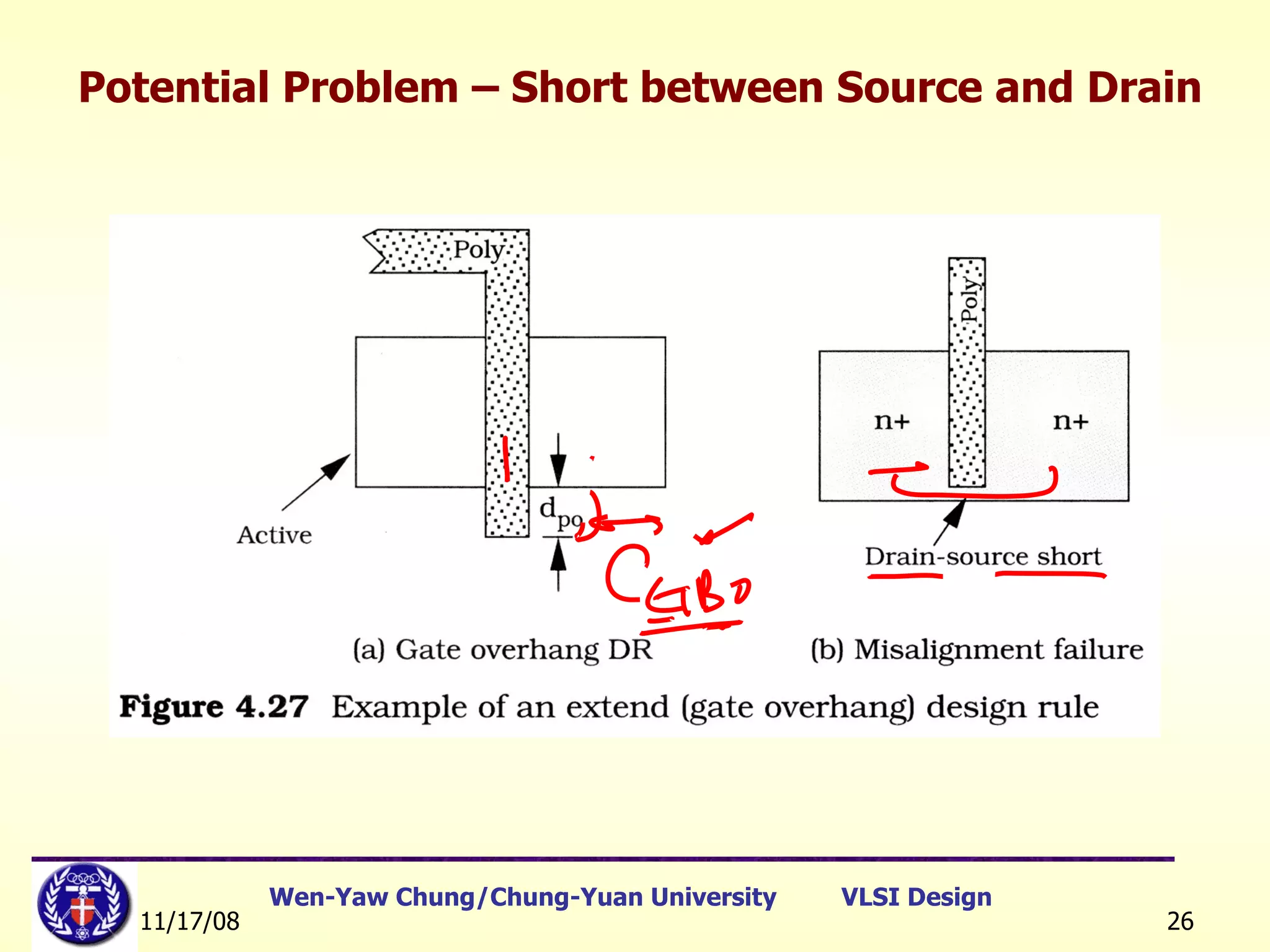
Potential Problem – Short between Source and Drain
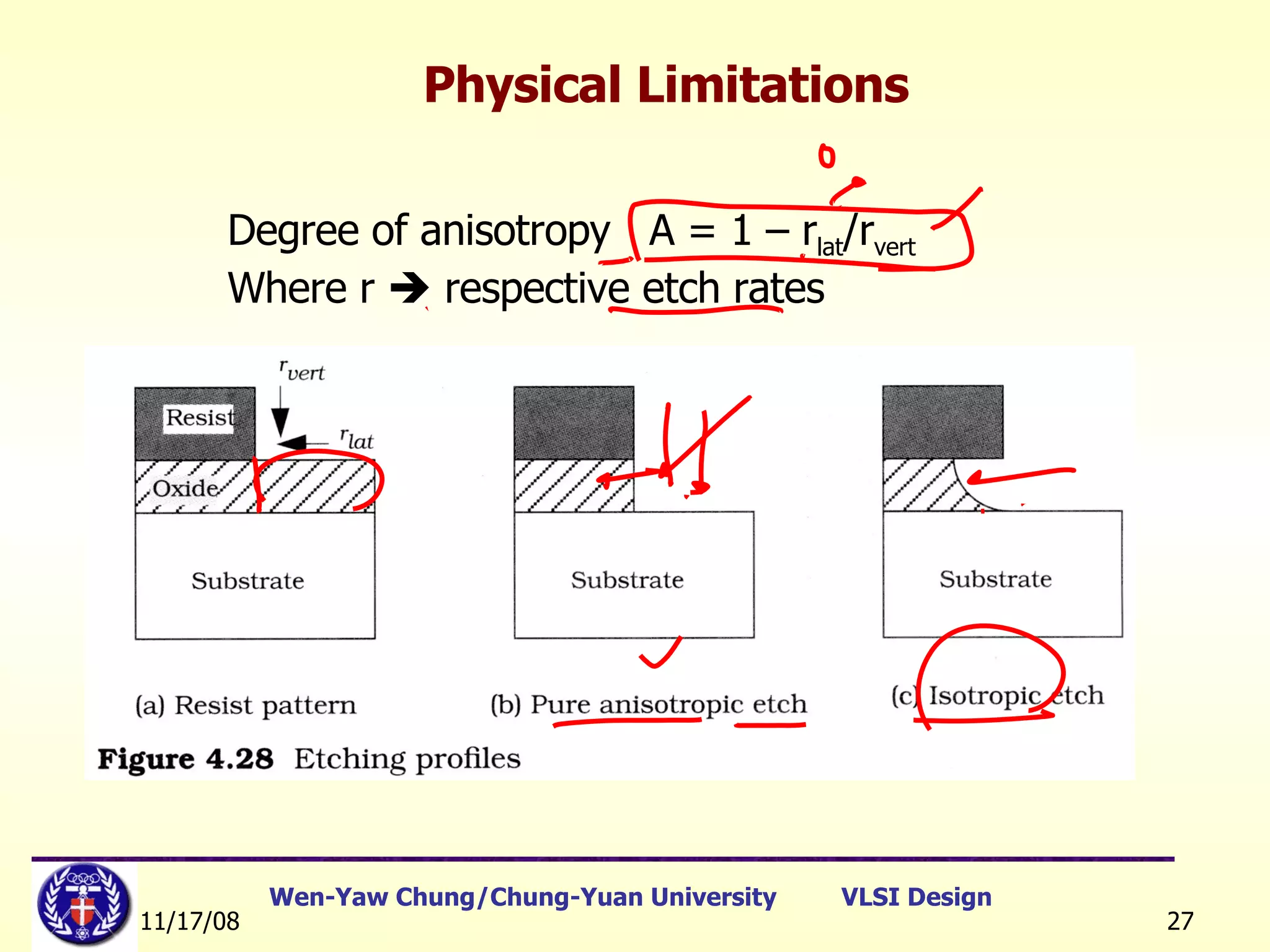
Degree of anisotropy  A = 1 – r lat /r vert Where r    respective etch rates Physical Limitations
Design Rule  (0) Due to the photo resolution, concentration, temperature and reaction time of the chemical reagents, the layout should tolerate some errors caused by process environment.  In order to avoid the influence from process variation, the layout of the circuit schematics should follow the design Rule 。
The purpose of design rules Ref. Jan M. Rabaey, et. al, © Digital Integrated Circuits 2nd Edition Interface between designer and process engineer Guidelines for constructing process masks Unit dimension: Minimum line width scalable design rules: lambda parameter absolute dimensions (micron rules)
Design Rules(1) Layout rules are used for preparing the masks for fabrication. Fabrication processes have inherent limitations in accuracy. Design rules specify geometry of masks to optimize yield and reliability (trade-offs: area, yield, reliability). Three major rules: Wire width:  Minimum dimension associated with a given feature. Wire separation:  Allowable separation. Contact:  overlap rules. [Ref]:   教育部顧問室 「超大型積體電路與系統設計」教育改進計畫  EDA 聯盟 – 推廣課程  Chap.1
Design Rules(2) Two major approaches: “ Micron” rules: stated at micron resolution.    rules: simplified micron rules with limited scaling attributes.    may be viewed as the size of minimum feature. Design rules represents a tolerance which insures very high probability of correct fabrication (not a hard boundary between correct and incorrect fabrication).  Design rules are determined by experience. [Ref]:   教育部顧問室 「超大型積體電路與系統設計」教育改進計畫  EDA 聯盟 – 推廣課程  Chap.1
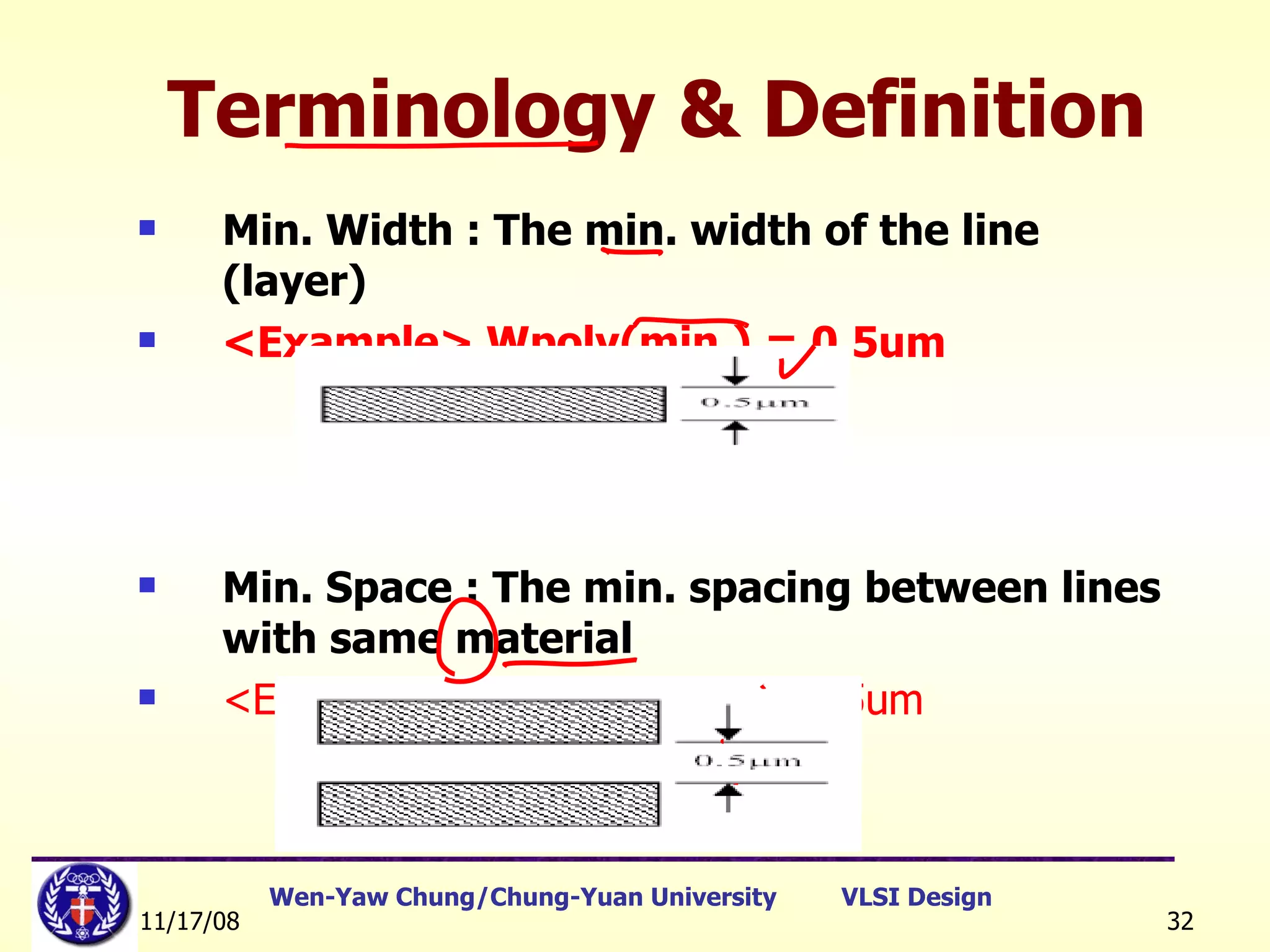
Terminology & Definition Min. Width : The min. width of the line (layer) <Example> Wpoly(min.) = 0.5um Min. Space : The min. spacing between lines with same material <Example> Spoly-poly(min.) = 0.5um
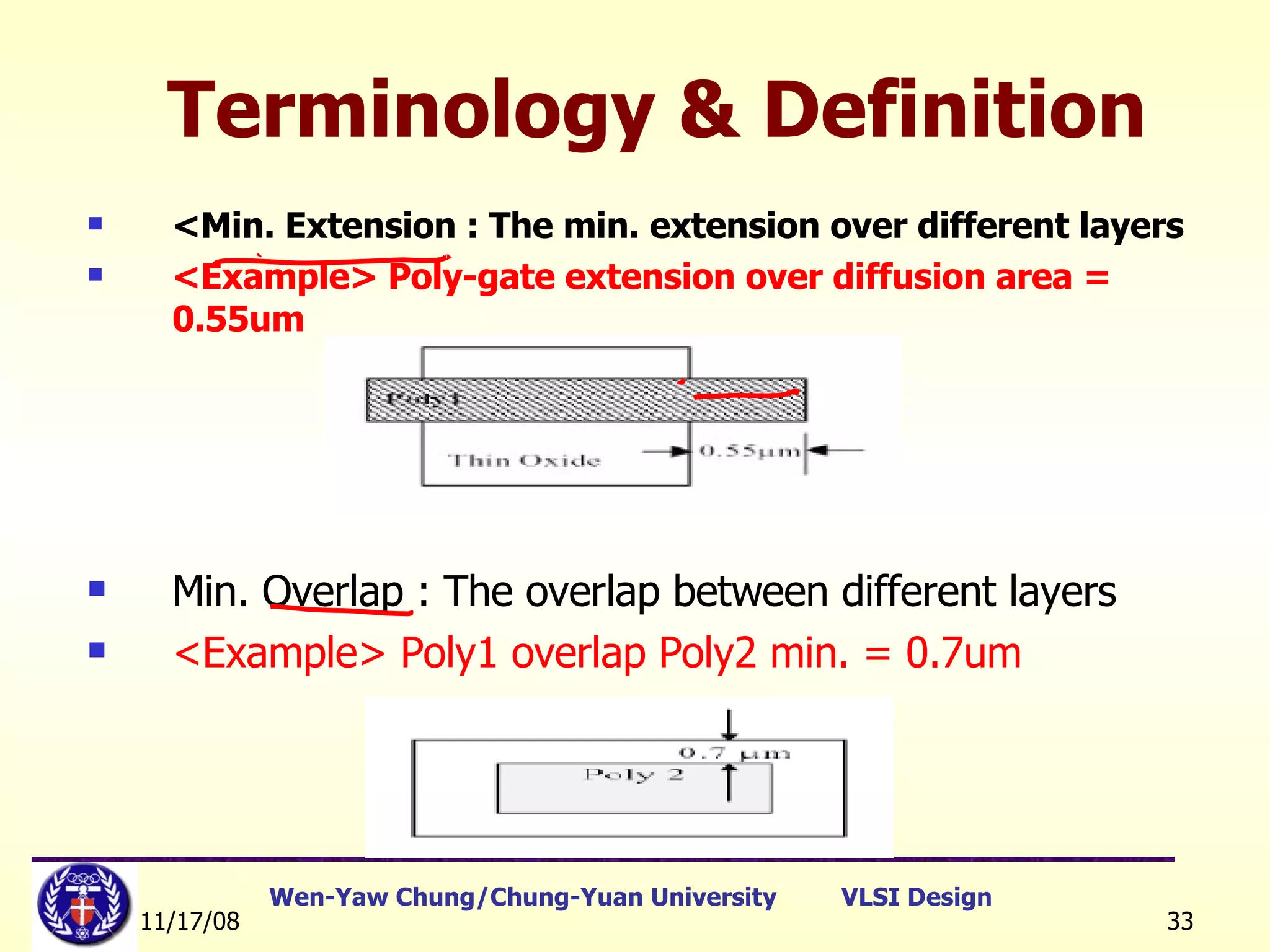
<Min. Extension : The min. extension over different layers <Example> Poly-gate extension over diffusion area = 0.55um Min. Overlap : The overlap between different layers  <Example> Poly1 overlap Poly2 min. = 0.7um   Terminology & Definition
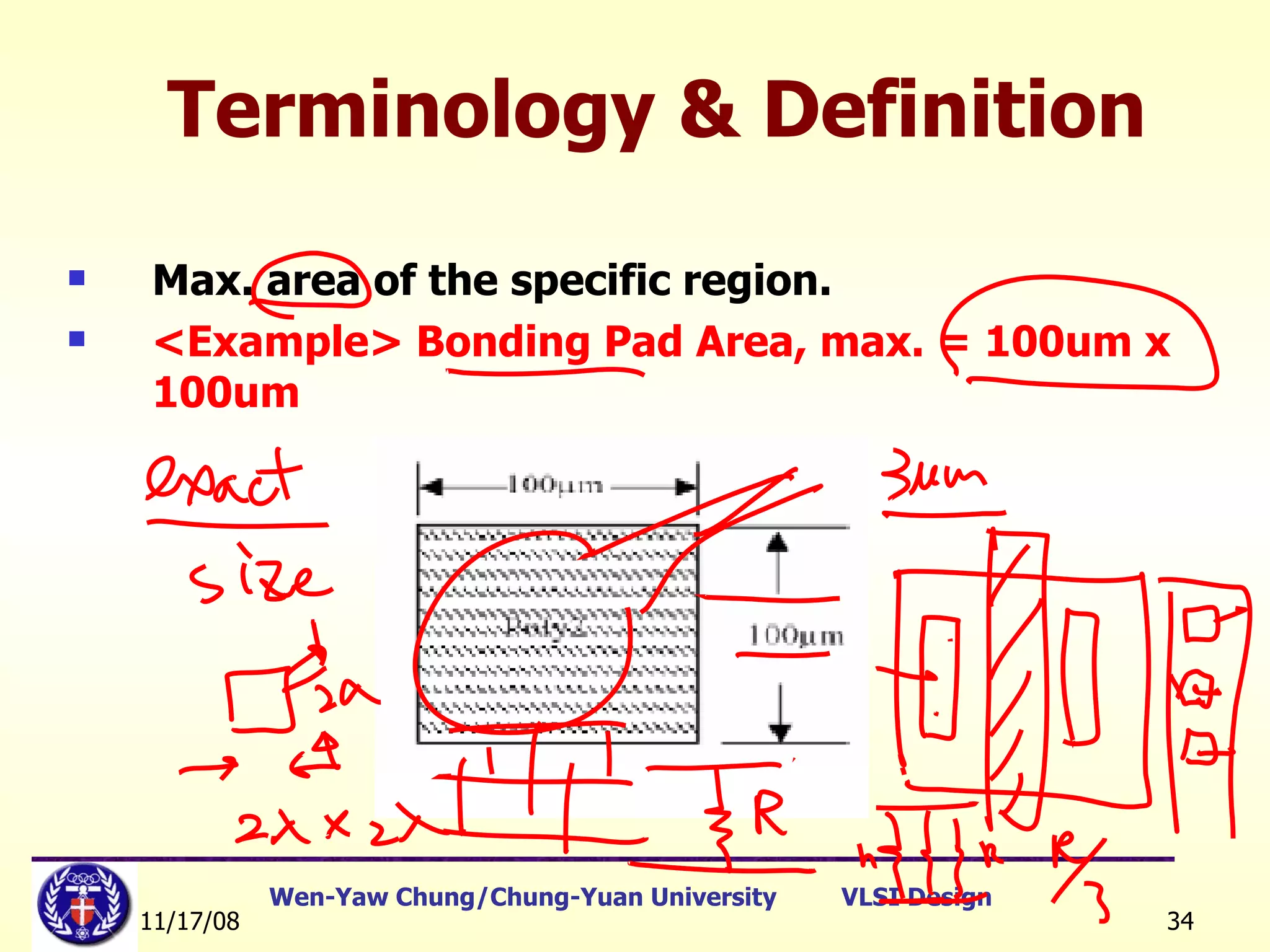
Terminology & Definition Max. area of the specific region. <Example> Bonding Pad Area, max. = 100um x 100um
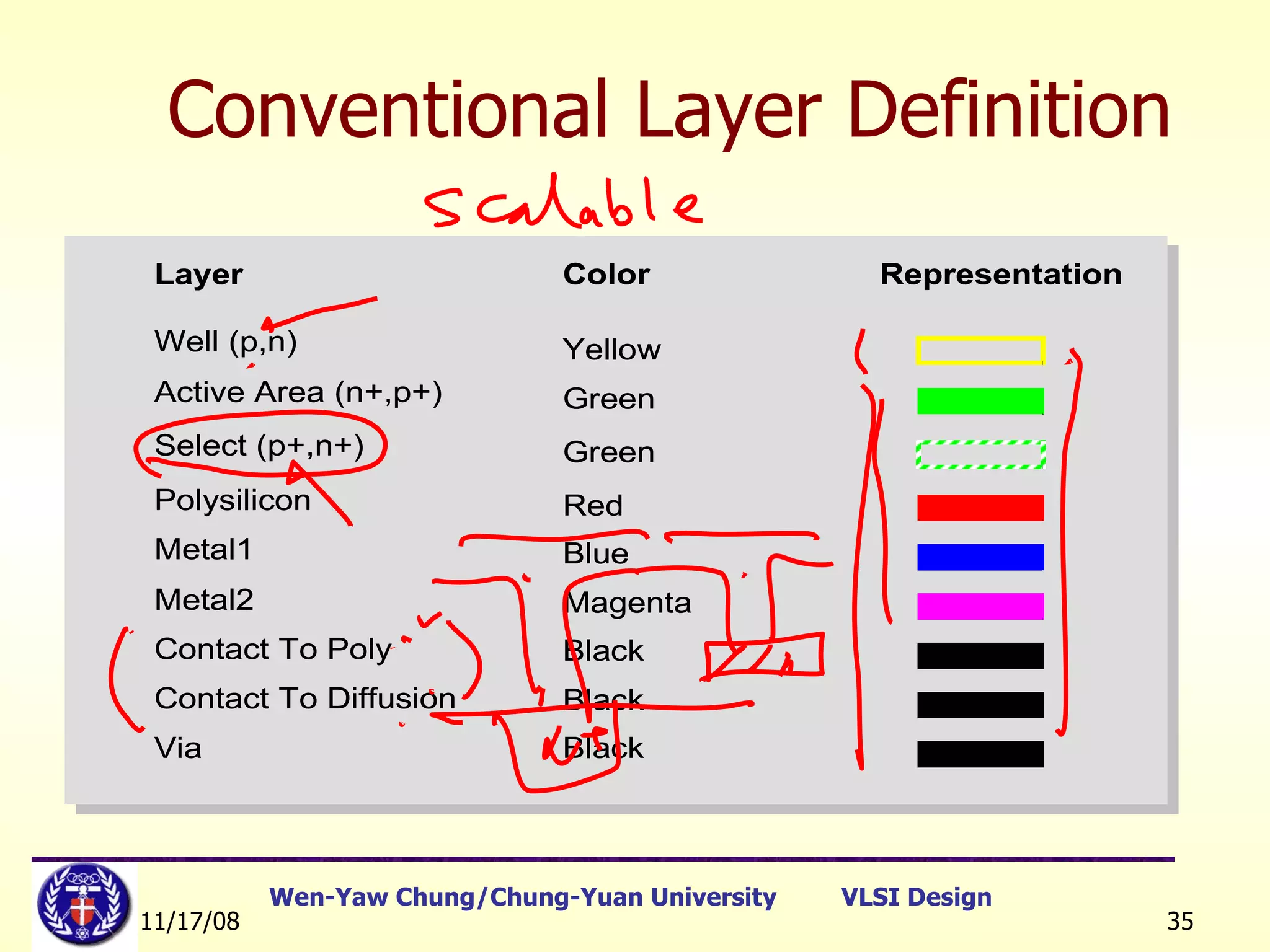
Conventional Layer Definition
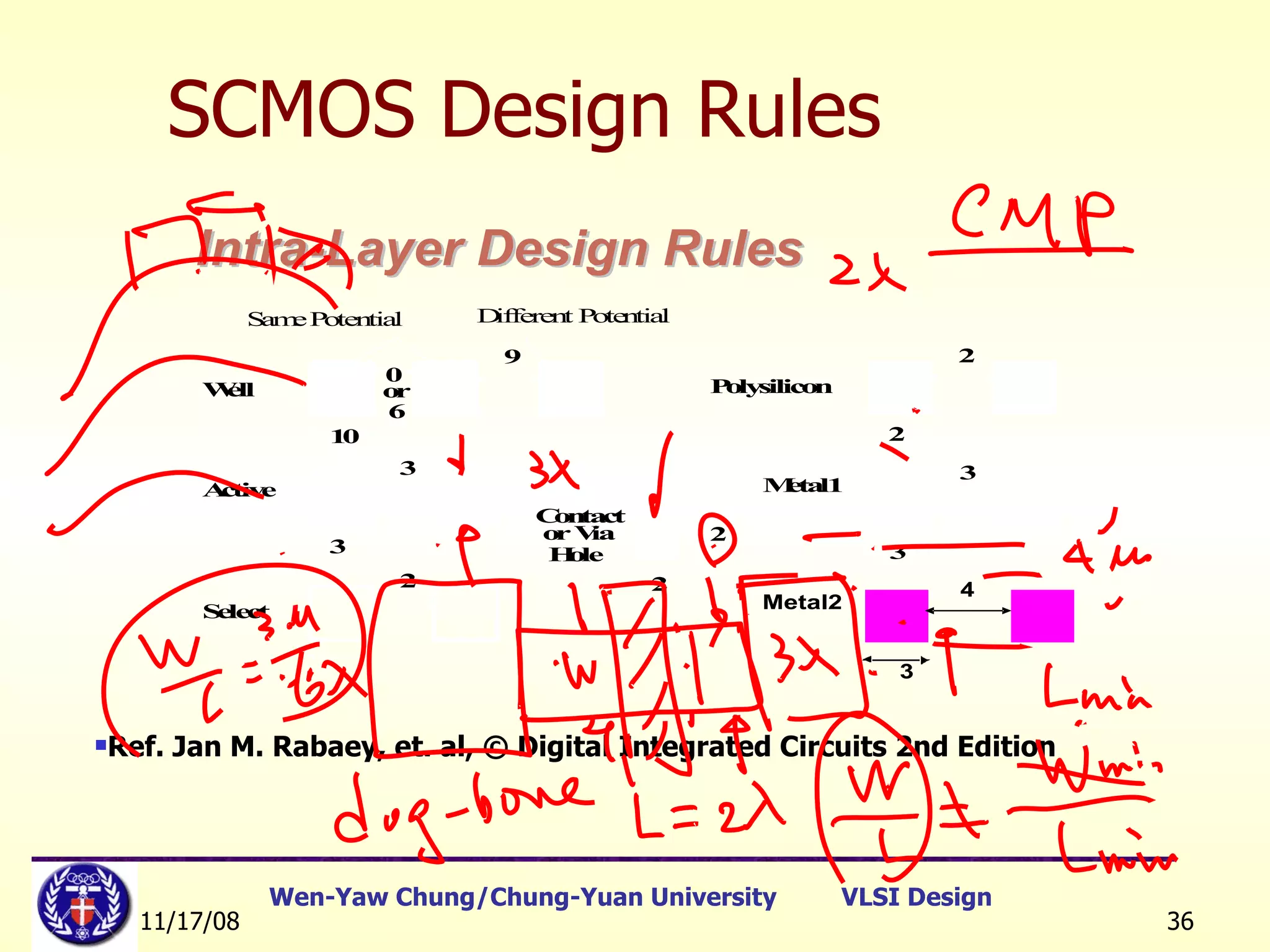
SCMOS Design Rules Ref. Jan M. Rabaey, et. al, © Digital Integrated Circuits 2nd Edition
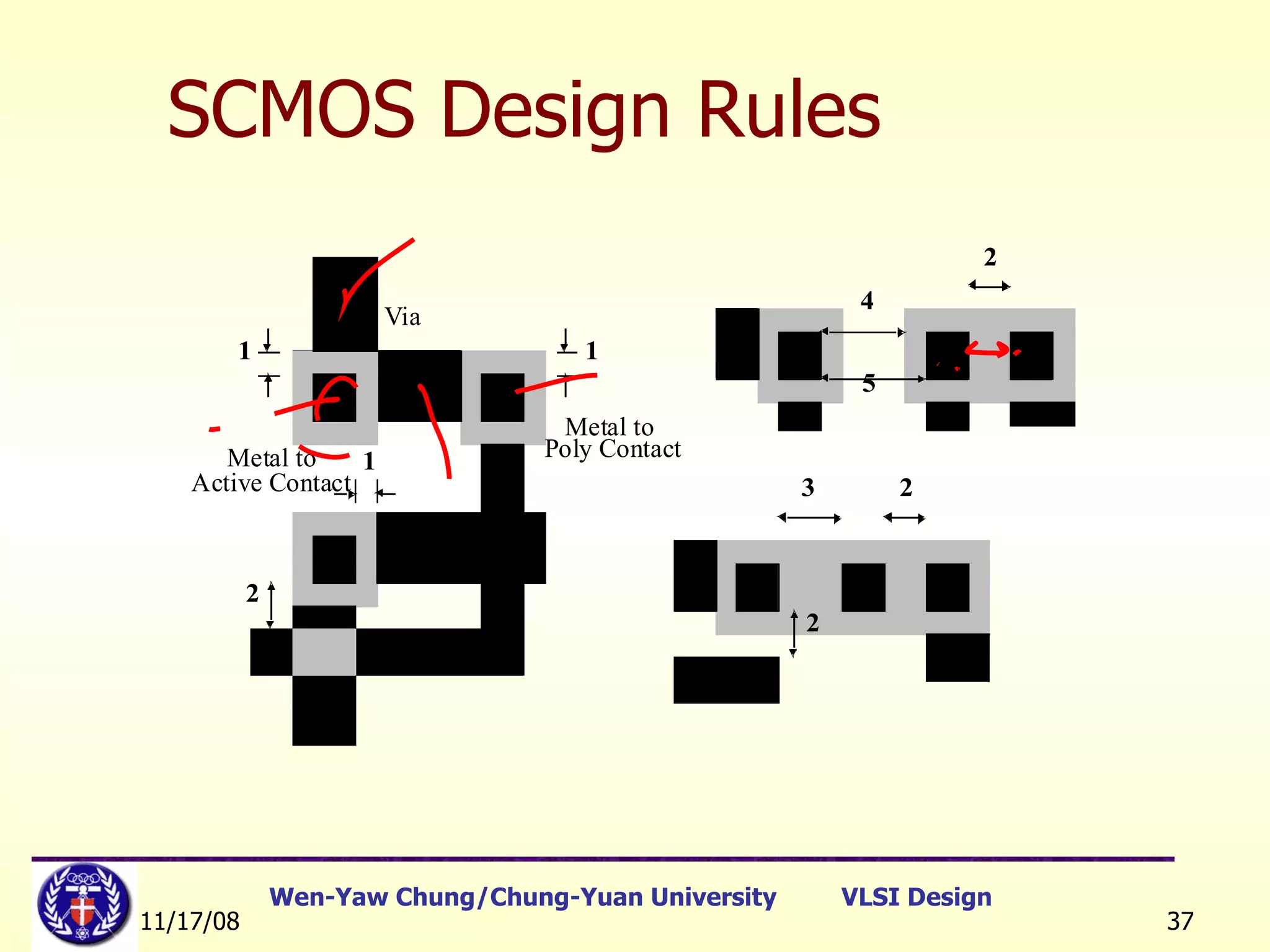
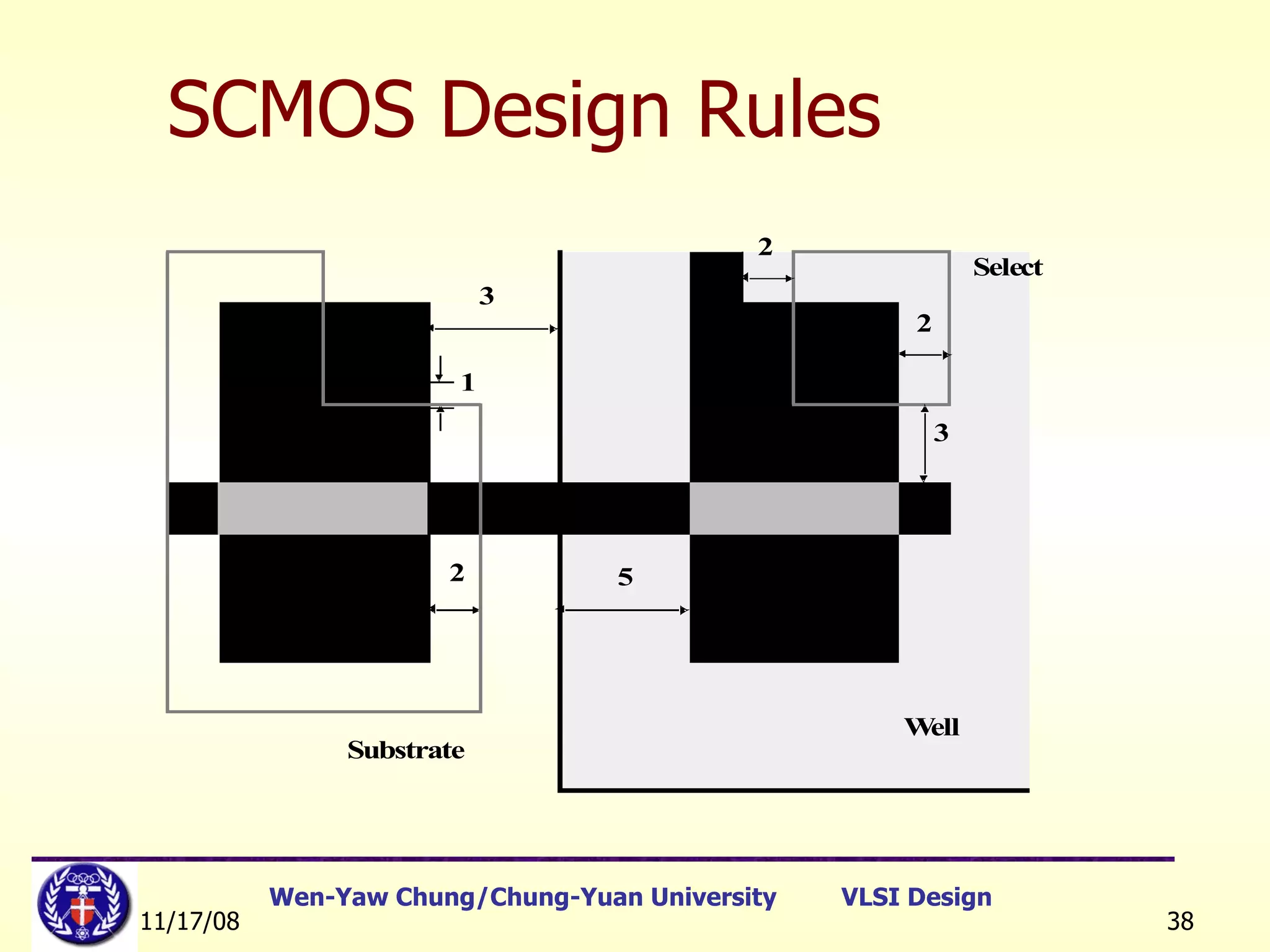
SCMOS Design Rules
SCMOS Design Rules
SCMOS Design Rules [Ref]:   教育部顧問室 「超大型積體電路與系統設計」教育改進計畫  EDA 聯盟 – 推廣課程  Chap.1
MOSIS Layout Design Rules MOSIS design rules (SCMOS rules) are available at http://www.mosis.org. 3 basic design rules:  Wire width Wire separation Contact rule MOSIS design rule examples [Ref]:   教育部顧問室 「超大型積體電路與系統設計」教育改進計畫  EDA 聯盟 – 推廣課程  Chap.1
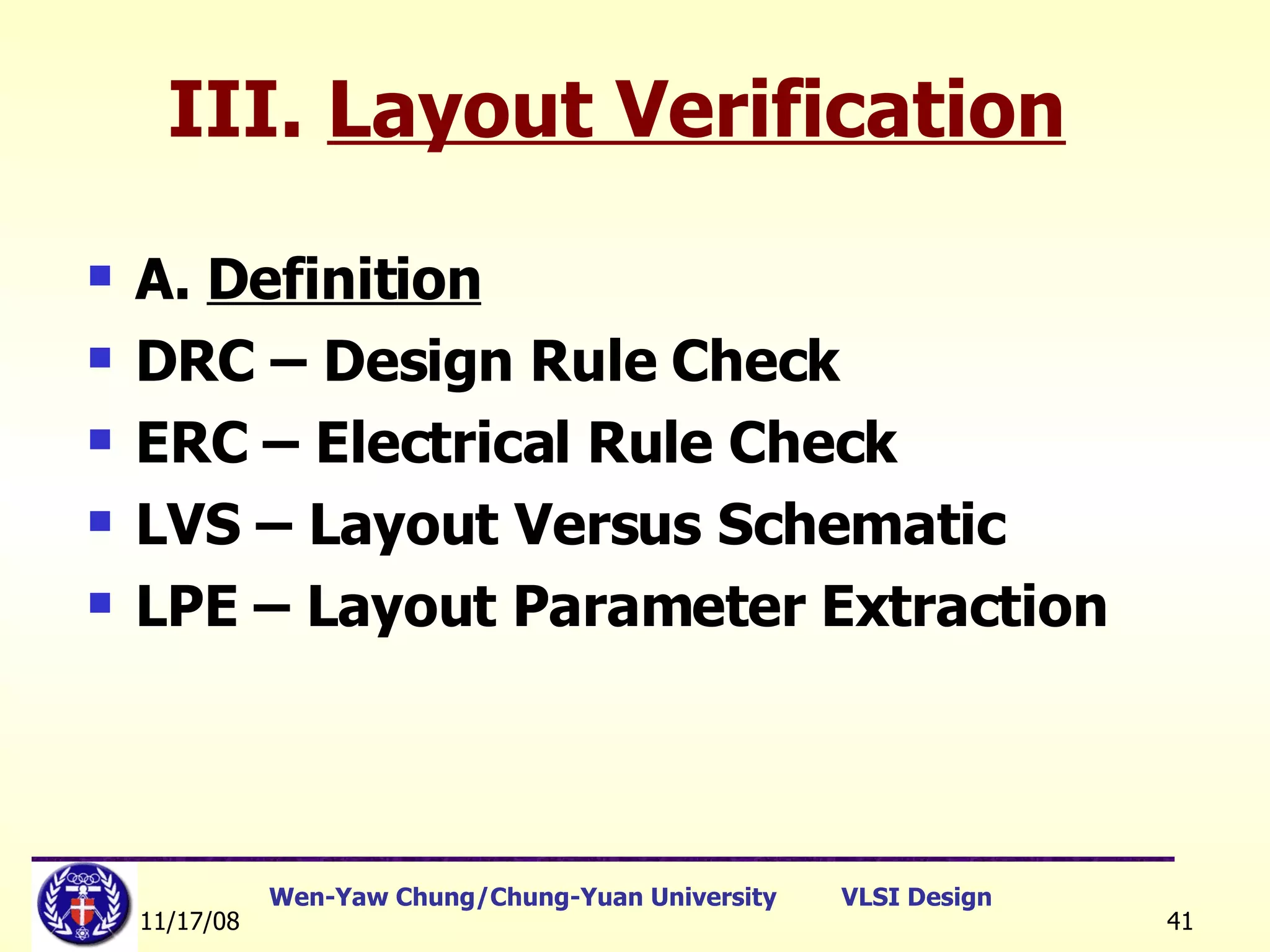
III.  Layout Verification A.  Definition DRC – Design Rule Check ERC – Electrical Rule Check LVS – Layout Versus Schematic LPE – Layout Parameter Extraction
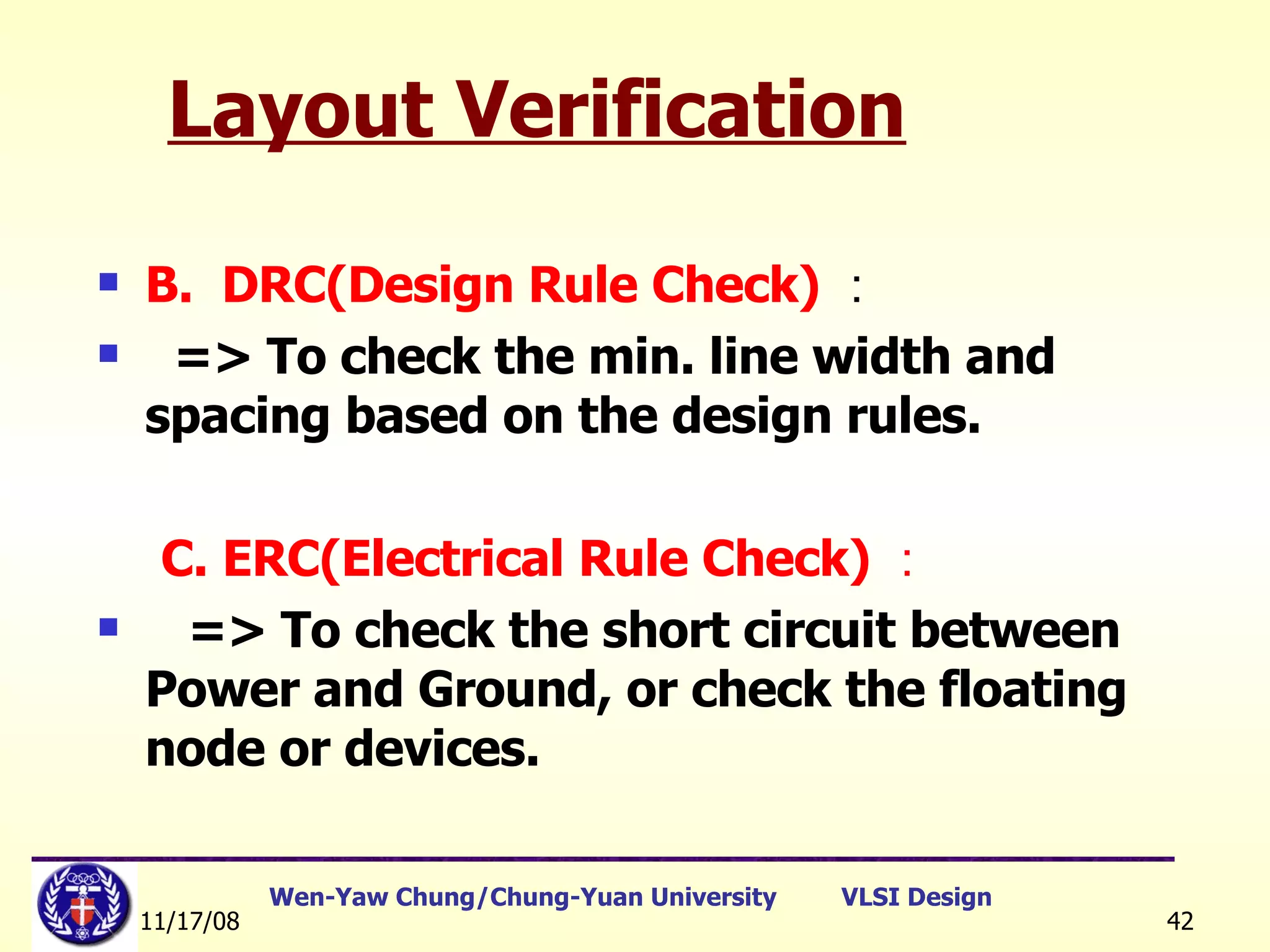
Layout Verification B.  DRC(Design Rule Check) : => To check the min. line width and spacing based on the design rules. C. ERC(Electrical Rule Check) : => To check the short circuit between Power and Ground, or check the floating node or devices.
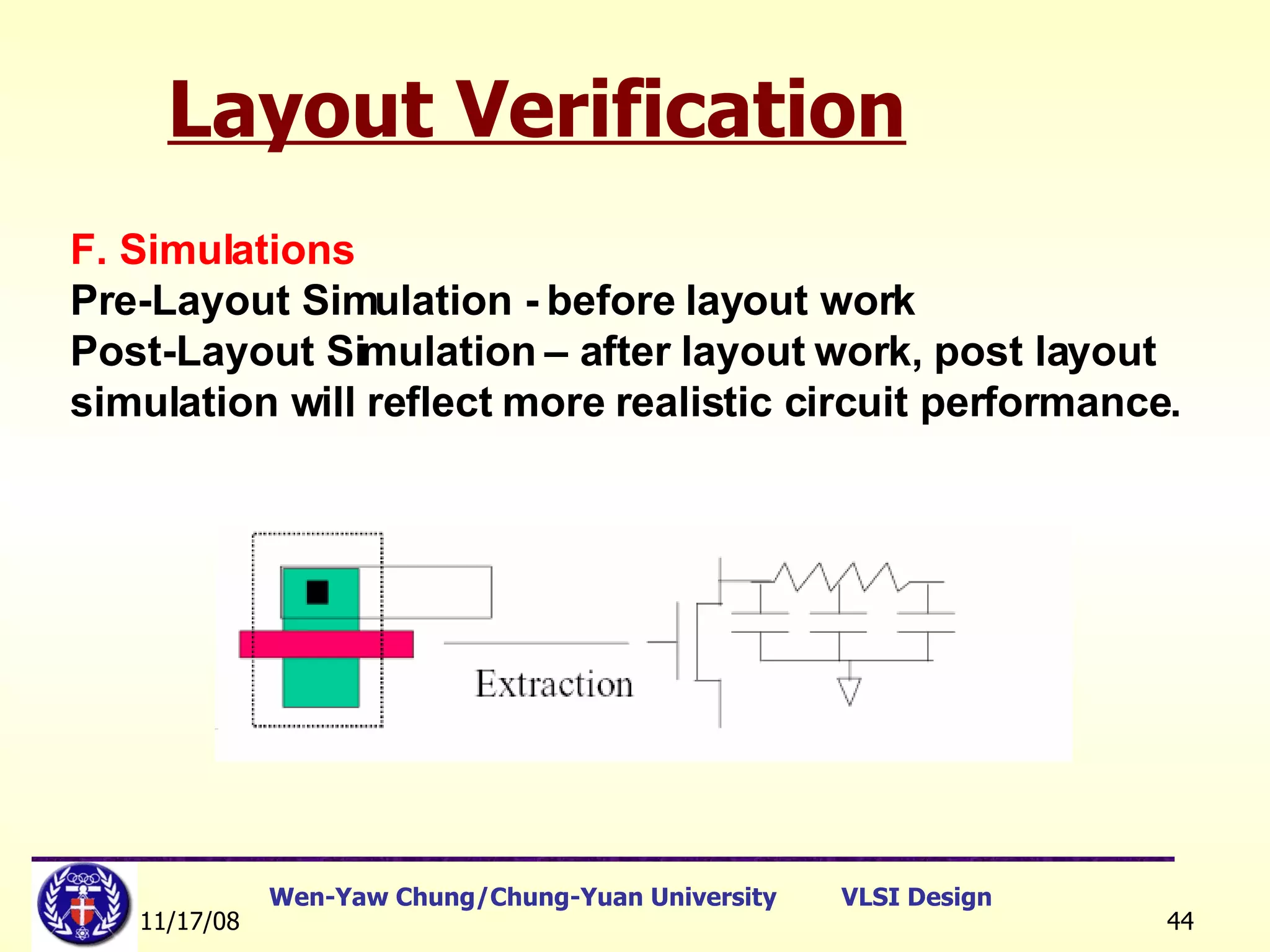
Layout Verification D. LVS(Layout versus Schematic) : => To verify the consistency between Schematic and Layout. For example : to check the amount of transistor numbers, sizes of W/L.  E. LPE or PEX(Layout Parameter Extraction) : =>  From the database of layout, to extract the devices with parasitics including effective W/L, parasitic capacitances and series resistance. The extracted file is in SPICE format and can be used for Post-Layout Simulation 。
Layout Verification F. Simulations Pre-Layout Simulation - before layout work Post-Layout Simulation – after layout work, post layout  simulation will reflect more realistic circuit performance.
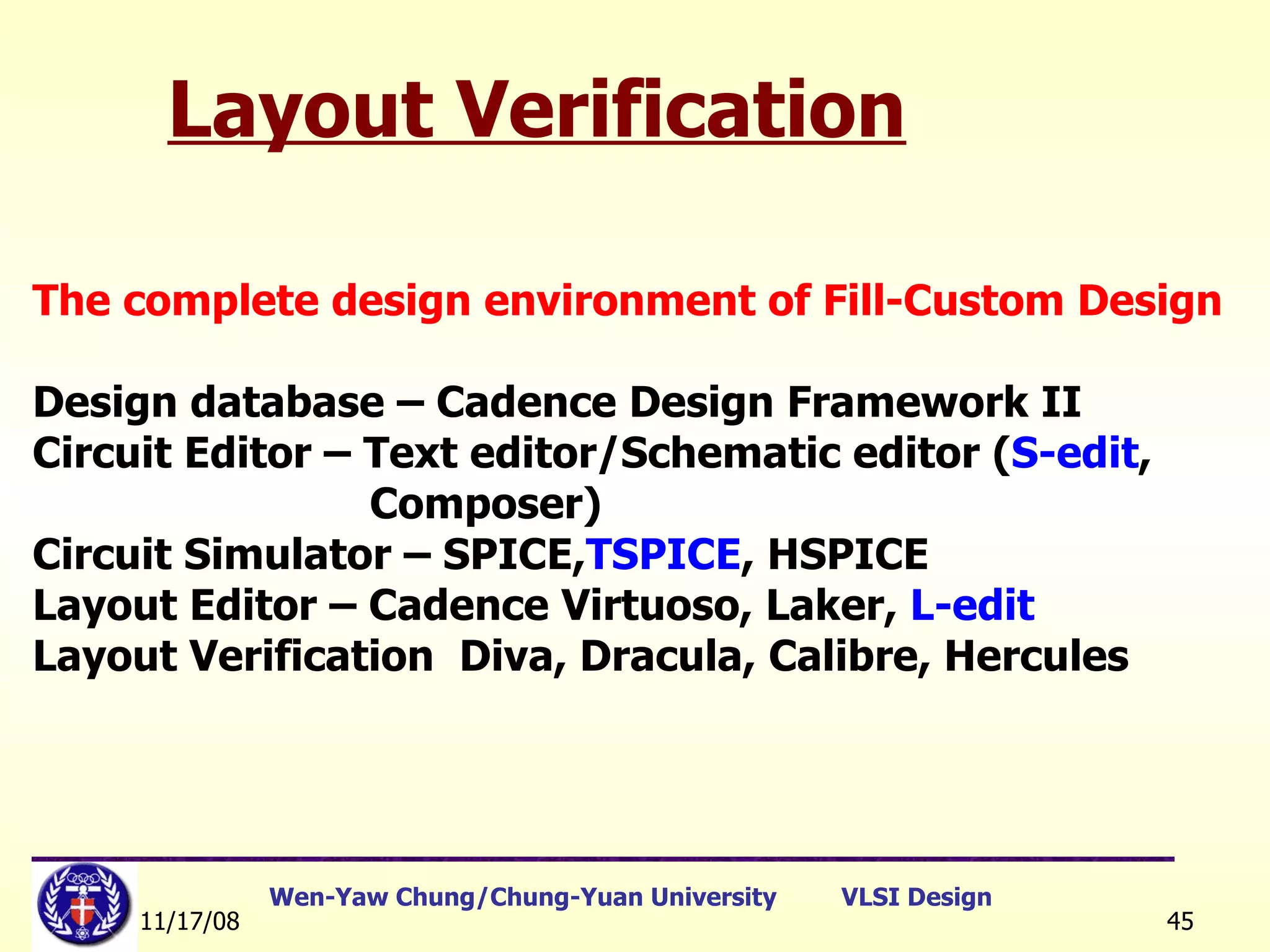
Layout Verification The complete design environment of Fill-Custom Design Design database – Cadence Design Framework II Circuit Editor – Text editor/Schematic editor ( S-edit ,  Composer) Circuit Simulator – SPICE, TSPICE , HSPICE Layout Editor – Cadence Virtuoso, Laker,  L-edit Layout Verification  Diva, Dracula, Calibre, Hercules
Concluding Remarks Milestones technology in silicon era Transistor    Integrated Circuits    CMOS Technology Key weapons in SOC era Design Automation Design Reuse Breakthrough techniques in design automation Simulation (e.g., SPICE, Verilog-XL, etc.) Automatic Placement and Routing (APR) Logic Synthesis (e.g., Design Compiler) Formal Verification Test Pattern Generation It is EDA that pushes the IC design technology forward ! [Ref]:   教育部顧問室 「超大型積體電路與系統設計」教育改進計畫  EDA 聯盟 – 推廣課程  Chap.1
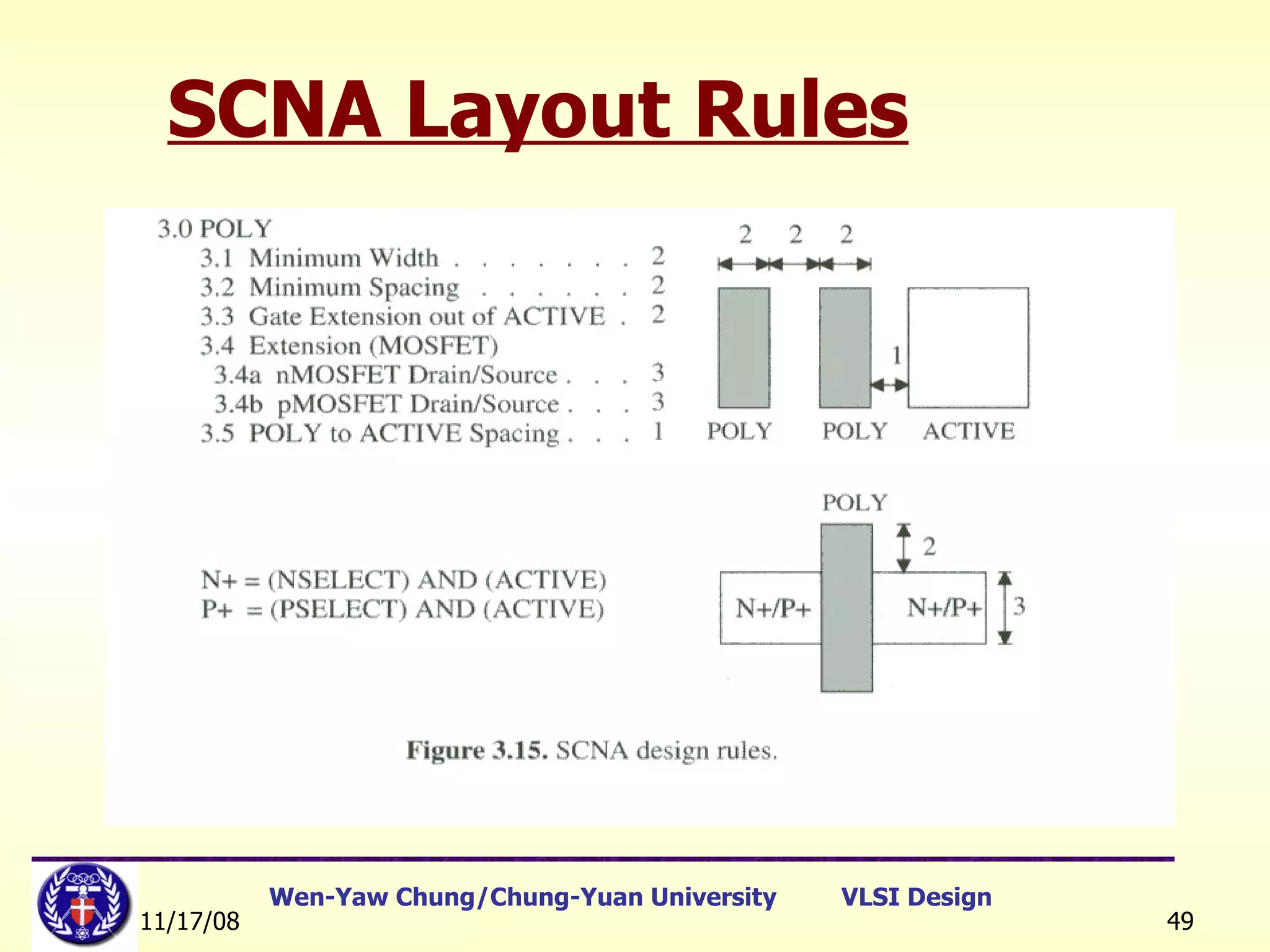
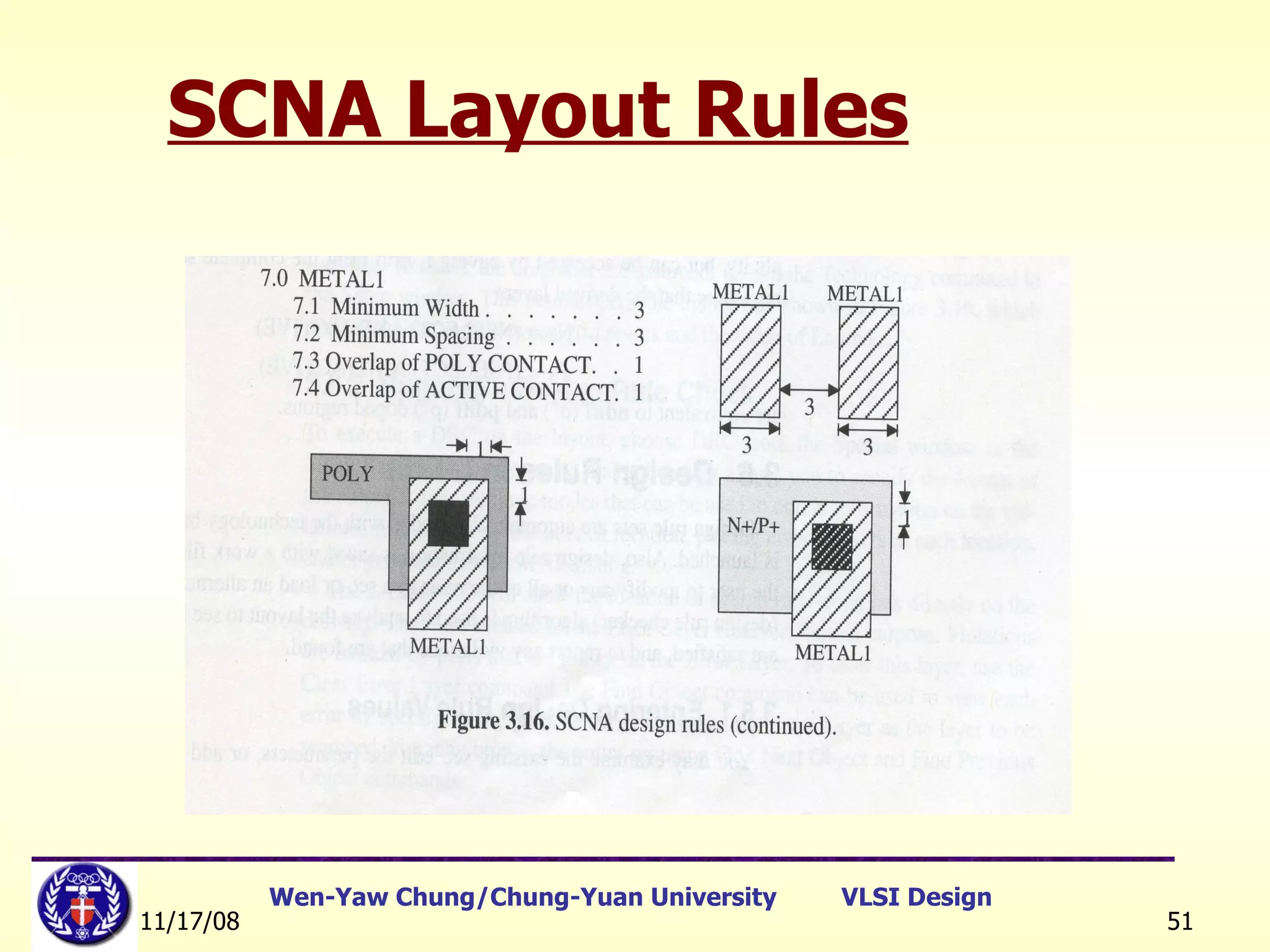
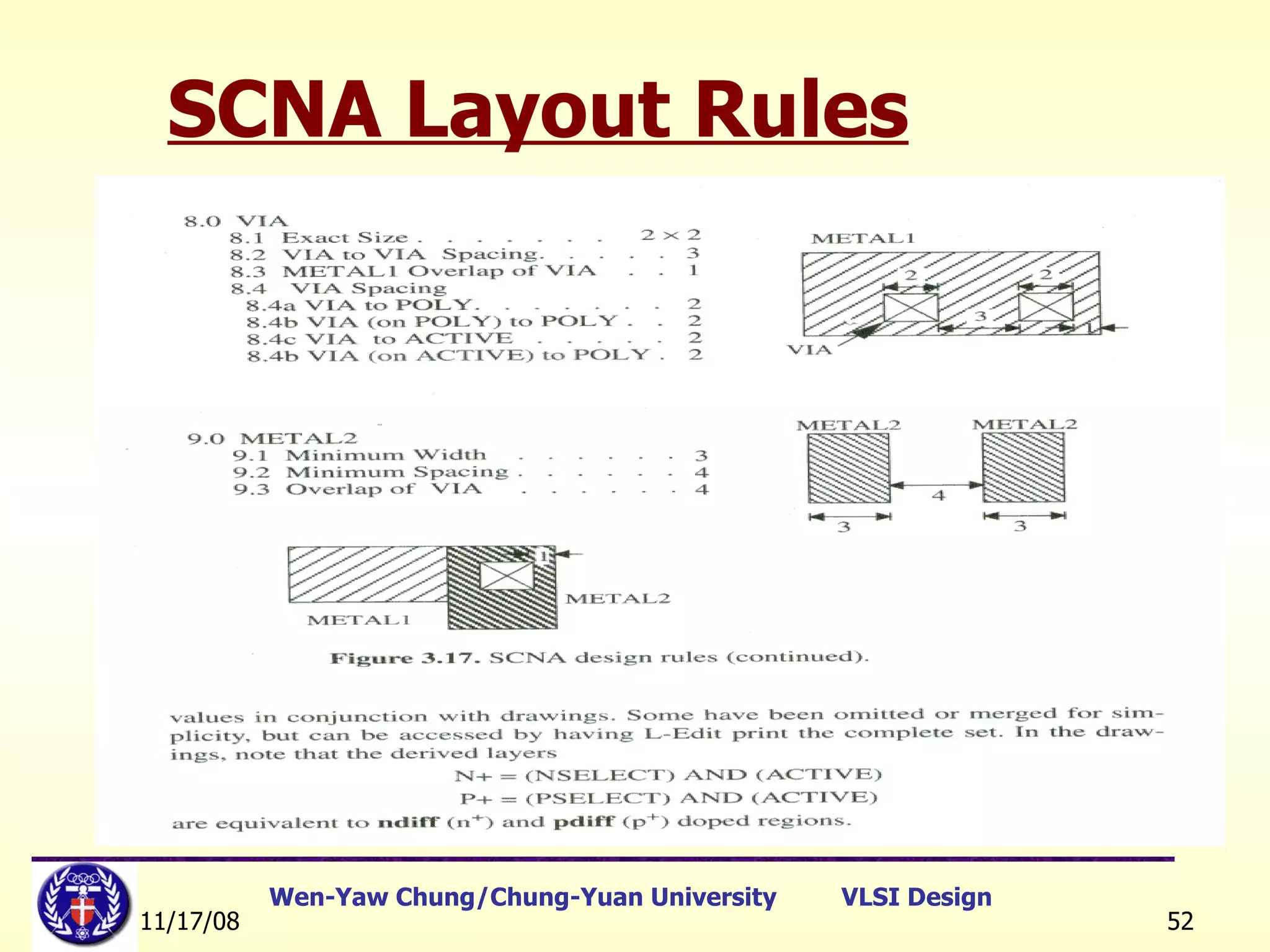
SCNA Layout Rules [Ref.] John P. Uyemura, “Physical Design of CMOS  Integrated Circuits Using L-EDIT”, PWS Publishing Company, 1995.
SCNA Layout Rules
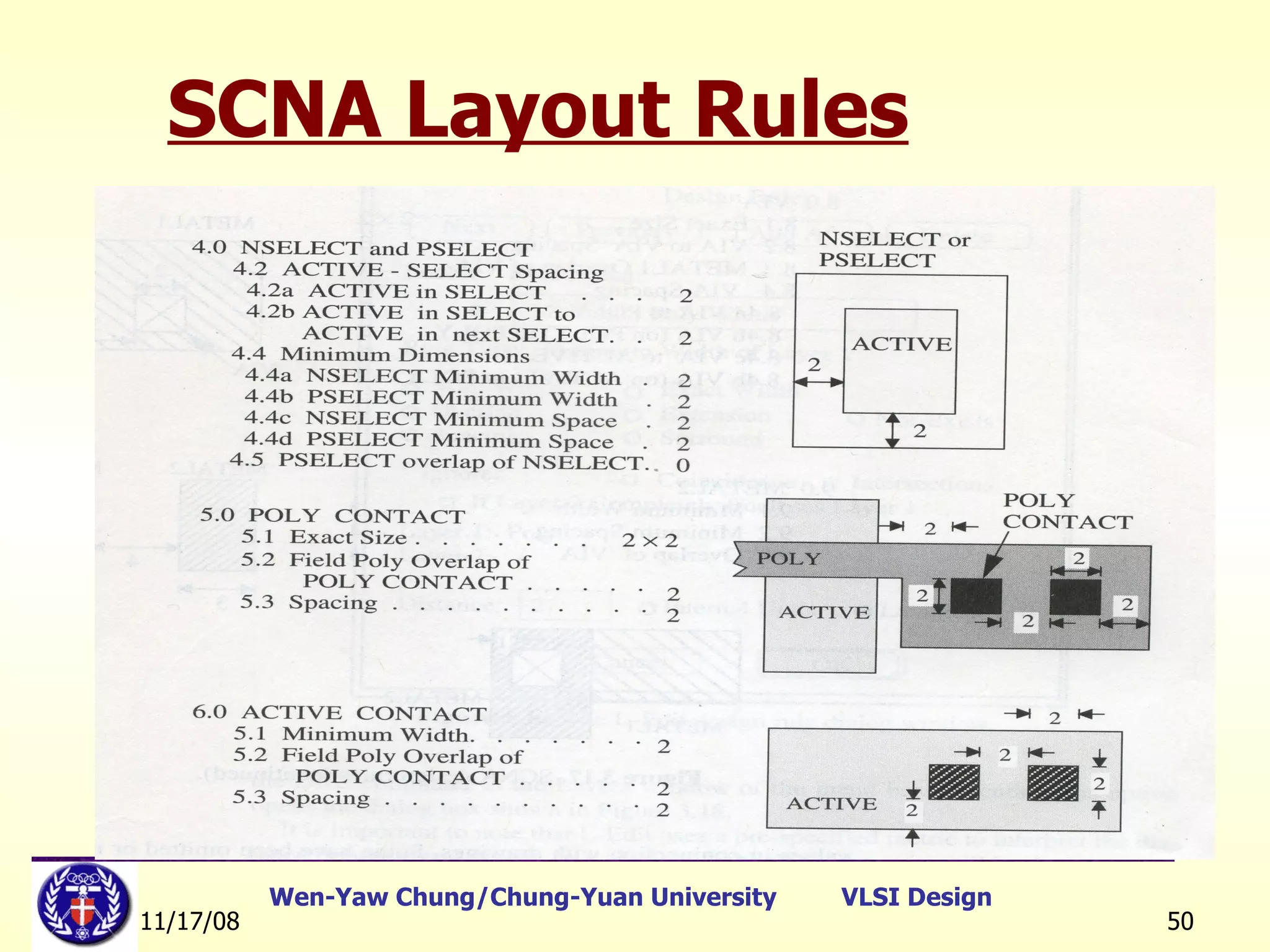
SCNA Layout Rules
SCNA Layout Rules
SCNA Layout Rules
SCNA Layout Rules
LAB. 3 Set#1 – Stick Diagram Practice Set#2 – Reverse Engineering

lect5_Stick_diagram_layout_rules

  • 1.
    VLSI Design andLayout Practice Lect5 – Stick Diagram & Scalable Design Rules Danny Wen-Yaw Chung Institute of Electronic Engineering Chung-Yuan Christian University Sept. 2008
  • 2.
    IC Layout Conceptand Examples I. Stick Diagram II. Design Rules III. Layout Verification Ref: http://140.135.9.56/XMS/
  • 3.
  • 4.
  • 5.
    A. Basic Concept 1. Based on the view point of IC layout, the stick diagram can help us understand the circuit function and its geometrical location relative to other circuit blocks. Legend: contact metal 2 metal 1 poly ndiff pdiff VDD in VSS out ■
  • 6.
    A. Basic Concept2. Although the stick diagram is an abstract presentation of real layout, it can use graphical symbols or legend to allocate the circuit to 2-diomensional plane and reach the aim same as the physical layout does. 3. The stick diagram is similar to a backbone of the real layout but without the real size and aspect ratio of the devices , it still can reflect the real condition to layout of the silicon chip.
  • 7.
    B. Notations ofthe stick diagram
  • 8.
    Stick Diagram Intermediaterepresentation between the transistor level and the mask (layout) level. Gives topological information (identifies different layers and their relationship) Assumes that wires have no width. It is possible to translate stick diagram automatically to layout with correct design rules. [Ref]: 教育部顧問室 「超大型積體電路與系統設計」教育改進計畫 EDA 聯盟 – 推廣課程 Chap.1
  • 9.
    Stick Diagram 1.When the same material (on the same layer) touch or cross, they are connected and belong to the same electrical node. 2. When polysilicon crosses N or P diffusion , an N or P transistor is formed. Polysilicon is drawn on top of diffusion. Diffusion must be drawn connecting the source and the drain. Gate is automatically self-aligned during fabrication. [Ref]: 教育部顧問室 「超大型積體電路與系統設計」教育改進計畫 EDA 聯盟 – 推廣課程 Chap.1
  • 10.
    Stick Diagram 3.When a metal line needs to be connected to one of the other three conductors, a contact cut ( via ) is required. [Ref]: 教育部顧問室 「超大型積體電路與系統設計」教育改進計畫 EDA 聯盟 – 推廣課程 Chap.1
  • 11.
    Stick Diagram 4.Manhattan geometrical rule: When we use only vertical and horizontal lines In orthogonal to describe circuitry. Boston geometrical rule: The stick diagram also allows curves to describe circuitry. 5. In order to describe N/PMOS more completely, to add n-well 、 P+ select 、 well contact and substrate contact are optional for 4-terminal notation.
  • 12.
    Conclusion 1. Stick diagram is a draft of real layout, it serves as an abstract view between the schematic and layout . 2. Stick diagram uses different lines, colors and geometrical shapes to present circuit nodes, devices, and their relative location . 3. Stick diagram doesn’t include information about the accurate coordinates and sizes of device, the length and width of conductors and the real size of well region.
  • 13.
    CMOS Inverter StickDiagrams Basic layout More area efficient layout [Ref]: 教育部顧問室 「超大型積體電路與系統設計」教育改進計畫 EDA 聯盟 – 推廣課程 Chap.1
  • 14.
    CMOS inverter describedin other way. CMOS Inverter Stick Diagrams V DD in VSS out
  • 15.
    CMOS Transmission GateThe transmission gate Circuit schematic Stick diagram
  • 16.
  • 17.
    [Ref]: 教育部顧問室 「超大型積體電路與系統設計」教育改進計畫 EDA 聯盟 – 推廣課程 Chap.1 CMOS Stick Diagrams NAND
  • 18.
    < Exercise 1> To draw the following circuitry by using a stick diagram
  • 19.
    < Exercise 2> To draw the stick diagram and the schematic for the following layout
  • 20.
    CMOS Stick Diagrams[Ref]: 教育部顧問室 「超大型積體電路與系統設計」教育改進計畫 EDA 聯盟 – 推廣課程 Chap.1 NOR
  • 21.
    CMOS Inverter MaskLayout Min. spacing and line width consideration
  • 22.
    Lambda design rulesare based on a reference metric λ that has units of um. All widths, spacing and distances are written in the form  Value = m λ Where m is scaling multiplier. <e.g.> λ = 1um  w = 2 λ =2um s = 3 λ =3um Lambda-based Design Rules
  • 23.
    Lambda based design:half of technology since 1985. As technology changes with smaller dimensions, a simple change in the value of  can be used to produce a new mask set. All device mask dimensions are based on multiples of  , e.g., polysilicon minimum width = 2  . Minimum metal to metal spacing = 3  Lambda-based Design Rules 6  2  6   3  3 
  • 24.
    Active Contact andSurround Rule
  • 25.
    Potential Problem -Misalignment
  • 26.
    Potential Problem –Short between Source and Drain
  • 27.
    Degree of anisotropy A = 1 – r lat /r vert Where r  respective etch rates Physical Limitations
  • 28.
    Design Rule (0) Due to the photo resolution, concentration, temperature and reaction time of the chemical reagents, the layout should tolerate some errors caused by process environment. In order to avoid the influence from process variation, the layout of the circuit schematics should follow the design Rule 。
  • 29.
    The purpose ofdesign rules Ref. Jan M. Rabaey, et. al, © Digital Integrated Circuits 2nd Edition Interface between designer and process engineer Guidelines for constructing process masks Unit dimension: Minimum line width scalable design rules: lambda parameter absolute dimensions (micron rules)
  • 30.
    Design Rules(1) Layoutrules are used for preparing the masks for fabrication. Fabrication processes have inherent limitations in accuracy. Design rules specify geometry of masks to optimize yield and reliability (trade-offs: area, yield, reliability). Three major rules: Wire width: Minimum dimension associated with a given feature. Wire separation: Allowable separation. Contact: overlap rules. [Ref]: 教育部顧問室 「超大型積體電路與系統設計」教育改進計畫 EDA 聯盟 – 推廣課程 Chap.1
  • 31.
    Design Rules(2) Twomajor approaches: “ Micron” rules: stated at micron resolution.  rules: simplified micron rules with limited scaling attributes.  may be viewed as the size of minimum feature. Design rules represents a tolerance which insures very high probability of correct fabrication (not a hard boundary between correct and incorrect fabrication). Design rules are determined by experience. [Ref]: 教育部顧問室 「超大型積體電路與系統設計」教育改進計畫 EDA 聯盟 – 推廣課程 Chap.1
  • 32.
    Terminology & DefinitionMin. Width : The min. width of the line (layer) <Example> Wpoly(min.) = 0.5um Min. Space : The min. spacing between lines with same material <Example> Spoly-poly(min.) = 0.5um
  • 33.
    <Min. Extension :The min. extension over different layers <Example> Poly-gate extension over diffusion area = 0.55um Min. Overlap : The overlap between different layers <Example> Poly1 overlap Poly2 min. = 0.7um Terminology & Definition
  • 34.
    Terminology & DefinitionMax. area of the specific region. <Example> Bonding Pad Area, max. = 100um x 100um
  • 35.
  • 36.
    SCMOS Design RulesRef. Jan M. Rabaey, et. al, © Digital Integrated Circuits 2nd Edition
  • 37.
  • 38.
  • 39.
    SCMOS Design Rules[Ref]: 教育部顧問室 「超大型積體電路與系統設計」教育改進計畫 EDA 聯盟 – 推廣課程 Chap.1
  • 40.
    MOSIS Layout DesignRules MOSIS design rules (SCMOS rules) are available at http://www.mosis.org. 3 basic design rules: Wire width Wire separation Contact rule MOSIS design rule examples [Ref]: 教育部顧問室 「超大型積體電路與系統設計」教育改進計畫 EDA 聯盟 – 推廣課程 Chap.1
  • 41.
    III. LayoutVerification A. Definition DRC – Design Rule Check ERC – Electrical Rule Check LVS – Layout Versus Schematic LPE – Layout Parameter Extraction
  • 42.
    Layout Verification B. DRC(Design Rule Check) : => To check the min. line width and spacing based on the design rules. C. ERC(Electrical Rule Check) : => To check the short circuit between Power and Ground, or check the floating node or devices.
  • 43.
    Layout Verification D.LVS(Layout versus Schematic) : => To verify the consistency between Schematic and Layout. For example : to check the amount of transistor numbers, sizes of W/L. E. LPE or PEX(Layout Parameter Extraction) : => From the database of layout, to extract the devices with parasitics including effective W/L, parasitic capacitances and series resistance. The extracted file is in SPICE format and can be used for Post-Layout Simulation 。
  • 44.
    Layout Verification F.Simulations Pre-Layout Simulation - before layout work Post-Layout Simulation – after layout work, post layout simulation will reflect more realistic circuit performance.
  • 45.
    Layout Verification Thecomplete design environment of Fill-Custom Design Design database – Cadence Design Framework II Circuit Editor – Text editor/Schematic editor ( S-edit , Composer) Circuit Simulator – SPICE, TSPICE , HSPICE Layout Editor – Cadence Virtuoso, Laker, L-edit Layout Verification Diva, Dracula, Calibre, Hercules
  • 46.
    Concluding Remarks Milestonestechnology in silicon era Transistor  Integrated Circuits  CMOS Technology Key weapons in SOC era Design Automation Design Reuse Breakthrough techniques in design automation Simulation (e.g., SPICE, Verilog-XL, etc.) Automatic Placement and Routing (APR) Logic Synthesis (e.g., Design Compiler) Formal Verification Test Pattern Generation It is EDA that pushes the IC design technology forward ! [Ref]: 教育部顧問室 「超大型積體電路與系統設計」教育改進計畫 EDA 聯盟 – 推廣課程 Chap.1
  • 47.
    SCNA Layout Rules[Ref.] John P. Uyemura, “Physical Design of CMOS Integrated Circuits Using L-EDIT”, PWS Publishing Company, 1995.
  • 48.
  • 49.
  • 50.
  • 51.
  • 52.
  • 53.
    LAB. 3 Set#1– Stick Diagram Practice Set#2 – Reverse Engineering