Submitted by : yateendra sahu
Et&T 7th B
R/N : 3032810123
What is network?
 A network is a collection of computers, printers,
routers, switches, and other devices that are able to
communicate with each other over some transmission
media.
 In other words network is a physical connection
between computing devices established using either
cable media or wireless media.
Types of network
 Local Area Network (LAN)
 Metropolitan Area Network (MAN)
 Wide Area Network (WAN)
 Local Area Network (LAN) : A Local Area Network (LAN) is a group of
computers and network communication devices within a limited geographic
area, such as an office building.
 Metropolitan Area Network (MAN) : MAN is defined as a network that
connects LAN across a city-wide geographic area. It may be a single network
such as cable television network.
 Wide Area Network (WAN) : A WAN network that spans large geographical
location usually connects multiple LANs. This is generally more expansive
technology. Its implementation is more sophisticated than LANs .
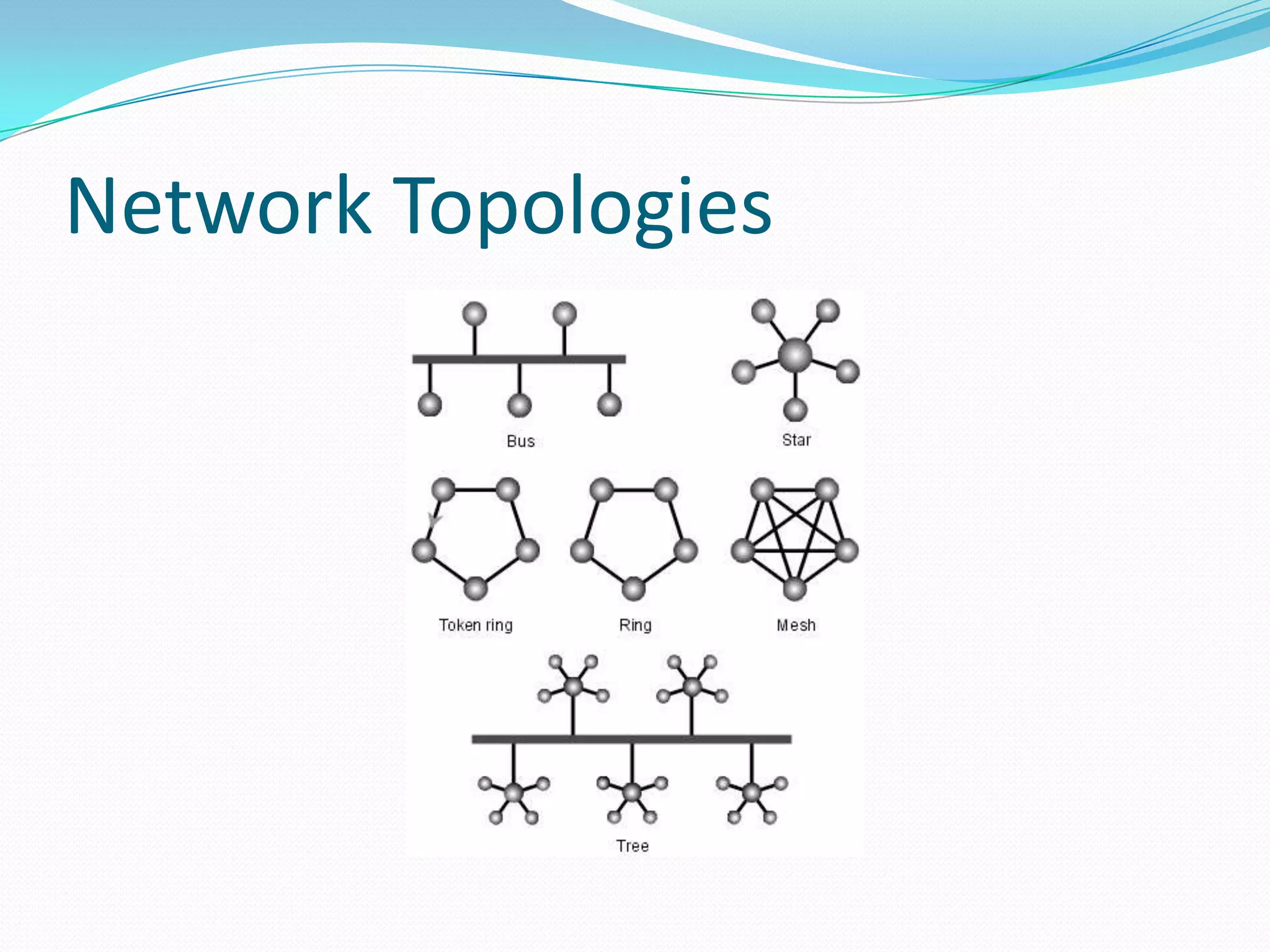
Network Topologies
LAN Transmission Methods
 Unicast transmission
 Multicast transmission
 Broadcast transmission
 Unicast transmission : In this, a single data packet is sent from a
source to a single destination on the network
 Multicast transmission : In multicast transmissions, a single
data packet is copied and sent to specific destinations on the network.
 Broadcast transmission : In multicast transmissions, a single
data packet is copied and sent to specific destinations on the network
LAN Infrastructure Devices
There are numerous devices associated with data information flow
across a LAN. When adjoined, they create the infrastructure of a
functional LAN. These devices include:
 Repeaters
 Bridges
 Hubs
 Switches
 Routers
 Repeaters
Repeaters, located within the physical layer of a network, regenerate
and propagate signals from one to another. They do not change any
information being transmitted, and they cannot filter any information.
Repeaters help to extend the distances of networks by boosting weak
signals.
 Bridges
Bridges are intelligent repeaters. They regenerate transmitted signals,
but unlike repeaters, they can also determine destinations.
 Hubs
Hubs connect all computer LAN connections into one device. They are
nothing more than multiport repeaters. Hubs cannot determine
destinations; they merely transmit to every line attached in a half-
duplex mode.
 Switches
Switches connect all computer LAN connections, the same as hubs do.
The difference is that switches can run in full-duplex mode and are able
to direct and filter information to and from specific destinations.
 Routers
Routers are a step up from bridges. They are able to route and filter
information to different networks. Some routers can automatically
detect problems and redirect information around the problem area.
These are called "intelligent routers."
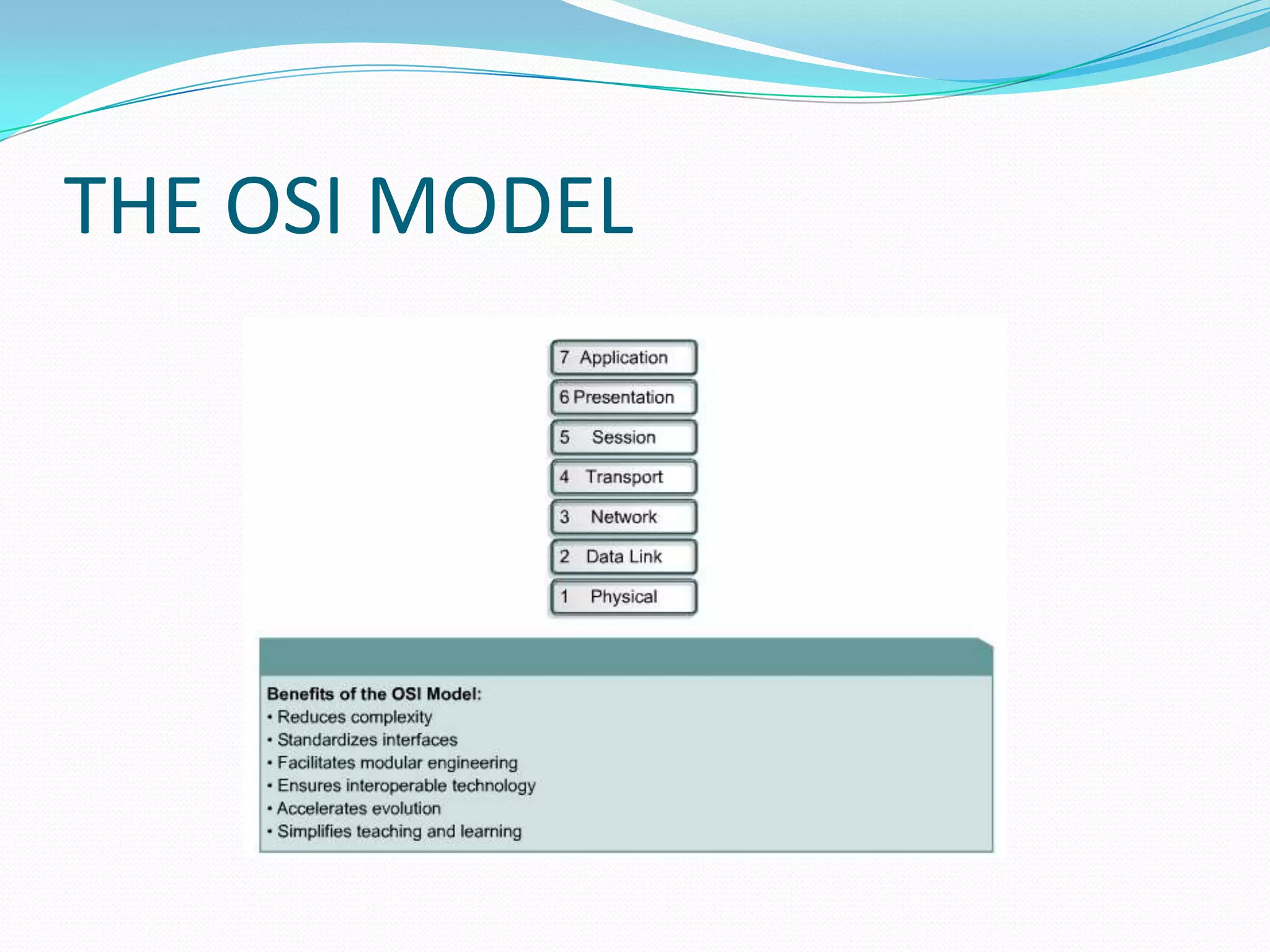
THE OSI MODEL
Routing
 A router is a device that sends packets from one
network to another network. Routers receive packets,
read their headers to find addressing information, and
send them on to their correct destination on the
network or Internet.
 Routers can forward packets through an internetwork
by maintaining routing information in a database
called a routing table.
Static and Dynamic Routing
• Static
o Static routing is a form of
routing in which paths
between nodes are always
used in a pre-defined way.
o Uses a route that a
network administrator
enters into the router
manually
o Simple to design
o Cannot react to network
changes automatically
• Dynamic
o Uses a route that a
network routing protocol
adjusts automatically for
topology or traffic changes
o Automatically react to
network changes
o Analyzes the incoming
routing updates
Switching
 A switch is a multiport bridge. It provides the same
functionality, but with a higher port density. In
addition, switches provide features that cannot be
found in bridges.
 Switches are associated with the Data Link layer of the
OSI Model.
 Switches build a forwarding database in a manner
similar to bridges.
 Switches examine the source and destination Data
Link address in each packet to build the
database and make forwarding decisions.
Reference
 Www.livinginternet.com
 CCNA : Cisco Certified Network Associate Study Guide
(Exam 640-802) , 6th Edition
 Wikipedia
 Ccna study guide, Aaron Balchunas
 Data Communication and Computer Networking ,
B.A. Forouzan, Tata McGraw Hill, 2nd Edition.
THANK YOU

Cisco Routing and Switching by yateendra sahu ppt

  • 1.
    Submitted by :yateendra sahu Et&T 7th B R/N : 3032810123
  • 2.
    What is network? A network is a collection of computers, printers, routers, switches, and other devices that are able to communicate with each other over some transmission media.  In other words network is a physical connection between computing devices established using either cable media or wireless media.
  • 3.
    Types of network Local Area Network (LAN)  Metropolitan Area Network (MAN)  Wide Area Network (WAN)  Local Area Network (LAN) : A Local Area Network (LAN) is a group of computers and network communication devices within a limited geographic area, such as an office building.  Metropolitan Area Network (MAN) : MAN is defined as a network that connects LAN across a city-wide geographic area. It may be a single network such as cable television network.  Wide Area Network (WAN) : A WAN network that spans large geographical location usually connects multiple LANs. This is generally more expansive technology. Its implementation is more sophisticated than LANs .
  • 4.
  • 5.
    LAN Transmission Methods Unicast transmission  Multicast transmission  Broadcast transmission  Unicast transmission : In this, a single data packet is sent from a source to a single destination on the network  Multicast transmission : In multicast transmissions, a single data packet is copied and sent to specific destinations on the network.  Broadcast transmission : In multicast transmissions, a single data packet is copied and sent to specific destinations on the network
  • 6.
    LAN Infrastructure Devices Thereare numerous devices associated with data information flow across a LAN. When adjoined, they create the infrastructure of a functional LAN. These devices include:  Repeaters  Bridges  Hubs  Switches  Routers
  • 7.
     Repeaters Repeaters, locatedwithin the physical layer of a network, regenerate and propagate signals from one to another. They do not change any information being transmitted, and they cannot filter any information. Repeaters help to extend the distances of networks by boosting weak signals.  Bridges Bridges are intelligent repeaters. They regenerate transmitted signals, but unlike repeaters, they can also determine destinations.  Hubs Hubs connect all computer LAN connections into one device. They are nothing more than multiport repeaters. Hubs cannot determine destinations; they merely transmit to every line attached in a half- duplex mode.
  • 8.
     Switches Switches connectall computer LAN connections, the same as hubs do. The difference is that switches can run in full-duplex mode and are able to direct and filter information to and from specific destinations.  Routers Routers are a step up from bridges. They are able to route and filter information to different networks. Some routers can automatically detect problems and redirect information around the problem area. These are called "intelligent routers."
  • 9.
  • 10.
    Routing  A routeris a device that sends packets from one network to another network. Routers receive packets, read their headers to find addressing information, and send them on to their correct destination on the network or Internet.  Routers can forward packets through an internetwork by maintaining routing information in a database called a routing table.
  • 11.
    Static and DynamicRouting • Static o Static routing is a form of routing in which paths between nodes are always used in a pre-defined way. o Uses a route that a network administrator enters into the router manually o Simple to design o Cannot react to network changes automatically • Dynamic o Uses a route that a network routing protocol adjusts automatically for topology or traffic changes o Automatically react to network changes o Analyzes the incoming routing updates
  • 12.
    Switching  A switchis a multiport bridge. It provides the same functionality, but with a higher port density. In addition, switches provide features that cannot be found in bridges.  Switches are associated with the Data Link layer of the OSI Model.  Switches build a forwarding database in a manner similar to bridges.  Switches examine the source and destination Data Link address in each packet to build the database and make forwarding decisions.
  • 13.
    Reference  Www.livinginternet.com  CCNA: Cisco Certified Network Associate Study Guide (Exam 640-802) , 6th Edition  Wikipedia  Ccna study guide, Aaron Balchunas  Data Communication and Computer Networking , B.A. Forouzan, Tata McGraw Hill, 2nd Edition.
  • 14.