Scope and Sequence VCD
 Semester course outline
 “Look at me” (perspective typography stickers) 20%
 “A mouse needs a house” (drawing techniques for narrative,
3D and aesthetics) 40%
 “Water is life” (Logo, design process, analysis) 40%
The Design Process
 The Brief (identify client, needs, purpose..)
 Research (collecting ideas, information, ..)
 Generation of ideas (exploring design ideas, use
imagination, visualisation)
 Development of concepts (select preferred idea and apply
range of methods, materials media..)
 Refinement of ideas (modify visual communications in
response to feedback and evaluation)
 Development of visual presentation (presenting final
outcome)
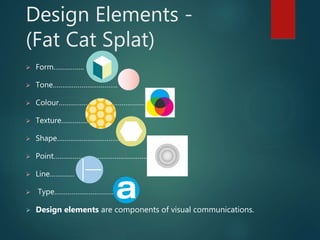
Design Elements -
(Fat Cat Splat)
 Form…………….
 Tone…………………………….
 Colour………………………………………..
 Texture…………..
 Shape……………………………
 Point……………………………………………
 Line………….
 Type………………………….
 Design elements are components of visual communications.
Vocabulary
 Formcombining shape and value to create the illusion
of three dimensions on a flat surface
 Tone Properties to colour hue and intensity
 Colour light reflected on an object.
 Texture tactile quality of an object
 Shape lines combined to create an enclosed space
 Point mark or short line
 Line a point extended in both directions
 Type letter form
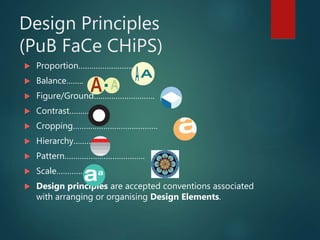
Design Principles
(PuB FaCe CHiPS)
 Proportion…………………….
 Balance……..
 Figure/Ground……………………….
 Contrast……….
 Cropping…………………………………
 Hierarchy………
 Pattern……………………………….
 Scale………….
 Design principles are accepted conventions associated
with arranging or organising Design Elements.
Why is Type so important in
Visual communication?
 We are all Type consumers and interact with typefaces frequently in
our daily life. The shapes and styles of the type communicate a huge
amount of information independently of the words they spell out.
 A type has the power to transform the meaning of a word: to give it
voice and a personality, to make it look knowledgeable, extrovert or
stylish.
 Type guide us, interact with our senses, giving us a glimpse of what a
product might taste or smell like, if it is expensive or important etc….
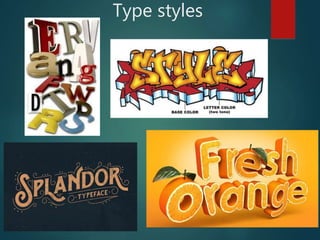
Type styles
Activity 1: Typography
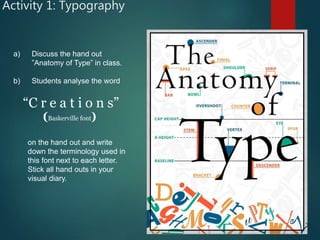
a) Discuss the hand out
”Anatomy of Type” in class.
b) Students analyse the word
“C r e a t i o n s”
(Baskerville font)
on the hand out and write
down the terminology used in
this font next to each letter.
Stick all hand outs in your
visual diary.
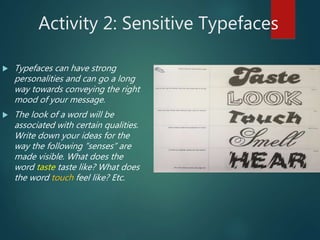
Activity 2: Sensitive Typefaces
 Typefaces can have strong
personalities and can go a long
way towards conveying the right
mood of your message.
 The look of a word will be
associated with certain qualities.
Write down your ideas for the
way the following ”senses” are
made visible. What does the
word taste taste like? What does
the word touch feel like? Etc.
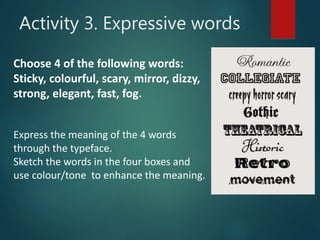
Choose 4 of the following words:
Sticky, colourful, scary, mirror, dizzy,
strong, elegant, fast, fog.
Express the meaning of the 4 words
through the typeface.
Sketch the words in the four boxes and
use colour/tone to enhance the meaning.
Activity 3. Expressive words
Activity 4a:
Find your Font (type)
1. Write down 3 adjectives which represent qualities you
have eg; creative, organized …..
2. Then research 3 fonts, each font reflecting one of your
qualities.
3. Type each word on your iPad in the researched font
and make it a large size, in small size you write down
the name of the font.
4. Put the 3 words in a pic collage and print this out and
stick this in your visual diary.
5. Annotate what made you choose each font. Discuss
shape.
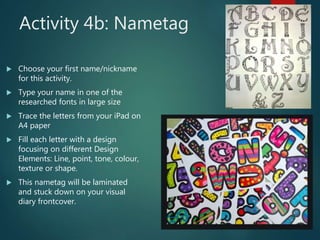
Activity 4b: Nametag
 Choose your first name/nickname
for this activity.
 Type your name in one of the
researched fonts in large size
 Trace the letters from your iPad on
A4 paper
 Fill each letter with a design
focusing on different Design
Elements: Line, point, tone, colour,
texture or shape.
 This nametag will be laminated
and stuck down on your visual
diary frontcover.
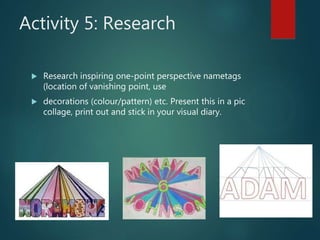
Activity 5: Research
 Research inspiring one-point perspective nametags
(location of vanishing point, use
 decorations (colour/pattern) etc. Present this in a pic
collage, print out and stick in your visual diary.
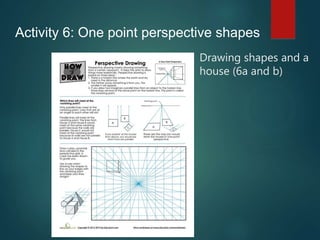
Drawing shapes and a
house (6a and b)
Activity 6: One point perspective shapes
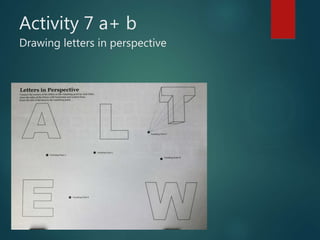
Activity 7 a+ b
Drawing letters in perspective
Activity 8.
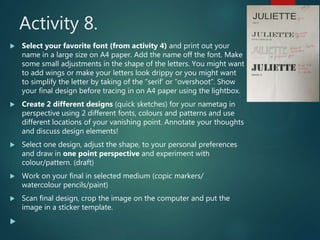
 Select your favorite font (from activity 4) and print out your
name in a large size on A4 paper. Add the name off the font. Make
some small adjustments in the shape of the letters. You might want
to add wings or make your letters look drippy or you might want
to simplify the letter by taking of the “serif’ or “overshoot”. Show
your final design before tracing in on A4 paper using the lightbox.
 Create 2 different designs (quick sketches) for your nametag in
perspective using 2 different fonts, colours and patterns and use
different locations of your vanishing point. Annotate your thoughts
and discuss design elements!
 Select one design, adjust the shape, to your personal preferences
and draw in one point perspective and experiment with
colour/pattern. (draft)
 Work on your final in selected medium (copic markers/
watercolour pencils/paint)
 Scan final design, crop the image on the computer and put the
image in a sticker template.

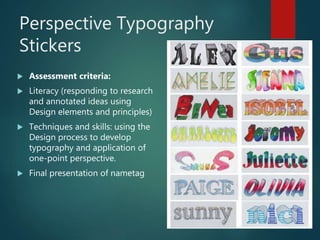
Perspective Typography
Stickers
 Assessment criteria:
 Literacy (responding to research
and annotated ideas using
Design elements and principles)
 Techniques and skills: using the
Design process to develop
typography and application of
one-point perspective.
 Final presentation of nametag

Y8 vcd 2021 perspective typography stickers 2

  • 1.
    Scope and SequenceVCD  Semester course outline  “Look at me” (perspective typography stickers) 20%  “A mouse needs a house” (drawing techniques for narrative, 3D and aesthetics) 40%  “Water is life” (Logo, design process, analysis) 40%
  • 2.
    The Design Process The Brief (identify client, needs, purpose..)  Research (collecting ideas, information, ..)  Generation of ideas (exploring design ideas, use imagination, visualisation)  Development of concepts (select preferred idea and apply range of methods, materials media..)  Refinement of ideas (modify visual communications in response to feedback and evaluation)  Development of visual presentation (presenting final outcome)
  • 3.
    Design Elements - (FatCat Splat)  Form…………….  Tone…………………………….  Colour………………………………………..  Texture…………..  Shape……………………………  Point……………………………………………  Line………….  Type………………………….  Design elements are components of visual communications.
  • 4.
    Vocabulary  Formcombining shapeand value to create the illusion of three dimensions on a flat surface  Tone Properties to colour hue and intensity  Colour light reflected on an object.  Texture tactile quality of an object  Shape lines combined to create an enclosed space  Point mark or short line  Line a point extended in both directions  Type letter form
  • 5.
    Design Principles (PuB FaCeCHiPS)  Proportion…………………….  Balance……..  Figure/Ground……………………….  Contrast……….  Cropping…………………………………  Hierarchy………  Pattern……………………………….  Scale………….  Design principles are accepted conventions associated with arranging or organising Design Elements.
  • 6.
    Why is Typeso important in Visual communication?  We are all Type consumers and interact with typefaces frequently in our daily life. The shapes and styles of the type communicate a huge amount of information independently of the words they spell out.  A type has the power to transform the meaning of a word: to give it voice and a personality, to make it look knowledgeable, extrovert or stylish.  Type guide us, interact with our senses, giving us a glimpse of what a product might taste or smell like, if it is expensive or important etc….
  • 7.
  • 8.
    Activity 1: Typography a)Discuss the hand out ”Anatomy of Type” in class. b) Students analyse the word “C r e a t i o n s” (Baskerville font) on the hand out and write down the terminology used in this font next to each letter. Stick all hand outs in your visual diary.
  • 9.
    Activity 2: SensitiveTypefaces  Typefaces can have strong personalities and can go a long way towards conveying the right mood of your message.  The look of a word will be associated with certain qualities. Write down your ideas for the way the following ”senses” are made visible. What does the word taste taste like? What does the word touch feel like? Etc.
  • 10.
    Choose 4 ofthe following words: Sticky, colourful, scary, mirror, dizzy, strong, elegant, fast, fog. Express the meaning of the 4 words through the typeface. Sketch the words in the four boxes and use colour/tone to enhance the meaning. Activity 3. Expressive words
  • 11.
    Activity 4a: Find yourFont (type) 1. Write down 3 adjectives which represent qualities you have eg; creative, organized ….. 2. Then research 3 fonts, each font reflecting one of your qualities. 3. Type each word on your iPad in the researched font and make it a large size, in small size you write down the name of the font. 4. Put the 3 words in a pic collage and print this out and stick this in your visual diary. 5. Annotate what made you choose each font. Discuss shape.
  • 12.
    Activity 4b: Nametag Choose your first name/nickname for this activity.  Type your name in one of the researched fonts in large size  Trace the letters from your iPad on A4 paper  Fill each letter with a design focusing on different Design Elements: Line, point, tone, colour, texture or shape.  This nametag will be laminated and stuck down on your visual diary frontcover.
  • 13.
    Activity 5: Research Research inspiring one-point perspective nametags (location of vanishing point, use  decorations (colour/pattern) etc. Present this in a pic collage, print out and stick in your visual diary.
  • 14.
    Drawing shapes anda house (6a and b) Activity 6: One point perspective shapes
  • 15.
    Activity 7 a+b Drawing letters in perspective
  • 16.
    Activity 8.  Selectyour favorite font (from activity 4) and print out your name in a large size on A4 paper. Add the name off the font. Make some small adjustments in the shape of the letters. You might want to add wings or make your letters look drippy or you might want to simplify the letter by taking of the “serif’ or “overshoot”. Show your final design before tracing in on A4 paper using the lightbox.  Create 2 different designs (quick sketches) for your nametag in perspective using 2 different fonts, colours and patterns and use different locations of your vanishing point. Annotate your thoughts and discuss design elements!  Select one design, adjust the shape, to your personal preferences and draw in one point perspective and experiment with colour/pattern. (draft)  Work on your final in selected medium (copic markers/ watercolour pencils/paint)  Scan final design, crop the image on the computer and put the image in a sticker template. 
  • 17.
    Perspective Typography Stickers  Assessmentcriteria:  Literacy (responding to research and annotated ideas using Design elements and principles)  Techniques and skills: using the Design process to develop typography and application of one-point perspective.  Final presentation of nametag