Visual Principles
Roles of Visual in Instruction
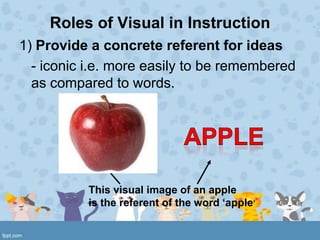
1) Provide a concrete referent for ideas
  - iconic i.e. more easily to be remembered
  as compared to words.


           This visual image of an apple
           is the referent of the word ‘apple’
Role of Visuals in Instruction
2. Motivate learners by attracting their
   attention, holding their attention and
   generating emotional responses.

3. Simplify information that is difficult to
   understand.
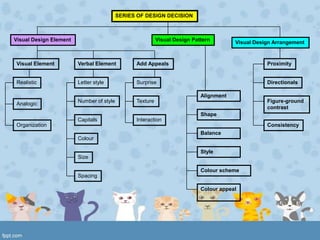
SERIES OF DESIGN DECISION


Visual Design Element                                     Visual Design Pattern        Visual Design Arrangement


Visual Element          Verbal Element          Add Appeals                                       Proximity


Realistic               Letter style            Surprise                                          Directionals

                                                                           Alignment
                        Number of style         Texture                                           Figure-ground
Analogic
                                                                                                  contrast
                                                                           Shape
                        Capitals                Interaction
Organization                                                                                      Consistency
                                                                           Balance
                        Colour

                                                                           Style
                        Size

                                                                           Colour scheme
                        Spacing

                                                                           Colour appeal
Visual Literacy
• refer to the learned ability to interpret
  visual messages accurately to create
  such messages.

2 visual approaches
  1. Input Strategy
  2. Output Strategy
Input Strategy
• helping learners to “decode”
  (read), visuals proficiently by
  practicing visual analysis
     Developmental Effects
     Cultural Effects
     Visual Preferences
Developmental Effect
 (Dwyer, 1978) “As a child gets older, he
  becomes more capable of attending
  selectively to those features of an
  instructional presentation that have the
  greatest potential for enhancing his
  learning of desired information.
Different cultural groups may perceive
   visual materials in different ways.
          • Usually thumbs up gesture
            means positive or okay.

          • But for Balinese the thumbs
            up is part of a ritual way of
            showing respect to someone
            of a higher caste.
Visual Preferences

• Teacher should select between
  preferred visual and most effective
  visual.
Visual Literacy: Output Strategies

1) Learners create their own visual
  presentation
  - using camera / camcorder etc.
  - sequencing – ability to arrange idea in
  logical order
Goals of Visual Design
• Ensure legibility
• Reduce the effort required to interpret the
  message
• Increase the viewer‟s active engagement
  with the message
• Focus attention on the most important part
  of the message
Process of Visual Design

1) Elements – selecting the verbal/visual
   elements to be incorporated into display
2) Pattern – choosing an underlying pattern
   for the elements of the display
3) Arrangement – arranging the individual
   element within the underlying pattern
Elements : Visual Elements
1) Realistic
• Show the actual object under study


       ABSTRACT           REALISTIC
Elements : Visual Elements
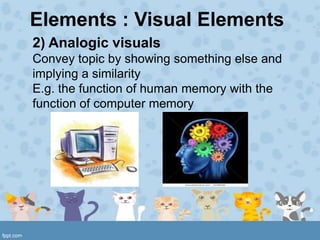
2) Analogic visuals
Convey topic by showing something else and
implying a similarity
E.g. the function of human memory with the
function of computer memory
Elements : Visual Elements


3) Organizational visuals
• Such as flowcharts, graphs, maps,
  classification charts
Elements : Verbal Elements

1) Letter style
• It should be consistent and harmonize with
  the other visual elements
• Straightforward and plain style
Elements : Verbal Elements

2) Number of lettering styles
• Not more than 2 different type styles
• Limit variations (bold, italic, underline, size
  changes) to four
Elements : Verbal Elements

3) Capitals
• Use lowercase letters
• Adding capitals when it is necessary
• Headlines can be in capitals but not more
  than 3 words
Elements : Verbal Elements

4) Colour of lettering
• The lettering colour should contrast with
  the background colour
• Think about your audience..
Elements : Verbal Elements

5) Size of lettering
• Rule of thumb: make lower case letters ½
  inch high for each 10 feet of viewer
  distance
Elements : Verbal Elements

6) Spacing between letters
• Consider „optical spacing‟
• Estimating approximately equal amounts
  of with space between letters


     LABWORK
Elements : Verbal Elements

7) Spacing between lines
• Letters should be not too cramped or too
  widely separate
• Text is most legible when separation is
  11/2 times average letter height
Elements :
     Elements that add appeals

• Surprise


• Interaction
Process of Visual Design : Pattern
Alignment      Shape       Balance


   Style    Color Scheme   Color Appeal
Process of Visual Design : Pattern

1) Alignment
• Balance alignment
• Same imaginary horizontal and vertical
  line
• Viewer expend little effort making sense
  out of what they are seeing
Process of Visual Design : Pattern

2) Shape
• Put and arrange visual into shape that
  familiar to learner
• Simple geometric figure – circle, rectangle
• Consider of the „Rule Of Thirds‟
Rule of Thirds


• Place your important elements where these lines
intersect
• Good places to put things; third of the way up, third of
the way in from the left
• Duff places to put things; right in the middle, right at the
top, right at the bottom, away in the corner
Process of Visual Design : Pattern

3) Balance
• The „weight‟ of the elements in a display is
  equally distributed either horizontally or
  vertically
Process of Visual Design : Pattern

4) Style
• Simple, uncluttered
• Primary colour for children
• Realistic colour for adult
Process of Visual Design : Pattern
5) Colour scheme
• Consider the harmoniousness of the
  colour – color wheel
6) Colour appeal
•   Consider „warm‟ and „cool‟ colour
•   Warm colour – active learner, children
•   Cool colour – thoughtful learner, adult
•   Consider cultural basis
The Colour Wheel

     Complimentary colours: any two colours
     that lie directly opposite each other

      Analogous colours: colours that lie
      next to each other


      Complimentary and
      Analogous colours may form
      pleasing combinations when
      used together in a display
• Use cool    colour   for
background

• Highlight important cues
in warm colour such as red
and orange
Arrangement
•   Proximity
•   Directional
•   Figure-Ground Contrast
•   Consistency
Visual Planning Tools
 Storyboarding Types of Letters       Drawing, Sketching and Cartooning


 Digital Images
                                                         Photo CDs


                   (CCD)

Digital Cameras            Flatbed Scanner
Visual principles

Visual principles

  • 1.
  • 2.
    Roles of Visualin Instruction 1) Provide a concrete referent for ideas - iconic i.e. more easily to be remembered as compared to words. This visual image of an apple is the referent of the word ‘apple’
  • 3.
    Role of Visualsin Instruction 2. Motivate learners by attracting their attention, holding their attention and generating emotional responses. 3. Simplify information that is difficult to understand.
  • 4.
    SERIES OF DESIGNDECISION Visual Design Element Visual Design Pattern Visual Design Arrangement Visual Element Verbal Element Add Appeals Proximity Realistic Letter style Surprise Directionals Alignment Number of style Texture Figure-ground Analogic contrast Shape Capitals Interaction Organization Consistency Balance Colour Style Size Colour scheme Spacing Colour appeal
  • 5.
    Visual Literacy • referto the learned ability to interpret visual messages accurately to create such messages. 2 visual approaches 1. Input Strategy 2. Output Strategy
  • 6.
    Input Strategy • helpinglearners to “decode” (read), visuals proficiently by practicing visual analysis Developmental Effects Cultural Effects Visual Preferences
  • 7.
    Developmental Effect  (Dwyer,1978) “As a child gets older, he becomes more capable of attending selectively to those features of an instructional presentation that have the greatest potential for enhancing his learning of desired information.
  • 8.
    Different cultural groupsmay perceive visual materials in different ways. • Usually thumbs up gesture means positive or okay. • But for Balinese the thumbs up is part of a ritual way of showing respect to someone of a higher caste.
  • 9.
    Visual Preferences • Teachershould select between preferred visual and most effective visual.
  • 10.
    Visual Literacy: OutputStrategies 1) Learners create their own visual presentation - using camera / camcorder etc. - sequencing – ability to arrange idea in logical order
  • 11.
    Goals of VisualDesign • Ensure legibility • Reduce the effort required to interpret the message • Increase the viewer‟s active engagement with the message • Focus attention on the most important part of the message
  • 12.
    Process of VisualDesign 1) Elements – selecting the verbal/visual elements to be incorporated into display 2) Pattern – choosing an underlying pattern for the elements of the display 3) Arrangement – arranging the individual element within the underlying pattern
  • 13.
    Elements : VisualElements 1) Realistic • Show the actual object under study ABSTRACT REALISTIC
  • 14.
    Elements : VisualElements 2) Analogic visuals Convey topic by showing something else and implying a similarity E.g. the function of human memory with the function of computer memory
  • 15.
    Elements : VisualElements 3) Organizational visuals • Such as flowcharts, graphs, maps, classification charts
  • 16.
    Elements : VerbalElements 1) Letter style • It should be consistent and harmonize with the other visual elements • Straightforward and plain style
  • 17.
    Elements : VerbalElements 2) Number of lettering styles • Not more than 2 different type styles • Limit variations (bold, italic, underline, size changes) to four
  • 18.
    Elements : VerbalElements 3) Capitals • Use lowercase letters • Adding capitals when it is necessary • Headlines can be in capitals but not more than 3 words
  • 19.
    Elements : VerbalElements 4) Colour of lettering • The lettering colour should contrast with the background colour • Think about your audience..
  • 20.
    Elements : VerbalElements 5) Size of lettering • Rule of thumb: make lower case letters ½ inch high for each 10 feet of viewer distance
  • 21.
    Elements : VerbalElements 6) Spacing between letters • Consider „optical spacing‟ • Estimating approximately equal amounts of with space between letters LABWORK
  • 22.
    Elements : VerbalElements 7) Spacing between lines • Letters should be not too cramped or too widely separate • Text is most legible when separation is 11/2 times average letter height
  • 23.
    Elements : Elements that add appeals • Surprise • Interaction
  • 24.
    Process of VisualDesign : Pattern Alignment Shape Balance Style Color Scheme Color Appeal
  • 25.
    Process of VisualDesign : Pattern 1) Alignment • Balance alignment • Same imaginary horizontal and vertical line • Viewer expend little effort making sense out of what they are seeing
  • 26.
    Process of VisualDesign : Pattern 2) Shape • Put and arrange visual into shape that familiar to learner • Simple geometric figure – circle, rectangle • Consider of the „Rule Of Thirds‟
  • 27.
    Rule of Thirds •Place your important elements where these lines intersect • Good places to put things; third of the way up, third of the way in from the left • Duff places to put things; right in the middle, right at the top, right at the bottom, away in the corner
  • 30.
    Process of VisualDesign : Pattern 3) Balance • The „weight‟ of the elements in a display is equally distributed either horizontally or vertically
  • 31.
    Process of VisualDesign : Pattern 4) Style • Simple, uncluttered • Primary colour for children • Realistic colour for adult
  • 32.
    Process of VisualDesign : Pattern 5) Colour scheme • Consider the harmoniousness of the colour – color wheel 6) Colour appeal • Consider „warm‟ and „cool‟ colour • Warm colour – active learner, children • Cool colour – thoughtful learner, adult • Consider cultural basis
  • 33.
    The Colour Wheel Complimentary colours: any two colours that lie directly opposite each other Analogous colours: colours that lie next to each other Complimentary and Analogous colours may form pleasing combinations when used together in a display
  • 34.
    • Use cool colour for background • Highlight important cues in warm colour such as red and orange
  • 35.
    Arrangement • Proximity • Directional • Figure-Ground Contrast • Consistency
  • 36.
    Visual Planning Tools Storyboarding Types of Letters Drawing, Sketching and Cartooning Digital Images Photo CDs (CCD) Digital Cameras Flatbed Scanner