MOBILE APPLICATION: How to Create a Typeface
                     GD 492-001
                     Betsy Peters
MOBILE APPLICATION: How to Create a Typeface


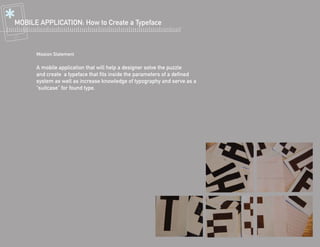
      Mission Statement

      A mobile application that will help a designer solve the puzzle
      and create a typeface that fits inside the parameters of a defined
      system as well as increase knowledge of typography and serve as a
      “suitcase” for found type.
MOBILE APPLICATION: How to Create a Typeface


          AUDIENCE? students, creative thinkers, doodlers, designers, teachers
                      one who is motiviated by a class project, personal interest, or professional work


     CIRCUMSTANCE? a 3-step process: learning typographic basics and history, creating
                   your own modular system through play, using an existing method to
                   create a more complex, working typeface using Illustrator and Typetool

             TIMING? everywhere, in your sketchpad, on your computer, quick play
                      quick pictures, modular play, longer interations for the novice level detail


          LOCATION? documenting, travel, personal time, classroom, waiting time
                      public/private, stuctured play, structured process, structured learning


             VALUE? to complete the puzzle, creating a cohesive typographic system that
                    has rules, with a few exceptions, analyzing and observing type,
                    learning how to master type and type anatomy.
MOBILE APPLICATION: How to Create a Typeface
              USERS:   PERSONA // EXPERIENCE // PERCEPTIONS // MOTIVES // EMOTIONS // REASONING


          BEGINNERS    students of Type 2 // type layout, type options, some knowledge of anatomy and rules, still learning // curiosity,
                       intimidating // play, knowledge, learn, class project // pride, trial and error, Reward // learning experience,
                       activity, test
      FEEDBACK FROM    Motivated by seeing other people’s typefaces who use the app, promote
           INTERVIEW   yourself, they would enjoy the play of the modular type detail, include a
                       pen tool for the finger (doodle), show process of other type designers,
                       rating system

        INTERMEDIATE   Grif Friedman, 3rd year design student // type 1, 2, & 3, has created a modular typeface, and complex typeface
                       // useful, creative, personal tool // fulfill inspirations, document process, have on hand // excitement, relaxed
                       // still a tool to learn, but on a mobile app for fun, create anywhere, promotional
                       Most of his type motivation came from learning type, using the letter-
                       press, and some from taking pictures of found type. Playing with mod-
                       ular type helps to understand the system from an individual to whole
                       level. Motivated by school projects and briefs, would use app for play.

              NOVICE   Katie Meaney, Type 2 teacher and designer // type knowledge, teach knowledge, typeface creator // a teaching
                       tool, want to get hands on, good for play // teaches a process, tool to other systems, fun // curiosity, fulfilling,
                       excitement // cool to students, records process, forces play, aid

                       Stresses learning the type basics, and constantly reminding yourself
                       about your rules. Start with found type and try to fill in the rest of the
                       puzzle, motivation through “dangling the carrot”, involve students by
                       uploading and getting feedback. Method, on and off computer, bring
                       one thing different to the app. (music, seeing type in space, activity)
+
    MOBILE APPLICATION: How to Create a Typeface

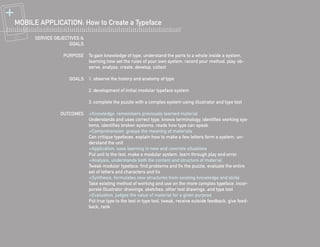
          SERVICE OBJECTIVES &
                        GOALS

                     PURPOSE     To gain knowledge of type, understand the parts to a whole inside a system,
                                 learning how set the rules of your own system, record your method, play, ob-
                                 serve, analyze, create, develop, collect

                        GOALS    1. observe the history and anatomy of type

                                 2. development of initial modular typeface system

                                 3. complete the puzzle with a complex system using illustrator and type tool

                    OUTCOMES     +Knowledge, remembers previously learned material
                                 Understands and uses correct type, knows terminology, identifies working sys-
                                 tems, identifies broken systems, reads how type can speak
                                 +Comprehension, grasps the meaning of materials
                                 Can critique typefaces, explain how to make a few letters form a system, un-
                                 derstand the unit
                                 +Application, uses learning in new and concrete situations
                                 Put unit to the test, make a modular system, learn through play and error
                                 +Analysis, understands both the content and structure of material
                                 Tweak modular typeface, find problems and fix the puzzle, evaluate the entire
                                 set of letters and characters and fix
                                 +Synthesis, formulates new structures from existing knowledge and skills
                                 Take existing method of working and use on the more complex typeface, incor-
                                 porate Illustrator drawings, sketches, other tool drawings, and type tool
                                 +Evaluation, judges the value of material for a given purpose
                                 Put true type to the test in type tool, tweak, receive outside feedback, give feed-
                                 back, rank
@MOBILE APPLICATION: How to Create a Typeface

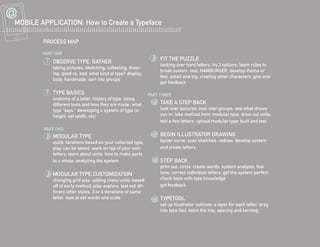
          PROCESS MAP

          PART ONE
                                                                     5       FIT THE PUZZLE
           1   OBSERVE TYPE, GATHER
                                                                             looking over hard letters, try 3 options, learn rules to
               taking pictures, sketching, collecting, draw-
                                                                             break system, test, HAMBURGER, develop theme or
               ing, good vs. bad, what kind of type? display,
                                                                             feel, small and big, creating other characters, give and
               body, handmade, sort into groups
                                                                             get feedback

           2   TYPE BASICS                                         PART THREE
               anatomy of a letter, history of type, using
               different tools and how they are made, what
                                                                     6       TAKE A STEP BACK
               type “says,” developing a system of type (x-                  look over pictures, look over groups, see what draws
               height, set width, etc)                                       you in, take method from modular type, draw out units,
                                                                             test a few letters, upload modular type, built and test
          PART TWO
           3   MODULAR TYPE                                          7       BEGIN ILLUSTRATOR DRAWING
               quick iterations based on your collected type,                bezier curve, scan sketches, redraw, develop system
               play, can be saved, work on top of your own                   and create letters
               letters, learn about units, how to make parts
               to a whole, analyzing the system                          8   STEP BACK
                                                                             print out, circle, create words, system analysis, fine
           4   MODULAR TYPE CUSTOMIZATION                                    tune, correct individual letters, get the system perfect,
               changing grid size, adding many units, based                  check back with type knowledge
               off of early method, play, explore, test out dif-             get feedback
               ferent letter styles, 3 or 4 iterations of same
               letter, look at set words and scale                   9       TYPETOOL
                                                                             set up illustrator, outlines, a layer for each letter, drag
                                                                             into type tool, learn the tray, spacing and kerning
{ MOBILE APPLICATION: How to Create a Typeface
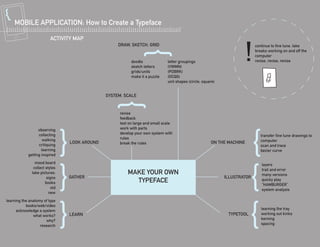
                         ACTIVITY MAP
                                                   DRAW, SKETCH, GRID


                                                          doodle              letter groupings
                                                          sketch letters      (VWMN)
                                                          grids/units         (PDBRK)
                                                          make it a puzzle    (OCQG)
                                                                              unit shapes (circle, square)


                                              SYSTEM, SCALE


                                                    revise
                                                    feedback
                                                    test on large and small scale
                  observing                         work with parts
                  collecting                        develop your own system with
                     walking                        rules
                                LOOK AROUND         break the rules                                    ON THE MACHINE
                  critiquing
                    learning
            getting inspired
                mood board                                                                                                 layers
               collect styles                                                                                              trail and error
              take pictures:                            MAKE YOUR OWN                                                      many versions
                        signs   GATHER                                                                       ILLUSTRATOR
                       books                              TYPEFACE                                                         quicky play
                                                                                                                           “HAMBURGER”
                          old                                                                                              system analysis
                         new
learning the anatomy of type
           books/web/video
      acknowledge a system                                                                                                 learning the tray
               what works?      LEARN                                                                         TYPETOOL     working out kinks
                      why?                                                                                                 kerning
                   research                                                                                                spacing
! MOBILE APPLICATION: How to Create a Typeface
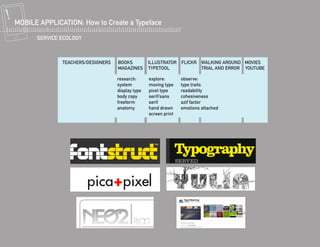
        SERVICE ECOLOGY


                                research:      explore:       observe:
                                system         moving type    type traits
                                display type   pixel type     readability
                                body copy      serif/sans     cohesiveness
                                freeform       serif          azif factor
                                anatomy        hand drawn     emotions attached
                                               screen print

Mobile App Project Proposal: B. Peters

  • 1.
    MOBILE APPLICATION: Howto Create a Typeface GD 492-001 Betsy Peters
  • 2.
    MOBILE APPLICATION: Howto Create a Typeface Mission Statement A mobile application that will help a designer solve the puzzle and create a typeface that fits inside the parameters of a defined system as well as increase knowledge of typography and serve as a “suitcase” for found type.
  • 3.
    MOBILE APPLICATION: Howto Create a Typeface AUDIENCE? students, creative thinkers, doodlers, designers, teachers one who is motiviated by a class project, personal interest, or professional work CIRCUMSTANCE? a 3-step process: learning typographic basics and history, creating your own modular system through play, using an existing method to create a more complex, working typeface using Illustrator and Typetool TIMING? everywhere, in your sketchpad, on your computer, quick play quick pictures, modular play, longer interations for the novice level detail LOCATION? documenting, travel, personal time, classroom, waiting time public/private, stuctured play, structured process, structured learning VALUE? to complete the puzzle, creating a cohesive typographic system that has rules, with a few exceptions, analyzing and observing type, learning how to master type and type anatomy.
  • 4.
    MOBILE APPLICATION: Howto Create a Typeface USERS: PERSONA // EXPERIENCE // PERCEPTIONS // MOTIVES // EMOTIONS // REASONING BEGINNERS students of Type 2 // type layout, type options, some knowledge of anatomy and rules, still learning // curiosity, intimidating // play, knowledge, learn, class project // pride, trial and error, Reward // learning experience, activity, test FEEDBACK FROM Motivated by seeing other people’s typefaces who use the app, promote INTERVIEW yourself, they would enjoy the play of the modular type detail, include a pen tool for the finger (doodle), show process of other type designers, rating system INTERMEDIATE Grif Friedman, 3rd year design student // type 1, 2, & 3, has created a modular typeface, and complex typeface // useful, creative, personal tool // fulfill inspirations, document process, have on hand // excitement, relaxed // still a tool to learn, but on a mobile app for fun, create anywhere, promotional Most of his type motivation came from learning type, using the letter- press, and some from taking pictures of found type. Playing with mod- ular type helps to understand the system from an individual to whole level. Motivated by school projects and briefs, would use app for play. NOVICE Katie Meaney, Type 2 teacher and designer // type knowledge, teach knowledge, typeface creator // a teaching tool, want to get hands on, good for play // teaches a process, tool to other systems, fun // curiosity, fulfilling, excitement // cool to students, records process, forces play, aid Stresses learning the type basics, and constantly reminding yourself about your rules. Start with found type and try to fill in the rest of the puzzle, motivation through “dangling the carrot”, involve students by uploading and getting feedback. Method, on and off computer, bring one thing different to the app. (music, seeing type in space, activity)
  • 5.
    + MOBILE APPLICATION: How to Create a Typeface SERVICE OBJECTIVES & GOALS PURPOSE To gain knowledge of type, understand the parts to a whole inside a system, learning how set the rules of your own system, record your method, play, ob- serve, analyze, create, develop, collect GOALS 1. observe the history and anatomy of type 2. development of initial modular typeface system 3. complete the puzzle with a complex system using illustrator and type tool OUTCOMES +Knowledge, remembers previously learned material Understands and uses correct type, knows terminology, identifies working sys- tems, identifies broken systems, reads how type can speak +Comprehension, grasps the meaning of materials Can critique typefaces, explain how to make a few letters form a system, un- derstand the unit +Application, uses learning in new and concrete situations Put unit to the test, make a modular system, learn through play and error +Analysis, understands both the content and structure of material Tweak modular typeface, find problems and fix the puzzle, evaluate the entire set of letters and characters and fix +Synthesis, formulates new structures from existing knowledge and skills Take existing method of working and use on the more complex typeface, incor- porate Illustrator drawings, sketches, other tool drawings, and type tool +Evaluation, judges the value of material for a given purpose Put true type to the test in type tool, tweak, receive outside feedback, give feed- back, rank
  • 6.
    @MOBILE APPLICATION: Howto Create a Typeface PROCESS MAP PART ONE 5 FIT THE PUZZLE 1 OBSERVE TYPE, GATHER looking over hard letters, try 3 options, learn rules to taking pictures, sketching, collecting, draw- break system, test, HAMBURGER, develop theme or ing, good vs. bad, what kind of type? display, feel, small and big, creating other characters, give and body, handmade, sort into groups get feedback 2 TYPE BASICS PART THREE anatomy of a letter, history of type, using different tools and how they are made, what 6 TAKE A STEP BACK type “says,” developing a system of type (x- look over pictures, look over groups, see what draws height, set width, etc) you in, take method from modular type, draw out units, test a few letters, upload modular type, built and test PART TWO 3 MODULAR TYPE 7 BEGIN ILLUSTRATOR DRAWING quick iterations based on your collected type, bezier curve, scan sketches, redraw, develop system play, can be saved, work on top of your own and create letters letters, learn about units, how to make parts to a whole, analyzing the system 8 STEP BACK print out, circle, create words, system analysis, fine 4 MODULAR TYPE CUSTOMIZATION tune, correct individual letters, get the system perfect, changing grid size, adding many units, based check back with type knowledge off of early method, play, explore, test out dif- get feedback ferent letter styles, 3 or 4 iterations of same letter, look at set words and scale 9 TYPETOOL set up illustrator, outlines, a layer for each letter, drag into type tool, learn the tray, spacing and kerning
  • 7.
    { MOBILE APPLICATION:How to Create a Typeface ACTIVITY MAP DRAW, SKETCH, GRID doodle letter groupings sketch letters (VWMN) grids/units (PDBRK) make it a puzzle (OCQG) unit shapes (circle, square) SYSTEM, SCALE revise feedback test on large and small scale observing work with parts collecting develop your own system with walking rules LOOK AROUND break the rules ON THE MACHINE critiquing learning getting inspired mood board layers collect styles trail and error take pictures: MAKE YOUR OWN many versions signs GATHER ILLUSTRATOR books TYPEFACE quicky play “HAMBURGER” old system analysis new learning the anatomy of type books/web/video acknowledge a system learning the tray what works? LEARN TYPETOOL working out kinks why? kerning research spacing
  • 8.
    ! MOBILE APPLICATION:How to Create a Typeface SERVICE ECOLOGY research: explore: observe: system moving type type traits display type pixel type readability body copy serif/sans cohesiveness freeform serif azif factor anatomy hand drawn emotions attached screen print