WORKSHOP ON THE
PYTHON PROGRAMMING
IN QGIS
Presented by:
Jyoti Dhakal (07)
Archana K.C (09)
Megha Shrestha (27)
Sushmita Timilsina (32)
Python programming and Qgis
• Python is a very powerful, simple and understandable
language
• QGIS is an open source for presenting, interpreting and
analyzing the geographic information
Program schedule
• Setup
• Loading layers in QGIS
• Assessing active layers
• Iterating over vector layers
• Modifying layers
• Communicating with User
• Using map canvas to visualize map
Setup
• QGIS is an open source
• For this workshop we are using QGIS 2.0.1 Dufor
• For python programming in QGIS
• Plugins -> Python console
•Before we begin
• from qgis.core import *
• import qgis.utils
Import the capabilities and utilities to be used through Python in
Python console
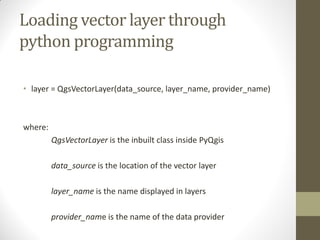
Loading vector layer through
python programming
• layer = QgsVectorLayer(data_source, layer_name, provider_name)
where:
QgsVectorLayer is the inbuilt class inside PyQgis
data_source is the location of the vector layer
layer_name is the name displayed in layers
provider_name is the name of the data provider
Contd…
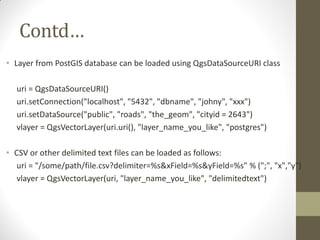
• Layer from PostGIS database can be loaded using QgsDataSourceURI class
uri = QgsDataSourceURI()
uri.setConnection("localhost", "5432", "dbname", "johny", "xxx")
uri.setDataSource("public", "roads", "the_geom", "cityid = 2643")
vlayer = QgsVectorLayer(uri.uri(), "layer_name_you_like", "postgres")
• CSV or other delimited text files can be loaded as follows:
uri = "/some/path/file.csv?delimiter=%s&xField=%s&yField=%s" % (";", "x","y")
vlayer = QgsVectorLayer(uri, "layer_name_you_like", "delimitedtext")
Contd…
• GPX files
• SpatiaLite database
• WFS connection
Adding layer to the qgis map
layer
• QgsMapLayerRegistry is needed which is already defined in qgis.core
module
QgsMapLayerRegistry.instance().addMapLayer(layer)
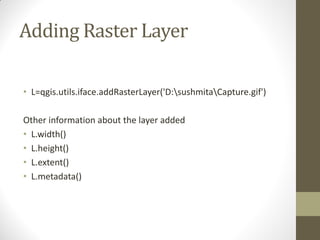
Adding Raster Layer
• L=qgis.utils.iface.addRasterLayer('D:sushmitaCapture.gif')
Other information about the layer added
• L.width()
• L.height()
• L.extent()
• L.metadata()
Assessing the layers
• There are number of ways to assess the layers
• First of you need to import qgis.utils.iface
• Method 1 :
Run the following command:
>>> aLayer = qgis.utils.iface.activeLayer()
>>> aLayer
• Method 2 :
>>> canvas = qgis.utils.iface.mapCanvas()
>>> cLayer = canvas.currentLayer()
>>> cLayer.name()
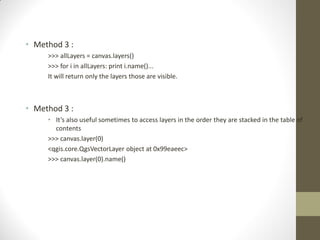
• Method 3 :
>>> allLayers = canvas.layers()
>>> for i in allLayers: print i.name()...
It will return only the layers those are visible.
• Method 3 :
• It’s also useful sometimes to access layers in the order they are stacked in the table of
contents
>>> canvas.layer(0)
<qgis.core.QgsVectorLayer object at 0x99eaeec>
>>> canvas.layer(0).name()
Geometry type
• QGIS return 0,1,2 for Point, Line and Polygon features
respectively
Geometry construction
• from coordinates
gPnt = QgsGeometry.fromPoint(QgsPoint(1,1))
gLine = QgsGeometry.fromPolyline( [ QgsPoint(1,1), QgsPoint(2,2) ] )
gPolygon = QgsGeometry.fromPolygon( [ [ QgsPoint(1,1), QgsPoint(2,2), 
QgsPoint(2,1) ] ] )
Accessor functions are required to extract the information
>>>gPnt.asPoint()
(1,1)
>>> gLine.asPolyline()
[(1,1), (2,2)]
>>> gPolygon.asPolygon()
[[(1,1), (2,2), (2,1), (1,1)]]
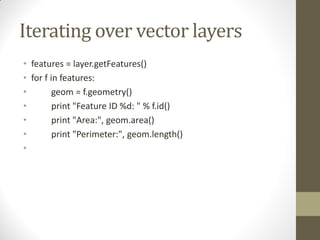
Iterating over vector layers
• features = layer.getFeatures()
• for f in features:
• geom = f.geometry()
• print "Feature ID %d: " % f.id()
• print "Area:", geom.area()
• print "Perimeter:", geom.length()
•
Modifying vector layers
• Start Editing
layer.startEditing()
• Functionality that supports editing of layer data
caps = layer.dataProvider().capabilities()
• Layer.commitChanges()
• Layer.rollback()
• # create layer
• vl = QgsVectorLayer("Point", "temporary_points", "memory")
• pr = vl.dataProvider()
• # add fields
• pr.addAttributes( [ QgsField("name", QVariant.String),
• QgsField("age", QVariant.Int),
• QgsField("size", QVariant.Double) ] )
• # add a feature
• fet = QgsFeature()
• fet.setGeometry( QgsGeometry.fromPoint(QgsPoint(10,10)) )
• fet.setAttributes(["Johny", 2, 0.3])
• pr.addFeatures([fet])
Communicating with the user
• Making a graphical user interface for easy communicating with the
user
• QgsMessageBar
• QPushButton
• progressMessageBar
• pushMessage
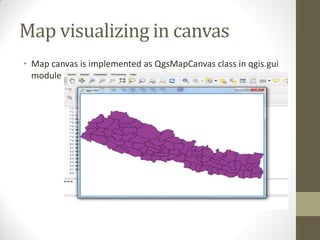
Map visualizing in canvas
• Map canvas is implemented as QgsMapCanvas class in qgis.gui
module
Workshop with python qgis

Workshop with python qgis

  • 1.
    WORKSHOP ON THE PYTHONPROGRAMMING IN QGIS Presented by: Jyoti Dhakal (07) Archana K.C (09) Megha Shrestha (27) Sushmita Timilsina (32)
  • 2.
    Python programming andQgis • Python is a very powerful, simple and understandable language • QGIS is an open source for presenting, interpreting and analyzing the geographic information
  • 3.
    Program schedule • Setup •Loading layers in QGIS • Assessing active layers • Iterating over vector layers • Modifying layers • Communicating with User • Using map canvas to visualize map
  • 4.
    Setup • QGIS isan open source • For this workshop we are using QGIS 2.0.1 Dufor • For python programming in QGIS • Plugins -> Python console
  • 5.
    •Before we begin •from qgis.core import * • import qgis.utils Import the capabilities and utilities to be used through Python in Python console
  • 6.
    Loading vector layerthrough python programming • layer = QgsVectorLayer(data_source, layer_name, provider_name) where: QgsVectorLayer is the inbuilt class inside PyQgis data_source is the location of the vector layer layer_name is the name displayed in layers provider_name is the name of the data provider
  • 7.
    Contd… • Layer fromPostGIS database can be loaded using QgsDataSourceURI class uri = QgsDataSourceURI() uri.setConnection("localhost", "5432", "dbname", "johny", "xxx") uri.setDataSource("public", "roads", "the_geom", "cityid = 2643") vlayer = QgsVectorLayer(uri.uri(), "layer_name_you_like", "postgres") • CSV or other delimited text files can be loaded as follows: uri = "/some/path/file.csv?delimiter=%s&xField=%s&yField=%s" % (";", "x","y") vlayer = QgsVectorLayer(uri, "layer_name_you_like", "delimitedtext")
  • 8.
    Contd… • GPX files •SpatiaLite database • WFS connection
  • 9.
    Adding layer tothe qgis map layer • QgsMapLayerRegistry is needed which is already defined in qgis.core module QgsMapLayerRegistry.instance().addMapLayer(layer)
  • 10.
    Adding Raster Layer •L=qgis.utils.iface.addRasterLayer('D:sushmitaCapture.gif') Other information about the layer added • L.width() • L.height() • L.extent() • L.metadata()
  • 11.
    Assessing the layers •There are number of ways to assess the layers • First of you need to import qgis.utils.iface • Method 1 : Run the following command: >>> aLayer = qgis.utils.iface.activeLayer() >>> aLayer • Method 2 : >>> canvas = qgis.utils.iface.mapCanvas() >>> cLayer = canvas.currentLayer() >>> cLayer.name()
  • 12.
    • Method 3: >>> allLayers = canvas.layers() >>> for i in allLayers: print i.name()... It will return only the layers those are visible. • Method 3 : • It’s also useful sometimes to access layers in the order they are stacked in the table of contents >>> canvas.layer(0) <qgis.core.QgsVectorLayer object at 0x99eaeec> >>> canvas.layer(0).name()
  • 13.
    Geometry type • QGISreturn 0,1,2 for Point, Line and Polygon features respectively
  • 14.
    Geometry construction • fromcoordinates gPnt = QgsGeometry.fromPoint(QgsPoint(1,1)) gLine = QgsGeometry.fromPolyline( [ QgsPoint(1,1), QgsPoint(2,2) ] ) gPolygon = QgsGeometry.fromPolygon( [ [ QgsPoint(1,1), QgsPoint(2,2), QgsPoint(2,1) ] ] ) Accessor functions are required to extract the information >>>gPnt.asPoint() (1,1) >>> gLine.asPolyline() [(1,1), (2,2)] >>> gPolygon.asPolygon() [[(1,1), (2,2), (2,1), (1,1)]]
  • 15.
    Iterating over vectorlayers • features = layer.getFeatures() • for f in features: • geom = f.geometry() • print "Feature ID %d: " % f.id() • print "Area:", geom.area() • print "Perimeter:", geom.length() •
  • 16.
    Modifying vector layers •Start Editing layer.startEditing() • Functionality that supports editing of layer data caps = layer.dataProvider().capabilities() • Layer.commitChanges() • Layer.rollback()
  • 17.
    • # createlayer • vl = QgsVectorLayer("Point", "temporary_points", "memory") • pr = vl.dataProvider() • # add fields • pr.addAttributes( [ QgsField("name", QVariant.String), • QgsField("age", QVariant.Int), • QgsField("size", QVariant.Double) ] ) • # add a feature • fet = QgsFeature() • fet.setGeometry( QgsGeometry.fromPoint(QgsPoint(10,10)) ) • fet.setAttributes(["Johny", 2, 0.3]) • pr.addFeatures([fet])
  • 18.
    Communicating with theuser • Making a graphical user interface for easy communicating with the user • QgsMessageBar • QPushButton • progressMessageBar • pushMessage
  • 19.
    Map visualizing incanvas • Map canvas is implemented as QgsMapCanvas class in qgis.gui module